How the Complete Portfolio Trading System Works | large multi-chart portfolios

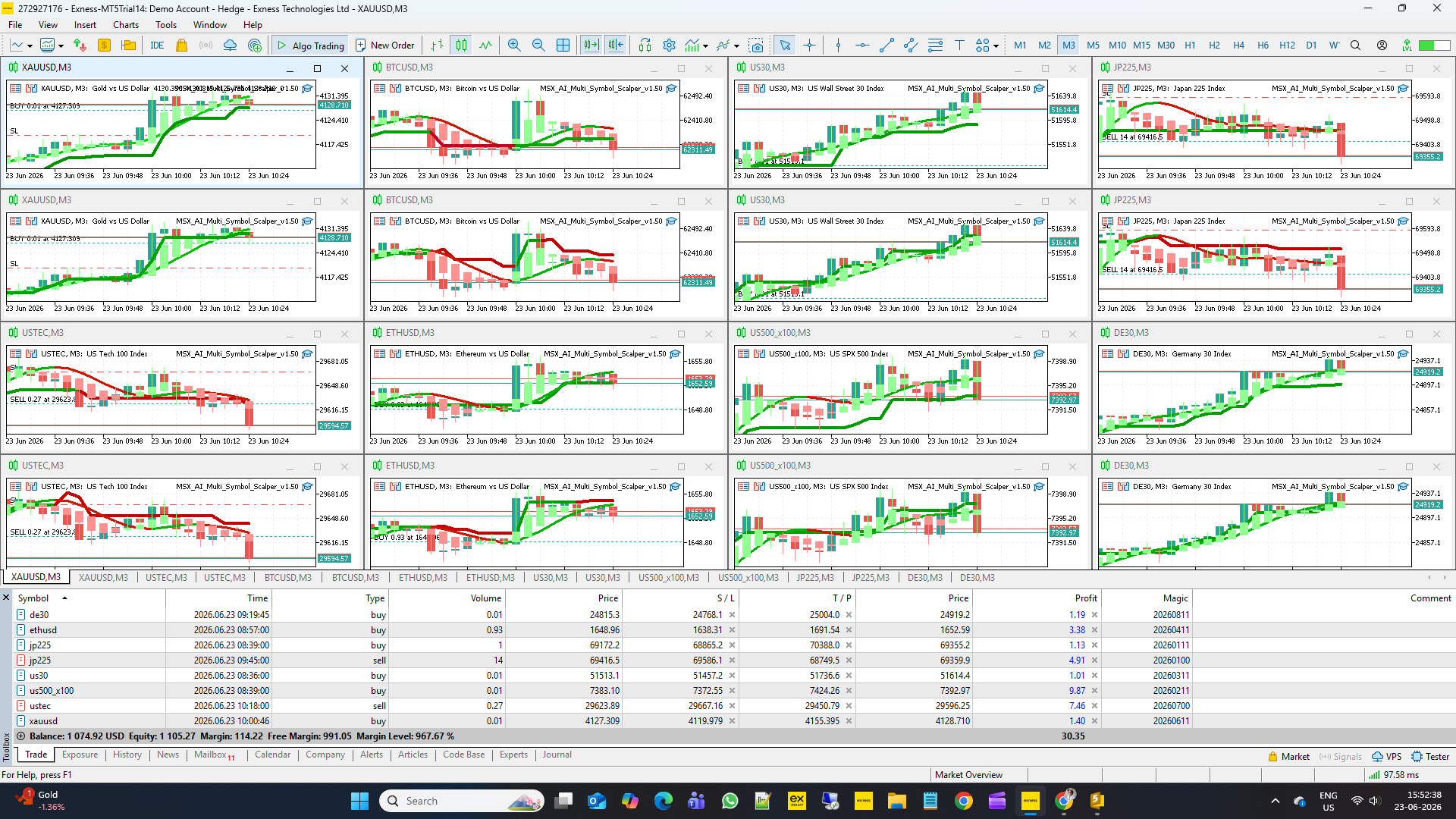
MSX AI Multi Symbol Scalper was designed as a portfolio trading system rather than a traditional single-chart Expert Advisor.
A typical deployment may consist of multiple independent chart instances operating simultaneously within the same MetaTrader 5 account.
Example portfolio deployment:
BTCUSD
• BUY Engine
• SELL Engine
XAUUSD
• BUY Engine
• SELL Engine
USTEC
• BUY Engine
• SELL Engine
Additional symbols may be added according to the trader's requirements. Depending on account size and broker specifications, traders may operate from a single chart up to large multi-chart portfolios containing many independent trading engines at present up to 16 charts with a single mt5 Broker account minimum equity $2000.
Each chart operates independently while sharing the same trading account equity, free margin and account resources.
Every EA instance maintains its own:
• Symbol
• Timeframe
• Magic Number
• Instance Tag
• Trade Signals
• Position Management
• Daily Capital Protection
This architecture allows BUY and SELL engines to operate independently even when attached to the same symbol and timeframe.
For example:
XAUUSD M5 BUY Engine
and
XAUUSD M5 SELL Engine
can run simultaneously on separate charts while maintaining completely independent trade logic, trend analysis, protection status and trading decisions.
Broker Day Initialization
At the beginning of every broker server trading day, the EA automatically initializes its daily tracking systems.
The broker day start is determined using broker server time rather than local computer time.
Each EA instance records its own daily starting equity reference for independent protection calculations.
At the same time, the Master Account Protection system records a shared account-wide starting equity value used by all EA instances running on the same trading account.
These values remain fixed for the entire broker day and are automatically restored after:
• MT5 Restarts
• VPS Restarts
• Chart Refreshes
• EA Reloads
• Terminal Reconnects
Session Management
The EA continuously evaluates the configured trading sessions using broker server time.
Supported sessions include:
• Tokyo
• London
• New York
• Custom Session
Trading activity is allowed only during enabled sessions.
Optional controls include:
• Session-End Entry Blocking
• Session-End Position Closure
• Trading Hour Restrictions
• Automatic Session Monitoring
When a session closes, the EA may optionally block new entries or close existing positions according to user settings.
If multiple sessions overlap, trading continues without interruption.
Signal Generation
During active trading sessions, each chart continuously evaluates market conditions using three independent analytical engines:
• Master Smoothed HMA Trend Engine
• Hybrid Heiken Ashi Trend Engine
• MSX SuperTrend Advanced Engine
These engines work together as a synchronized confirmation framework.
Additional filters such as Trend Strength Validation may also be applied before trade execution is permitted.
Only when all required conditions align does a trade become eligible for execution.
Portfolio-Aware Position Sizing
Before opening a new position, the EA evaluates available account resources.
Position size is determined using:
• Current Account Equity
• Selected Risk Percentage
• Stop Loss Distance
• Broker Margin Requirements
• Current Portfolio Exposure
• Free Margin Availability
• Free Margin Reserve Settings
The Free Margin Budget Engine automatically adjusts lot size when required to maintain account stability during multi-symbol operation.
A final Margin Level verification is then performed before every order is sent to the broker.
Independent Trade Management
After a trade has been opened, each EA instance manages its position independently.
Available management tools include:
• Fixed Stop Loss
• Fixed Take Profit
• ATR Stop Loss
• ATR Take Profit
• Hard Reversal Exit
• Soft Reversal Exit
• Multi-Stage Partial Profit Taking
• One Trade Per Trend Control
• Pullback Re-Entry Control
Each position is monitored continuously until it is closed by its management rules or protection systems.
Dual-Layer Capital Protection
The EA includes two independent protection layers.
Layer 1 – Independent EA Protection
Each chart monitors only its own trading activity.
Available protections include:
• Daily Profit Target
• Daily Loss Limit
• Maximum Daily Drawdown
When a limit is reached:
• The current position may be closed
• Daily Sleep Mode is activated
• New entries are blocked
• Other charts continue operating normally
The affected EA remains asleep until the next broker server trading day.
Layer 2 – Master Account Protection
The Master Account Protection system supervises the entire trading account.
Available protections include:
• Master Daily Profit Target
• Master Daily Loss Limit
• Master Maximum Drawdown
These protections use total account equity, including realized and floating account performance.
When a Master Protection limit is reached:
• Account-wide lock is activated
• Existing positions may be closed
• All EA instances stop opening new trades
• Master Sleep Mode becomes active
• Trading remains suspended until the next broker server trading day
This architecture helps traders protect both individual strategies and the overall trading account simultaneously.
Per-Trade Emergency Protection
In addition to daily protection limits, every EA instance may optionally use a Per-Trade Loss Protection module.
This protection continuously monitors the floating loss of the currently open position.
If the floating loss reaches the user-defined percentage limit, the position can be closed immediately without waiting for the original Stop Loss level to be reached.
This mechanism acts as an additional emergency protection layer designed to reduce exposure during abnormal market conditions, including sudden volatility spikes, unexpected news reactions, liquidity shocks or rapid directional price movements.
Unlike Daily Protection modules, Per-Trade Protection focuses exclusively on the currently active position and can react before larger account-level protection limits are reached.
Potential benefits include:
• Reduced Exposure During Extreme Volatility
• Faster Response To Adverse Price Movement
• Additional Protection Beyond Stop Loss
• Improved Capital Preservation
• Independent Protection For Every EA Instance
Independent BUY and SELL Engine Recovery Architecture
A unique characteristic of MSX AI Multi Symbol Scalper is the ability to operate independent BUY and SELL engines simultaneously on the same symbol and timeframe.
For example:
XAUUSD M5 BUY Engine
and
XAUUSD M5 SELL Engine
may operate independently on separate charts while sharing the same trading account.
When market direction changes rapidly, one engine may experience a losing trade while the opposite engine simultaneously detects the emerging trend and becomes eligible to open a new position according to its own trading logic.
Because both engines operate independently, the system can continue participating in changing market conditions without requiring a single chart to reverse its own position.
This architecture may help maintain continuous market participation during:
• Strong Trend Reversals
• Directional Market Transitions
• False Breakouts
• Temporary Pullbacks
• Rapid Sentiment Changes
• Volatile Market Conditions
The BUY engine and SELL engine do not depend on each other and maintain completely separate:
• Trade Signals
• Trend Analysis
• Capital Protection
• Position Management
• Daily Sleep States
This allows each side of the market to be evaluated independently while preserving full portfolio flexibility.
Weekend Protection
Weekend Protection operates independently from normal session controls.
For traditional markets such as:
• Gold
• Indices
• Most CFDs
• Many Commodities
the EA may:
• Block new entries
• Close open positions
• Enter weekend protection mode
before market closure.
For markets that remain open during weekends, such as certain cryptocurrency symbols offered by supporting brokers, trading behaviour depends entirely on the user's configured Weekend Protection settings.
If Weekend Protection is disabled, trading may continue normally on supported weekend markets.
If Weekend Protection is enabled, the EA follows the configured weekend rules regardless of symbol type.
New Broker Day Reset
When a genuine new broker server day begins:
• Daily Profit Locks are cleared
• Daily Loss Locks are cleared
• Daily Drawdown Locks are cleared
• Master Account Locks are cleared
• Sleep Modes are removed
• New daily equity references are created
• Trading activity resumes automatically
This process occurs automatically without requiring any user intervention.
The result is a fully automated portfolio trading environment capable of supervising multiple symbols, multiple chart instances and multiple independent trading engines while maintaining both individual strategy protection and account-wide capital protection.