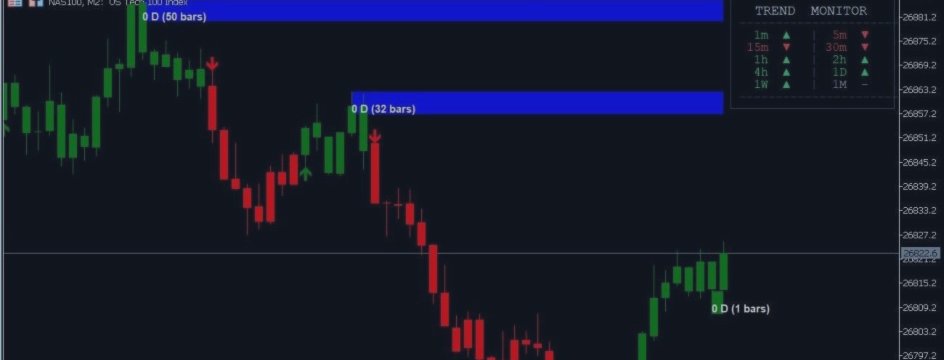

A comprehensive MetaTrader 5 indicator combining trend following, momentum analysis, support/resistance zones, and multi-timeframe monitoring in one powerful toolkit.

1️⃣ Signal Master - Trend Detection
The Signal Master module provides clear entry signals based on ATR volatility measurements:
What You See
- Green Arrows (↑): Buy signals below candle lows
- Red Arrows (↓): Sell signals above candle highs
- Green Trail Line (optional): Dynamic support for long positions
- Red Trail Line (optional): Dynamic resistance for short positions
When to Use Trailing Lines
- Show Lines = true: Best for visualizing trend strength and potential trailing stop levels
- Show Lines = false: Cleaner chart - use when you only want entry signals
2️⃣ LinReg Candles - Momentum Analysis
Linear Regression Candles replace standard price candles with trend-strength colored candles:
| Candle Type | Color | Meaning |
|---|---|---|
| Long Trend | Green | Strong bullish momentum - LinReg slope clearly upward |
| Short Trend | Red | Strong bearish momentum - LinReg slope clearly downward |
| Flat Up | Light Green | Bullish but consolidating - weaker upward momentum |
| Flat Down | Light Red | Bearish but consolidating - weaker downward momentum |
Signal Line (Blue)
The blue line overlaying candles is the smoothed signal line (MA of LinReg closes). Use it for:
- General trend direction at a glance
- Crossover confirmations with price
- Dynamic support/resistance level
3️⃣ Longevity Zones - Dynamic S/R
Longevity Zones are adaptive support and resistance areas that highlight where price has historically reacted:
Zone Characteristics
- Upper Zones (Red): Resistance areas where price tends to reverse down
- Lower Zones (Green): Support areas where price tends to reverse up
- Alpha Transparency: Adjustable opacity so zones don't obscure price action
- Labels: Can appear at zone root bar or offset for cleaner look
How to Use Zones
- Entering Trades: Look for price bouncing off lower zones for longs, rejecting upper zones for shorts
- Exiting Trades: Take profit near opposing zones
- Stop Placement: Place stops just beyond zone boundaries
- Breakouts: Strong closes beyond zones suggest trend continuation
4️⃣ Trend Dashboard - Multi-Timeframe View
The Dashboard panel provides instant trend alignment check across 10 timeframes:
Dashboard Layout
| Timeframe | Bullish | Bearish | Neutral |
|---|---|---|---|
| 1m - 1M (10 TFs) | ▲ | ▼ | ─ |
Green ▲ = Bullish | Red ▼ = Bearish | Gray ─ = Flat/Neutral
Dashboard Position Options
- Top-Right: Default, keeps chart visible
- Top-Left: Good for right-side chart focus
- Bottom-Right: Stays out of price action area
- Bottom-Left: Alternative bottom placement
- Bottom-Center: Centered, symmetrical layout
5️⃣ Support & Resistance Lines (Optional)
When enabled, displays 14 horizontal lines (7 resistance + 7 support) based on calculated levels. Default is OFF to keep charts clean.
🔧 Parameter Settings
Signal Master Settings
| Parameter | Default | Description |
|---|---|---|
| Buy Sensitivity | 2.0 | ATR multiplier for buy signals. Higher = less sensitive (fewer signals) |
| Buy ATR Period | 1 | ATR calculation period for buys. Set to 0 to disable buy signals |
| Sell Sensitivity | 2.0 | ATR multiplier for sell signals |
| Sell ATR Period | 1 | ATR calculation period for sells. Set to 0 to disable sell signals |
| Show Buy Trailing Line | false | Display green trailing stop line for longs |
| Show Sell Trailing Line | false | Display red trailing stop line for shorts |
LinReg Settings
| Parameter | Default | Description |
|---|---|---|
| Signal Smoothing | 7 | Period for signal line calculation (1-200) |
| Simple MA Signal | true | true = SMA, false = EMA for signal line |
| Show Signal Line | true | Display blue signal line overlay |
| Use LinReg Candles | true | Enable colored LinReg candles (disable to see normal candles) |
| LinReg Length | 11 | Linear regression calculation period (1-200) |
Longevity Zones Settings
| Parameter | Default | Description |
|---|---|---|
| Show Longevity Zones | true | Enable/disable zone display |
| Longevity Length | 5 | Lookback period for zone calculation |
| Upper Zone Color | Red | Color for resistance zones |
| Upper Zone Alpha | 64 | Transparency (0-255, 64 ≈ 25% opacity) |
| Lower Zone Color | Dark Green | Color for support zones |
| Lower Zone Alpha | 64 | Transparency for lower zones |
| Labels at Zone Root | true | true = label at zone start, false = use offset |
| Label Offset Bars | 10 | If not at root, how many bars to offset labels |
Dashboard Settings
| Parameter | Default | Description |
|---|---|---|
| Dashboard Panel | true | Enable/disable trend dashboard |
| Panel Background | Dark Blue-Gray | Background color (default: C'18,22,34') |
| Panel BG Alpha | 235 | Opacity (235 ≈ 92% opaque) |
| Panel Text Color | Light Gray | Text color (default: C'220,225,238') |
| Volume MA Length | 20 | For internal calculations |
| Panel Placement | Top-Right | Position: Top-Right/Top-Left/Bottom-Right/Bottom-Left/Bottom-Center |
| Panel X Offset | 0 | Horizontal adjustment (+ = right, - = left) |
| Panel Y Offset | 0 | Vertical adjustment (+ = down, - = up) |
S/R Lines Settings
| Parameter | Default | Description |
|---|---|---|
| Show S/R Lines | false | Display 14 support/resistance lines (7 up + 7 down) |
Oscillator Settings (Internal)
| Parameter | Default | Description |
|---|---|---|
| MACD Fast | 12 | MACD fast EMA period |
| MACD Slow | 26 | MACD slow EMA period |
| MACD Signal | 9 | MACD signal line period |
| Stochastic Length | 14 | Stochastic %K period |
| Stochastic K | 3 | Stochastic %K slowing |
| Stochastic D | 3 | Stochastic %D period |
🔔 Alert Configuration
Alert Types
| Type | Setting | Setup Required |
|---|---|---|
| Popup | InpAlertPopup = true | None - works immediately |
| Sound | InpAlertSound = true | Place .wav file in MQL5/Sounds/ |
| InpAlertEmail = true | Configure in MT5: Tools → Options → Email | |
| Push | InpAlertPush = true | MT5 mobile app + Tools → Options → Notifications |
Custom Alert Settings
| Parameter | Default | Description |
|---|---|---|
| Buy Sound File | alert.wav | Sound for buy signals |
| Sell Sound File | alert2.wav | Sound for sell signals |
| Buy Alert Message | "Signal Master BUY signal confirmed" | Custom text for buy alerts |
| Sell Alert Message | "Signal Master SELL signal confirmed" | Custom text for sell alerts |
📖 How to Use
Scenario 1: Trend Following
Look for confluent direction across timeframes. Ideally 3+ adjacent TFs showing same direction (e.g., 5m, 15m, 30m all bullish ▲).
Green arrow (▲) appears = Consider long entry. Red arrow (▼) appears = Consider short entry.
Candle should be green (Long or Flat-Up) for buys, red for sells. Avoid counter-trend Signal Master signals.
For longs: Price near lower zone (support) = better entry. Near upper zone (resistance) = caution.
Scenario 2: Zone Trading
- Identify active Longevity Zones on chart
- Wait for price to enter a lower zone (for longs) or upper zone (for shorts)
- Look for confirmation: Signal Master arrow + LinReg candle color matching direction
- Enter when price bounces off zone with momentum
- Stop loss: Just beyond zone boundary
- Take profit: Next opposing zone or trailing stop using Signal Master trail line
Scenario 3: Multi-Timeframe Confirmation
- Open the same symbol on 2-3 timeframes (e.g., H4 for trend, H1 for entry, M15 for precision)
- Dashboard shows trend alignment across all TFs
- Only take trades when H4 and H1 agree (both bullish or both bearish)
- Use M15 for exact entry timing with Signal Master arrows
Color Coding Quick Reference
| Element | Color | Meaning |
|---|---|---|
| Signal Master Buy Arrow | Green | Buy signal |
| Signal Master Sell Arrow | Red | Sell signal |
| LinReg Long | Green Candle | Strong bullish |
| LinReg Short | Red Candle | Strong bearish |
| Upper Zone | Red Tint | Resistance area |
| Lower Zone | Green Tint | Support area |
| Dashboard ▲ | Green | Bullish TF |
| Dashboard ▼ | Red | Bearish TF |
⚡ Short-Term Trading: M3 & M5 Strategies
For traders focusing on quick intraday moves, the M3 (3-minute) and M5 (5-minute) timeframes offer excellent opportunities with Signal Master. These timeframes balance noise reduction with timely entry signals.
🎯 M3 & M5 Recommended Settings
| Parameter | M3 Setting | M5 Setting | Why |
|---|---|---|---|
| Buy Sensitivity | 1.2 | 1.5 | Lower = more signals for quick entries |
| Sell Sensitivity | 1.2 | 1.5 | Match buy sensitivity for balance |
| LinReg Length | 5 | 7 | Faster response to price changes |
| Signal Smoothing | 5 | 7 | Quick but not noisy |
| Longevity Length | 3 | 4 | Tighter zones for short-term S/R |
| Show Trailing Lines | true | true | Essential for quick exit decisions |
| Dashboard | true | true | Monitor M15/M30/H1 trend alignment |
📊 M3 Trading Strategy: Rapid Scalping
Focus on high-volatility pairs: XAUUSD (Gold), GBPJPY, USDJPY, or major indices during London/NY sessions. Avoid low-volatility periods (Asian session for forex, midday lulls).
Before entering on M3, check that M15 shows same direction. Example: If M3 shows buy arrow, M15 should show ▲ (bullish). Never trade against the M15 trend on M3.
Wait for all 4 conditions to align:
- Signal Master arrow appears (green for long, red for short)
- LinReg candle confirms direction (green candle for long)
- Price touches or bounces off lower zone (for longs)
- Spread is tight (under 2-3 pips for forex, under 30 cents for gold)
- Take Profit: 5-8 pips (forex) or 50-80 points (gold)
- Stop Loss: 3-5 pips or when price crosses opposite trail line
- Time Exit: Close if not profitable within 3-5 bars
- Trailing Stop: Move to breakeven after +2 pips profit
📈 M5 Trading Strategy: Momentum Capture
M5 offers slightly more confirmation than M3 while maintaining short-term focus. Ideal for traders who want quick trades but need a bit more setup time.
M5 Entry Strategy: "Zone + Arrow + M15 Alignment"
- Identify the Setup: Price enters a Longevity Zone (lower zone for longs, upper for shorts)
- Wait for Signal Master Arrow: Must appear while price is still in the zone
- Confirm with LinReg: Candle color matches arrow direction
- Dashboard Check: M15 and M30 both showing same direction
- Enter: At market or on a 1-pip pullback after arrow
M5 Exit Strategies
| Method | Target | Best For |
|---|---|---|
| Fixed Target | 10-15 pips | Strong trend days (London/NY open) |
| Zone-to-Zone | Next opposing zone | Range-bound markets |
| Trail Line Exit | When price crosses trail line | Extended moves, let winners run |
| Time-Based | Close after 10-15 minutes | Choppy markets, prevent stagnation |
🔥 M3/M5 High-Probability Setups
Setup 1: "Zone Bounce with Momentum" (Win Rate: ~65%)
- Price touches lower zone on M3/M5
- Signal Master buy arrow appears immediately
- LinReg candle turns green on same bar
- M15 dashboard shows ▲ bullish
- Entry: Market order on arrow close
- Exit: Upper zone or +8 pips
Setup 2: "Trend Continuation Pullback" (Win Rate: ~60%)
- H1 and M15 both trending same direction (e.g., bullish)
- Price pulls back to Signal Master trail line on M5
- Buy arrow appears at trail line support
- LinReg candle confirms with green color
- Entry: Trail line touch with arrow confirmation
- Exit: Next resistance or trail line break
Setup 3: "Multi-Timeframe Breakout" (Win Rate: ~55% but high R:R)
- M3, M5, M15 all showing same direction in Dashboard
- Price breaks above upper zone with strong momentum
- Signal Master arrow confirms breakout direction
- Volume spike (visible on chart as large candle)
- Entry: Breakout close above zone
- Exit: 2:1 reward-to-risk or next major zone
⚠️ M3/M5 Risk Management
Critical Rules for Short-Term Trading
- Max 2-3 trades per hour: Overtrading kills profitability on short timeframes
- 1% risk per trade maximum: M3/M5 volatility can cause quick losses
- Daily loss limit: Stop after 3 consecutive losses or -2% daily
- Avoid news: Close all positions 5 minutes before high-impact news
- Spread filter: If spread > 50% of your target profit, skip the trade
⏰ Best Trading Sessions for M3/M5
| Session | Time (EST) | Best Pairs | Strategy |
|---|---|---|---|
| London Open | 3:00 - 5:00 AM | GBP pairs, EURUSD, Gold | Breakout trading, high volatility |
| London-NY Overlap | 8:00 - 11:00 AM | All majors, Gold, Oil | Best volume, use Zone Bounce setup |
| NY Afternoon | 2:00 - 4:00 PM | USD pairs, Indices | Trend continuation, lighter size |
✅ Best Practices
🎯 Recommended Settings by Style
Scalper (M1-M5 charts)
- Signal Master Sensitivity: 1.5 (more signals)
- LinReg Length: 7 (faster response)
- Show Trailing Lines: true (tight stops)
- Alert Sound: Different sounds for quick direction recognition
Swing Trader (1h-4h charts)
- Signal Master Sensitivity: 2.0-3.0 (fewer, stronger signals)
- LinReg Length: 11-21 (smoother trends)
- Longevity Length: 8-13 (wider zones)
- Dashboard: Essential for checking higher TF alignment
Position Trader (Daily+ charts)
- Signal Master Sensitivity: 3.0+ (only major signals)
- LinReg Length: 21-50 (long-term trend)
- Zones: Essential for major S/R identification
- S/R Lines: Can enable for additional structure
General Tips
- Combine Modules: Don't rely on just one feature. Best trades occur when Signal Master signal + LinReg color + Zone bounce + Dashboard alignment all agree
- Avoid Choppy Markets: When Dashboard shows mixed signals (▲▼▲▼), stay flat or reduce position size
- Use Zones for Targets: Even if you enter on Signal Master signal, take profits at opposing Longevity Zones
- Use Trail Lines for Exits: When trailing lines are enabled, consider exiting when price crosses the line (momentum loss)
- Customize Colors: If default red/green don't work with your chart theme, adjust InpColUp, InpColLo, and dashboard colors
- Sound Alerts: Enable when monitoring multiple pairs - you'll know when your pair signals without watching constantly
- Disable What You Don't Use: Turn off LinReg candles if you prefer normal candles, or disable Dashboard if you only trade one timeframe
Start Using Signal Master Today
Whether you're a scalper looking for quick entries or a swing trader seeking trend alignment, this indicator provides the multi-layered analysis you need for confident trading decisions.
One indicator. Four modules. Unlimited possibilities.
Signal Master + LinReg + Zones + Dashboard | Complete User Guide | Version 4.0
https://www.mql5.com/en/market/product/174187




