SIGNAL SCANNING CONFIGURATION GUIDE - MIRAGE TRADING SYSTEM EA


To ensure the Mirage Trading System EA operates according to your strategy, you must correctly configure the scanning scope in the Inputs tab. Below are the 3 main operating modes:
1. Single Chart Trading Mode
Use this when you want the EA to focus only on the specific currency pair and Timeframe currently open.
-
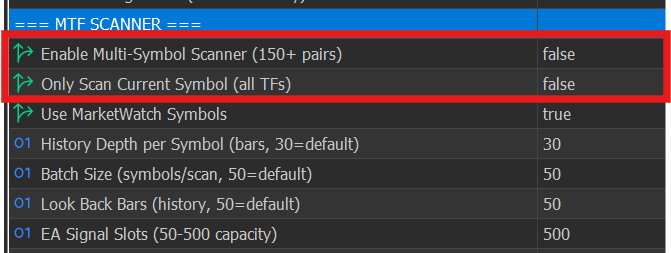
How to set up: Go to the Inputs tab and adjust the following parameters:
-
-
Result: The EA will only scan and receive signals from the active chart window you are currently viewing.
2. Multi-Timeframe Mode (Single Symbol)
Use this when you want the EA to find signals across all timeframes (M1, M5, H1, D1, etc.) for the current currency pair.
-
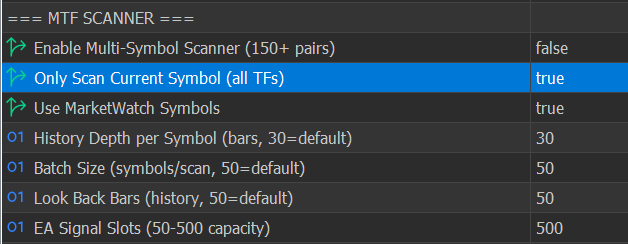
How to set up:
-
Result: The EA will automatically monitor signals from every timeframe of the specific asset currently open on your chart.
3. Multi-Symbol & Multi-Timeframe Mode (Full Market Scan)
Use this when you want the EA to automatically hunt for signals across all symbols and various timeframes simultaneously.
-
How to set up:
-
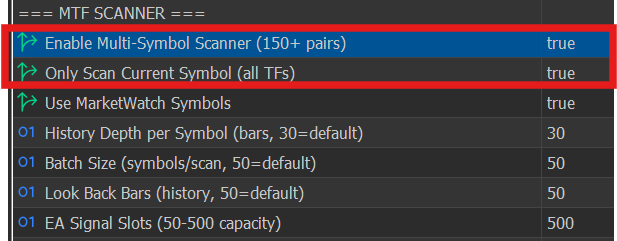
Switch both of the following options to true:
-
Important Note: In the specific list of Timeframes provided in the settings, manually tick (true) the specific timeframes you want the EA to scan (e.g., only select M15, H1, and H4).
-
-
Result: The EA will scan the entire symbol list and your selected timeframes to ensure no market opportunities are missed.




