
Welcome to the official guide for Akali EA. Akali is a precision-based scalping tool with a tight trailing SL specifically for Gold (XAUUSD). Below you will find the recommended setup, the "Smart Approach" to managing risk, and a detailed explanation of the updated input parameters
Live Signal: Click Here!
⚡ Core Setup Requirements
-
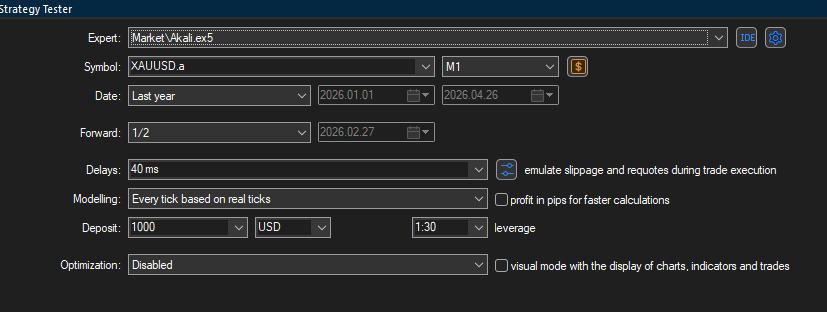
Symbol: XAUUSD (Gold)
-
Timeframe: M1 (1 Minute)
-
Recommended Brokers:
-
Vantage
-
FP markets
-
Axi
-
Blackbull
-
Note: I highly recommend avoiding IC Markets. Recently, they have been experiencing significant slippage issues, execution delays, and frequent spread spikes, which can severely impact the EA's performance.
-
❓ Why is the Broker Selection Critical?
Akali EA is a precision scalping strategy that utilizes a very tight trailing Stop Loss to lock in profits. Because the EA reacts to micro-movements in the market, your broker's trading conditions will make or break your results. Here is why:
-
Spread: A low, stable spread is mandatory. High spreads will artificially trigger the tight trailing stop prematurely, turning potential winning trades into break-even trades or small losses before the price can naturally move in your favor.
-
Slippage: During volatile Gold breakouts, slippage can drastically alter your entry and exit prices. A broker with deep liquidity and minimal slippage ensures your orders are filled as close to the requested price as possible.
-
Execution Speed: Scalping requires split-second reactions. Brokers with ultra-fast execution speeds ensure that the EA's market orders, pending order triggers, and trailing stop modifications are processed instantly without delays or requotes.
🧠 The "Smart Approach"
Akali EA is designed as a High Win-Rate System. This means that while it wins the vast majority of trades, the average loss is larger than the average win.
The Statistical Edge: Based on historical performance, losses are rare. It is common to encounter a single loss and then not see another loss for 2 months or more.
How to trade this: You can run the EA directly on your live account, but if you want to be conservative, you can use the Smart Approach:
-
Run Akali EA on a Demo Account (ensure it is the same broker/server time as your real account).
-
Wait for the EA to hit a Stop Loss on the Demo account.
-
As soon as the loss occurs on the Demo account, switch the EA to your Real Account.
-
This aims to capitalize on the high probability of a subsequent long winning streak.
🛠️ Input Parameters Explained
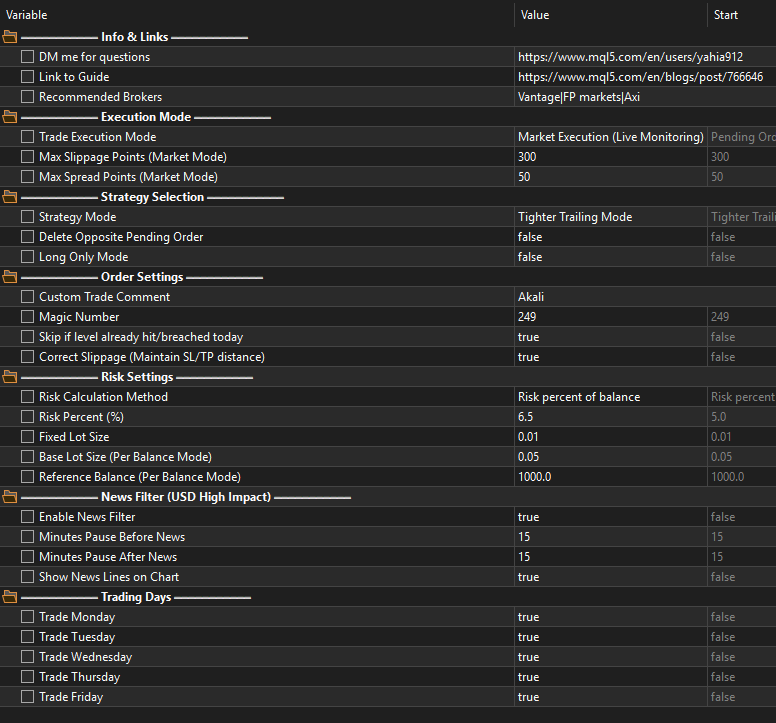
1. Execution Mode
-
Execution Mode:
-
Pending Orders: The EA places Buy Stop and Sell Stop orders at the levels of interest.
-
Market Execution: Instead of placing pending orders, the EA actively monitors the price live. It executes a market order exactly when the level is reached.
-
-
Max Slippage / Max Spread Points: Only active in Market Execution mode. These filters protect your entries by skipping trades if the market spread or slippage is too high during a breakout.
2. Strategy Selection
-
Strategy Mode:
-
Tighter Trailing (Recommended): This mode uses the tightest settings for maximum profit locking.
-
Wider Trailing
-
-
Delete Opposite Pending Order:
-
False (Default): Both Buy and Sell orders remain active.
-
True : As soon as one order is triggered, the opposite order is immediately deleted.
-
-
Long Only: Set to True if you only want the EA to look for Buy setups.
3. Order Settings
-
Trade Comment: Custom comment for your trades (Default: Akali).
-
Magic Number: A unique ID for the EA's trades (Default: 249).
-
Skip Breached Levels: If a level was already hit or breached today at market open or before the EA started, it skips placing an order for that direction. This also acts as a state recovery feature if your terminal restarts.
-
Correct Slippage: An advanced slippage correction system. If enabled, the EA detects execution slippage and automatically adjusts both the Stop Loss and Take Profit to strictly maintain their intended point distances from the actual slipped entry price.
4. Risk Settings
-
Risk Calculation Method:
-
Risk percent of balance: Automatically calculates the lot size based on a percentage of your account balance.
-
Fixed lot size: Uses the exact manual lot size you define for every trade.
-
Fixed lot size per balance: Dynamically scales your lot size based on your balance (e.g., trading a base lot size for every Reference Balance amount, like 0.05 lots per $1,000).
-
-
Risk Percent (%): If using percentage risk, define the value here.
-
Fixed Lot Size: Define the volume here if using Fixed mode.
-
Base Lot Size & Reference Balance: Define the scaling parameters here if using the "Per Balance" mode.
5. News Filter (USD High Impact) (New)
-
Enable News Filter: Set to True to pull live USD High-Impact event data from Forex Factory. The EA will automatically pause trading, close open positions, and cancel pending orders during the news window.
-
⚠️ IMPORTANT: To use this, you must go to your MT5 terminal's Tools -> Options -> Expert Advisors and add
to the "Allow WebRequest for listed URL" box.
-
-
Minutes Before / After News: Defines how long the EA should pause trading around the news release.
-
Show News Lines: Visually plots upcoming high-impact news as vertical lines directly on your chart.
6. Trading Days
-
Trade Monday - Friday: These inputs allow you to filter specific trading days. Set to True to trade on that day, or False to skip it.
For any questions or support, please DM me via my profile: https://www.mql5.com/en/users/yahia912



![[iVISTscalp5]: XAUUSD. Forecast First. Market Reaction Afterwards](https://c.mql5.com/6/1035/splash-preview-777232.png "[iVISTscalp5]: XAUUSD. Forecast First. Market Reaction Afterwards")
