
Demo & Free Trial:
Since MT5 doesn't support interactive drag-and-drop in the Strategy Tester, you can test this utility for free:
- Demo Accounts: Download the free Demo version (fully functional).
- Live Accounts: Message me your account number for a free 1-week trial.
Demo Installation:
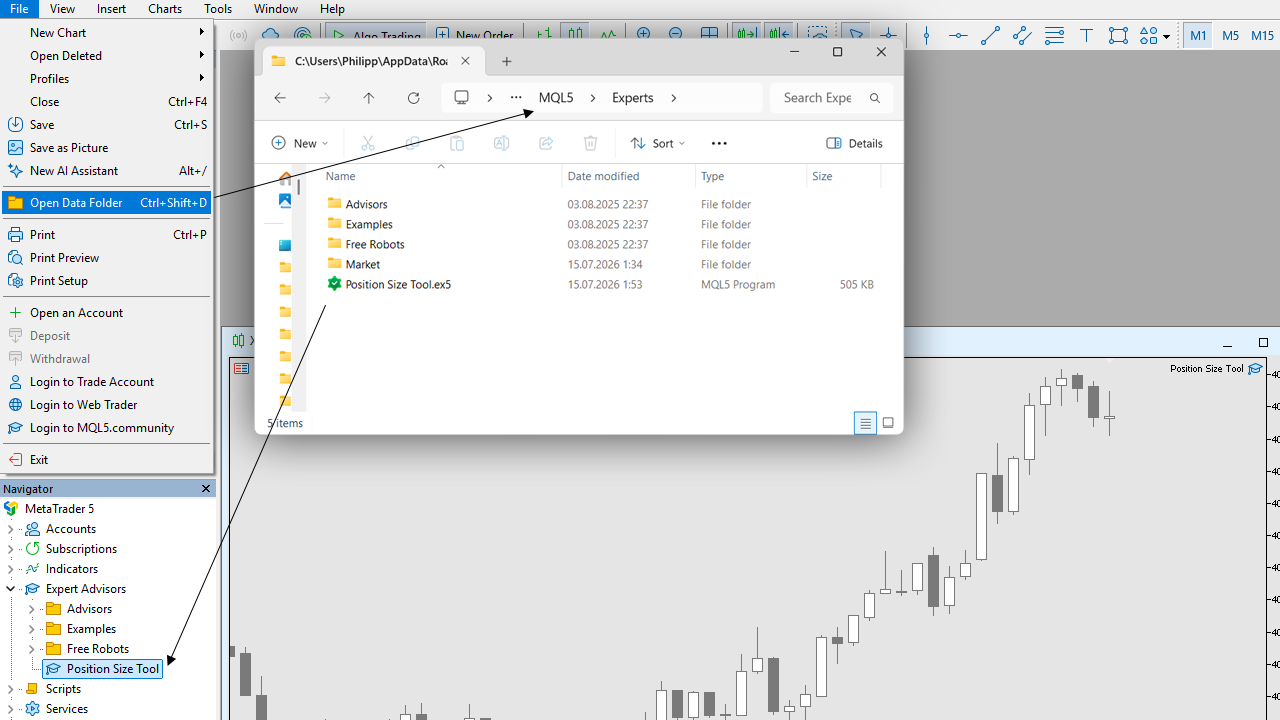
- Install the file: Open MT5, go to File → Open Data Folder, and copy the .ex5 file into the MQL5\Experts directory. Refresh your Navigator panel.
- Launch: Find the utility in your Navigator menu and drag it onto your chart.
- Enable Trading Settings:
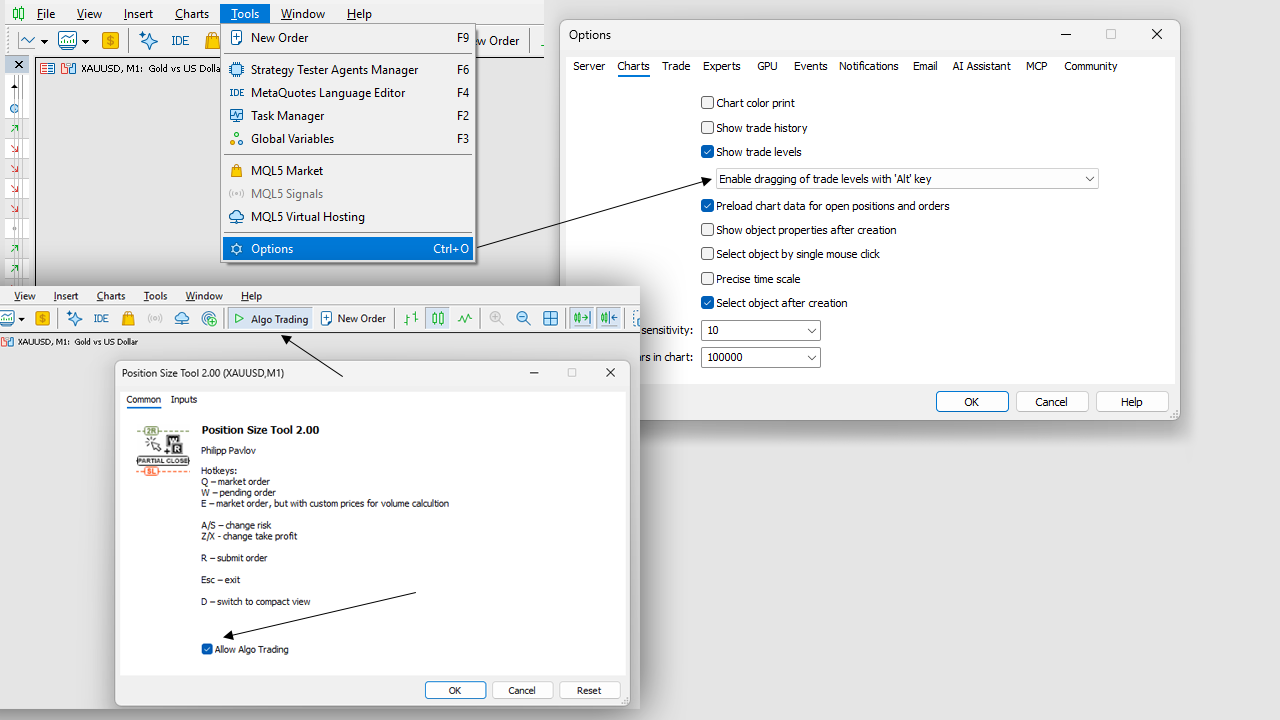
- Go to Tools → Options → Expert Advisors and check "Allow algorithmic trading".
- Make sure the main Algo Trading button on the top MT5 toolbar is turned on (green).
- In the utility's properties window (Common tab), ensure "Allow Algo Trading" is checked.
- Recommended Chart Setting: To prevent accidental misclicks on native MT5 levels, go to Tools → Options → Charts and enable "Use 'Alt' key to drag trade levels".
Position size tool a fast, hotkey-driven utility to calculate risk, place orders, and manage positions directly on your MT5 chart.
I built this tool because I was tired of clunky, bloated trading panels that cover half the screen and lag when you need them most. I wanted a clean chart and the ability to execute and manage manual trades on the fly using only my keyboard and mouse.
It is designed for manual traders - especially scalpers and day traders - who value execution speed, clean charts, and precise risk management.
Check the video for a more in-depth overview.
Main features:
- Fast Order Execution: Press Q for a market order or W for a pending order, point your mouse to your stop-loss level, and send the trade. No manual lot calculations required.
- Missed Entry Risk Calculation (Hotkey E): If the price has already moved but you want to calculate your lot size as if you entered earlier, just point your mouse to your desired entry, press E, move to your stop-loss, and the EA will calculate the exact volume for your risk.
- Smart Risk & Commission Math: Automatically calculates lot sizes based on your stop-loss distance. You can set up to 5 risk presets and switch between them instantly using hotkeys. You can also include your broker's commission directly into the risk calculation.
- Local Partial Closes (Hidden from Broker): Drag and drop partial close levels directly on the chart. These levels run locally in your terminal, meaning they are completely invisible to your broker. Once hit, the EA handles the partial close.
- One-Cancels-the-Other (OCO) Orders: Link two pending orders together. As soon as one triggers, the other is automatically deleted.
- Order Automation: Move your stop-loss to break-even (with a customizable offset) or to a specific price when a trigger level is reached. You can also auto-delete pending orders if the market moves too far against your setup.
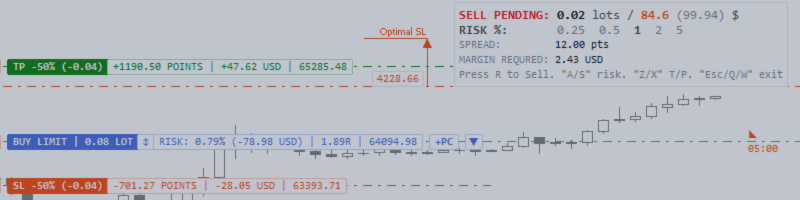
- Clean UI & Info Lines: The entry line displays your exact risk %, currency risk, R:R ratio, and price. TP and SL lines show projected profit or loss. Need absolute clean charts? Press D to toggle Compact Mode, which hides all buttons and leaves only essential labels.
- Focus Mode: Managing multiple trades? Click on any element of a specific trade to highlight it, while all other trades on the chart temporarily fade into the background.
- Custom & Synthetic Symbols: Fully supports custom symbols, making it perfect for synthetic or non-standard charts.
How to:
-
How to Send an Order:
- Point your mouse where you want to enter and press W (pending) or Q (market order) or E (to calculate a missed entry).
- Move your mouse to your Stop-Loss level. Use A / S to adjust your risk percentage, and Z / X to set your Take-Profit.
- Press R to send the order to the market.
-
How to turn on/off compact mode:
Just press D.
- How to use on Custom Symbol:
- Attach EA to custom chart (for example EURUSD_TICK_CHART)
- In EA's settings find "Symbol" parameter and set it to original name (EURUSD).
Files:
Position_Size_Tool.ex5
548 kb




