
This page where you will find detailed instructions on how to install, configure and use Scalper Investor EA

My Telegram group - link

My Youtube channel - link

My Broker for Algo trading - link
M15 SET-FILES
These are the MAIN set-files for trading on the M15 timeframe - download here (Next update on November, 2026)
TThese are ADDITIONAL set-files for trading on the M15 timeframe - download here (Next update on November, 2025)
H1 SET-FILES
These are the MAIN set-files for trading on the H1 timeframe - download here (Next update on November, 2026)
TThese are ADDITIONAL set-files for trading on the H1 timeframe - download here (Next update on November, 2026)
MONEY MANAGEMENT
By default, the advisor uses the automatic money management function and is set to medium risk.
If you are trading on your personal account and you don't care about controlling the size of the trading drawdown, then use the default settings. In this case, the advisor will use the automatic money management function and trade with a lot size of 0.01 for every 1000 units of deposit. Thus, if your deposit size is, for example, 5000 USD, the trading lot size will be 0.05.
If you are trading for a Prop Firm and you need the maximum trading drawdown not to exceed 5%, then set the value of the "Deposit amount for autolot calculation" variable to 2500. In this case, the advisor will use a lot size of 0.01 for every 2500 deposit units. Thus, if your deposit size is, for example, 5000 USD, the trading lot size will be 0.02.
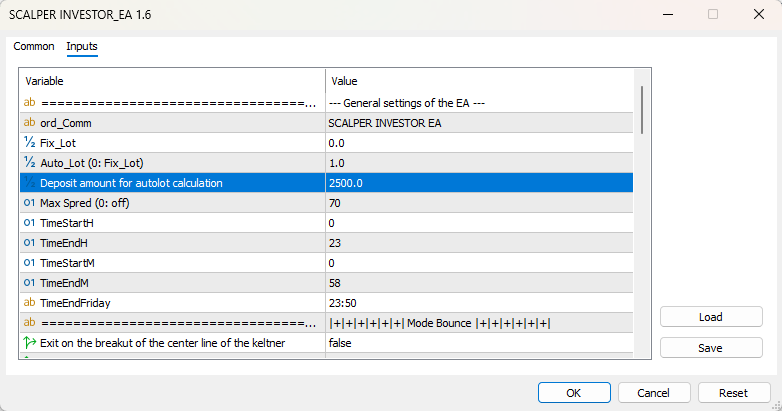
Risk level classification:
- "N-deposit Units to increase" = 2500 (this is the minimum risk)
- "N-deposit Units to increase" = 1000 (this is the average risk)
- "N-deposit Units to increase" = 500 (this is the high risk)
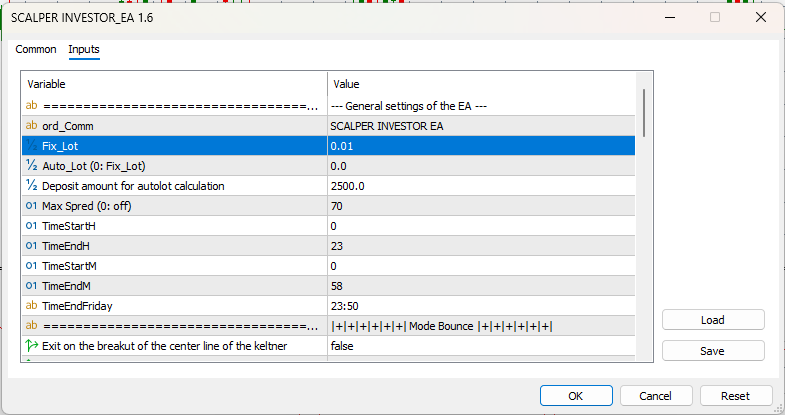
Fixed Lot Trading
If you want to use a fixed lot, set the desired trading lot value for the "Fixed lot size" variable. In this case, the advisor will use the trading lot you specified for trading: