 MetaTrader 5
 Expert Advisors
 Indikatoren
 Skripte
 Bibliotheken
 Speicher
und werden Sie Mitglied unserer Fangruppe
Veröffentliche einen Link auf das Skript, damit die anderen ihn auch nutzen können
Bewerten Sie es im Terminal MetaTrader 5

TesterVsLive - match a Strategy Tester report against your real account, trade by trade - Indikator für den MetaTrader 4

- Ansichten:
- 421
- Rating:
- Veröffentlicht:
-
 Sie verpassen Handelsmöglichkeiten:
- Freie Handelsapplikationen
- Über 8.000 Signale zum Kopieren
- Wirtschaftsnachrichten für die Lage an den Finanzmärkte
Registrierung EinloggenSie stimmen der Website-Richtlinie und den Nutzungsbedingungen zu.
Wenn Sie kein Benutzerkonto haben, registrieren Sie sich -
 Benötigen Sie einen Roboter oder Indikator, der auf diesem Code basiert? Bestellen Sie ihn im Freelance-Bereich
Zum Freelance
Benötigen Sie einen Roboter oder Indikator, der auf diesem Code basiert? Bestellen Sie ihn im Freelance-Bereich
Zum Freelance
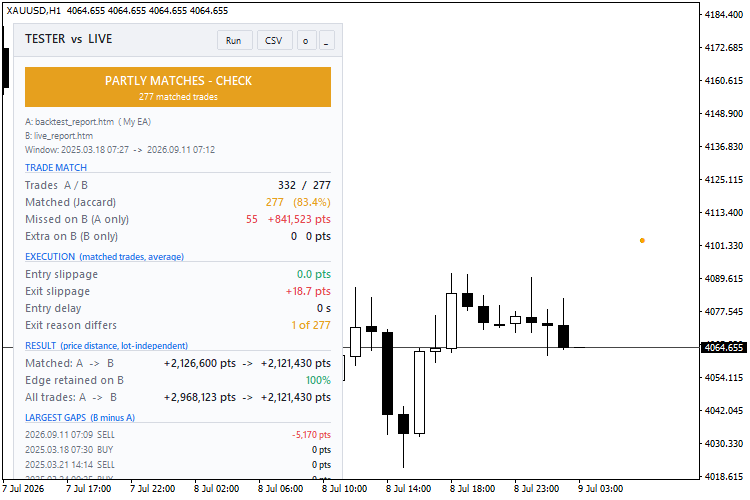
A backtest looks great. Then the EA runs live and the numbers are different, and nobody can say why. Was it slippage, missed signals, a restart or a manual trade? Or was the backtest flattering?
TesterVsLive answers that trade by trade. It never opens, modifies or closes orders.
What you get:
- Verdict: green (live matches backtest), amber (partly matches) or red (live differs).
- Trade match:
- trades on each side and the match rate (Jaccard)
- trades the backtest took but live missed, and what they earned
- extra live trades the backtest never took
- Execution: average entry slippage, exit slippage and entry delay, plus trades where one side hit SL/TP and the other did not.
- Result:
- price distance captured on matched trades, backtest vs live (independent of lot size)
- the % of the backtest edge retained live
- real commission and swap
- Largest gaps: the 5 matched trades where live did worst against the backtest.
- Chart marks:
- blue = backtest entry, orange = live entry, a dotted line joins a matched pair
- red ✕ = missed by live, magenta ✕ = extra on live
- every mark has a tooltip
- CSV export of the full trade-by-trade table.
Two modes:
- Report vs account history: the main use.
- Report vs a second report: compare two brokers, two data feeds, or two versions of an EA.
Quick start:
- In the Strategy Tester, right-click the report and choose Save as Report.
- Copy the .htm file to MQL4\Files .
- In the Account History tab, choose All History.
- Attach TesterVsLive to the traded symbol. Set the report name and the EA's magic number.
How matching works:
- Only closed trades are used, within the window where both sides overlap.
- Backtest trades are processed in time order. Each takes the nearest unused live trade in the same direction within the tolerance (default 180 s).
- Match rate = matched / (backtest + live − matched).
- Slippage is signed: positive means live got a worse price.
Limitations:
- MT4 tester reports have commission = 0, so costs are shown for the live side only.
- Partial-close remainder tickets are skipped.
- For grid or basket EAs, lower the match tolerance.
- The verdict thresholds are practical rules of thumb, not statistics:
- green = match ≥ 90 % and edge retained ≥ 80 %
- amber = ≥ 70 % and ≥ 50 %
Free to use, modify and share (MIT). No warranty, and nothing here is trading advice.
UT Bot Alerts for MT4 - faithful port with signal statistics panel and daily session filter
An MT4 port of QuantNomad's "UT Bot Alerts", one of the most-used scripts on TradingView. It draws the ATR trailing stop, Buy/Sell signals and bar colors, and adds a panel that counts what the signals would have done, after costs, inside your trading hours.
Range Filter Buy and Sell for MT4 - faithful port of DonovanWall / guikroth with signal statistics
An MT4 port of the popular TradingView "Range Filter Buy and Sell 5min". The filter line only moves when price exceeds a smoothed average range, which filters out small swings. Includes Buy/Sell signals, target bands and bar colors, plus a signal statistics panel with a daily session filter.
Three Colors
Example: Moving Average indicator filling by different colors
 MACD Sample
Classical MACD Sample.