GoldenZone OrderBlock
- 指标
- 版本: 10.30
- 激活: 5

GoldenZone OrderBlock Pro MT5
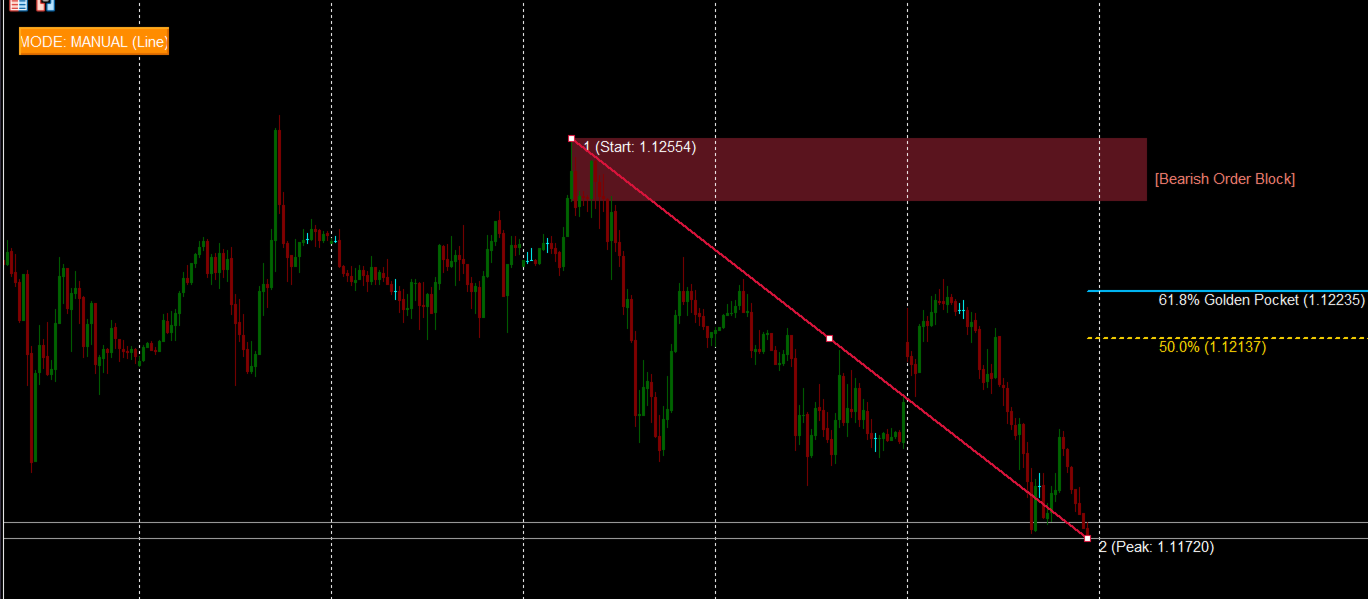
GoldenZone OrderBlock Pro is a high-performance analytical tool designed for MetaTrader 5 that combines the power of Fibonacci retracements (Golden Pocket 50.0% – 61.8%) with Smart Money Concepts (Order Block).
The indicator identifies impulsive market swings, detects institutional accumulation/distribution zones (Order Blocks), and projects high-probability retracement zones to enter trades in the direction of the underlying trend with tight stop-losses and superior Risk-to-Reward ratios.
Key Features
-
Dual Operation Mode in One Click:
-
AUTO (ZigZag): Automatically tracks price action swings using an integrated ZigZag algorithm, mapping the most recent verified impulse without manual intervention.
-
MANUAL (Line): Interactive mode allowing you to stretch and drag the impulse line between any swing high and low.
-
-
Persistent Multi-Timeframe Mapping: Draw or locate your impulse swing on higher timeframes (H1 / H4), then switch down to lower timeframes (M5 / M1) for precision entries. All lines, Order Block zones, and levels remain locked to their exact price coordinates and timestamps. Mode states persist seamlessly across timeframe switches.
-
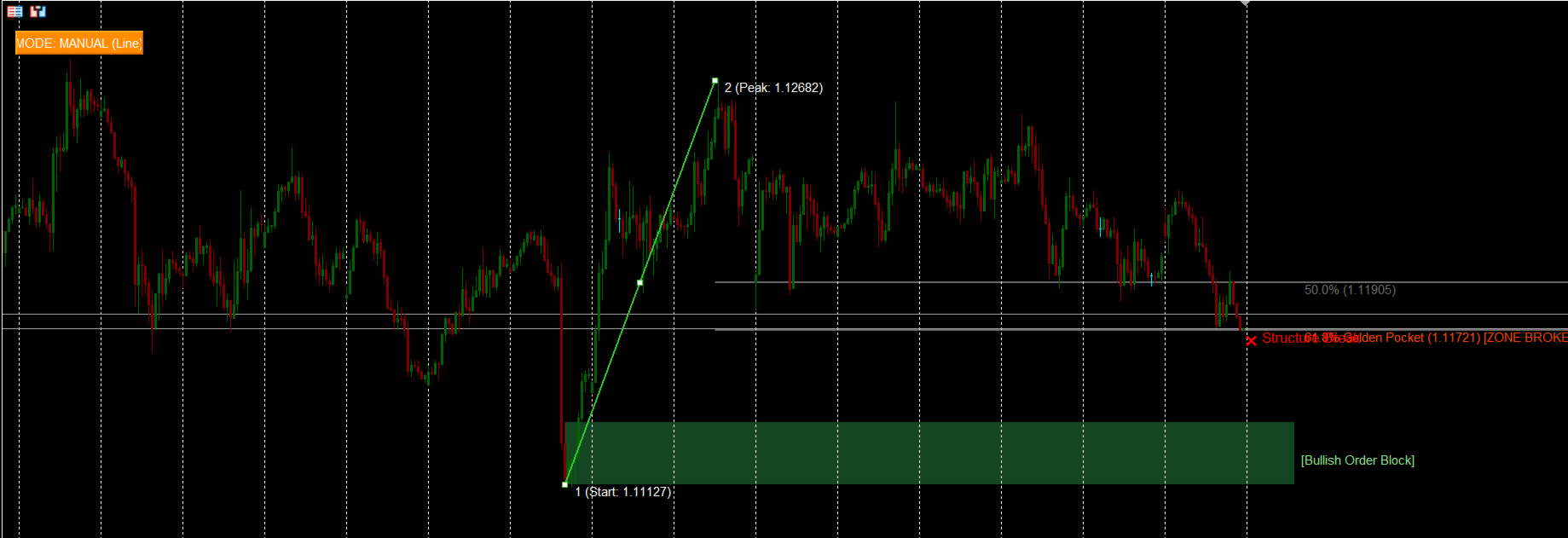
Automated Order Block Detection: Scans and projects the origin candle of the impulse (Bearish OB for Sell / Bullish OB for Buy) as an extended institutional price zone straight to live price action.
-
Trend Structure Break Filter: Continuously monitors subsequent candle closes. If price closes beyond the 61.8% level, the indicator signals an invalidation with an on-chart ❌ Structure Break mark, muting the zone to protect you from falling into trap reversals.
-
Non-Repainting Smart Alerts: Triggered strictly once per impulse swing upon the first touch of the 50.0% level, 61.8% Golden Pocket, or Order Block entry — completely free of repetitive tick spam.
-
EA & Automated Trading Ready: Exports primary levels into standard indicator buffers (iCustom compatible) for automated expert advisors.
Trading Strategy & Rules
-
Direction Identification:
-
BUY Setup: Upward impulse line (Green). Retracement levels project downwards into the discount zone (50.0% – 61.8%).
-
SELL Setup: Downward impulse line (Red). Retracement levels project upwards into the premium zone (50.0% – 61.8%).
-
-
Entry Area:
-
Look for confirmation or place limit orders within the 50.0% – 61.8% Golden Pocket, especially when confluence aligns with the highlighted Order Block box.
-
-
Stop-Loss Placement:
-
Place defensive stops beyond the 61.8% level or behind the boundary of the Order Block (Point 1).
-
-
Take-Profit Target:
-
Primary target is set at the previous structural peak/trough (Point 2).
-
Input Parameters
-
InpDefaultMode — Default startup mode (MODE_AUTO or MODE_MANUAL ).
-
InpRatio1 — Equilibrium retracement ratio (default: 0.500 ).
-
InpRatio2 — Golden Pocket ratio (default: 0.618 ).
-
InpShowOB — Enable/disable the Order Block visual rectangle.
-
InpEnableAlert — Master toggle for pop-up and sound alerts.
-
InpAlertOB — Enable alerts when price touches the Order Block.
-
InpAlertLevels — Enable alerts on 50.0% and 61.8% level touches.
-
InpDepth, InpDeviation, InpBackstep — Standard ZigZag parameters for automated swing detection.