LineLock Trade Panel
- 专家
- 版本: 1.0
- 激活: 5

LineLock Trade Panel – drag-and-drop order entry and trade management for MT4
Note: the Market’s free demo runs only in the Strategy Tester, where MT4 doesn’t allow panel buttons or line dragging. To try LineLock properly, use the free edition, “LineLock Trade Panel EURUSD”: every feature, every symbol on demo accounts.
Note: the Market’s free demo runs only in the Strategy Tester, where MT4 doesn’t allow panel buttons or line dragging. To try LineLock properly, use the free edition, “LineLock Trade Panel EURUSD”: every feature, every symbol on demo accounts.
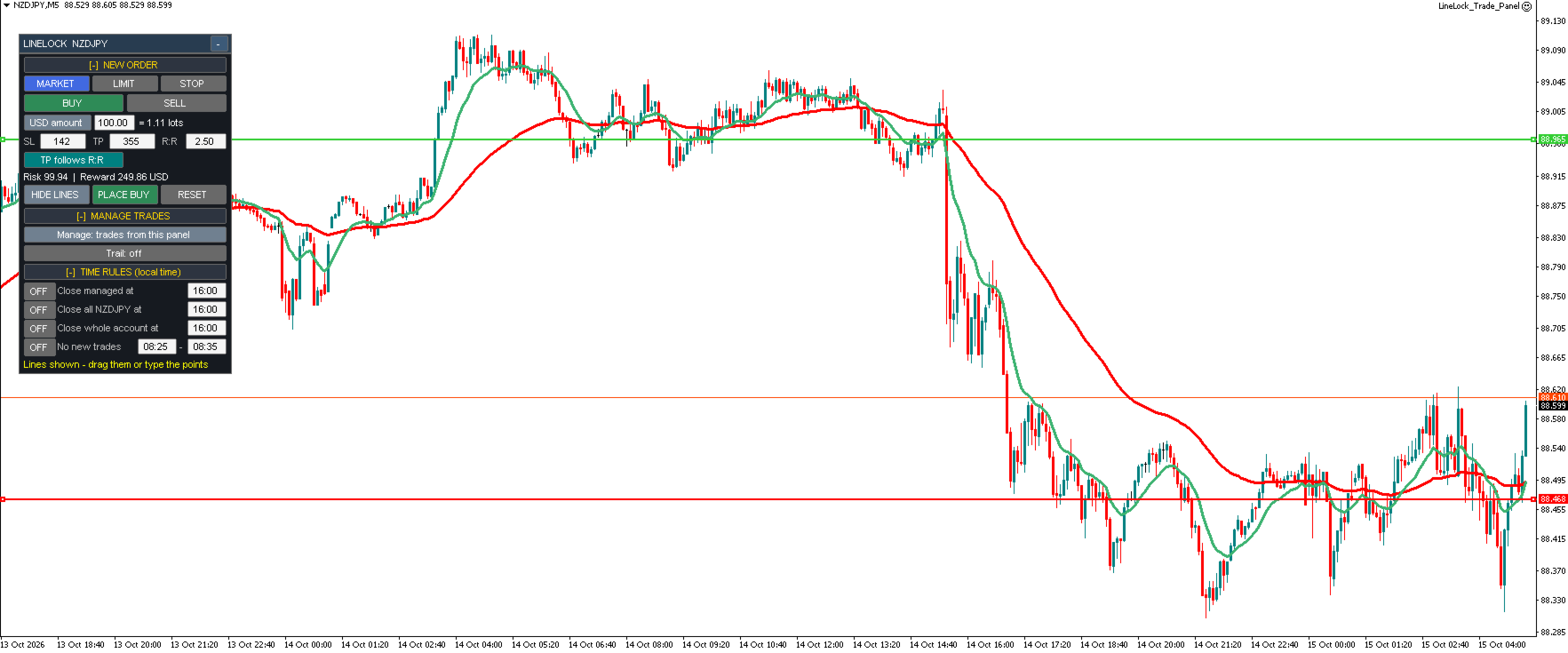
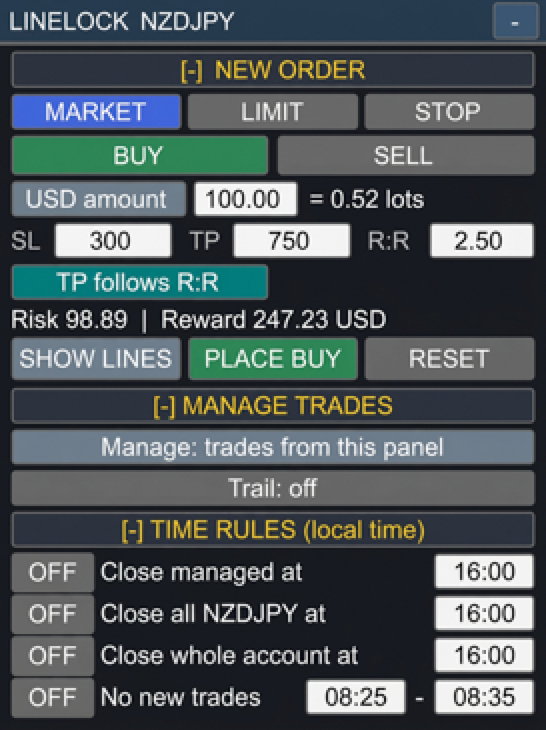
LineLock puts a compact, movable control panel on your chart so you can plan, place and manage trades visually – without doing lot-size math or babysitting your stops.
ORDER ENTRY
- Market, Limit and Stop orders, Buy or Sell, from one panel
- Click "Show Lines" and drag the Entry, Stop Loss and Take Profit lines exactly where you want them – or type the distance in points
- Lines you drag stay where you drop them; the panel updates the points, risk and reward for you
- Optional "TP follows R:R" mode keeps your take profit at your chosen risk:reward as you adjust the stop
- Checks entry side, stop distance and broker stop levels before sending, with clear on-panel messages
POSITION SIZING
- Risk as % of balance, % of equity, a fixed money amount, or a fixed lot size
- Lot size is calculated from your actual stop distance and shown before you place the trade, along with risk and reward in your account currency
- Warns you when the broker's minimum lot would risk more than your target
TRADE MANAGEMENT
- Manage only trades placed from the panel, or every trade on the symbol (including manual trades)
- Trailing stop options:
– Candle high/low (lowest low / highest high of the last N candles)
– Candle close
– Any indicator on your chart (by name and buffer)
– Moving average (any period, method and price)
- Three ways to exit on the trail:
– Move the broker stop loss (classic trailing stop – only ever tightens)
– Close only when a candle CLOSES beyond the trail (ignores wicks)
– Close as soon as live price breaks the trail by a set number of points
- Offset (distance beyond the trail) and "Start after" (only trail once the trade is a set number of points in profit)
- Trailing level drawn on the chart for every managed trade
TIME RULES
- Close managed trades at a set time
- Close all trades on the symbol at a set time
- Close all trades in the account at a set time
- Block new orders during a set time window (e.g. around news)
- Times are entered in your own local time
PANEL
- Collapsible sections – open only what you need
- Drag to move anywhere on the chart, or minimize to a single bar
- Remembers your settings per symbol between sessions and timeframe changes
NOTES
- This is a trading utility. It does not generate signals or trade on its own.
- The EA must stay running on the chart for trailing and time rules to work.
- Enable AutoTrading. If your broker rejects stops on market orders, set SendStopsAfterEntry = true.
- Please test on a demo account first.