Simba Position Manager Pro

  • 实用工具
  • Emmanuel Ndacyayisenga
    Emmanuel Ndacyayisenga
    • Founder & Lead Developer | Quant Trader & MQL5 Developer 在  ShieldNexus
    • 卢旺达
    • 1045
    NDACYAYISENGA Emmanuel is a quantitative trader and MQL5 Expert Advisor developer focused on transforming practical trading concepts into systematic and automated trading solutions.
  • 版本: 3.50
  • 激活: 10
SIMBA POSITION MANAGER PRO

You already know how to enter. SIMBA helps you manage what happens next.

After more than 5 years of trading, I have learned something that many traders discover the hard way:

Finding an entry is not the hardest part of trading. Managing the position after you enter is.

There is almost nothing more frustrating than closing a good trade too early...

Only to watch price continue directly toward the take-profit you originally planned.

And there is almost nothing worse than spending hours—or even days—waiting for a high-quality setup, entering at the right moment, watching the trade move in your favor...

Then watching the market reverse, hit your stop loss, and continue in the direction you originally expected.

You were not necessarily wrong about the market.

The problem was what happened after entry.

THE REAL TRADING PROBLEM

Anyone can open a trade.

Buy or sell.

The market can move up or down. You can be right about direction and still lose money. You can even be wrong and temporarily make money.

So the question is not simply:

“Was my entry right?”

The more important question is:

“What did I do after I entered?”

Where should the stop loss move?

When should you protect the position?

Should you take partial profit?

When should you let the remaining position run?

When is the market losing momentum?

When should you stop giving the trade more room?

These decisions become extremely difficult when you are watching a live position and emotions start taking over.

That is where SIMBA Position Manager Pro comes in.

SIMBA DOES NOT FIND TRADES FOR YOU.

You find the trade. SIMBA manages the position.

SIMBA is an MT5 Expert Advisor designed specifically for post-entry trade management.

It does not open trades.

It does not force signals on you.

It does not decide whether you should buy or sell.

You remain in control of the entry.

Once your position is open, SIMBA can help manage the position according to predefined risk and exit rules.

You choose the trade.
SIMBA helps manage the journey.

WHAT HAPPENS AFTER YOU ENTER?

SIMBA continuously monitors your positions and can handle important management tasks such as:

Automatic SL & TP Protection

SIMBA can establish protection using volatility and market-based calculations rather than forcing you to choose completely arbitrary distances.

 Maximum Risk Protection

Set a maximum risk percentage so position protection follows a predefined risk limit.

Automatic Break-Even

When the trade reaches the configured profit threshold, SIMBA can move protection toward break-even.

The goal is simple:

Don't allow a trade that has already paid you to unnecessarily become a full-risk trade again.

 Partial Profit Taking

When a position reaches the configured R-multiple, SIMBA can close a portion of the position.

You bank some profit while keeping part of the trade alive.

 Runner Management

After partial profit-taking, the remaining position can continue toward a larger target.

This allows you to participate in those occasional large moves instead of automatically closing everything too early.

 R-Based Trailing

SIMBA can trail the position according to its R-multiple rather than simply using an arbitrary fixed number of points.

As the trade develops, management develops with it.

PSAR Trailing

Parabolic SAR can be incorporated into the trailing process to help follow the market's evolving structure.

DEMA Momentum Exit

When momentum conditions weaken and the configured DEMA exit condition is triggered, SIMBA can close the position rather than waiting blindly for the original stop loss.

Live R Calculation

SIMBA continuously recalculates the trade's R based on the current stop, so the dashboard reflects the position's current risk/reward state rather than simply showing the original entry risk.

When protection has moved beyond the entry price, the position can be shown as:

LOCKED

Meaning the stop has moved into a risk-free area.

 KNOW WHAT YOUR TRADE IS DOING

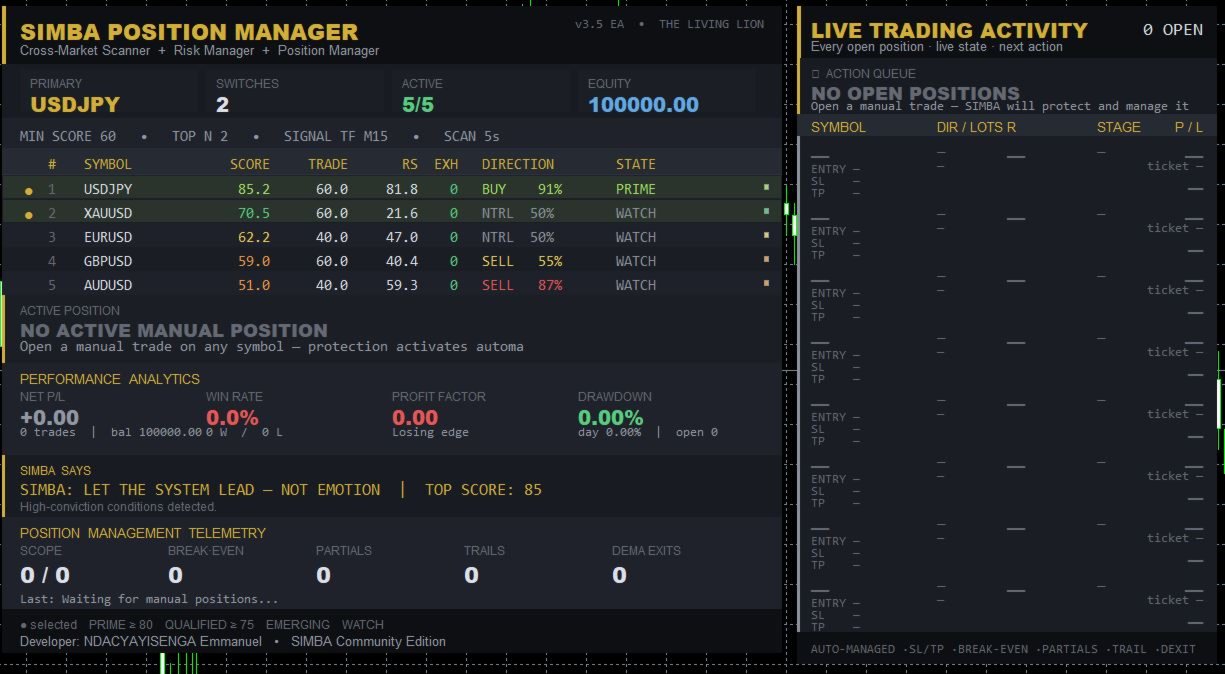
SIMBA includes a live trade-management dashboard so you don't have to constantly calculate everything manually.

You can monitor:

  • Symbol

  • Direction

  • Position size

  • Entry price

  • Current price

  • Stop Loss

  • Take Profit

  • Live P/L

  • Live R

  • Risk/reward information

  • Current management stage

  • Next planned action

  • Position status

The position lifecycle can be displayed through stages such as:

INITIAL → BREAK-EVEN → POST-PARTIAL → RUNNER

Instead of asking yourself:

“What should I do with this trade?”

SIMBA gives you a structured management framework to follow.

 WHY THIS MATTERS

Imagine this:

You enter a trade.

Price moves +1R.

Then +1.5R.

Then +2R.

Your emotions start changing.

You think:

“Maybe I should close everything.”

You close.

Five minutes later...

The market moves another 3R.

You were right.

But you weren't positioned for the entire move.

Now imagine the opposite.

Your trade reaches +1.5R.

You refuse to move your stop.

Price reverses.

Your original stop gets hit.

Then price turns around and reaches your original target.

That is the pain SIMBA is designed to address.

The market will always be uncertain.

Your management process doesn't have to be.

BUILT AROUND RISK, NOT PREDICTION

SIMBA does not claim to know where the market will go next.

Nobody does.

Instead, it focuses on something you can control:

How you manage the risk once you are in the market.

The philosophy is simple:

Protect capital first.
Manage risk continuously.
Take partial profits when appropriate.
Give strong trades room to develop.
React when momentum changes.
Don't let emotion rewrite the plan.

 MORE THAN A POSITION MANAGER

SIMBA also includes a Market Scanner / MarketPicker that can monitor your selected symbols and rank market conditions using factors such as:

  • Trend

  • Momentum

  • Timing

  • Multi-timeframe alignment

  • Tradeability

  • Relative strength

  • Volatility

  • Exhaustion

  • Risk/reward conditions

Markets can be classified into states such as:

PRIME
QUALIFIED
EMERGING
WATCH
DECAYING

This gives you additional market context while your positions are being managed.

 PERFORMANCE ANALYTICS

SIMBA also provides account-level analytics including:

  • Net realized P/L

  • Win rate

  • Profit factor

  • Peak drawdown

  • Daily drawdown

  • Total trades

  • Winning trades

  • Losing trades

  • Open positions

You don't just see the trade.

You see the bigger picture.

 BUILT FOR REAL TRADERS

SIMBA can be useful for:

Manual Traders

You decide when to enter. SIMBA helps manage the position afterward.

Signal Traders

Receive an entry from your preferred signal source and apply structured position management.

Prop-Firm Traders

Use predefined risk limits, break-even management, partials and trailing rules to reduce emotional interference.

Experienced Traders

When your entry strategy is already developed but your biggest weakness is trade management.

Traders Who Keep Giving Back Profits

If you regularly see winning trades turn into losing trades, SIMBA is built around exactly this problem.

SIMBA IS NOT A MAGIC MONEY MACHINE

Let's be clear.

SIMBA does not predict the future.

It does not guarantee profits.

It does not guarantee a particular win rate.

It does not guarantee that every trade will reach its target.

It does not replace a trading strategy.

SIMBA manages positions. It does not manufacture profitable entries.

Your entry still matters.

Market conditions still matter.

Risk still matters.

But once you are in the trade, you now have a structured management system working with you.

THE SIMBA APPROACH

YOU

Choose the market.

YOU

Choose the strategy.

YOU

Choose the entry.

SIMBA

Protects the position.

SIMBA

Manages break-even.

SIMBA

Can secure partial profits.

SIMBA

Manages the runner.

SIMBA

Trails according to predefined rules.

SIMBA

Monitors momentum conditions.

YOU

Remain in control.

 THE BIG IDEA

Most trading tools are obsessed with one question:

“WHEN SHOULD I ENTER?”

SIMBA asks a different question:

“NOW THAT YOU ARE IN... WHAT ARE YOU GOING TO DO?”

Because getting into a trade is only the beginning.

The real battle starts after you click BUY or SELL.

The market doesn't care how good your analysis was.

It will test your patience.

It will test your risk management.

It will test your emotions.

It will tempt you to close too early.

It will tempt you to move your stop.

It will tempt you to hold a losing trade too long.

SIMBA is built to bring structure to that battle.

 ENTER YOUR WAY. MANAGE WITH SIMBA.

You don't need another tool telling you when to click BUY.

You need a better process for what happens after you click it.

You open the trade.
SIMBA manages the position.

Protect what the market gives you.

Give strong trades room to breathe.

Reduce unnecessary emotional decisions.

And manage your positions with a defined process instead of improvising every time the market moves.

SIMBA Position Manager Pro

Enter with your strategy. Manage with discipline.

The lion doesn't predict the market.
The lion manages the position.

PRODUCT IDENTITY

Developed by: ShieldNexus
Developer: NDACYAYISENGA Emmanuel
Trading Engine: SIMBA Trading Engine
Product Edition: SIMBA Community Edition

SIMBA Position Manager Pro
Powered by the SIMBA Trading Engine

© NDACYAYISENGA Emmanuel / ShieldNexus

Product version and features may be updated over time.

Risk Warning: Trading financial markets involves substantial risk. Past or simulated performance does not guarantee future results. Use appropriate risk management and test the EA on a demo account before live deployment.

推荐产品
Trade assistant pro v8
Ahmed Mohammed Bakr Bakr
2 (1)
FREE FREE FREE Trade Assistant MT5 – Professional Trading & Risk Management Panel Trade Assistant MT5 is an advanced trading panel designed to help traders execute orders faster, safer, and more professionally . It simplifies manual trading by combining smart order management , precise risk control , and one-click execution , making it ideal for both beginners and advanced traders. This tool does not trade automatically . Instead, it empowers you with full control while applying professional-gra
FREE
ConsistencyGuard
Vanessa Cristina Ribeiro Dos Anjos
版本 7.04 重大更新,重点加强日内交易纪律和账户保护。 • Post-Session Review(交易后复盘)模式,复盘时间可设置为 0 至 60 分钟。 • 完成当天允许的交易次数后,交易者可以保持 MetaTrader 5 开启,用于查看图表、截图以及填写交易日志。 • 达到每日交易次数限制后,如果尝试进行新的交易,将触发 Emergency Close(紧急平仓)保护。 • Emergency Close 会关闭未平仓头寸并取消挂单,然后锁定交易时段并关闭 MetaTrader 5。 • 持久化每日锁定机制可防止交易者在严重违规后重新打开 MetaTrader 5 继续交易。 • 最大授权交易手数保护。 • 最大交易手数提高后将锁定 7 天。在此期间仍允许使用更小的交易手数。 • 改进交易次数统计。 • 部分平仓不会被计算为新的交易。 • 面板实时显示 Realized P/L(已实现盈亏)和 Floating P/L(浮动盈亏)。 • 改进连续止损统计。 • 图表面板更加紧凑、简洁。 • 每日交易次数直接显示在图表上。 • 改进 MetaTrader 5 重启后的交易规则
FREE
FiT Panel Pro
Thonglak Janyakorn
Overview FiT Panel Pro is a professional-grade trade management panel designed for MetaTrader 5 traders who demand speed, precision, and full control over their trades. Built with a modern dark-theme UI, it combines one-click execution with advanced risk management, visual SL/TP drag lines, automatic Fibonacci-based levels, and comprehensive order management — all in a single, compact panel. Whether you are a scalper, day trader, or swing trader, FiT Panel Pro gives you the edge you need to exec
FREE
Introduction Welcome to the world of Forex trading, where every tick of the market can be influenced by news events. Introducing our expert advisor for MetaTrader, your ultimate tool for navigating the complexities of news trading. This innovative advisor is specifically designed to automate your trading strategy during key macroeconomic releases, ensuring you never miss an opportunity.  When important indicators are announced, volatility often spikes, creating potential for profit. Our expert
FREE
通过我们的MT4和MT5高级交易管理器革新您的交易 Mt4 Version : https://www.mql5.com/en/market/product/107249 利用我们的MT4和MT5高级交易管理器来强化您的交易策略,提升精准度和控制力。与传统交易管理器不同,我们的管理器不仅能动态适应市场条件,还在您进入交易的瞬间设置自动止损和止盈水平。 主要特点: 自动进入策略: 通过自动进入策略即时抓住机会。进入交易时,系统会战略性地设置预设的止损和止盈,确保从一开始就严格的风险管理。 动态止损管理: 实时应对市场变化。当您的交易达到+0.50%的利润时,系统会自动将止损减半,保护您的收益并控制风险。 保本保护: 获得+1%利润时享受安宁。我们的高级交易管理器会将止损移动至保本水平,确保您初始资金安全,让利润得以延续。 优化利润锁定: 轻松最大化收益。当达到+2%利润时,交易管理器将止损调整为+1%,在确保利润的同时允许市场波动。 高效的进入和退出自动化: 通过自动执行止损和止盈,充满信心地交易。无需时刻监控,将更多精力放在优化您的策略上。 多资产兼容性: 轻松多样化您的投资组合。我
FREE
Long Waiting
Aleksandr Davydov
Expert description Algorithm optimized for Nasdaq trading The Expert Advisor is based on the constant maintenance of long positions with daily profit taking, if there is any, and temporary interruption of work during the implementation of prolonged corrections The Expert Advisor's trading principle is based on the historical volatility of the traded asset. The values of the Correction Size (InpMaxMinusForMarginCallShort) and Maximum Fall (InpMaxMinusForMarginCallLong) are set manually. Recomm
FREE
IMPORTANT NOTE: This is a professional Trade Management Utility and on-chart assistant. It is NOT an automated trading robot. It does not open trades on its own. The UltraFast Trade Manager MT5 is the ultimate execution and risk-management suite designed to give you absolute control over your manual and algorithmic trades. When managing multiple positions, calculating complex net break-even points, or constantly monitoring the economic calendar, hesitation can lead to costly mistakes. This utili
FREE
Trade Assistant Panel
Md Sakhawat Hossain
5 (1)
Trade Assistant Panel: Your Optimal Trading Ally "The Trade Assistant Panel" is a graphical tool for traders aiming to simplify and enhance their trading experience. It streamlines order execution and management, allowing you to focus on market analysis and decision-making. With just a few clicks, you can initiate various order types, ensuring that you always have full control over your trading strategy: Buy Orders Sell Orders Buy Stop Orders Buy Limit Orders Sell Stop Orders Sell Limit Orders Y
FREE
Trendline Rebounce M5
Abd Rahman Bin Muhammad
Trendline Rebounce M5 是 一 款 MetaTrader 5 智能 交易 系统( EA), 用于 在 M5 时间 周期 寻找 趋势 线 回 踩 和 拒绝 形态 蜡烛。 在 开 立 首 个 仓 位 前, 它 会 检查 更高 时间 周期 的 市场 方向 和 结构。 入 场 评估 结合 五项 条件: EMA 趋势、 已 确认 的 摆动 结构、 趋势 线 回 踩、 拒绝 形态 蜡烛 以及 RSI 动能。 默认 最低 入 场 评 分为 四分。 在 默认 设置 下, EMA 趋势 和 拒绝 形态 蜡烛 是 必需 条件。 对于 首次 入 场, EA 可 检查 H1 趋势 方向、 H1 趋势 运行 情况、 H1 潜在 或 已 确认 的 双 顶 和 双 底 形态, 以及 H1 和 H4 上 与 交易 方向 相反 的 趋势 线。 如果 更高 时间 周期 的 市场 环境 不 支持 M5 信号, 这些 过滤 条件 可能 阻止 入 场。 可 选 的 加 仓 功能 会 在 价格 朝 不利 于 现有 持 仓 组合 的 方向 移动 后, 寻找 支撑 位 或 阻力 位。 加 仓 必须 触 及 相应
FREE
================================================================ MATRIX CONDITION MONITOR Live Trade Condition Panel for MetaTrader 5 Fully Automatic -- Works with ALL Matrix EAs ================================================================ NEVER MISS A TRADE SETUP AGAIN Matrix Condition Monitor is a free utility that attaches to any chart and automatically checks all 10 trade conditions in real time -- showing you exactly why a trade will or will not open, and alerting you the moment ever
FREE
Donchian Breakout And Rsi
Mattia Impicciatore
4.33 (3)
概述 本指标是经典 Donchian 通道 的增强版,增加了多种实用的交易功能。 除了标准的三条线(最高、最低和中线),系统能够检测 突破 ,并在图表上用箭头进行可视化标记,同时只显示 与当前趋势方向相反的那条线 ,让图表更加简洁。 功能包括: 可视化信号 :突破时在图表上绘制彩色箭头 自动通知 :弹窗、Push 推送和 Email 邮件 RSI 过滤 :根据市场相对强弱验证信号 个性化设置 :颜色、线条粗细、箭头符号、RSI 阈值等 工作原理 Donchian 通道计算: 上轨线 :最近 N 根已收盘 K 线的最高价 下轨线 :最近 N 根已收盘 K 线的最低价 中线 :最高价和最低价的平均值 看涨突破 :收盘价高于上轨线 看跌突破 :收盘价低于下轨线 指标会: 绘制三条 Donchian 通道线 仅在 方向变化后的首次突破 绘制箭头 隐藏顺应趋势方向的那条线(上涨趋势: 只显示红色下轨线;下跌趋势: 只显示绿色上轨线) 可选用 RSI 过滤突破信号,减少虚假突破 支持实时发送通知 参数说明 Donchian 通道设置 indPeriod :计算通道高低点的已收盘 K 线数量 Lin
FREE
Ninja Master
Lasse Mathias Baagoe S Christensen
3 (2)
Ninja Master: Powering Traders & Investors Worldwide. Ninja Master is an advanced and adaptable Gold Expert Advisor developed exclusively for Gold on the 5-minute timeframe . It is a complete trading solution that performs a range of tasks, including following the trend , analyzing the chart , smart TP system , and smart filters . It does not use neural learning or AI — instead, it uses an adaptable smart algorithm designed for traders who prioritize capital protection and steady growth . Create
FREE
介绍适用于 MT5 的 NAS100 Auto SL 和 TP Maker: 有了我们的 NAS100 Auto SL 和 TP Maker,再也不会错过止损和止盈的设置,这是交易者在 MetaTrader 5 上浏览纳斯达克 100 市场时不可或缺的助手。该工具专为寻求自动管理止损和止盈水平的无缝解决方案的用户而设计。 主要功能 轻松实现自动化: 自动监控无止损和/或止盈的纳斯达克 100 指数交易。 根据用户配置设置动态调整水平。 订单类型的多样性: 兼容纳斯达克 100 指数的市价订单和挂单。 支持 MetaTrader 5 中的各种订单类型。 定制配置: 用户友好的参数设置允许自定义跟踪偏好和止损/止盈水平。 范围灵活: 可选择为其运行的特定 NAS100 工具或所有交易工具设置止损和止盈。 快速执行: 确保快速设置所需的 StopLoss 和/或 TakeProfit 值,无需等待新的 tick 即可迅速响应。 MetaTrader 5 兼容性: 与 MetaTrader 5 中的所有订单类型兼容,实现无缝集成。 使用 NAS100 Auto SL 和 TP Maker
FREE
手动管理持仓往往容易导致错过出场时机、情绪化犹豫以及持仓缺乏风控保护。 Trade Manager Lite 是一款专为 MetaTrader 5 设计的高效持仓管理工具,旨在全自动执行止损(Stop Loss)、止盈(Take Profit)、保本(Break-Even)、移动止损(Trailing Stop)以及分批平仓(Partial Close)。 无论您是通过电脑桌面手动下单、手机版 MT5 远程开仓,还是借助外部指标进场,Trade Manager Lite 都能即时捕捉未受保护的订单,并根据预设的点数自动施加风险防护。 核心功能特性(免费版) 全自动补齐 SL & TP: 实时扫描并检测无保护的持仓,根据您设定的点数自动添加止损与止盈。 智能自动保本(Break-Even): 当订单浮盈达到设定点数时,自动将止损移至开仓价,并支持设置额外缓冲点数以抵消点差和手续费。 动态移动止损(Trailing Stop): 随着行情朝有利方向推进,以设定的步进点数自动跟进移动止损,牢牢锁定浮动利润。 自动化分批平仓(Partial Close): 当达到指定利润目标时,自动平掉指定比
FREE
Pro Spread Monitor Pro Spread Monitor is a specialized, professional-grade utility designed to provide real-time, low-latency monitoring of market spreads directly on your trading chart. In high-volatility environments, sudden spread spikes can significantly impact your execution quality and the integrity of your stop-loss levels. This indicator provides immediate visual feedback, allowing you to identify "danger zones" instantly and avoid trading during periods of unfavorable liquidity. Key Fea
FREE
Chart Pro Classic Dark v1.00 Chart Pro Classic Dark is a professional MT5 chart styling and customization tool designed to give your charts a clean, modern, and professional dark appearance. Key Features Dark Black Background — Applies a clean black background to the chart. ️ Candlestick Chart — Automatically configures the chart to use candlesticks. Bullish Candles — Green/Lime bullish candles. Bearish Candles — White bearish candles. Grid Removal — Hides the chart grid for a clean
FREE
Signalator Lot Size Evaluator MT5 是一款免费的本地 MetaTrader 5 工具,专为希望在手动下单前估算交易手数的交易者设计。 您可以根据所选交易品种、BUY 或 SELL 方向、计划入场价格、Stop Loss、可选 Take Profit 以及风险百分比来规划交易。计算器结合当前账户信息和经纪商提供的交易品种规格,估算建议手数以及主要风险数据。 使用流程非常简单:定义交易参数 → 选择账户风险水平 → 查看建议手数和经纪商交易条件 → 如果交易设置合适,再手动执行交易。 Signalator Lot Size Evaluator MT5 是 Signalator Trading and Analysis Ecosystem 的一部分。这是一个不断扩展的实用 MetaTrader 工具系列,涵盖交易准备、交易品种与经纪商分析、账户监控、持仓管理以及日常交易工作流程优化。 Lot Size Evaluator 可以作为独立的专用工具使用,适合只需要在交易前进行仓位大小和风险计算的交易者。相同的功能也已经集成到功能更全面的 Signalator Tr
FREE
核心功能 智能交易管理 一键开仓平仓操作,支持自定义手数设置. 多种平仓模式:全部平仓、按方向平仓、按盈亏状态平仓. 专业风险控制控制风险 实时监控点差,避免高成本交易环境.可视化控制面板。 直观的图形界面所有功能一键操作. 实时显示仓位信息、盈亏状况、点差状态. 支持面板最小化、锁定功能,防止误操作 . 产品优势 高效便捷无需复杂设置,开箱即用 图形化操作,告别繁琐代码.实时数据更新,决策更及时. ️安全可靠点差监控,避免恶劣市场条件交易. 专业实用支持多种订单类型管理,灵活的手数配置 详细的仓位信息展示. 适用场景 手动交易者:提供专业的方便控制工具 效率追求者:一键式操作,提升交易效率.       如果你用的方便的话,记得分享给你的朋友!
FREE
BB Strategy V5.01 Advanced Bollinger Bands Grid Expert Advisor BB Strategy V5.01 is a fully automated Expert Advisor for MetaTrader 5 that combines Bollinger Bands mean-reversion trading, percentage-based grid management, advanced entry filtering, and intelligent risk control. The EA is designed to identify temporary market overextensions and capture high-probability reversal opportunities while filtering out low-quality entries that often occur during strong trending conditions. Unlike traditio
FREE
Backtesting PRO
Raul Benjamin Correa Reyes
Backtesting PRO: Make a review of the market based on the available history of your broker. Practice your strategies and verify them in seconds. Remember to maintain excellent risk management, check your days and hours of operation. R emember to start it in the shortest period to operate. Any questions or suggestions can be sent to this email: autoeducacion0110@gmail.com
FREE
AI Weekly Open Bias Trader
Fadi Hassan Khaled Ghanem
以周开盘价作为偏向线,并在周偏向方向上交易该线的拒绝形态。 工作原理 EA 在信号时间周期(默认 H1)的每根已收盘K线上评估一次规则,因此信号不会重绘,测试器与实时图表上的逻辑完全一致。当形态出现且该品种上没有本 EA 的持仓时,它会开立一笔带有止损和目标的市价单。 主要功能 基于风险的手数计算(按余额百分比),带最大手数上限和可用预付款检查 基于 ATR 的止损,带最大距离限制,目标为止损的倍数 基于 ATR 的保本和追踪止损 交易之间的最少K线数 每次仅一个持仓,无网格,无马丁格尔,无加仓摊平 每笔交易都带有 SL 和 TP 图表上的小型状态面板 推荐 主要外汇货币对、XAUUSD 和指数。信号时间周期默认为 H1;可在输入参数中更改。 输入参数 风险管理: 每笔交易风险(余额的 %),最大手数上限,魔术号。 信号: 信号时间周期,价格须接近周开盘价的距离(x ATR)。 止损与目标: ATR 周期,默认 SL 距离(x ATR),最大 SL 距离(x ATR,0 = 关闭),TP 为 SL 距离的倍数。 交易管理: 保本触发(x ATR,0 = 关闭),ATR 追踪距离(x A
FREE
Auric Mohd iK
Md Iqbal Kaiser
AURIC MOHD-iK is a dynamic, logic-based Expert Advisor (EA) engineered specifically for trading XAUUSD (Gold). Unlike standard trading systems that rely on lagging, unreliable indicators, this EA operates purely on clean price logic—executing trades the way an experienced human trader naturally reads the market. This version is completely free with limitations, offering permanent value to your trading setup with zero hidden costs. Active Auric Mode That's it!!!!!!!!!! Core Trading Parameters Ac
FREE
PZ Goldfinch Scalper EA MT5
PZ TRADING SLU
3.33 (57)
这是我著名的剥头皮机Goldfinch EA的最新版本,它是十年前首次发布。它以短期内突然出现的波动性扩张为市场提供了头条:它假设并试图在突然的价格加速后利用价格变动的惯性。这个新版本已经过简化,使交易者可以轻松使用测试仪的优化功能来找到最佳交易参数。 [ 安装指南 | 更新指南 | 故障排除 | 常见问题 | 所有产品 ] 简单的输入参数可简化优化 可定制的贸易管理设置 交易时段选择 工作日选择 金钱管理 谨防... ick牛黄牛是危险的,因为许多因素都会破坏收益。可变的点差和滑点降低了交易的数学期望,经纪人的低报价密度可能导致幻像交易,止损位破坏了您获取利润的能力,并且网络滞后意味着重新报价。建议注意。 回溯测试 EA交易仅使用报价数据。请以“每笔交易”模式回测。 它根本不使用HLOC(高-低-开-关)数据 交易时间无关紧要 为了获得更好的性能,请为您希望在每个刻度线模式下交易的每个交易品种运行云优化。稍后分享! 输入参数 触发点:触发点差所需的价格变动。 (预设= 10) 最小时间窗口:价格波动发生的最短时间。 (默认= 3) 最长时间窗口:价格波动发生的最长时间。
FREE
Morning Range Breakout (Free Version) Morning Range Breakout (Free Version) is a straightforward trading advisor that implements a breakout strategy based on the morning range. It identifies the high and low within a specified time interval (e.g., 08:00–10:00 UTC) and opens a trade on a breakout upward or downward. The free version includes core functionality without restrictions. All parameters and messages are in English, per MQL5 Market requirements. Key Features Detects morning range based
FREE
SimpleTrade by Gioeste
Giovanni Scelzi
4 (3)
Discover the power of automated trading with **SimpleTradeGioeste**, an Expert Advisor (EA) designed to optimize your trading operations in the Forex market. This innovative EA combines advanced trading strategies with proven technical indicators, offering an unparalleled trading experience. video backtest :  https://youtu.be/OPqqIbu8d3k?si=xkMX6vwOdfmfsE-A ****Strengths**** - **Multi-Indicator Strategy**: SimpleTradeGioeste employs an integrated approach that combines four main technical ind
FREE
VolumeMonitorUtility 一款用于 MetaTrader 5 终端的服务型实用工具,以紧凑的信息面板形式在图表上显示关键的成交量分析指标。该工具基于开源 VolumeAnalysis 库构建,专为基于成交量做出决策的交易者设计。 功能 监控面板:图表角落的紧凑信息器实时显示指定周期内的平均成交量、当前K线成交量、成交量增量以及市场状态。 异常检测器:工具将当前成交量与平均值进行比较,当成交量超过标准指定倍数时,高亮显示 ANOMALY 状态。 增量指示:激进买入与卖出之间的差值以颜色高亮显示(绿色 — 买方占优,红色 — 卖方占优)。 警报:检测到成交量异常时,工具触发 Alert 警报,并具有防 spam 保护(每分钟不超过一次)。 灵活设置:可设置异常倍数、平均成交量计算周期、启用或禁用警报,以及自定义面板颜色。 最低负载:工具不执行交易操作,不修改历史数据,并针对同时在多个图表上运行进行了优化。 适用人群 需要即时看到活跃度峰值的剥头皮交易者和日内交易者。 使用 VolumeAnalysis 库并希望直观监控其运行的 EA 开发者。 基于成交量确认的突破水平构建策
FREE
SpreadMonitor 一款用于 MetaTrader 5 的指标,可视化点差水平,并在图表上显示包含当前值、统计数据和实时历史的紧凑交互式面板。帮助您随时看到进入市场的真实成本。 指标功能 按点差水平对K线着色: 蓝色 — 正常点差。 橙色 — 偏高。 灰色 — 高(不建议交易)。 监控面板显示: 以点计价的当前点差值。 统计数据:N根K线内的平均、最大和最小点差。 基于tick更新的实时直方图。 核心功能 实时直方图。 基于滑动的tick缓冲区构建并持续更新。点差飙升立即可见,无需等待K线收盘。 自动主题。 面板自动检测图表背景,在浅色和深色主题间切换。手动选择: InpTheme = Auto / Light / Dark 。 可折叠面板。 标题栏的“- / +”按钮可将面板折叠至标题栏并展开。折叠状态会被记住。 拖动记忆。 面板可通过标题栏拖动;位置按图表保存,切换品种或时间周期时不会重置。 不透明渲染。 纯色面板背景绘制在K线上方,确保清晰可读。 紧凑布局。 标题在左,大字当前值及单位在右,直方图在下。 自动语言检测 (11种语言)。指标自动适配终端语言。 设置 点差阈值
FREE
Retail Sentiment MT5 一款用于 MetaTrader 5 的信息类指标,基于 MyFxBook Community Outlook 数据显示零售交易者的情绪。面板实时显示所选品种的多空持仓百分比。 指标显示内容 图表角落的紧凑面板: LONG XX% — 蓝色柱,显示买方百分比。 SHORT XX% — 橙色柱,显示卖方百分比。 状态 — 彩色指示器(Long / Short / Neutral)。 更新时间 — 最后数据更新时间戳。 功能 MyFxBook 数据 — 当前零售交易者持仓。 实时更新 — 按指定间隔刷新。 颜色编码 — 蓝色、橙色、灰色。 4 个面板位置 — 左下、右下、左上、右上。 支持任何品种 — 自动或手动。 深色和浅色主题 — 根据图表背景自动检测。 固定位置 — 面板不随鼠标移动。 可配置 Signal Ratio 阈值 — 用于 Long/Short 状态。 要求 指标运行需要免费的 MyFxBook 账户。请在 myfxbook.com 注册(邮箱和密码)并确认邮箱。无需连接交易账户——该账户仅用于获取 API 访问权限。 在 Meta
FREE
Equity monitor This is a simple means change informer. I wrote it for myself, maybe someone will need it... 1. Displays the change in funds for the day. Every day, when the terminal is first launched, it remembers the current funds and monitors changes throughout the day. 2. The first day of the month, well remembers the money and, within months, to monitor changes. 3. Well, it displays the profit of the open position. To work, you need to create 4 global variables: gvarEqityDay , gvarEq
FREE
Know the Candle Close Time
Benbyaanda Silvere Henri Sedric Kabore
This indicator allows to know the remaining time before the closing of the candle. It works on every timeframe. It is very usefull when your trading strategy depend of the close or the open of a specific candle. So use it like you want. Don't forget to leave a comment or a request for a EA or an indicator. Also spread it to your friends and don't hesitate to visit my profile to see others tools.
FREE
该产品的买家也购买
Trade Assistant MT5
Evgeniy Kravchenko
4.43 (216)
它有助于计算每笔交易的风险,容易安装新的订单,具有部分关闭功能的订单管理, 7 种类型的追踪止损和其他有用的功能。   附加材料和说明 安装说明   -   应用程序说明 线条功能  - 在图表上显示开仓线、止损线、止盈线。 有了这个功能,就可以很容易地设置一个新的订单,并在开仓前看到它的附加特性。   风险管理  - 风险计算功能在考虑到设定的风险和止损单的大小的情况下,计算新订单的成交量。它允许你设置任何大小的止损,同时观察设定的风险。 批量计算按钮 - 启用 / 禁用风险计算。 在 " 风险 " 一栏中设置必要的风险值,从 0 到 100 的百分比或存款的货币。 在 " 设置 " 选项卡上选择风险计算的变量: $ 货币, % 余额, % 资产, % 自由保证金, % 自定义, %AB 前一天, %AB 前一周, %AB 前一个月。   R/TP 和 R/SL - 设置止盈和止损的关系。 这允许你设置相对于损失的利润大小。 例如, 1 : 1 - 这决定了 TP = SL 的大小。 2 : 1 - 这意味着 TP 是 SL 的两倍。 RR - 它禁用比率。   订单管理 该面板支
欢迎来到 Trade Manager EA——这是一个终极风险管理工具,旨在使交易变得更直观、精准和高效。它不仅仅是一个下单工具,而是一个用于无缝交易计划、仓位管理和风险控制的全面解决方案。不论您是新手交易员、资深交易员,还是需要快速执行的剥头皮交易员,Trade Manager EA 都可以满足您的需求,适用于外汇、指数、大宗商品、加密货币等各种市场。 借助 Trade Manager EA,复杂的计算已成过去。只需分析市场,在图表上用水平线标记入场、止损和止盈,设置您的风险水平,Trade Manager 就会立即计算出理想的头寸规模,并实时显示以点、账户货币计价的止损和止盈。每笔交易都得以轻松管理。 主要功能: 头寸规模计算器 :根据定义的风险瞬间确定交易规模。 简单的交易计划 :在图表上用可拖动的水平线直接计划交易,设置入场、止损和止盈。 实时显示 SL 和 TP :以账户货币、点或分显示止损和止盈,便于分析。 高级保护工具 盈亏平衡选项 : 基本盈亏平衡 :当您的交易达到设定水平时自动保护利润。 多级盈亏平衡 :设置多达 4 个级别以逐步保护利润。 尾随止损选项 : 基本尾随
Farmed Hedge Yield Farming | All Markets (Manual - Hybrid - Semi/Automated EA) VERIFIED TRADING RESULTS - Farmed Hedge Yield Axi Copy:  https://www.mql5.com/en/signals/2356376 - Farmed Hedge Yield Exn Copy:   https://www.mql5.com/en/signals/2356404 - Farmed Hedge Yield V Copy:  https://www.mql5.com/en/signals/2357156 IMPORTANT NOTICE: FarmedHedge is a MANUAL-FOCUSED TRADING UTILITY ,not a fully automated EA. Results shown on this Signal include manual trades and overall strategic management.
Telegram to MT5 Multi-Channel Copier   可将您 Telegram 和 Discord 频道中的交易信号自动复制到 MetaTrader 5。无需机器人、无需浏览器扩展、无需手动复制。信号一到 Telegram 或 Discord,EA 几秒内就在您的终端开仓。 在复制某个频道之前,内置回测器还能告诉您该频道在您的账户上会有怎样的表现。 产品包含两个组件:一个监听您 Telegram 频道的 Windows 应用程序,以及在 MT5 终端执行信号的本 EA。同时提供 MT4 版本   点此 . 购买前先试用:   应用程序可免费下载。连接您自己的频道,查看每条信号的读取结果。Backtest 选项卡和实际交易需要已购买或已租用的 EA。本页面的免费演示版只能在策略测试器中运行,而策略测试器无法读取 Telegram 和 Discord。 设置指南与应用下载:   https://www.mql5.com/zh/blogs/post/779480 了解如何 回测任何 Telegram 信号频道 。 当前价格将来会上调。 工作原理 应用通过您自己的 Te
Local Trade Copier EA MT5
Juvenille Emperor Limited
4.94 (150)
Local Trade Copier EA MT5 是一款快速、灵活的交易复制工具,用于在同一台 Windows 电脑或 Windows VPS 上的多个 MetaTrader 5 账户之间复制和管理交易。 它将本地交易同步与 Receiver 端的手数管理、风险管理、交易过滤、品种映射、交易管理和账户保护功能结合在一起。 只需约 1 分钟 即可完成 Transmitter 和 Receiver 终端的设置,并可在同一经纪商或不同经纪商的账户之间复制手动交易或 EA 交易。在合适的条件下,本地 MetaTrader 终端之间的交易信息可以在 0.5 秒以内 完成同步。实际交易执行速度取决于经纪商延迟、网络状况、电脑/VPS 性能以及终端负载。 购买前先试用免费演示版 您可以在 MT5 模拟账户上测试 功能完整的 Local Trade Copier EA MT5 免费演示版 ,每次可使用 4 小时 : 下载 Local Trade Copier EA MT5 免费演示版 将下载的文件放入: MT5 → 文件 → 打开数据文件夹 → MQL5 → Experts 然后重新启动 MT
EA Overfitter
Stephen J Martret
5 (4)
回测看起来很漂亮。但它明天、下周、下个月还能继续赚钱吗? EA Overfitter 让您的 EA 在 100 段它从未见过的价格历史上重新运行。一个分数告诉您这个优势是否真实。 回测告诉您的,是 EA 在某一段价格历史上的表现——那段恰好发生过的历史。您无法从中判断,这个结果有多少来自策略本身,又有多少只是那一条特定路径带来的。 EA Overfitter 回答的正是这个问题。它构建最多 100 段您的 EA 从未交易过的合成价格历史,让策略在全部这些历史上重新运行,并展示它所产生的完整结果区间。您得到的不再是一条幸运或不幸路径上的单个数字,而是一幅真实的图景:策略在陌生数据上多久能赚钱、典型结果是什么样(而不是最好的那一次),以及您的回测离它有多远。 这些世界是由您自己的近期历史重建而成,因此这不是预测——任何从历史数据出发的检验都不可能是预测。它告诉您的是:这个优势是否依赖于价格的某一种特定排列,以及回测数字距离典型结果有多远。在投入资金之前,这才是值得回答的问题。 三个步骤 1. 构建。在图表上选择时间区间和世界数量,然后按 Build。EA Overfitter 会
TradePanel MT5
Alfiya Fazylova
4.89 (174)
交易面板是一款多功能交易助手。该应用包含超过50种手动交易功能,并允许您自动执行大多数交易任务。 应用程序说明 : https://www.mql5.com/zh/blogs/post/761102 用于模拟账户的应用程序试用版: https://www.mql5.com/zh/blogs/post/762579 如何安装应用程序: https://www.mql5.com/zh/blogs/post/762580 如何在可视化模式下测试应用程序: https://www.mql5.com/zh/blogs/post/770278 如何在VPS MetaTrader上安装应用程序: https://www.mql5.com/zh/blogs/post/770196 贸易. 只需单击一下即可执行交易操作: 打開掛單和頭寸,並自動計算風險。 一鍵打開多個訂單和頭寸。 打開訂單網格。 按組別關閉掛單和頭寸。 反轉頭寸方向(關閉買入>打開賣出,關閉賣出>打開買入)。 鎖定頭寸(通過開啟缺少的頭寸,使買入和賣出頭寸的數量相等)。 一鍵部分關閉所有頭寸。 將所有頭寸的止盈和止損設置在同一價格水平。
Exp COPYLOT CLIENT for MT5
Vladislav Andruschenko
3.97 (35)
适用于 MetaTrader 5 的专业交易复制器 快速、专业、稳定可靠的 交易复制器 ,适用于 MetaTrader 。 COPYLOT 可在 MT4 和 MT5 终端之间复制 Forex 交易,并支持 Hedge 和 Netting 账户。 COPYLOT 的 MT5 版本支持: - MT5 Hedge → MT5 Hedge - MT5 Hedge → MT5 Netting - MT5 Netting → MT5 Hedge - MT5 Netting → MT5 Netting - MT4 → MT5 Hedge - MT4 → MT5 Netting MT4 版本 完整说明 + DEMO + PDF 如何购买 如何安装 如何获取日志文件 如何测试和优化 Expforex 的所有产品 您也可以将交易复制到 MT4 终端(MT4 → MT4,MT5 → MT4): COPYLOT CLIENT for MT4 COPYLOT 是一款专业的交易和持仓复制器,可同时与 2、3 甚至 10 个终端协同工作。 支持从 模拟账户和投资者账户 复制,也支持同时在多个终端上运行。 您可以使
按照自己的交易规则复制 Telegram 信号 Telegram to MT5 Signal Trader 可将 Telegram 公开及私密频道和群组中的文字交易信号自动复制到 MetaTrader 5。通过一个桌面应用管理多个信号提供者和 MT5 账户,并为 每个提供者单独设置风险和交易参数 。 复制信号无需 Telegram 机器人,也无需配置 API。 只需通过手机号或二维码登录您自己的 Telegram 账户,然后选择您已加入的频道或群组。您无需创建机器人,也无需提供 Telegram API 令牌、API ID 或 API hash。 自行选择仓位大小,将平仓分配到多个止盈价位,并自动执行保本止损和移动止损。在跟随信号提供者的同时,掌握信号的实际交易方式。 本产品由这款 MT5 EA 和必须配合使用的 Windows 桌面应用组成。请参阅 安装指南及应用下载 。 管理多个信号提供者和账户 为每个提供者单独设置: 为每个频道设置专属的仓位计算方式、入场规则、止损、止盈和交易管理参数。 灵活分配至不同账户: 将同一提供者的信号复制到多个已连接的 MT5 账户,并为每个账户使用不
News Trade EA MT5
Konstantin Kulikov
4.55 (11)
在此向大家介绍一款我本人使用多年的机器人。该产品支持半自动和全自动交易模式。 >>> Chat <<< 本程序包含基于经济日历新闻的灵活交易设置功能。不支持策略测试器检验。仅可进行实际操作。 下載最新的設定檔: https://www.mql5.com/en/blogs/post/747929 訊號監控: https://www.mql5.com/en/signals/author/test-standart 请参考博客中各类参数说明自行实现个性化设置   : https://www.mql5.com/en/blogs/post/748545   。 主要默认设置说明 单一图表英镑/GBP(英镑美元/GBPUSD、欧元英镑/EURGBP、英镑日元/GBPJPY、英镑加拿大元/GBPCAD、英镑澳大利亚元/GBPAUD、英镑瑞士法郎/GBPCHF)货币对操作。英镑/GBP是波动性最大的货币,能够为用户顺利完成交易提供更多机会。 Use_Symbols_from_Line = true; Symbols_Line = GBPUSD, EURGBP, GBPJPY, GBPCAD, GB
Power Candles Strategy Scanner:自我优化的多品种交易设置扫描器 一个风吹草动就提醒的扫描器,只会让您学会忽略它。一根K线收盘时行情一热闹,提醒接连不断,您真正要做的那个交易设置就被淹没在噪音里。 Power Candles Strategy Scanner 在您 Market Watch 中的每个品种上运行自我优化的 Power Candles 引擎,只针对通过您自己筛选条件的内容发出提醒:最后一根已收盘K线的强度、交易设置的盈亏比、实时点差,以及您交易的资产类别。一旦某个品种进入您的列表,扫描器就会通知您。被您筛掉的一切保持安静,同一根K线收盘的所有命中合并成一条消息送达。 购买前先看看面板和每一个筛选条件。 截图、完整功能导览以及与 Power Candles 的配合流程: stein.investments/products/power-candles-scanner 本工具属于 Stein Investments 生态系统:18 款以上工具,外加 Max,您的一对一 AI 交易导师。  全天候在线,深入了解每一个指标,在您需要把事情想清楚的那一刻
================================================================================ POC BREAKOUT - V20.72. Full Professional Grade Toolkit ================================================================================ POC Breakout is a full MetaTrader 5 trading dashboard for discretionary traders who want breakout signals, Point of Control (POC) context, volume profiles, order flow, market structure, news, alerts, and advanced trade planning in one professional workspace. Attached directly to you
The product will copy all telegram signal to MT5 ( which you are member) , also it can work as remote copier.  Easy to set up, copy order instant, can work with almost signal formats, image signal,  s upport to translate other language to English Work with all type of channel or group, even channel have "Restrict Saving Content", work with  multi channel, multi MT5 Work as remote copier: with signal have ticket number, it will copy exactly via ticket number. Support to backtest signal. How to s
Unlimited Trade Copier Pro MT5 is a tool to copy trade remotely to multiple MT4, MT5 and cTrader accounts at different computers/locations over internet. This is an ideal solution for you if you are a signal provider and want to copy your trades to other receivers globally on your own rules. One provider can copy trades to multiple receivers and one receiver can get trade from multiple providers as well. The provider can even set the subscription expiry for each receiver, so that receiver will n
VirtualTradePad PRO SE MT5 — MetaTrader 5 专业交易控制中心 VirtualTradePad PRO SE 是一款基于图表的高级交易面板,也是适用于 MetaTrader 5 的交易管理工作区。它专为希望获得更快执行、更清晰持仓控制、结构化交易管理、可视化价位规划,以及直接在图表上完成专业交易流程的交易者而设计。 这不仅仅是一个 BUY / SELL 面板。PRO SE 将手动交易、挂单、持仓管理、部分平仓、篮子利润/亏损控制、加仓均价层级、ATM 规则、信号监控、实时市场信息、策略测试器 (Strategy Tester) 流程以及面向 VPS 的运行方式整合到一个互相关联的界面中。 MT4 版本 | 完整说明和截图 | 如何购买 | 如何安装 | 如何获取日志文件 | 如何测试与优化 | Expforex 的所有产品 为什么交易者会选择这套面板 图表一键交易 ,并支持键盘快速操作 快速完成开仓、平仓、修改、反转、锁仓与部分平仓 深度控制仓位、挂单、总利润与风控逻辑 自动参数计算,减少手动输入与重复劳动 为什么 PRO SE 比标准手动交易更高
MetaTrader 5 的 order block、BOS 与 ChoCH 智能交易系统,带 Telegram 提醒 SMC Trade Pilot MT5 读取图表上的市场结构,并将信号发送到 Telegram。它标注结构突破(BOS)与性质改变(ChoCH),绘制 带强度评分的 order block ,跟踪 fair value gap(FVG)与 liquidity sweep,显示带 point of control、value area high 与 value area low 的 volume profile,并在一个紧凑面板中汇总多周期模块、共振评分与 kill zone 交易时段。 收盘即标注,随后确认 突破在K线收盘的瞬间被标为 PENDING ,早于任何确认。当出现新的高点或新的低点时转为已确认;它会在可设置的K线数量后自动失效,价格使其无效时也会消失。一个参数决定发送哪些提醒:仅待定、仅确认,或两者。 order block 计数器 面板会统计自己绘制的区域:检测到多少、仍然活跃多少、已被击穿多少、平均评分,以及在被击穿前曾引发价格反应的比例。这是对工具在您
Timeless Charts
Samuel Manoel De Souza
5 (9)
Timeless Charts is an all-in-one trading utility for professional traders. It combines custom chart types such as Seconds Charts and Renko with advanced order flow analysis using Footprints , Clusters , Volume Profiles , VWAP studies, and anchored analysis tools for deeper market insight. Trading and position management are handled directly from the chart through an integrated trade management panel , while Market Replay and Virtual Accounts provide environments for practicing trading skills and
Strategy Builder offers an incredible amount of functionality. It combines a trade panel with configurable automation (covert indicators into an EA), real-time statistics (profit & draw down) plus automatic optimization of SL, TP/exit, trading hours, indicator inputs. Multiple indicators can be combined into an single alert/trade signal and can include custom indicators, even if just have ex4 file or purchased from Market. The system is easily configured via a CONFIG button and associated pop-u
News Filter EA
Rashed Samir
5 (2)
News Filter EA: Advanced Algo Trading Assistant News Filter EA is an advanced algo trading assistant designed to enhance your trading experience. By using the News Filter EA , you can integrate a Forex economic news filter into your existing expert advisor, even if you do not have access to its source code. In addition to the news filter, you can also specify trading days and hours for your expert. The News Filter EA also includes risk management  and equity protection features. MT4 Version Ma
MetaTrader 5 专业交易面板 —— 图表与键盘一键交易的高效控制中心 一款面向主动交易者的专业 Trading Panel,可让您比标准 MetaTrader 操作方式更快、更直观地完成开仓、平仓、修改、管理与控制。 这不是一个普通的小工具,而是一个为高频手动操作、仓位管理、挂单控制与利润管理而设计的完整交易工作台。 通过这套面板,您可以直接在图表上一键执行交易,通过键盘快速触发核心操作,并借助自动参数计算、图形提示、信息标签以及可视化管理功能,大幅减少重复性操作,让整个交易流程更加流畅、高效且专业。 使用我们的交易面板,您可以直接从图表上一键下单,执行交易操作的速度可比标准 MetaTrader 控件快约 30 倍。 全新高级版本现已推出: 使用 VirtualTradePad PRO SE 升级您的交易流程 — 适用于 MetaTrader 5 和 MetaTrader 4 的新一代专业交易面板。 MT4 版本 | 完整说明 + DEMO + PDF | 如何购买 | 如何安装 | 如何获取日志文件 | 如何测试与优化 | Expforex 的所有产品 为什么交易者会
Trade Dashboard MT5
Fatemeh Ameri
4.94 (135)
疲于复杂的订单下达和手动计算?Trade Dashboard 是您的解决方案。凭借其用户友好的界面,订单下达变得轻而易举,只需点击一下,您就可以开设交易、设置止损和止盈水平、管理交易手数,并计算风险回报比,让您只需专注于您的策略。告别手动计算,使用 Trade Dashboard 简化您的交易体验。 立即下载演示版本 。 您可以在这里找到仪表盘功能和特性的详细信息 。 加入 Telegram 频道 。 购买后请给我发消息以获取支持。如果您需要添加更多功能,可以在产品的评论区留下您的想法,我愿意听取任何建议,希望您能在使用我的产品时获得最佳体验 。 这是 MT4 版本。 风险管理:使用 Trade Dashboard,可以将您的风险设置为账户余额或权益的百分比,或将风险设置为总金额。在图表上直观地定义您的止损,让工具准确计算每个货币对的适当手数。该工具还可以根据您期望的风险回报比自动设置止盈水平。它甚至可以在手数计算中涵盖佣金和点差费用。此外,您的止损和止盈可以转变为虚拟水平,隐藏于经纪商。通过 Trade Dashboard 的高级风险管理功能,掌控风险,保护您的资本。 交易线
Trade Manager DashPlus
Henry Lyubomir Wallace
4.85 (13)
DashPlus 是一款先进的交易管理工具,旨在提升您在 MetaTrader 5 平台上的交易效率和效果。它提供一整套功能,包括风险计算、订单管理、先进的网格系统、基于图表的工具和绩效分析。 主要功能 1. 恢复网格 实施一个平均和灵活的网格系统,以在不利的市场条件下管理交易。 允许设置战略性进出点,以优化交易恢复。 2. 叠加网格 通过在强劲的市场波动中增加仓位,最大化有利交易的潜在回报。 帮助您通过扩展获利交易来利用趋势市场。 3. 盈亏线 在图表上直接提供潜在利润和损失场景的可视化表示。 调整设置并拖动盈亏线,以在执行之前评估各种交易结果。 4. 篮子模式 简化同一交易品种的多仓位管理,将它们合并为一个聚合仓位。 基于平均价格,便于监控和应用止损、止盈以及其他订单修改。 5. 图表上的新闻 将预定的经济新闻事件整合到您的交易图表中。 帮助您随时掌握可能影响市场波动的即将发生的事件,从而更好地规划交易。 6. 警报 设置基于时间或价格的警报,通知会显示在 MT5 中,或通过 MT5 应用发送到您的移动设备。 对监控关键价格水平或重要的交易时段非常有用。 7. 绩效统计 提供详细的
EA Portfolio Control & Cloud Monitoring for MetaTrader 5 Your EAs manage trades. KONTROL_01 manages your EAs. A control system for traders running multiple Expert Advisors on the same account. Coordinate EA activity, manage trading risks and monitor your setup remotely. A detailed User Manual is available via DM after purchase. IN PRACTICE Multiple EAs. No coordination. Your EAs trade independently, unaware of each other's activity. KONTROL_01 coordinates them, limits simultaneous activity a
发现信号很好,但提供商的信号太小?您需要更大的持仓量,但终端设置太差?信号手数管理器将通过所需交易量的重复订单来增加提供商的头寸交易量。 只需设置手数大小和用于复制订单的信号名称即可。 Signal Lot Manager 是一个批量乘数实用程序,用于在您的终端上复制订单。来源可以选择任何顾问、手动交易、单独的交易信号。它具有广泛的功能、简单的设置以及高速度和可靠性。 Signal Lot Manager 安装和输入指南 如果您想获取有关 EA 的通知,请将我们的 URL 添加到 MT4/MT5 终端(参见屏幕截图)。 MT4版本     https://www.mql5.com/en/market/product/34864 MT5版本     https://www.mql5.com/en/market/product/41610 一般输入: 信号标题:信号的名称(您可以从信号顺序注释中复制它)。 最大限度。滑点:开仓交易可接受的最大滑点。因此,如果当前价格超过最高价格。与信号订单的入场价格相比的滑点距离,交易不会被复制。这对于防止复制交易出现不必要的滑点非常有用,特别是在高波动
Trade Manager DaneTrades
Levi Dane Benjamin
4.13 (31)
交易管理器可帮助您快速进入和退出交易,同时自动计算风险。 包括帮助您防止过度交易、报复性交易和情绪化交易的功能。 交易可以自动管理,账户绩效指标可以在图表中可视化。 这些功能使该面板成为所有手动交易者的理想选择,并有助于增强 MetaTrader 5 平台。多语言支持。 MT4版本  |  用户指南+演示 交易经理在策略测试器中不起作用。 如需演示,请参阅用户指南 风险管理 根据%或$自动调整风险 可选择使用固定手数或根据交易量和点自动计算手数 使用 RR、点数或价格设置盈亏平衡止损 追踪止损设置 最大每日损失百分比,在达到目标时自动平仓所有交易。 保护账户免遭过多提款并阻止您过度交易 最大每日损失(以美元为单位)在达到目标时自动关闭所有交易。 保护账户免遭过多提款并阻止您过度交易 一键实现所有交易的盈亏平衡 自动计算从手机/电话发送的交易的风险 OCO 在设置中可用 交易和头寸管理 通过设置每月、每周、每天、每小时或每分钟的最大交易次数,停止过度交易和报复性交易。 高级挂单管理。 调整何时关闭挂单的规则 追踪挂单 支持市价订单和挂单 每日最大利润目标(以美元为单位)以确保头寸并停止
TradingView-grade charts, native in MT5, with Pine Script v4 and up support A complete charting replacement built inside MetaTrader 5: a custom rendering engine, a Pine Script v4-v6 interpreter, 10+ built-in indicators, professional drawing tools, multi-chart layouts, a forex sessions overview, a bar replay simulator, and an integrated trade manager with risk-based position sizing. One license. Free updates for life. Why ChartZephyr MT5 gives you world-class execution. Its charting engine hasn't
图表交易助手与风险管理面板 功能全面的图表级交易工具:支持多模式止损(SL)和止盈(TP)(ATR、风险收益比R:R、点数、账户货币)、实时分析和财经日历 Ergotick Trade Manager 是一款专为主观交易员、自营挑战交易员和剥头皮交易员打造的多合一专业交易面板。它将瞬时自动手数计算、多模式止损止盈设置、高级一揽子订单(Basket)管理、实时账户统计以及集成的财经新闻日历融为一体,提供单一、清爽的 MetaTrader 5 交互界面。 告别手动计算仓位大小!在毫秒级内自动计算出精准手数,立即执行带风险管理的订单,并通过内置的每日亏损限制保护来捍卫您的资本安全。 核心功能 1. 交互式视觉工具与手数自动计算器 图表拖拽设置(Drag & Drop): 在入场交易前,直接在图表上拖放和调整入场线、止损(SL)、止盈(TP)、保本(BE)、移动止盈1(TP1)和移动止盈2(TP2)线条。 自动手数计算器: 根据您的 账户风险百分比(%) 或 固定美元风险($) 立即计算出精确的仓位大小;或者输入 固定手数 来自动反向计算您的美元风险。 内置风险计算与 ATR 仓位管理: 支持
Local Trade Copier EA 是针对需要从外部来源执行交易信号或需要同时管理多个账户的个人交易者或账户经理的解决方案,无需 MAM 或 PAMM 账户。它可以从多达 8 个主帐户复制到无限的从帐户 [ 安装指南 | 更新指南 | 故障排除 | 常见问题 | 所有产品 ] 100% 自托管 容易安装和使用 不使用安装程序、配置文件、服务器、内存管道或 DLL 1000 次激活可永久使用 EA 本地执行,无网络延迟 它实现了您需要的所有功能: 最多8个主账户和无限从属账户 适用于所有经纪人和 DD/NDD/ECN/STP 执行 适用于具有不同帐户货币的帐户 在真实账户和模拟账户之间工作不明显 支持主从账户中的符号名称后缀 按幻数和订单评论过滤 不会干扰其他交易 可选择复制 SL 和 TP 水平 可选择复制挂单 支持符号翻译 支持部分关闭 反向模式 灵活的交易规模: - 固定地段 - 乘数 - 成比例的 - 与乘数成比例 EA 可以使用投资者或任何账户的主密码复制交易。 如何将交易从一个主账户复制到一个或多个从账户 在源终端中安装 EA 将 EA 加载到任何图表并选择“MA
Seconds Chart MT5
Boris Sedov
4.61 (18)
秒级图表 (Seconds Chart) - 一款专为 MetaTrader 5 设计的独特工具,用于创建秒级时间框架的图表。 通过 秒级图表 ,您可以构建以秒为单位的时间框架图表,获得标准分钟或小时图表无法提供的极致灵活性和分析精度。例如,时间框架 S15 表示每根蜡烛图持续15秒。您可以使用任何支持自定义交易品种的指标和EA交易系统。操作它们就像在标准图表上交易一样方便。 与标准工具不同, 秒级图表 让您能够在超短时间框架下进行高精度交易,无延迟干扰。 免费演示版: Seconds Chart v2.29 Demo.ex5 下载免费演示版,亲自体验: 功能齐全 - 所有功能均可使用 24小时测试 - 足够评估准确性和便利性 仅限模拟账户 - 大多数经纪商均可轻松开立 仅限GBPCAD图表 - 大多数终端均可使用 这些限制仅适用于演示版。完整版适用于任何账户类型(真实、演示、竞赛)和任何图表(XAUUSD、EURUSD 等),无任何限制。 如何安装演示版 通过上方链接下载演示文件 打开MetaTrader -> 文件 -> 打开数据文件夹 -> MQL5 -> Experts 将下
Trade Assistant 38 in 1
Makarii Gubaydullin
4.91 (23)
多功能工具:手数计算器,网格订单,风险回报比,交易管理器,供求区域,价格行为等等 演示版本   |   用户手册 交易助手   不能在策略测试器中工作 :您可以下载   此处的演示版本  来测试此 工具 。 联系我   如有任何问题  / 改进建议 / 发现错误 如需MT4版本,请访问 此处 简化、加速并自动化您的交易   流程 。通过此   仪表板 扩展标准终端功能。 交易面板  适用于任何交易品种:外汇、股票、指数、加密货币等。 1. 开立新交易 :手数 / 风险 / 风险回报比计算 :手动交易的风险管理 手数计算器(根据风险大小计算交易量) 风险计算器(根据手数大小计算风险金额) 风险回报   比率 网格订单:  + 动态距离选项,及拆分手数选项 订单激活触发器,+ 买入止损限价 / 卖出止损限价 虚拟止损,虚拟止盈(隐藏止损,隐藏止盈:经纪商不可见) 智能止损 / 入场价位:若K线收盘突破则避免虚假触发 隐藏订单(虚拟挂单) 计划订单:即使市场休市也可挂单交易(周末计划器) 额外多级止盈价位 具有不同ID的OCO(一单取消另一单)订单 图表上的交易可视化 + 调整 止损 /
作者的更多信息
Simba Gravity Signal
Emmanuel Ndacyayisenga
SIMBA GRAVITY SIGNAL Find Where Price Has Weight Every trader has experienced it. You open a chart and begin marking levels. Support. Resistance. Previous highs. Previous lows. VWAP. Higher timeframe structure. Before long, the chart is covered with lines. The real challenge is no longer finding information. The challenge is knowing which information actually matters. SIMBA GRAVITY SIGNAL was built to solve that problem. Instead of treating every level equally, SIMBA analyzes multiple layers of
FREE
Simba Prop Firm EA
Emmanuel Ndacyayisenga
SIMBA PROP FIRM EA  A Smarter Approach to Prop Firm Challenges and Funded Account Management Trade with a Plan. Manage Risk with Precision. Protect Every Opportunity. Passing a prop firm challenge is one objective. Keeping the funded account, managing drawdown, and building consistent trading performance is another. SIMBA PROP FIRM EA is designed to help you approach both with a structured, risk-first trading system. Built for MetaTrader 5, SIMBA combines multi-factor trade selection, automated
Simba Market Picker
Emmanuel Ndacyayisenga
SIMBA MarketPicker SIMBA MarketPicker is a MetaTrader 5 indicator designed for market scanning, comparison, and market selection . It is provided free of charge and is intended to help traders organize multiple instruments in one view, compare their current technical conditions, and identify markets that may deserve further analysis. iInstead of examining every symbol individually, MarketPicker provides a structured view of configured markets and applies the same analytical framework across them
FREE
Simba Bot Scanner
Emmanuel Ndacyayisenga
SIMBA BOT SCANNER EA : Multi-Symbol MT5 Expert Advisor Scan Multiple Markets. Identify Opportunities. Automate Your Trading. One EA. Multiple Markets. Complete Trading Management. SIMBA BOT SCANNER is a powerful multi-symbol Expert Advisor for MetaTrader 5, designed for traders who want to identify trading opportunities across multiple markets without spending hours monitoring charts manually. Combining intelligent setup scoring, multi-timeframe analysis, automated execution, risk-based positio

Simba Position Manager
Emmanuel Ndacyayisenga
SIMBA POSITION MANAGER Trade Your Setup. Understand Your Position. You found the setup. You opened the trade. Now what? This is where many traders struggle. Finding an entry is only one part of trading. Once a position is open, you still need to understand whether the trade is progressing, how much risk remains, when the position reaches important R-multiples, whether momentum is strengthening or weakening, and whether market conditions continue to support the trade. SIMBA Position Manager is de
SIMBA Manual Assistant Pro You Already Know How to Enter. Now Manage the Trade With a Plan. You already have a trading strategy. Maybe you trade support and resistance. Maybe breakouts, price action, moving averages, market structure, supply and demand, or something completely different. You know how you want to enter. But what happens after you enter? Should you move your stop-loss to break-even? Should you take partial profit? Should you let the trade run? Is that pullback normal, or is the m
Simba Price Navigator
Emmanuel Ndacyayisenga
SIMBA Price Navigator Stop asking “Buy or Sell?” — start asking “Where is price going, and what would prove me wrong?” You can have a great trading strategy and still struggle with one simple question: Where is price likely to go next? Your strategy may tell you when to enter. Your indicators may tell you the trend. Your Fibonacci levels may show important areas. But what about the destination ? That is where SIMBA Price Navigator comes in. SIMBA Price Navigator is an MT5 analysis indicator desi
Simba Cloud EA
Emmanuel Ndacyayisenga
SIMBA CLOUD EA Automated Trading and Position Management for MetaTrader 5 Developed by ShieldNexus | Powered by the SIMBA Trading System SIMBA CLOUD EA is designed for traders who want more than basic trade execution. It combines automated market evaluation, configurable trading logic, and active position management in one integrated system. Whether you are developing your trading routine or looking to automate an established approach, SIMBA CLOUD EA provides a systematic framework for evaluati
SIMBA MARKET FORECAST MACHINE Stop Chasing BUY/SELL Signals. Start Forecasting the Market. You probably already have enough indicators. RSI. MACD. Moving averages. Stochastic. Trend indicators. Buy arrows. Sell arrows. The problem is not finding another indicator. The problem is understanding what the market is actually doing . A normal indicator may tell you: BUY But what happens next? Where is price likely to go? How strong is the setup? What market regime are you in? What could invalidate the
Simba Price Signal
Emmanuel Ndacyayisenga
SIMBA Price Signal  Rule of Seven + DeMark Forecast & Market Structure Dashboard See the market. Plan the trade. Track the outcome. SIMBA Price Signal is a non-trading analytical indicator for MetaTrader 5 designed to help traders analyze market direction, potential price targets, supply and demand zones, market exhaustion, risk-to-reward, and overall setup quality from one dashboard. The indicator combines Rule of Seven projections, DeMark Sequential analysis, H1 supply and demand zones, Fibona
Simba Guardian EA
Emmanuel Ndacyayisenga
SIMBA GUARDIAN EA Automated Trend-Following Expert Advisor for MetaTrader 5 Identify opportunities. Execute systematically. Manage trades with discipline. A Smarter, More Structured Way to Trade Meet SIMBA GUARDIAN EA , an automated trading solution for MetaTrader 5 built around trend-following, systematic trade execution, and structured position management. Designed for traders who value a rules-based approach, SIMBA GUARDIAN EA evaluates market conditions, identifies qualifying trading opport
Simba Prop Fim Manager
Emmanuel Ndacyayisenga
SIMBA PROP FIRM MANAGER: Professional Risk & Trade Management for MT5 Trade Your Strategy. Manage Your Risk. Protect Your Progress. You may already have a profitable trading strategy. You understand market structure, identify quality setups, and know when to enter the market. Yet, challenges can still fail because of inconsistent risk management, emotional decisions, excessive trading, or poorly managed open positions. SIMBA PROP FIRM MANAGER is designed for traders who want to approach prop fir
筛选:
无评论
回复评论