Newstrader28
- 专家
- 版本: 37.0
- 激活: 5

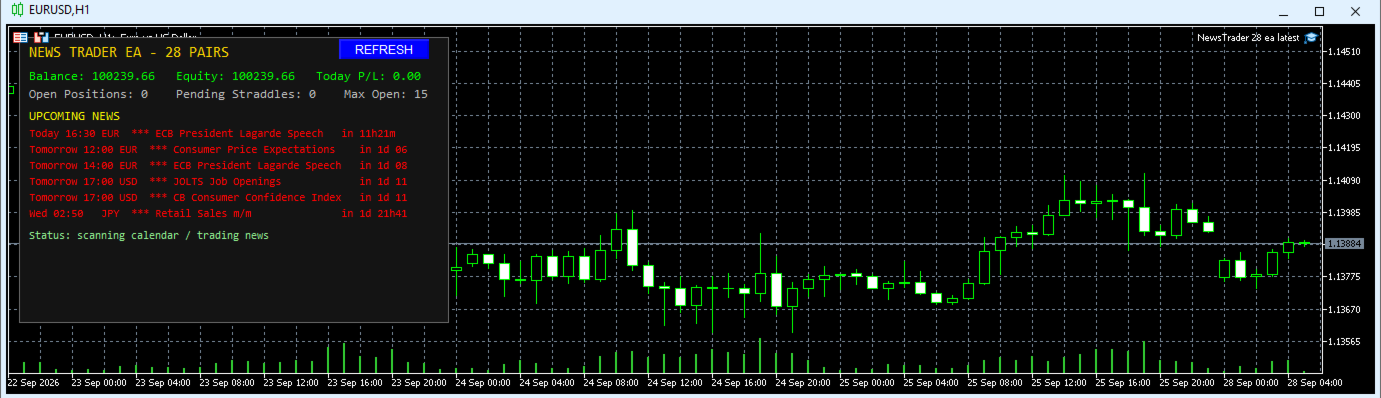
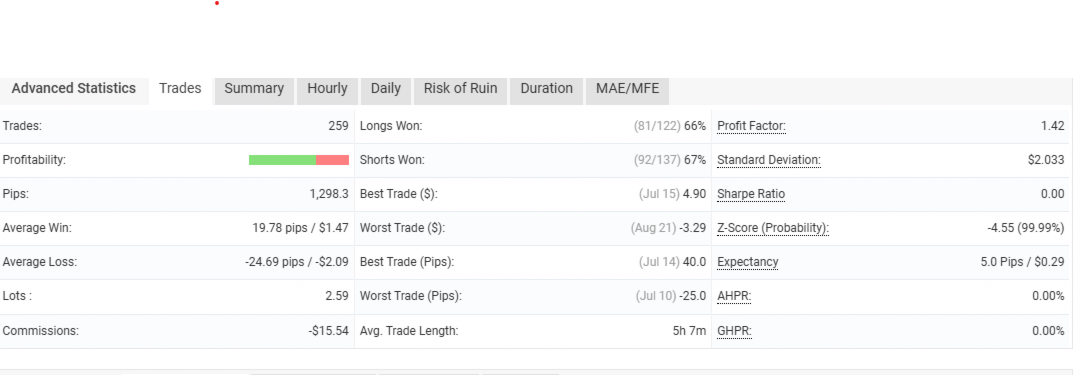
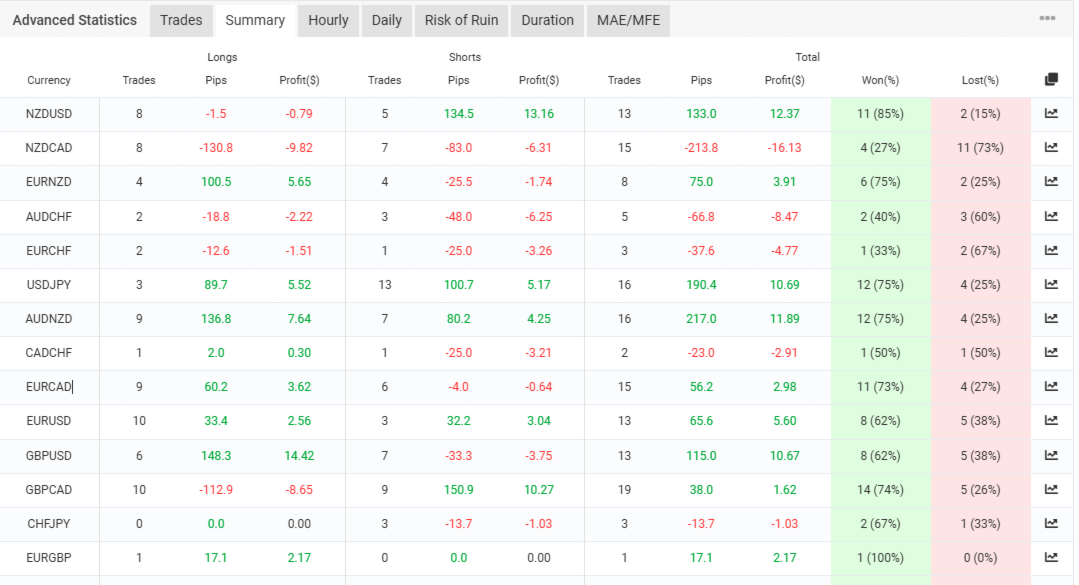
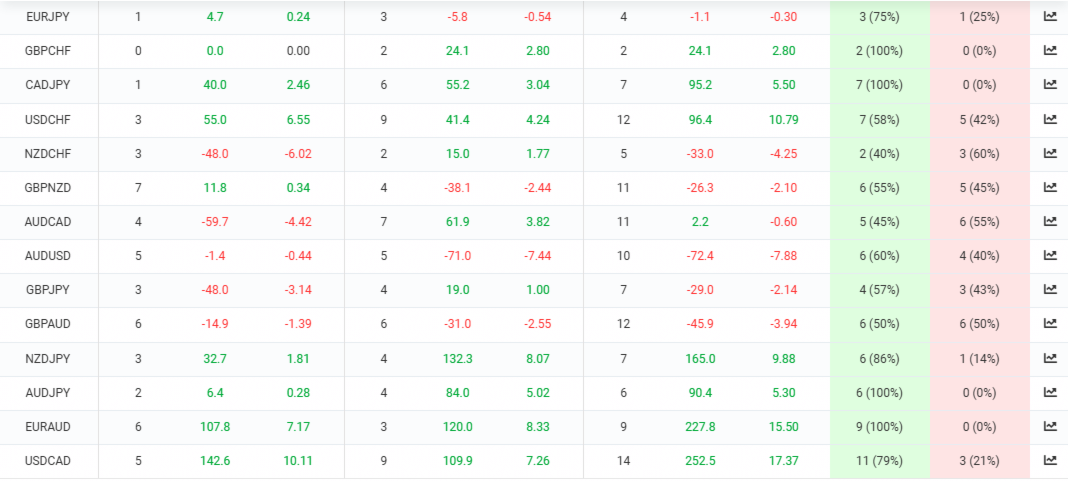
fundamental news trading mt5 ea.ready and set up to trade mql5 news calendar; with option of forexfactory news. backtesting ea is to show function of ea.results of demo are in screenshots.for latest set files leave comment in review or comments and i will send.vps with latency of 1-2ms is live account.
📊 Live Performance TrackingSee how this Expert Advisor performs under live market conditions. You can track real-time trades, drawdown metrics, and historical growth directly on my official MQL5 Signal page:
👉 Click Here to View the Live Newstrader28 Signal
How it works
- For every calendar event that matches your importance and event-type filters, the EA places a Buy Stop and a Sell Stop (a "straddle") a few minutes before the release on every enabled pair that contains the event's currency.
- Whichever side is hit first becomes the trade. By default the opposite order is kept alive until its cancel time so a reversal can also be caught (setting #20); turn that Off for strict one-cancels-other.
- Untriggered orders are cancelled automatically after the release.
- Open trades use per-pair stop loss, take profit, break-even and trailing stop.
- Optional Spike Reversal opens one opposite trade after a news trade closes in profit.
- If both feeds are used, MQL5 has priority and Forex Factory events that overlap an MQL5 event are ignored, so the same news is never traded twice.
Protection features
- Friday Finish (#36-#38): at the Friday server time you choose, the EA closes ALL its open trades, deletes ALL its pending orders and opens nothing new until the following week. If a close fails it retries every cycle.
- Late-Friday cutoff (#34-#35): no new straddles after the chosen hour.
- Daily loss limit (#32), maximum open trades (#33), maximum spread (#21) and pending-order limit awareness.
- Rollover blackout (#39-#43): skips news and new entries around the daily rollover.
- Margin pre-checks and broker minimum stop-distance checks before every order.
- Skips events with no confirmed time or too little lead time.
Setup
- Attach the EA to any one chart (the chart symbol is only used for timing). Enable Algo Trading.
- Make sure the pairs you want to trade are visible in Market Watch. If your broker adds a prefix or suffix, fill in #1 and #2.
- For the optional Forex Factory feed, add its address (#54) under Tools > Options > Expert Advisors > Allow WebRequest. The MQL5 calendar needs no setup.
- Check the Friday times (#35, #37, #38) and the rollover settings (#40-#43). These use your broker's SERVER time.
- Test on a demo account first.
Strategy Tester
Use "Every tick" or "Every tick based on real ticks": the strategy depends on tick-level movement around releases. Add the pairs' history so multi-symbol testing works. The tester uses the real calendar; by default (#58) a labelled synthetic daily signal is added in the tester only so short test windows still show trades. It is never used on a live or demo chart.
Input reference
Every input has a number. The number is shown at the start of its name in the EA's Inputs tab.
Symbols / Broker
| # | Setting | Default | What it does |
|---|---|---|---|
| 1 | InpSymbolPrefix | (empty) | Text your broker adds BEFORE symbol names (e.g. "m" for mEURUSD). Leave empty if your symbols are plain EURUSD. |
| 2 | InpSymbolSuffix | (empty) | Text your broker adds AFTER symbol names (e.g. ".a" or "-ECN"). Leave empty if none. |
News Filter
| # | Setting | Default | What it does |
|---|---|---|---|
| 3 | InpTradeHighImpact | On | Trade events the calendar rates HIGH importance. |
| 4 | InpTradeMediumImpact | Off | Also trade MEDIUM importance events. |
| 5 | InpTradeLowImpact | Off | Also trade LOW importance events. |
Event Type Filters
| # | Setting | Default | What it does |
|---|---|---|---|
| 6 | InpTradeRateDecisions | On | Allow central-bank interest rate decisions. Set to Off to skip them. |
| 7 | InpTradeNFP | On | Allow Non-Farm Payrolls / Employment Change releases. Set to Off to skip them. |
| 8 | InpTradeCPI | On | Allow CPI / inflation releases. Set to Off to skip them. |
| 9 | InpSkipTentativeEvents | On | Skip events that have no confirmed release time (e.g. "Tentative" decisions), because trading a placeholder time is unreliable. |
| 10 | InpMinLeadSecondsToTrade | 30 | Skip a release if the EA only learns its exact time with fewer than this many seconds left to prepare. |
Entry Direction
| # | Setting | Default | What it does |
|---|---|---|---|
| 11 | InpTradeBeforeEvent | On | On = place the straddle BEFORE the release (normal). Off = place it AFTER the release, using the "minutes before" value (#17) as minutes after. Useful to avoid heavy slippage on the first spike. |
Spike Reversal
| # | Setting | Default | What it does |
|---|---|---|---|
| 12 | InpSpikeReversalEnabled | Off | Master switch for Spike Reversal: after a news trade closes in profit, open one opposite-direction trade at market (once per news event). |
| 13 | InpReversalMagicNumber | 280229 | Separate magic number for reversal trades so their results can be analysed apart from the main trades. |
| 14 | InpReverseOnTP | On | Reverse when the original trade closed by Take Profit. |
| 15 | InpReverseOnTrailing | On | Reverse when the original trade closed in profit by trailing stop. |
| 16 | InpReverseOnBreakEven | On | Reverse when the original trade closed in profit by its break-even stop. |
Entry Timing
| # | Setting | Default | What it does |
|---|---|---|---|
| 17 | InpPrepareMinutesBefore | 5 | Place the straddle this many minutes before the release. |
| 18 | InpCancelMinutesAfter | 15 | Cancel a straddle leg that has not triggered this many minutes after the release. |
| 19 | InpExpireMinutesAfter | 20 | Hard expiry time for pending orders, in minutes after the release. |
| 20 | InpKeepBothLegsOpen | On | On = when one leg triggers, keep the other leg alive until its cancel/expiry time so a reversal can still be caught. Off = strict OCO (the other leg is cancelled immediately). |
Order Parameters
| # | Setting | Default | What it does |
|---|---|---|---|
| 21 | InpMaxSpreadPoints | 40 | Skip a symbol if its current spread (in points) is above this value. |
| 22 | InpMaxTradesPerEvent | 28 | Maximum number of symbols traded for one news event (28 max). |
| 23 | InpOnePerSymbolAtATime | On | Skip a symbol that already has an active news trade, so overlapping events cannot stack positions. |
Money Management
| # | Setting | Default | What it does |
|---|---|---|---|
| 24 | InpUseRiskPercent | Off | On = lot size is calculated from a % risk of balance and the pair's stop loss. Off = fixed lot (#26). |
| 25 | InpRiskPercent | 0.5 | Risk per trade as % of balance (used when #24 is On). |
| 26 | InpFixedLot | 0.01 | Fixed lot size (used when #24 is Off). |
| 27 | InpMaxLot | 2.0 | Hard cap on the calculated lot size. |
Trade Management
| # | Setting | Default | What it does |
|---|---|---|---|
| 28 | InpUseBreakEven | On | Master switch for break-even. Per-pair trigger/lock values are in the pair settings below. |
| 29 | InpTrailingStepPips | 2 | Minimum step (pips) before the trailing stop is moved. Applies to all pairs. |
| 30 | InpNormalizeSLTPAfterFill | On | After a fill, keep resetting SL/TP to the pair's configured pip distances measured from the ACTUAL entry price (corrects slippage / wide spread) until break-even or trailing takes over. If price has already passed the corrected level, the trade is closed. |
| 31 | InpMaxNormalizeRetries | 5 | Safety net: give up correcting a position's SL/TP after this many consecutive failed attempts. |
Risk Controls, Friday Finish and Rollover
| # | Setting | Default | What it does |
|---|---|---|---|
| 32 | InpMaxDailyLossPercent | 10.0 | Stop opening new trades for the rest of the day once the day's loss reaches this % of the starting balance. |
| 33 | InpMaxOpenTradesTotal | 15 | Maximum number of open positions at the same time, across all symbols. |
| 34 | InpAvoidFridayLate | On | Stop placing new straddles late on Friday. |
| 35 | InpFridayCutoffHour | 22 | Broker SERVER-time hour on Friday after which no new straddles are placed. |
| 36 | InpFridayCloseAll | On | FRIDAY FINISH. On = at the time set in #37/#38 every open trade is closed and every pending order is deleted, and nothing new is opened until the following week. Retries every cycle if a close fails. |
| 37 | InpFridayCloseHour | 22 | Friday Finish: broker SERVER-time hour at which everything is closed. |
| 38 | InpFridayCloseMinute | 30 | Friday Finish: broker SERVER-time minute at which everything is closed. |
| 39 | InpAvoidRollover | On | Skip news events and block new entries around the daily rollover, when spreads widen and prices can be erratic. |
| 40 | InpRolloverHour | 0 | Rollover hour, broker SERVER time (0 = 00:00). |
| 41 | InpRolloverMinute | 0 | Rollover minute, broker SERVER time. |
| 42 | InpRolloverMinsBefore | 30 | Blackout starts this many minutes BEFORE rollover. |
| 43 | InpRolloverMinsAfter | 30 | Blackout ends this many minutes AFTER rollover. |
General
| # | Setting | Default | What it does |
|---|---|---|---|
| 44 | InpMagicNumber | 280228 | Magic number that identifies this EA's orders and trades. Change it if you run several EAs on one account. |
| 45 | InpTimerSeconds | 2 | How often (seconds) the EA runs its main timer cycle. |
| 46 | InpShowPanel | On | Show the on-chart dashboard (upcoming news, status, open trades, today's P/L). |
| 47 | InpPanelEventRows | 6 | Number of upcoming events listed on the dashboard. |
News Calendar Sources
| # | Setting | Default | What it does |
|---|---|---|---|
| 48 | InpNewsSourceMode | NEWS_SOURCE_BOTH | News source: MQL5 Economic Calendar only, Forex Factory only, or BOTH (MQL5 has priority, Forex Factory fills gaps). |
| 49 | InpLookaheadHours | 48 | How many hours ahead the EA scans the calendar for events. |
| 50 | InpCalendarRefreshSeconds | 5 | How often (seconds) the native MQL5 calendar is re-read. |
| 51 | InpPanelPastGraceMinutes | 1 | Keep a released event on the dashboard for this many minutes. |
| 52 | InpDebugLogging | Off | Write extra detail about news sync and decisions to the Experts log. |
| 53 | InpShowBacktestInfo | On | Show an on-screen status overlay in the Strategy Tester (most useful in Visual mode). |
Forex Factory Gap-Filler
| # | Setting | Default | What it does |
|---|---|---|---|
| 54 | InpForexFactoryURL | check website.or google. no url address allowed here | Forex Factory weekly XML address. Must be added under Tools > Options > Expert Advisors > "Allow WebRequest for listed URL". |
| 55 | InpForexFactoryRefreshSeconds | 300 | Minimum seconds between Forex Factory requests (the feed updates rarely and is rate-limited). |
| 56 | InpForexFactoryTimeoutMs | 3000 | Forex Factory request timeout, in milliseconds. |
| 57 | InpForexFactoryOverlapMinutes | 15 | In BOTH mode, a Forex Factory event is ignored if any MQL5 calendar event falls within this many minutes of it (prevents duplicate trades). |
Strategy Tester Demo Signal
| # | Setting | Default | What it does |
|---|---|---|---|
| 58 | InpUseDemoScheduleInBacktest | On | Strategy Tester ONLY: adds a clearly labelled synthetic daily signal alongside the real calendar so short test windows still show trades. Never used on a live/demo chart. |
| 59 | InpDemoScheduleServerHour | 13 | Tester only: server-time hour of the daily demo signal. |
| 60 | InpDemoScheduleServerMinute | 30 | Tester only: server-time minute of the daily demo signal. |
Per-pair settings (#61 - #312)
Each of the 28 pairs has its own block of 9 numbered settings with identical meaning. Defaults shown are for EURUSD; other pairs use the same values except where noted in the table of pairs.
| Position in the pair's block | Function | Default (all pairs) |
|---|---|---|
| +0 (e.g. #61 for EURUSD) | Trade this pair | On |
| +1 (e.g. #62 for EURUSD) | Straddle distance from price (pips) | 12 (GBPUSD 20) |
| +2 (e.g. #63 for EURUSD) | Stop loss (pips) | 25 |
| +3 (e.g. #64 for EURUSD) | Take profit (pips) | 40 |
| +4 (e.g. #65 for EURUSD) | Break-even trigger (pips, 0 = off) | 15 |
| +5 (e.g. #66 for EURUSD) | Break-even lock (pips) | 2 |
| +6 (e.g. #67 for EURUSD) | Enable trailing stop | On |
| +7 (e.g. #68 for EURUSD) | Profit before trailing starts (pips) | 20 |
| +8 (e.g. #69 for EURUSD) | Trailing stop distance (pips) | 20 |
| Pair | Numbers | Trade by default | Straddle (pips) |
|---|---|---|---|
| EURUSD | 61 - 69 | On | 12 |
| GBPUSD | 70 - 78 | On | 20 |
| AUDUSD | 79 - 87 | Off | 12 |
| NZDUSD | 88 - 96 | On | 12 |
| USDJPY | 97 - 105 | On | 12 |
| USDCHF | 106 - 114 | On | 12 |
| USDCAD | 115 - 123 | On | 12 |
| EURGBP | 124 - 132 | Off | 12 |
| EURJPY | 133 - 141 | Off | 12 |
| EURCHF | 142 - 150 | Off | 12 |
| EURAUD | 151 - 159 | On | 12 |
| EURCAD | 160 - 168 | Off | 12 |
| EURNZD | 169 - 177 | Off | 12 |
| GBPJPY | 178 - 186 | Off | 12 |
| GBPCHF | 187 - 195 | Off | 12 |
| GBPAUD | 196 - 204 | Off | 12 |
| GBPCAD | 205 - 213 | Off | 12 |
| GBPNZD | 214 - 222 | Off | 12 |
| AUDJPY | 223 - 231 | Off | 12 |
| AUDCHF | 232 - 240 | Off | 12 |
| AUDCAD | 241 - 249 | Off | 12 |
| AUDNZD | 250 - 258 | On | 12 |
| NZDJPY | 259 - 267 | Off | 12 |
| NZDCHF | 268 - 276 | Off | 12 |
| NZDCAD | 277 - 285 | Off | 12 |
| CADJPY | 286 - 294 | Off | 12 |
| CADCHF | 295 - 303 | Off | 12 |
| CHFJPY | 304 - 312 | Off | 12 |
Risk warning
Trading around news releases involves high risk: spreads can widen sharply, prices can gap, and orders can fill with slippage or be rejected. Past or tested results do not guarantee future results. Use only money you can afford to lose and test on demo first.
📊 Direct Comparison
| Feature | 🗒 Fundamental News Trading | 📈 Technical Trading |
| Core Focus | Economic data, central bank policies, and geopolitical events. | Historical charts, price patterns, and mathematical indicators. |
| Primary Tool | Economic calendars, news feeds, and financial statements. | Price charts, moving averages, RSI, and MACD. |
| Core Philosophy | Assets have an intrinsic value; markets adjust to match economic realities. | All known information is already "priced in"; history repeats itself. |
| Time Horizon | Often triggers short-term volatility, but shifts long-term trends. | Typically used for short-to-medium-term execution windows. |
| Key Catalysts | Interest rate decisions, CPI/Inflation reports, employment data (NFP). | Support/resistance breaks, trendlines, and candlestick patterns. |