SirenQuant
- 专家
- 版本: 1.0
- 激活: 5

SirenQuant - EMA pullback on the New York session
SirenQuant looks for one specific pattern: in a clear trend, price returns to its fast moving average again and again before continuing. The robot waits for the candle that dips to that average but closes back on the trend side, and enters at that close.
This is not a new idea and does not claim to be. What the robot adds is the discipline around it: one position, a stop always in place, a bounded trading window, and a filter that stands aside when the cost of trading eats into the trade's own edge.
How it trades
- One position at a time. It never adds and never averages.
- A stop loss is ALWAYS placed on the server, sized as a multiple of ATR. A position is never left unprotected.
- The target is set as a multiple of the trade's own risk.
- It trades only during the New York session and closes everything at the end of it. No positions are carried overnight or over the weekend.
- Position size is a percentage of capital, calculated on a smoothed equity average so the lot does not jump right at equity highs.
- Cost filter: before each entry it measures spread plus commission against the money the stop puts at risk. If that toll exceeds the configured limit, it does not trade.
- Spread filter: it stands aside when the spread widens beyond the ATR-based threshold.
What it does NOT do
No martingale. No grid. No averaging down. No lot increase to recover losses. No trades without a stop loss. No "recovery" cycles after a loser.
What to expect
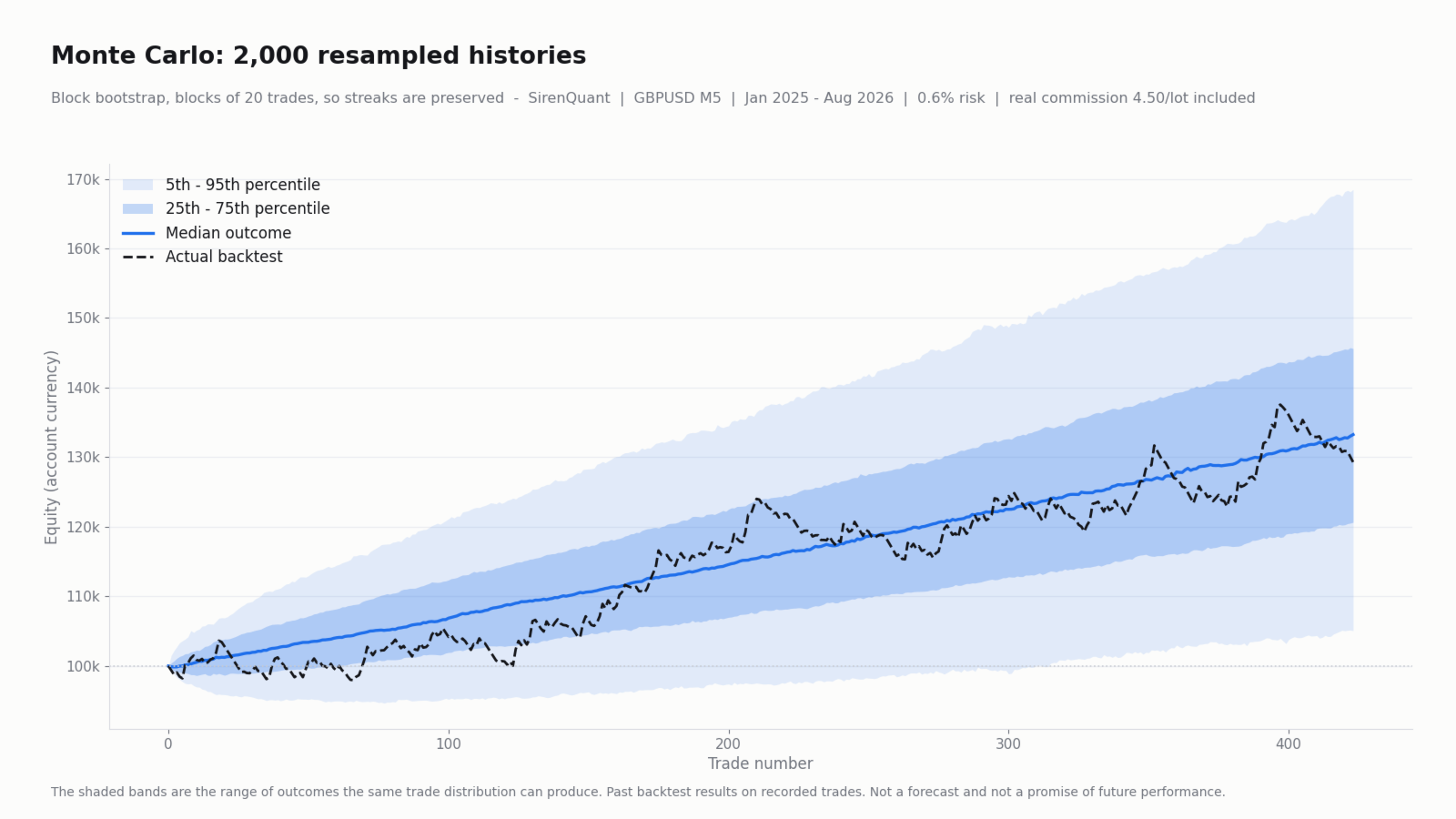
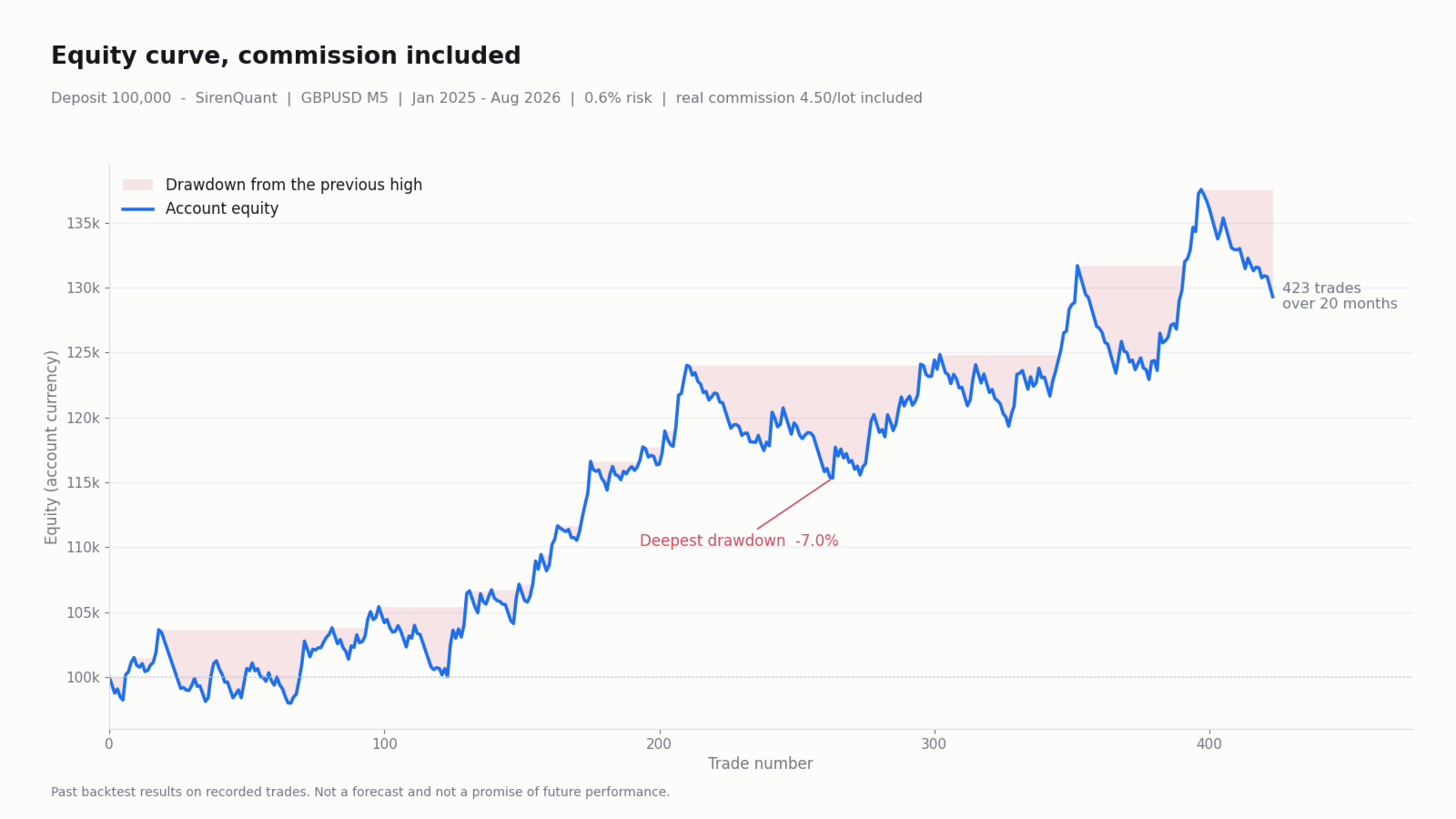
These figures describe the system's measured behaviour. They are not a forecast and they will not repeat identically:
- Around one trade per business day, roughly 20 per month.
- Average time in the market: about 4 hours. Maximum: the session.
- Fewer than half of the trades close in profit. This is a strategy of large winners and small losers: strings of 12 or more consecutive losing trades are normal and expected. In the study the longest run was 14.
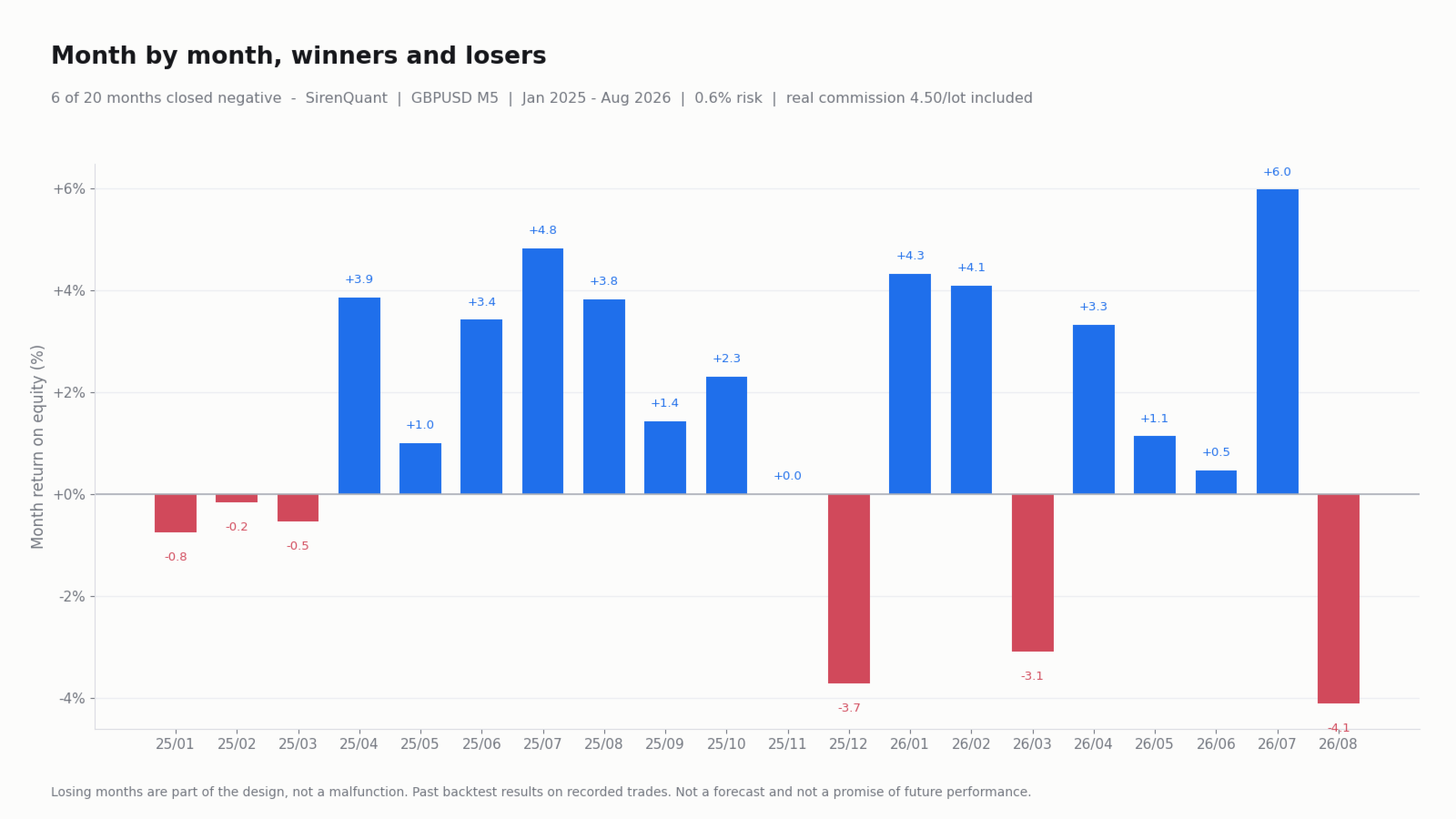
- Roughly one month in four closes negative.
- There will be stretches of weeks below the previous equity high. That is part of the design, not a malfunction.
If these characteristics do not match how you trade, this robot is not right for you. It is better that you do not buy it than that you buy it expecting something else.
Requirements
- Designed and measured on GBPUSD, M5 timeframe. It runs on any symbol and timeframe, but the defaults are the ones from that study.
- An account with low spread and a known commission (ECN/Raw type). Commission is decisive: in the study it took close to a third of the gross profit. The InpCommPerLot parameter must reflect your account's REAL round-turn commission, or the cost filter protects nothing.
- Recommended minimum deposit: 2,000 in the account currency at the default 0.6 % risk. With less capital the broker's minimum lot may force more risk than intended on wide-stop trades.
- Hedging or netting accounts alike.
- No DLLs and no external files required.
Before going live - please read this
- Check your server time. The robot works in New York time and derives it from your broker's GMT offset. European servers (GMT+2/+3) and New York do not switch to daylight saving on the same date. Set InpBrokerDst to the calendar your broker follows and confirm on the chart panel that the "NY hh:mm" line matches the real New York time. If it does not match, the robot will trade a different session than intended.
- Set your real commission in InpCommPerLot before running any test. A backtest with zero commission represents nothing.
- Run the strategy tester on your own symbol and your own broker. Costs vary a great deal between brokers and are decisive for this strategy.
- Run it on demo long enough to go through at least one losing streak and learn how it feels before it happens with real money.
Main parameters
- InpTimeframe - timeframe (chart timeframe by default).
- InpEmaFast / InpEmaSlow - fast and slow moving averages.
- InpStopAtr - stop width in ATR multiples.
- InpTargetR - target in multiples of risk.
- InpSessionStartMin / InpSessionEndMin - entry window in minutes from midnight, New York time.
- InpCloseAllMinNY / InpFridayCloseMinNY - forced close time.
- InpBrokerGMTWinter / InpBrokerGMTSummer / InpBrokerDst - your broker server's time offset.
- InpRiskPercent - risk per trade as % of capital.
- InpEquitySmooth - equity smoothing used for position sizing.
- InpCommPerLot - real round-turn commission per lot.
- InpMaxTollPct - maximum toll allowed as % of risk.
The on-chart panel always shows the robot's state: session, trend, ATR, risk base, projected lot, toll against the limit, and the specific reason it is not entering at that moment. Every parameter is documented in the properties window.