News Straddle

---คำเตือน EA ตัวนี้เหมาะสำหรับโบรคเกอร์ที่ Slippage ต่ำ---

EA ตัวนี้ถูกสร้างมาด้วยหลักการ Long Straddle ของ Option ที่จะวาง Position ดักทางทั้ง 2 หน้า หากราคาไปทางใดทางนึงจนเกินระดับราคา Break Event จะกำไรไม่จำกัด เเต่ถ้าราคาผิดทางจะขาดทุนแค่ค่าพรีเมี่ยม ดังนั้นเมื่อข่าวออกการที่กราฟฉีกตัวไปทางใดทางนั้นบน Option สามารถสร้างกำไรได้ทันที   แต่เนื่องจากการเทรด XAUUSD Spot CFDs ไม่ได้มีหลักการขาดทุนเเค่ค่าพรีเมี่ยม การ ฺ Buy Sell สามารถกำไร/ขาดทุนได้ไม่จำกัด ดังนั้นการเทรดข่าวด้วยเครื่องมือ EA News Straddle จะมีการจัดการออเดอร์เพื่อจำกัดความเสี่ยงในการเทรดข่าวให้อย่างรวดเร็วดังนี้

ในตัวแปร Open Order หากผู้ใช้เลือก Market 
เมื่อผู้ใช้กดปุ่ม Place Order ระบบจะเปิดออเดอร์ Buy Sell ทันที SL Lot Size ตามที่ผู้ใช้กำหนด  เมื่อข่าวอออกกราฟได้พุ่งไปทิศทางใดทิศทางนึงจนชน SL ออเดอร์ที่ผิดทาง หากผู้ใช้กดปุ่ม Auto BEO ให้ทำงาน ค้างไว้ก่อนกราฟกระชาก SL ระบบจะขยับ Stop Loss มาบังทุนทั้นทีด้วยระยะ Buffer BEO ตามที่ผู้ใช้กำหนด แต่หากผู้ใช้ไม่เปิดโหมด Auto BEO ให้ทำงาน หากกราฟกระชากตอนข่าวออกไปชน SL ที่ผิดทางระบบจะไม่ขยับ SL มาบังทุนออเดอร์ที่ถูกทาง เเต่หากผู้ใช้กดปุ่ม BEO ระบบจะขยับมาบังทุนให้  ในส่วนของโหมด Auto  BEB หากผู้ใช้เปิดโหมดนี้ก่อนที่ข่าวออกกราฟวิ่งกระชากไปชน SL ของออเดอร์ที่ผิดทางเเละวิ่งไปต่อในระยะที่ผู้ใช้กำหนดในช่อง Rang BEB ระบบจะขยับ SL มาอยู่ในจุดที่จะกำไรเท่ากับ SL ที่เสียไปของออเดอร์ที่ผิดทาง  เเต่หากผู้ใช้ไม่เปิดโหมด Auto  BEB ก่อนที่กราฟจะกระชากหากกราฟกระชากชน SL ออเดอร์ที่ผิดทางแล้วผู้ใช้กดปุ่ม BEB ระบบจะขยับ SL ไปจุดที่จะกำไรเท่ากับที่ขาดทุนของออเดอร์ที่ผิดทางในทันที  


ในส่วนของฟังชั่นก์ Auto TP จะทำงานก็ต่อเมื่อหากผู้ใช้เปิดใช้งานก่อนที่กราฟจะกระชากไปชน SL ฝั่งที่ผิดทางระบบนี้จะหากกราฟจบแท่ง 1 นาที ระบบจัดปิดออเดอร์ที่ถูกทางทันที หากผู้ใช้ต้องการเก็บกำไรด้วยเทคนิคส่วนตัวไม่ควรเปิดใช้งานตัวนี้


ในตัวแปร Open Order หากผู้ใช้เลือก Stop

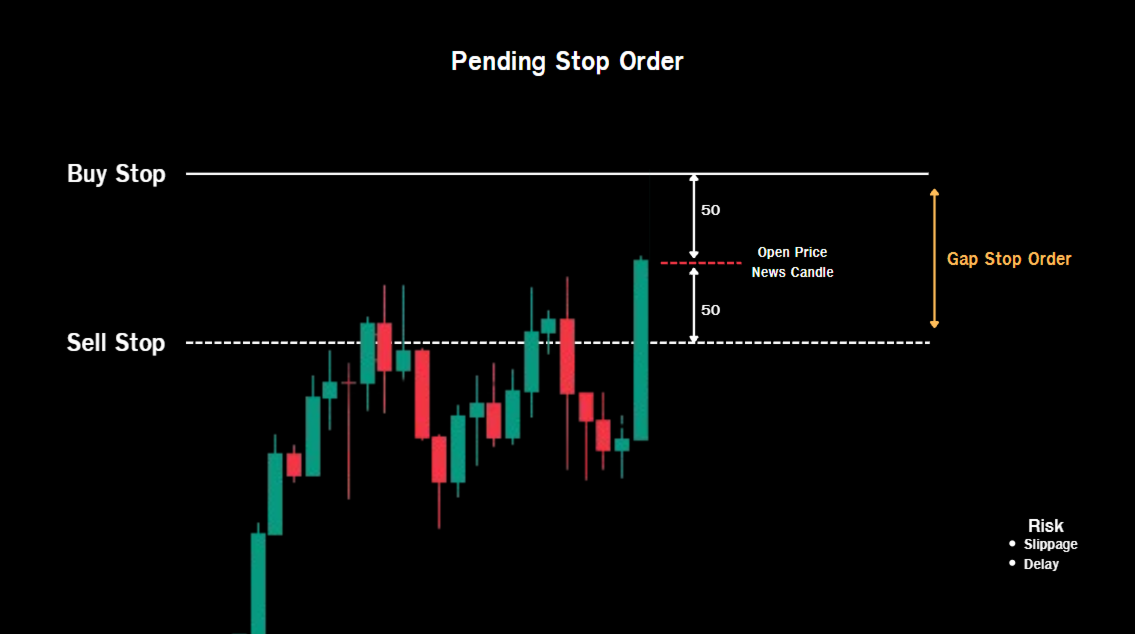
หากผู้ใช้กดปุ่ม Place Order ระบบจะวาง Buy Stop  Sell Stop เหนือราคาปัจจุบันตามที่ผู้ใช้กำหนดในตัวแปร Rang SL เเละระยะห่างที่วาง Stop order จากราคาปัจจุบันจะกำที่ตัวแปร Rang Stop Order   เมื่อข่าวออกกราฟกระชากไปทางใดทางนึงจนชน Stop Order ระบบจะลบ Stop order อีกฝั่งที่กราฟไม่ได้วิ่งออกทันที เเละหากผู้ใช้เปิด Auto BEO หากกราฟวิ่งจากจุดเปิดออเดอร์ในระยะที่กำหนดในตัวเเปร Rang Trigger BEO ระบบจะขยับ SL บังทุนโดยอัตโนมัติ แต่หากไม่เปิด ผู้ใช้กดปุ่ม BEO ระบบก็จะขยับบังทุนได้เช่นกันระยะการขยับบังทุนขึ้นกับตัวเเปร Buffer BEO 

ในตัวแปร Open Order หากผู้ใช้เลือก Pending

ระบบจะทำงานคล้ายกับโหมด Stop ต่างกันที่โหมดนี้จะเช็คจุดเข้าหากเกิด Slippage จุดเข้าไม่ตรงกับจุดที่วางเส้นไว้ ระบบจะคำนวณ Lot size ให้ขาดทุนเท่ากับจำนวนเงินที่ผู้ใช้กำหนดในตัวเเปร Risk Loss Money ส่วนการทำงานหากผู้ใช้เปิด Auto BEO หากกราฟวิ่งถึงระยะที่กำหนดระบบจะขยับ SL กันหน้าทุนให้เช่นเดียวกัน

ปุ่ม Reset State หากผู้ใช้เสร็จสิ้นการเทรดก่อนปิด MT5 หรือลบ EA ออกจากกราฟควรกดปุ่มนี้ 1 ครั้งเพื่อล้างแคชของระบบ


การตั้งค่า EA News Straddle

1.Mode Open Order เลือกโหมดสำหรับใช้วาง 

    -Market  หากผู้ใช้กดปุ่ม Place Order ระบบจะวางคำสั่ง Market Buy Sell ที่ราคา Bid Ask   

    -Stop หากผู้ใชช้กดปุ่ม Place Order ระบบจะวางคำสั่ง Buy Stop Sell Stop เหนือ/ล่างราคา Bid  Ask 

    -Pending หากผู้ใช้กดปุ่ม Place Order ระบบจะวางเส้นประที่เป็นจุด Pending Order เมื่อราคาไปถึงระบบจะคำนวน Lot เพื่อหาว่าระบบจะต้องใช้ lot เท่าไรถึงจะขาดทุนเท่ากับจำนวนเงินที่ผู้ใช้กำหนด โหมดนี้เปิดออเดอร์ได้ทีละชุด ไม่สามารถรัวไม้ได้

2.Slippage ตั้งค่าระยะการกระโดดของราคาที่ยอมรับได้ หากราคาเกินกว่าค่านี้ระบบจะไม่เปิดออเดอร์ในโหมด Pending จะหาจุดที่เปิดได้ไปเรื่อยๆมีหน่วยเป็น Ponit

3.Lot  ระบุปริมาณการเทรด

4.Magic Number ระบุค่านี้ไม่ให้ซ้ำกับ EA ตัวอื่น

5.Rang Stop Loss(Point) ระยะการวาง Stop Loss จากจุดเข้า / จุดวาง Pending 

6.Rang Place Stop Order(Point) ระยะการวาง Buy Sell Stop เหนือราคาปัจจุบัน

7.Risk Loss Money($$$) จำนวนเงินที่เสียได้ในระยะ SL ที่กำหนด สำหรับโหมด Pending

8.Rang Trigger Break Event Balance(Point) ระยะที่กราฟชน SL ออเดอร์ออเดอร์ฝั่งผิดทางเพื่อขยับ SL ของออเดอร์ที่ถูกทางมาในจุดที่เท่ากันกับที่ขาดทุนของออเดอร์ที่ผิดทาง สำหรับโหมด Market

9.Buffer Break Event(Point) ระยะเผื่อสำหรับการขยับ SL บังทุน

10.Rang Trigger Break Event Order(Point) ระยะที่ระบบจะขยับ SL บังทุน สำหรับโหมด Stop 

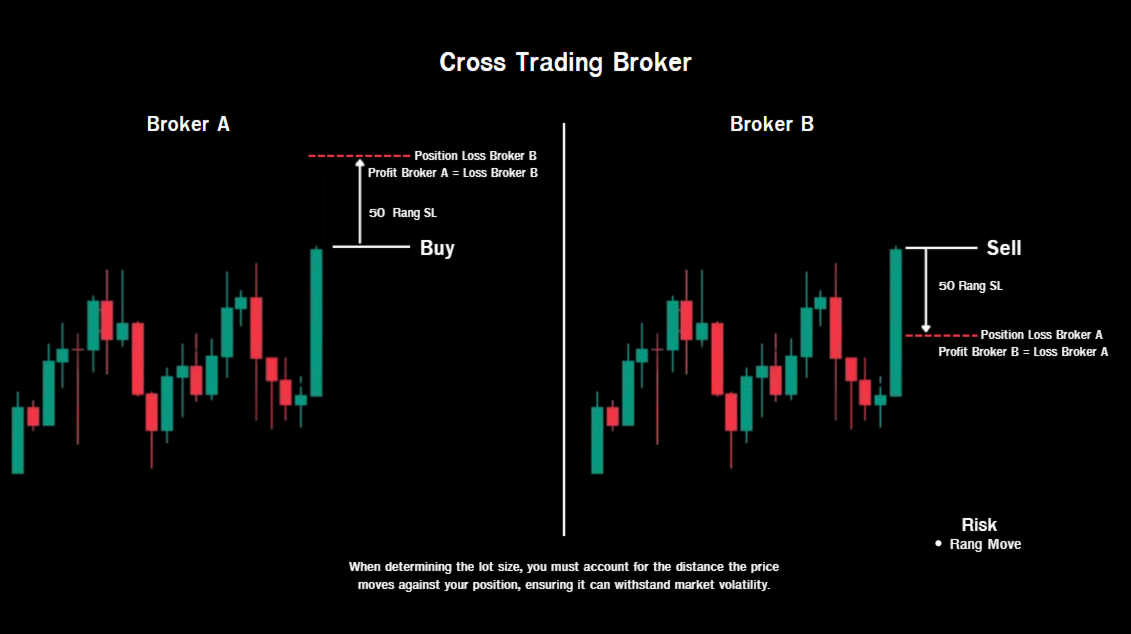
11.Invert Trading Cross Broker โหมดเทรดสวนทางข้ามโบรกเกอร์ โหมดนี้เหมาะสำหรับคนที่เจอปัญหาสลิปเพจไม่สามารถหาโบรคที่สลิปเพจต่ำได้ โหมดนี้มีหลัการทำงานคือ โบรกเกอร์มี 2 โบรคต้องอยู่ในเครื่องเดียวกัน ติดตั้ง EA เมื่อผู้ใช้กดเปิดออเดอร์ Buy  ที่เป็น Main ระบบจะเปิดออเดอร์ Sell ที่เป็น Invert ด้วย lot size ที่เท่ากัน

12.Stage Order Cross Broker หากผู้ใช้ตั้ง Main คือตัวหลักที่ผู้ใช้กดเปิดออเดอร์ หากผู้ใช้ตั้ง Invert ระบบจะเปิดออเดอร์ตรงข้าม Main

13.Break Event Order Cross Broker หากเปิดระบบนี้ระบบจะขยับ SL บังทุนออเดอร์ที่ถูกทางเมื่ออเดอร์ที่วิ่งผิดทางเกิดการปิดออเดอร์

14.Buffer Break  Event Cross Broker(Point) ระยะเผื่อกันหน้าทุน

15.Break Event Balance Cross Broker ระบบนี้หากออเดอร์ที่วิ่งผิดทางปิดออเดอร์ หากวิ่งที่ระยะที่กำหนดระบบจะคำนวณจุดที่กราฟย้อนกลับมาแล้วจะกำไรเท่ากับที่ขาดทุนของออเดอร์ที่ผิดทาง

16.Rang Trigger Break Event  Balance  Cross Broker (Ponit) ระยะที่หลังออเดอร์ผิดทางถูกปิดในการขยับ SL เท่ากับจุดที่ขาดทุน

17.Panel Theme ธีมของ Panel

18.Show Panel Spread  โชว์ค่า Spread


---Warning: This EA is suitable for brokers with low slippage---


This EA is built on the Long Straddle principle of Options, placing positions to hedge against both price movements. If the price moves in either direction and exceeds the Break Event level, there is unlimited profit. However, if the price moves in the wrong direction, only the premium will be lost. Therefore, when news is released and the price diverges in either direction in Options trading, it can generate immediate profits. However, since XAUUSD Spot CFDs trading doesn't only involve premium losses, and Buy/Sell trades can have unlimited profit/loss, the EA News Straddle manages orders to quickly limit risk during news trading as follows:


In the Open Order variable, if the user selects Market:

When the user presses the Place Order button, the system will immediately open a Buy/Sell order with a Stop Loss (SL) and Lot Size as specified by the user. When the news is released and the price rallies in either direction and hits the SL of the wrong order, if the user activates and holds the Auto BEO button before the price rallies, the system will automatically move the Stop Loss to protect the capital using the Buffer BEO distance as specified by the user. However, if the user does not enable Auto BEB mode, if the chart surging after news release and hitting the SL on the wrong side, the system will not move the SL to protect the profit of the correct order. But if the user presses the BEB button, the system will move to protect the profit. In Auto BEB mode, if the user enables this mode before news release and the chart surging and hitting the SL of the wrong order and continues to move within the range specified by the user in the BEB range, the system will move the SL to a point where the profit equals the loss of the wrong order. But if the user does not enable Auto BEB mode before the surging, if the chart surging and hitting the SL of the wrong order and the user presses the BEB button, the system will immediately move the SL to a point where the profit equals the loss of the wrong order.


The Auto TP function will only work if the user activates it before the chart surging and hitting the SL on the wrong side. The system will detect the end of the 1-minute candlestick and immediately close the correct order. If the user wants to profit using personal techniques, this feature should not be enabled.


In the Open Order variable, if the user selects Stop,


if the user presses the Place Order button, the system will place a Buy Stop/Sell Stop above the current price as defined by the user in the Range SL variable. The distance between the Stop Order and the current price will be determined by the Range Stop Order variable. When news is released and the graph surges in either direction and hits the Stop Order, the system will immediately delete the Stop Order on the opposite side that the graph did not move on. And if the user enables Auto BEO, if the graph moves from the opening order point within the distance specified in the Range Trigger BEO variable, the system will automatically move the Stop Order to protect capital. However, if not open, and the user presses the BEO button, the system will also adjust the stop-loss. The distance of the stop-loss adjustment depends on the Buffer BEO variable.


In the Open Order variable, if the user selects Pending,


the system will work similarly to Stop mode, but this mode checks the entry point. If slippage occurs and the entry point does not match the point where the line is placed, the system will calculate the Lot size to mitigate losses equal to the amount the user specifies in the Risk Loss Money variable. Similarly, if the user enables Auto BEO, if the graph reaches the specified range, the system will adjust the SL to protect the profit/loss.


The Reset State button should be pressed once to clear the system cache after the user finishes trading before closing MT5 or deleting the EA from the chart.


EA News Straddle Settings


1. Open Order Mode: Select the mode for placing orders.


-Market: If the user presses the Place Order button, the system will place a Market Buy/Sell order at the Bid/Ask price.


-Stop: If the user presses the Place Order button, the system will place a Buy Stop/Sell Stop order above/below the Bid/Ask price.


-Pending: If the user presses the Place Order button, the system will place a dashed line representing the Pending Order point. When the price reaches it, the system will calculate the stop-loss. 1. Lot Size: Determines the lot size required to minimize losses equal to the user-defined amount. Orders can only be opened one at a time; rapid placement of multiple trades is not permitted.


2. Slippage: Sets the acceptable price jump distance. 1. Lot: Specify the trading volume. If the price exceeds this value, the system will not open an order in Pending mode and will continuously search for openable points. The unit is Points.


2. Lot: Specify the trading volume.


3. Magic Number: Specify a value that is unique and not used by other EAs.


4. Range Stop Loss (Point): The distance to place the Stop Loss from the entry point / Pending point.


5. Range Place Stop Order (Point): The distance to place the Buy/Sell Stop order above the current price.


6. Risk Loss Money ($$$): The amount of money that can be lost within the defined SL range for Pending mode.


7. Range Trigger Break Event Balance (Point): The distance at which the graph hits the SL of the losing order to move the SL of the correct order to the same point as the loss of the losing order for Market mode.


8. Buffer Break Event (Point): The buffer distance for adjusting the SL to cover losses.


9. Buffer Break Event (Point): The distance for the system to adjust the SL to cover losses.


10. Range Trigger Break Event Order (Point): The distance at which the system will adjust the SL to cover losses for Stop mode.


11. Invert Trading Cross Broker: A mode for trading in opposite directions across different brokers. This mode is suitable for those who encounter slippage problems and cannot find brokers with low slippage. The principle of operation is that there are two brokers installed on the same machine. When the user opens a Buy order (Main), the system will open an Inverted Sell order with the same lot size.


12. Stage Order Cross Broker: If the user sets Main as the primary broker where the order is opened, and sets Invert, the system will open an order opposite to the Main.


13. Break Event Order Cross Broker: If this system is enabled, the SL (Stop Loss) will shift to protect correct orders when an incorrect order is closed.


14. Buffer Break Event Cross Broker (Point): A buffer distance to protect losses.


15. Break Event Balance Cross Broker: If an incorrect order is closed, and it reaches a specified distance, the system will calculate the point where the graph retraces, and the profit will equal the loss of the incorrect order.


16. Range Trigger Break Event Balance Cross Broker (Point): The distance after an incorrect order is closed when the SL is shifted, equal to the loss point.


17. Panel Theme

推荐产品
Morning Range Breakout (Free Version) Morning Range Breakout (Free Version) is a straightforward trading advisor that implements a breakout strategy based on the morning range. It identifies the high and low within a specified time interval (e.g., 08:00–10:00 UTC) and opens a trade on a breakout upward or downward. The free version includes core functionality without restrictions. All parameters and messages are in English, per MQL5 Market requirements. Key Features Detects morning range based
FREE
AI Advisor – 让 AI 真正看见你的交易世界 AI Advisor 会根据你的真实账户信息自动生成高质量提示词,可以直接粘贴到任意 AI 聊天中使用。 它帮你快速梳理账户状态,理解当前品种格局,识别风险点,挖掘潜在盈利机会,让 AI 以你的真实交易情况为基础来思考和交流,而不是凭空猜测。 快速链接 Download:      AI Advisor v1.02.ex4      AI Advisor   v1.02.ex5 Installation guide AI Advisor  Version Overview FAQ & troubleshooting 使用方法 – 三步搞定 在你关心的品种图表上打开 AI Advisor。 在右侧列表中选择一个合适的 “AI Advisor 模式”(AI Advisor Modes),让程序自动把账户信息、仓位、品种和结构整理进提示词。 点击「复制」,然后把生成的文本粘贴到你常用的任意 AI 聊天界面中,开始对话即可。 内置 Prompt 简要说明 AI Advisor 内置了一组常用分析场景,覆盖交易中最典型的几类问题,例如
FREE
Go Long Advanced
Phantom Trading Inc.
4.78 (9)
Go Long EA实现了基于系统性日间交易原则的高级日内交易策略,具有多重技术确认。虽然许多交易者寻求复杂的算法,但该EA将简单而有效的概念与复杂的风险管理和多重技术过滤器相结合。 该EA每天在特定时间开仓,但仅在市场条件符合多个技术指标时才会执行。这种系统性方法有助于捕捉日内行情,同时避免过夜持仓成本侵蚀利润。EA会在预设时间自动平仓,这对想要避免过夜风险的交易者来说是理想之选。 该EA的特别之处在于其自适应风险管理系统。持仓规模根据多个因素自动调整: - 基础资金和风险百分比设置 - 技术指标条件(均线、RSI、MACD等) - 在条件特别有利时增加持仓规模的特殊乘数 该EA包含多个可启用/禁用的技术过滤器: - 移动平均线(MA)过滤器,带价格关系检查 - RSI超卖条件和乘数 - MACD趋势确认 - ATR波动率过滤器 - 布林带位置验证 - ADX趋势强度确认 - 动量确认 - 随机指标超卖条件 - 一目均衡表云图位置验证 - 摆动模式识别 <资金管理设置> 基础资金:风险计算的基础资金 风险百分比:每笔交易基础资金的风险百分比 获利百分比:止盈距离(0 = 禁
FREE
SimpleTrade by Gioeste
Giovanni Scelzi
4 (3)
Discover the power of automated trading with **SimpleTradeGioeste**, an Expert Advisor (EA) designed to optimize your trading operations in the Forex market. This innovative EA combines advanced trading strategies with proven technical indicators, offering an unparalleled trading experience. video backtest :  https://youtu.be/OPqqIbu8d3k?si=xkMX6vwOdfmfsE-A ****Strengths**** - **Multi-Indicator Strategy**: SimpleTradeGioeste employs an integrated approach that combines four main technical ind
FREE
Golden Square X
Huynh Tan Linh N
4.18 (11)
This is my latest Free version for Gold. With optimized parameters and user-friendly features, this version is likely very easy to use and highly effective. You can customize TP and SL parameters as you wish, but the default settings should work well for you without the need for further adjustments.  This version is designed for the M5. This version does not require a large capital investment; only $100-$200 is sufficient for Golden Square X to run and generate profits for you. Based on backtest
FREE
Brent Trend Bot
Maksim Kononenko
4.5 (16)
The Brent Trend Bot special feature is simple basic tools and logic of operation. There are no many strategies and dozens of settings, like other EAs, it works according to one algorithm. The operating principle is a trend-following strategy with an attempt to get the maximum profitability adjusted for risk. Therefore, it can be recommended for beginners. Its strong point is the principle of closing transactions. Its goal is not to chase profits, but to minimize the number of unprofitable trans
FREE
Эксперт  MACD_LevelTrader MT5   создан для торговле валютной пары XAUUSD. Данная версия это наработки того, что можно извлечь  из  индикатора MACD и Moving Average.  Важно   перед тестированием изменить настройку с 1000 на 5000                       Offset in points UP from SMA200 for sell              5000                       Offset in points DOWN from SMA200 for buy        5000   Тайм фрейм  М5. Два варианта логики, П араметр  true=вход по уровню  MACD +   SMA200, false=вход по MACD  Тестиру
FREE
EA Zone Recovery Assistant เป็น EA ที่ช่วยเปิดออเดอร์ Recovery ตามระดับราคาที่ผู้ใช้กำหนดได้อัตโนมัติ //โดยหลักการทำงานมีดังนี้// เมื่อผู้ใช้เปิดออเดอร์ Buy หรือ Sell (Market Order) EA จะตรวจสอบจุด SL ภายในเวลาที่กำหนดในตัวแปร Input Delay Check for setting Price Recovery ถ้าผู้ใช้วาง SL วางภายในเวลาที่กำหนด ระบบจะลบ SL ออกแล้วใช้จุดที่วาง SL เปิดออเดอร์ Recovery เมื่อกราฟวิ่งผิดทางถึงจุดที่กำหนด //แต่ถ้าผู้ใช้ไม่วาง SL ภายในเวลาที่กำหนดระบบจะไม่มีการทำ Recovery ในออเดอร์นั้นแม้ผู้ใช้มีการวาง SL
FREE
Fibo Trader FREE MT5
Grzegorz Korycki
3 (3)
Fibo Trader is an expert advisor that allows you to create automated presets for oscillation patterns in reference to Fibonacci retracements values using fully automated and dynamically created grid. The process is achieved by first optimizing the EA, then running it on automated mode. EA allows you to switch between automatic and manual mode. When in manual mode the user will use a graphical panel that allows to manage the current trading conditions, or to take control in any moment to trade ma
FREE
TradeGreat Bot
Mykyta Nikolaiev
TradeGreat Mean Reversion EA TradeGreat is an automated trading system built around statistical price behavior analysis relative to a Moving Average (MA) . The system evaluates price deviation from the average value using proprietary mathematical models rather than traditional indicator-based signals. The strategy relies on quantitative analysis of market behavior, where the Moving Average serves as a reference point, while entry and exit decisions are determined by internal mathematical calcul
FREE
Fully autonomous neural network Expert Advisor for Gold (XAUUSD) trading. Features real-time dynamic Self-Learning based on closed trades and a unique interactive AI training progress bar directly on your chart! Aurum AI Evolution XAUUSD is a next-generation, high-tech trading robot engineered specifically for the highly volatile Gold market. The core of the EA utilizes a single-layer perceptron mathematical model paired with a Hyperbolic Tangent (MathTanh) activation function. The network is co
FREE
Pump Liquidity Refueling
Konstantin Meshcheriakov
— RU_ PUMP V3_0 Nourishes — «Питание» Баланса Что такое «Nourishing Balance»? Представьте, что ваш торговый счёт — это волосы, а ликвидность — питательное средство для них. Когда крупные игроки (банки и фонды) вливают большие объёмы, цена делает резкий рывок — импульс, или PUMP. Это момент, когда рынок максимально насыщен энергией. Советник PUMP V3_0 работает как профессиональный уход: он находит такие моменты и «питает» ими ваш торговый баланс, делая его сильнее и плотнее. Результаты «питания
FREE
Main Features: Trading Panel: Quick on-chart buttons for Buy, Sell, Close Profit, and Close All. Risk Management: Built-in Auto Lot calculation based on your specified risk percentage. Visual Tools: Automatically draws Supply/Demand zones and Fibonacci levels on the current chart. Market Data: Displays real-time ATR (Volatility) and RSI values directly on the panel. Optional Auto Mode: A basic automated trading function using EMA crossover and ATR volatility filter. Parameters to Note: RiskPerce
FREE
Use this expert advisor whose strategy is essentially based on the Relative Strength Index (RSI) indicator as well as a personal touch. Other free expert advisors are available in my personal space as well as signals, do not hesitate to visit and leave a comment, it will make me happy and will make me want to offer content. Expert advisors currently available: LVL Creator LVL Creator Pro LVL Bollinger Bands   Trading is not a magic solution, so before using this expert on a live account, carry
FREE
Trade Anomalo BTC Multi Grid
Alessandro Virgilio
4.25 (4)
Trade Anomalo BTC Multi Grid EA   Trade Anomalo  BTC Multi Grid  is an advanced, fully automated Multi-Grid Expert Advisor meticulously designed to navigate the volatility of BTC and other major pairs. Introduces highly requested features, including Multi-Window Time Management and an interactive, upgraded on-chart dashboard. Unlike traditional grids that get trapped in one direction,   Parallel Pro   utilizes a dual-engine architecture (Grid A and an optional inverted mirror Grid B) to simultan
FREE
FiT Panel Pro
Thonglak Janyakorn
Overview FiT Panel Pro is a professional-grade trade management panel designed for MetaTrader 5 traders who demand speed, precision, and full control over their trades. Built with a modern dark-theme UI, it combines one-click execution with advanced risk management, visual SL/TP drag lines, automatic Fibonacci-based levels, and comprehensive order management — all in a single, compact panel. Whether you are a scalper, day trader, or swing trader, FiT Panel Pro gives you the edge you need to exec

FREE
Trade assistant pro v8
Ahmed Mohammed Bakr Bakr
2 (1)
FREE FREE FREE Trade Assistant MT5 – Professional Trading & Risk Management Panel Trade Assistant MT5 is an advanced trading panel designed to help traders execute orders faster, safer, and more professionally . It simplifies manual trading by combining smart order management , precise risk control , and one-click execution , making it ideal for both beginners and advanced traders. This tool does not trade automatically . Instead, it empowers you with full control while applying professional-gra
FREE
Reversal Composite Candles
MetaQuotes Ltd.
3.69 (16)
该系统的思路是通过计算复合蜡烛来识别反转形态。 反转形态类似日本蜡烛条分析的 "锤头" 和 "吊颈" 形态。但它使用符合蜡烛替代单一的蜡烛,并且不需要复合蜡烛的小实体来确认反转。 输入参数: Range - 最大柱线数量, 计算复合蜡烛时用。 Minimum - 最小复合蜡烛大小 (传统的点数)。 ShadowBig and ShadowSmall - 影线 (复合蜡烛单元)。 Limit, StopLoss and TakeProfit - 开盘价, 止损位和止盈位, 它们是相对于复合蜡烛的收盘价 (复合蜡烛单元)。 Expiration - 订单过期时间 (单位柱线), 用于挂单 (Limit!=0.0)。 反向蜡烛条形态的判别如下。 它计算复合蜡烛参数,其自最后的完整柱线 (索引为 1) 至由 Range 输入参数定义的柱线数量。如果复合蜡烛大小大于由 Minimum 输入参数指定的数值, 它分析复合蜡烛的影线检测反转条件。 空头能量的特征是复合蜡烛的上影线为零, 多头能量的特征是复合蜡烛的下影线为零。 为确认空头趋势反转 (且多头开始),需要以下检查: 下影线的大小 (多头能量
FREE
Quantum Gold Pro EA
Chaiwat Wongsricha
Description Quantum Gold Pro EA is a TRIAL Expert Advisor for MetaTrader 5, specially designed for Gold (XAUUSD) automated trading. This EA uses smart market entry logic, basket profit management, and built-in risk protection to support traders who want to test automated strategies before using the full version. Features Optimized for Gold (XAUUSD) Automatic Buy / Sell trading system Basket Take Profit control Spread and margin protection Dashboard display on chart Smart risk management Easy se
FREE
PZ Goldfinch Scalper EA MT5
PZ TRADING SLU
3.33 (57)
这是我著名的剥头皮机Goldfinch EA的最新版本,它是十年前首次发布。它以短期内突然出现的波动性扩张为市场提供了头条:它假设并试图在突然的价格加速后利用价格变动的惯性。这个新版本已经过简化,使交易者可以轻松使用测试仪的优化功能来找到最佳交易参数。 [ 安装指南 | 更新指南 | 故障排除 | 常见问题 | 所有产品 ] 简单的输入参数可简化优化 可定制的贸易管理设置 交易时段选择 工作日选择 金钱管理 谨防... ick牛黄牛是危险的,因为许多因素都会破坏收益。可变的点差和滑点降低了交易的数学期望,经纪人的低报价密度可能导致幻像交易,止损位破坏了您获取利润的能力,并且网络滞后意味着重新报价。建议注意。 回溯测试 EA交易仅使用报价数据。请以“每笔交易”模式回测。 它根本不使用HLOC(高-低-开-关)数据 交易时间无关紧要 为了获得更好的性能,请为您希望在每个刻度线模式下交易的每个交易品种运行云优化。稍后分享! 输入参数 触发点:触发点差所需的价格变动。 (预设= 10) 最小时间窗口:价格波动发生的最短时间。 (默认= 3) 最长时间窗口:价格波动发生的最长时间。
FREE
Range Auto TP SL
Dilwyn Tng
4.57 (47)
Range Auto TP SL  is for you, 100% free for now, download it and give me a good review and you are free to use it for lifetime !!!! Range Auto TP SL is a EA to set Stop Loss and Take Profit level based on range using Average True Range (ATR). It works on both manually opened positions via PC MT5 Teriminals or MT5 Mobiles and EA/robots opened position. You can specify magic number for it to work on or it can work on all the positions. Many EA does not good Stop Loss and Take Profit function and
FREE
核心功能 智能交易管理 一键开仓平仓操作,支持自定义手数设置. 多种平仓模式:全部平仓、按方向平仓、按盈亏状态平仓. 专业风险控制控制风险 实时监控点差,避免高成本交易环境.可视化控制面板。 直观的图形界面所有功能一键操作. 实时显示仓位信息、盈亏状况、点差状态. 支持面板最小化、锁定功能,防止误操作 . 产品优势 高效便捷无需复杂设置,开箱即用 图形化操作,告别繁琐代码.实时数据更新,决策更及时. ️安全可靠点差监控,避免恶劣市场条件交易. 专业实用支持多种订单类型管理,灵活的手数配置 详细的仓位信息展示. 适用场景 手动交易者:提供专业的方便控制工具 效率追求者:一键式操作,提升交易效率.       如果你用的方便的话,记得分享给你的朋友!
FREE
Kalifx Local trade copier
Calvin Andile Mahlangu
4 (4)
Kalifx Local Trade Copier Kalifx Local Trade Copier is built to replicate trades from one trading account (Master) to another (Slave) in real time. Its main purpose is to copy trading activity—such as opening, modifying, and closing trades—so that multiple accounts can follow the same strategy without manual intervention. This is especially useful for managing multiple accounts, testing strategies across different brokers, or mirroring trades between accounts. The EA operates in two modes: MAS
FREE
### FTBP Telegram Panel - Your On-Chart Notification Center **FTBP Telegram Panel** is not just an Expert Advisor, but a full-featured tool for traders who want to receive instant notifications about their trades in Telegram and manage the visual style of their terminal. The product is completely free! ### Key Features * **Instant Telegram Notifications:** Get alerts for every opened and closed trade, including the ticker, volume, and financial result. * **Interactive Control Panel:** Forget
FREE
介绍适用于 MT5 的 NAS100 Auto SL 和 TP Maker: 有了我们的 NAS100 Auto SL 和 TP Maker,再也不会错过止损和止盈的设置,这是交易者在 MetaTrader 5 上浏览纳斯达克 100 市场时不可或缺的助手。该工具专为寻求自动管理止损和止盈水平的无缝解决方案的用户而设计。 主要功能 轻松实现自动化: 自动监控无止损和/或止盈的纳斯达克 100 指数交易。 根据用户配置设置动态调整水平。 订单类型的多样性: 兼容纳斯达克 100 指数的市价订单和挂单。 支持 MetaTrader 5 中的各种订单类型。 定制配置: 用户友好的参数设置允许自定义跟踪偏好和止损/止盈水平。 范围灵活: 可选择为其运行的特定 NAS100 工具或所有交易工具设置止损和止盈。 快速执行: 确保快速设置所需的 StopLoss 和/或 TakeProfit 值,无需等待新的 tick 即可迅速响应。 MetaTrader 5 兼容性: 与 MetaTrader 5 中的所有订单类型兼容,实现无缝集成。 使用 NAS100 Auto SL 和 TP Maker
FREE
Risk Manager – Account Protection Tool Risk Manager is an Expert Advisor for MetaTrader 5 designed to protect your trading account by applying automatic risk management rules. This tool does not open trades . It continuously monitors your account and enforces predefined limits to help prevent excessive losses and maintain disciplined trading. Risk Manager works in the background and can manage positions opened by manual trading or other Expert Advisors. It is particularly useful for: • Manual tr
FREE
Quick Close 1S
Tan Au Phuong
5 (9)
Quick Close 1S 是一款用于快速且有序交易管理的工具。它提供简洁的控制面板,可立即开仓或平仓,应用灵活的 SL/TP 设置,管理订单篮目标,并控制总体盈利或亏损。适合注重精准、高效和清晰执行的交易者日常使用。 主要功能 简化交易控制:通过直观面板管理持仓,可选择开/平特定类型订单或一次性全部执行。 灵活 SL/TP 设置:为单个订单或整个订单篮设置固定或基于K线的止损/止盈。 订单篮目标与移动止损:以点数设定订单篮 TP,并使用可自定义的移动止损维持仓位。 全局风险管理:当达到预设的盈利或亏损水平(金额或百分比)时自动平掉所有仓位。 可自定义界面:设置 Magic Number、滑点限制,并可启用按键点击音效。 感谢您选择此工具。如果您觉得它有帮助,请给予积极评价以肯定开发者的努力。本工具是无盈利分享的,您的反馈与支持对我们非常重要。
FREE
AvA 8 limited
Sveinn FRIDFINNSSON
INFORMATIVE There is no price for this Trading System "AvA - 8 limited" it is free of charge. It has limited input parameters and limited number of levels for GAMMA and DELTA modules, but it has enough for you to try and even trade, it is fully functional. The paid version is of course ideal for trading. Being professional traders and system designers, we decided that the best way forward is to be as transparent as possible. This is in regards to how our trading systems are built and how they w
FREE
Chart Pro Classic Dark v1.00 Chart Pro Classic Dark is a professional MT5 chart styling and customization tool designed to give your charts a clean, modern, and professional dark appearance. Key Features Dark Black Background — Applies a clean black background to the chart. ️ Candlestick Chart — Automatically configures the chart to use candlesticks. Bullish Candles — Green/Lime bullish candles. Bearish Candles — White bearish candles. Grid Removal — Hides the chart grid for a clean
FREE
Game Changer Grid EA MT5 Game Changer Grid EA MT5 is a fully automated trading robot that combines technical momentum filters with an adaptive, fixed-lot grid architecture. The system uses a multi-layered verification process to identify directional setups before executing trades, preventing the chaotic entries common in traditional grid systems. Core Trading Strategy The Expert Advisor relies on a strict multi-indicator confirmation matrix to open an initial market position: Directional Signal
FREE
该产品的买家也购买
Trade Assistant MT5
Evgeniy Kravchenko
4.43 (216)
它有助于计算每笔交易的风险,容易安装新的订单,具有部分关闭功能的订单管理, 7 种类型的追踪止损和其他有用的功能。   附加材料和说明 安装说明   -   应用程序说明 线条功能  - 在图表上显示开仓线、止损线、止盈线。 有了这个功能,就可以很容易地设置一个新的订单,并在开仓前看到它的附加特性。   风险管理  - 风险计算功能在考虑到设定的风险和止损单的大小的情况下,计算新订单的成交量。它允许你设置任何大小的止损,同时观察设定的风险。 批量计算按钮 - 启用 / 禁用风险计算。 在 " 风险 " 一栏中设置必要的风险值,从 0 到 100 的百分比或存款的货币。 在 " 设置 " 选项卡上选择风险计算的变量: $ 货币, % 余额, % 资产, % 自由保证金, % 自定义, %AB 前一天, %AB 前一周, %AB 前一个月。   R/TP 和 R/SL - 设置止盈和止损的关系。 这允许你设置相对于损失的利润大小。 例如, 1 : 1 - 这决定了 TP = SL 的大小。 2 : 1 - 这意味着 TP 是 SL 的两倍。 RR - 它禁用比率。   订单管理 该面板支
Farmed Hedge Yield Farming | All Markets (Manual - Hybrid - Semi/Automated EA) VERIFIED TRADING RESULTS - Farmed Hedge Yield Axi Copy:  https://www.mql5.com/en/signals/2356376 - Farmed Hedge Yield Exn Copy:   https://www.mql5.com/en/signals/2356404 - Farmed Hedge Yield V Copy:  https://www.mql5.com/en/signals/2357156 IMPORTANT NOTICE: FarmedHedge is a MANUAL-FOCUSED TRADING UTILITY ,not a fully automated EA. Results shown on this Signal include manual trades and overall strategic management.
欢迎来到 Trade Manager EA——这是一个终极风险管理工具,旨在使交易变得更直观、精准和高效。它不仅仅是一个下单工具,而是一个用于无缝交易计划、仓位管理和风险控制的全面解决方案。不论您是新手交易员、资深交易员,还是需要快速执行的剥头皮交易员,Trade Manager EA 都可以满足您的需求,适用于外汇、指数、大宗商品、加密货币等各种市场。 借助 Trade Manager EA,复杂的计算已成过去。只需分析市场,在图表上用水平线标记入场、止损和止盈,设置您的风险水平,Trade Manager 就会立即计算出理想的头寸规模,并实时显示以点、账户货币计价的止损和止盈。每笔交易都得以轻松管理。 主要功能: 头寸规模计算器 :根据定义的风险瞬间确定交易规模。 简单的交易计划 :在图表上用可拖动的水平线直接计划交易,设置入场、止损和止盈。 实时显示 SL 和 TP :以账户货币、点或分显示止损和止盈,便于分析。 高级保护工具 盈亏平衡选项 : 基本盈亏平衡 :当您的交易达到设定水平时自动保护利润。 多级盈亏平衡 :设置多达 4 个级别以逐步保护利润。 尾随止损选项 : 基本尾随
Telegram to MT5 Multi-Channel Copier   可将您 Telegram 和 Discord 频道中的交易信号自动复制到 MetaTrader 5。无需机器人、无需浏览器扩展、无需手动复制。信号一到 Telegram 或 Discord,EA 几秒内就在您的终端开仓。 在复制某个频道之前,内置回测器还能告诉您该频道在您的账户上会有怎样的表现。 产品包含两个组件:一个监听您 Telegram 频道的 Windows 应用程序,以及在 MT5 终端执行信号的本 EA。同时提供 MT4 版本   点此 . 购买前先试用:   应用程序可免费下载。连接您自己的频道,查看每条信号的读取结果。Backtest 选项卡和实际交易需要已购买或已租用的 EA。本页面的免费演示版只能在策略测试器中运行,而策略测试器无法读取 Telegram 和 Discord。 设置指南与应用下载:   https://www.mql5.com/zh/blogs/post/779480 了解如何 回测任何 Telegram 信号频道 。 当前价格将来会上调。 工作原理 应用通过您自己的 Te
Local Trade Copier EA MT5
Juvenille Emperor Limited
4.94 (150)
Local Trade Copier EA MT5 是一款快速、灵活的交易复制工具,用于在同一台 Windows 电脑或 Windows VPS 上的多个 MetaTrader 5 账户之间复制和管理交易。 它将本地交易同步与 Receiver 端的手数管理、风险管理、交易过滤、品种映射、交易管理和账户保护功能结合在一起。 只需约 1 分钟 即可完成 Transmitter 和 Receiver 终端的设置,并可在同一经纪商或不同经纪商的账户之间复制手动交易或 EA 交易。在合适的条件下,本地 MetaTrader 终端之间的交易信息可以在 0.5 秒以内 完成同步。实际交易执行速度取决于经纪商延迟、网络状况、电脑/VPS 性能以及终端负载。 购买前先试用免费演示版 您可以在 MT5 模拟账户上测试 功能完整的 Local Trade Copier EA MT5 免费演示版 ,每次可使用 4 小时 : 下载 Local Trade Copier EA MT5 免费演示版 将下载的文件放入: MT5 → 文件 → 打开数据文件夹 → MQL5 → Experts 然后重新启动 MT
TradePanel MT5
Alfiya Fazylova
4.89 (174)
交易面板是一款多功能交易助手。该应用包含超过50种手动交易功能,并允许您自动执行大多数交易任务。 应用程序说明 : https://www.mql5.com/zh/blogs/post/761102 用于模拟账户的应用程序试用版: https://www.mql5.com/zh/blogs/post/762579 如何安装应用程序: https://www.mql5.com/zh/blogs/post/762580 如何在可视化模式下测试应用程序: https://www.mql5.com/zh/blogs/post/770278 如何在VPS MetaTrader上安装应用程序: https://www.mql5.com/zh/blogs/post/770196 贸易. 只需单击一下即可执行交易操作: 打開掛單和頭寸,並自動計算風險。 一鍵打開多個訂單和頭寸。 打開訂單網格。 按組別關閉掛單和頭寸。 反轉頭寸方向(關閉買入>打開賣出,關閉賣出>打開買入)。 鎖定頭寸(通過開啟缺少的頭寸,使買入和賣出頭寸的數量相等)。 一鍵部分關閉所有頭寸。 將所有頭寸的止盈和止損設置在同一價格水平。
EA Overfitter
Stephen J Martret
5 (4)
回测看起来很漂亮。但它明天、下周、下个月还能继续赚钱吗? EA Overfitter 让您的 EA 在 100 段它从未见过的价格历史上重新运行。一个分数告诉您这个优势是否真实。 回测告诉您的,是 EA 在某一段价格历史上的表现——那段恰好发生过的历史。您无法从中判断,这个结果有多少来自策略本身,又有多少只是那一条特定路径带来的。 EA Overfitter 回答的正是这个问题。它构建最多 100 段您的 EA 从未交易过的合成价格历史,让策略在全部这些历史上重新运行,并展示它所产生的完整结果区间。您得到的不再是一条幸运或不幸路径上的单个数字,而是一幅真实的图景:策略在陌生数据上多久能赚钱、典型结果是什么样(而不是最好的那一次),以及您的回测离它有多远。 这些世界是由您自己的近期历史重建而成,因此这不是预测——任何从历史数据出发的检验都不可能是预测。它告诉您的是:这个优势是否依赖于价格的某一种特定排列,以及回测数字距离典型结果有多远。在投入资金之前,这才是值得回答的问题。 三个步骤 1. 构建。在图表上选择时间区间和世界数量,然后按 Build。EA Overfitter 会
按照自己的交易规则复制 Telegram 信号 Telegram to MT5 Signal Trader 可将 Telegram 公开及私密频道和群组中的文字交易信号自动复制到 MetaTrader 5。通过一个桌面应用管理多个信号提供者和 MT5 账户,并为 每个提供者单独设置风险和交易参数 。 复制信号无需 Telegram 机器人,也无需配置 API。 只需通过手机号或二维码登录您自己的 Telegram 账户,然后选择您已加入的频道或群组。您无需创建机器人,也无需提供 Telegram API 令牌、API ID 或 API hash。 自行选择仓位大小,将平仓分配到多个止盈价位,并自动执行保本止损和移动止损。在跟随信号提供者的同时,掌握信号的实际交易方式。 本产品由这款 MT5 EA 和必须配合使用的 Windows 桌面应用组成。请参阅 安装指南及应用下载 。 管理多个信号提供者和账户 为每个提供者单独设置: 为每个频道设置专属的仓位计算方式、入场规则、止损、止盈和交易管理参数。 灵活分配至不同账户: 将同一提供者的信号复制到多个已连接的 MT5 账户,并为每个账户使用不
Strategy Ledger Pro
Abdullah Uygar Tuna
5 (17)
现已支持中文。 Strategy Ledger Pro 是一款适用于 MetaTrader 5 的只读账户分析面板。它按智能交易系统(EA)、策略、品种和魔术号拆分账户结果,让您看清每一个的真实贡献。 面板支持 11 种语言:English、Français、Deutsch、Español、Italiano、Português、Русский、Türkçe、中文、日本語 和 한국어。 下载演示版之前请注意。 Market 仅在策略测试器中运行任何付费产品的演示版。本面板分析的是您自己账户上的交易,而策略测试器中没有可读取的账户历史,因此演示版会打开一个空面板并加以说明。这是演示机制的工作方式,并非产品的限制。 本描述中的视频展示了面板在真实账户上的运行效果。 详细的 使用手册 (英文)介绍了每项功能, AureusAI Trading Suite 群组欢迎交流讨论并发布公告。 MetaTrader 对整个账户只显示一个余额。当多个 EA 同时交易时,这个余额无法说明每个 EA 的贡献。Strategy Ledger Pro 读取账户历史,重建已平仓头寸,将其归入各个策略,并在一个
Exp COPYLOT CLIENT for MT5
Vladislav Andruschenko
3.97 (35)
适用于 MetaTrader 5 的专业交易复制器 快速、专业、稳定可靠的 交易复制器 ,适用于 MetaTrader 。 COPYLOT 可在 MT4 和 MT5 终端之间复制 Forex 交易,并支持 Hedge 和 Netting 账户。 COPYLOT 的 MT5 版本支持: - MT5 Hedge → MT5 Hedge - MT5 Hedge → MT5 Netting - MT5 Netting → MT5 Hedge - MT5 Netting → MT5 Netting - MT4 → MT5 Hedge - MT4 → MT5 Netting MT4 版本 完整说明 + DEMO + PDF 如何购买 如何安装 如何获取日志文件 如何测试和优化 Expforex 的所有产品 您也可以将交易复制到 MT4 终端(MT4 → MT4,MT5 → MT4): COPYLOT CLIENT for MT4 COPYLOT 是一款专业的交易和持仓复制器,可同时与 2、3 甚至 10 个终端协同工作。 支持从 模拟账户和投资者账户 复制,也支持同时在多个终端上运行。 您可以使
News Trade EA MT5
Konstantin Kulikov
4.55 (11)
在此向大家介绍一款我本人使用多年的机器人。该产品支持半自动和全自动交易模式。 >>> Chat <<< 本程序包含基于经济日历新闻的灵活交易设置功能。不支持策略测试器检验。仅可进行实际操作。 下載最新的設定檔: https://www.mql5.com/en/blogs/post/747929 訊號監控: https://www.mql5.com/en/signals/author/test-standart 请参考博客中各类参数说明自行实现个性化设置   : https://www.mql5.com/en/blogs/post/748545   。 主要默认设置说明 单一图表英镑/GBP(英镑美元/GBPUSD、欧元英镑/EURGBP、英镑日元/GBPJPY、英镑加拿大元/GBPCAD、英镑澳大利亚元/GBPAUD、英镑瑞士法郎/GBPCHF)货币对操作。英镑/GBP是波动性最大的货币,能够为用户顺利完成交易提供更多机会。 Use_Symbols_from_Line = true; Symbols_Line = GBPUSD, EURGBP, GBPJPY, GBPCAD, GB
================================================================================ POC BREAKOUT - V20.72. Full Professional Grade Toolkit ================================================================================ POC Breakout is a full MetaTrader 5 trading dashboard for discretionary traders who want breakout signals, Point of Control (POC) context, volume profiles, order flow, market structure, news, alerts, and advanced trade planning in one professional workspace. Attached directly to you
The product will copy all telegram signal to MT5 ( which you are member) , also it can work as remote copier.  Easy to set up, copy order instant, can work with almost signal formats, image signal,  s upport to translate other language to English Work with all type of channel or group, even channel have "Restrict Saving Content", work with  multi channel, multi MT5 Work as remote copier: with signal have ticket number, it will copy exactly via ticket number. Support to backtest signal. How to s
下一次更新 — 版本 2.52 即将推出![全新功能] 准备迎接 4 项重大新功能,全面提升您的市场分析能力与交易流程! 我们将通过 4 项全新功能,进一步提升市场分析水平,满足您的交易需求。现为您介绍: 1. TRADE OVERVIEW DASHBOARD 2. CONFLUENCE AT ZONE 3. STRONG & WEAK HIGH/LOW 4. OTE 1. TRADE OVERVIEW DASHBOARD 一个帮助您更轻松地了解整体市场状况的仪表盘,为您的交易决策提供参考指引,帮助您系统地分析市场并规划交易,所有信息尽在一个屏幕中。 多时间周期市场概览(Multi-Timeframe Market Overview) 更清晰地了解市场方向与价格结构 快速查看市场状况 为系统化市场分析和入场规划提供指引。 2. CONFLUENCE AT ZONE 当价格进入关键区域时……您将了解有多少项支持因素相互吻合。 关键区域是交易决策至关重要的地方。但仅仅是价格进入某个区域还不够。此功能可帮助您在入场交易前,识别相互吻合的因素,包括信号及其他相关因素,从而进行更全面的分析,并
EA Auditor
Stephen J Martret
5 (7)
EA Auditor is an independent analysis tool for traders evaluating Expert Advisors and trading signals on MetaTrader 5. It audits backtest reports, reviews posted developer signals, and cross-verifies the two against each other to help traders assess strategies before committing capital. The MQL5 market offers a wide range of Expert Advisors from many developers, with varying approaches, quality, and transparency. EA Auditor provides a consistent, data-driven framework for reviewing them, answer
Telegram To MT5 Ultra
Mirel Daniel Gheonu
5 (5)
Telegram To MT5 — 信号复制器 将您的 Telegram 频道中的交易信号变成真实的 MT5 订单 — 自动执行,可用于任意数量的账户,风险与规则完全由您掌控。 Telegram To MT5 将您已在 Telegram 关注的 VIP / 信号频道连接到您的 MetaTrader 5 终端。一个免费的配套桌面应用读取消息(即使是禁止机器人的频道),而本 EA 在您的账户上执行这些信号 — 应用您自己的风险设置、品种映射、止盈处理、交易时段与新闻过滤。 它是一个信号复制器,而非黑箱策略:由您决定信任哪些频道,以及每笔交易如何计算手数和管理。 分步设置与配套应用安装指南 工作原理 [您的 Telegram 频道] -> [配套桌面应用] -> [MT5 + 本 EA] -> 订单 配套桌面应用(免费,已包含)使用您的 Telegram 账户登录并监视您所选择的频道。即使是禁止机器人的 VIP 频道也能正常工作,它通过一个私有、加密的本地桥接转发每条消息。 本 EA 挂在一个图表上,在 MT5 接收这些信号,并按照您的规则开仓 / 管理交易。 应用与 EA 之间的连接是位于
HINN MagicEntry Extra
ALGOFLOW OÜ
4.74 (19)
HINN MAGIC ENTRY – the ultimate tool for entry and position management! SIMPLE. FASTEST. INTUITIVE. MAX AUTOMATED. Place orders by selecting a level directly on the chart! full description   ::  demo-version  :: 60-sec-video-description Key features: - Market, limit, and pending orders - Automatic lot size calculation - Automatic spread and commission accounting - Unlimited partitial take-profits  - Breakeven and trailing stop-loss and take-profit  functions - Invalidation leves - Intuitive, a
Telegram to MT5 Coppy
Sergey Batudayev
5 (10)
Telegram 到 MT5: 终极信号复制解决方案 使用 Telegram 到 MT5 简化您的交易,这款现代化工具可直接从 Telegram 频道和聊天室复制交易信号到您的 MetaTrader 5 平台,无需 DLL 文件。这款强大的解决方案可确保精准的信号执行、丰富的自定义选项,节省时间并提高您的效率。 [ Instructions and DEMO ] 主要特点 直接 Telegram API 集成 通过电话号码和安全码进行身份验证。 通过用户友好的 EXE 桥轻松管理聊天 ID。 添加、删除和刷新多个频道/聊天以同时复制信号。 使用高级过滤器进行信号解析 跳过包含异常词(例如“报告”、“结果”)的不需要的信号。 支持灵活的 SL 和 TP 格式:价格、点数或点数。 自动计算指定点而不是价格的信号的切入点。 订单定制和灵活性 使用多种模式配置订单大小:固定手数、动态手数(% 风险)或特定符号手数。 使用信号数据或自定义参数调整 SL/TP。 设置滑点限制、挂单到期时间和重试参数,以实现无缝执行。 综合符号管理 排除特定符号或映射到特定经纪人的符号。 自定义信号和经纪商符号之间
Trade copier MT5
Alfiya Fazylova
4.61 (57)
Trade Copier 是一种专业实用程序,旨在复制和同步交易账户之间的交易。 复制发生从供应商的帐户/终端到收件人的帐户/终端,安装在同一台计算机或 vps 上。 在购买之前,您可以在演示帐户上测试演示版本。 演示 这里 。 完整说明 这里 。 主要功能和优点: 支持复制MT5>MT5、MT4>MT5、MT5>MT4,包括МТ5 netting账户。 供应商和收件人模式在同一产品中实现。 简单直观的界面,允许您直接从图表中实时控制复制。 连接中断或终端重新启动时不会丢失设置和位置。 允许您选择要复制的符号,也可以替换接收者的符号,例如 EURUSD> USDJPY。 允许为每个符号设置个性化的复制设置。 支持回拷贝。 能够仅复制某些订单。 允许您设置开仓交易价格的最大差异和最大时间延迟。 正确复制部分订单关闭的执行。 计算复制手数的几种方法。 同步止盈和止损。有几种方法可以计算它们的位置。 支持通过执行在“Market account”上工作,其中 SL / TP 仅在开仓后设置。 如何使用简单的设置复制交易 将供应商终端和接收终端安装在同一台计算机或 VPS 上。 在供应商终端上
AW Shepherd Safety MT5
AW Trading Software Limited
5 (5)
AW Shepherd Safety EA 是一款用于管理已开仓位的智能交易系统。首单由交易者通过面板开出,之后由智能交易系统自行管理篮子:结合趋势过滤加开补仓单,按 TakeProfit、追踪或止损平掉该方向的订单,并在图表上显示平仓水平。 买单和卖单分开管理,两个方向可以同时持仓。补仓单并非价格走过设定间距就开出,而是要等 Parabolic SAR、两条 MA 或K线颜色显示价格朝持仓方向反转之后才开出。手动开出的仓位或由其他智能交易系统开出的仓位,只要 Orders Magic number 一致,智能交易系统同样会接管。 智能交易系统如何管理仓位: 1 交易者点击 Open Buy 或 Open Sell 按钮开出首单,手数取自 Order Size 字段。 2 当价格逆向移动达到 Minimal step between recovery orders 且趋势过滤显示反转时,智能交易系统开出补仓单,手数按 Type of increase orders 计算。 3 目标从该方向全部订单的盈亏平衡价起算:每加一张补仓单,盈亏平衡价都会向当前价格靠近。 4 该方向按 Type
News Filter EA
Rashed Samir
5 (2)
News Filter EA: Advanced Algo Trading Assistant News Filter EA is an advanced algo trading assistant designed to enhance your trading experience. By using the News Filter EA , you can integrate a Forex economic news filter into your existing expert advisor, even if you do not have access to its source code. In addition to the news filter, you can also specify trading days and hours for your expert. The News Filter EA also includes risk management  and equity protection features. MT4 Version Ma
MT5 to Telegram Signal Provider 是一个易于使用且完全可自定义的工具,它允许向 Telegram 的聊天室、频道或群组发送 指定 的信号,将您的账户变为一个 信号提供商 。 与大多数竞争产品不同,它不使用 DLL 导入。 [ 演示 ] [ 手册 ] [ MT4 版本 ] [ Discord 版本 ] [ Telegram 频道 ]  New: [ Telegram To MT5 ] 设置 提供了逐步的 用户指南 。 不需要了解 Telegram API;开发者提供了您所需的一切。 关键特性 能够自定义发送给订阅者的订单详情 您可以创建分层的订阅模型,例如铜、银、金。其中金订阅获得所有信号等。 通过 id、符号或评论过滤订单 包括执行订单的图表截图 在发送的截图上绘制已关闭的订单,以便额外核实 延迟发送新订单消息的可能性,以便在发送前对位置进行调整 订单详情完全透明: 新的市场订单*带截图 订单修改(止损、获利) 已关闭的订单*带截图 部分关闭的订单** 新的挂单 修改的挂单(进场价格) 挂单激活(作为新的市场订单附加) 已删除的挂单 历史订单报告
Timeless Charts
Samuel Manoel De Souza
5 (9)
Timeless Charts is an all-in-one trading utility for professional traders. It combines custom chart types such as Seconds Charts and Renko with advanced order flow analysis using Footprints , Clusters , Volume Profiles , VWAP studies, and anchored analysis tools for deeper market insight. Trading and position management are handled directly from the chart through an integrated trade management panel , while Market Replay and Virtual Accounts provide environments for practicing trading skills and
VirtualTradePad PRO SE MT5 — MetaTrader 5 专业交易控制中心 VirtualTradePad PRO SE 是一款基于图表的高级交易面板,也是适用于 MetaTrader 5 的交易管理工作区。它专为希望获得更快执行、更清晰持仓控制、结构化交易管理、可视化价位规划,以及直接在图表上完成专业交易流程的交易者而设计。 这不仅仅是一个 BUY / SELL 面板。PRO SE 将手动交易、挂单、持仓管理、部分平仓、篮子利润/亏损控制、加仓均价层级、ATM 规则、信号监控、实时市场信息、策略测试器 (Strategy Tester) 流程以及面向 VPS 的运行方式整合到一个互相关联的界面中。 MT4 版本 | 完整说明和截图 | 如何购买 | 如何安装 | 如何获取日志文件 | 如何测试与优化 | Expforex 的所有产品 为什么交易者会选择这套面板 图表一键交易 ,并支持键盘快速操作 快速完成开仓、平仓、修改、反转、锁仓与部分平仓 深度控制仓位、挂单、总利润与风控逻辑 自动参数计算,减少手动输入与重复劳动 为什么 PRO SE 比标准手动交易更高
Trader Evolution
Siarhei Vashchylka
5 (7)
" Trader Evolution " - A utility designed for traders who use wave and technical analysis in their work. One tab of the utility is capable of money management and opening orders, and the other can help in making Elliott wave and technical analysis. Manual (Be sure to read before purchasing) | Version for MT4 Advantages 1. Trading in a few clicks. Immediate and pending orders are available in the panel 2. Money management. The program automatically selects the appropriate lot size 3. Simplifies
AW Trade Manager
AW Trading Software Limited
AW Trade Manager 是一款 MetaTrader 5 交易面板,在图表上提供风险/回报工具。交易通过用鼠标拖动 Entry、Stop Loss 和 Take Profit 线来规划:标签显示价格、距离和金额,区域显示盈利和亏损,手数按风险计算。发送之前,确认窗口完整显示这笔交易,包括风险、保证金和该仓位的规则。 使用手册与说明 -> 这里 / 免费 LIVE 演示版 -> 这里 入场后的仓位管理方面,面板提供保本、追踪止损、部分平仓、按时间平仓和隐藏价位。这些功能可在 Rules 选项卡中为所有新交易开启,也可在仓位窗口中只为单个仓位开启。在单笔交易之上,还有账户风险限制、篮子、定时任务、提醒和 MT5 经济日历统一发挥作用。 优势: 图表上的交易计划:Entry、Stop Loss 和 Take Profit 线,带标签、区域和 R:R 按百分比或金额形式的风险计算手数,手数向下取整,入场前即可看到实际风险 市价单和挂单、Stop-Limit、在图表上用标尺设置到期时间、OCO:Mirror、Fork、Pair 保本、7 种追踪止损及 Step lock、TP 和 SL
RETAILBERG FOOTPRINT CHART PRO — Order-Flow Workspace for MetaTrader 5 Version 7.00  |  Professional System  |  31 tools  |  One chart A full 150-page illustrated User Manual is included. Please read the full manual to understand this feature packed footprint chart elements and ui. https://www.mql5.com/en/blogs/post/777982 DEMO / STRATEGY TESTER — PLEASE READ FIRST
MetaTrader 5 专业交易面板 —— 图表与键盘一键交易的高效控制中心 一款面向主动交易者的专业 Trading Panel,可让您比标准 MetaTrader 操作方式更快、更直观地完成开仓、平仓、修改、管理与控制。 这不是一个普通的小工具,而是一个为高频手动操作、仓位管理、挂单控制与利润管理而设计的完整交易工作台。 通过这套面板,您可以直接在图表上一键执行交易,通过键盘快速触发核心操作,并借助自动参数计算、图形提示、信息标签以及可视化管理功能,大幅减少重复性操作,让整个交易流程更加流畅、高效且专业。 使用我们的交易面板,您可以直接从图表上一键下单,执行交易操作的速度可比标准 MetaTrader 控件快约 30 倍。 全新高级版本现已推出: 使用 VirtualTradePad PRO SE 升级您的交易流程 — 适用于 MetaTrader 5 和 MetaTrader 4 的新一代专业交易面板。 MT4 版本 | 完整说明 + DEMO + PDF | 如何购买 | 如何安装 | 如何获取日志文件 | 如何测试与优化 | Expforex 的所有产品 为什么交易者会
图表交易助手与风险管理面板 功能全面的图表级交易工具:支持多模式止损(SL)和止盈(TP)(ATR、风险收益比R:R、点数、账户货币)、实时分析和财经日历 Ergotick Trade Manager 是一款专为主观交易员、自营挑战交易员和剥头皮交易员打造的多合一专业交易面板。它将瞬时自动手数计算、多模式止损止盈设置、高级一揽子订单(Basket)管理、实时账户统计以及集成的财经新闻日历融为一体,提供单一、清爽的 MetaTrader 5 交互界面。 告别手动计算仓位大小!在毫秒级内自动计算出精准手数,立即执行带风险管理的订单,并通过内置的每日亏损限制保护来捍卫您的资本安全。 核心功能 1. 交互式视觉工具与手数自动计算器 图表拖拽设置(Drag & Drop): 在入场交易前,直接在图表上拖放和调整入场线、止损(SL)、止盈(TP)、保本(BE)、移动止盈1(TP1)和移动止盈2(TP2)线条。 自动手数计算器: 根据您的 账户风险百分比(%) 或 固定美元风险($) 立即计算出精确的仓位大小;或者输入 固定手数 来自动反向计算您的美元风险。 内置风险计算与 ATR 仓位管理: 支持
RS Trade Copier - 超快 本地跟单系统,配备 真正的 图形界面。别再手动输入账号了。告别200多个晦涩的参数设置。 一款可靠且灵活的工具,用于在 MT5 和 MT4 多个终端之间复制交易操作。适合专业交易员、信号服务商以及个人投资者使用。能够以高精度和低延迟将一个或多个信号源(Provider)的 交易操作同步 到一个或多个接收端(Client)。支持简单自动配置和高级手动设置。不会干扰手动或其他 EA 开的订单。完全 在 MT5 本地运行 ,无需第三方服务器。 RS Trade Copier 与其他解决方案的对比 RS Trade Copier 其他解决方案 设置 可视化分步向导。 设置大约需要 1 分钟。 200 多个晦涩的输入参数。 设置大约需要 20 分钟。 速度 异步交易操作。 批量平仓 50 个头寸仅需 ~1 秒。 缓慢的顺序执行。 批量平仓 50 个头寸需要约 25 秒。 界面 真正的图形界面,支持 11 种语言的工具提示。 无需手册即可上手。 EA 属性中“输入参数”选项卡下的长长参数列表。 需要阅读所有文档。 批量操作 完全支持。 接收端上的批量平仓瞬
作者的更多信息
The Grid strategy is suitable for highly volatile market conditions with a price range. Its principle of operation is to open Buy and Sell orders at every price level specified by the user and close them for profit at the user-defined target. This EA allows for two zone setting options: 1. Fixed: A fixed zone range. 2. %: A defined percentage zone range. The EA has open parameters, suitable for research, learning, or optimization. It also includes a safety system to prevent duplicate order o
FREE
Block Price
Phakin Somkid
Block Price คือ Indicator ที่ตีเส้นบนกราฟทุกๆราคาที่ผู้ใช้กำหนด โดยผู้ใช้จะต้องกำหนดกรอบราคาที่ต้องการตีเส้นในตัวแปร High Price - Low Price หากผู้ใช้ต้องการตีเส้นทุกๆ 2500 จุด XAUUSD  เมื่อกำหนดค่านี้ในตัวเเปร Distance Block (Point) ระบบจะตีเส้นทุก 2500 จุดภายในกรอบราคา  High Price - Low Price  หากผู้ใช้ต้องการทดราคากราฟที่ติดตั้งเครื่องมือให้ตรงกับราคาฟิวเจอร์ ผู้ใช้สามารถกำหนดค่าในตัวแปร  Basis(USD) เพื่อให้ระบบตีเส้นตรงกับราคาฟิวเจอร์โดยต้องระบบค่าความต่างของราคาให้ตรงเช่นหากราคา ทองคำ Futur
FREE
EA Zone Recovery Assistant เป็น EA ที่ช่วยเปิดออเดอร์ Recovery ตามระดับราคาที่ผู้ใช้กำหนดได้อัตโนมัติ //โดยหลักการทำงานมีดังนี้// เมื่อผู้ใช้เปิดออเดอร์ Buy หรือ Sell (Market Order) EA จะตรวจสอบจุด SL ภายในเวลาที่กำหนดในตัวแปร Input Delay Check for setting Price Recovery ถ้าผู้ใช้วาง SL วางภายในเวลาที่กำหนด ระบบจะลบ SL ออกแล้วใช้จุดที่วาง SL เปิดออเดอร์ Recovery เมื่อกราฟวิ่งผิดทางถึงจุดที่กำหนด //แต่ถ้าผู้ใช้ไม่วาง SL ภายในเวลาที่กำหนดระบบจะไม่มีการทำ Recovery ในออเดอร์นั้นแม้ผู้ใช้มีการวาง SL
FREE
The Grid strategy is suitable for highly volatile market conditions with a price range. Its principle of operation is to open Buy and Sell orders at every price level specified by the user and close them for profit at the user-defined target. This A allows for two zone setting options: 1. Fixed: A fixed zone range. 2. %: A defined percentage zone range. This EA  has open parameters, making it suitable for research, learning, or optimization. It also features advanced security measures to preve
筛选:
无评论
回复评论