StructureMap Pro MT4
- 指标
- 版本: 1.0
- 激活: 20

StructureMap Pro — Market Structure Labels (HH / HL / LH / LL) for MT4
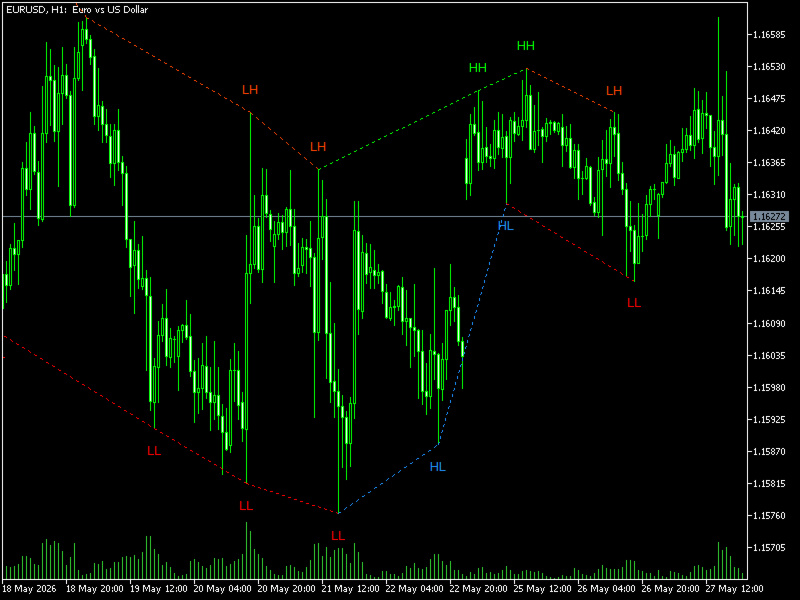
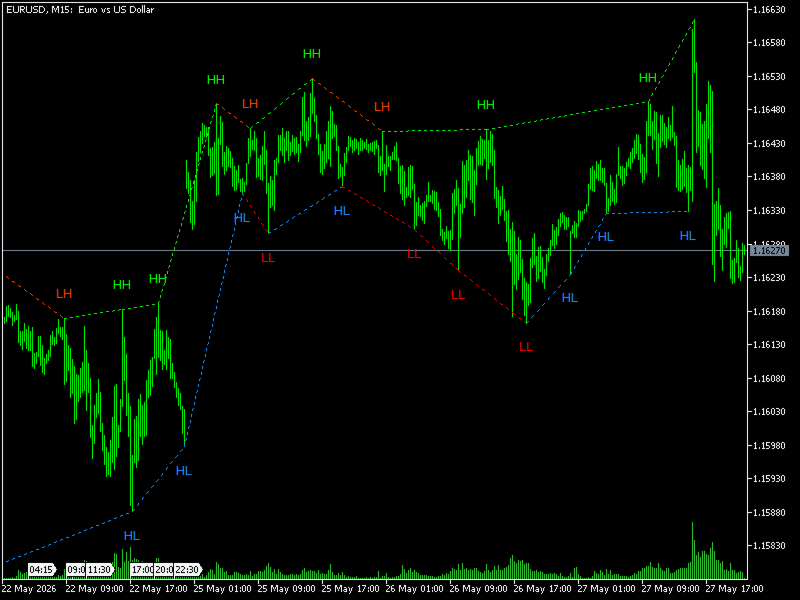
StructureMap Pro automatically marks market structure on your chart. Every confirmed swing high and swing low is labeled as Higher High (HH), Higher Low (HL), Lower High (LH) or Lower Low (LL), and consecutive pivots are connected with dotted lines, so the "staircase" of the trend is visible at a glance.
No more drawing swing points by hand — the indicator does it consistently on any symbol and any timeframe.
How to read the chart
- Green labels (HH / HL) = bullish structure
- Red / orange labels (LH / LL) = bearish structure
- HH + HL sequence = uptrend confirmed, look for buy setups
- LH + LL sequence = downtrend confirmed, look for sell setups
- HH followed by LH = momentum fading, possible reversal ahead
- LL followed by HL = sellers losing control, watch for reversal
- Dotted lines connect consecutive pivot highs (orange/red) and pivot lows (blue)
Key parameters
- Pivot Bars — how many bars to the left AND right must confirm a swing point. Higher value = fewer, more significant pivots.
- Min Gap Bars — minimum number of bars between two pivots of the same type. Prevents label crowding in choppy markets.
Recommended settings
| Timeframe | Pivot Bars | Min Gap Bars | Use |
| M1 / M5 | 3 | 15 | Scalping |
| M15 | 5 | 12 | Intraday (default) |
| M30 | 5 | 10 | Intraday / swing |
| H1 | 5 | 10 | Tested, clean output |
| H4 | 5 | 8 | Swing trading |
| D1 | 3 | 5 | Position trading |
| W1 | 3 | 3 | Macro structure |
Tip: too many labels → increase Min Gap Bars by 5. Too few labels → decrease Pivot Bars by 1–2.
Important
A swing point is confirmed only after "Pivot Bars" candles have closed on its right side. This is how all pivot-based structure tools work: labels appear with that delay and do not change afterwards.
Works on Forex, Gold, indices and crypto — any symbol your broker provides.
Please test the free demo in the Strategy Tester (visual mode) before purchasing.