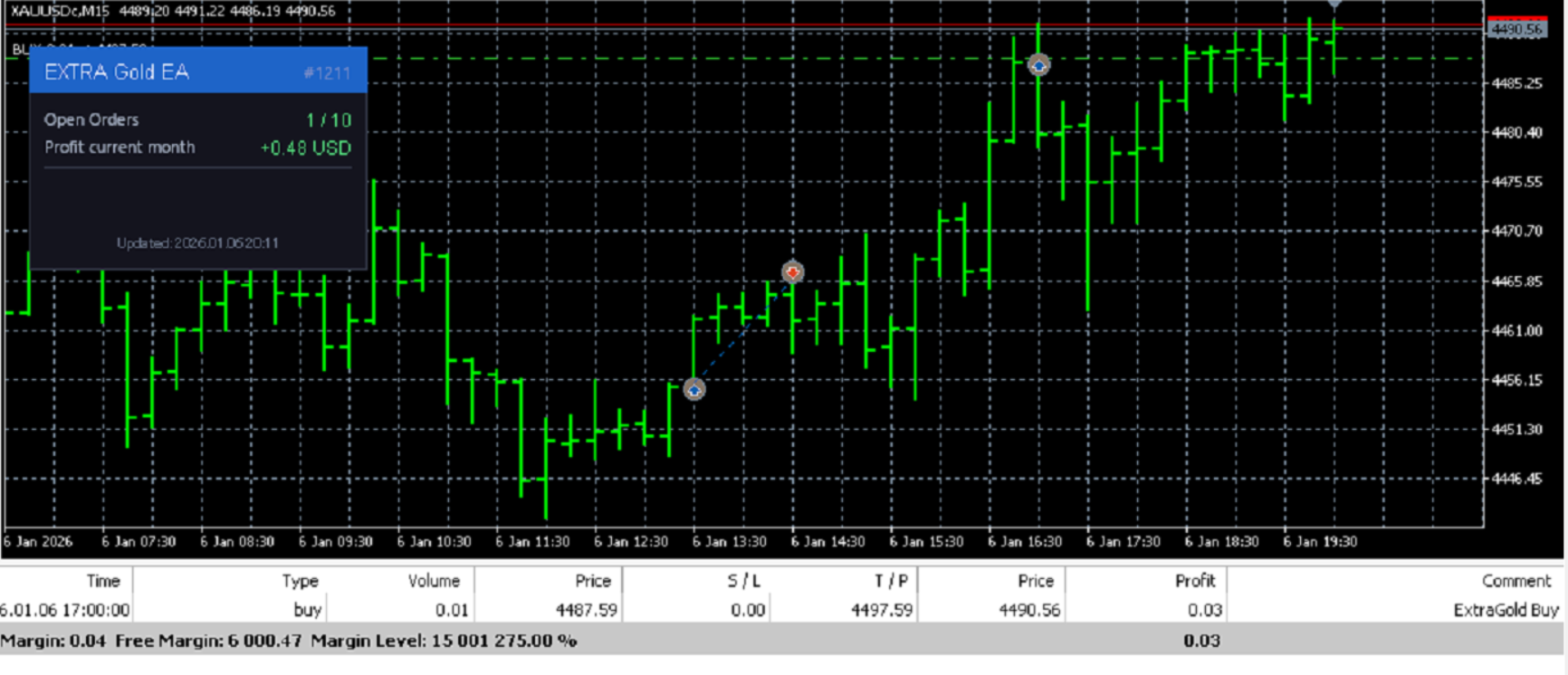
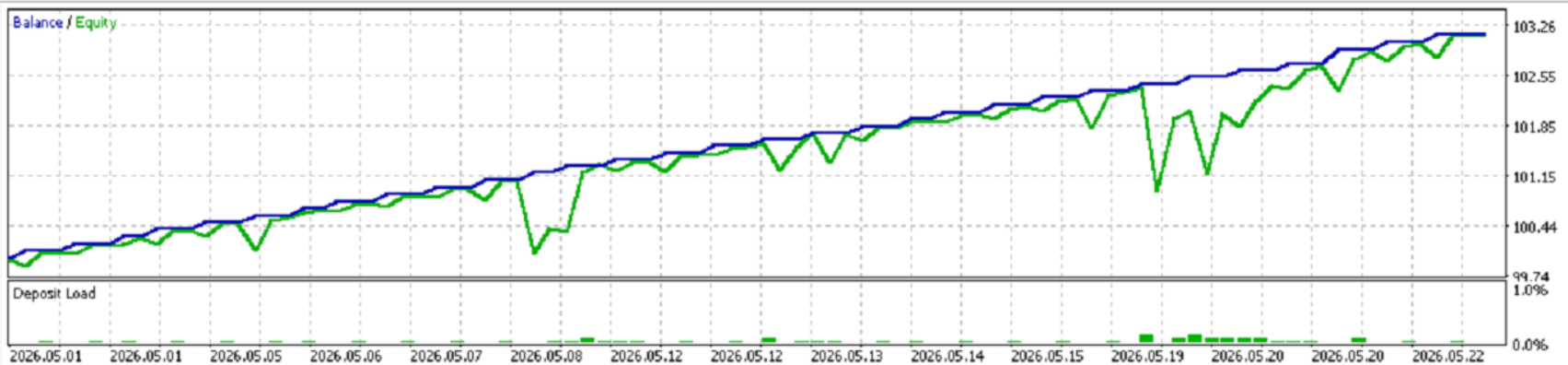
Extra Gold
- 专家
- 版本: 1.0
- 激活: 5

Overview
Extra Gold EA is a disciplined, rule-based Expert Advisor designed for traders who believe in trading at the right time — not all the time. Built exclusively as a buy-only strategy, Extra Gold fires orders at two precise time windows you define, giving you full control over when the market is entered. No random signals, no complex indicators to guess — just clean, structured execution at your chosen moments.
Whether you trade Forex pairs, gold, indices, or any MT5 instrument, Extra Gold slots seamlessly into your session-based trading routine.
** This Product Price will increase $5 every 10 sold **
Why Extra Gold?
Most EAs flood the market with orders and rely on luck. Extra Gold takes the opposite approach: surgical entries at specific times, strict position limits, and multiple safety gates before every trade. It is designed for traders who already have a view on market timing and want automated, disciplined execution without emotional interference.
How It Works — Logic Explained
Extra Gold runs a sequential safety check on every tick before any trade is executed.
Step 1 — Buy Limit Guard
The EA first counts active Buy Limit pending orders on the chart. If 2 or more Buy Limits already exist, the EA immediately stops — it will not stack orders on top of manual or external pending orders. This protects against over-exposure when you are manually managing the market.
Step 2 — Maximum Position Check
The EA counts all open Buy positions with the matching Magic Number. If the count has reached MaxOP (your configured limit), no new order is placed. This hard cap prevents runaway lot accumulation.
Step 3 — Time Window Execution
Extra Gold monitors two independent time windows:
- Window 1 — defined by Hour1 and Minute1 (default: 13:30 server time)
- Window 2 — defined by Hour2 and Minute2 (default: 17:00 server time)
When the server clock matches either window, the EA checks whether a Buy order has already been opened during that specific window today. If not, it proceeds to open one. After a successful entry, the EA pauses for 2 minutes to avoid duplicate executions on the same minute bar.
Step 4 — Pre-Trade Safety Validation (3-Layer Check)
Before any order is sent to the broker, Extra Gold runs three hard validations:
- IsAllowTrading — Verifies that AutoTrading is enabled in the terminal, the EA has trade permission on the chart, the account is not suspended, and Expert Advisors are permitted by the account.
- CheckVolumeValue — Confirms the lot size is within the broker's minimum/maximum volume limits and is a valid multiple of the broker's volume step.
- CheckMoneyForTrade — Calculates the actual margin required for the order using OrderCalcMargin() and compares it against available free margin. If funds are insufficient, the trade is skipped and a detailed log is printed.
Only when all three checks pass does the order go to the broker.
Order Placement
Buy orders are placed at the current Ask price with a Take Profit calculated as:
TP Price = Ask + (TP pips × pip value)
The EA automatically detects 5-digit and 3-digit brokers (where 1 pip = 10 points) and adjusts the pip value accordingly. No Stop Loss is set by default — position management is left to the trader's discretion.
Input Parameters
| Parameter | Type | Default | Description |
|---|---|---|---|
| Lot | double | 0.01 | Trade volume per order. Adjusted to broker's step automatically. |
| MaxOP | int | 10 | Maximum number of open Buy positions allowed simultaneously. |
| TP | int | 1000 | Take Profit in pips above the entry price. |
| Hour1 | int | 13 | Server hour for the first trading window. |
| Minute1 | int | 30 | Server minute for the first trading window. |
| Hour2 | int | 17 | Server hour for the second trading window. |
| Minute2 | int | 0 | Server minute for the second trading window. |
| MagicNumber | long | 1211 | Unique identifier for orders placed by this EA. Allows multiple EA instances on different symbols without interference. |
Built-In Dashboard
Extra Gold displays a clean, real-time information panel directly on the chart:
- EA Name — Always visible so you know which EA is active at a glance.
- Open Orders — Current count vs. your MaxOP limit, color-coded (green = active, red = at limit).
- Monthly Profit — Total closed profit/loss for the current calendar month, filtered by this EA's Magic Number. Includes commission and swap. Displayed in your account currency, color-coded green/red.
- Last Updated — Server timestamp of the last UI refresh.
Key Features
- Buy-only strategy — Clean, directional bias without short-side complexity.
- Dual time window execution — Automate entries at two precise moments per day.
- Buy Limit guard — Respects existing pending orders and avoids stacking.
- Hard position cap — MaxOP ensures you never exceed your risk threshold.
- 2-minute cool-down — Prevents duplicate entries on rapid tick bursts.
- 3-layer pre-trade validation — Permission check, volume check, and margin check before every order.
- Auto pip detection — Works correctly on both 4-digit and 5-digit brokers.
- Multi-instance safe — Magic Number isolation allows running on multiple symbols simultaneously.
- Live chart dashboard — Monitor open orders and monthly profit without opening the terminal.
- Detailed journal logging — Every check result and order event is logged with full context for easy auditing.
Recommended Use
- Best suited for session-based traders who target specific market open/overlap times (e.g., London open at 13:30, New York afternoon at 17:00).
- Works on any symbol supported by your broker — Forex majors, XAU/USD, indices, crypto CFDs.
- Pair with a fixed lot and wide TP for a trend-following approach, or reduce TP for scalping-style session plays.
- Use the Magic Number to run separate instances on EURUSD, XAUUSD, or GBPUSD simultaneously without conflict.
Important Notes
- This EA does not use Stop Loss by default. Risk management is the trader's responsibility.
- All times are based on MT5 server time — verify your broker's server timezone before configuring windows.
- Backtesting is supported via MetaTrader 5 Strategy Tester using tick data or OHLC modeling.
- Minimum deposit depends on your broker's margin requirements and lot size settings.
Extra Gold EA — Trade at the right time. Every time.