Royal Copier Client

  • 实用工具
  • Janet Abu Khalil
    Janet Abu Khalil
    4.5 (8)
    Professional software engineer and trader with 5 years of experience in the financial markets. I am part of the AtlasLabs.uk Engineering Division, where I develop trading solutions, software tools, and technical systems. My background includes networking, system support, and troubleshooting, helping
  • 版本: 2.20
  • 更新: 3 四月 2026
  • 激活: 10

Royal Copier — 专业版 MT4 交易复制器

Royal Copier 是一款适用于 MetaTrader 4 的专业本地实时交易复制器。 现在它已将两种功能整合到一个 MT4 Expert Advisor 中。 您只需在参数中选择 EA 运行于 Master 模式Client 模式

这意味着同一个 EA 既可用于源账户,也可用于接收账户,同时保留原有复制器的运行逻辑。

Royal Copier 支持以下常见账户复制方式:

  • MT4 到 MT4
  • MT4 到 MT5
  • MT5 到 MT4
  • MT5 到 MT5

如需 MT5 复制,请使用 MT5_Copier

工作原理

Royal Copier 是一个本地复制器,通过同一台 Windows 电脑上的共享文件运行。 当 EA 设置为 Master 模式 时,它会监控源账户并将所有交易活动写入共享文件。 当 EA 设置为 Client 模式 时,它会读取该文件,并在接收账户上镜像执行相同操作。

复制器可以同步以下内容:

  • 市价单
  • 挂单
  • 交易平仓
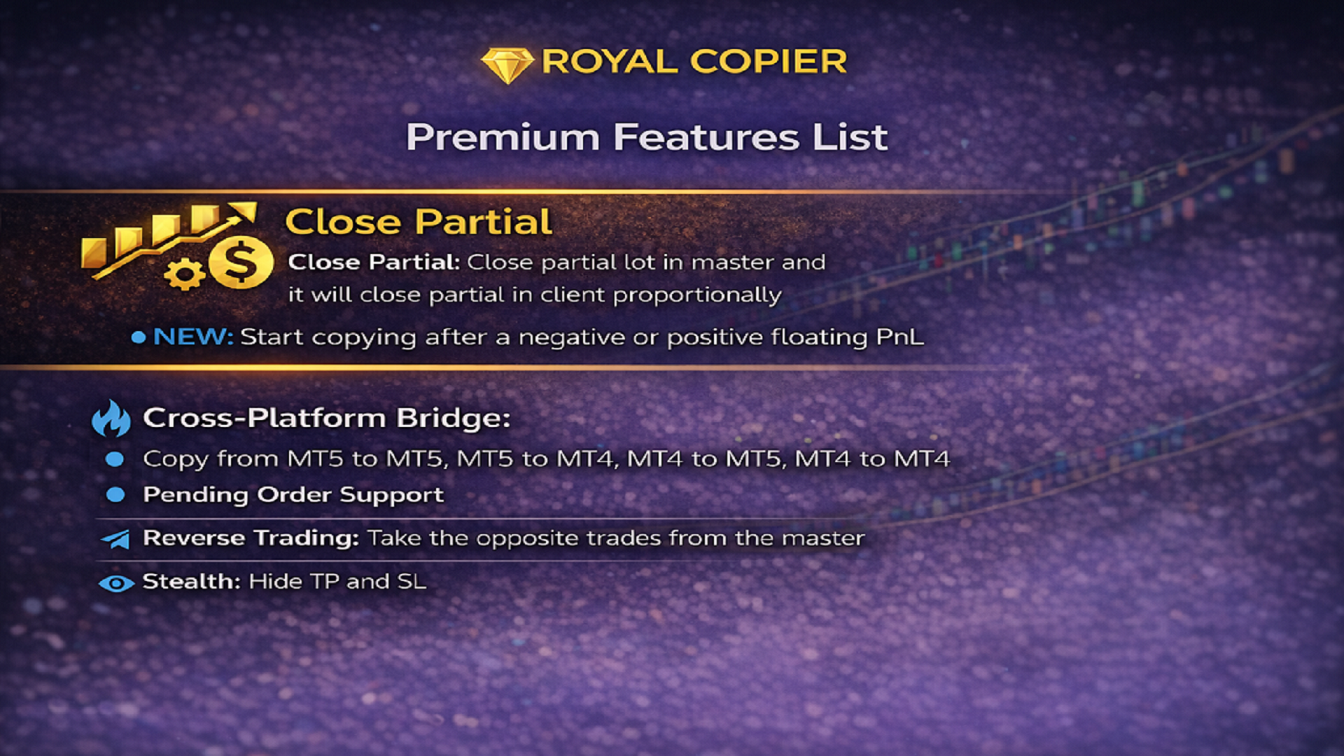
  • 部分平仓
  • 止损和止盈修改
  • 挂单更新和删除

两个终端必须运行在同一台 Windows 电脑上。 账户之间本身不需要直接互联网连接。

主要功能

  • 单一 MT4 EA,可选择 MasterClient 模式
  • 可配置间隔的实时同步
  • 复制市价单、挂单、修改和关闭操作
  • 按比例同步部分平仓
  • 实时同步止损和止盈修改
  • 多种手数管理模式:
    • 倍数
    • 固定手数
    • 风险百分比
    • 余额系数
    • 余额比例缩放
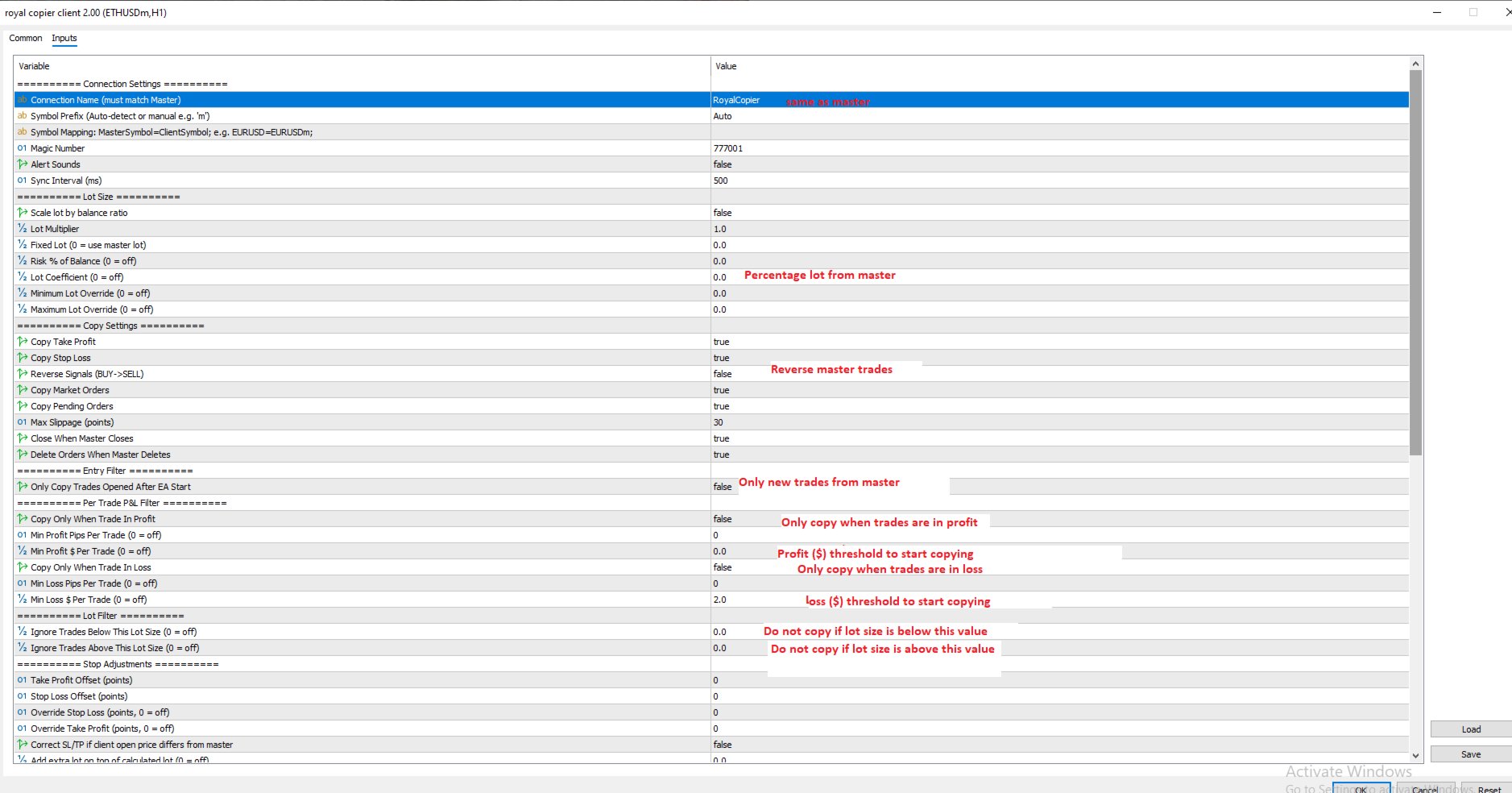
  • 仅复制盈利交易或仅复制亏损交易
  • 最小点数和最小美元金额过滤
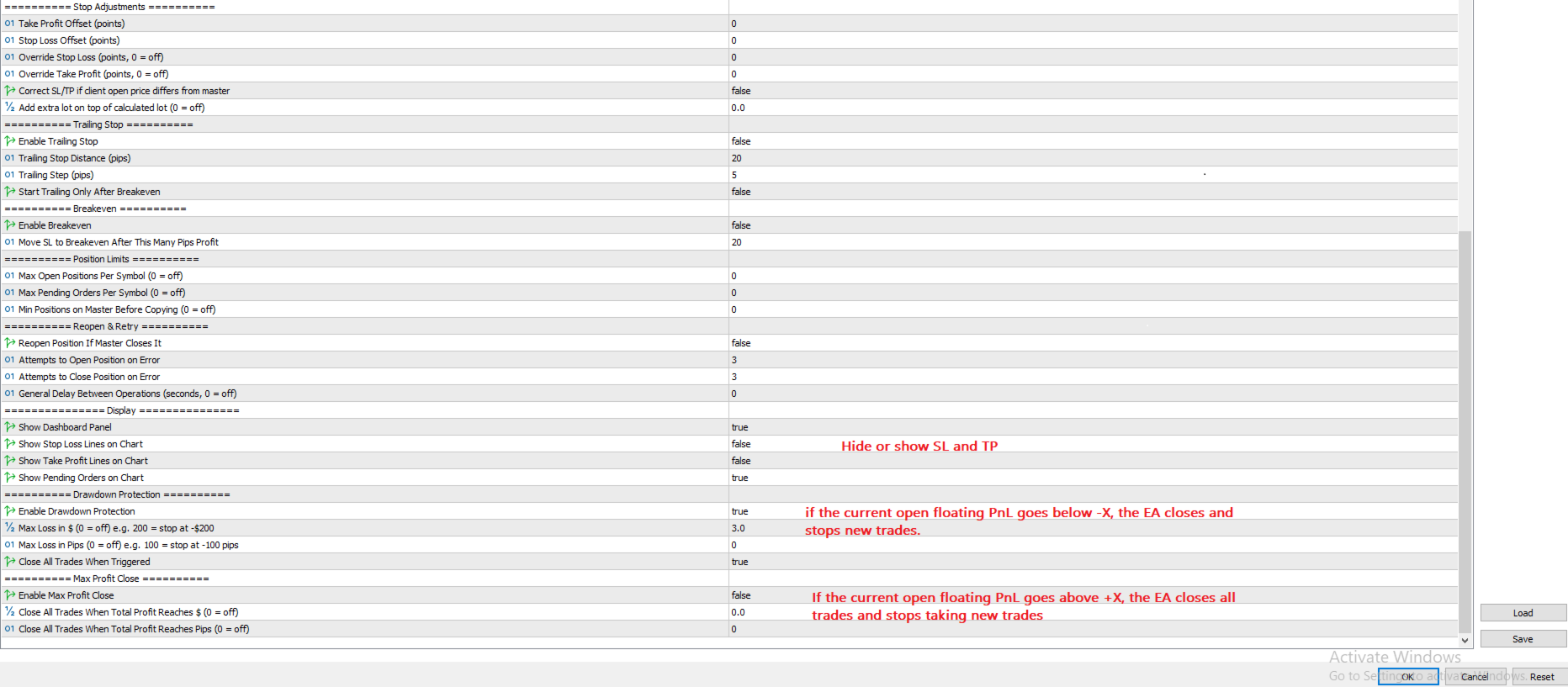
  • 回撤保护,在达到亏损限制时停止复制并平仓
  • 最大盈利关闭,在达到目标时关闭所有已复制交易
  • 自动识别交易品种前缀和后缀
  • 支持不同经纪商之间的手动品种映射
  • 客户端独立追踪止损和保本管理
  • 按品种、交易方向、手数范围和交易时段过滤
  • 反向模式,将 BUY 复制为 SELL,将 SELL 复制为 BUY
  • 仅复制新交易模式
  • 每个品种的持仓数量限制
  • 可配置开仓和平仓的重试次数
  • 为严格经纪商提供可选操作延迟
  • 可选在图表上显示 SL/TP 线和挂单
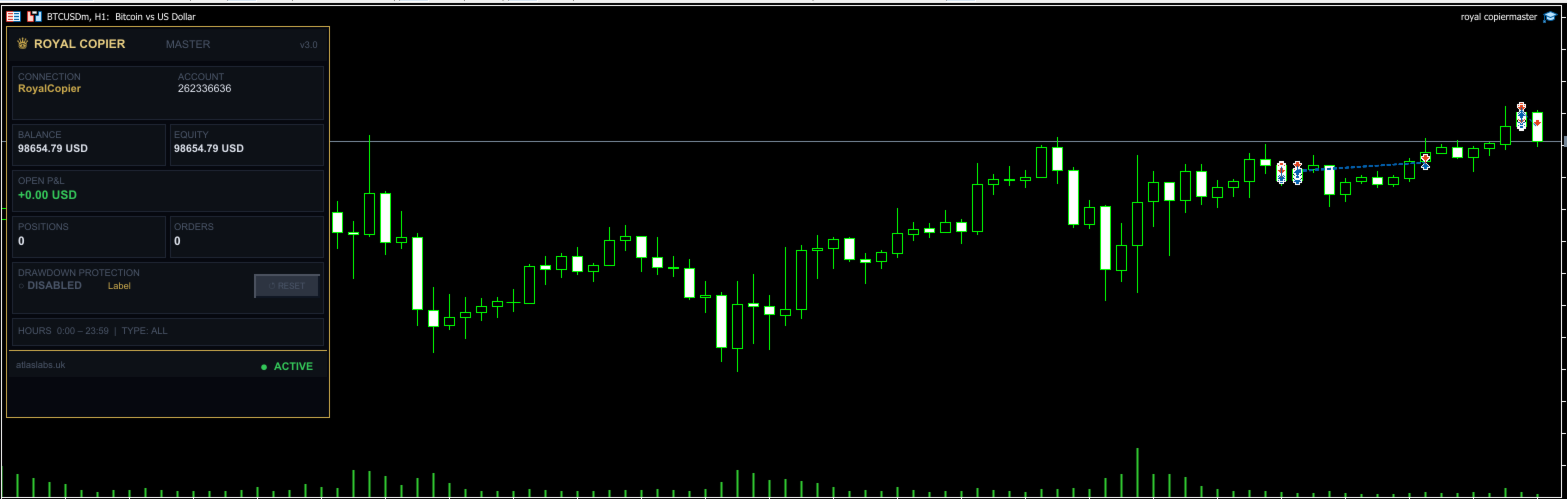
  • 实时仪表板显示账户统计、当前设置和保护状态
  • 在触发 Drawdown Protection 或 Max Profit Close 后可一键重置
  • 多个 Client 可同时复制一个 Master

使用方法

作为 Master 使用 Royal Copier:

  • 将 EA 加载到源账户的任意图表上
  • 在参数中选择 Master 模式
  • 设置您的 Connection Name
  • 让 EA 在源终端持续运行

作为 Client 使用 Royal Copier:

  • 将同一个 EA 加载到接收 MT4 账户的任意图表上
  • 在参数中选择 Client 模式
  • 使用与 Master 相同的 Connection Name
  • 根据需要配置手数、过滤器、回撤保护、盈利目标及其他客户端设置

在 MT4 与 MT5 之间复制:

  • 在 MT4 端使用本 EA,并根据您的设置选择 Master 模式Client 模式
  • 如需 MT5 复制,请使用 MT5_Copier
  • 确保双方使用相同的 Connection Name

当两端正确运行后,复制器将根据您的设置实时同步交易。

系统要求

  • MetaTrader 终端安装在同一台 Windows 电脑上
  • 两个终端均启用 AutoTrading
  • 如您的设置需要,请启用 DLL imports
  • 双方使用相同的 Connection Name

支持的市场

  • 外汇
  • 黄金
  • 指数
  • 加密货币
  • 其他经纪商支持的交易品种

重要说明

Royal Copier 仅为技术性交易复制工具。 它不提供交易信号、金融建议或投资组合管理服务。

文档说明

我们可根据要求提供完整的 PDF 文档,其中详细说明所有参数和设置。

推荐产品
Trade Copier Professional — 本地复制解决方案   Trade Copier Professional 是一款可靠的本地交易复制系统,适用于 MetaTrader 4/5。它允许交易者在同一台电脑上的多个账户之间即时复制仓位,内置安全控制,并配备专业级仪表盘。   概览   该 EA 可在单一文件中同时运行 Master 和 Slave 模式,并可无缝切换。交易可在 MT4 与 MT5 终端之间复制,无需依赖互联网,采用本地文件通信以实现最高速度与稳定性。实时仪表盘显示连接状态、复制统计以及每日表现。   手数与风险管理   提供四种手数模式:固定手数、倍数、风险百分比和余额百分比。止损与止盈可按比例调整或缩放,必要时可反向复制信号。安全功能包括每日亏损与交易限制、最小/最大手数控制、断线保护以及错误跟踪与自动关闭。   过滤与可靠性   交易可按品种或 magic number 进行过滤,配置灵活。系统通过错误检测、重试逻辑、安全关闭和全面日志确保可靠性。优化后的执行速度几乎即时,且资源占用极低。   使用方法   将 EA 附加到图表,设置为 Ma
Customized Copy MT4
Kyra Nickaline Watson-gordon
Customized Copy is a Multi-Terminal visual trade copying utility that supports Metatrader4 and Metatrader5 for Trade Copying.  You can activate EA on 10 different PCs/VPS. On each PC/VPS can install on Unlimited Terminals. Specifications :     Real Time, Multi Terminal - Multi Account - MT4/MT5 trade copying (support over 50 accounts at same time)     All settings are input visually.     Visual display and modify of copy map and network     Each copy path can be used with different settings
Exp COPYLOT CLIENT for MT4
Vladislav Andruschenko
4.69 (65)
MetaTrader 4 专业交易复制器 快速、专业、可靠的 MetaTrader 4 交易复制器。 COPYLOT 可在 MetaTrader 4 与 MetaTrader 5 终端之间复制外汇交易,并为不同账户类型和交易场景提供灵活的同步方案。 COPYLOT MT4 版本支持: MetaTrader 4 → MetaTrader 4 MetaTrader 5 Hedge → MetaTrader 4 MetaTrader 5 Netting → MetaTrader 4   MT5 版本 完整说明 + DEMO + PDF 如何购买 如何安装 如何获取日志文件 如何测试与优化 Expforex 的全部产品 您也可以使用 MetaTrader 5 版本,在 MetaTrader 5 → MetaTrader 5 和 MetaTrader 4 → MetaTrader 5 之间进行复制: COPYLOT CLIENT for MT5 COPYLOT 是一款专业级交易复制器,可稳定运行于 2、3 甚至 10 个终端之间。 支持从模拟账户和投资者密码账户进行复制 可同时运行在多个终端上
Mk EURUSD ecn
Maryna Kauzova
Only 1 copies at the price of 99 USD. Last price 999 USD   EURUSD ECN - is a trading algorithm designed for trading on ECN accounts or any other accounts with small margins and small spread! EURUSD ECN trading strategy is based on historical axioms of breaking the daily price range. Why EURUSD ECN belongs to safe trading systems?! - each order has a short fixed Stop Loss - the EA will not open an order if the trading account conditions do not match the recommendations (if orders are not opened
Local Trade Copier EA MT4
Juvenille Emperor Limited
4.96 (110)
通过 Local Trade Copier EA MT4 获得非常快速的交易复制体验。它的简单1分钟设置,使您可以在同一台Windows计算机或Windows VPS上在多个MetaTrader终端之间复制交易,具有闪电般快速的复制速度,低于0.5秒。 无论您是初学者还是专业交易者, Local Trade Copier EA MT4 都提供了广泛的选项,可根据您的特定需求进行自定义。对于任何希望增加利润潜力的人来说,这都是终极解决方案。 今天就尝试一下,看看为什么它是市场上最快、最简单的贸易复印机! 提示: 您可以在您的模拟账户中下载并试用 Local Trade Copier EA MT4 模拟版: 这里 将下载的免费演示文件粘贴到您的 MT4 >> 文件 >> 打开数据文件夹 >> MQL4 >> 专家文件夹并重新启动您的终端。  免费演示版本每次可在 4 小时内发挥全部功能,仅限演示帐户。 要重置试用期,请转至 MT4 >> 工具 >> 全局变量 >> Control + A >> 删除。 请仅在非关键模拟账户上执行此操作,不要在挑战道具公司账户中执行此操作。 如果您无法在
Binary Options Copier Remote is an EA that allows to copy binary options trades between MT4 accounts at different computers. This is an ideal solution for signal provider, who want to share his trade with the others globally on his own rules. Provider can give free bonus license to 10 receivers. That means those 10 receivers can copy from provider by using Binary Options Receiver Free (no cost). From 11th one, receiver have to buy Binary Options Receiver Pro (paid version) in order to copy from
MT4 Copier
Nurhidaya Tullah
MT4 到 MT4 交易复制器 – MetaTrader 4 本地交易复制系统 一款专业的 MetaTrader 4 本地交易复制工具,可在同一台电脑或 VPS 环境中,在多个 MT4 终端之间同步交易。 该系统适用于管理多个账户的交易者,提供稳定、一致的交易复制,并支持灵活配置。 它在不同环境中都能可靠运行,包括个人电脑和 VPS,具体性能取决于终端运行状况与系统资源。 典型使用场景 多账户交易管理 自营(Prop Firm)账户管理 MT4 终端之间的交易信号复制 多账户投资组合分配 需要可靠复制交易的 VPS 或本地环境 结构化执行的专业交易系统 主要功能 MT4 终端之间本地复制交易 反向交易模式(Reverse mode) 支持多个 Master 与 Slave 终端 市价单复制 挂单复制(Buy Limit、Sell Limit、Buy Stop、Sell Stop) 止损与止盈同步 Magic Number 过滤系统 仅买 / 仅卖过滤 灵活的手数管理系统 图表内专业仪表盘 推送、弹窗和邮件通知 无 DLL 或外部依赖 交易品种映射(重要) 不同经纪商可能使
SonicTradeCopier: (Best for scalping) Easy Fast Reliable trade copier. Copy trades from one terminal to an other (internet copy feature coming soon.) MT4 to MT4. MT4 to MT5. MT5 to MT5. MT5 to MT4. MT4/MT5 to any other platform copy possibility for custom made solutions. Reverse trading. Advance filters for traders. Features: (Setting up copying policies) Sender only has to setup  signal name and start sending signals [ You must start signal sender first always ]. Receiver sets up  signal na
This robot trades a pair of two symbols at the go and as such it cannot be tested with strategy tester in Metatrader 4. The reason being that Metatrader 4 strategy tester cannot synchronize price timing for more than one symbol at the time. To test this robot successfully, one has to run it in real-time on a demo account and monitor it for days. Statistical Arbitrage Cointegrated Pairs Trading Robot is an expert advisor executable on any PC running Metatrader 4. A linear regression is applied on
顾问工具,用于将交易从一个MT5帐户或MT4帐户复制到另一个MT4帐户。 Demo-version can be downloaded   here . 您可以在净额结算和套期保值账户之间以任何组合复制头寸。 您可以通过仪器的名称和将被复制的位置的魔术数字来设置过滤器。 到目前为止,来源仅发送有关市场头寸的信息。 挂单在变成公开市场头寸时被处理. 在一个终端上,顾问以发送者模式(发送者)启动,在另一个终端上-在接收者模式(接收者)中启动。 终端必须在同一台服务器上工作,以便它们具有相同的共享数据文件夹,通过该文件夹交换数据。 安装程序 在发件人帐户的终端中,我们以发件人模式启动顾问,配置常规参数。 在接收器帐户的终端中,我们在接收器模式下启动顾问,为接收器配置常规参数和参数。 要复制MT4->MT5,请使用此产品作为发送者,另一个真实交易复制MT5产品作为接收者。 要复制MT5->MT4,请使用此产品作为接收方,另一个真实交易复制MT5产品作为发送方。 More detailed information in the  post .
Fast copier for sending trades to multiple MT4 / MT5 accounts. Perfect for copying trades from MT4 to MT5 accounts. MT4 Trade Copier Master EA sends trades instantly from your master account to one or multiple slave accounts. Supports copying to: • MT5 accounts • MT4 accounts Perfect for: • Multi-account traders • Signal providers • Account managers • Personal account mirroring Main Features • Fast local trade copying • Low latency execution • Multiple slave accounts support • Copy open position
Copy Master mt4
Evgenii Aksenov
5 (5)
此实用程序将允许您将具有主设置的一个终端的任何事务复制到具有从属设置的其他终端 与此同时,您可以选择要复制的对,根据几个参数设置复制顺序的大小。 设定亏损限额或只复制盈利交易 您可以将MT4或MT5的交易复制到其他经纪商的MT4或MT5 现在,将任何在MT4中工作的专家的信号复制到MT5终端或返回并不困难 使用复制大师复制任何交易从其他信号,专家顾问,手动交易.  使用设置,您可以更改批量大小,交易方向,只复制有利可图的交易,并设置价值以保存您的存款  复制大师可以在一个帐户上组合不同订阅信号的几种策略 要复制交易到MT4,你需要复制主MT5版本: https://www.mql5.com/zh/market/product/74371 有关复制向导设置的其他信息: https://www.mql5.com/en/blogs/post/749356 (抱歉文本的自动翻译)
Copyist MS
Aleksei Moshkin
4 (4)
Copyist MS is a simple and easy to use trade copier. It works as a single-file Expert Advisor with toggled Master and Slave operation modes. Configurations Type of work - work mode selection: Master or Slave; Copy by magic number - copy trade orders by magic number (configure in master terminal) Will not copy currency pairs - list of unwanted currency pairs to copy (configure in master terminal) Master account number - master-terminal trading account number; Selective copying currency pairs - i
FXA LTC is a trade copier for MT4 terminal. This is a fantastic tool for coping trades from one MT4 terminal to many others running on the same PC/VPS. It is extremely easy to setup with minimal settings you can be coping trades in minutes. FXA LTC also caters for Brokers that use different symbol names. FXA LTC will copy trades in 0.5 seconds or less. Please note this will only work on live charts, it will not do anything in the simulator Features Super fast trade coping less than 0.5s the cop
Virtual Collider Manual   is a trading assistant with a built-in panel for manual trading. It automatically moves a position opened by a trader in profit using innovative adaptive grid algorithm of averaging and adaptive pyramiding Know-how of the grid algorithm of averaging and pyramiding of the   Virtual Collider Manual   trading robot is based on fully automatic adaptation of all characteristics of dynamically build order grid and pyramid with actual price movement with no need for adjusting
自动盈亏平衡水平 使用   此   工具 ,   您 可以 激活 自动 止损 移动, 当 交易 达到 预期 利润时.  对于   短期   交易者   尤其   重要.   偏移选项也可用: 可以保护部分利润. 多功能工具 : 66+ 功能, 包括此工具  |   联系我  如有任何问题  |   MT5版本 激活自动盈亏平衡功能的过程: 1.   选择符号或交易   将为其激活自动盈亏平衡功能: 对于当前   [Symbol]   / 对于   [ALL]   所有交易 / 或特定交易   [Ticket] . 除了[Symbol]或[ALL]规则外 - 您可以为特定交易设置单独规则, 通过其票号: 单独[Ticket]的规则将优先. 2. 选择您要激活自动盈亏平衡的   交易类型   : [ALL]: 所有活跃交易; [Longs]: 仅买入交易; [Shorts]: 仅卖出交易; 3.   [When profit] : 只有当   交易达到指定利润金额时 , SL才会被移动. 4.   [+ Offset] : 您可以设置   额外的SL偏移 , 向 TP水平方向. 因此,
Trade copier MT4
Alfiya Fazylova
4.56 (32)
Trade Copier 是一种专业实用程序,旨在复制和同步交易账户之间的交易。 复制发生从供应商的帐户/终端到收件人的帐户/终端,安装在同一台计算机或 vps 上。 促销活动 - 如果您已经购买了“Trade copier MT5”,您可以免费获取“Trade copier MT4”(用于 MT4 > MT5 和 MT4 < MT5 的复制)。欲了解更多详细条款,请通过私人消息与我们联系! 在购买之前,您可以在演示帐户上测试演示版本。 演示 这里 。 完整说明 这里 。 主要功能和优点: 支持复制MT4>MT4、MT4>MT5、MT5>MT4,包括МТ5 netting账户。 供应商和收件人模式在同一产品中实现。 简单直观的界面,允许您直接从图表中实时控制复制。 连接中断或终端重新启动时不会丢失设置和位置。 允许您选择要复制的符号,也可以替换接收者的符号,例如 EURUSD> USDJPY。 支持回拷贝。 能够仅复制某些订单。 允许您设置开仓交易价格的最大差异和最大时间延迟。 正确复制部分订单关闭的执行。 计算复制手数的几种方法。 同步止盈和止损。有几种方法可以计算它们的位置。 支持
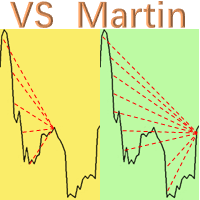
This is the EA tool "VS Martin" (VSMT) that I developed and have been using. Now I share it with users in need. Function: Automate trading according to the user's preset Martingale trading sequence. The tool can monitor market changes in real time and automatically adjust prices according to the set profit target to achieve maximum profit and exit trades in time. The entire Martingale execution process does not require manual intervention. Advantages: 1.    Users can customize the Martingale tra
Financial Radar GFX
Yasir Mohammed Sachit Sachit
Gold Trend Rider – Automated Expert Advisor for XAUUSD Trading Disclaimer : Trading Gold (XAUUSD) involves significant risk. Past performance does not guarantee future results. Test on a demo account and apply proper risk management before live trading. Overview Gold Trend Rider is a fully automated Expert Advisor specifically designed for Gold trading. It leverages the Parabolic SAR indicator to detect trend direction and open trades accordingly. Its trailing stop mechanism manages positions d
Auto Trade Copier
Vu Trung Kien
4.76 (85)
自动交易复制器旨在以 100% 的准确度在多个 MT4/MT5 账户/终端之间复制交易。提供商和接收方账户必须位于同一台 PC/VPS 上。使用此工具,您可以将交易复制到同一台 PC/VPS 上的接收方账户。所有交易操作都将从提供商复制到接收方,不会有任何延迟。此版本仅适用于 MT4 账户。对于 MT5 账户,您必须使用 MT5 的自动交易复制器。参考: 参考: 对于 MT4 接收器,请下载“Trade Receiver Free” 这里 . 对于 MT5 接收器,请下载“Trade Receiver Free MT5”  这里 . 对于同一台 PC/VPS 上的 MT5 提供商,请检查“Auto Trade Copier MT5” 这里 . 如果您需要通过互联网在不同的 PC/VPS 上进行账户复制,请查看“Trade Copier Pro” 这里 . 如果您需要通过互联网在不同的 PC/VPS 账户之间进行复制,且接收方数量不限,请查看“无限交易复制器专业版” 这里 . 以下是重点功能 在 MT4 和 MT5 账户之间复制。 一个提供商可以将交易复制到多个接收者的账户。 一个提
Hedge and Position Commander MT4
AL MOOSAWI ABDULLAH JAFFER BAQER
• Please test the product in the Strategy Tester before purchasing to understand how it works. • If you face any issues, contact me via private message—I’m always available to help. • After purchase, send me a screenshot of your order to receive a   FREE EA   as a gift. Hedge & Position Commander The Hedge & Position Commander is an advanced trading utility designed to give traders complete control over their positions with powerful hedging capabilities and comprehensive position management to
ONECLICK COPIER EA – UNIFIED VERSION 1.0 Category: Trade Utility | Type: Local Trade Copier for MT4 Created by fxdancer (Hani Mabad) Version: 1.0 – May 2025 OVERVIEW OneClick Copier EA is a local trade copying utility, not a trading strategy. It is designed for manual traders, fund managers, or multi-account users who want to mirror trades across MT4 terminals running on the same computer. This EA does not generate signals or place trades by itself. Instead, it acts as a bridge between accou
The utility copies trades from the signal provider accounts (master accounts, one or multiple providers) to unlimited number of receiver accounts (slave accounts). The provider is defined by the 'provider' parameter (any combination of numbers and letters). For example, there are two providers. Run the utility in master mode on them, and set different values to the provider parameter. On the account designated for copying these signals, run two utilities in slave mode in different windows, setti
You can also monitor the real account performance here: https://www.mql5.com/en/signals/2346679 I opened this account on December 2, 2025 . Please follow along and see how it grows from here — I’m excited to share its progress with you. Product Description  This EA is not over-fitted to backtests . It is designed with a strong focus on long-term stability and realistic, practical operation , rather than chasing perfect historical results. I created this EA because I felt that leaving money
Speedy EA
AL MOOSAWI ABDULLAH JAFFER BAQER
Trading using Experts are the best ways to win in Forex! Here are our second Expert Advisor, where you can Set and forget! Time frame: M1 All currency Pairs will work perfectly on the EA Account type: All (If hedging is not allowed, please disable either Sell or Buy) Please please do not take unnecessary risks. (Trading is risky, and there are no guarantees for winning)   We wish you successful trading. (Trading is risky, and there are no guarantees for winning)   Check our other pro
Introduction Copytrade Online is a powerful EA tool that helps you automatically copy trades from a Master account to Slave accounts on MetaTrader 4/5 (MT4/MT5) platforms. The EA ensures fast, secure, and easy trade transmission, suitable for both individuals and trading groups. Copy online via the internet from an MT4/MT5 account on one computer to MT4/MT5 accounts on multiple other computers. Key Features Automatically copy trades from the Master account to multiple Slave accounts. Supports b
RSI Scanner
Tetyana Shcherba
Utility is designed to monitor and analyze the market conditions for all symbols of the MetaTrader 4 terminal using real-time data from the RSI indicator. Automatically detects all the pairs in your terminal, and also can filter them into groups. Gets the RSI indicator data for all timeframes and all selected pairs. Tracks up to 4 programmable signal patterns and notifies when they appear. Automatically opens a new chart for a given template when you click the desired pair in the table. Input p
Just Copier MT4
Agung Imaduddin
5 (5)
"Just copier" is designed to copy trading without any complicated settings. The copy can be done in one PC. One EA can be set as master (provider) or slave (receiver). The receiver lot can be set to multiple providers lots. Please also check this product at fxina.hostingerapp.com.  Any type of copy is available. MT4 -> MT5 MT4 -> MT4 MT5 -> MT5 MT5 -> MT4 If you want to copy MT4 -> MT5 or MT5 -> MT4, please purchase "Just copier" for MT4 and "Just copier" for MT5 separately. Just Copier can copy
EquityGuardEA
Valery Sorrentino
DEMO VERSION DOWNLOAD HERE Update In Version 1.4 it is possible to set the amount of profit or loss in currency for martingale trades, by setting the profit or loss value for 0.01 lots the expert advisor will automatically multiply it if the starting base lot of the martingale increases or decreases youtube:  https://youtu.be/xn6TG8tyEfM **EquityGuardEA - Equity Management Expert Advisor** EquityGuardEA is a powerful Expert Advisor (EA) developed for the MetaTrader 4 (MT4) platform, provid
OTE Trade Copier
Olaoluwa Oluwaseun Bamitale
OTE Trade Copier MT4 Trade Copier & Prop Firm Risk Manager Copy trades between MT4 accounts on the same PC or VPS while protecting your funded accounts with professional risk controls. Why Traders Choose OTE Trade Copier MT4 Fast local MT4 to MT4 trade copying Designed for prop firm and funded account traders Daily drawdown and maximum drawdown protection Soft stop and hard stop account protection Fixed lot, mirror lot, equity ratio, and balance ratio Symbol mapping for brokers with different s
FREE
该产品的买家也购买
The product will copy all telegram signal to MT4   ( which you are member  ) , also it can work as remote copier.  Easy to set up, copy order instant, can work with almost signal formats, image signal, s upport to translate other language to English Work with all type of channel or group, even channel have "Restrict Saving Content", work with  multi channel, multi MT5 Work as remote copier: with signal have ticket number, it will copy exactly via ticket number. Support to backtest signal. How to
EasyInsight AIO MT4
Alain Verleyen
4 (2)
EASY Insight AIO – 全能智能交易一站式解决方案 概述 想象一下,您可以在几秒钟内扫描整个市场——外汇、黄金、加密货币、指数,甚至股票——无需手动筛选图表、繁琐安装或配置指标。 EASY Insight AIO 是您专为 AI 交易打造的即装即用数据导出工具。它将整个市场快照一次性输出为简洁的 CSV 文件,直接支持 ChatGPT、Claude、Gemini、Perplexity 等各类 AI 平台的即时分析。 无需窗口切换,无需图表叠加,也没有任何杂乱。只需纯净、结构化的数据自动导出,让您专注于基于数据的高效决策,无需再盯盘耗时。 为什么选择 EASY Insight AIO? 真正的一体化 • 无需设置,无需安装指标,无图表叠加。只需安装、运行并导出——就是这么简单。 多资产全覆盖 • 扫描分析外汇、金属、加密货币、指数、股票——您的券商所能提供的一切市场。 AI 专属数据导出 • 高度结构化、针对 AI 优化的 CSV 文件,直接适配主流智能工具和平台。 完整导出内容: • 三个可选周期的货币强度分析 • 净多头头寸变化体现市场情绪 • 成交量变化、
Custom Alerts AIO:多市场智能监控,一键启动,无需设置 概述 Custom Alerts AIO 是一款“开箱即用”的高级市场扫描工具,无需额外安装任何其他指标或进行复杂设置。它内置了 Stein Investments 的所有核心指标(FX Power、FX Volume、FX Dynamic、FX Levels 和 IX Power),可帮助您轻松监控所有主要资产类别,如外汇、黄金、指数和加密货币。如果您的经纪商支持股票,您也可以手动添加个股进行监控。 1. 为什么选择 Custom Alerts AIO? 无需额外购买任何指标 • 所有关键指标均已内置,开箱即用。 • 专注于实时预警,不包含任何图形元素,性能高效,界面简洁。 全面覆盖所有主要市场 • 支持监控外汇、金属、加密货币和指数市场。 • 无需手动输入任何交易品种,只需在设置中勾选资产类别即可启用。 • 股票并不属于默认类别,如有需要可手动通过参数输入添加。 高效、专业、便捷 • 无需图表模板和手动加载,适合自动化或远程交易环境。 • 非常适合 VPS 上长期运行,或作为后台市场预警工具使用。 2
Unlimited Trade Copier Pro is a tool to copy trade remotely to multiple MT4, MT5 and cTrader accounts at different computers/locations over internet. This is an ideal solution for you if you are a signal provider and want to copy your trades to other receivers globally on your own rules. One provider can copy trades to multiple receivers and one receiver can get trade from multiple providers as well. The provider can even set the subscription expiry for each receiver, so that receiver will not b
ManHedger MT4
Peter Mueller
5 (2)
THIS EA IS A SEMI-AUTO EA, IT NEEDS USER INPUT. Manual & Test Version Please TEST this product before   BUYING  and watch my video about it. Contact me for user support or bug reports, or if you want the MT5 version! MT5 Version I do not guarantee any profits or financial success using this EA. With this Expert Advisor, you can: Implement your own   Zone Recovery   strategy to capitalize on trending markets. Create   Grid   trading strategies, to profit from ranging markets. Place orders easil
VirtualTradePad PRO SE MT4 — MetaTrader 4 高级交易面板和图表工作区 VirtualTradePad PRO SE 是一款适用于 MetaTrader 4 的专业交易面板和交易管理工作区。它帮助交易者通过一个基于图表的界面,更快速地开仓、管理、保护、平仓和分析交易。 该产品专为需要的不只是简单按钮集合的活跃手动交易者而创建。PRO SE 将一键执行、挂单、持仓控制、部分平仓、篮子利润/亏损逻辑、加仓均价层级、ATM 规则、信号监控、市场信息、策略测试器流程和面向 VPS 的准备整合到一个结构化工作区中。 MT5 版本 | 完整说明和截图 | 如何购买 | 如何安装 | 如何获取日志文件 | 如何测试与优化 | Expforex 的所有产品 为什么交易者会选择这套面板 图表一键交易 ,并支持键盘快速操作 快速完成开仓、平仓、修改、反转、锁仓与部分平仓 深度控制仓位、挂单、总利润与风控逻辑 自动参数计算,减少手动输入与重复劳动 相对于普通手动交易的优势 一个工作区替代多个窗口 — 交易执行、持仓控制、风险信息和管理工具都保留在图表上。 更快处理交易
RedFox Copier Pro
Rui Manh Tien
4.7 (10)
Time saving and fast execution Whether you’re traveling or sleeping, always know that Telegram To Mt4 performs the trades for you. In other words, Our   Telegram MT4 Signal Trader  will analyze the trading signals you receive on your selected Telegram channels and execute them to your Telegram to MT4 account. Reduce The Risk Telegram To Mt4   defines the whole experience of copying signals from   Telegram signal copier to mt4 platforms. Users not only can follow all instructions from the signa
Smart Channel M4
Vahidreza Heidar Gholami
The trend in the market can be predicted using trend lines but the problem is you don’t know where exactly the price is going to touch the trend line where you can put your pending orders on. Smart Channel Expert Advisor makes it possible to put an advanced channel around the price data, which can be configured to handle placing orders, opening and closing positions, managing risk per trade, spread, slippage, and trailing stop-loss and take-profit automatically. Features Money Management (Calcul
Crystal Trade Manager PRO – 高级 MT4 风险与交易控制系统 免费版: https://www.mql5.com/en/market/product/150632 概述 Crystal Trade Manager PRO(CTM)是一款为 MetaTrader 4 打造的完整专业级风险管理与交易控制工具。 它专为需要严格执行、稳定风险保护和智能自动化的交易者而设计。 系统可全面管理风险、保护账户权益、执行每日限制、自动设置 SL/TP,并提供专业级的一键式快速交易面板。 非常适合参与 prop firm 挑战、日内交易、剥头皮交易以及专业资金管理的交易者。 同时提供完整的 MT5 版本。 核心亮点功能 1. 高级风险与回撤保护 支持每日回撤限制 1%–70% 。 一旦达到回撤上限,系统将立即平掉 所有仓位 。 可选:突破后自动删除 所有挂单 。 每日锁仓模式:当天达到限制后阻止新下单,次日自动恢复。 完全符合各大 prop firm 的规则与要求。 2. 日内盈利与亏损目标自动化 可设置每日 盈利目标 与 亏损限制 (账户货币,例如 USD)。 达到任何目
The product will copy all  Discord  signal   to MT4   ( which you are member  ) , also it can work as remote copier.  Easy to set up. Work with almost signal formats, support to translate other language to English Work with multi channel, multi MT4. Work with Image signal. Copy order instant, auto detect symbol. Work as remote copier: with signal have ticket number, it will copy exactly via ticket number. How to setup and guide: Let read all details about setup and download Discord To MetaTrader
Dashboard Trade Manager
Moegamat Luqmaan Titus
1 (1)
Dashboard.mq4 - 简单交易管理器 为那些喜欢手动交易并希望简化交易管理的交易者设计,这个强大的MQL4工具通过提供实时仪表盘来管理交易,提升了交易效率。它无缝集成到MetaTrader中,轻松计算仓位大小,并跟踪风险指标。 主要特点: 风险和保证金显示 :实时计算仓位大小、保证金要求和胜率,以便做出精确的交易决策。 交易管理按钮 :一键按钮用于下达买入/卖出订单、平仓(所有、盈利或亏损的交易)以及通过取消止盈或止损来修改订单。 可定制的胜率跟踪 :分析不同时间段的交易表现,包括当前月份、最近的交易或所有历史交易。 互动和直观的UI :清晰、易于导航的仪表盘,具有可定制按钮,方便快速操作。 准确的计算 :基于账户余额和风险百分比的内置仓位大小计算器。 这个工具非常适合那些希望在MetaTrader 4平台上直接管理交易并优化风险回报策略的交易者。
面板 FFx 隐藏管理 轻松帮助您在图表上直接管理您的订单。下面描述所有特征: 止盈, 止损和尾随停止均隐藏 每笔交易在图表上都有自己的指示线 可按您的需要拖拽任何线来改变止盈/止损 当止盈 #1 到达,自动将止损位移到盈亏平衡位置的选项 选择止盈/止损类型的选项 (通过点数或价格) 选择尾随停止类型的选项 (通过点数, MA, 分形, PSAR 或 ATR) 定义哪些订单您希望在当前图表上进行管理 (所有订单或特定单号) 最大化 / 最小化面板按钮 在图表上将面板拖拽到任意位置 显示交易信息的选项 如何使用它? (参看以下截图) 选择您希望管理的订单 (所有或特定的) 设置您的目标, 止损和尾随停止 … 之后点击 “放置”。它们都独立工作,这样您就只需设置一次。 如果您希望删除一个止盈, 止损或尾随停止, 选择正确的订单 … 然后点击 “删除” 当您选择设置 “所有当前符号”, 则 “当前设置”显示在面板里。这些设置将自动用于所有新开订单。若要重置/删除这些设置, 点击 “重置所有”。 如果 “显示交易信息”被选中, 一个新的小表格显示在面板之下, 包括每笔订单及其当前的目标和尾随停
FFx Risk Calculator panel will help you to calculate very easily your trades size, SL or the risk directly on the chart. All features are described below: Option to select which parameter to calculate: Risk, Stop Loss or Lot Size The panel will show if the lot size is allowed according to the current account free margin Button to maximize/minimize the panel Drag and Drop the panel anywhere on the chart How to use it? Select the parameter you want to be calculated. It will be based on the 2 other
Trade Copier Pro
Vu Trung Kien
4.29 (14)
Trade Copier Pro 是一个强大的工具,多账户之间进行远程复制的贸易超过互联网不同的位置。这是一个信号提供商的理想解决方案,谁想要与全球范围内对自己规则的人分享他的贸易。一个供应商的交易可以复制到多接收器和一个接收器可以得到贸易额从多供应商也是如此。 供应商和接收器可与供电内置的数据库管理系统来管理他的合作伙伴名单。 这个工具允许全局配置模式(copy过来互联网)和本地模式(在同一台PC/服务器内复制)之间进行选择。 要求: MetaTrader4的4.00版构建670或以上。 参考: 如果你只需要在本地复制与更低的价格,你可以检查Auto Trade Copier在: https://www.mql5.com/en/market/product/4676 以下是亮点功能:     在一个工具提供商或接收器之间转换角色。     一个供应商的交易可以复制到多接收器和一个接收器可以从多个供应商收到交易。     供应/接收器可通过供电数据库管理系统,而无需额外的工具管理自己的接收器/供应商名单(添加,删除,编辑,启用/禁用)。     全球模式(copy过来互联网)和本
News Trader Pro
Vu Trung Kien
4.38 (16)
新闻操盘手专业版 是一个独特的机器人,让您使用您预先定义的策略进行消息交易。它从几个流行的外汇网站加载的每条消息的片断。您可以选择任何消息和预设的策略进行交易,之后新闻操盘手专业版根据选定的策略,在新闻来临时自动进行交易。 新闻发布给出了赚点数的机会,因为在那个时刻,价格通常有大动作。现在,利用这款工具,新闻交易变得比以往任何时候更容易,更灵活,更令人兴奋。不要等待,不要错失,不要再迷惑了。每周只需针对重要新闻设置一次,这个工具将完全按照您的计划进行精准交易。 演示版: 由于这不是一个自动交易机器人 (它是半自动), 您需要下载单独的演示版本: https://www.mql5.com/zh/market/product/5931 参考: 如果您只需要加载新闻 (无需交易), 您可以购买新闻加载机专业版: https://www.mql5.com/zh/market/product/5463 功能 包括所有 新闻加载机专业版 的功能 (查看详情)。 针对每条新闻构建您自己的策略,具有非常灵活的参数。 支持五种高级策略,带有大量控制参数 (止损, 止盈, 尾随, 网格间隔, 手数缩放,
FFx Watcher PRO
Eric Venturi-Bloxs
The FFx Watcher PRO is a dashboard displaying on a single chart the current direction of up to 15 standard indicators and up to 9 timeframes. It has 2 different modes: 1. Watcher mode: Multi Indicators User is able to select up to 15 indicators to be displayed User is able to select up to 9 timeframes to be displayed 2. Watcher mode: Multi Pairs User is able to select any number of pairs/symbols User is able to select up to 9 timeframes to be displayed This mode uses one of the standard indicat
Transaction Repeater Full
Alexandr Bryzgalov
5 (4)
Copies transactions between MT4 terminals. Possibilities: quick copy start minimum processor load direct and reverse (reverse) copying. copying Take Profit and Stop Loss levels copying deferred and their changes copy transactions one to many copy trades many to one local copy only Attention: The product is designed for copying trades only within a single computer or VPS with access to the desktop. The product will not work on the built-in Virtual Hosting of the terminal. We will help you set up
The product combines a manual trade panel with the ability to perform actions automatically in a highly configurable way. Actions include capturing indicator values and then based on those values raising alerts, open/close or partially close trades, scale-in, setting up pending orders, adjusting stop loss, take profit and more. On-chart controls can be configured, such as tick boxes and buttons, so can be fully interactive. The EA also handles money management, news events, hidden stop loss, tak
The Price Action Dashboard is an innovative tool to help the trader to control a large number of financial instruments. This tool is designed to automatically suggest signals and price conditions. The Dashboard analyzes all major Time Frame suggesting price action conditions with graphic elements. The Dashboard can suggest you the strength of the trend identifying directional movement, it is an indispensable tool for those who want to open position themselves using market trends identifiers. The
Elliott Wave Counter 是一个面板,用于快速和用户友好地手动标记 Elliott 波浪。可以选择一种颜色和一个级别的标记。还有用于删除最后一个标记和工具制作的整个标记的功能。一键制作标记。点击五次 - 有五波!艾略特波浪计数器对于艾略特波浪的初学者和专业分析师来说都是一个很好的工具。 艾略特波浪计数器安装和输入指南 如果你想得到   关于 EA 添加 URL (   http://autofxhub.com   ) MT5 终端的 通知 (见截图)。 MT4版本 https://www.mql5.com/en/market/product/14016 MT5版本 https://www.mql5.com/en/market/product/15081 一般输入: 波形类型按钮: 此按钮允许用户选择他们想要在图表上突出显示的波形类型。可用的选项包括推动波、调整波和其他自定义波模式。 波级按钮: 这个按钮   允许用户选择他们想要在图表上突出显示的波形级别。可用的选项包括初级、中级和次级波级别。 波浪颜色: 这个   按钮   允许用户选择他们想要在图表上突出显示的波浪图
If you wish to draw Support and Resistance lines, view: daily market opening, classical pivot levels, Fibonacci pivot levels, trend lines, Fibonacci levels, the remaining time to candle closing, and current spread. If you seek to place your orders with the exact lot that meets your desired stop loss risk. If you wish to do all this and more with just one click, then this is the perfect tool to use. This tool will allow you to feel more relaxed when deciding to open orders, as well as predicting
部分平仓专家 是一款将多种功能整合到一个自动化系统中的工具。该 EA 提供多种风险管理选项,并最大化潜在收益,从而帮助交易者更有效地管理仓位。 使用部分平仓专家,交易者可以设置   部分关闭   锁定利润的水平,     追踪止损   保护利润和限制损失的水平,     收支平衡   水平,以确保即使价格朝着不利于交易的方向变动,交易也能实现盈亏平衡,以及其他一些功能。 使用这款一体化智能交易系统,交易者可以节省时间和精力,因为他们无需时刻监控交易。相反,EA 会根据市场情况执行预设指令,从而为交易者提供更大的灵活性和对交易的控制力。 附加部分关闭专家,     按下键盘上的“p”   ,更改设置,然后就可以开始了。 部分关闭专家   安装和输入指南 如果您想收到有关 EA 的通知,请添加 URL(   http://www.betasoft.dev   )MT4/MT5 终端(见截图)。 MT4版本 https://www.mql5.com/en/market/product/14965 MT5版本 https://www.mql5.com/en/market/product/15
Master Trend Dashboard is a new generation indicator, compact, light and efficient. Each element of this Dashboard is designed to return specific signals as: Price Action, Breakout, Net Change (performance of the instrument), algorithmic studies, correlations and statistical calculations. This tool will change your way of trading allowing you to receive important information. See the Graphic Signals to understand every single signal below: Graphic Signals Symbol name and arrow color Green = Cur
Trade Copier Agent 旨在复制多个 MetaTrader(4/5) 账户/终端之间的交易。 使用此工具,您可以充当提供者(源)或接收者(目的地)。所有交易行为都将立即从提供者复制到接收者。 该工具允许您在同一台计算机上的多个 MetaTrader 终端之间复制交易,复制速度快如闪电,不到 0.5 秒。 贸易复印机代理安装和输入指南 请在开始复制之前或没有订单时在提供商帐户上应用设置! 有订单时的任何更改都会影响收款人帐户。 例如:如果提供者账户应用买单然后禁用接收者账户上的所有买单将被关闭。 如果您想获得有关 EA 添加 URL (   http://autofxhub.com   ) MT4 终端的通知(请参阅屏幕截图)。 MT5版本 https://www.mql5.com/en/market/product/77134 以下是亮点功能: 在 MT4 和 MT5 账户之间复制。 在一个工具内切换提供者或接收者。 每个账户既可以作为Provider又可以作为Receiver,因此账户之间可以通过2种传输方式相互复制。这就像一个贸易共享网络。 一个提供者可以将交易
Unlimited Binary Options Copier Remote is a powerful tool to copy binary options trades remotely between multiple accounts at different locations over internet. This is an ideal solution for signal provider, who want to share his binary options trades with the others globally on his own rules. One provider can copy trades to unlimited receivers and one receiver can get trade from unlimited providers as well. The provider can set the subscription expiry for each receiver, so that receiver will no
This is an Expert Adviser use for manual trading as a background EA or combine with external EA to open orders. Loss Recovery Trading is one of your options to handle the lose positions instead of using stop loss by setting a zone recovery area and target to exit the turn rounds sequence. How It Work? If the market goes against your first positions direction at the specific of losing points, the EA will open an opposite direction position with calculated larger lot size and also keep the first
Great for scalper/intraday weapon for your ease daily trading. Scalper weapon will suit's you for any trading condition, whether it's intraday / scalper this tool is important for you which providing the missing function on the native MT4 platform. You have to check Allow Auto Trading by pressing Ctrl+O, going to Expert Advisors tab, and checking " Allow automated trading" . also to ensure the " auto trading " is green. Input Parameters _MINIMIZED_AT_START: to chose whether the panel is minimiz
Market Pressure Dashboard is a new generation utility. Its main function is to assist you and give you operational ideas optimizing your analytical work. Using this utility you could monitor a lots of financial instruments (max 28 symbols FOREX) in a very simple way. The Market Pressure indicator allows you to customize the internal list of the symbols to be monitored. The opening function and position management with this panel will be much more comfortable and navigation charts very powerful.
Contact/message me if you encounter any issue using the product or need extra feature to add on the base version. There is a demo version of this panel Dashboard Trading Made Simple Demo in my product list, please try it out to get familiar with all functionalities free, LINK . This system basically utilizes TDI as the main indicator to generate trading signal mainly on H1 and H4 timeframes. The signal will be further filtered and trimmed. Stochastic; Heiken Ashi candle direction and candle siz
Telegram Publisher Agent 是一个附加组件,允许交易者实时向他们的 Telegram 频道和群组发送信号。通过可定制的消息、图表截图和其他功能,该工具可以帮助交易者与他们的追随者分享他们的交易见解和策略。该工具还具有亮暗主题切换的精美设计,为用户提供美观和功能性的交易体验。 Telegram Publisher Agent 旨在将您的所有交易作为信号发布在您的频道和群组中。您所要做的就是提供交易,然后 Telegram 发布商代理将为您完成所有繁重的工作,只需单击一个按钮即可将交易信号发送到您的交易渠道或群组。 电报发布代理   安装和输入指南 如果您想获得有关 EA 添加 URL ( http://autofxhub.com ) MT4/MT5 终端的通知(见屏幕截图)。 MT4版本 https://www.mql5.com/en/market/product/18985 MT5版本 https://www.mql5.com/en/market/product/23946 主要特点: 信号发送 - 将信号发送到用户的 Telegram 频道和组,带有可自定义的
作者的更多信息
Telegram to mt5 pro
Janet Abu Khalil
4 (4)
Telegram to MT5 Pro — 高级 Telegram 信号复制器(Auto-Fix,多TP,风险控制,完整交易管理) Telegram to MT5 Pro — 专业 Telegram 信号复制系统 Telegram to MT5 Pro 可将来自 Telegram 的交易信号实时复制到您的 MetaTrader 5 账户,并提供完整的风险控制、执行管理与交易管理功能。 系统由两个组件组成: • 运行在 MetaTrader 5 内的 Expert Advisor(EA) • 连接 Telegram 并将信号发送到 EA 的桌面桥接程序 两个组件必须在同一台电脑运行。由于 MQL5 限制,EA 无法直接连接 Telegram。 支持与安装 提供完整 PDF 安装指南。 支持内容: • 完整 PDF 使用手册 • 分步安装指导 • 在线聊天支持 • 交易商设置帮助(前缀、后缀、符号映射) 功能说明 • 读取任意 Telegram 群组或频道信号 • 自动解析交易品种、方向、入场、止损、止盈 • 秒级执行交易 • 管理交易(移动止损、保本、部分平仓) • 支持多账户与多信号
Royal Copier
Janet Abu Khalil
5 (1)
Royal Copier — 专业版 MT5 交易复制器 Royal Copier 是一款适用于 MetaTrader 5 的专业本地实时交易复制器。 现在它已将两种功能整合到一个 MT5 Expert Advisor 中。 您只需在参数中选择 EA 运行于 Master 模式 或 Client 模式 。 这意味着同一个 EA 既可用于源账户,也可用于接收账户,同时保留原有复制器的运行逻辑。 Royal Copier 支持以下常见账户复制方式: MT5 到 MT5 MT5 到 MT4 MT4 到 MT4 MT4 到 MT5 如需与 MT4 进行复制,请使用 MT4_Copier 。 工作原理 Royal Copier 是一个本地复制器,通过同一台 Windows 电脑上的共享文件运行。 当 EA 设置为 Master 模式 时,它会监控源账户并将所有交易活动写入共享文件。 当 EA 设置为 Client 模式 时,它会读取该文件,并在接收账户上镜像执行相同操作。 复制器可以同步以下内容: 市价单 挂单 交易平仓 部分平仓 止损和止盈修改 挂单更新和删除 两个终端必须运行在同一台 Win
Gold M1 Pro
Janet Abu Khalil
5 (1)
Gold M1 Pro – MT5 Expert Advisor Gold M1 Pro 是一款 MT5 Expert Advisor,主要设计用于在 M1 时间周期交易 XAUUSD / Gold。 该 EA 包含三种运行模式: Gold M1 Pro 标准策略 AI trading mode 同时使用两个系统的混合模式 标准模式设计为交易次数较少、筛选更严格。AI mode 可能会根据市场条件和用户设置更加活跃。混合模式允许两个引擎一起运行。 用户应先在模拟账户上测试 EA,并根据经纪商条件、点差、杠杆、止损距离限制、执行速度、交易品种后缀和账户类型选择保守的手数设置。 Monitoring Signals 以下 MQL5 signals 可用于监控真实交易活动: Standard Mode 1: https://www.mql5.com/en/signals/2381027 Standard Mode 2: https://www.mql5.com/en/signals/2381033 AI Mode: https://www.mql5.com/en/signals/

Poison Ivy
Janet Abu Khalil
5 (2)
Info: Working trading pairs :  XAUUSD, GOLD  Timeframe: H1 Min deposit: $100 Min leverage 1:20  Works with any broker, though an ECN broker is recommended Features: No martingale No grid trading No averaging No dangerous money management techniques Hard stop loss and take profit for every trade Stable results since 1999 with 99.9% quality quotes Not sensitive to broker conditions Easy to install and use FTMO and Prop firm ready Complies with FIFO rules (Need to disable Hedging in EA settings)
什么是 Telegram to MT4 Pro? Telegram to MT4 Pro 可将来自私人、公开和受限 Telegram 频道和群组的信号自动复制到您的 MetaTrader 4 账户。 Telegram to MT4 Pro 是一款专业的信号复制器,可将任何 Telegram 频道或群组中的交易信号实时自动复制到您的 MetaTrader 4 账户,并对每一笔交易提供完整控制。 该系统由两个协同工作的部分组成: 此 Expert Advisor — 安装在您的 MT4 图表上以执行交易 配套桌面应用程序 — TelegramMT4Pro.exe — 连接到 Telegram 并将信号桥接到 EA 您可以同时将多个 Telegram 信号提供者连接到多个 MT4 账户。每个账户和每个提供者的所有设置都可以单独配置。 注意:系统自动运行。无需在 MetaTrader 内进行手动连接设置。 系统要求 项目 要求 操作系统 Windows 10 或更高版本 MetaTrader MetaTrader 4(任何经纪商) 配套应用程序 TelegramMT4Pro.exe — 必须在


MT4 to Telegram Pro is a complete MT4 to Telegram copier and publishing solution that transforms your MetaTrader 4 terminal into a real time Telegram signal, reporting, and notification system. It can copy market orders, pending orders, closed trades, partial closes, trade modifications, and news alerts directly from your MT4 account to your Telegram channel or group. One of its strongest advantages is flexibility. All messages are editable in plain text, so you are not locked into fixed wording
MT4 to Discord Pro 是一套专业的 MetaTrader 4 到 Discord 发布和通知系统,可将您的交易活动直接从 MT4 实时发送到任何 Discord 频道。 它将您的 MetaTrader 4 终端转换为完整的 Discord 提醒解决方案,适用于交易者、信号提供者、社区、账户管理者以及任何希望以干净和专业格式自动发布交易活动的人。 该 EA 可以发送新市场订单、挂单、交易关闭、部分平仓、Stop Loss 和 Take Profit 修改以及计划账户历史报告的提醒。它还可以在新交易提醒中附带图表截图,使用可自定义消息模板,并通过集成的 Forex Factory 新闻日历过滤器监控经济新闻事件。 MT4 to Discord Pro 最强大的优势之一就是灵活性。您不会被固定消息所限制。该系统支持可自定义消息模板,因此您可以根据自己的风格、品牌和 Discord 频道格式调整提醒内容。 主要功能 新市场订单的实时 Discord 提醒 交易关闭提醒,包括 Take Profit、Stop Loss 和手动关闭 部分平仓提醒 Stop Loss 和 Take
Discord to MT4 Pro Discord to MT4 Pro — это профессиональный советник для MetaTrader 4, который считывает торговые сообщения из канала Discord и автоматически исполняет их на вашем счете MT4. Он предназначен для трейдеров, которые получают сигналы через Discord и хотят прямое исполнение внутри MetaTrader 4 с гибкой обработкой рыночных ордеров, отложенных ордеров, входов по диапазону, лестничных входов, логики один ордер на каждый TP, безубытка, трейлинг-стопа, частичного закрытия, ежедневных пра
什么是 Discord to Telegram Pro? Discord to Telegram Pro 是一款专业的 MetaTrader 4 桥接工具,可自动读取您所选 Discord 频道中的消息,并将其直接转发到您的 Telegram 频道、群组或私人聊天。 该 EA 适用于信号提供者、私人社区、Discord 交易群以及希望将 Discord 消息自动转发到 Telegram、无需手动复制粘贴的用户。 该系统在 MetaTrader 4 内部作为桥接器运行: 使用您的 Discord 机器人令牌和频道 ID 连接到 Discord 每隔几秒检查一次频道中的新消息 识别信号和管理消息 提取 BUY、SELL、CLOSE、BREAKEVEN、PARTIAL CLOSE、入场区间、止损、止盈以及 TP OPEN 等信息 使用您的 Telegram 机器人令牌和 Telegram Chat ID 将消息发送到 Telegram 该产品是一个 Discord 到 Telegram 的桥接工具 。除非您另外构建交易执行功能,否则它不需要开仓交易。 它可以识别哪些消息? 该 EA 可以识别
适用于 MT4 的 Telegram to Discord Pro Telegram to Discord Pro 是一款适用于 MetaTrader 4 的桥接型 Expert Advisor,可从 Telegram 机器人聊天、频道或群组中读取交易信号和交易管理消息,然后以清晰且可自定义的格式将其转发到您的 Discord 频道。 该 EA 适用于交易者、信号提供者、私人社区以及自动化用户,他们希望将 Telegram 中的交易消息实时同步到 Discord。 它可以识别并转发 Buy、Sell、Close、Breakeven 和 Partial Close 等消息。它还可以读取信号细节,例如交易品种、入场价、止损、止盈水平以及 open TP 文本,然后将信息以格式化模式或原始文本模式发送到 Discord。 该 EA 同时支持普通 Telegram 消息和 Telegram 频道帖子,因此适用于私有频道、公共频道、群组以及基于机器人的工作流程。 如需 Discord 和 Telegram 设置帮助,请阅读 README 指南。 此 EA 的功能 Telegram to Disc
Poison Ivy Pro
Janet Abu Khalil
Poison Ivy - 带新闻过滤器的交易EA Poison Ivy是一款多品种自动交易专家顾问 专为GBPUSD、Y优化,H1时间框架效果最佳 最低入金:每0.01手100美元;建议每0.01手500美元 实盘信号 新闻回测功能 EA支持启用新闻过滤器的完整回测 购买后申请历史新闻CSV文件 包含2022-2025年数据,每季度更新 双重新闻源:Forex Factory + DailyFX 输入参数 - 启用或禁用特定工作日交易 - 设置交易开始和停止时间 - 用于交易识别的魔术号码 - 基于账户余额百分比的手数 - 以美元计的静态止盈和止损 - 当总利润达到定义百分比时关闭所有交易 - 带可配置参数的智能仓位管理 - 具有高/中/低影响级别的新闻过滤器 注意事项 - EA使用默认设置立即开始交易 - 使用截图中显示的SET文件以获得最佳性能 - GBPUSD/USDJPY使用H1时间框架 - 策略测试器提供带新闻事件的准确结果 - 无需外部库 安装 1. 将EA放入/MQL4/Experts文件夹 2. 允许Web请求至:    -   https://nfs.fa
Bitcoin Sniper
Janet Abu Khalil
Bitcoin Sniper for MT5 Bitcoin Sniper 是一款完全自动化的 Expert Advisor,专为 MetaTrader 5 上的 BTCUSD 开发。安装到图表并完成设置后,EA 将自动管理交易,在交易时段内无需人工干预。 该系统适合希望使用结构化 BTCUSD 解决方案的交易者,提供受控的风险设置、交易频率限制、追踪管理以及每日保护选项。 欢迎查看我的 Gold EA: https://www.mql5.com/en/market/product/162022 如果它符合您的需求,购买它将是支持我工作的一个很好的方式。 信号: https://www.mql5.com/en/signals/2345679 推荐设置 交易品种:BTCUSD 时间周期:M30 最低入金:$200 推荐手数:每 $500 余额使用 0.01 手 经纪商要求:经纪商必须支持周末比特币交易 VPS:建议使用,以确保 24/7 稳定运行 如何使用 将 EA 文件复制到 MetaTrader 5 的 Experts 文件夹中。 重新启动 MetaTrader 5 或刷新 Nav
Tokyo Crown
Janet Abu Khalil
Tokyo Crown   — 适用于 GBPUSD   和 USDJPY 的会话型智能交易系统 Tokyo   Crown 是一款纪律性强、低频交易的智能交易系统,专为在 GBPUSD 和 USDJPY 上进行可控交易而设计,也适用于类似 prop   firm 的考核和实盘账户。 系统平均每天每个品种专注于一笔高质量交易,使用固定止损和止盈,无任何隐藏马丁策略,并具有严格的资金保护机制。 策略概览 Tokyo Crown   分析亚洲盘与伦敦早盘的结构,在满足特定波动性和趋势条件时,从隔夜区间中寻找干净的突破或均值回归机会。 系统通过过滤噪音行情来避免过度交易,每个信号只开一笔预设风险的订单,使整体表现更加稳定,也更便于监控。 主要特性 低频交易:平均每天每个品种约一笔交易(若条件不满足,有些天可能不会交易)。 支持固定手数和基于余额的自动手数,并可设置自动手数上限。 止损和止盈以点数设置,兼容 ECN、Raw   和 Standard 类型账户。 可调节经纪商服务器时间偏移,使会话逻辑与服务器时间对齐。 每个品种和每个 EA   实例的最大持仓数量可控。 基于账户权益的全局止损和
PropPass – EA для проп-фирм челленджей Система автоматизации проп-фирм челленджей и управления рисками Стартовое предложение Только 5 лицензий доступны по этой цене. После продажи первых 5 копий цена будет увеличена. Основная цель Основная цель PropPass — организовать торговлю таким образом, чтобы: • если челлендж не пройден на любом этапе, сторона восстановления на реальном счёте может помочь компенсировать стоимость челленджа и помочь трейдеру продолжить путь к проп-фирме • если челлендж про
MT5 to Telegram Pro 是一套完整的 MT5 到 Telegram 复制与发布解决方案,可将您的 MetaTrader 5 终端转换为实时 Telegram 信号、报告和通知系统。 它可以将市价订单、挂单、已平仓交易、部分平仓、交易修改以及新闻提醒,直接从您的 MT5 账户复制到您的 Telegram 频道或群组。 它最强大的优势之一就是灵活性。所有消息都可以用纯文本编辑,因此您不会被固定措辞所限制。您可以为每种事件类型使用自己的频道名称、品牌名称、风格、布局和自定义文本,从而使您的 Telegram 发布内容完全符合您自己的品牌与展示方式。 MT5 to Telegram Pro 还可以将重要新闻提醒直接发送到 Telegram,因此它不仅仅是一个交易复制器。它会成为一套完整的 MT5 到 Telegram 发布和通知系统。 该 EA 还可以截取干净的图表截图,在截图时不会显示 EA 面板、仪表板或 EA 名称。它还可以根据您的设置显示或隐藏余额,并以点数、美元、百分比或全部一起显示结果。 无需 Python 桥接,无需外部服务器,也无需 DLL。一切都直接在 Met
MT5 to Discord Pro 是一套专业的 MetaTrader 5 到 Discord 发布和通知系统,可将您的交易活动直接从 MT5 实时发送到任何 Discord 频道。 它将您的 MetaTrader 5 终端转换为完整的 Discord 提醒解决方案,适用于交易者、信号提供者、社区、账户管理者以及任何希望以干净和专业格式自动发布交易活动的人。 该 EA 可以发送新市场订单、挂单、交易关闭、部分平仓、Stop Loss 和 Take Profit 修改以及计划账户历史报告的提醒。它还可以在新交易提醒中附带图表截图,使用可自定义消息模板,并通过集成的 Forex Factory 新闻日历过滤器监控经济新闻事件。 MT5 to Discord Pro 最强大的优势之一就是灵活性。您不会被固定消息所限制。该系统支持可自定义消息模板,因此您可以根据自己的风格、品牌和 Discord 频道格式调整提醒内容。 主要功能 新市场订单的实时 Discord 提醒 交易关闭提醒,包括 Take Profit、Stop Loss 和手动关闭 部分平仓提醒 Stop Loss 和 Take
Discord to MT5 Pro Discord to MT5 Pro — это профессиональный советник для MetaTrader 5, который считывает торговые сообщения из канала Discord и автоматически исполняет их на вашем счете MT5. Он предназначен для трейдеров, которые получают сигналы через Discord и хотят прямое исполнение внутри MetaTrader 5 с гибкой обработкой рыночных ордеров, отложенных ордеров, входов по диапазону, лестничных входов, логики один ордер на каждый TP, безубытка, трейлинг-стопа, частичного закрытия, ежедневных пра
什么是 Discord to Telegram Pro? Discord to Telegram Pro 是一款专业的 MetaTrader 5 桥接工具,可自动读取您所选 Discord 频道中的消息,并将其直接转发到您的 Telegram 频道、群组或私人聊天。 该 EA 适用于信号提供者、私人社区、Discord 交易群以及希望将 Discord 消息自动转发到 Telegram、无需手动复制粘贴的用户。 该系统在 MetaTrader 5 内部作为桥接器运行: 使用您的 Discord 机器人令牌和频道 ID 连接到 Discord 每隔几秒检查一次频道中的新消息 识别信号和管理消息 提取 BUY、SELL、CLOSE、BREAKEVEN、PARTIAL CLOSE、入场区间、止损、止盈以及 TP OPEN 等信息 使用您的 Telegram 机器人令牌和 Telegram Chat ID 将消息发送到 Telegram 该产品是一个 Discord 到 Telegram 的桥接工具 。除非您另外构建交易执行功能,否则它不需要开仓交易。 它可以识别哪些消息? 该 EA 可以识别
适用于 MT5 的 Telegram to Discord Pro Telegram to Discord Pro 是一款适用于 MetaTrader 5 的桥接型 Expert Advisor,可从 Telegram 机器人聊天、频道或群组中读取交易信号和交易管理消息,然后以清晰且可自定义的格式将其转发到您的 Discord 频道。 该 EA 适用于交易者、信号提供者、私人社区以及自动化用户,他们希望将 Telegram 中的交易消息实时同步到 Discord。 它可以识别并转发 Buy、Sell、Close、Breakeven 和 Partial Close 等消息。它还可以读取信号细节,例如交易品种、入场价、止损、止盈水平以及 open TP 文本,然后将信息以格式化模式或原始文本模式发送到 Discord。 该 EA 同时支持普通 Telegram 消息和 Telegram 频道帖子,因此适用于私有频道、公共频道、群组以及基于机器人的工作流程。 如需 Discord 和 Telegram 设置帮助,请阅读 README 指南。 此 EA 的功能 Telegram to Disc
Martingale Super EA
Janet Abu Khalil
Martingale Super EA Venom Martingale 是一款专业的网格型 Expert Advisor,专为受控篮子交易而设计,具有独立的 BUY 和 SELL 引擎、按点数平仓的篮子管理、灵活的网格递进方式以及可选的高级恢复逻辑。 该 EA 支持 BUY 和 SELL 独立运行、每一侧独立的篮子管理、可选的联合篮子平仓以及可配置的网格结构。网格递进可设置为   Fixed Lot 、 Sum Grid   或   Custom Grid   模式。在   Custom Grid   模式下,用户可以为每个网格步骤定义手数和距离。 篮子管理基于点数。EA 可以分别关闭 BUY 篮子、分别关闭 SELL 篮子,或者在达到所选篮子目标时同时关闭两边。这使交易者能够更精确地控制篮子出场。 EA 中包含一个名为   Super EA   的特殊输入参数。 当   Super EA = true   时 Expert Advisor 以完整模式运行,并使用完整的策略逻辑,包括网格扩展、篮子管理以及已配置的交易行为。 当   Super EA = false   时 Expe
Quantum Ai Live
Janet Abu Khalil
Quantum AI Live Quantum AI Live 是一款先进的在线 AI 驱动 Expert Advisor,专为使用实时市场智能运行而设计,而不是依赖传统固定历史逻辑。该 EA 连接到实时 AI 交易引擎,该引擎持续监控市场,分析实时条件,并在 AI 引擎发现有效交易机会时发送交易信号。 这不是普通的静态机器人。Quantum AI Live 围绕一个实时 AI 代理构建,该代理 24 小时运行,跟随真实市场行为,并且只在出现合格机会时做出反应。 Live signal 1: https://www.mql5.com/en/signals/2375564?source=Site+Signals+My Quantum AI Live 主要专注于 Gold 交易,但当市场条件合适时,AI 引擎也可以在选定的货币对上发现机会。该系统设计为只有在实时 AI 分析确认交易设置具备足够潜力时才进行交易。 Main Concept Quantum AI Live 使用完全在线的 AI execution engine。安装在您的 MetaTrader 5 终端上的 EA 作为执行
筛选:
无评论
回复评论