Auto Stop Take Profit Stacker EA

This Stacker EA will:

  • Automatically set Stop loss on a new order
  • Automatically set Take profit on a new order
  • Stack (or open up to 4 additional orders at the same time) when a new order is placed, the SL/TP can be preset individually for each order.
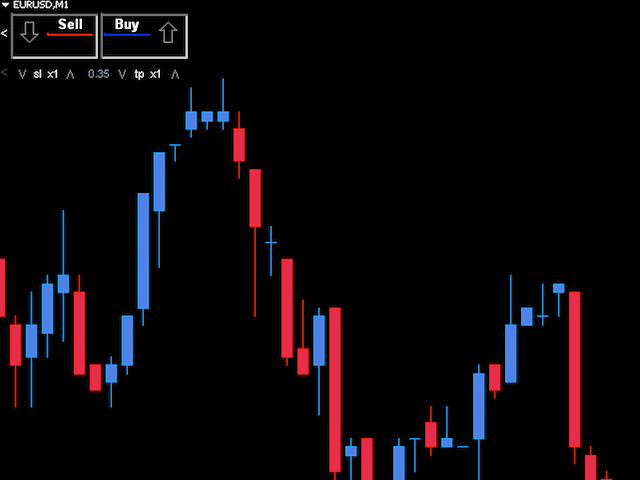
  • Provides a transparent replacement for the standard 1-click trading buttons in MetaTrader 4 (1 click still works and SL/TP will automatically be set as well as Stacking).
  • Automatically calculate lot order size according to preset risk management percentage and account size.


Features

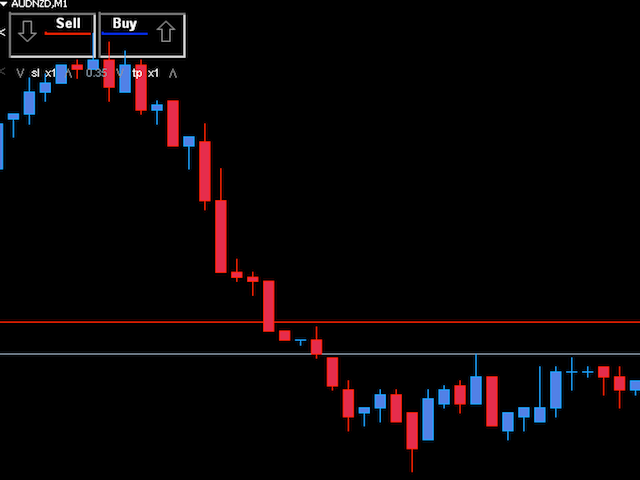
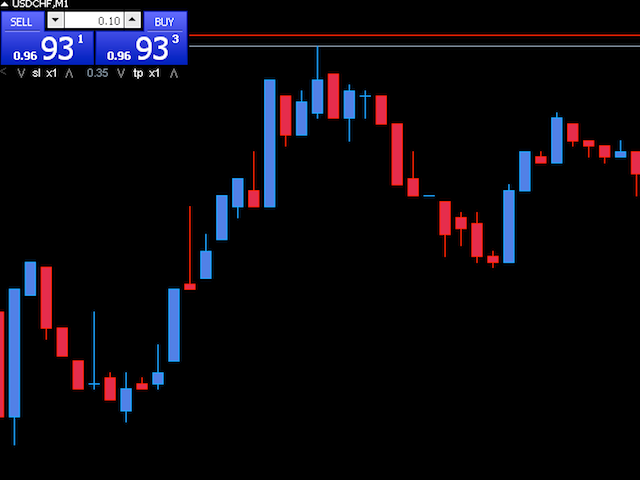
  • Simple Transparent Sell / Buy Buttons: So the buttons do not block the charts like the standard 1 click buttons on MetaTrader 4.
  • Auto Stop and Take Profit: When an order is placed, the SL and TP are automatically set according to settings.
  • Automatic Stacking: The Stacker EA, can be set to automatically place up to 5 orders with 1 click. Each order can be set individually, including SL, TP or if the order is enabled.
  • Auto Stack and SL/TP on external orders: If orders are placed using the standard methods (1 click buttons, pending orders), the stacker is enabled by default to modify and stack the order(s) according to the stacker settings. If you do not want to use this feature, be sure to disable “StackExternalOrders”.
  • Automatic Risk Calculation: Instead of calculating and setting lot size, the Stacker EA will do this automatically. The default risk size is 2% and is calculated according to Stop Loss settings and number of stacks enabled. This saves time, mistakes and enables your trade size to adjust automatically according to your trading success.
  • On chart Stop Loss and Take Profit multiplier: This makes it easy to adjust your trade according to market conditions, instead of having to change the Expert Advisor settings, you can simply adjust your SL /TP with simple increments. It is advisable to keep your initial SL/TP minimal (3-5 pips for scalping) and use the on chart multiplier to set your actual SL/TP size.


Indicator Parameters

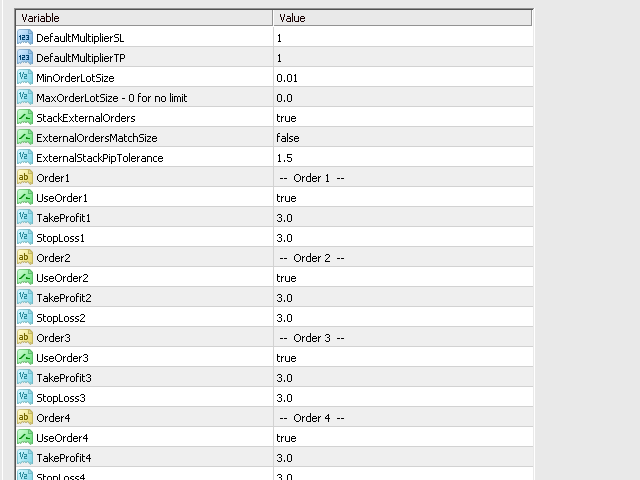
  • DefaultMultiplierSL - The default for the Stop loss Multiplier.
  • DefaultMultiplierTP - The default for the Take profit Multiplier.
  • MinOrderLotSize - The minimum lot size.
  • MaxOrderLotSize - The maximum lot size (0 for no limit).
  • StackExternalOrders - When enabled, external orders will be automatically modified according to the stacker settings.
  • ExternalOrdersMatchSize - If StackExternalOrders is enabled, any stacks will have the same lot size as external order.
  • ExternalStackPipTolerance - Stacks will only be placed on an external order if the prices is still within this setting.
  • UseOrder1 - To use Order 1 of order stack.
  • TakeProfit1 - Take profit setting for Order 1.
  • StopLoss1 - Stop loss setting for Order 1.
  • UseOrder2 - To use Order 2 of order stack.
  • TakeProfit2 - Take profit setting for Order 2.
  • StopLoss2 - Stop loss setting for Order 2.
  • UseOrder3 - To use Order 3 of order stack.
  • TakeProfit3 - Take profit setting for Order 3.
  • StopLoss3 - Stop loss setting for Order 3.
  • UseOrder4 - To use Order 4 of order stack.
  • TakeProfit4 - Take profit setting for Order 4.
  • StopLoss4 - Stop loss setting for Order 4.
  • UseOrder5 - To use Order 5 of order stack.
  • TakeProfit5 - Take profit setting for Order 5.
  • StopLoss5 - Stop loss setting for Order 5.
  • UseAutoLotSize - When enabled, Order lot size will automatically be calculated according to risk management settings.
  • RiskManagementPercent - The percentage of balance used in the calculation of Order lot size based on Stop loss settings.
  • RiskManagementPipSizeDefault - Used to calculate Auto Lot Size if SL is not set (15 is used unless valid size is given).
  • RiskManagementPipSizeOverride - 0 to disable, if set above 0 Risk / Auto Lot Size is based only on this value (use with caution as Order Stop loss settings and number of stacks have no effect).
  • RiskManagementReserveBalance - To reserve a portion of balance.
  • CalculateRiskOnEquity - Balance will be calculated on account equity.
  • CalculateRiskOnMinEquityAndBalance - Balance will be calculated on the lowest of account equity and account balance.
  • ShowControlPanelByDefault - To show Control Panel by default.
  • MagicNumberPrefix - Magic Number Prefix used on each Order.
  • MaxSlippagePoints - Orders will be placed only if the price is still within this setting.
  • ShowExecuteTime - For debugging, will show expert execute time.
推荐产品
Pirate
Anatoliy Lukanin
3.9 (20)
Deposit :   from 100 deposit units Trading pairs: I recommend currency pairs: EURAUD, CHFJPY, EURCHF, EURGBP, AUDCHF, CADCHF, USDCHF. Trading period :  Any Account: You should use ECN-ECN.Pro accounts with five-digit quotes with a moderate size (spread). Parameters: USING - Choice, trading risk or fixed lot RISK/LOT - Lot Risk Value RESTORING_THE_BALANCE - Restoring balance* HOW_THE_RESET_WINDOW - Reset the Global Variable TAKE_PROFIT - Set profit STOP_LOSS - Set loss COUNT_BUY - The number of s
MODIFIER V.11 the default setting for this EA is for XAU/USD, TF M1. this ea uses the candle pattern indicator, accompanied by a news reactor button. if you have questions please click the link provided on the parameter page technically this ea works full time, if installed on a vps. You can add orders via gadgets, Android or PC at home. this ea is very flexible. if you install ea on vps, you can add order whenever you get trading signal with high probability. and then your manual order will b
MyVolume Profile Scalper
Ahmad Aan Isnain Shofwan
购买之前,请使用模拟帐户 MyVolume Profile FV(免费版本) 进行几个月的前向测试。了解它,并找到最适合您的设置。 MyVolume Profile Scalper EA 是一种先进的 自动化   程序,旨在使用交易量配置文件,该程序 获取 指定时间段内特定价格水平的总交易量,并将总交易量划分为上涨交易量(使价格上涨的交易) ) 或下跌成交量(导致价格下跌的交易),然后开仓或 下 单。 该 EA 的核心引擎使用 Volume、Heiken Ashi 和 ADX 指标。 使用可定制的移动平均线的附加过滤器来确保并遵循移动平均线指标给出的趋势。 此过滤器是可选的,默认情况下为 TRUE(使用此过滤器)。 MyVolume Profile Scalper EA  按降序(从大到小时间范围)扫描所有时间范围(D1、H4、H1、M30、M15、M5、M1),并在条件匹配时下订单,您可以跟踪该交易量的交易量概况用于订单的时间范围。 扫描的时间范围是    可定制的。 特征: 批次模式:固定批次 如果您不需要鞅,请将鞅乘数设置为 1 来启用/禁用鞅 使用网格策略。 根据定义的距离(
Gyroscopes
Nadiya Mirosh
Gyroscope        professional forex expert   (for EURUSD, GBPUSD, USDJPY, AUDUSD, USDCHF, EURGBP, EURJPY, NZDUSD, USDCAD, EURCHF, AUDJPY, CADJPY pairs)   alyzing the market using the Elliot Wave Index. Elliott wave theory is the interpretation of processes in financial markets through a system of visual models (waves) on price charts. The author of the theory, Ralph Elliott, identified eight variants of alternating waves (of which five are in the trend and three are against the trend). The mov
FiboPlusWaveRunner
Sergey Malysh
3.29 (7)
Expert.   Automatic and manual trading. Ready-made trading system based on   Elliott waves   and Fibonacci retracement levels . It is simple and affordable. Display of the marking of Elliott waves (main or alternative option) on the chart. Construction of horizontal levels, support and resistance lines, a channel. Superposition of Fibonacci levels on waves 1, 3, 5, A Alert system (on-screen, E-Mail, Push notifications).    visual panel for opening orders in manual trading. visual panel for sett
DracoAI
Hua Manh Hung
DracoAI is a revolutionary automated forex trading robot based on neural network.  Loss coverage is our premium exclusive feature. DracoAI IS: THE BEST MONEY MAKING SERVICE & STABLE PASSIVE INCOME PROFIT, EVEN IF YOU DO NOT PARTICIPATE IN BIDDING FINANCIAL INDEPENDENCE AND STABILITY DracoAI IS SAFE, BECAUSE: WE GUARANTEE THE SAFETY OF YOUR FUNDS NEGATIVE RESULTS OF TRADING ARE COVERED BY OUR RESERVE FUND 100% CONFIDENTIALITY Monitoring  - most popular signal at MQL5 :  https://www.mql5.com/en/s
You can also monitor the real account performance here: https://www.mql5.com/en/signals/2346679 I opened this account on December 2, 2025 . Please follow along and see how it grows from here — I’m excited to share its progress with you. Product Description  This EA is not over-fitted to backtests . It is designed with a strong focus on long-term stability and realistic, practical operation , rather than chasing perfect historical results. I created this EA because I felt that leaving money
Infinity Gold AI
Dmitriq Evgenoeviz Ko
Infinity Gold AI is a trading robot (expert advisor) for the MetaTrader 4 (MT4) terminal, designed for automated trading of the XAUUSD (gold) currency pair. This advisor was developed by experienced traders with ten years of experience in financial markets and focuses on conservative trading methods based on clear money and risk management rules. The full list is available for your convenience at https://www.mql5.com/ru/users/pants-dmi/seller Key Features of Infinity Gold AI: Trading method : Sc
Digital Experts
Mohamed Nasseem
DIGITAL EXPERTS EA is a tool designed to assemble five of our digital experts into one expert as follows: MILCH COW HEDGE EA is primarily a Hedging Strategy. Expert support is to seize every opportunity in any direction. Not just opens the deals, but chooses the right time to close the open positions to begin trading again. MILCH COW MIX EA is primarily a Hedging and Multiples Strategy. Expert support is to seize every opportunity in any direction. Not just opens the deals, but chooses the right
体验  Professional Manager Trader  的强大力量,将您的交易推向新的高度。我们一起自信地在外汇市场中航行,深知成功不仅取决于发现获利交易,还在于通过有效的资金管理来保护资本。 凭借 对风险和资金管理的高度关注, Professional Manager Trader   将成 为您成功交易的关键。它以敏锐的风险管理和严格的头寸规模,在不可预测的外汇市场中航行,保护您的资本并限制下行风险。 我 们创新的交易界面始终走在市场周期的前沿,无缝适应金融市场不断变化的特性。通过广泛的研究和先进的算法分析创建,为您提供可靠的交易解决方案。 为了展示其性能,我们提供了访问我们个人真实账户的机会,交易界面在此账户上已成功运行数月。亲身目睹这个强大工具如何提升您的交易水平。 真 实账户监控: https://www.mql5.com/zh/signals/1968277 体 验  Professional Manager Trader   的 强大力量, 将您的交易推向新的高度。我 们一起自信地在外汇市场中航行,深知成功不仅取决于发现获利交易,还在于通过有效的资金管理来保护资
Gold Invest Pro is designed specifically for trading gold. The EA works only with buy positions on XAUUSD and gradually builds a series of trades, then closes them as a single basket when the total profit reaches a predefined target in money. Inside, it includes: a limit on the maximum number of orders; a profit target for the whole basket in account currency; equity-based protection — when a specified drawdown level is reached, all trades can be closed. It is not a “magic button”, but a tool f
ALT Income
Maksim Bogdanov
ALT Income  - Автоматизированный    советник. Написан для пары EURUSD. .  Торгует  на тайм фрейме M5.  Рекомендованные условия торговли при плече 1:500 Минимальный депозит  - 100 условных единиц (EUR, USD) .  Процент загруженного депозита при продаже -    MaxRiskSELL   от 1 до 15;   Прибыль от одной сделки - TakeProfitSell от 50 до 100.0; Рекомендованные условия торговли при плече  1:40 Минимальный депозит  - 100 условных единиц (EUR, USD) .  Процент загруженного депозита при продаже -    MaxR
Gold Bullion
Armin Heshmat
Gold Bullion EA   is   VIP ,   It    was developed by   ENZOFXEA   team in Germany with experienced traders with   more than 15 years   of trading experience.The indicators used in expert have nothing to do with the standard indicators in the market and are completely derived from strategy. All Trade Have StopLoss Always Behind Order An expert based on    (GOLD , XAUUSD   ) This Expert  is Day Trader and  Breakout strategy NOTE Default EA setting is correct    Time Frame :  Daily  D1 first depo
Historical Pattern MT5: 统计优势的8大支柱   停止猜测。用数据交易。 纯数学。零指标。机构优势。 老实说,大多数交易者失败是因为他们打错了仗。他们盯着5分钟图表,画着随意的线,依靠希望交易。与此同时,机构——银行、对冲基金和算法——是基于 结构性事实 进行交易的。 如果你基于“感觉”交易,你基本上就是大玩家的流动性。 其实不必如此。 这个EA为你提供了“蓝图”。我们不猜测。我们依靠从 10到30年 的各种市场历史中提炼出的 原始、未过滤的数据 。我们跟随全球资本的流向。 真理的8大支柱 该系统基于8种不可否认的市场力量计算加权的“汇聚得分”: 支柱 1:历史季节性 (30%)   市场的记忆。   市场不是随机的;它是季节性的。就像人们在冬天买取暖油一样,企业在每年的特定时间(纳税季节、财政年度结束)转移数十亿美元。我们追踪了 10到30年 的这种行为。如果美元在过去30年中有24年的3月都在上涨,那不是猜测——那是你必须尊重的概率。 支柱 2:绩效审计 (20%)   现实检查。   历史告诉我们 应该 发生什么。支柱2检查它 是否 正在发生。它对过去6个月
SPYDR Pro EA
Mhmwd Hsn Mhmwd Mhmd
Why Choose SPYDR Pro EA?   Optimized for Indices : Perfectly tailored for trading major indices like   US 500, US 30, US 100, and DAX .   Daily Timeframe Strategy : Works exclusively on the   Daily (D1) chart , ensuring low-frequency, high-probability trades.   Advanced Risk Management : Built-in stop-loss (SL) and take-profit (TP) levels to protect your capital.   No Martingale or Grid Strategies : Safe and sustainable trading approach without risky money management techniques.   User
DawnScapl
Waichun Liao
5 (1)
DawnScapl  采用全自动化交易,不使用马丁,加仓或不止损等方式。专为在低市场波动期间进行剥头皮而设计。运用多种高级算法交易,设计多道风控保驾护航。 使用货币对:具体查看参数例表提标。 工作周期时间: M15. 实盘信号: https://www.mql5.com/zh/signals/536396 一般建议 最低存款为100美元,   使用如:ICMARKETS,TICKMILL等价差小的平台. 参数 EA Comment - 订单注释 Slippage  - 最大允许价格滑点 Lots  - 固定下单手数 Auto_Risk  - 自动下单手数 TradeOnFriday-周五交易开关 Friday_Hour-如果周五交易为True,则止时间为停止新订交易时间
Ksm: Smart Solution for Automated Forex Trading Ksm is a tool designed for automating Forex trading, using modern methods of time-series data analysis to work with multiple currency pairs across different timeframes. Key Features and Benefits Multi-currency support : Ksm enables trading across multiple currency pairs, helping traders adapt their strategies to various market conditions. New currency pairs can be easily added. Time-series data analysis : Utilizing advanced algorithms, Ksm analyzes
The Arrow Scalper
Fawwaz Abdulmantaser Salim Albaker
1 (2)
Dear Friend..  I share with you this simple Expert Adviser .. it is full automatic  this Expert Adviser following the trend of the pair you install on or any stocks or indices , it is works like that: - when the trend on H4 chart show a start of up trend the expert will wait till the 15M & 1H charts show an up trend the EA will open a buy order directly , and do the same for down trend and open a sell order the buy or sell  order lot size and take profit and stop loss will measured manually  by
FREE
NoDoubt Money In System
NKATEKO VUKOSI LEROY MASANGO
NOTE:  The EA open and close trades automatically. It only open one position at a time and close it at high profit or less loss. A next position will be opened whenever the EA Strategy requirements are met. Watch our video to see how it works.   DEFAULT INPUTS: ARE CHANGEABLE Variable Value  Warning  Use [PIPS] not [POINTS]  Trade Size  0.05  Maximum Spread  3.0  Adjusted in OnInit  3  Maximum Stop Loss  0.0   Maximum Take Profit  0.0  Audible alerts  True  Maximum Open Trades  1  Hedging  Tru
Hedging Forex EA1
Samir Arman
5 (2)
️ Hedging Forex EA1 – Smart Risk Control with ATR & Hedge Strategy Now with enhanced features and virtual strategy tester guidance --- Overview Hedging Forex EA1 is a smart, risk-managed Expert Advisor designed for volatile currency pairs using a hedging strategy. This EA provides advanced control over position sizing, trade timing, and Take Profit strategies with ATR integration. Whether you're a beginner or an experienced trader, Hedging Forex EA1 offers flexibility, protection, an
Gold of the Incas
Dmitriq Evgenoeviz Ko
Gold of the Incas is a highly effective trading advisor created specifically for the MT4 platform and focused on the gold market and major currency pairs. Using complex algorithms, it analyzes market trends and price fluctuations in real time, ensuring maximum profit with minimal risk. the full list for your convenience is available https://www.mql5.com/ru/users/pants-dmi/seller The effectiveness of Gold of the Incas is confirmed by long testing periods, where it demonstrated outstanding res
H4 GBPUSD Trend Scalper is a trend signal scalper The EA trades according to the trend strategy using original built-in indicator for opening and closing orders. The external inputs for limiting trading on Fridays and Mondays are available. The purpose of the strategy is to use the current trend with the most benefit. According to the results of testing and working on demo and real accounts, the best results achieved by using the Н4 timeframe on the GBP/USD pair Works on MetaTrader 4 Build 971+
Insight Investor: Advanced Multi-Currency Forex Trading Bot Introduction In the fast-paced world of Forex trading, having the right tools can significantly enhance your trading experience. Insight Investor is an advanced multi-currency trading bot designed to automate and optimize your trading operations. This expert advisor employs modern algorithms to analyze market conditions and execute trades, aiming to deliver consistent results while maintaining controlled risk levels. Key Features of Ins
MaxNinjya20
Yutaka Yoshinouchi
This EA has been winning steadily for seven years in the strategy tester. I haven't tested it further because it would be pointless to do so, but I think it would produce the same results. This is because the logic is designed to not lose in any market environment. Performance over seven years: About 3 times. In a world where economic commentators say that a 7% annual interest rate is considered genius, this EA has earned 42% annual interest. This Max Ninjya is a genuine and authentic EA. An
Simos MT4
Maryna Shulzhenko
5 (1)
Description of   Simo : an innovative robot with a unique trading system Simo is a revolutionary trading robot that changes the rules of the game with its unique trading system. Using sentiment analysis and machine learning, Simo takes trading to a new level. This robot can work on any time frame, with any currency pair, and on the server of any broker. Simo uses its own algorithm to make trading decisions. Various approaches to analyzing input data allow the robot to make more informed decis
NewHorizon MT4
Evgeniy Zhdan
The EA uses a complex non-linear formula for calculating market entry points and a unique algorithm for fixing the result of work. The trading expert does not use the increase in the volume of transactions to block unprofitable positions. Mandatory take profit and stop loss levels are used. The adviser controls the spread increase by the broker and skips trading until the spread returns to its "normal" values. The best results are achieved when working with trading instruments with default
(My offer also includes a more advanced version of this EA with an extended list of available filters and methods for generating trading signals: MultiAsset SuperTrend Trader Pro,  available on my profile.) MultiAsset SuperTrend Trader: The Ultimate Trend Engine for MetaTrader 4 Dominate the Markets with Precision, Diversification, and Pure Trend Alignment Are you looking for a trading strategy that combines the power of pure trend following with the safety of portfolio diversification? The M
Accuracity
Vladislav Filippov
1 (1)
For the expert to work correctly, do not forget to upload the files to the directory of the agreement (... AppData \ Roaming \ MetaQuotes \ Terminal \ Common \ Files) Accuracity is a completely new generation automated trading neuro-system. This system, whose structural basis is a specialized neural network, is able to permanently learn in chaotic market conditions, organizing and systematizing them to optimize trading and protect the user from the systematic opening of transactions against th
Market Maestro: Your Ideal Partner for Automated Forex Trading If you're looking for a reliable assistant for trading in the currency market, Market Maestro is exactly what you need. This modern Forex bot is built using the latest technologies and algorithms, allowing it to effectively analyze market data and make informed trading decisions in real-time. Key Features of Market Maestro 1. Multicurrency Capability for Broad Opportunities Market Maestro can work with a wide range of currency pairs,

Evening Scalper Pro
Valeriia Mishchenko
4 (19)
EA has live track records with low drawdown: Live signal - Best Pairs Live signal - All Pairs Evening Scalper Pro is the state-of-the-art mean-reversion trading system that operates during the American trading session. It's very different from most other scalping systems, since it uses a unique trading logic on cross pairs that have a strong mean-reverting tendency with high profit targets. EA enters the market with market orders from 19 to 23h, it does not open trades during rollover (0:00-1:
该产品的买家也购买
Assassin Trading Assistant
Anthony Donald Dickenson Jr
The EA is used as an assistant for traders in the Trading Masters group.  The EA assists with identifying setups when taking trades using the strategies outline in the Trading Masters Group.  The EA has been developed and is intended for use by community members who understand the concepts and would like assistance navigating trade setups.  It is recommended to first understand the concepts presented in the Trading Masters group before purchasing this EA so the user can understand and benefit fr
The Golden Shield EA 是一款基于XAUUSD(GOLD)特有的波动性编译而成,是一种内在运行逻辑简单却又不一般的交易工具,它使用了马丁格尔+对冲+顺势而为一套运行模式。EA通过收集并学习了大量的历史数据,结合品种特性无数次用于测试市场,为此而诞生。 EA的逻辑很简单,当你打开策略,任何时候都可以双向开仓,自动止盈,整体止损;当行情走势缓慢的时候,它会很耐心等待机会,当走势瞬间变大,它也会根据走势的速率、持续性,择机进场补仓,同时它也会顺势补仓。 由于在策略中使用全自动交易,回测数据将不能体现 Golden Shield   EA的特性,你可以在任何时间段将它用于模拟盘进行测试1个月~3个月,在此为了展现策略的特性,将向市场提供免费1个月的测试期限(请联系我)。最后它将无视任何的数据大行情,因此它是暴力的,同时它也是一款极具性价比的交易专家。 10个月的实盘成果 展示:   https://www.mql5.com/zh/signals/1798191 (您可以通过回测去判断一款产品的价值,但我更愿意用实战去验证自己的成果,让我们一起通过模拟或实盘去见证吧!!) 参
Note: After installation, please go to Tools>Options>Expert Advisors and add   https://porsaj.com   to 'Allow WebRequest for listed URL'. Still Problem?! Please check Internet connection! Unlock the power of cutting-edge technology with Porsaj Artificial Intelligence Bot, your trusted Expert Advisor for MT4. Designed to revolutionize your trading experience, this advanced bot combines sentiment analysis, technical analysis, and harmonic patterns, all driven by the incredible capabilities of art
Copiador MT4
Luciana Andrea Maggiori
Copiador – La Mejor Herramienta para Copiar Operaciones en MetaTrader 4 Este no es un simple copiador de operaciones que únicamente permite copiar transacciones de forma local entre diferentes cuentas de MetaTrader 4 en cualquier dirección y cantidad. ¡Por supuesto que lo hace! ¡Pero Copiador hace mucho más! Descubre sus características y beneficios a continuación FUNCIONALIDADES DESTACADAS: Copiado entre brokers diferentes : Puedes copiar operaciones desde una cuenta en un broker
Trade Hub Expert Advisor (EA) – Description Trade Hub is a centralized risk and trade management Expert Advisor designed to enforce strict control over grid-based trading across multiple charts and symbols. Its primary function is capital protection and disciplined trade execution , achieved through the following key limitations: Global Grid Limiting – Restricts the total number of active grids across all charts where the EA is running. Per-Symbol Order Control – Caps the number of simultane
神奇点位测算系统 支撑、压力、目标位... 用科学的测算来帮助您的交易 找到相应的高低点 通过我们对当前图表的观察,找出相应的高点和低点 输入高低点并计算 在相应位置输入高低点数值,并点击计算就可以得出支撑压力目标等 预埋下单等待结果 通过计算得到的价格进行预埋下单(极限位风险小)并设好止损,等待结果 三点确认测算 该功能分为"测下跌"和"测上涨"两种模式,通过三个关键点位的组合分析,测算价格在趋势中的可能目标位。 涨跌回调反弹测算 该功能帮助用户判断价格在上涨过程中可能的回调位置,或在下跌过程中可能的反弹位置,辅助判断趋势延续性。 节省时间精力|专注价格研究 极大地节省了时间和精力,可以在工作的同时让交易自动进行,交易者可以将更多的精力放在研究市场趋势及策略。
Local Trade Copier EA MT4
Juvenille Emperor Limited
4.96 (105)
通过 Local Trade Copier EA MT4 获得非常快速的交易复制体验。它的简单1分钟设置,使您可以在同一台Windows计算机或Windows VPS上在多个MetaTrader终端之间复制交易,具有闪电般快速的复制速度,低于0.5秒。 无论您是初学者还是专业交易者, Local Trade Copier EA MT4 都提供了广泛的选项,可根据您的特定需求进行自定义。对于任何希望增加利润潜力的人来说,这都是终极解决方案。 今天就尝试一下,看看为什么它是市场上最快、最简单的贸易复印机! 提示: 您可以在您的模拟账户中下载并试用 Local Trade Copier EA MT4 模拟版: 这里 将下载的免费演示文件粘贴到您的 MT4 >> 文件 >> 打开数据文件夹 >> MQL4 >> 专家文件夹并重新启动您的终端。  免费演示版本每次可在 4 小时内发挥全部功能,仅限演示帐户。 要重置试用期,请转至 MT4 >> 工具 >> 全局变量 >> Control + A >> 删除。 请仅在非关键模拟账户上执行此操作,不要在挑战道具公司账户中执行此操作。 如果您无法在
欢迎来到 Trade Manager EA——这是一个终极风险管理工具,旨在使交易变得更直观、精准和高效。它不仅仅是一个下单工具,而是一个用于无缝交易计划、仓位管理和风险控制的全面解决方案。不论您是新手交易员、资深交易员,还是需要快速执行的剥头皮交易员,Trade Manager EA 都可以满足您的需求,适用于外汇、指数、大宗商品、加密货币等各种市场。 借助 Trade Manager EA,复杂的计算已成过去。只需分析市场,在图表上用水平线标记入场、止损和止盈,设置您的风险水平,Trade Manager 就会立即计算出理想的头寸规模,并实时显示以点、账户货币计价的止损和止盈。每笔交易都得以轻松管理。 主要功能: 头寸规模计算器 :根据定义的风险瞬间确定交易规模。 简单的交易计划 :在图表上用可拖动的水平线直接计划交易,设置入场、止损和止盈。 实时显示 SL 和 TP :以账户货币、点或分显示止损和止盈,便于分析。 高级保护工具 盈亏平衡选项 : 基本盈亏平衡 :当您的交易达到设定水平时自动保护利润。 多级盈亏平衡 :设置多达 4 个级别以逐步保护利润。 尾随止损选项 : 基本尾随
Trade Assistant MT4
Evgeniy Kravchenko
4.42 (192)
它有助于计算每笔交易的风险,容易安装新的订单,具有部分关闭功能的订单管理, 7 种类型的追踪止损和其他有用的功能。 附加材料和说明 安装说明 - 应用程序说明 - 模拟账户应用程序的试用版 线条功能  - 在图表上显示开仓线、止损线、止盈线。 有了这个功能,就可以很容易地设置一个新的订单,并在开仓前看到它的附加特性。   风险管理  - 风险计算功能在考虑到设定的风险和止损单的大小的情况下,计算新订单的成交量。它允许你设置任何大小的止损,同时观察设定的风险。 批量计算按钮 - 启用 / 禁用风险计算。 在 " 风险 " 一栏中设置必要的风险值,从 0 到 100 的百分比或存款的货币。 在 " 设置 " 选项卡上选择风险计算的变量: $ 货币, % 余额, % 资产, % 自由保证金, % 自定义, %AB 前一天, %AB 前一周, %AB 前一个月。   R/TP 和 R/SL - 设置止盈和止损的关系。 这允许你设置相对于损失的利润大小。 例如, 1 : 1 - 这决定了 TP = SL 的大小。 2 : 1 - 这意味着 TP 是 SL 的两倍。 RR - 它禁用比率。  
The product will copy all telegram signal to MT4   ( which you are member  ) , also it can work as remote copier.  Easy to set up, copy order instant, can work with almost signal formats, image signal, s upport to translate other language to English Work with all type of channel or group, even channel have "Restrict Saving Content", work with  multi channel, multi MT5 Work as remote copier: with signal have ticket number, it will copy exactly via ticket number. Support to backtest signal. How to
Exp COPYLOT CLIENT for MT4
Vladislav Andruschenko
4.69 (65)
MetaTrader 4 的交易复制器。     它从任何账户复制外汇交易、头寸、订单。 它是最好的贸易复印机之一     MT4 - MT4,MT5 - MT4     为了   复制 MT4     版本(或     MT4 - MT5 MT5 - MT5     为了   复制MT5     版本)。 MT5版本 详细描述   +DEMO +PDF 如何购买 如何安装     如何获取日志文件     如何测试和优化     Expforex 的所有产品 复印机 版本       MetaTrader 5 终端 (   МТ5 - МТ5, МТ4 - МТ5   )-   Copylot 客户端 MT5 独特的复制算法将所有交易从主账户准确复制到您的客户账户。 该产品还以其高运行速度而著称,并且具有强大的错误处理能力。 一组强大的功能。 该程序可以在多个终端绑定上运行。 使用它作为您在一个账户上交易的多个账户的交易 的同步器 , - COPYLOT 会将您的交易复制到其他终端。 从已关闭的账户中复制 Invest 密码; 部分关闭仅从 mt4 到 mt4 从模拟账户复制到
Copy Cat More Trade Copier MT4 (复制猫MT4) 不仅仅是一个简单的本地交易复制工具;它是一个为当今交易挑战而设计的完整风险管理与执行框架。从 prop firm 挑战到个人账户管理,它都能通过强大的执行力、资本保护、灵活配置以及先进的交易处理来适应各种情况。 该复制器同时支持 Master(发送端) 和 Slave(接收端) 模式,能够实时同步市价单与挂单、交易修改、部分平仓以及 Close By 操作。它兼容模拟账户与真实账户,支持交易或投资者密码,并通过持久交易记忆系统(Persistent Trade Memory)确保即使 EA、终端或 VPS 重启后也能恢复。可同时管理多个 Master 与 Slave,并通过前缀/后缀自动调整或自定义符号映射来处理跨平台或跨经纪商差异。 使用手册/设置: Copy Cat Trading Copier 使用手册 Copy Cat More MT5: https://www.mql5.com/en/market/product/139088 加入频道: https://www.mql5.com/en/cha
TradePanel MT4
Alfiya Fazylova
4.84 (89)
交易面板是一个多功能的交易助手。该应用程序包含超过 50 个用于手动交易的交易功能,并允许您自动化大多数交易操作。 注意,该应用程序在策略测试器中不起作用。购买之前,您可以在模拟帐户上测试演示版本。演示版 这里 。 完整说明 这里 。 贸易。 让您一键执行交易操作: 通过自动风险计算打开挂单和仓位。 一键打开多个订单和仓位。 打开订单网格。 按组关闭挂单和持仓。 头寸反转(关闭买入并打开卖出或关闭卖出并打开买入)。 锁定头寸(开立额外头寸,以平衡买入和卖出头寸的交易量)。 一键部分平仓所有仓位。 为同一价格水平的所有头寸设置止盈和止损。 将所有头寸的止损设置为该头寸的盈亏平衡水平。 开单建仓时,您可以应用以下功能: 计算交易量的多个订单或仓位之间的分布(一键开仓多个订单或仓位时)。 图表上未来订单交易水平的可视化。 设置开仓时允许的最大点差大小。 止盈和止损之间的自动比率。 虚拟止损和止盈。 根据当前点差的大小自动增加止损和止盈的大小。 根据 ATR 指标的读数计算止盈和止损。 设置挂单的到期日期。 挂单设置为“追踪”(挂单自动跟随当前价格移动指定距离)。 管理通过移动终端(手机)开立
Trade copier MT4
Alfiya Fazylova
4.58 (33)
Trade Copier 是一种专业实用程序,旨在复制和同步交易账户之间的交易。 复制发生从供应商的帐户/终端到收件人的帐户/终端,安装在同一台计算机或 vps 上。 在购买之前,您可以在演示帐户上测试演示版本。 演示 这里 。 完整说明 这里 。 主要功能和优点: 支持复制MT4>MT4、MT4>MT5、MT5>MT4,包括МТ5 netting账户。 供应商和收件人模式在同一产品中实现。 简单直观的界面,允许您直接从图表中实时控制复制。 连接中断或终端重新启动时不会丢失设置和位置。 允许您选择要复制的符号,也可以替换接收者的符号,例如 EURUSD> USDJPY。 支持回拷贝。 能够仅复制某些订单。 允许您设置开仓交易价格的最大差异和最大时间延迟。 正确复制部分订单关闭的执行。 计算复制手数的几种方法。 同步止盈和止损。有几种方法可以计算它们的位置。 支持通过执行在“Market account”上工作,其中 SL / TP 仅在开仓后设置。 如何使用简单的设置复制交易 将供应商终端和接收终端安装在同一台计算机或 VPS 上。 在供应商终端上以“Master”模式安装复印机,然后
KT Equity Protector MT4
KEENBASE SOFTWARE SOLUTIONS
3.4 (5)
轻松保护您的交易资金 保护交易资金与增长资金同等重要。KT Equity Protector 是您的个人风险管理助手,持续监控账户权益,在达到预设的利润目标或止损水平时,自动关闭所有持仓和挂单,以防止亏损或锁定盈利。 无需情绪化的决策,也不再需要猜测——只需让这个可靠的资金保护工具为您全天候守护账户。 KT Equity Protector 可自动通过关闭所有图表来阻止其他交易机器人继续操作。这确保在您手动重新启动 KT Equity Protector 之前,不会发生任何进一步的交易行为,从而让您完全掌控并安心交易。 工作原理 权益止损(防止亏损): 假设您的账户余额为 $10,000,设置了 $1,000 的权益止损。一旦账户权益降至 $9,000,KT Equity Protector 将立即关闭所有交易,保护您的资金免受更大亏损。 权益止盈(锁定利润): 同样地,如果您设置了 $2,000 的权益止盈目标,当账户权益达到 $12,000 时,EA 将立即平仓,锁定收益并保障已获得的利润。 两种强大的资金计算模式: 相对模式(基于百分比): 按照账户初始余额的百分比计算止损和
News Filter EA: Advanced Algo Trading Assistant News Filter EA is an advanced algo trading assistant designed to enhance your trading experience. By using the   News Filter EA , you can integrate a Forex economic news filter into your existing expert advisor, even if you do not have access to its source code. In addition to the news filter, you can also specify   trading days   and   hours   for your expert. The News Filter EA also includes   risk management   and   equity protection   features


MT4 至 Telegram 信号提供者 是一款易用、可完全自定义的工具,它使发送信号到 Telegram 成为可能,将您的账户变成信号提供者。 消息的格式 可以完全自定义! 但是,为了简便使用,您也可以选择一个预设模板,并能够启用或禁用消息的特定部分。 [ 演示 ]  [ 手册 ] [ MT5 版本 ] [ Discord 版本 ] [ Telegram 频道 ]  New: [ Telegram To MT5 ] 设置 可通过 用户指南 获取逐步说明。 无需了解 Telegram API;开发者提供所需的一切。 主要特性 自定义发送给订阅者的订单详情的能力 您可以创建分层订阅模型,例如铜牌、银牌、金牌。金牌订阅可获得所有信号等。 按订单号、符号或备注过滤订单 包括执行订单的图表的屏幕截图 在发送的屏幕截图上绘制已关闭的订单,以便额外验证 推迟发送新订单消息的可能性,以便在发送前对位置进行调整 订单详情的全透明度: 新的市场订单 *附带屏幕截图 订单修改(止损、获利点) 已关闭订单 *附带屏幕截图 部分关闭订单 ** 新的挂起订单 修改的挂起订单(进场价格) 挂起订单激活(
Trade Dashboard MT4
Fatemeh Ameri
4.96 (53)
疲于复杂的订单下达和手动计算?Trade Dashboard 是您的解决方案。凭借其用户友好的界面,订单下达变得轻而易举,只需点击一下,您就可以开设交易、设置止损和止盈水平、管理交易手数,并计算风险回报比,让您只需专注于您的策略。告别手动计算,使用 Trade Dashboard 简化您的交易体验。 立即下载演示版本 。 您可以在这里找到仪表盘功能和特性的详细信息 。 加入 Telegram 频道 。 购买后请给我发消息以获取支持。如果您需要添加更多功能,可以在产品的评论区留下您的想法,我愿意听取任何建议,希望您能在使用我的产品时获得最佳体验 。 这是 MT5 版本。 风险管理:使用 Trade Dashboard,可以将您的风险设置为账户余额或权益的百分比,或将风险设置为总金额。在图表上直观地定义您的止损,让工具准确计算每个货币对的适当手数。该工具还可以根据您期望的风险回报比自动设置止盈水平。它甚至可以在手数计算中涵盖佣金和点差费用。此外,您的止损和止盈可以转变为虚拟水平,隐藏于经纪商。通过 Trade Dashboard 的高级风险管理功能,掌控风险,保护您的资本。 交易线
CloseIfProfitorLoss with Trailing
Vladislav Andruschenko
4.87 (31)
在 MetaTrader 4 中使用利润跟踪功能在达到总利润/亏损时平仓。 您可以启用 虚拟停止(单独订单)   , 分别计算和平仓 买入和卖出头寸 (Separate BUY SELL)   , 关闭和计算 所有交易品种或仅当前交易品种(所有交易品种)   , 启用追踪获利( 追踪 利润) 关闭存款货币、点数、余额百分比的总损益。 该应用程序旨在与任何其他 EA 一起用于任何账户或与手动交易结合使用。 MT5 版本 详细描述   +DEMO +PDF 如何购买 如何安装     如何获取日志文件     如何测试和优化     Expforex 的所有产品 一旦某些货币对或所有货币对的交易总余额大于或等于设置中指定的值,所有头寸将被关闭并删除订单。 此版本不仅能够在指定的利润水平平仓,而且还可以追踪利润以获得更好的结果。 我们实用程序的主要功能 按所有交易品种的总利润平仓; 按单独交易的总利润结算。 (虚拟模式); 按总利润结算并追踪利润; 按总利润以点数、百分比或货币结算; 所有交易或单独交易均以总亏损结束; 关闭交易后关闭图表和终端、风险管理器、包含关闭信息的邮件、推送通
Multi Copy
Kaijun Wang
5 (1)
跟单->方便快捷的界面交互,用户上手即用     ->>>> 推荐在windows电脑,或者VPS Windows上使用 基本功能: 跟单正常交互速度0.5s以下 自动检测信号源,并显示信号源账号列表 自动匹配品种,不同平台常用交易品种(后缀不同等特殊情况)95%自动匹配,基本无需手动设置,品种映射表可随意双击更改对应品种.(映射表具有快速搜索品种功能) 4种手数计算模式(1.倍率 2.固定手数 3.自适应资金风险 4.源账户资金比例风险) 特殊手数模式:可以根据止损资金风险反算手数(可能止损过小计算的手数过大,请谨慎使用) 多个平台,多组信号源,多组接收端随意组合(   MT4 和MT5数据可互通, 需分别购买安装 )        发送端接收端二合一,加载的时候选择模式 接收减仓信号,可以进行减仓操作. 可以反向跟单 可以分别控制跟单类型,是否跟随止损止盈 提供4种跟单开仓价格模式设置(1.开仓价格范围 2.跟单比信号更有优势的价格  3.跟单开仓在比信号劣势的价格  4.不限制开仓价格) 支持语言自动识别[中文,英文] 常见使用小技巧: 一个账户仅加载一个接收端即可自动交易所有
Ultimate Extractor - Professional Trading Analytics for MT4 Ultimate Extractor transforms your MetaTrader 4 trading history into actionable insights with comprehensive analytics, interactive charts, and real-time performance tracking. Ability to combine multiple accounts and MT4 and MT5 into a single dashboard. What It Does Automatically analyzes your MT4 trading history across all Expert Advisors and generates detailed HTML reports with interactive visualizations. Tracks live performance metric
Take a Break
Eric Emmrich
5 (31)
The most advanced news filter on MQL market - free demo available Take a Break has transformed from a basic news filter into a comprehensive account protection solution. It seamlessly pauses any other Expert Advisors during news events or based on your custom filters, all while safeguarding your EA settings - restoring them automatically when trading resumes for complete peace of mind. Typical use cases: A single news filter for all your EAs. Stop trading during news/high volatility (+ close all
Trade Manager MT4 DaneTrades
Levi Dane Benjamin
4.09 (11)
交易管理器可帮助您快速进入和退出交易,同时自动计算风险。 包括帮助您防止过度交易、报复性交易和情绪化交易的功能。 交易可以自动管理,账户绩效指标可以在图表中可视化。 这些功能使该面板成为所有手动交易者的理想选择,并有助于增强 MetaTrader 4 平台。多语言支持。 MT5版本  |  用户指南+演示 交易经理在策略测试器中不起作用。 如需演示,请参阅用户指南 风险管理 根据%或$自动调整风险 可选择使用固定手数或根据交易量和点自动计算手数 使用 RR、点数或价格设置盈亏平衡止损 追踪止损设置 最大每日损失百分比,在达到目标时自动平仓所有交易。 保护账户免遭过多提款并阻止您过度交易 最大每日损失(以美元为单位)在达到目标时自动关闭所有交易。 保护账户免遭过多提款并阻止您过度交易 一键实现所有交易的盈亏平衡 自动计算从手机/电话发送的交易的风险 OCO 在设置中可用 交易和头寸管理 通过设置每月、每周、每天、每小时或每分钟的最大交易次数,停止过度交易和报复性交易。 高级挂单管理。 调整何时关闭挂单的规则 追踪挂单 支持市价订单和挂单 每日最大利润目标(以美元为单位)以确保头寸并停止
KopirMT4 Copy trades for MT4
Alexandr Gavrilin
4.53 (81)
The adviser has been withdrawn from sale  KopirMT4 (CopierMT4) - transaction copier for the MetaTrader 4 terminal, copies (synchronizes, duplicates) transactions from any accounts (copier, copy dealers).  Supports copying: MT4 <-> MT4, MT4 -> MT5 Hedge, MT5 Hedge -> MT4 Support:  https://www.mql5.com/ru/messages/01c3f341a058d901 Why exactly our product? The copier has a high speed and is not dependent on ticks. Copy speed - less than 0.5 sec. Transactions are copied with high accuracy, the sc
Shepherd Safety EA
AW Trading Software Limited
4.92 (13)
The work of the utility is directed at opening new market orders, maintaining them, transferring the unprofitable orders into profit using an internal loss handling algorithm, trend filtering and various types of trailing stop and take profit. Suitable for any instruments and timeframes. The algorithm works separately for buys and sells, which allows simultaneously working in both directions as well. For the event when the additional orders opened by the utility do not become profitable, a Stop
Unlimited Trade Copier Pro is a tool to copy trade remotely to multiple MT4, MT5 and cTrader accounts at different computers/locations over internet. This is an ideal solution for you if you are a signal provider and want to copy your trades to other receivers globally on your own rules. One provider can copy trades to multiple receivers and one receiver can get trade from multiple providers as well. The provider can even set the subscription expiry for each receiver, so that receiver will not b
Equity Protect Pro:全方位账户保护专家,让您的交易更安心 如果您正在寻找账户保护、净值保护、投资组合保护、多策略保护、利润保护、利润收割、交易安全、风控程序、自动风控、自动清仓、条件清仓、定时清仓、动态清仓、跟踪止损、一键关闭、一键清仓、一键还原等功能,Equity Protect Pro 就是您要找的程序。 它配置简单,当到达预设条件时,可关闭所有图表,同时支持关闭信号订阅(这意味着所有交易程序也将停止运行)。此时,将不再有新订单产生,最后再关闭所有订单,有效防止意外损失,让您在交易过程中高枕无忧。 Equity Protect Pro Demo Version for yo u to test   Equity Protect Pro MT4 Demo.ex4 Equity Protect Pro MT5 Demo.ex5 Equity Protect Pro 拥有 14 个核心功能,它们都是独立运行的。您可以根据您的交易策略,选择合适的功能组合使用。这些功能默认为关闭状态,不使用时无需修改。需要使用时,只需将“enable (function)”设置为 tru
Everything for chart Technical Analysis indicator MT4 in one tool Draw your supply demand zone with rectangle and support resistance with trendline and get alerts to mobile phone or email alert -  Risk reward indicator Video tutorials, manuals, DEMO download   here .  Find contacts on my   profile . 1.   Extended rectangles and trendlines Object will be extended to the right edge of the chart when price will draw new candles on chart. This is rectangle extender or trendline extender. 2. Price to
Trend Line Optimizer
Evgenii Aksenov
4.11 (19)
这是趋势线PRO指标的自动参数优化器 轻松快速地为您最喜爱的趋势线PRO指标选择最佳参数。  优化只需几秒钟。 优化器允许您找到每对和周期的最佳参数:振幅,TP1-TP3,止损,以及所选历史部分(天)上的时间过滤器和HTF过滤器的值  要优化不同的时间框架,您需要不同的历史范围: M5-M15设置计算范围参数(天)=60(三个月) M30-H1设置计算范围参数(天)=120(6个月) H4设置参数计算范围(天)=240(一年) D1-W1设置参数计算范围(天)=720(三年) MN1设置参数计算范围(天)=1200(五年) 优化后,参数自动保存到文件夹中的现成设置文件中:MQL4>Files>trendlineoptimizedsettings  如何使用优化器实用程序: 在需要优化的符号和时间的图形上运行优化器实用程序。 优化结束后单击保存按钮 将趋势线PRO指标添加到图表,然后将趋势线PRO扫描仪 Trend Line PRO指标面板上TP1、TP2、TP3、止损和利润指标的值将变得更好,Trend Line PRO 扫描仪中会出现一个按钮(红色或蓝色  Manual G
Now, you have your very own  PROP FIRM AUTO-CLOSER  program! Once your account target or drawdown hits, all open orders will close automatically. “One mistake and your prop account is gone.  Prop Firm Close All Orders for MT4  ensures that never happens.” All of your   OPEN ORDERS   will automatically close when: Your   ACCOUNT TARGET   is hit,  OR Your specified   ACCOUNT DRAWDOWN   is hit,  OR WEEKEND CLOSE   is set and current time is already past the specified time,  OR CLOSE ALL ORDERS   bu
筛选:
无评论
回复评论