 MetaTrader 5
 专家
专家
 指标
指标
 程序库
程序库
 实用工具
实用工具
 窗口小部件
窗口小部件
 规则
规则
MetaTrader 5 交易实用工具 - 32
 以下是可在MetaTrader 5中简化交易的交易程序。将鼠标悬停在一个工具上,阅读它的描述和用途。
Account Sentinel MT5 FREE – Simple Account Monitor Monitor your MT5 account basics in real-time right on your chart! See Balance, Equity, Free Margin, and Margin Level at a glance. Perfect for beginners checking risk without hassle. Key FREE Features: Clean dashboard updates every second Color alerts: Green for safe (Margin Level >80%), Yellow warning, Red danger Basic stats: Balance & Equity difference shown clearly Upgrade for More Power: FULL Version ($49): Add Used Margin, Drawdown %, Multi
FREE

Chart Pro Classic Dark v1.00 Chart Pro Classic Dark is a professional MT5 chart styling and customization tool designed to give your charts a clean, modern, and professional dark appearance. Key Features Dark Black Background — Applies a clean black background to the chart. ️ Candlestick Chart — Automatically configures the chart to use candlesticks. Bullish Candles — Green/Lime bullish candles. Bearish Candles — White bearish candles. Grid Removal — Hides the chart grid for a clean
FREE

TradeBridge EA — Automated Trade Execution for the MyFXRoom Community Important: TradeBridge EA is part of a 2-stage system built specifically for the MyFXRoom trading community. It will not function as a standalone EA. It works in conjunction with the MyFXRoom Bridge application to receive and execute trade alerts automatically. For information on accessing the Bridge, please visit the author's MQL5 profile. Overview TradeBridge EA is a professional automated execution layer for MetaTrader 5.
FREE

History On Chart is an indicator that shows the "trail" of all trades made in a specific period of time. It shows the entry and exit point with their respective dates and prices. It also shows the type of trades and the cash result. Open trades are also displayed, but only the entry point. The indicator is free and fully customizable. If you have any questions please contact us. Enjoy!
This is a free indicator, but it took hours to develop. If you want to pay me a coffee, I appreciate a lot <
FREE

TradeCopier is an application for automated copying of trades for different accounts in MetaTrader 5 terminal with flexible rules of filtering and modification. With TradeCopier, copying, filtering and transformation of trades are realized and processed via the server . It means that copying trades is possible within one or several computers. How can you boost your trading results with TradeCopier? Your convenience and speed Average speed of copying: 100 ms Working with MetaTrader 5 Working with
FREE

Orders Manager is a simple and indispensable assistant for managing all your orders. Inputs: Magic = 999; // Magic TakeProfit = 1000; // Take Profit. If = 0 the level is not setts. StopLoss = 0; // Stop Loss. If = 0 the level is not setts. Slippage = 10; // Slippage GeneralProfit = false; // Closing all orders based on total profit. If false the function is disabled and works according to TakePr
FREE

Ladies and gentlemen, let me explain a simple tool that can help adjust stop-loss positions based on historical data and customized distance. Tool Name: Trailing Stop Pro Description: A trailing stop is a risk management tool commonly used in trading. It allows traders to set a dynamic stop-loss level that automatically adjusts as the price moves in their favor. Here’s how it works: Initial Stop-Loss: When you enter a trade, you set an initial stop-loss level. This is the price at which you’re
FREE

EW Close All – 一键全平。全部关闭 。
EW Close All 是一款轻量级、多语言 EA 专家顾问,只需点击一次按钮,即可瞬间关闭所有持仓并取消全部挂单。
关闭所有已开仓位 取消所有挂单 适用于任意交易品种和任意时间周期 多语言界面 干净、快速、可靠
完美适用于快速离场、风险控制或每日收盘前的清理工作。
保持绝对掌控 —— 用 EW Close All 几秒钟内关闭一切!
EW Close All – 一键全平。全部关闭 。
EW Close All 是一款轻量级、多语言 EA 专家顾问,只需点击一次按钮,即可瞬间关闭所有持仓并取消全部挂单。
关闭所有已开仓位 取消所有挂单 适用于任意交易品种和任意时间周期 多语言界面 干净、快速、可靠
完美适用于快速离场、风险控制或每日收盘前的清理工作。
保持绝对掌控 —— 用 EW Close All 几秒钟内关闭一切!
FREE

交易数据分析助手 : 这是一款交易数据统计分析工具,数据图表较多可供分析参考 . 语言: 支持语言的选择切换(目前支持中文和英文 主动识别不用人工选择) 主窗口显示: 余额显示 总盈亏显示 现在持仓盈亏金额显示 现在持仓盈亏比例显示 买单卖单总单量,总手数,以及盈亏情况显示. 仓位使用比例显示 按照目前持仓能够承受的亏损点数预计 (点击右下角可缩放)每日订单单量,手数,盈亏情况统计 (点击右下角可缩放) 当周盈亏数据
(点击右下角可缩放) 当月盈亏数据
(点击右下角可缩放) 当年盈亏数据
交易数据统计区: 详细订单统计,(可以选择按日,周,月,季度,年)(按品种,识别码)(现有持仓详细统计) 盈亏/手数/交易次数 柱状图 多/空持仓时间/获利水平情况 多货币盈利次数/盈利水平分布情况 余额净值曲线/余额曲线/盈利曲线等(注:加载余额净值曲线可能需要一定的数据处理时间,请耐心等待加载完成...) 每次订单盈亏利润柱状图 多货币对盈利曲线图 数据统计分析报告 关于版本更新 有任何问题,建议,欢迎交流.
FREE

Quanition Calendar Diagnostic — 适用于 MT5 的免费诊断脚本(脚本名:CalendarDiagnostic)。结果显示在 Experts 选项卡。 经济日历标签页为空,或新闻过滤器不再触发。原因可能是日历数据过期、电脑或 VPS 时钟偏移,也可能只是标签页启用了过滤。只看 Calendar 标签页,这三种情况很难区分。 这个脚本的作用,就是把这三种原因区分开来,然后清楚地告诉你接下来应该怎么做。 它到底做了什么 它通过 API 直接读取日历数据库,而这条路径不会受到界面上任何过滤器设置的影响。仅凭这一点事实,就足以把第三种原因(标签页被过滤)从另外两种原因中区分出来:如果 API 明明返回了未来的事件,而你的 Calendar 标签页却什么都没有显示,那说明问题只是出在标签页的过滤设置上,你的交易终端本身完全没有问题。 接着,它会把读取到的结果归入以下几种判定之一: HEALTHY — 存在未来事件,说明数据源是活跃的 STALE_FEED — 数据行是存在的,但没有一条晚于当前时间 EMPTY — 在整个查询窗口内,一条记录都没有 API_ERROR
FREE
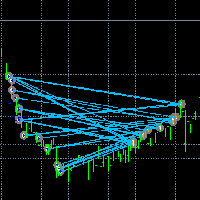
让交易更清晰可见。 你是否曾在 MT5 策略测试器或图表上的信号可视化中分析过交易?
如果答案是“是”,那么你一定知道那些交易线几乎看不清。
解决方案就是实用工具 “Visible Deals” 。
“Visible Deals” 可以让你的交易线变得更粗,甚至可以更改颜色。
只需将 “Visible Deals” 拖放到图表上,并调整新的线条格式即可。 Make the deal visible. Have you ever analyzed the deals in the MT4 Strategy Tester or Signal Visualization on Chart? If the answer is "Yes", then you know how sightless trade lines are. The solution is the utility "Visible Deals". The utility "Visible Deals" allow you to make trade lines wider or even change color. Just
FREE

非常抱歉,因为网络原因无法给大家提供服务,如果安装使用遇到任何问题,请联系:9048914@qq.com,谢谢。 币安是全球知名的加密数字货币交易所!为方便对加密数字货币行情进行实时数据分析,程序可自动将币安期货实时成交数据导入到MT5进行分析,主要功能有:
1、支持币安全部USD-M期货交易对自动创建,也可以单独设置基础货币。基础货币BaseCurrency为空表示所有货币,也可以单独设置BNB、ETC等任何币安支持的加密货币。 2、同步币安各货币的价格精度、交易量精度以及最大交易量等。
3、通过WebSocket链接币安,每一笔期货成交即可推送到Mt5更新行情。
4、支持所有期货品种同时更新,为提高实时数据效率,可自定义最大更新组(需要打开对应窗口更新),工具默认最大组数为4组,需要打开4个图表窗口,运行时分别设置RangNO为0,1,2,3(小于最大窗口数),以此类推。如果仅需要更新当前窗口的实时行情,可将RangNO设置为-1。
5、实时行情更新请使用代理地址,因此,必须将代理地址 trade.ctabot.com 添加到:MT5——工具——选项——EA——WebReq
FREE

Active Session Timer — Key Features Real-Time Session Status
Instantly see which global trading sessions (London, New York, Tokyo, Sydney) are active or inactive at any given time. Start & End Countdown Timers
Displays exact start and end times for each session, along with live countdowns to help you plan trades in advance. Local Time Zone Support
Requires users to set their local time zone during installation for accurate and personalized session tracking across all broker servers.
FREE
核心定位 MT5 專用高級分析工具,深度解析交易歷史,挖掘數據洞察,優化策略並提升盈利能力。 核心用途 策略性能評估:分析盈利能力、穩定性與風險,給出 A+-D 級客觀評級 交易模式發現:識別優質品種、時段及盈利習慣,匹配不同市場條件 風險管理優化:計算回撤與風險指標,提供風險調整後的表現分析 主要功能 智能策略檢測:按魔術號碼分組,識別 23 種常見策略,分離手動 / EA 交易 多維度分析:覆蓋策略、品種、時間、評論四大維度,支持三維交叉分析 高級評論分析:自動解析評論中的策略信息,實現標準化與跨策略對比 組合表現分析:推薦最佳交易組合,警示低效配置 多類分析指標:包含基礎盈利、風險控制、高級統計三大類核心指標 輸出報告 終端簡明報告:策略排名、最佳組合、評論洞察、智能改進建議 詳細 CSV 報告:完整統計數據、品種 / 評論 / 時間分析、數據質量評估 使用特色 智能數據處理:自動擴展數據範圍,精確匹配持倉,支持靈活過濾 用戶友好設計:可調節詳情等級,自定義時間範圍,選擇是否包含手動交易 專業級分析:機構級績效標準,多層次風險評估,實戰導向建議 適用人群 EA 開發人員(驗證策
FREE

You only need to load this EA into a single chart. Key Features Session Lockdown Blocks ALL trades outside London/NY sessions Instant position closing at session end NEW: Pre-close alerts (configurable minutes before session end) Smart Daily Limits Profit Target: Set $ or % goals to lock in gains Loss Limit: Hard-stop protection against bad days NEW: Choose between Balance (closed P&L) or Equity (including floating P&L) Dual-Layer Protection Prevention: Stops orders before execution Elimination
FREE

It adds the symbols listed on Binance Spot to the Metatrader5 market clock. With this free file you can list the entire list in seconds. You can easily upload it to your demo account. It is the first file uploaded for Binance Spot Tick and is available for free. Tools menu / Options / Expert Advisors / You need to select Use WebRequest for listed URL You can watch videos to add Metatrader.
FREE

a script created with ChatGPT. It changes the symbol in every other chart window to the symbol of the window where you run the script. The story behind it. I use MT5 across 2 monitors. Same price/symbol, different candles. because changing the symbol in every window was tedious. So I had ChatGPT write this script. Important: this script only changes the symbol, everything else like indicators or objects is not transferred to other chart windows
FREE

The TradeHistoryParsing is a utility for working with the trade history obtained from the MetaTrader 5 terminal. The product is based on the " RegularExpressions in MQL5 " library. It allows to quickly get the required data on your trading history. The filtering results are displayed as a table, a summary of mathematical statistics is provided below the table.
Working with the tool Export the trade report as an html file and place it into the "sandbox". After that, when launching the EA, specif
FREE

An Essential Tool for Traders regardless of experience
Problem : You want to place trades for a few trading pairs, you now have to scroll through individual charts to place your trades. Your playing it wisely and would like to secure small gains for trades that go in your favour and here you are again checking your trades back and forth and closing some off manually Solution : Use the panel. Drag and Drop the panel into any single chart and type in the pairs you need in the inputs. Save time an
FREE

input double MaxDailyLoss = 500.0; // Maximum floating loss in account currency input double SafetyBufferMoney = 10.0; // Trigger at MaxDailyLoss - SafetyBufferMoney input int CheckEverySeconds = 2; input bool is_debugged = false; // Print additional messages in the Terminal
input bool is_Closing_All_Positions = false; // if false for each open position, each new reversed position with the same symbol & lot size will be opened.
This EA will then remove itself from the Chart
FREE

Less is more. Find the strongest trends! This expert scans ALL currency pairs for a strong trend combined with a breakout.
Requirements for a trend report: 1. Up-trend or down-trend must be found in all of the following timeframes (D, H4, H1, M30) 2. Breakout in the daily timeframe (the upper or lower band of the Bollinger band must be broken)
The correctness of the trend is confirmed to 90%
FREE

ExpertGain Risk Manager MT5 is a professional MetaTrader 5 utility designed to help traders manage risk, protect trading capital, and improve trading discipline. It is built for manual traders, semi-automated traders, prop-firm traders, forex traders, gold traders, and anyone who needs better control over daily losses, drawdown, trade exposure, and open positions. This utility does not open trades automatically and does not provide buy or sell signals. Instead, it focuses on responsible trade ma
FREE

This is a utility for storing the data on open interest (OI), ratio of buyer/seller orders' number and the ratio of buyer/seller orders' volumes on the Russian FORTS futures market. This is the first product of the series. Now, you can trace history of the specified data in real time in МТ5 terminal. This allows you to develop brand new trading strategies or considerably improve the existing ones. The data received from FORTS market is stored as a database (text CSV or binary one at user's discr
FREE

this is a Demo version of product. its limit of 3 trade at a time. when you buy full version try to click here https://www.mql5.com/en/market/product/168370
The Core Philosophy: Ultra-Fast Execution In the world of scalping, milliseconds matter. This configuration utilizes a Fixed Lot Size strategy combined with lightning-fast keyboard triggers to ensure you never miss a price level.
CandleWise Trade Logic This feature restricts trade frequency to prevent "over-trading" during volatile moves
FREE

Alert Relay Helper (EA) – MT5 & MT4
Encrypted bridge that forwards indicator alerts to external messengers * in real-time. Plug-and-play utility – simply attach it to one chart. Zero trading functions – does not open, modify or close orders. End-to-end AES-256 encryption – only custom indicators that support the same key can broadcast messages (e.g. VWAP Ultimate Pro v1.20+). Multi-platform – MT5 build 4150+, MT4 build 1380+. Before you turn it on : Open Tools > Options > Expert Advisors and
FREE

Lucky Gold Mining Data Reader is a read-only account monitoring and audit utility for MetaTrader 5. It provides a clear dashboard for monitoring trading account activity without sending, modifying, closing or deleting orders and positions. READ ME BEFORE YOU LOVE ME
(SINCERELY — GOLD) Lucky Gold Mining — Automated XAUUSD Trading System - Trading Systems - 14 August 2026 - Traders' Blogs
FOX CUSTOMER BENEFITS Verified customers with qualifying MQL5 Market purchases may be eligible for complimen
FREE

FTU Auto Trade with on Chart Panel Mt5 (basic version)
This EA will improve your trading, lower work load and improve risk management Adjust Lot size, entry based on at market or by price input EA will manage entry, stop loss, partial close and adjust stop loss after tp1, partial Designed to be compact and efficient, small layout for multiple chart trading
Features: Lot groups - Allows for fast change to various risk models Tp, Partial and SL management Multiple No Trade Times - Various time
FREE

Description The indicator based on Average True Range (ATR) is designed to accurately determine the possible range of price fluctuations on a selected timeframe. This tool is ideal for both beginner traders and experienced professionals looking to effectively plan their trades. Key Features: Displays possible price fluctuation levels on the chart, simplifying visual analysis. Utilizes the power of the ATR algorithm to calculate precise volatility values. Adapts to any timeframe, providing releva
FREE

EEFX Volatility Tool is a simple MT5 risk-management utility that calculates a suggested trading lot size based on current market volatility. Markets do not move the same amount every day. A fixed lot size can therefore create very different levels of exposure depending on whether volatility is low, normal or unusually high. The EEFX Volatility Tool automatically measures volatility and provides a suggested lot size directly on your MT5 chart, helping you adapt your position sizing to changing m
FREE

Equity Aler t can help you send notifications to your personal Telegram when your account equity reaches/ drops below a preset value. Additionally, you can check your MT4/5 account info anytime from your Telegram by simple command: /check . Get more free useful EAs here !
HOW TO SET UP? * Get inputs for EA: - Telegram Bot Token: Create a Telegram bot by @BotFather , and save your Bot Token. Find your bot by username & press "start". - Telegram User ID: Use your User ID by chatting
FREE

Panel Tool – Button Click Trading (Replaces Default Trade Panel)
Features
1. Open or close Long positions with a button click.
2. Open or close Short positions with a button click.
3. Set lot sizes.
4. Set Stop-Loss (SL) or Take-Profit (TP) points (0 = not used).
5. Set order comments.
6. Display the Break-Even price .
7. Show total Long and Short lot sizes.
8. Display Profit or Loss in USD.
9. Show daily Profit or Loss in USD.
10. Set ID = 0 to manage manual orders together .
FREE

Donation: USDT (TRC20) : TQJsYp64FgLLeQiyNnS6hhCNBjnz4ykbT1 USDT (BEP20, Polygon) : 0x5b50AaaE515452071D395D28BC3D78d16279D168
You can use this expert to execute Martingale orders for you open positions. This expert will add to your positions with a pre-defined loss step.
For choosing open positions you can use Symbol Name or Magic Number . Also the loss step will be defined by currency or pips. All positions that refer to a certain order will be closed by entered Profit from input section. For
FREE
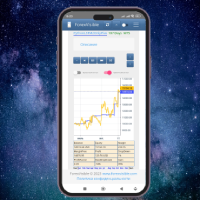
This client utility is intended for sharing and copying signals, as well as for monitoring your Expert Advisor on the site https://forexvisible.com . The Android version of the site can be downloaded here The version for the MT4 terminal can be downloaded here https://www.mql5.com/en/market/product/106509 There are many reasons to use this application in your trading, and these are: 1. If you have many trading advisors and many accounts, it is very difficult to track them and monitor everythin
FREE
CYP Trade Manager Basic - Advanced Position Management for MT5 Protect Your Trades with Professional Risk Management CYP Trade Manager Basic is a sophisticated trade management Expert Advisor designed to protect your trading capital and maximize profit potential through intelligent position management. Perfect for both beginner and experienced traders who want to automate their trade management without the complexity. Key Features Automatic Breakeven Protection Moves stop loss to breakeven
FREE

Discover our all-in-one monitoring and notifications EA for MetaTrader. Designed to ensure traders’ security and peace of mind, this unique EA offers a full range of advanced features that will allow you to stay informed and control your account activity, anytime and anywhere. Key Features : Continuous server monitoring: real-time notification on server availability and performance (Cpu, Ram, disk), connectivity, latency and more Advanced account management: live tracking of margin calls, dro
FREE

NHS Prop Firm Guardian NHS Prop Firm Guardian is a dedicated, single-panel risk monitor and drawdown protection overlay for MetaTrader 5, built around one core idea: watch the account relentlessly, and enforce the limit the moment it's crossed — even if the trader isn't looking . It is a pure risk-monitor companion tool, not an order-entry or trade-management system: it does not place trades, manage stops, or run automation strategies. Its job is tracking Daily drawdown on the current chart symb
FREE

Please visit = https://www.mql5.com/en/market/product/186048 for slave EA
MT4 Version = https://www.mql5.com/en/market/product/186079
Free Demo Version = https://c.mql5.com/6/1033/COPYTRADE_BIN7D.zip
User Manual : download here
Best EA Trade Copier for MT5. EA Trade Copier is a powerful and reliable trade copying solution that transfers trades from one Master account to multiple Slave accounts in real time. Whether you manage multiple trading accounts, investor accounts, VPS terminals,
FREE

The utility draws reversal levels using the formulas for each of the selected number of candles:
Pivot = (high + close + low) / 3 R1 = ( 2 * Pivot) - low S1 = ( 2 * Pivot) - high R2 = Pivot + (R1 -S1) R3 = high + ( 2 * (Pivot - low)) S2 = Pivot - (R1 - S1) S3 = low - ( 2 * (high - Pivot)) H = high L = low U = if the candle is bullish, then close. Otherwise - open D = if the candle is bullish, then open. Otherwise - close
On any timeframe.
After a new candle closes on the calculated timeframe
FREE
This indicator is to be used in bot connectors for automation of Pct Multi indicator entries.
How to use: Configure the bot connector with the following information: Indicator name: pctmultibot Call buffer: 0 Put buffer: 1
Do not add this indicator to the chart, just configure it in the bot connector!
Pct Multi indicator:
https://www.mql5.com/en/market/product/111091
FREE

This is a very simple backtesting tool. It starts from the most old chart in the past chart. It has 0.2pips spread, and you can do averaging 10 times. You can set the size of bars and the time frame as a parameter. You can't change the time frame during the backtest. These are the functions of buttons. ------------------------------------------------------------ Resume/Pause: Auto scroll stop and resume. Next bar: Showing candle sticks one by one. Speed1,2,3: The speed of auto scroll. Skip: ski
FREE

This utility is a graphical shell for other Expert Advisors that do not have their own graphical shell or whose graphical shell you do not like. Just run the utility on a free chart of any currency pair, specify in the input parameters the "Magic Number" of the advisor to which you want to connect the utility, and a graphical shell will appear on the graph, containing information about the traded currency pairs, current positions and trading results of your advisor. If you like this utility, tak
FREE

Simply deletes all objects from a chart, at once.
Q: Shouldn't I remove the indicator(s) from the chart instead, if I want to get rid of those objects? A: Absolutely. There are rare cases though, when you might end up with residual objects that don't programatically get removed from your chart, due to bugs or some other reason.
Q: Why use this script, when I can press Ctrl+B, list all objects, then manually select and delete each one? A: To save time, really. Maybe you have too many unwanted o
FREE

This is an indicator to control the Parameters of Range Volume Hybrid Generator expert advisor -It does not work as stand alone, it works as a remote control of Range Volume Hybrid Generator and must be applied on the custom chart generated by the EA. To get Range Volume Hybrid Generator expert advisor: https://www.mql5.com/en/market/product/165557
Parameters that can be adjusted: Trading Style as well as manual setting of Range, Volume and start Date of data collection. What's the video for
FREE

Global Session Map turns one MetaTrader 5 chart into a clear session workspace. It shows which major trading sessions are active in broker time, when the next transition occurs, and where session overlaps appear.
The panel is designed for discretionary traders who need reliable time context without entry signals or profit claims. Session windows and display preferences are configurable and remain available after chart or terminal restarts.
Main functions
• Sydney, Tokyo, London and New York s
FREE

A FOMO blocker to click before opening an emotional trade.
Once activated, the blocker remains in effect—even if you change settings or restart MT5—until the timer runs out, preventing you from opening new trades.
Set the duration you need for your mindset to return to normal.
Use it without restraint.
If you open a trade during this period, it will be closed immediately.
---- NEW VERSION FULL https://www.mql5.com/en/market/product/192677
Check out my alert for stepping away from your PC
FREE

PositionRelay TV Slave Subscriber 将 PositionRelay 云端的 TradingView 网络钩子信号镜像到您的 MetaTrader 5 跟随账户。它轮询虚拟 TradingView 源账户(非 MT5 主账户),并以 TV_ 票注复制开仓、平仓和修改操作。
配套产品:PositionRelay Master Publisher 与 PositionRelay Slave Subscriber 用于 MT5 主→从复制交易。每条产品线使用专用 slave EA — 勿在同一 slave 上同时运行 master 与 TV 源。
要求: - 含 TV Sync 的有效 PositionRelay 订阅(TV Sync 套餐,或包含 TV Sync 的 Pro/Ultimate) - TradingView Plus+ 并启用 2FA、配置网络钩子警报(见 positionrelay.com 上的 TradingView 设置指南) - 来自 positionrelay.com 控制台的 PositionRelay User ID - 来自控
FREE
Utilidad de uso informativo la cual ayudará a gestionar el riesgo de los trades con la ayuda visual de los datos proporcionados. el usuario se encargará de ubicar sus SL y TP manual acorde al lotaje. Asesor experto desarrollado para MT5 con el objetivo de ingresar ratios de utilidad y % de riesgo, adicional los Pips de SL para el cálculo del lotaje para dicho riesgo. Estos se calculan sobre el balance actual. El usuario tomaría como dato ingresar el lotaje que se calculó y arrastrar el S
FREE
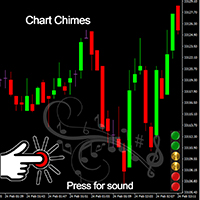
Chart Chimes 简介 - 让交易成为交响乐的 MT4/MT5 指标! 厌倦了整天盯着图表看? 交易时需要提神来保持精神振奋吗? 好吧,Chart Chimes 已经为您准备好了!
使用 Chart Chimes,每次按下该按钮时,您都会听到有趣的声音,让您的脸上露出笑容并跳到您的脚步。 想象一下在胜利的喇叭声或轻柔的竖琴声的背景下进行交易——就像拥有自己的私人管弦乐队为您加油一样!
但 Chart Chimes 不仅仅是一个有趣的消遣 - 它是一个强大的工具,可以帮助您在交易时保持专注和参与。 通过自定义声音的能力,您可以创建适合您的交易风格和偏好的独特声音环境。 需要一点提醒来坚持止损吗? 为什么不设置模仿裁判哨子的声音! 或者,也许您想用烟花的声音来庆祝成功的交易 - 可能性是无限的!
那么,当您可以拥有 Chart Chimes 时,为什么还要选择无聊、安静的图表呢? 对于想要为他们的交易程序注入一点乐趣和个性的交易者来说,这是一个完美的补充。 使用 Chart Chimes,每笔交易都可以成为您耳边的音乐!
FREE

Change lot size, set TP / SL points and with one click place an order. Track current order count and total running profit. Instant Close all Buy trades, Close all Sell trades or Close All open trades buttons. Trailing SL feature Support for Manual orders. Utility types Risk management, Graphical objects, Panels. Main features
Take Profit and Stop Loss in points (10pip = 100 points) After the price reaches the Take Profit threshold, orders will be closed in profit After the price reaches the St
FREE

Very often there are situations when you need to quickly close all open positions or close only under a certain condition...
The Positions Close script closes open positions according to the selected settings.
You can choose to close All positions , only Buy, only Sell
You can also choose by which symbols to close positions: by all symbols or only by the current one, on the chart of which the script was thrown
There is a filter for closing profitable or unprofitable positions, as well as bo
FREE

This Utility tells you the volatility of any symbol for any of the major time frames. As trades occur, the volume increases for each period. When each period ends, the bucket is reset to 0. Volumes are sorted from largest to smallest within each shown period. Click any symbol to highlight that symbol in all period columns. Volume information is specific to transactions placed at your broker. To test in the Tester, set the following:
EURUSD,M1,1 minute OHLC 2018.01.01 to 2018.01.02 (a day’s worth
FREE

多数の通貨を取引している場合、画面をカチャカチャ切り替えの際にどの通貨を見ているか 迷ったことはありませんか。 表示している通貨が大きく表示されるMT4用のインジケーターは あるのですがMT5用がなかったので作成しました。
機能: どの通貨でも表示可能になります。 表示位置 (左上 、 右上 、 左下 、 右下) の 指定 が可能 になります。 表示位置(X軸、Y軸)が変更可能 になります。 フォントの色を 変更可能 になります。 使用するフォント を指定することが可能になります。 フォントサイズ の 変更が可能 になります。 インストール方法: ファイル->データフォルダーを開く->MQL5フォルダー->Indicatorsフォルダー 配下にex5ファイルを置いてMT5を再起動してください。
FREE

Introducing our cutting-edge Trade Copier Expert Advisor for MetaTrader 5 (MT5) – the ultimate solution for seamless trade replication across multiple accounts on the same server or computer. Elevate your trading experience and take control of your investment strategy like never before with our professional-grade Trade Copier. Key Features: Effortless Trade Replication: Our Trade Copier effortlessly duplicates trades from a master account to multiple slave accounts, ensuring that you never miss
FREE
This indicator allows to hide CCI oscillator (on all MT5 timeframes) from a date define by the user, with a vertical line (Alone) or a panel (with "Hidden Candles"). Indicator Inputs: Period Apply To Information on "Commodity Channel Index" indicator is available here: https://www.metatrader4.com/en/trading-platform/help/analytics/tech_indicators/commodity_channel_index ************************************************************* Hey traders!! Give me your feeds! We are a community here and
FREE

A ticker that shows the average bitcoin price of the selected currency and keeps updating it at regular intervals. PRO version updates more often and displays details about the price change! Make sure you have added the API address http://metakod.com/mk/api in the list of allowed URLs on tab Tools → Options → Expert Advisors. All of the supported currencies and the API address are listed in the screenshots below.
Inputs Logging level - Controls the amount of details written to the log (default:
FREE

Shved Position Pips Label is a professional utility indicator for MetaTrader 5 that displays the real-time floating profit or loss of all your active positions directly on the chart. No more switching to the "Trade" tab at the bottom of the terminal — all crucial information about your running trades is positioned right in front of your eyes next to the current price line! Key Advantages: Smooth Price-Anchored Alignment: The labels are anchored to the last bar and smoothly slide vertically f
FREE
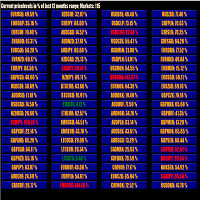
This tool scans up to 200 markets simultaneously and displays the current price level in a range specified by the user in a chart window.
By clicking on one of the buttons, a new chart window opens for the selected symbol. A template file can be specified as an input parameter, which is applied directly to the opened chart window.
The user can specify the font size of the buttons, the number of buttons per column and the level at which marking should take place in the input parameters. The upd
FREE

Positions Risk Analyzer Utility
The Trade Analyzer is a powerful tool designed for real-time monitoring of your trading performance directly on the chart. It provides insights into: Total Open Positions : Number of active trades. Potential Profit (TP) : Estimated profit if all Take Profits are hit. Potential Loss (SL) : Maximum potential loss if all Stop Losses are triggered. Floating Profit/Loss : Real-time net profit or loss of all open trades. This utility dynamically updates its calculation
FREE

SymbolScope MT5 是您的个人品种规格助手。无需再在终端中查看合约规格或在互联网上搜索数据。所有必要信息都随时可得,就在图表上一个优雅简约的面板中。 它的用途是什么?
交易者在开仓前了解品种的精确参数至关重要:点值、合约规模、最小手数、掉期。SymbolScope MT5 为当前品种即时提供这些数据,并允许您快速切换到任何其他品种以研究其规格。 主要功能: 一键获取完整规格:按下 INFO 按钮,面板展开,显示所选品种的详尽参数列表。 所有重要参数一览无余: 当前的 ASK 和 BID 价格。 点值(最小价格变动单位)。 点值 Tick Value 和 点距 Tick Size。 合约规模 Contract Size。 最小手数 Volume MIN、最大手数 Volume MAX 和 手数步进 Volume Step。 多头掉期 Swap Long 和 空头掉期 Swap Short 的值。 快速切换品种:内置下拉列表,包含市场报价中所有可用的品种。选择新品种时,图表会自动切换,面板中的数据也会立即更新。 紧凑且不引人注目的界面:在折叠状态下,面板在图表上占用最小空间,
FREE
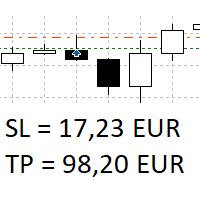
The panel shows all positions and all orders in a small movable window in the chart. Stop loss and take profit are converted into account currency. With the tool you can immediately see the maximum loss in the case of stop loss and the profit in the case of take profit. If there are several positions, a sum is formed. The panel shows either all positions/orders of the current symbol or all existing ones. The data is recalculated for each tick, and moving Stop Loss or Take Profit is immediately v
FREE

This is a decorative utility that replaces the standard marks of completed deals with "Kingdom Come: Deliverance" game style markers.
In addition to the graphic display of the price and time of the transaction, the notes also contain a textual representation of the transaction volume. Running utility Drag the utility from the Navigator window to the desired graph. The utility does not use input parameters and does not require configuration. All trademarks available on the chart will be replaced
FREE

Trading Companion is an EA bridge to the Telegram chat. It does not place trades, it provides to your Telegram's terminal information about your accounts - it can be used with any other EA, indicator or trading solution. It notifies you about the server lag (ping between your terminal and your broker) and includes a feature to withdraw wisely from your account.
Settings Ping limit: default 300ms - will warn you if ping is superior Basis Fund: 0, deactivated - each time you will withdraw, it is
FREE

GBPUSD indicator.mq5 – Smart Signal Arrow Indicator Mark.mq5 is a professional-grade, fully autonomous signal indicator designed for serious traders who want visual, consistent trade signals with smart logic and advanced filtering. Built for GBPUSD M15 , it generates Buy , Sell , Buy Stop , and Sell Stop signals using a custom combination of Alligator (Lips) , RSI , DEMA , and DeMarker indicators — and it even writes signal data to a .csv file for automation or external trade management. K
FREE

Prop Firm Daily Loss Guardian Prop Firm Daily Loss Guardian is a lightweight risk-management utility for MetaTrader 5. It displays a clear on-chart “traffic light” status panel for your daily loss usage and can optionally enforce a hard stop by closing newly opened positions once a critical drawdown level is reached. The tool is designed for traders who want an immediate, visual understanding of when to reduce risk and when to stop trading for the day. Key Features On-chart status panel with tra
FREE

FREE

Margin Tick Ratio — margin efficiency analysis for all broker's instruments
Margin Tick Ratio is a script for MetaTrader 5 that runs through your broker's tools in one run and answers a practical question: how much "tick" profit do you get for each unit of collateral, and how expensive is the entry spread.
The script does not trade. It collects data, ranks tools by efficiency, and generates a user-friendly report in a terminal, CSV, and interactive HTML file.
Who is this product for
• T
FREE

WAP TP Stealth EA – Intelligent Basket Management for Precision Exits WAP TP Stealth EA is a specialized trade management expert advisor designed for traders who rely on basket strategies, recovery systems, and multi-position workflows. Instead of closing trades individually, the EA dynamically calculates the Weighted Average Price (WAP) of all open positions and executes a coordinated closure once your defined profit target is reached. This approach enables efficient drawdown management, smooth
FREE
TradeManagerEA — Full Trade Management Solution Overview (Short Description) The TradeManagerEA is a specialized Expert Advisor designed to manage open trades across all symbols. It provides automatic breakeven rules, trailing stops, and additional settings optimized for Gold (XAU/GOLD). This tool requires minimal user intervention and can enhance the consistency of your trading approach. Detailed Description 1. Core Features Breakeven Management : Automatically moves Stop Loss to entry price p
FREE

Zone Eraser MT5 by Forex Persian Trading Effortlessly Clean Your Charts with a Single Click! Struggling with cluttered charts filled with unwanted objects?
Tired of manually deleting trade history lines, technical analysis tools, and shapes one by one? Zone Eraser MT5 is the ultimate script designed to streamline your workflow, helping you maintain a clean and organized trading chart with just a single action. Say goodbye to tedious manual deletions and hello to efficiency and precision!
FREE

Exaado Capital care If you've been searching for ways to manage Drawdown control, Drawdown Control, Balance protection, or Daily Drawdown Limit related to trading with Prop Firms, FTMO, My Forex Fund, or Funded accounts, then you've come to the right place. Additionally, if you're looking to safeguard your trading account, we can help. Do you struggle with managing your drawdown while trading funded accounts? Our EA is designed specifically for those in your position. Many prop firms have a "Tra
FREE
MetaTrader市场是一个简单方便的网站,在这里开发者可以出售自己的交易应用程序。
我们将帮助您发布您的产品,并向您解释如何为市场准备您的产品描述。市场上所有的应用程序都是加密保护并且只能在买家的电脑上运行。非法拷贝是不可能的。
