 MetaTrader 5
 专家
专家 指标
指标 程序库
程序库 实用工具
实用工具 窗口小部件
窗口小部件 规则
规则适用于MetaTrader 5的EA交易和指标 - 324
 使用EA交易和指标,使外汇交易获得更多盈利。EA交易可使您自动开启和关闭交易,而指标将帮助您更准确地预测市场行为。
该页面提供MetaTrader 5应用程序的目录。
使用EA交易和指标,使外汇交易获得更多盈利。EA交易可使您自动开启和关闭交易,而指标将帮助您更准确地预测市场行为。
该页面提供MetaTrader 5应用程序的目录。 
EA Name: Dynamic Hybrid Scalper (XAU Specialist) "A Synergistic Blend of Trend Following and Smart Grid Logic for Consistent Gold Trading" Key Highlights Multi-Timeframe Analysis: Triple-layer trend analysis that monitors the High Timeframe (HTF) trend down to the specific entry Signal Timeframe for maximum precision. 5-Factor Signal Confirmation: A sophisticated filtering system using five core metrics: EMA Trend, RSI, MACD, ADX Strength, and Price Action Breakout. Dynamic Lot Managemen

ภาษาไทย คุณสมบัติหลัก 1. การวิเคราะห์ Volume Profile คำนวณ Point of Control (POC) อัตโนมัติ - ระดับราคาที่มีปริมาณการซื้อขายสูงสุด POC2 และ POC3 - ระดับราคาที่มีปริมาณสูงสุดอันดับ 2 และ 3 แสดงการกระจายตัวของปริมาณการซื้อขาย ปรับระยะเวลาคำนวณได้ (MaxBarsToCalculate = 300) 2. การตรวจจับ Swing High/Low โหมด AUTO : ตรวจจับจุดสูงสุด-ต่ำสุดอัตโนมัติ โหมด MANUAL : ลากเส้นกำหนดจุด Swing ด้วยตนเอง ใช้ได้ทุก Timeframe ตั้งแต่ M1 ถึง D1 เส้น Swing ลากด้วยเมาส์ได้ บันทึกค่า Swing อัตโนมัติสำหรับแต่ละส

N/B: All our product purchase comes with our free ‘’DAILY SCALPER EA’’ - bit.ly/4qlFLNh Whatsapp Developer for yours after successful purchase
REVERSAL ENTRY PRO INDICATOR
The Smart Money's Secret Weapon for Pinpointing Extreme Reversal Zones
INTRODUCTION: THE TRADER'S DILEMMA
Every trader knows the frustration: You see a market reaching extremes, but when do you enter? How do you distinguish between a minor pullback and a major trend reversal? Where do you place your stop loss that'

QuantFusion BTC Pro is a professional-grade, multi-dimensional trading indicator optimized for Bitcoin/USD markets. By integrating advanced technical analysis, smart money concepts, and intelligent signal filtering, the indicator is designed to deliver high-probability trading signals. Its Multi-Category Alignment System requires confirmation from independent technical categories to validate entries and minimize false signals. Advanced Signal Generation System Dual-Level Quality: Generates stan

Singularity AI System:算法时代的理性资本管理方案 外汇市场充满了试图根据过去指标预测未来的智能交易系统。 我的 Singularity AI 系统正在改变这一现状。 它不仅是一个脚本, 更是一个灵活的交易生态系统, 专为那些寻求智能支撑的稳定回报、 而非激进刷单的交易者而设计。 透明化标准 我邀请您亲自验证我的算法效率。 我不隐藏任何数据, 并展示系统在真实市场环境下的表现。 查看 SINGULARITY AI 实时信号 核心哲学:演化而非优化 与大多数过度拟合历史数据的系统不同, 我在 Singularity AI 中采用了动态自学习原则。 系统不仅仅是执行算法, 它还会实时评估趋势的健康状况。 我的核心优势 语境智能: 当竞争对手在争论入场点时, Singularity 在分析市场环境。 如果波动性变得异常, 系统将进入待命模式。 我追求的是资本保值, 而非交易频率。 自适应免疫: 2025 年的市场已与十年前截然不同。 我的算法内置了相位偏移检测机制, 无需人工干预即可在不同策略间切换。 风险管理美学: 我摒弃了僵化的止损, 转而采用多级风险对冲系统。 每个

关键交易参数 必读内容 - 您的成功从这里开始 黄金交易强力系统 此精英系统专为黄金(XAU/USD)交易而精心校准和精密设计。 警告: 不兼容其他货币对或资产 图表时间框架规格 M1 (1分钟图表) 强制要求 闪电般快速执行,提供精准操作和最大利润潜力 智能手数分配矩阵 高级资金管理蓝图 账户余额 推荐手数 $2,000 0.01 $4,000 0.02 $6,000 0.03 $8,000 0.04 $10,000 0.05 $12,000 0.06 $14,000 0.07 $16,000 0.08 $18,000 0.09 $20,000 0.10 渐进式扩展原则 动态仓位规模 = 指数增长轨迹 ️ 风险管理与资金保护 最大预期回撤: 25% 止损激活频率: 每年2-3次 智能止损/止盈引擎: 全自动保护系统 专家建议 虽然我们的先进系统自主管理止损/止盈,但您仍可根据自己的判断手动锁定利润。 然而,为了获得最佳优化和最大回报,我们强烈建议信任自动化止损/止盈智能系统

Gold Ambush Breakout Aurum Xauusd Algo 黄金狙击手 | 趋势波段策略 | 稳健增长 Aurum Gold Ambush 是一款专为 XAUUSD (黄金) 设计的专业交易系统,其核心理念是“耐心”与“精准”。与那些每分钟都在频繁开单的高频机器人不同,该算法就像一名 狙击手 (Sniper):它会静静等待完美的形态出现,然后果断出击,以捕捉最大的行情波动。 这款 EA 专为 长期资本增长 而设计,重质量而非数量。 ️ 这款 EA 适合您吗?(请务必阅读) * 请勿购买:如果您在寻找“刺激”,并希望看到每小时都在开单。 * 请勿购买:如果您在寻找“一夜暴富”的赌博工具。 * 请购买:如果您明白 一笔完美的波段交易 胜过 50 笔微利的剥头皮交易。 * 请购买:如果您希望以专业的风险回报比,稳步实现资本增长。 "Aurum" 的投资哲学 请将此 EA 视为一项 数字资产 (Digital Asset),而不是赌桌上的筹码。 大多数交易者失败是因为他们追求“快钱”。Aurum 是为那些懂得 复利 (Compounding)

hello Trading MAster, Gold AI Master– Advanced Automated Trading System Gold AI Master is a professional, fully automated trading robot developed exclusively for XAUUSD (Gold) . ️ Important Setup & Testing Instructions Before running any backtest or starting live trading, please carefully review and adjust the input settings as shown in the reference image. Mandatory Input Settings (Before Testing) ️ Input Setting Lots: 0.01 → Recommended Balance: $50 StopLossPips: 700 TakePr

EA NAME: Trade Manager mit Signalgeber
OPTIMIERT FÜR TIMEFRAMES: Alle Timeframes
KURZBESCHREIBUNG: Ein hochentwickelter, semi-automatischer Expert Advisor mit einem dualen Strategiesystem für Swing-Trading auf Forex-Paaren und spezialisiertem Scalping auf Gold. Die Strategie basiert auf einem Scoring-System aus mehreren Indikatoren. Empfohlene Timeframes sind M5/M15 für Scalping und H1/H4 für Swing-Trading.
Dieser Expert Advisor ist ein hybrides Trading-Tool, das einen automatischen Signal-G

The Trading Sessions Dashboard is a powerful and user-friendly MT5 indicator designed to provide traders with real-time insights into the major forex trading sessions. It displays the status of each session (Active or Closed) along with the remaining time until closure or the next opening, helping you align your trading strategy with market hours. Built for clarity and professionalism, this indicator is perfect for beginners and experienced traders alike, ensuring you never miss key session tran

User Guide: EA for AI Gemini EA for AI Gemini is a smart trading assistant that connects your MetaTrader 5 directly to Google Gemini AI. It analyzes market structure, price action, and provides trading insights (Signal, SL, and TP) in real-time. To ensure EA for AI Gemini works correctly, please follow these 4 simple steps. STEP 1: Get Your FREE Google Gemini API Key This EA requires an API Key from Google to "think". It is free and easy to get. Open your web browser and go to: Google AI S

https://www.mql5.com/tr/users/bilisimprofesoru/seller Flash Copy Pro MT5 - Professional & Ultra Fast Local Trade Copier Short Description: A professional Trade Copier designed for Prop Firms and multi-account management. Features zero-lag copying, smart symbol matching, and advanced error protection. Full Description: Flash Copy Pro MT5 is a high-performance tool designed to copy trades from a single Master account to unlimited Slave accounts within milliseconds. It is specifically develope

XAU Alpha EA MT5 (M5 timeframe) XAU Alpha is an Expert Advisor developed for MetaTrader 5, designed to trade XAUUSD (Gold) on the M5 timeframe. The system operates entirely based on predefined algorithmic rules and automatically manages trade execution when programmed conditions are met. This Expert Advisor is intended for traders who prefer a structured, rule-based grid trading approach rather than discretionary decision-making. Suggested Trading Environment Instrument XAUUSD Timeframe M5 Rec

Turtle Bull Trend BTC: 机构级海龟趋势系统 ️ 警告:如果您在寻找那种号称“99%胜率”却最终会让您爆仓的剥头皮策略,请立即离开。 本系统专为拥有机构思维、追求长期复利和超高盈亏比的专业交易者设计。 Turtle Bull Trend BTC 是一款基于传奇“海龟交易法则”核心逻辑,并针对比特币(Bitcoin)的高波动特性进行了深度改良的 Expert Advisor (EA)。我们引入了独家的 6种形态 SSL 通道过滤 (6-Pattern SSL Filter) ,旨在在震荡市场中减少磨损,精准捕捉比特币一年中那几次足以改变账户净值的 超级单边趋势 核心交易逻辑(为什么它能盈利?) 绝大多数散户亏损的原因是“截断利润,让亏损奔跑”(喜欢抗单,赚一点就跑)。 本策略反其道而行之: 低胜率 (~20%): 我们诚实地告诉您,这是一款趋势策略,您会经历连续的小额试错止损。 极高的盈亏比 (1:10+): 我们的平均盈利交易往往是平均亏损交易的 10倍甚至更多 。 结果: 您只需要做对 20% 的单子,那一波大趋势的利润就足以覆盖所有成本,并带来巨大

NEXA EA 005 – Momentum Trend Catch GOLD 专用动量趋势自动交易系统 官方用户手册(中文简体版) 1️⃣ 产品概述 NEXA EA 005 – Momentum Trend Catch 是一款
低频率、高风险回报比(High RR) 的
GOLD(XAUUSD)专用动量趋势型自动交易 EA 。 本 EA 不属于剥头皮或高频交易系统 。
只有在 高周期趋势方向与低周期动量突破在“已收盘K线”上同时成立时 才会进场,从而有效过滤市场噪音。 2️⃣ 核心交易逻辑 趋势判断(高周期) 使用 H1 周期的 EMA50 仅顺着价格相对于 EMA 的方向交易 基于 ATR 距离计算趋势强度评分(Trend Score) 只有达到最低趋势评分时才允许进场 进场触发(低周期) M5 周期,仅使用已收盘K线 Momentum 指标突破其平均值 K线实体比例达到最小要求 突破近期高点 / 低点结构 可选 成交量放大过滤条件 所有判断均基于 已收盘K线(无重绘 / No Repaint) 。 3️⃣ 进场与出场规则 进场规则 每根K线只评估一次进

Gold Mine AI EA (v1.07) Dual-Mode XAUUSD Trading System – Scalping & Swing Precision Gold Mine AI EA is a robust, risk-controlled MetaTrader 5 Expert Advisor engineered exclusively for XAUUSD (Gold) .
It combines high-speed intraday scalping with trend-following swing trading , allowing the EA to adapt dynamically to different market conditions while maintaining strict capital protection. This EA is fully NETTING account compatible and includes advanced margin checking , making it suitable for m

Unlock the power of Smart Money Concepts (SMC) with the cleanest FVG indicator on the market. Smart FVG Pro is not just another gap detector. It is designed for professional traders who need to filter out noise and focus on high-probability reversal zones. Unlike standard indicators that clutter your chart with every minor gap, Smart FVG Pro uses advanced filtering logic (Trend + Volatility) and a unique "Smart Mitigation" system to automatically remove invalidated zones, keeping your chart clea

Stop Master Pro | The Risk-to-Lot Execution Engine Convert Risk into Precision: Instantly Turn Dollar Risk ($) into Exact Lot Sizes. Instant Order Placement for Manual Traders. Click here to download the official Stop Master Pro User Manual (English)
Product Description Stop Master Pro is a professional-grade execution tool designed for the discerning manual trader. It is not a " robot " that makes decisions; it is a precision instrument that empowers you to execute your trading plan with spe

PriceAction Pro EA (v1.8) PriceAction Pro EA is a fully automated MetaTrader 5 Expert Advisor built around high-probability price action patterns , strict risk management , and multi-timeframe trend confirmation .
It is designed for traders who value precision, discipline, and capital protection over over-optimization or martingale-style systems. The EA focuses on clean market structure , entering trades only when price action aligns with higher-timeframe direction and predefined risk rules.

SNeox AI 是一款自动化多货币交易机器人,用于在外汇市场进行稳定的长期交易。 该投资顾问采用成熟的算法分析市场价格和波动性,专注于在可控风险下进行谨慎交易。 注意! 新年促销:前 15 名顾客 - 99 美元
接下来 15 件 - 159 美元
最终价格:229 美元
赶紧抓住这个机会! MT4 Version: https://www.mql5.com/ru/market/product/158516
交易工具: EURUSD GBPUSD NZDUSD AUDUSD USDCAD USDCHF 该机器人能够同时处理多个货币对,从而实现交易操作的多元化。
运作原理: 缺乏鞅 缺乏平均值 缺乏锁定 缺乏订单网格 所有交易均基于专有算法进行,该算法分析当前市场状况,而不使用激进的资金管理方法。
顾问功能: 准确的价格和市场波动性分析 针对高订单执行速度进行了优化 专注于最大限度地减少回撤 设置简便,无需持续监控 适用于“设置好就不用管”的形式
推荐用于: 长期自动化交易 可在真实账户和模拟账户上使用 负责执行市场交易的账户

Market Info Pro: Your Ultimate Trading Dashboard for MT5 Elevate your Forex trading experience with Market Info Pro, the advanced indicator that provides all essential market information at a glance on your MT5 chart. Key Features: Real-time display of spread, ask, bid, current session, time to candle close, and more. Extended info: balance, equity, free margin, margin used, leverage, open trades, profit/loss, swap, commission, current time, symbol, timeframe. Fully customizable: Choose which in

Product Description SAR MACD Pro EA is a sophisticated automated trading system that combines two powerful technical indicators: Parabolic SAR and MACD. Designed for traders of all levels, this EA identifies optimal entry points with integrated risk management. Trading Idea : The EA looks for convergences between Parabolic SAR directional changes and MACD line crossovers to generate reliable trading signals. Key Features Technical Features Double confirmation : SAR + MACD for enhanced acc
AI RSI PRO — 经典的进化。它属于 EA AI PRO 系列,这意味着代码 100% 由人工智能设计和编写,并配备了 24 种不同的机构级头寸管理功能, AI RSI PRO — 均值回归策略的进化 这是一种专业的交易算法,通过智能 Price Action(价格行为)过滤器的额外信号确认,将传奇的 RSI(相对强弱指数)指标从简单的震荡指标转变为高精度的狙击系统。AI RSI PRO 是指标的数学精度与价格运动现实之间的完美平衡。 机器人的广泛功能库中包括:智能新闻过滤器,四种止损(SL)选项,三种移动止损(Trailing SL)选项(包括先进的 High/Low 移动止损),部分平仓系统(也有三种不同变体,包括独特的基于“交易量乘数金额”的选项),以及两个具有灵活设置的交易量乘数选项,用于激进增值。独特的主要开仓信号确认技术——Price Action(突破)——过滤了市场噪音,仅在价格真实变动时开启交易;此外还有三种止盈(Take Profit)选项,包括盈利移动止盈。该顾问(EA)适用于 MT5 上的任何时间周期和交易资产,适用于任何账户类型、任何经纪商以及自营

KING GOLD 3.40 (MT5) — XAUUSD Micro Scalper KING GOLD 3.40 is an Expert Advisor for MetaTrader 5 designed for XAUUSD (Gold). The EA is optimized for small lot trading and focuses on short-term entries under suitable market conditions. Recommended settings: Symbol: XAUUSD Timeframe: M1–M5 (depends on broker conditions) Lot size: 0.01 (example) Account type: Hedging Minimum deposit: from 300 USD (recommended for margin safety) Testing note:
This product has been tested in the MetaTrader 5 Strateg

Stop chasing the market and start flowing with it. Trend Flow EA MT5 is designed for traders who want a clean, logical approach to the markets without staring at charts all day. No Martingale, no Grid, no risky averaging.
Timeframe: H1 (1 Hour) is the sweet spot. It ignores the noise. It only opens a trade when the price "reloads" and confirms it is ready to continue the trend.

OneClick Trade Panel 是一款专业的交易管理工具,让您轻松掌控关键交易功能。该EA专为需要快速高效进行交易管理的交易者设计,可将复杂的交易任务简化为一键操作。
这款工具可以帮助您比传统手动方法更快、更高效地管理您的持仓。
该EA的功能 这款智能交易助手提供三个关键的交易管理功能:
移动止损/止盈至盈亏平衡点 - 智能交易保护
自动将盈利交易的止损位移动到入场价格
自动将亏损交易的止盈位移动到入场价格
一键保护所有持仓
部分平仓 - 逐步获利
平仓一定比例的仓位(10%、25%、50%等)
可在设置中配置百分比
可同时处理多个仓位
全部平仓 - 紧急退出
立即平仓所有持仓
可应用于当前交易品种或所有交易品种
非常适合快速退出市场
主要特点 三个核心功能:在一个面板中完成所有交易管理
智能盈亏平衡逻辑:针对盈利和亏损情况采取不同的操作
灵活的设置:调整部分平仓百分比(1-99%)
可视化自定义:选择按钮颜色、布局(垂直/水平)和面板位置
交易品种控制:仅管理当前交易品种或所有持仓交易品种
安全选项:可选的确认对话框
追踪盈亏平衡

UT Bot LineReg Expert Advisor is an advanced, fully automated trading system designed for MetaTrader 5. It combines the popular UT Bot trend logic with Linear Regression–based trend confirmation to identify high-probability market entries while filtering out sideways and low-quality signals. The Expert Advisor is built with a strong focus on risk control, execution safety, and stable performance , making it suitable for both beginners and experienced traders.

NEXUS TRADING PRO IA - Sistema Profissional de Trading com IA Versão 4.71 | Compatível com TODOS os Ativos e Corretoras MT5
O QUE VOCÊ ESTÁ COMPRANDO Este NÃO é só um robô. É um sistema completo 3 em 1:
1. ROBÔ INTELIGENTE → Negocie automaticamente com IA 2. PAINEL OPERACIONAL → 26 botões para manual de negociação profissional 3. PAINEL DE INFORMAÇÕES → Monitoramento em tempo real de mais de 25 métricas
RESULTADO: Você pode operar 100% automatizado, 100% manual OU combinando os do

DAILY OH/OL SDEV QUANT MODEL - STATISTICAL TRADING WITH PRECISION RISK MANAGEMENT
TRADE WITH MATHEMATICAL CERTAINTY - KNOW YOUR EXACT STOP-LOSS AND TAKE-PROFIT BEFORE YOU ENTER
This indicator analyzes 5,000+ days of price history to give you: Exact entry levels (sigma bands locked at daily open) Exact stop-loss distance (from M

SMC VALID EA (MT5) Version: 1.10
Author: Marrion Brave Wabomba
Category: Smart Money Concepts (SMC) and ICT concepts ICT Smart Money Daily Zones (SMC Pro) ICT Smart Money Daily Zones (SMC Pro) – ICT Daily Buy & Sell Zones Pro is a professional-grade Smart Money Concepts (SMC) / ICT trading indicator for MetaTrader 5, designed to clearly map institutional daily levels and guide traders with high-probability decision zones . This indicator automatically analyzes the Daily timeframe (PDH / PD

N/B: All our product purchase comes with our free ‘’DAILY SCALPER EA’’ - bit.ly/4qlFLNh Whatsapp Developer for yours after successful purchase
PIN BAR POWER REVERSAL SCANNER MT5
UNLOCK THE SECRET OF INSTITUTIONAL TRADING WITHOUT THE HEDGE FUND BUDGET
What If I Told You There's a Way to Spot Reversals BEFORE They Happen?
Professional traders know: Pin bars at key levels are where fortunes are made. The institutions use them. The smart money follows them. And now, YOU can trade them w

Professional Break of Structure & Fair Value Gap Trading System The Yunzuh BOS FVG EA is a sophisticated algorithmic trading solution designed for MetaTrader 5 that implements institutional-grade market structure analysis combined with precise entry execution. Built on the principles of price action and market microstructure, this expert advisor identifies high-probability trading opportunities by detecting Break of Structure (BOS) patterns and Fair Value Gaps (FVG) across multiple timeframes. C

The fully automated Expert Advisor built exclusively for XAU/USD (Gold). This EA combines a high-probability, three-EMA trend-following strategy with a professional two-stage risk management system to secure profits quickly and efficiently. Optimized for the M1/M5 timeframes. The Strategy: Filtered 3-EMA Crossover Our system utilizes three Exponential Moving Averages to confirm both momentum and trend direction, dramatically reducing false signals common in basic crossover EAs. Fast EMA (

SMC VALID EA (MT5) Version: 1.10
Author: Marrion Brave Wabomba
Category: Smart Money Concepts (SMC) / ICT Hybrid – Fully Automated MT5 Expert Advisor Overview SMC VALID EA is a professional-grade, fully automated MetaTrader 5 trading bot built around Smart Money Concepts (SMC) and ICT market structure principles , with a strong focus on capital protection, margin safety, and prop-firm compliance . The EA is designed for swing trading by default , with optional controlled scalping logic. Every

Boleta Marota is a trading tool designed for traders who value speed, clarity, and full control when executing orders on MetaTrader 5. Created by Renan Martins , Boleta Marota offers a clean and intuitive interface that brings the most important trading actions together, allowing you to buy, sell, move to breakeven, and cancel orders with just one click. The interface is built for real trading conditions:
Clean and straightforward design
Essential information always visible
Reduced operati

AlgoMatrix EMA Ribbon Trend Pro (MT5) AlgoMatrix EMA Ribbon Trend Pro is a professional MetaTrader 5 indicator designed for traders who prefer cleaner trend analysis and more structured market guidance. Many traders face the same challenge: market conditions often become difficult to read. Charts become crowded, signals appear too frequently, and it becomes harder to understand whether the market is truly trending or simply moving sideways. AlgoMatrix EMA Ribbon Trend Pro was created to simplify
ATR Grid Risk Controller – Trade Management Utility ATR Grid Risk Controller is a manual trade execution and risk management Expert Advisor , designed for discretionary traders and prop firm traders who require strict risk control, precision, and execution discipline . This EA does NOT generate trading signals , does NOT decide when to enter , and does NOT use martingale or lot multiplication .
The trader keeps full control of trade decisions, while the EA handles risk calculation and executi

PriceAction EA - Professional Price Action Pattern Trading System Overview
PriceAction EA is an advanced algorithmic trading system designed to identify and trade high-probability price action patterns across multiple timeframes. Built for MetaTrader 5, this expert advisor combines classical technical analysis patterns with sophisticated risk management to deliver consistent trading performance in both trending and ranging markets. Core Trading Methodology
The EA operates on a multi-timeframe

Overview Liquidity Indicator is a market analysis tool designed to help traders identify potential market reaction zones based on liquidity behavior and price action. Instead of using traditional moving averages, this indicator analyzes liquidity flow and pivot structures to highlight areas where price may react. This indicator is intended to support technical analysis and decision-making, not to predict or guarantee market outcomes.

The MACD New York Session EA is a structured, rule-based trading system designed to capture high-quality trend and momentum opportunities during the most liquid part of the trading day. It is built around the classic MACD crossover concept, enhanced with session control, volatility-based risk management, and optional price action confirmation for cleaner entries. By focusing exclusively on the New York session, the EA avoids low-liquidity noise and concentrates execution where institutional part

Every Trader trades in a market zone. If you are not living in the time zone you are trading, you need a clock to show you what time it is in your favorite time zone, and it should be small at the same time to not interrupt your trading process. In this small indicator, you have access to 3 major clocks around the world, and you can easily look at them. We have some other products that I am sure will help you with your trading career. Please have a look at the link: LINK our all-in-one trading

Descrição sugerida (português) AVA ICT Pro Signals é um indicador profissional para MetaTrader 5 baseado em conceitos ICT, projetado para encontrar pontos de reversão e continuidade com alta precisão. Ele combina pivôs inteligentes, detecção de FVG e leitura de momentum para gerar sinais de compra e venda visualmente claros no gráfico. O indicador não repinta, é leve e funciona em qualquer par e timeframe, o que permite usar a mesma lógica em Forex, índices, ouro e criptomoedas. As entradas são

Advanced Momentum & Strength MT5 Expert Advisor Built for Precision, Control & Consistency
TRDR Bot-4 is a next-generation Expert Advisor developed by TRADEWYZE, engineered for traders who want a balance of powerful automation, robust risk controls, and transparent strategy logic. This EA delivers stronger entry confirmation, improved order reliability, and flexible money management suited for Indices, Commodities and Forex trading environments. This EA is not a Black Box. All indicators,

UZFX SWS {剥头皮盈利信号} Pro v1.0是由Usman Zabir(UZFX实验室)专为剥头皮交易者、日内交易者及波段交易者开发的强力无重绘指标,旨在快速波动市场中提供精准入场信号。特别适合追求可靠实时信号、拒绝延迟或虚假重绘的交易者。
我推荐*的最佳时间周期:30分钟及以上。 {1小时}是我的首选,其效果令人惊叹...! 注意:与{ LTL 164343 }指标结合使用,可提高获胜信号率。 使用 LTL 信号判断趋势,利用 SWS 信号确定入场时机。 这种方法将最大化您的胜率,并有效规避虚假信号。
核心功能包括:
清晰的视觉箭头标示近期及历史信号(可选点状显示过往信号)。 自动计算并绘制交易线:入场点、止损位(基于近期震荡高低点)及多档止盈位(风险回报比1:1、2:1、3.5:1——完全可自定义)。 图表信息面板实时显示最新信号详情、入场价、止损位及止盈位。 全面警报系统:弹窗提示、声音提醒、推送通知及邮件提醒。 图表自定义选项(颜色、背景、K线样式)。 内置许可证过期系统保障安全分发(可通过更新日期续期)。 适用于所有货币对、大宗商品及时间周期,UZFX SWS

IQ Trade Status – A Professional Trade Panel to track all your LIVE TRADES in a single dashboard. IQ Trade Status is not just a trade panel; it is a professional dashboard designed for MetaTrader. It replaces the default Terminal window with a clean, structured, and actionable overview of your account and open trades.
The dashboard is designed to help you instantly answer three critical questions: How much have I made today? How much will I lose if all my trades go wrong? Is my account over-lev

Trendline Breakouts with Targets - Never Miss a Breakout Again Stop Drawing Lines Manually. Let the Chart Do It For You. Remember the last time you drew a perfect trendline, only to have price break through it while you were away from your screen? Or spent hours analyzing charts trying to find the "right" trendlines, second-guessing every line you drew? Those days are over. The Trendline Breakouts indicator does the heavy lifting for you - automatically spotting the trendlines that actually matt

Title: HTF Candle Insight - See the Big Picture on One Chart Introduction: Stop switching tabs constantly! HTF Candle Insight allows you to visualize Higher Timeframe price action directly on your current trading chart. Whether you are a Scalper, Day Trader, or Swing Trader, seeing the "Big Picture" candle structure is crucial for identifying trends, reversals, and key levels (Support/Resistance). Key Features: Dual HTF Overlay: Display up to 2 different Higher Timeframes simultaneously (e.g.,
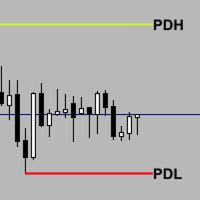
Previous_Highs_Lows-Socarix-STS Previous_Highs_Lows-Socarix-STS automatically plots the previous day, week and month highs and lows (PDH/PDL, PWH/PWL, PMH/PML), extending these levels forward in time and labeling them clearly.
It highlights confluences when several levels share the same price and can mark crossed levels with an “X”, with optional fading. Weekly and monthly levels use smart logic: levels that were already crossed earlier in the current week/month are hidden for today. Fully custo

NEXA ADX-EMA Trend Ride GOLD 专用微趋势跟随 EA 官方用户使用说明(简体中文) 1️⃣ 产品概述 NEXA ADX-EMA Trend Ride 是一款
专为 GOLD(XAUUSD)设计的全自动交易 EA 。 与传统基于高周期(H1/H4)的趋势系统不同,
本 EA 专注于 已形成趋势内部出现的微观加速行情 ,
通过精确入场捕捉趋势扩展机会。 核心理念
小亏损 + 少数但强劲的趋势爆发行情
(Fat Tail 收益结构) 2️⃣ 时间周期结构(重要) 内部计算周期(EA 核心逻辑) EA 的所有交易判断 均基于以下内部固定时间周期 : TrendTF : M5 (微趋势方向判断) TriggerTF : M1 (精确入场执行) M5 :通过 EMA 与 ADX 判断短期趋势方向 M1 :RSI 回调 + 微动量触发精确入场 ️ 重要说明 EA 所附加的图表周期 不会影响 交易逻辑 EA 始终按照内部 M5 / M1 结构运行 高周期参考(H1 / M15)— 仅用于观察 H1 与 M15 不参与 EA 的任何计算逻辑 ,
仅用于
Work description The MA7 Lavender indicator is based on the standard Stochastic Oscillator indicator. It shows the intersection of the main and signal lines in overbought and oversold zones. Detailed information about the MA7 Lavender indicator.
Indicator settings General settings This group contains settings for the Stochastic Oscillator indicator.
Message settings This group contains the notification settings when the arrows appear.
Arrow display settings This group contains the arrow displ

The ZigZag Buy Level is a specialized tool for traders who utilize market structure and classic ZigZag patterns to define key support and entry points. It automatically identifies "Main Highs"—significant highs confirmed by the subsequent price action—and then calculates a high-probability "Buy Level" based on a specified percentage pullback from that Main High to the last corrective low. This indicator helps you anticipate deep retracement entries, clearly marking them on the chart with labels

Website Description Identify high-probability Buy setups with the Dual-Force Pullback Signal Pro indicator. This powerful tool generates a strong "Buy" signal only when a constructive MACD pullback is confirmed on two different MACD settings (Slow and Fast) and the RSI is above 50, indicating bullish momentum and confirmation. The signals are delivered via sound, pop-up alerts, and push notifications, ensuring you never miss a confirmed entry. It's specifically designed for the M5 timeframe for
TradePanel Pro Indicator Testing & Trading Simulator Core Purpose (Clear & Honest) TradePanel Pro is a manual trading simulator designed to test indicators, signals, and strategies in real market conditions — without relying on automated logic. You see the signal → you click → you evaluate the result . What TradePanel Pro Is (Correct Positioning) Manual BUY / SELL execution panel
Layered entries (multi-order testing)
Real-time TP / SL behavior
Trailing stop simulation
Profit /

ZIVA TrendX is a professional trend-oriented indicator engineered to provide a clear and structured assessment of market direction through a cloud-based analytical framework. The indicator analyzes price behavior relative to dynamically derived trend boundaries, forming a continuous cloud structure that visually represents the prevailing market bias. This structure enables traders to maintain alignment with dominant directional conditions while filtering short-term market noise. All internal ca

大家好,我來這裡是為了解決交易者面臨的一大難題。
當我打開價格圖表並開始分析時,會遇到一個大問題。
我需要在 MetaTrader 5 的不同視窗和時間框架之間切換,繪製趨勢線、訂單區塊以及各種靜態和動態線來了解市場。
這非常麻煩,而且有時會誤導我。因此,我萌生了設計一個系統的想法,它可以解決所有這些問題,並在給定的時間框架內顯示我需要的所有資訊。
現在,這個系統已經可以供您使用。您只需點擊價格圖表,即可輕鬆查看您喜歡的時間範圍內的趨勢線和訂單區塊 (OB)。
價格圖表上會顯示兩張表格。一個表格提供您所需的基本信息,另一個表格則讓您只需點擊圖表即可輕鬆訪問工具的各項功能。
法曼趨勢線 - 在動態模式下,它會基於包括平均真實波幅 (ATR)、持倉流動性和訂單區塊在內的多個參數進行極其複雜的計算,並將其與更高和更低時間框架進行比較,最終顯示在價格圖表上。
- 此工具的訊號僅供參考。您可以在設定表中關閉訊號,以便根據指標和計算結果仔細查看您的分析系統。 FARMAN PRO v9 – 智能资金交易系统
FARMAN PRO v9 是一款为 MetaTrader 5

DCA Grid Trading Strategy - Professional Multi-Level System Overview An advanced Dollar Cost Averaging (DCA) grid trading Expert Advisor that automatically manages multiple order levels with intelligent position sizing and dynamic take profit optimization. Key Features Smart Grid System Automated grid trading with configurable spacing (default 300 pips) Up to 21 DCA levels for maximum market coverage Pending limit orders placement at 100 pips distance Dynamic Lot Management Initial lot size: 0.1

Market Compass EA(MT5) Market Compass EA 是一款专为 MetaTrader 5 设计的全自动交易专家顾问(EA),通过结合 日线级别的市场结构分析 与 精确的日内入场逻辑 ,用于识别 高概率的趋势方向交易机会 。
该 EA 如同市场的“指南针”,先判断主要趋势方向,再 仅在趋势一致的情况下执行交易 。 Market Compass EA 的工作原理 1️⃣ 趋势识别(高周期分析) Market Compass EA 在 日线(D1)周期 上分析整体市场方向,依据包括: 更高的高点与更高的低点(多头结构) 更低的高点与更低的低点(空头结构) 通过历史枢轴区域进行结构确认 趋势判断结果: 多头趋势 空头趋势 无明确趋势 当前趋势会以不同颜色的文字标签直接显示在图表上。 2️⃣ 精准入场逻辑(H1 执行周期) 在趋势确认后,EA 会在 H1 周期 中寻找与日线方向一致的 价格行为反转形态 。 入场条件基于: 枢轴点与K线形态 突破与确认结构 入场前对风险回报比的验证 所有交易 仅顺应日线趋势方向执行 。 3️⃣ 智能风险与资金管理 M

Dual Bollinger Session Channel MetaTrader 5 专业固定会话布林通道
专为价格行为、突破交易及机构级市场结构分析而设计,基于真实交易会话数据。
产品概述 Dual Bollinger Session Channel 是一款 MetaTrader 5 的专业级技术指标,它基于前一个真实交易会话(日线或周线)的数据,通过两个独立的布林带计算,构建出固定的统计价格通道。 与传统布林带在每个新K线出现时持续重算不同,本指标会在整个当前活跃会话期间 锁定所有通道水平 ,为交易者在整个交易时段内提供稳定可靠的统计框架。 该方法可精准可视化以下内容: 价格均衡区域 统计超伸区域 波动率扩张与收缩区域 该指标在 任意时间周期 下均完全可用,保持视觉一致性,并消除基于对象类指标常见的失真问题。 运行逻辑 识别上一个有效的交易会话(日线或周线) 计算两条独立的布林带: 内轨(BB1) :使用较小的标准差 外轨(BB2) :使用较大的标准差 所有计算出的水平在当前整个会话期间保持固定 严格遵守会话边界,自动在日与日或周与周之间生成视觉间隙 可选的统计着色及周五专属

MM Ultimate Pro Analyzer v10.0 - USER GUIDEBASIC USAGEStep 1: Add to Chart Open any chart in MetaTrader 5 Go to Navigator → Indicators Find MM Ultimate Pro Analyzer Drag it onto your chart A settings window will appear Step 2: Configure for Your Timeframe Choose settings based on what you trade: Timeframe NumberOfCandles VolumeAveragePeriod M1-M5 (Scalping) 10-20 50 M15-M30 (Day Trading) 5-10 30 H1-H4 (Swing Trading) 3-7 20 D1+ (Position Trading) 3-5 14 Step 3: Understand the Button Bar At the t

Professional P/L Calculator & Risk-Reward Tool
**The complete trading management solution combining two powerful tools in one!**
What You Get:
Advanced P/L Calculator - Real-time profit/loss tracking with percentage - Automatic break-even price calculation - Risk levels: -10%, -20% loss lines displayed on chart - Profit targets: +10%, +20% gain lines - Complete position breakdown (Buy/Sell lots, swap, net position) - Target price calculator - see P/L at any price level - Set SL/TP fo

Golden Entry V1.1 – 基于 Smart Money Concept 的智能交易 EA(MT5) Golden Entry 是一款基于 Smart Money Concepts(SMC) 和 ICT 交易逻辑 构建的 MetaTrader 5 全自动智能交易系统(Expert Advisor)。
该系统专注于 市场结构分析 、 机构资金行为 以及 高质量入场点 ,避免使用随机指标和过度优化的策略。 本 EA 适合追求 纪律、逻辑和结构化交易 的交易者,而非高风险或激进交易风格。 交易逻辑 Golden Entry 基于 Smart Money 市场结构理论 对市场进行分析,包括: 市场结构(HH、HL、LH、LL) 结构突破(Break of Structure,BOS) 市场特征变化(Change of Character,CHoCH) 趋势方向与市场偏向判断 入场逻辑遵循 ICT 交易思想 ,只有当价格与关键结构区域产生有效交互后,系统才会执行交易。
EA 不会追价 ,也 不使用滞后型指标 。 入场理念 基于市场结构的方向过滤 仅在条件确认后入场 无随机交易 无信号

Protect your capital and lock in profits automatically with Account Guard Pro . This indispensable account management Expert Advisor ensures strict adherence to your daily risk limits. Set a maximum daily loss and a daily profit target—once either is reached, Guardian Pro instantly closes all open positions and pending orders, and halts all trading activity until the start of the next day. Its integrated visual dashboard provides a clear, real-time view of your daily P/L and current status. A cr

Product Name: Stream Deck Pro Trader - Ultimate Manager & Charting Suite Short Description: The definitive Trading Assistant for manual execution. Features professional Setup Tagging, "Ghost Mode" risk management, and built-in Institutional Indicators (Volume Profile, VWAP, S/D Zones). Full Description: Stream Deck Pro Trader is a professional trading ecosystem designed for high-performance manual traders and Prop Firm candidates who need speed, precision, and consistent risk management. Stop w

Scalping Trade Panel – Fast and Precise Trading Control for MT5
Scalping Trade Panel is a professional trading panel designed for MetaTrader 5, offering traders lightning-fast access to market and pending orders directly from the chart. Optimized for scalping strategies, it combines precision, speed, and simplicity in one compact interface.
Key Features:
Market Orders: Execute BUY and SELL orders instantly with a single click.
Stop Losses : You can add a stop loss for any market or pending
AuricPercent Grid EA 是一款基于百分比的网格和投资组合管理专家顾问,专为 XAUUSD(黄金)设计,但可扩展至所有工具(外汇货币对、金属、指数等),采用仅做多(仅买入)逻辑运行。 这款EA的关键区别在于,网格距离和盈利目标并非以点数计算,而是以价格的百分比(%)计算。这减少了因不同交易品种的“点值/位数/波动性”差异而导致的不一致行为。
战略概要 EA 只开立买入(多头)交易。 当价格回落到指定的 GridStepPercent 时,就会添加一个新的买入信号。 计算未平仓买入交易的加权平均价格。 当价格上涨超过平均价格 BasketTP_Percent 时,该篮子将以盈利平仓(所有交易都将平仓)。 可选模块可用于激活诸如(真/假)风险管理、波动性保护、时间过滤器、部分关闭等功能。
为什么使用“基于百分比”的表格? 同样的设置也适用于基于 pip 的系统: 在XAUUSD中,非常频繁/非常罕见, 欧元兑美元的情况则不同。 它在索引中的表现可能完全不同。 然而,基于百分比的方法会根据价格进行调整: 它对不同的符号会给出“类似”的反应。 它减少了数字/点数混淆。 它在
Hi Traders, THV MTF Candle Range with Fibo is a powerful MT5 indicator designed to help traders clearly identify key price levels, higher-timeframe structure, and high-probability reaction zones directly on the chart without switching time frames. Key Features:
Options to select the number of HTF candles to display on your lower-timeframe chart Displays High / Low / Mid / Fibonacci levels of higher-timeframe (HTF) candle ranges Option to display Fibonacci levels for all HTF candles or only the

The Apparatus Aurum is a MetaTrader 4 & 5 ONLY EA used to determine and predict market structure reversals. An EA that’s fully AI driven with market learning tools specializing in minimizing risk and maximizing profits(Moderate risk). A tool designed behind a lot of passion, market experience, backtesting and fundamental intelligence where Gold CDF(contract for difference)is heavily watched and analyzed. Though, it shows its abilities to handle other pairs; AUDUSD, USDJPY very well! For Gold(XAU
Clr-Dynamic RSI v SMA Indicator : A Comprehensive Analysis of Features and Advantages
The Clr-Dynamic RSI v SMA indicator represents a significant evolutionary leap in technical analysis tools, transforming the classic Relative Strength Index (RSI) from a potentially ambiguous oscillator into a sophisticated, multi-dimensional trading system. At its core, this indicator retains the mathematical foundation of the RSI, measuring the speed and change of price movements, but radically enhances its

# GoldSmartEA - RSI Reversal Strategy with Smart Recovery
## Overview GoldSmartEA is a professional automated trading system that combines RSI reversal signals with an intelligent recovery grid mechanism. Designed for EURUSD on H1 timeframe.
## Key Features **RSI Reversal Strategy** - Counter-trend during session, trend-following outside session **Smart Recovery Grid** - Automatically hedges and balances positions **Auto Lot Adjustment** - Works with any broker (supports MIN lot from 0.0

AI Bolinger Pro — 经典进化 (AI Bolinger Pro — Evolution of the Classic) 它属于 EA AI PRO 系列,这意味着其代码 100% 由人工智能设计和编写 。它配备了 24 种不同的机构级头寸管理功能,这使其成为拥有最多样化模式的领先 EA(智能交易系统)之一。 通过 AI 创建该顾问消除了人为因素,从而最大限度地降低了用户的购买价格。如果由真人程序员开发类似的功能,买家的花费将不少于 15,000 美元 。 该顾问的功能完全适合 剥头皮交易者 (Scalpers) 、 日内交易者 (Day Traders) 、 波段交易者 (Swing Traders) 以及任何需要自动化执行和风险管理的交易者。 机器人的强大武器库包括: 智能新闻过滤器、四种止损 (SL) 选项、三种追踪止损 (Trailing SL) 选项(包括基于 High/Low 的高级追踪)、三种部分平仓 (Partial Close) 选项(包括独特的基于“交易量倍数”的选项),以及两种带有灵活设置的交易量倍增 (Volume Multiplier) 选项,
MetaTrader市场是 出售自动交易和技术指标的最好地方。
您只需要以一个有吸引力的设计和良好的描述为MetaTrader平台开发应用程序。我们将为您解释如何在市场发布您的产品将它提供给数以百万计的MetaTrader用户。
