 MetaTrader 5
 专家
专家
 指标
指标
 程序库
程序库
 实用工具
实用工具
 窗口小部件
窗口小部件
 规则
规则
适用于MetaTrader 5的EA交易和指标 - 163
 使用EA交易和指标,使外汇交易获得更多盈利。EA交易可使您自动开启和关闭交易,而指标将帮助您更准确地预测市场行为。
该页面提供MetaTrader 5应用程序的目录。
使用EA交易和指标,使外汇交易获得更多盈利。EA交易可使您自动开启和关闭交易,而指标将帮助您更准确地预测市场行为。
该页面提供MetaTrader 5应用程序的目录。 
Opening EA - Start Edition
Is a tool to trade the OpeningStrategy! The Opening EA is a semi-automated EA for MetaTrader 5! This means that the trader must actively start the EA using the Start button and stop it using the Stop button.
This EA pursues an opening strategy which, at the start of trading, e.g. on the DAX or Nasdaq, etc., opens a trading channel with predefined TP's (TakeProfit). Two pending orders with the same lot size are set at the beginning. As soon as one of the pending order
FREE

Your risk, sized before the trade. Set risk once - percent of balance, percent of equity, or a fixed amount - and the panel computes the lot for every trade from your stop distance. Drag the ENTRY, SL and TP lines on the chart; each carries a live label with price, money at risk and R multiple, with shaded risk and reward zones. An entry line placed away from price becomes a pending order. Orders you can account for. Every order, market or pending, is written to a durable journal before it is se
FREE

Ultra Momentum Advanced Directional-Force Market Analyzer Ultra Momentum is a professional momentum indicator engineered to detect the market’s true speed and directional dominance . It combines the classic Momentum calculation with an adaptive multi-period structure and high-quality algorithmic smoothing to deliver a noise-resistant, market-contextual view of momentum. Unlike standard oscillators, Ultra Momentum does more than measure a simple price difference: it analyzes the coherence of m
FREE

The Time End bar by MMD is a simple indicator that shows the number of seconds remaining in the three selected intervals. According to the MMD methodology, the moment when a directional price movement occurs is important. This indicator allows you to use this relationship more effectively in Forex and Futures trading.
Functionality description:
Time Frame 1 Period - defining the first time interval Time Frame 1 Color - specifying the color for the first time interval Time Frame 1 Period - def
FREE

非常抱歉,因为网络原因无法给大家提供服务,如果安装使用遇到任何问题,请联系:9048914@qq.com,谢谢。 币安是全球知名的加密数字货币交易所!为方便对加密数字货币行情进行实时数据分析,程序可自动将币安期货实时成交数据导入到MT5进行分析,主要功能有:
1、支持币安全部USD-M期货交易对自动创建,也可以单独设置基础货币。基础货币BaseCurrency为空表示所有货币,也可以单独设置BNB、ETC等任何币安支持的加密货币。 2、同步币安各货币的价格精度、交易量精度以及最大交易量等。
3、通过WebSocket链接币安,每一笔期货成交即可推送到Mt5更新行情。
4、支持所有期货品种同时更新,为提高实时数据效率,可自定义最大更新组(需要打开对应窗口更新),工具默认最大组数为4组,需要打开4个图表窗口,运行时分别设置RangNO为0,1,2,3(小于最大窗口数),以此类推。如果仅需要更新当前窗口的实时行情,可将RangNO设置为-1。
5、实时行情更新请使用代理地址,因此,必须将代理地址 trade.ctabot.com 添加到:MT5——工具——选项——EA——WebReq
FREE

If you like this product, please give it a 5 star rating as a token of appreciation.
This indicator calculates and draws pivot points and support/resistance levels for both daily and weekly timeframes: Pivot (central) level Support levels S1, S2, S3 Resistance levels R1, R2, R3 It allows showing daily, weekly, or both sets of pivots , giving traders visual references for potential support/resistance areas.
Pivot mode: Choose which pivots to display (weekly, daily, or both). Colors and style: C
FREE

在交易中,时机不是优势——而是一切。 盈利交易与亏损交易之间的差距,往往只在几秒之间。
Candle Sentinel 通过实时显示当前K线距离收盘还剩多少时间,让你彻底掌控时间。 不再猜测。
不再盲目等待。
不再追高进场。 只剩下—— 纯粹的精准。 为什么交易者选择 Candle Sentinel Candle Sentinel 不只是一个计时器……
它是你的 决策武器 。 精确掌握K线收盘时刻
在最佳时机确认突破
避免因过早进场带来的假信号
在高波动市场中保持信心交易
在任何周期下提升交易精准度 智能动态时间显示 指标会根据当前时间周期自动调整显示格式: 低周期显示 秒(MM:SS) 日内周期显示 小时和分钟 日线周期显示 天和小时 月线周期显示 周和天 你始终看到 最清晰、最实用 的时间格式。 完全可自定义界面 将 Candle Sentinel 打造成你专属的交易风格: 更改文字颜色 调整字体大小 移动到图表任意位置 自定义线条颜色和粗细 适配深色或浅色主题 简洁美观。
专业质感。 为专业交易者而生 完美适用于: 剥头皮交易(短线)
FREE

Lot Dashboard is a trade execution and position-management panel for MetaTrader 5. It is designed for traders who want faster entries, clearer exposure visibility, and more flexible manual exit planning directly on the chart. The dashboard combines one-click market entries, quick management tools, live open-position metrics, and scenario-based exit lines in one compact panel. It is suitable for traders who scale in, manage multiple open positions, and want more control over how exits are planne
FREE

Standard PVSR is based on Pivot Points.
Steps to Setup the Indicator: Install the Custom Indicator; Set all the Lines Color, Width and Styles; Set visualization to All Timeframe; and DONE
It can be used for: All Pairs: Forex, Cryptocurrencies, Metals, Stocks, Indices etc. All Timeframe All Brokers All type of Trading Style like Scalping, Swing, Intraday, Short-Term, Long-Term etc. Multiple Chart
-->> For any Type of Support, Guidance, Setup Issue, EA Optimization, Input Setup etc. etc
FREE

SVS Assistant SVS Assistant is the execution half of Smart Volatility Squeeze MT5. It carries out the orders you request from that indicator's 1-Click Trading Desk, applies your risk rules to them, and manages the resulting positions. It is published free of charge. Please read this before downloading: it does not analyse the market and it produces no signals of its own. Without the Smart Volatility Squeeze indicator running on the same chart there is nothing for it to listen to, and it will do
FREE

特别优惠:前100次下载完全免费!之后价格将上调至30美元。 ️ 1. POSITION SIZING (仓位规模设置) Sizing_Method: 选择手数计算方法(SIZING_LOTS 为手动设置,SIZING_PCT_EQUITY 为按账户净值风险百分比计算,SIZING_FIXED_CASH 为固定美元风险金额)。 Sizing_ManualLots: 固定手数大小(当选择 SIZING_LOTS 时生效)。 Sizing_RiskPercent: 每笔交易占账户净值的风险百分比。 Sizing_RiskCash: 每笔交易的固定风险金额(美元)。 2. TARGETS & STOP LOSS (目标与止损设置) Exit_StopLoss: 止损距离,以点数 (Points) 为单位(0 = 禁用)。 Exit_Target1, 2, 3: 止盈目标距离,以点数为单位(支持最多3级分批平仓)。 Exit_T1_Fraction: 达到目标 1 时平仓的头寸百分比。 Exit_T2_Fraction: 达到目标 2 时平仓的头寸百分比。 Exit_T3_Fra
FREE
The best No Nonsense Forex EA for testing and real time trading your NNFX algorithm. This is a demo version, get the full version from mt5.karelnagel.com .
Demo version Full version Test whole NNFX algo Yes Yes Chart testing Partly Yes Multiple pairs One pair at a time All pairs that you need at once Optimization No Yes Strategy tester Yes Yes Live trading No Yes
FREE

Market Analysis, Market Structure, Price Action, Trend Analysis, Bullish, Bearish, Range Market, Directional Bias, Market Dashboard, Trading Dashboard, Trend Detection, Market Scanner, Market Context, Breakout Analysis, Consolidation Analysis, Trend Filter, Technical Analysis, Real Time Analysis
This indicator analyzes price behavior in real time and classifies market conditions into Bullish , Bearish , Range , and Neutral scenarios. Price is continuously evaluated relative to a dynamic referen
FREE

FRONTIER PIVOTS - Geometric Levels Indicator This indicator plots support and resistance levels/ranges on the chart using mathematical calculations. It helps traders identify potential price reaction zones based on geometric patterns. Main Features: Automatically calculates and displays key price levels Plots both support and resistance lines Uses daily price data for level calculation Clean visual presentation with different colors for different level types No repainting - levels remain static
FREE

Clean Reversal Signals is a clean and efficient visual tool designed to highlight when price touches the upper or lower extremes of a Donchian channel (120 periods) — zones that are often critical for potential reversals or price reactions. This indicator does not generate buy or sell signals and should not be used to enter trades by itself . As the name implies, it’s an indicator — its job is to indicate , not confirm. Use it as an extra layer of confirmation within your own trading strategy .
FREE

The Missed Opportunity Analyzer is a professional historical analysis tool that identifies and visualizes high probability trading opportunities you missed in the past. Unlike predictive indicators, it provides 100% non-repainting hindsight analysis to help you study price behavior, refine your strategy, and improve your trading discipline. Core Concept The indicator scans historical data to find confirmed price swings where:
Price moved to your target (TP) before hitting your sto
FREE

# ️ VUI LÒNG ĐỌC KỸ TRƯỚC KHI SỬ DỤNG CÔNG CỤ NÀY!
**Trước khi sử dụng chỉ báo logic xu hướng này, vui lòng dành thời gian đọc kỹ tất cả các chi tiết, hướng dẫn đa khung thời gian và cảnh báo rủi ro bên dưới. Sự an toàn vốn của bạn hoàn toàn phụ thuộc vào việc bạn hiểu rõ các quy tắc này. Cảm ơn bạn đã dành thời gian và sự tận tâm!**
---
### MỨC ĐỘ THANH KHOẢN XU HƯỚNG — CÔNG CỤ ĐỘNG LỰC ĐA KHUNG THỜI GIAN NÂNG CAO
**Trend Liquidity Levels** là một công cụ phân tích mạnh mẽ được thiết k
FREE

"Elder Ray" or "Ray" indicator is based on the Dr. Alexander Elder's oscillators: Bulls & Bears Power. Both of them works with an EMA. This indicator is used by traders to identify divergence, market directions and more... Dr. Elder's method generally uses a 13-day EMA Period but this can be modified based on your personal demand. The calculations are: Bulls Power= high candle - EMA close Bears Poder= low candle - EMA close Lime line represents Bulls Power and OrangeRed line, shows Bears Power
FREE

The ATR Indicator Based on Heiken Ashi is a unique volatility analysis tool that combines the Average True Range (ATR) with Heiken Ashi candlestick calculations to provide a smoother and more reliable measure of market volatility. Unlike the traditional ATR, which uses standard candlesticks, this indicator applies the Heiken Ashi formula to filter out market noise and deliver a clearer volatility signal.
Key Features: • ATR Calculation Based on Heiken Ashi Candlesticks – Offers a more stable v
FREE

RiskCalculator — Professional Risk Management Panel for MT5 RiskCalculator is a fully-featured, floating panel EA for MetaTrader 5 that automates risk management, position sizing, and trade monitoring — all from a single draggable interface directly on your chart. Designed for active traders who need fast, accurate lot sizing and real-time position oversight without switching between windows or doing manual math. Core Features ️ Risk Calculator (Calculate Tab) Enter your desired risk percentage
FREE
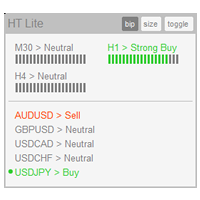
The indicator High Trend Lite monitors 5 symbols in up to 3 timeframes simultaneously and calculates the strength of their signals. The indicator notifies you when a signal is the same in different timeframes. The indicator can do this from just one chart. Therefore, High Trend Lite is a multicurrency and multitimeframe indicator. With the High Trend Pro , available at this link , you will have an unlimited number of symbols, 4 timeframes, a colourful chart of the primary MACD indicator, several
FREE

Triple Trend Core (EMA 50, 100, 200): * Dynamic trend tracking across three timeframes. * Ultra-thin visualisation to avoid overlapping with candlesticks. Thermal Fibonacci Retracement (Dynamic Heat Map): * Temperature Levels: Retracements are intuitively coloured. Shallow levels (0% - 23.6%) in Red/Orange indicate high-tension zones and quick continuation, while deep levels (76.4% - 100%) in Blue signal cooling zones or extreme value. * Dynamic Adaptation: Automatically calculates the maximum a
FREE

Highlights a specific candle after a designated time interval. This feature is particularly useful for evaluating the potential profitability of breakout strategies that are triggered at specific candle intervals. It allows traders to visually assess whether a breakout strategy, set to activate at a certain candle, would have been successful in past market conditions.
FREE

CandleCat is a small animated companion that lives in the corner of your chart. It is not a trading system, not a signal generator and not an advisor. It never places, closes or modifies any order. It simply keeps you company while you work.
The cat sits on its cushion, breathes, blinks, stretches, and falls asleep during quiet hours. When something happens, it notices.
REACTS TO PRICE Perks up on an unusually large bullish candle. Startles on a sharp bearish candle. Looks at unusually long wi
FREE

LZ Spread Monitor is a professional utility designed to help traders monitor transaction costs and execution quality in real-time.
It provides instant feedback on current market conditions, helping you avoid trading during high-spread periods (news releases, rollovers, low liquidity).
Key Features - Spread Analytics: Monitor Current, Minimum, Maximum, and Average spread for the session. - Cost Calculator: Instantly see the monetary cost of the spread for a specific lot size (e.g., 1.0 Lot = $
FREE

Eexibe níveis de preço de referência diretamente na janela do gráfico. A sua função principal é projetar automaticamente pontos de preço importantes baseados em dados diários.
O indicador plota linhas horizontais que correspondem aos preços de abertura, máxima, mínima e fechamento do dia de negociação anterior (D-1).
Adicionalmente, exibe os níveis de abertura, máxima e mínima para o dia de negociação atual.
Os níveis de máxima e mínima do dia atual são atualizados dinamicamente durante o anda
FREE

MT5 Trade Alerts to Telegram Send your MetaTrader 5 trade activity to Telegram automatically. MT5 Trade Alerts to Telegram is an account-wide monitoring and notification utility for MetaTrader 5. It detects trade events on the trading account and publishes clear, customizable Telegram alerts without opening, modifying or managing trades. Use it for manual trading, Expert Advisors, signal channels, account monitoring or simply to keep a real-time record of trade activity on your phone. Main Featu
FREE
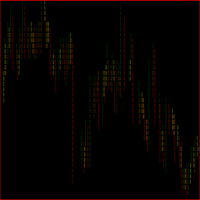
O indicador grafico de rompimento foi desenvolvido para elevar a precisão e confiabilidade na identificação de oportunidades de rompimento no mercado financeiro. Projetado com algoritmos avançados, este indicador destaca barras de rompimento com uma precisão notável, permitindo que traders identifiquem pontos de entrada e saída estratégicos. Recursos Principais: Precisão Aprimorada: Utiliza algoritmos avançados para identificar barras de rompimento com uma precisão excepcional. Alertas em Tempo
FREE

Spire - показывает трендовый, сигнальный, свечной прорыв в сторону верхней или нижней границы канала, а так же временную или долгую консолидацию в виде прямоугольного канала. Сигналы тренда не перерисовываются. В основу идеи индикатора входит Bollinger Bands.
Изменяемые параметры Signal trend -изменение цветовой гаммы сигнального символа тренда Lower limit - изменение цветовой гаммы нижней границы канала Upper limit - изменение цветовой гаммы верхней границы канала Internal field -изменение ц
FREE

Elevate your trading with this Metatrader 5 expert – the Position Volume Calculator. This tool takes the guesswork out of risk management and profit optimization. Simply input your desired stop-loss points with dragging the stop-loss line, and let the expert advisor compute the optimal position volume for your trade. Plus, with customizable reward ratios, it's easier than ever to set your take-profit points for maximum gains. Trade with confidence and precision. Try the Position Volume Calculat
FREE

VWAP BAR It´s power full indicator of candle by candle when lined up with greate analysis, you have great opportunity, finder defense candle. Is a good ideia from order flow method, now your meta trader 5 inside you time frame chart .
What is the Volume Weighted Average Price (VWAP)?
The volume weighted average price (VWAP) is a trading benchmark used by traders that gives the average price a security has traded at throughout the day, based on both volume and price. It is important be
FREE

Exact Countdown Timer — shows the remaining time before the current bar closes and a new bar forms. A fast and exact countdown timer will help you find the best moment to open a position. For example, it can be used on a seconds chart built using the Seconds Chart utility. Inputs Base corner — the chart corner to which an timer Is attached. X distance — the horizontal distance from the chart corner. Y distance — the vertical distance from the chart corner. Text font — font name Font size — font
FREE

A2 Trade Manager Finale EA is an EA that made for you that like SCALPING, HEDGING, or LONG TIME TRADING. FREE FOR DEMO ACCOUNT ONLY!!!!
Features : TRADING INFORMATION Total Equity information Running Total Profit / Loss information Margin Level information Running Profit / Loss each trade BUY and SELL (if Hedging) Total Lots information Current timeframe remaining Daily Profit / Loss information All time Profit / Loss information Local Currency conversion
TRADE MANAGER BUTTON Order Sell / Buy
FREE

AIX Notifier — Telegram and Discord alerts for AIX Analyst
AIX Notifier is a free companion utility for the AIX Analyst indicator. MetaTrader 5 indicators cannot access the internet by themselves, so AIX Notifier does it for them: it delivers AIX Analyst alerts, reports and the morning overview to Telegram and Discord, with a screenshot of the chart. It does not open, modify or close trades.
What it does • Sends AIX Analyst alerts to Telegram and Discord: price in a scenario zone, objective r
FREE

News Indicator. Shows the interest rate of 12 countries (Australia, Brazil, Canada, Mexico, euro zone, UK, India, New Zealand, Switzerland, United States, South Korea, Japan). It will help to analyze the impact of the interest rate on the exchange rate. It makes sense to set an indicator on large timeframes. To improve the information content, it makes sense to change the settings style of the indicator of the desired country, so that the line stands out from the total mass of indicators, as ind
FREE
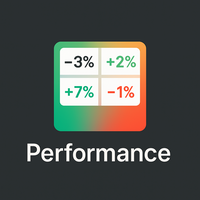
概览
Performance Indicator 显示一个 热力图 ,展示一组符号在可配置时间区间内的百分比收益。用于直观比较相对的 强弱 ,不对结果作任何保证。 配置
SymbolsList: 用逗号分隔的符号,必须与终端中的名称精确匹配。
BaseTF: 用于计算的基础时间框架。
UpdateSeconds: 自动刷新间隔(秒)。
CapPercent: 颜色强度的归一化值。
PeriodsList: 定义周期的字符串(例如 D1, W1, M1, M3, M6, Y1, YTD);接受诸如 1M 、 2W 、 YTD 之类格式。 收益计算
Standard periods: 比较当前收盘价与 N 个周期前的收盘价。
YTD: 使用最接近当前年初的收盘价以获得一致的比较。 视觉编码
背景: 非负收益为绿色,负收益为红色;强度根据 CapPercent 缩放。
文本: 若收益 ≥ 0 则为绿色,负值为红色,数据不可用时为灰色。双重编码确保可读性。 更新机制
计时器检查 UpdateSeconds 所定义的时间间隔,仅在允许的情况下重建热力图,并有内部保护机制防止过于频繁的
FREE

Day Close Hunter 为什么这很重要 每个交易者都熟悉这种情况:周五晚上,市场即将收盘,而您忘记在周末前平仓。周一市场开盘时出现跳空缺口,您的账户因此遭受本可避免的损失。 许多自动化交易系统没有内置的周五平仓功能。它们会在整个周末继续持仓,使您面临市场跳空的风险。 Day Close Hunter 一劳永逸地解决了这个问题。只需设置平仓时间和日期,即使您忘记操作,这个智能交易系统也会为您处理好一切。 产品定位 Day Close Hunter 是一款适用于 MetaTrader 5 的通用智能交易系统,能够在指定的工作日和时间自动平仓所有持仓和挂单。它非常适合保护您免受周末跳空缺口的伤害,也适用于每日收盘前的账户清理。 主要功能 可选择的交易日 — 通过复选框灵活配置。您可以选择任意日期平仓:仅周五、每天、或任意组合(例如周三 + 周五)。 精确的激活时间 — 设置智能交易系统开始执行平仓的时间。 持续监控 — 激活后,智能交易系统会以设定的间隔(默认5秒)检查持仓和挂单。如果出现新的持仓或挂单,它们将被立即平仓或删除,直到市场收盘。 三种平仓模式 : 全部(持
FREE

Magic Number Manager (OrderByMagic) Magic Number Manager (OrderByMagic) is a display-only MetaTrader 5 indicator that reads all open positions and groups them by magic number directly on the chart, refreshed every couple of seconds. It never opens, closes or modifies any trade. Features Live grouping by magic number: instantly see which positions belong to which EA. Per-group overview: total lots and profit/loss for each magic number. Collision detection: spot when two EAs share a magic number,
FREE
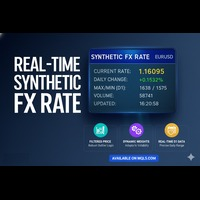
实时合成外汇汇率 (Real-Time Synthetic FX Rate) 实时合成外汇汇率 是一款高级指标,旨在为您的交易商(Broker)提供的任何货币对(包括主要、次要和外汇套利对)计算 稳健的合成汇率估值 。 其目标是提供一个 动态参考值 ,反映 每分钟的价格形成 过程,在官方汇率公布或机构验证之前,提供一个指导性的参考。 工作原理:稳健的混合模型 该指标通过结合三个关键组成部分来生成其合成值,并使用 动态权重 根据 市场波动性 进行自动调整: 成交量加权平均价格 (VWAP): 对成交量最大的价格水平赋予更高的权重,反映了买卖双方的真实市场共识。 截断均值 (Trimmed Mean): 自动排除极端价格或错误报价 ( outliers ,即异常值),确保参考值干净且稳定。 近期平均价格: 使合成汇率与最新的价格行为保持一致,避免过度滞后。 与官方汇率的区别 官方汇率: 通常每天计算一次,基于货币当局清算和验证的银行间交易。它代表一个 历史性 的参考值。 合成外汇汇率: 利用您交易商市场上的 实时数据 ,生成一个 分析性、估算而非官方 的值。 这个合成汇率充当一个 预先参考
FREE

当点差悄然扩大时入场交易,成本会高于预期,而仅关注单一交易品种的图表时,这一点很容易被忽略。
Phoenix 点差面板可同时实时显示多个交易品种的点差数据,并根据各品种自身的平均值进行颜色标注,因此您在下单前就能察觉点差扩大的情况。
如何实时显示点差成本
- 同时显示多达 15 种交易品种的实时当前点差、最小点差、最大点差和平均点差
- 支持以点差(pips)或点数(points)为单位显示
- 可按任意列(交易品种、当前点差、最小点差、最大点差、平均点差)排序
- 采用颜色编码的质量阈值(良好/警告/警报),阈值设定为各交易品种自身平均点差的倍数,而非不适用于所有交易品种的固定值
- 自动隐藏非活跃交易品种
警报
当交易品种的点差进入警告或警报区域时,会触发声音和推送通知。
使用 Phoenix 点差面板可:
- 在入场前检查整个观察列表中各品种的点差状况
- 避免在品种点差突然扩大超出正常范围时进行交易
- 将当前点差与该品种自身的典型范围进行比较,而非凭空猜测
使用方法
1. 附加到任何图表上;品种将自动从您的“市场
FREE

Fundamental Bias Dashboard for MetaTrader 5 Overview MacroEdge Pro is a comprehensive fundamental analysis panel that surfaces macro data, institutional positioning, and session timing in a single clean dashboard — directly on your chart. Designed for discretionary traders who need economic context without switching between tabs, terminals, or external tools. Rather than displaying raw numbers, MacroEdge Pro interprets them: beats vs misses, consecutive streaks, COT trend direction, kill zone ti
FREE

专家顾问允许您模拟由另一位专家执行并保存在csv文件中的事务的执行。 这对于在另一台服务器上检查交易策略的结果很有用。
使用另一个程序,例如,帐户历史导出器将帐户上的交易历史导出为所需格式的csv文件,或将程序代码从专家历史导出器连接到您的专家以导出历史。
在文件的开头应该有这样一行:
DATE,TICKET,TYPE,SYMBOL,VOLUME,ENTRY,PRICE,STOPLOSS,TAKEPROFIT,PROFIT,COMMISSION,FEE,SWAP,MAGIC, COMMENT
它可能不是从文件的一开始就找到的,也就是说,任何其他信息都可能在它之前。
在它们之后和文件的末尾,有一行以逗号分隔的字段值用于一个事务。 行中字段的值:
DATE - date in the format YYYY.MM .DD HH:MM:SS TICKET - transaction ticket (integer) TYPE - transaction type from ENUM_DEAL_TYPE (integer) SYMBOL - trading instrumen
FREE

Utility MTI (Main Trading Info) - 顯示交易者的基本交易信息,即:
點差的平均和當前大小 空頭和多頭頭寸的掉期大小 1 個交易手的 1 個點的成本 止損位大小(放置掛單的最小距離) 當前(紅色)結束前的時間和下一個(灰色)交易時段開始前的時間 距離當前交易時段結束的時間顯示為紅色,距離下一個交易時段開始的時間顯示為灰色。顏色可以在指標屬性中獨立調整。 Recommended Robot Scalper - https://www.mql5.com/en/market/product/77108
顯示通過以下方式執行:
歐洲交易時段(歐盟旗幟) 美國交易時段(美國國旗) Pacific Trading(澳大利亞國旗) 亞洲交易時段(日本國旗) 了解交易時段的結束時間和變化很重要,因為在交易時段結束時,許多交易者固定他們的頭寸,這可能導致趨勢變化,從而導致頭寸逆轉。
變量
Time On - 當前交易時段的顏色選擇
休息時間 - 選擇下一個會話開始前的時間顏色
平均點差 - 計算平均點差所涉及的最後一次報價的數量。
Swap Di
FREE

Overview Advanced MT5 EA that automatically detects, scores, and visualizes support/resistance levels with integrated trading panel, risk management, and multi-channel alerts. Installation (3 Steps) Copy EA File : Place Saturno_Smart_SR_PRO_EA.ex5 in MQL5\Experts\ folder Refresh : Right-click "Expert Advisors" in Navigator → "Refresh" Attach : Drag EA to chart → Click "OK" → Enable AutoTrading button Note : Ensure "Allow Automated Trading" is checked and the EA shows a smiley face Qu
FREE

If you are Looking Best indicators in Mql5 Market. Check these out!
SSS Scalping Smart Signals MT5 Indicator
Scalping Winning Signals Pro SWS
LTL Long Trend Locator The Ultimate Rule Protection Dashboard for FundingPips Traders Never Fail Another FundingPips Challenge Because of Rule Violations Most traders don't lose FundingPips challenges because they can't trade. They fail because they accidentally violate one of the firm's rules. A single mistake...
One oversized loss...
One overlooked d
FREE

MT5 CCI仪表板扫描器 MT5 CCI仪表板扫描器是一种工具,帮助跟踪不同时间框架和工具的商品渠道指数(CCI)水平,并在检测到新信号时提供实时警报。它用户友好,计算能力要求低,确保在任何计算机上都能平稳运行。 主要特点 自动仪器分组 :扫描器从您的市场观察列表中收集所有仪器,并将其分类(主要、次要、外来、其他)。使用设置中的简单复选框界面,轻松选择要扫描的仪器。 可自定义时间框架选择 :选择21种不同的时间框架进行扫描。所有选定的时间框架在仪表板上显示,并为每个时间框架发送新的信号通知。 简单的CCI设置 :调整CCI设置,包括周期和应用价格,并设置买入/卖出水平。您还可以决定是根据当前蜡烛还是最近关闭的蜡烛进行扫描。 颜色自定义 :个性化仪表板的主要背景、前景和信号箭头的颜色。扫描器将确保一切看起来整洁,并且容易辨认。 灵活的信号显示 :选择仪表板显示CCI值、信号年龄或不同设计的方向箭头。
如果您觉得这个扫描器有帮助,快速的评分或评论将不胜感激!如果您希望为其他指标创建类似的扫描器,随时联系我们——我很乐意提供帮助 ️
FREE

Candle Data HTTP Exporter NZDUSD 此免费版本仅导出 NZDUSD;完整版 Candle Data HTTP Exporter 可导出任意交易品种。 说明 本 EA 可将您的终端变成应用程序的历史和实时K线(OHLC)数据源。
互联网上有很多市场数据提供商,但实际上它们提供的数据质量并不总是令人满意。此外,这类服务往往价格更高,而且通常需要按每个交易品种支付月度订阅费。
使用本 EA,您可以向应用程序提供与终端中所见完全相同的K线数据,也就是您进行交易和市场分析所依据的数据。
与提供 Tick 数据的 Tick Data HTTP Exporter 搭配使用,即可获得市场分析所需的完整数据集。 功能 将K线数据发送到预先配置的外部 HTTP URL。 保证每一根K线都能送达;发生中断时,可从最后发送的K线继续。 K线时间戳偏移量(offset)提供两种存储方式: 本地文件(默认,自动管理) 您服务器上的 HTTP 地址(用于与应用程序集成) HTTP 请求失败时自动重试,确保K线可靠送达。 按可配置的批次大小传输数据。 配置 输入参数 说明 默认值 dat
FREE

FastCloser - Simple Profit-Taking Utility Description: FastCloser is a lightweight tool that automatically closes all open positions when total profit reaches a predefined target (in USD). Ideal for profit-taking without manual market monitoring. How It Works: Calculates the combined profit of all active trades. If profit ≥ TargetProfit (e.g., $100), it instantly closes all positions . Works as a one-click script (manual execution) or continuously as an Expert Advisor (auto-trading). Key Featur
FREE

TradeJournal DRP Connector is a listen-only Expert Advisor for MetaTrader 5, designed to synchronize trading events with the TradeJournal DRP web application.
This Expert Advisor does not open, modify, close or manage trades. It is not a trading strategy, not a signal provider and not an automated trading robot.
Its only purpose is to detect trading activity on your MetaTrader 5 account and send event data to your TradeJournal DRP account through a secure API connection.
Main features: - Det
FREE

//////////////////////////////////////////////// //////////////////////////////////
An improved version of the standard Bulls Power and Bears Power indicators.
Now it's two in one.
The setup is simple - you just need to specify the period. It is also very easy to understand the readings of this indicator, a signal above zero is a buy, and below it is a sell.
//////////////////////////////////////////////// ///////////////////////////////////
I hope this indicator will be very useful to you
FREE

"This indicator was designed so that you don't trade against the trend, the price strength helps you have more confidence in your entries. Note: The indicator can be used on any currency pairs, don't worry if you don't have all the indicators it uses installed, it will be calculated from the indicators you already have on the platform.With an interface that changes color for buy (blue), sell (red), and neutral
FREE
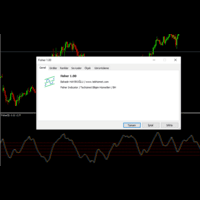
With Fisher level indicator. Many settings can be changed by the user, indicator created with original calculation. You can adjust the levels you create according to yourself and provide more stable displays. What is Fisher indicator: It transforms data that does not normally show a normal distribution, such as market prices. In essence, the transformation helps to better identify price reversals on a chart by making peak swings relatively rare events.
FREE

Kito Horizon Forecast is a closed-bar analytical indicator for MetaTrader 5. It combines current-chart conditions with confirmation and macro-timeframe context to present a directional forecast and a fixed planning roadmap.
The indicator does not open, modify or close trades. It is designed to support discretionary analysis and EA integration.
Main features
Long and short confidence The panel displays separate directional confidence scores and classifies the current state as LONG, SHORT or W
FREE

"Are you tired of losing money on unsuccessful trades? Look no further than EA Trailing Stop! Our program is designed to help you prevent losses and control your trades efficiently. With features such as adjustable stop loss and more, you can rest assured that your trades are in good hands. Don't wait any longer to start making successful trades. Try EA Trailing Stop today!"
You can use this as a starting point and tailor it to your audience and the platform you're using. This EA Trailing Stop
FREE

Protect your funded accounts and personal capital with military-grade precision. This utility continuously monitors your floating equity against your daily starting balance. The moment your custom drawdown threshold is breached, it instantly liquidates all open positions, deletes pending orders, and completely unloads from the chart. Stop revenge trading and never fail a prop firm evaluation due to a margin breach again.
FREE
Pivot Points are used by Forex traders to find support and resistance levels based on the previous day's price action. There are various ways to calculate pivot points, including averaging the open, high, low, and close of the previous day's chart price.
Forex Traders use a combination of pivot points with moving averages to find trading opportunities in the currency markets.
Pivot points are very useful tools that use the previous bars' highs, lows and closings to project support and resist
FREE
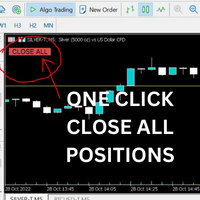
Just Attach to the Chart to be able to Click Button to Close all Open Positions in your Trading Account. Change Horizontal And Vertical Pixel based positioning for Button placement on chart. Appreciate your feedback and reviews. Note: All open positions on your trading account will be closed when button pressed.
If you need help with any simple utility happy to help.
FREE
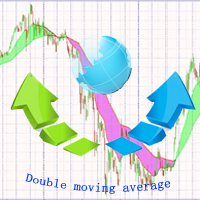
https://www.mql5.com A double moving average indicator This indicator uses the system's own two different time period of moving average indicators to reflect the movement of market prices. It is recommended that you use the default parameter Settings, which you can set according to your own experience to get the best predictive power. I hope it can provide some help for your trading.
FREE

Profit & Loss Display - MT5 Panel
On chart panel to display profit and loss per product over specified time period View P/L for EA trades only or also with manual trades Note this is a panel, not an indicator or algorithm, it simply displays profit and loss from account history
//---- Install ----// After download, attach indicator to chart from the markets folder which is in navigator window (Cntrl N)
//---- Study ----//
Set target profit for product per week/specified period Set loss limi
FREE

PERFECT.... Based on the professional MQL5 code you've provided, here are the top 10 reasons why your implementation is superior to standard trading scripts: High-Performance UI Throttling : By using GetTickCount() to limit UI updates to 200ms in OnTick , you prevent the terminal from freezing during high-volatility news events. Bulletproof Order Closing : Your HandleCloseAll uses a reverse loop ( i = PositionsTotal() - 1 ). This is the industry standard for ensuring no positions are skip
FREE

Title Prop Firm Risk Guardian Short description (one line) Real-time daily-loss and max-drawdown protection that automatically closes your trades and locks trading before you breach your prop firm limits. Full description Passing a prop firm challenge is hard enough — losing a funded account to a single careless trade is worse. Prop Firm Risk Guardian watches your account in real time and steps in before your daily-loss or maximum-drawdown limit is breached. It sits on your chart as a clean, mod
FREE
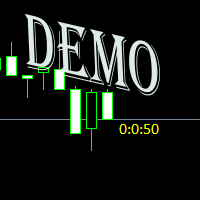
Простая утилита показывающая время до формирования свечи. Может быть очень полезна, если вход в сделку завязан на начале/завершении свечи. Демо версия работает на валюте EURUSD Входные параметры FontColor - Цвет текста. FontSize - Размер текста. FontName - Шрифт текста. TimeOnly - Указывать только время, без дополнительного текста. TypeOfDrawing - Тип отображения информации Важно : возможна задержка в 1 сек.
FREE

WPR Scalper Indicator for MetaTrader 5 Now for free! The WPR Scalper is a powerful indicator designed for traders seeking precise entry and exit signals based on the Williams %R oscillator. Optimized for volatile markets like BTCUSD on the H1 timeframe, it combines three Williams %R calculations (Fast, Slow, and Tortle) to identify overbought and oversold conditions with high accuracy. In the context of the WPR Scalper indicator, “Tortle” refers to a user-defined term for a third, slow Williams
FREE

Smart money is a powerful currency. This money is available to major investors who can identify, predict or even generate capital movements ahead of others. This money can flow into financial and capital markets and create dramatic price changes in various stocks. Therefore, detecting smart cash flow, which usually enters the market in a coherent manner and confronts the volume and value of transactions in a market with high returns, is one of the methods that some investors use to invest. But h
FREE

El AO Hybrid MA Master es un sistema de análisis de momentum avanzado para MQL5 que integra el Awesome Oscillator (AO) de Bill Williams con un modelo de confirmación basado en medias móviles duales . 1. Núcleo del Indicador (Core) Utiliza el algoritmo estándar del AO para medir la fuerza del mercado mediante la diferencia entre una SMA de 5 periodos y una SMA de 34 periodos del precio medio ( $High+Low/2$ ). El histograma está codificado cromáticamente para identificar la aceleración o desaceler
FREE

Risk Guardian Lite - Institutional Risk Monitor MT5 Are you trading blind? Most traders fail because they don't know their real-time exposure. Risk Guardian Lite is a high-performance monitoring tool designed for institutional traders who demand precision without visual clutter. Why choose Risk Guardian Lite? Unlike generic monitors, this version focuses on the "Golden Triad" of profitability: Net Profit, Real Exposure, and Efficiency Ratio (R:R). Elite Features: ️ Capital at Risk Monito
FREE

Full Description (Professional MQL5 Version) Range Scanner Pro is a lightweight and efficient MT5 indicator that scans price action to monitor market ranging conditions and potential breakout setups. Markets spend most of their time in consolidation. Identifying these range zones early allows traders to prepare for high-probability breakout trades. This tool is ideal for breakout traders, scalpers, intraday traders, and volatility-based strategy users. Key Features Detects market consoli
FREE

Elsna Alert (MT5 EA) is a lightweight Expert Advisor that monitors your trading account in real time and alerts you whenever a trade is opened or closed . It uses MetaTrader 5’s built-in OnTradeTransaction event to instantly detect any new executed deals—manual or automated—and plays a custom sound for each event.
You can choose whether it tracks all symbols or only the chart’s symbol . Key features: Instant audio alert when a trade opens or closes. Works with both manual and EA-driven trades. O
FREE

ST Flow Context: The Professional Trader’s Compass ST Flow Context is a macro analysis tool developed to identify the predominant direction of institutional money. It filters out intraday noise and delivers the real market context, helping the trader never to trade against the main tide. Key Features: Trend Alignment: Identifies whether the daily flow is bullish or bearish based on multiple timeframes. Interest Zones: Maps where institutional volume is defending positions. Entry Filter: Use Flow
FREE
Swap Monitor Indicator v1.0 by @marekfleisi Swap Monitor is a clean, lightweight MetaTrader 5 indicator that displays real-time swap values and open position swap data for the current symbol — directly on your chart. Whether you're a swing trader optimizing overnight holds or just want clear insight into swap costs and income, Swap Monitor gives you instant transparency on: LONG & SHORT swap values Color-coded swap profitability Open positions summary (including total swap profit/loss)
FREE
MetaTrader市场是 出售自动交易和技术指标的最好地方。
您只需要以一个有吸引力的设计和良好的描述为MetaTrader平台开发应用程序。我们将为您解释如何在市场发布您的产品将它提供给数以百万计的MetaTrader用户。
