 MetaTrader 5
 专家
专家
 指标
指标
 程序库
程序库
 实用工具
实用工具
 窗口小部件
窗口小部件
 规则
规则
免费的MetaTrader 4 交易实用工具 - 9
 以下是可在MetaTrader 4中简化外汇交易的交易程序。将鼠标悬停在下面列表中的工具上,阅读它的描述和用途。
Find Your Fibonacci Entry Levels Automatically Fibonacci Entries is a FREE trading utility that automatically displays key Fibonacci entry levels from the selected candle—so you can quickly identify potential pullback areas without manually drawing Fibonacci levels. KEY FEATURES Automatic Fibonacci Entries
Automatically calculate and display Fibonacci levels from the selected candle. Key Entry Levels
Displays: 23.6% • 38.2% • 50.0% Last Candle Analysis
Use the previous candle as
FREE

Simple Grid Dynamic Engine – Expert Advisor for Automated Grid Trading Simple Grid Dynamic Engine is a flexible grid-based trading Expert Advisor designed for traders who want structured order management and dynamic position expansion in trending or ranging markets. Signal https://www.mql5.com/en/signals/2364992 Important Note: This is ideally to be used with a trade pad which will close the positions and if needed accrue a basket to TP/SL at a profit.
Compatibility with manual trade panels suc
FREE

Msg2Line 是免费在线聊天网站,您可以在“LINE 聊天”中查看。
除非另有说明,否则我们将接受大多数的申请。
请不要将评论作为评论提交给国会。
已发送 0 条结果。
- 取消订阅 取消订阅
1. 编辑本段编辑内容。
2. 请勿打扰。
- 取消 评分 + 取消 评分
1. 编辑本段编辑内容。 2.
2. w/img 已删除。
- 删除此图片
1. 使用 IMG 删除图片。
*请注意,LINE TOKEN 不会自动生效。
*如果您使用“WebRequest”发送了电子邮件,
如果您使用“WebRequest”发送了电子邮件,请发送邮件至 LINE 帐户退出历史舞台并探索更多。 这是一个非常有用的工具,因此请明智地使用它。
由于缺乏解释,可能有些地方你不明白,但如果你不明白,请提问。
祝您交易生活愉快!
FREE

Msg2Slack 是将消息从 MT4/MT5 文本框发送到 Slack 的工具。 只需单击位于文本框右侧的按钮,您就可以轻松地将文本和图表图像发送到您的 Slack 频道。 即使您在图表上画线、标记、注释等,图像也会被发布。
无论您是想向自己还是群组发送消息,这个简单而强大的工具都可以让您非常轻松地捕获图表图像并即时发送消息。
Msg2Slack 工具显示在图表底部。 只需输入您的消息并单击右侧的按钮即可发布您的消息或带有图像的消息。
虽然效用水平因人而异,但任何使用 Slack 进行交流的人都可以从 Msg2Slack 即时发送图表图像的能力中获益。
获取 Slack API TOKEN 并将其设置为该工具的参数。
您还可以使用策略测试器来检查它是否有效。
FREE

Hm(水平标记)专为水平水平的手动标记而设计。 标记包含级别及其价格值。 线的厚度和颜色以及价格值在设置中设置。 水平可以放置在本地的时间框架,或公开设置所有的时间框架。
他的工作很简单:
1)–按你在设置中设置的键来标记级别;
2)-我们将线路带到所需的位置;
3)–点击鼠标右键和水平链接。
在未来,这些水平可以移动和调整。
从图表中移除后,指标不会自行清理水平。 他们将不得不手动删除。
最有效的应用是一次在所选交易工具上使用具有不同设置的多个HMS。
输入:
线条样式-线条样式
线宽-线厚
标记样式-价格标签的大小
标记偏移(像素)-相对于屏幕左边缘的标记偏移
线条颜色-线条和标签的颜色
单独的时间帧-显示在单独的时间帧上,或显示在所有时间帧上
标记热键-设置级别的键
FREE

Chart Buddy 是一款娱乐工具,旨在为您的交易图表增添乐趣。角色会沿着图表的右侧移动,仿佛在为价格波动加油,从而为您的交易体验增添独特和愉悦的元素。虽然它不会直接影响您的交易,但动画能提供轻松的分心效果,让您感受到仿佛有一个个人支持者。 主要功能: 价格波动支持 :角色根据价格方向(上升、下降或与您当前头寸一致)移动,仿佛在为市场加油。 角色选择 :您可以选择三种不同的角色(松鼠、相扑选手或女孩),也可以上传自定义图片来个性化体验。 可定制的动画 :调整角色移动的速度和切换时间,以符合您的喜好。 视觉娱乐 :动画角色为您的交易环境增添生动、互动的元素。 关于 illust STAMPO 该工具使用来自免费图片资源 illust STAMPO (stampo.fun) 的图片。有关这些图片的使用详情,请参阅 此文章 。 参数设置: 价格波动方向 :选择让角色响应价格的上升、下降或头寸的方向。 角色类型 :选择松鼠、相扑选手或女孩,或者上传自己的自定义图片。 切换时间 :设置角色移动的切换时间。 图片设置 :为上升和下降方向分别配置两组图片(共四张图片)。 Chart Buddy
FREE

該腳本以1個止損和5個不同的獲利打開5個賣單。 並下達4個限價單(賣出)。 默認設置以下參數: 所有未結訂單的止損-120點 獲利1張(0.1手)-30點 獲利其他4個訂單(每手0.04)-50、90、140、200點。
限價單的止損價比當前價格(下訂單時)高135-140點。 每個限價單的距離為20點。 帶有微型mart的批次大小-0.04、0.05、0.06、0.08。
對於限價單,將在2天后設置自動刪除。 您可以使用該顧問來支持未平倉合約https://www.mql5.com/en/market/product/56277
您可以在啟動之前使用自己的參數或帶有用於設置參數的窗口來訂購腳本。 就個人而言,我發現在沒有參數確認窗口的情況下運行腳本很方便。
MT5的腳本版本-https://www.mql5.com/en/market/product/56293
FREE

下面给你一版可以直接用于上架页的文案,你可以按你代码里的真实参数名再替换一下。 产品简介 QuantHubCommaner Dashboard for MT4 是一款专为 MetaTrader 4 设计的交易统计分析工具。
它不会参与开仓、加仓、平仓,也不会修改任何交易逻辑。它的作用是把账户中的历史交易数据和当前账户状态,以更直观、更清晰的方式展示出来。 通过这个统计表,用户可以快速查看账户在不同时间周期下的表现,并且支持按 品种、Magic、Comment、账户 等条件进行筛选分析。无论是手动交易者,还是 EA 用户,都可以更高效地完成复盘、统计和策略表现评估。 这款工具特别适合用于: 查看账户整体交易表现 分析某个 EA 或某组订单的真实结果 对比不同周期的收益变化 观察胜率、回撤、利润因子、平均持仓时间等核心指标 用图表和明细表快速完成交易复盘 功能亮点 1. 账户总览一目了然 面板可实时显示账户关键数据,例如: Balance Equity Free Margin Floating P/L Used Margin Open / Pending Leverage Buy / Se
FREE

The new version of the trading panel, which now has the ability to separately close Buy and Sell orders, display targets for all orders on the chart, as well as the ability to use the panel to trade with brokers working on the FIFO rule. Also, the new version adds option buttons for separate management of open orders.
It has a convenient visualized interface and intuitive control without a lot of additional tabs to which traders have to be distracted and switch their attention. Thanks to this,
FREE

Utility for order reversal. Closes orders on the chart on which it is launched and opens orders with the opposite direction instead of them. Has a simple and intuitive graphical interface. It is also possible to automatically reverse newly opened orders. MT5 version of the utility - https://www.mql5.com/en/market/product/74770 If you like this utility, take a look at my other products - https://www.mql5.com/en/users/nina_yermolenko/seller
FREE

Alarm Clock generates sound signal at the prescribed time. Time is set by a vertical line on the chart. Just shift this line on the chart to the future. After you set the line at the desired time, you can do whatever you want with the chart, like change a timeframe and a symbol - the alarm clock will generate a signal at the prescribed time anyway. If you accidentally remove the line, the indicator will restore it at the prescribed time. You can attach the indicator to different charts and set d
FREE

Simple and lightweight utility for automatically synchronizing the symbol of multiple charts Synchronization in both directions, regardless of which chart you change the symbol on Quickly activate or deactivate the synchronization of individual charts at the touch of a button Create multiple synchronization groups by assigning different event IDs Themes for bright and dark chart layouts
FREE

FOREXBOB AUTO CLOSER is a very handsome tool for manual traders who doing :- Scalping Correlation Hedging Those who use averaging methods etc. As this utility tool will help you by closing all your running trades when the universal floating P/L reaches a certain value that you will put in inputs. You may enable and disable the alert message on your mobile phone when auto closer close all the running deals on specified profit. You may add any message you want in notification. This tool consid
FREE

The only drawdown guardian that stops your other EAs from digging you deeper. PropMarshal monitors your account equity in real time and instantly closes all positions the moment a drawdown or profit target threshold is breached. But it doesn't stop there — it closes every chart on your platform too, cutting off any other Expert Advisors before they can open new trades and compound the damage. The Problem PropMarshal Solves Most prop firm traders run multiple EAs across multiple charts. When
FREE

Do not use Windows 7 with this EA MT4toTLGRM EA only sends text messages from Metatrader4 to a Telegram group or channel of your choice. From version 4.23 it sends messages to Discord, Twitter and Facebook. The messages are customizable to show information about any trading activity in the account. Also it shows a daily PnL report. Several instances of this EA can be used simultaneously in the same MT4 terminal for sending messages to different Telegram group/channel but ensure that each one ha
FREE

Advisor Information: EG Connection Alert FREE every hour sends simple push notifications about the presence of a terminal connection to the server.
The utility will be useful to you if automated trading is carried out on a remote machine and there is no possibility to constantly check the operation of the terminal. Just install the adviser on any chart with any timeframe. You will receive notifications about the connection every hour. If no notifications are received, the terminal should be chec
FREE

It is a tool to create TRAILING STOP ORDERS. Either BUY and/or SELL After creating stop orders, it will start to trail stop orders step by step. After stop order open, this time it will folllow the buy and/or sell order with TStop with TStep from the TStop Start point. It can help you to catch the perfect price to enter the market. Inputs are Stop Type : Buy Stop - Sell Stop - Both Repeat : How many times to create stop orders after closing opened one. Points Multiplyer : Multiply all point
FREE

The indicator is a real-time trading dashboard for MT4, showing account, trade, and risk information in a compact panel directly on the chart. Key Features Dashboard Display Shows instrument, price, spread, and remaining candle time. Shows account stats: balance, equity, margin, free margin, margin used. Floating profit and pips of all open trades. Historical profits: today, this week, this month, and all-time. Risk stats: total lot size, average risk per trade, average R:R ratio, average trade
FREE

Spread Alert 监控点差,并在点差高于正常值 时向您发出警告, 或 在超出您设置的阈值时向您发出警报。 特征:
根据 价差是否正常 、 高于正常 或已触发警报 , 选择 3 种不同的颜色
可选声音警报 ,可让您设置 自定义声音 (必须是 .wav 文件)
当您将鼠标悬停在标签上时,在工具提示中 显示记录的最低点差 、点 差警告 、 警报点 和点 差状态
参数:
姓名
描述
声音警报 达到警报阈值时播放声音文件 警报声音文件(必须是 .wav 文件) 警报消失后将播放的 wav 文件
警报声关闭开始(经纪人时间) 声音警报将被静音的开始时间
提示音结束(经纪人时间) 取消静音的结束时间
警报点 价格必须达到或超过的点数阈值
显示警报点 将在当前点差旁边显示您设置的阈值
警报标签:放大 如果启用,将在警报时调整标签大小并重新定位
警报标签:角落(必须设置为放大) 警示标签应放置的位置
标签字体颜色(普通) 达到警报阈值时显示价差的标签颜色
标签字体颜色(警告) 点差高于正常值时显示点差的标签颜色
标签字体颜色(警告) 达到警报阈值时显示价差的标签颜色
标签字体大小 显示价差
FREE

Exaado Capital care If you've been searching for ways to manage Drawdown control, Drawdown Control, Balance protection, or Daily Drawdown Limit related to trading with Prop Firms, FTMO, My Forex Fund, or Funded accounts, then you've come to the right place. Additionally, if you're looking to safeguard your trading account, we can help. Do you struggle with managing your drawdown while trading funded accounts? Our EA is designed specifically for those in your position. Many prop firms have a "Tra
FREE

EXTREME PRICE ACTION DASHBOARD
Make your trades professionally using advanced statistics and price action. Manages 29 pairs simultaneously. It has Buy and Sell buttons, close buy and close sell separately for each pair. Stop Gain and Stop Gain programmable in Pips automatically. Dynamically calculates 5 regions where statistically the most assertive sales and 5 more assertive shopping regions are found. Indicates the total lots, buy balance and sell balance for each pair. Change the graph's t
FREE

这个EA是一个小助手,适用于所有喜欢在智能手机或平板电脑上交易的人。EA被放置在一个图表上,并监控所有市场(多货币)。无论你在哪里,只要有网络,你就可以使用它进行交易。打开位置,设置停止,EA会自动在之前设置的比例(1:1,1:2等)到停止的位置创建一个TP。这是一个非常方便的功能,可以帮助你更好地管理你的交易。非常适合在移动设备上交易。无论你是在公交车上,还是在咖啡店,只要你有时间,你就可以进行交易。更多像是追踪停止的更新将会跟随。这将使你的交易更加灵活,更能适应市场的变化。 Translated via ChatGPT (Bing browser copilot) Excuse my bad mandarin.
FREE
Advisor-assistant for those who like trading on Fibonacci levels. Automatically finds manually plotted Fibonacci Lines on the chart, and opens an order when the levels are broken. The Expert Advisor has 4 customizable levels and the ability to turn them off as unnecessary.
Parameters: Lot - order volume (lot); Requote - price slippage; Magic - individual number for all EA orders, works only with own orders; Name Fibo - set initial name of Fibonacci lines; Level parameters are ide
FREE

Have you ever wanted to back-test a strategy but never wanted to risk real money? And the thought of using a demo account is exhausting as real time markets develop your skills slowly. This utility will help you develop your strategy faster and will help determine if the strategy works long-term by simulating real trading through back-tests. This will save you time as you can back-test strategies from previous price data. In order to set an sl during the backtest you have to click on the sl b
FREE

this EA draws vertical lines on the chart, either consecutive or alternating lines, depending on the input settings. Since vertical lines often represent time events, timing is important in trading.
StartTime = D'2025.03.12 23:00'; // Starting point (time and date) NumberOfLines = 10; // Total number of lines to draw IntervalCandles = 1; // Interval in candles (must be > 0) IntervalMinutes = 30; // Interval in minutes (0 to disable) Directi
FREE

Assistant for placing orders, closing orders, creating SL TP orders with tradingstop. Suitable for Scalping. Helps Traders place orders and close orders quickly. 1. Magic_mn ==> Ea number.2. total_buy ==> Buy order number. 3. total_sell ==> Sell order number. 3.TrailingStop_ON ==> ON/OFF . 4.TrailingStop ==> Poin profit protection. 5. GMT ==> Time GMT. 6. ShowEach ==> Show Profit on the chart. 7. Statistical ==>Statistics are allowed 8.Statistical_time_frame ==> Profit
FREE

為了讓新手交易者更容易理解,我做了一個交易平台賬戶信息面板,不收取任何費用。
首先,您必須在交易前了解平台。
各平台報價及商品規格與賬戶交易規則不同。
您可以調整面板的顏色和大小,如果您嘗試按下,面板可能會移動。 面板不會下單,放心加載EXPERTS 如果我升級了免費產品,您需要先將我的舊產品從市場上移除,然後重新啟動 MT4,然後再次下載以使用我升級的免費產品。
In order to make it easier for novice traders to understand, I made a trading platform account information panel, which does not charge any fees. First of all, you must understand the platform before trading. The quotations and commodity specifications of each platform are not the same as the account trading
FREE

請注意,該產品旨在幫助您為每筆手動開立的交易設置自動止損,特別是在它所附的圖表上。 關於掛單,只有在掛單被激活後才會設置止損。 要以點為單位設置所需的止損,您可以使用 InpStopLossPoints 參數。
請注意,該產品僅針對貨幣對進行了測試,例如 GBPUSD。 雖然它可能適用於其他符號,但尚未經過測試,您可以自行決定它是否適用於您的目的。 我們建議您在模擬賬戶而不是真實賬戶上測試產品,因為此產品不提供任何聲明或權利。
使用本產品的決定完全取決於您,因此我們無法提供任何保證或擔保。 我們要感謝 Orchard Forex 在這個 MT4 EA 上所做的工作,我們在其中添加了基於應用它的圖表而不是所有打開的交易的工作功能。
谷歌翻譯
FREE

快速符号是一个面板式指示器,符号名称作为可连接按钮,时间框架作为可点击按钮,使用该指标的主要目的是快速浏览交易对,面板本身带有隐藏/显示按钮,不会妨碍交易者,凭借快速的执行速度和无漏洞的性能,该工具是任何交易者最容易拥有的工具。 ====================== 如何使用 :
只需点击所需交易对,交易对就会直接在你操作的图表上打开,要更改时间框架只需点击所需的时间框架按钮即可。
============================================================================================================
FREE
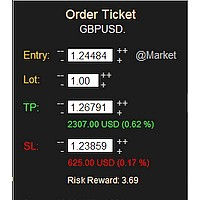
MONEY MANAGEMENT IS A CRITICAL COMPONENT OF SUCCESSFUL TRADING
One of the most important aspects of money management is risk management. YOU need to have a clear understanding of the risks associated with your trades, and mitigate those risks. This free MT4 indicator allows you to efficiently and easily protect your capital and avoid catastrophic losses. Download it and use it before every single trade! ***Please comment, rate and share it to your friends if you like it***
Tags: money managem
FREE
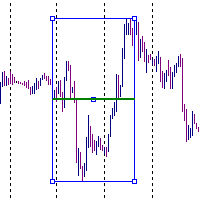
It is just an alternative fibo lines, because mt4 have is a very strange drawing of fibo lines A simple Box (Rectangle) graphic element with adjustable levels binding: it is possible to specify up to 17 custom levels, all rectangles on the chart with the given prefix in their name are processed. Levels are specified in % of the height of the rectangle. A convenient graphical element for analyzing charts by growth-correction levels. Enjoy your work!
FREE
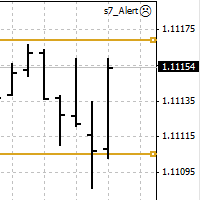
An Expert Advisor. A channel breakthrough signal. Attach two horizontal lines to a chart: one for the upper channel line, name it < Up > the other one for the lower border, name it < Dn >
Settings: sound = true - play a sound notification alert = true - show a dialog box containing user data comment = true - show a comment in the upper left corner of the chart print = false - print a message to the Experts log repet = 3 - number of times the sound file is played.
FREE

What is a tool ? Used for monitoring profit summary in your portfolio, by setting profit target. The tool will automatically close all open orders. When the profits meet the target set. How to use Place the tool on any currency pair, any timeframe and set profit target. Easy... Currency Pair : Any Timeframe : Any Input Parameter Summary profit for auto close all orders ($) Meaning : Input your profit target here. Visit my products Target Profit Magic Target Profit All The Profit Tracker Currenc
FREE

If you like trading by candle patterns and want to reinforce this approach by modern technologies, this script is for you. In fact, it is a part of a toolbox, that includes a neural network engine implementing Self-Organizing Map (SOM) for candle patterns recognition, prediction, and provides you with an option to explore input and resulting data. The toolbox contains: SOMFX1Builder - this script for training neural networks; it builds a file with generalized data about most characteristic pric
FREE
Stop and Reverse Martingale EA is an expert advisor that integrates the following inputs within it: Start lot size Lot multiplier Take profit distance in points Take profit distance in points *this input is a stop loss, is misspelled within the code of the EA Magic number A and B Start cycle with round number The distance of round number Daily maximum orders per cycle and close all Daily loss (maximum orders per cycle when this last order hit the stop loss the EA close all orders in the same m
FREE

該實用程序對需要自動執行某些操作的交易者很有用。它可以執行以下功能:
設置止盈水平。 設置止損水平。 將止損轉移到盈虧平衡點。 使用尾隨止損轉移止損。 該實用程序具有以下輸入參數:
TakeProfit-TP水平。 StopLoss-SL級別。 TrailingStop-如果不想使用尾隨止損,請將其設置為0。如果該值為正,則它將用於尾隨止損。如果設置負值,則當達到適當水平時,它將用於將SL轉換為收支平衡。 僅零值發生變化的跡象-僅在級別等於0時更改級別。也就是說,如果您手動傳輸級別,則顧問將不會觸摸它們。 BuyOrderColor-購買訂單級別的顏色。 SellOrderColor-賣單水平的顏色。 EA簡單易用,不消耗不必要的計算機資源,並且沒有任何額外的設置。 ______________________________________________________________________ 该实用程序对需要自动执行某些操作的交易者很有用。它可以执行以下功能:
设置止盈水平。 设置止损水平。 将止损转移到盈亏平衡点。 使用尾随止损转移止损。 该实用程序具有以下输入
FREE
The Five Minutes Tester indicator is a simple tester for the Five Minutes trading system and the Five Minutes Expert EA based on binary options. Its objective is constructing a balance line on history data and calculation of statistics during CALL and PUT transactions performed by Five Minutes trading system. The tester requires at least 100 bars in history for the EURUSD instrument on the five-minute interval. But, in order to receive reliable statistical data, it requires the bars to be downlo
FREE

Close All Profit Orders for MT4 script - closes absolutely all orders, whether pending or market ones.
Orders are closed at the current profit/loss indicators at the time of closing.
The script is suitable for moments when you need to quickly close all orders at the current indicators.
The script is very easy to use, just drag the script onto the chart and it will do its job.
Add me as a friend, I have many other useful products.
FREE

Close All SELL Orders for MT4 script - closes absolutely all orders, whether pending or market ones.
Orders are closed at the current profit/loss indicators at the time of closing.
The script is suitable for moments when you need to quickly close all orders at the current indicators.
The script is very easy to use, just drag the script onto the chart and it will do its job.
Add me as a friend, I have many other useful products.
FREE

Close All BUY Orders for MT4 script - closes absolutely all orders, whether pending or market ones.
Orders are closed at the current profit/loss indicators at the time of closing.
The script is suitable for moments when you need to quickly close all orders at the current indicators.
The script is very easy to use, just drag the script onto the chart and it will do its job.
Add me as a friend, I have many other useful products.
FREE

Risk Panel Pro (MT4) Risk Panel Pro is a Tool for MetaTrader 4 that automates placing Stop Loss and Take Profit based on a percentage of the account balance. It is a trade management utility; it does not provide trading signals and does not guarantee any profit. Main functions Auto-apply SL/TP on new orders using balance-based risk (default: SL 2%, TP 4%). Switch Automatic mode off to manage SL/TP manually. One-click buttons to apply SL or TP to existing positions at any time. Close Chart : clo
FREE

The Equity Curve indicator is a simple and helpful tool that shows the development of the equity curve in real time. For precision measurement, it should be used in a separate window with a period of M1.
Main features The indicator shows the development of the equity curve in real time. High precision on the minute chart. High-speed calculation. Available for MT4 and MT5. Please visit the Equity Curve indicator product page for the input and output parameters settings.
FREE

AutoOrderModify Free is a supporting tool for all Manual and System Forex Traders. It works perfectly for situations like: “I have a nice EA but lacks the Trailing and/or Break Even.” “I’m lazy to calculate SL and TP every time I open a position.” “I want to control all of my manual trades with Trailing/Break even” Anyone interested in this tool but want more function, please try the “ AutoOrderModifyEA Pro ”. The freeware version can’t manage positions by Magic Number but manage ALL positions.
FREE
Minimalist and fully customizable info panel. It works on any chart and timeframe, with 2 - 4 digits brokers and with 3 - 5 digits ones. It can show: Current Spread in pips (1 decimal digit if you are on a 3 - 5 digits broker) ATR (Average True Range) in pips Current Server Time Current GMT Time Important Account Info: Current Leverage and Stop-out Level (%) Time left for the current bar. Very useful on 4 h charts All info labels have a tooltip with the same data Available customizations : Enabl
FREE

PL Graph Visualizer 是一个实用程序,可显示您帐户损益的实时图表。
图表可以按货币对或幻数单独查看,让您对每个仓位的盈亏变化一目了然。 该工具可以与集成结算工具(可在此处找到)结合使用,以进一步增强其功能。
https://www.mql5.com/en/market/product/116884
实时图表不仅显示账户的总盈亏,还显示多个货币对的盈亏状况,让交易者即时掌握详细变化,辅助决策,让交易更加有效。
通过实时损益可视性增强您的交易策略。
该工具实时生成图表,因此如果您关闭图表、更改时间范围或重新启动 MT4,图表将从最新数据重新生成。
更详细的信息:
https://www.mql5.com/en/blogs/post/757410
FREE

Rick FX Academy Professional Trading Template MT4 Upgrade your MetaTrader 4 workspace with a clean and professional trading template designed for Forex, Gold, and Silver traders. The Rick FX Academy Professional Trading Template provides a modern black trading environment that helps traders focus on price action, market structure, and technical analysis. Designed for manual traders, strategy developers, and EA users who want a professional chart setup without spending hours customizing MT4. Feat
FREE

L'indicatore / Utilità Chart Clear è uno strumento essenziale per i trader che desiderano un grafico pulito, leggibile e professionalmente organizzato su Meta Trader 4. Una volta installato, modifica automaticamente l'aspetto del grafico senza richiedere alcun settaggio manuale, rendendolo immediatamente più chiaro e facile da analizzare.
Caratteristiche Principali: Grafico pulito e professionale: Sfondo bianco per una migliore leggibilità Candele verdi per i movimenti rialzisti e ros
FREE

LMBF Order Manager Hub LMBF Order Manager Hub is the free execution companion for compatible LMBF trading indicators on MetaTrader 4. MetaTrader 4 allows only one Expert Advisor on a chart, while a chart can host several indicators. This utility lets compatible LMBF indicators send confirmed order requests to one shared Expert Advisor. The manager can be attached to one chart while client indicators run on the same chart or on other open charts in the same MT4 terminal. The manager is an executi
FREE

Script for quickly determining the time offset of your broker's server relative to GMT. For correct operation in the strategy tester, many Expert Advisors require GMT time to be entered in the settings for the terminal where testing is being performed. Developers are forced to enter the GMT offset for testing separately, as such functions are not provided in the tester. This script can help quickly determine the time offset in your terminal relative to GMT.
Parameters Day light saving time for
FREE

This a very Simple EA with two take profit level lines TP1&TP2 both lines can be added using a button, incase the lotsize is less than 0.01 the lines will not show
in addition to that the EA has a breakeven function, where it moves the stoploss to entry point once the price reaches TP1 or TP2 , this function is disabled by default
please let me know if you face any issue with this EA
FREE

Metatrader 4 protection EA that limits profit Ways of working: * Aktif this EA to any pair in metatrader 4, you can start trade manual * Close all open orders if you have profit equity in money according to settings "Will close all open buy and sell orders regardless of profit or loss" * The EA/robot does not open orders, only closes orders if the settings are reached, this could be more or less due to market movements. For example, setting a profit of 5 $, the estimated profit can be 4.8 $ or
FREE

Virtual Trailing Stop Start, Trailing Stop and Trailing Step with TakeProfit and Stoploss Virtual Lines And Sound Alerts are included. Brake brokers limitation. You can put even 1 point trailing stops and take profit levels. Best EA for protecting your profits and scalping. MT5 version of this product in on the way. Point Multiplyer 1 means 1 point. You can adjust Multiplier point.
FREE

Virtual Assistant MINI VIRTUALL ASSISTANT = MAKE YOUR TP AND SL VIRTUAL! Tool meant to control your stop loss and take profit by converting them to virtual SL/TP (with support for TRAILING) Convert all SL and TP to virtual so your exits on trades are hidden from your broker!
Run this EA on any graph, choose 1MIN timeframe (VA is autosaving data only on new bar detected, so graph TF equals to VA autosave period) !!! When using virtual trade exits, stable connection is needed for order executi
FREE
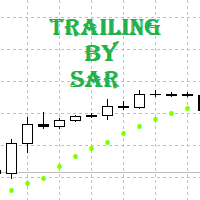
Tracking positions using trailing on the Parabolic SAR indicator. It is necessary to allow automated trading in the terminal settings. In testing mode, the utility opens Buy or Sell positions on the first ticks, which allows you to visually observe the given logic, changing the utility parameters. In real mode, the utility does not open positions. Discuss the complexities of Forex trading here: chat "Age of Expert Advisors" . Parameters Select_Magic - selection of magic numbers. Positions with
FREE

This MQL4 code is a custom indicator that draws multiple colored rectangles on a chart, spaced apart by a defined pip distance, and projected into the future. Here's a brief breakdown: Purpose: Draws several horizontal rectangles (zones) starting from a specified price. Rectangles are spaced apart vertically by a pip distance. Colors alternate between FirstColor and SecondColor . Rectangles can be drawn behind candles and optionally filled. Each rectangle extends into the future for a specified
FREE

The indicator shows support and resistance levels as horizontal lines. It shows the highs and lows of former days, weeks and month in every chart.
How to work with support and resistance levels show the EA Limit Scalper and the Universal Moving Average Expert Advisor (UniMA EA) .
When the tip of the coursor is on a line (mouseover) it shows the real value of the level and which high or low is shown, see explanation below.
The indicator must be installed like an expert advisor ! To se
FREE

If you execute or test an Expert Advisor on a laptop, personal computer or a VPS, you may face the situation when Internet connection is lost and the EA stops. Of course, this utility ( Disconnect Alerts ) will not help you restore the Internet connection, but it will gather the information and will send an alert to you about when and how long your terminal was without access to the Internet and did not actually work. After receiving such a notification, you can check your trades or think about
FREE
Простая утилита MQLTA Draw Grid поможет вам нарисовать сетку на вашем графике. Она полезна при изучении графика и моделирования сетки.
Как она работает? Утилита будет создавать горизонтальные линии в зависимости от заданных параметров
Как использовать этот инструмент Установите индикатор на график, выбрав параметры по умолчанию. Выберите начальную точку, значения минимума и максимума диапазона и стиль. В появившейся графической панели вы сможете создавать и удалять сетку, а также изменять неко
FREE

Why do you need this script? If you place lots of orders and re-calculate your risk for every order you placed, you definitely need such a script. This script places one or (optional) two different orders with the following script inputs.
Utility parameters Operation Type - "Buy","Sell","Buylimit","Selllimit","Buystop","Sellstop" Price - Entry price of the order(s). Stop Loss - Stop Loss of the order(s). Take Profit 1 - Take Profit of the first order. Take Profit 2 - Take Profit of the second o
FREE

Layering — Build Profit in Measured Steps
Layering helps you grow and protect a position by placing additional trades at equal, defined distances as the market moves. It's a structured layering approach designed to secure the account and bank profit as each take-profit is reached.
What it does for you Measured layering: trades are added at equal distances you define — no guesswork. Account protection built in: the layering logic is designed to secure your account as it works. Profit-locking: a
FREE

Handle orders for different magic -1 for all magic, 0 for manual orders, 1-XXXXXX for EAs For example, if you want to control orders from EA with magic 3333, your manual orders, type 0;3333 Close on exact time, example. close order every XX:15 --> Close all on 00:15, Close all on 11:15, Close all on 12:15... Close on Loss, close the loss for single order, close the loss for the whole magic number.
Parameters Description (-1 for all magic)(0 for manual orders)
List of the magic to check - 0;1;2
FREE

The main purpose of this expert advisor is to protect your hardly gained profits. Once the market goes in your favor, with amount of specified pips [configured via EA inputs], the EA will do the following: Move the Stop-loss of the profitable positions to Breakeven. Lock in some profits, i.e put the SL above/below your entry with specified pips Will close part of position, % of lots, once the EA was triggered. By default, the "Move to Breakeven EA" will modify all opened positions on the termi
FREE

This Utility is a tool to manage level of profits or losses for each order without using stop loss or take profit. The Utility applies virtual levels to close orders in profit or loss. You can use the robot to manage manually opened orders or manage orders opened by another EA.
You can to get the source code from here .
Parameters OrdersManage - orders to manage (all orders of all symbols or orders on the current chart). Stop Loss Pips - virtual stop loss level. Take Profit Pips - virtual take
FREE

This indicator is designed to provide all useful information about symbol, account, positions and profit. It is developed for improving trader's money management.
Parameters Calc can be divided to separate blocks. Each block is possible to hide, set its own color and other properties. Block symbol: This block displays information about actual SPREAD, POINT VALUE (in deposit currency for 1 lot), SWAP LONG and SHORT. Show symbol info - display/hide this block Color of symbol info - color of this
FREE

Expert Info: Pin = 0 --> Manual Trade" TralingStop = 0 --> Traling Stop Off " Sell & buy --> Open Order " C-All --> Close All Order" C-Buy --> Close Buy Order" C-Sell --> Close Sell Order Input Parameter: input Name_ = " ----- Gooinsta Army Simple ----- "; input Pin = 0.0; input Resiko = _Medium; input min_Lot = 0.01; input max_Lots = 1.0; input Slipage = 3; input double Target = 1050; input maxorders = 100; input TralingStop = 10; input End = " ----- Salam Profit Konsisten ----- ";
FREE

FX Live — Stats Export
Works only with https://fxlive.trading
Monitor all your MetaTrader accounts from a single dashboard, in real time, across every broker. FX Live Stats Export is an utility, not a trading robot. It never opens, modifies or closes a position. It reads your account and sends the data to your private FX Live dashboard, so you can follow every account you own from one place — on your computer or your phone — without switching between MetaTrader terminals.
WHAT IT DOES Atta
FREE
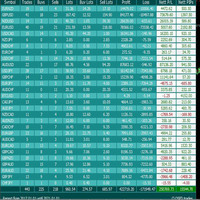
For more info, questions and problems join to discord.gg/reitakfx
Very informative and detailed tool for your account. - pairs, number of trades, lot size, profit, lose, nett p/l, net pips - profit growth chart
Instalation : - open chart and delete every other indicator on it - put this report on chart
Setting : - magic number - filters (comment, symbols, currencies) - date (today, week, month custom) - Start / End date (this is for custom date) - report type (open - only active trades wi
FREE

FREE UNTIL FEBRUARY 14, 2023
SPEND MORE TIME WITH YOUR FAMILY. ENJOY LIFE… DO NOTHING. This version is only auto set of Takeprofit and StopLoss
Main Version of TropangFX: MT4 Version | MT5 Version Recommended timeframe: H1 Supported currency pairs: GBPUSD, EURUSD, EURCHF , USDCAD, USDCHF , AUDCAD, EURCAD, EURAUD and many more...
Requirements
The EA requires good brokerage conditions: low spread and slippage during the rollover time. I advise using a really good ECN brok
FREE

Saved your Account Margin for multiple Trades Trading Robot Closing all second open Trades automatic Closing Trades that reached max. Lot Trading Robot built to avoid:
-Stop multiple Trades -Save overtrading -Hold Strategy -max. Lot -Prop conform
-long Account holding -Prop Firm Account holder - Robot allow one Trade per Symbol -Stop loosing by click multiple Times Trade Button -Robot needs to be Set on every Symbol that will be saved - no Settings configure OneRule OneFunktion Set on Chart
FREE

The new version of MirrorSoftware 2021 has been completely rewriten and optimized.
This version requires to be loaded only on a single chart because it can detect all actions on every symbol and not only the actions of symbol where it is loaded.
Even the graphics and the configuration mode have been completely redesigned. The MirrorSoftware is composed of two components (all components are required to work): MirrorController (free indicator): This component must be loaded into the MASTER
FREE
MetaTrader市场是您可以下载免费模拟自动交易,用历史数据进行测试和优化的唯一商店。
阅读应用程序的概述和其他客户的评论,直接下载程序到您的程序端并且在购买之前测试一个自动交易。只有在MetaTrader市场可以完全免费测试应用程序。
