 MetaTrader 5
 エキスパート
 インディケータ
 ライブラリ
ライブラリ
 ユーティリティ
 ウィジェット
 ルール
ルール
YouTubeにあるマーケットチュートリアルビデオをご覧ください
ロボットや指標を購入する
仮想ホスティングで
EAを実行
EAを実行
ロボットや指標を購入前にテストする
マーケットで収入を得る
販売のためにプロダクトをプレゼンテーションする方法
MetaTrader 4版無料取引ユーティリティ - 9
 以下はMetaTrader4での外国替取引を簡素化する取引プログラムです。以下のリストのユーティリティにカーソルを合わせて、説明と目的をご覧ください。
NNFX TOOL – The Essential Order Management Tool for the Modern Trader A "small but mighty" EA, designed to optimize your trading workflow: High Performance: Lightweight yet powerful operation, ensuring precise and efficient order execution. Versatile: Perfect for NNFX method followers, while being incredibly user-friendly for beginners and sophisticated enough for pro-traders. SPECIAL FEATURE - Mobile Trading Support: Automatically sets immediate Stop Loss (SL) and Take Profit (TP) for pending
FREE

現在の取引口座の取引履歴のエクスポートを実行します。 ファイルは MQL4/Files ターミナルフォルダに保存されます( メインターミナルメニューから開くことができます: ファイル->データディレクトリを開く (Ctrl + Shift + D)そしてフォルダに移動します MQL5 /ファイル) または端末の Common/Files フォルダにあります。 ファイル名は自動的に生成されるか、スクリプトパラメータを使用して手動で設定されます。 履歴ファイルは、EAを使用して別の取引サーバーで同じ取引シーケンスをシミュレートするために使用できます シンプルヒストリーレシーバー 。 ファイルの名前: ファイル名を 指定するか、フィールドを空白のままにして、ファイル名を自動的に生成します。 区切り 文字:CSVファイル(カンマ'、'またはセミコロン';')および小数点(ピリオド'。'またはカンマ'、')のデータ部分の区切り記号を設定します ファイルを共通フォルダに保存 :Trueの場合、ファイルはCommon/Filesフォルダーに保存されます。
FREE

iCUSTOM INDICATOR TESTERはCODERS用のツールですが、それだけではありません。 これは、.mq4ファイルとしてのソースコードがなく、コンパイルされた.ex4ファイルのみの場合でも、特にカスタムインジケーターをテストおよびチェックするために設計されたプログラムです。
トレーダーはインジケーターをテストし、アイデアがインジケーターデータと関連付けられているかどうかを確認します。アイデアが実際に計算され、この特定のインジケーターに基づいてEAを作成できるかどうかを確認します。 開発者とトレーダーの両方の時間を節約できます。
インジケーターの名前をINDICATORのNAMEフィールドに入力し、.ex4インジケーターファイルをインジケーターフォルダーに入れてください。
プログラムは、最初の64個のバッファの現在の値を表示します。
BUFFER値が常にゼロに等しい場合、このBUFFERはアクティブではない可能性があります。
FREE
Patterns Wizardはローソク足のパターン作成ツールです。このツールを使用すると、さまざまなパターンを作成し、チャートに異なるパターンを持つインジケーターのインスタンスを複数追加できます。 作成の仕組みをより理解するために、 My Candle インジケーターの例を参照してください。これには70以上の異なるローソク足のパターンが含まれています。 このインジケーターの主な特徴は、 30のルールパラメータ を持っていることです。これは、最後の30本のローソク足それぞれに異なるルールを設定できることを意味します。 パターンが表示されると、このツールは以下の操作ができます: カスタムサウンドの再生 MetaTraderでのアラート 携帯電話に通知を送信 メールの送信 このインジケーターはリペイントや再描画をしません。キャンドルの終了時のみに実行され、非常に高速です。さらに、分析するキャンドルの最大数を最適化するパラメータも備えています。 テストで使用して自由にルールを作成し、取引の分析をサポートするプロのツールが必要になったら、このツールを購入してください。 ローソク足パターンの
FREE

FX Live — Stats Export
Works only with https://fxlive.trading
Monitor all your MetaTrader accounts from a single dashboard, in real time, across every broker. FX Live Stats Export is an utility, not a trading robot. It never opens, modifies or closes a position. It reads your account and sends the data to your private FX Live dashboard, so you can follow every account you own from one place — on your computer or your phone — without switching between MetaTrader terminals.
WHAT IT DOES Atta
FREE

Program for automatic placement of stop loss and take profit orders. Values are calculated as points distance from open price. BreakEven option is also included. all options could be applied to BUY, SELL separately or together. Enter values in points in the fields on the right side of the menu and press dedicated button to aplly your settings.
If in doubt, The instruction is displayed in the tooltip.
FREE

RR Visualizer - Enhance Your MT4 Risk Management RR Visualizer is an essential MT4 utility for traders looking to optimize their risk management effortlessly. This tool calculates the ideal lot size based on your preferred risk percentage and the custom stop-loss distance you set, giving you full control over your money management. Designed with a user-friendly and attractive interface, RR Visualizer keeps the focus on your trading, not on complex calculations. Key Features Customizable Ris
FREE

Break-Even Pro * 3 BE modes: - RewardRisk_Single for single trade (only valid for positions with SL) - Points_Single for single trade - Points_DCA for multiple DCA trade * Start Value: value of RR or # points to start SL moving * Offset: distance in points between BE level & entry * Symbol Filter: Select All or a specific symbol * Partial Close (%): Close % initial volume when moving SL to BE (0 for no partial close) Join my telegram channel here for more useful free EAs. Thank yo
FREE

Stop exporting CSV files by hand. TX Journal Sync keeps your TX Journal trading diary up to date automatically: it reads your account history and open positions and securely pushes them to your journal at the interval you choose. Security first 100% read-only: this utility never opens, modifies or closes trades. Every upload is signed with HMAC-SHA256. Your Secret never leaves your terminal. Only trade data is sent: symbol, direction, volume, prices, times, profit, commission and swap. Nothing e
FREE

The utility is designed to detect positive swaps. Description If you are Swing Trader and your positions are open a few days to a few weeks, would be very helpful to know which Currency Swaps are positive. Even if you are a Scalping strategy supporter, would be very helpful to know a day of the week to charge 3 days swap rollover. The SwapDetector will help you to decide to hold or close a position to earn some extra income.
SwapDetector performs the draw objects function, please do not use it i
FREE

JVH Protection – Universal Prop Firm Risk Manager (MT4) Broker-Time Reset | Daily Max Loss | Overall Drawdown | Trailing Lock | Full Account Guard JVH Protection is a professional-grade equity protection system designed for serious traders using prop firms, automated strategies, or high-risk environments. This tool acts as a real-time risk firewall for your entire trading account. Key Features Full Account Protection Monitors all symbols Covers all magic numbers Works with manual trading
FREE

Easy Lot Size Calculator Stop calculating lot sizes manually and start trading visually.
Automatic position lot size calculator for MT4 (MT5 also available)
The Easy Lot Size Calculator is the ultimate trade management dashboard. It is designed for traders who need speed, precision, and strict risk management. Whether you are a scalper needing split-second execution or a swing trader demanding exact risk percentages, this EA handles the math so you can focus on the chart. Why Use This Calcu
FREE

保有ポジション/指値注文の一括SL/TP設定とキャンセルクローズ機能と含み益でのトレインリグストップ機能を持ったEAです。 [ポジション操作] -SL入力ボックス :SL値を価格で入力して左横の「SL」ラベルをクリックすると一括でSL設定が適用されます。 - TP入力ボックス :TP値を価格で 入力して左横の「TP」ラベルをクリックすると 一括でTP設定が適用されます。 - Pending :右側のボタンがTrueの時に指値注文への一括SL/TP設定がされます。Falseの時は指値注文へは一括SL/TP設定はされません。 - Open :右側のボタンがTrueの時にオープンポジションへの一括SL/TP設定がされます。オープンポジションへは 一括SL/TP設定はされません。 - ClosePending :現在の指値注文を一括でキャンセルします。 - CloseOpen :現在のオープンポジションを一括で決済します。
-補足- 設定したSL/TPをキャンセルするには、キャンセルしたい方(SL or TP)の入力ボックスに0を入力して左横の「SL」or「TP」ラベルをクリックするとキャン
FREE

Great dashboard for market analytics. Help you to analyze the values of the Moving Average indicator and prices.
Using this dashboard you can: find signals from the Moving Average from all timeframes; find signals from the Moving Average from all symbols; check - how far the Moving Average is from the price; check - the Moving Average value has changed; 2 types of signal.
Modes of operation (switched by a button on the graph): current value of Moving Average; the difference between the
FREE

This application is now replaced by Ofir Notify Light Edition (Free) or Ofir Notify (paid).
Thank all for your positive feedbacks.
Ofir Notify is a tool which send alerts on trades to Telegram Alert on any event concerning a position : Opening, Closing, modification (SL, TP) Send alerts to Chats, Groups and Channel Alert on Equity change Display Risk, Reward and progress of profit/lost for each position Customization of alerts ( only in full edition ) Sending charts screenshots with alerts
FREE

Mini Assistant is a small training tool in the strategy tester. A minimal set of buttons provides ease of use. There are no external parameters; they are simply not needed here. All you need is right on the screen. Before opening a position, in the special input windows, specify the required volume, as well as Stop Loss and Take Profit levels. To close a position, select it by ticket in the lower window. The program was written quickly, and also does not have a special uniqueness, so I post it i
FREE

What is The Commitment of Traders (COT)? The Commitment of Traders (COT) report is a weekly publication of net positions in the future market that is released on Fridays by CFTC commission. It is an outline for the commitment of the classified traders as commercial traders, speculators (non-commercial traders), and non-reportable traders. We use this report to understand the dynamics of the market. The commitment of commercial traders is not important for us because they take a position to he
FREE

Export Order History Free ! Meta Trader 4 script Please leave a review about this product to help other users benefit from it. Export trades history into a CSV file ( Excel sheet ) The summary is saved into a file in MQL4\Files folder. Choose / A ccount history / C ustom period from your MT4 Select period Click OK to Export file directory Open MT4 data folder CSV file ( Excel sheet ) Order > Open time > Close time > Type > Symbol > Size > Entry price > Exit price > T/P >
FREE

TRADING PANEL - CHART OVERLAY with: PARTIAL TAKE PROFIT ("virtual TP") % RISK LOT SIZE TRAILING STOP LOSS Fast and simple control of your trades this is DEM0 VERISON (for DEM0 acc.) of TRADING OVERLAY with PARTIAL take profit ("virtual TP") and % risk lot size
--- full version available on my 'seller page' as well as version for MT5
Easy lot size calculation with easy SL/TP setting. Your trading will be much more comfortable with this tool !
Works like any EA, add it
FREE

ボタン一つ。クリック一回。ネイキッドチャート。 MT5 version
全部描きました。トレンドライン、フィボナッチ、矩形、ゾーン、矢印… チャートはモダンアートのキャンバスのようです。美しい — でも価格がもう見えません。 NAKED CHART がワンクリックで解決します。 1回クリック → すべての描画が即座に消えます もう1回クリック → すべてそのままの状態で戻ります インジケーターは影響なし — 描画オブジェクトのみ非表示 ドラッグ可能なボタン — チャート上の好きな場所に配置 設定不要。複雑さゼロ。ただ、すべてを変えるボタンがあるだけ。------------------- --------------------- 「時に、最もシンプルなチャートが最も強力だ。」
— SPARTACUS2026
FREE
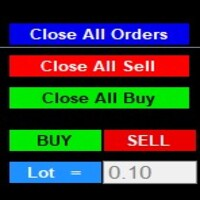
After purchase : - Please contact me at telegram https://t.me/SmartForex777 This Smart Dashboard Penal Very Easy , Fast And Accurate to Enter And Exit Trade Manually... Unique features Close All Orders... Close All Sell... Close All Buy... Buy / Sell... Lot Size Change Option... Works on any account type and broker... Works with all times frames and currency...
FREE

Server Time On Chart is a simple indicator that shows the time of the broker's server with hours, minutes and seconds in the lower left corner of the chart's. Within the inputs you can only change the size of the font and the color you want depending on your taste. You can see more of my publications here: https://www.mql5.com/en/users/joaquinmetayer/seller
FREE

Simply clock. Local time as default. There are possible to Select: Local Time /Server Time /GMT Time as input. Please take into account that the local time is the most accurate. However ,this clock always uses local time seconds, even If GMT / Server Time Is selected. I solved it this way to get more accuracy. Delays can occur when changing minutes or hours, if local time is not selected.
FREE

This is an ON CHART trade management panel. In other words, ON CHART Lot Size, Buy, Sell, Stop Loss, Take Profit, Close Buy, Close Sell and Close All buttons! *IMPORTANT NOTE: Input settings are NOT usable. You can change or insert Stop Loss and Take Profit values only on the chart panel. (See the below video!) This one is MT4 version!
BUTTONS List: 1. Lot Size - (0.01) is default click on it and insert the lot size with which you want to open a trade. 2. Stop Loss - (0.0) is default click on i
FREE

This tool will allow you to export candles data (Open, High, Low, Close, Volume) for any financial instrument present in your MetaTrader 4. You can download the data of multiple Symbols and TimeFrames in the same csv file at once. You can schedule the frequency, simply choose the refresh interval (1 minute minimum, if 0 then the extraction will be done once) and the tool will do the work. No need to open a lot of charts in order to get the last sync, the tool will download the data directly. The
FREE

Binary Options Pal Studio is analytical tool for constructing a profitable Binary Options trading strategy, combining technical data and money management systems.
Features Most of indicator parameters are optimizable for best win rate or simulated balance, generating best possible outcome. Daily, hourly ITM statistics are displayed on interactive dashboard, every day of the week and hour can be switched to set up specific time patterns. Trade size, payout, spread and money management systems (i
FREE

EA名:マルチトレード+ボタンEA
機能:このEAはMetaTrader4プラットフォームでのみ動作し、その機能は次のとおりです。
- 購入と販売ボタンを使用して、購入と販売の両方で自動的に注文を開きます。
- クローズオールボタンですべての未処理の注文を閉じます。
- EA設定の入力セクションから、開く注文の数とロットのサイズを決定します。
- テイクプロフィットを10ピップの最初の注文に自動的に設定すると、次の注文はテイクプロフィットが互いに10ピップの距離になります(データはEA設定の入力セクションで変更できます)。
- 10 ピップ後に起動する BE 機能を使用して、ストップロスを 20 ピップに自動的に設定し、利益でストップロスを 10 ティックに移動します (EA 設定の入力セクションからデータを編集できます) 。
FREE

NEW : integration with Ofir Signals to send personalized alerts Ofir Notify is a tool which send alerts on trades to Telegram Alert on any event concerning a position : Opening, Closing, modification (SL, TP) Send alerts to Chats, Groups and Channel Alert on Equity change Display Risk, Reward and progress of profit/lost for each position Customization of alerts Sending charts screenshots with alerts Send signals from your indicators or experts Multi-lingual NEW : version 2 brings integratio
FREE

Description: An advanced equity protection and trade management script. It monitors individual trade P&L and closes positions when floating equity targets (profit or loss) are met. It features "skip closing hours" for high volatility, wide spreads, or price instability times .
Features: Closes trades at a target profit (`MAX_FLOATING_EQUITY`) or maximum loss (`MAX_FLOATING_LOSS`). Includes a `FORCE_CLOSE_AT_MAX_EQUITY` level that bypasses all exit protection checks. "SKIP_CLOSING_HOURS" inpu
FREE

~~~~~Product Description~~~~~ This Close Panel Trading can Help Our Trading Plane . This has 13 Button Box , 2 Key In Box and 1 Description . CloseBuy All - To Close All Buy Active Order CloseBuy Profit - To Close All Buy Active Profit Order CloseBuy Lose - To Close All Buy Active Lose Order CloseBuy Pending - To Close All Pending Buy Order CloseSell All - To Close All Sell Active Order CloseSell Profit - To Close All Sell Active Profit Order CloseSell Lose - To
FREE

Trading panel for manual trading. Has a fairly wide functionality. Allows you to automatically calculate the order size, open both market and pending orders. It has a wide range of options for closing orders, it is possible to partially close orders, close orders after reaching a certain profit or loss, separately close profitable and unprofitable, buy and sell, as well as pending orders. The panel also contains a simple implementation of a grid of pending orders, reverse and lock functions, tr
FREE

It is just an alternative fibo lines, because mt4 have is a very strange drawing of fibo lines A simple Box (Rectangle) graphic element with adjustable levels binding: it is possible to specify up to 17 custom levels, all rectangles on the chart with the given prefix in their name are processed. Levels are specified in % of the height of the rectangle. A convenient graphical element for analyzing charts by growth-correction levels. Enjoy your work!
FREE

This is a free plug-in for Control-adora Expert adviser. It's main function is to create a Buy Stop arrow on the chart or a Sell Stop arrow when the price crosses above or below a trend line, which will allow Control-adora expert open a new trade when the desired lines will be crossed by the price.
Settings Prefix: Write here the prefix used to identify which trend lines are subject to be watched, value "Trendline" is set by default. Always use On Close Only: When set to true (by default) the c
FREE

This is a simple risk/reward setter. You enter your TP and SL in the currency amount and it sets it for you, you set your targets in money (not in pips), it helps beginners who are still learning about risk/reward ratios to set their risk/reward based on their capital or amount of money. For example, if you want to risk $3 to make $10, you just fill it in and it sets your order targets accordingly. You can set the TP and SL per chart or all opened charts only. Please make sure your targets are r
FREE

Telegram Signals Copier is a fully automated software that reads messages from Telegram and inserts them as orders on your MT4 terminal.
It comes with an advanced risk management tool, that can risk based on a % of your balance, fixed loss, and many other options.
You can fully customize how you take the signals, change the TP and SL level.
With an advanced analytics tool, you can see where your favorite signal providers are doing the most profit, and improve the profits even more.
Contact
FREE

This utility allows you to check and improve your binary options trading skills. This is an indicator, not an Expert Advisor. Therefore, you do not need to remove your active EA from the chart.
Inputs Expiry, min - option expiration time; InfoPanel background color - info panel background color; InfoPanel text color - info panel text color; InfoPanel text fontsize - info panel font size.
FREE

Copier Provider RAlabs MT4 — a signal source for local trade copying. A lightweight trade publishing tool for a copying system consisting of Copier Provider RAlabs (signal source) and Copier Master RAlabs (receiver). Copier Provider RAlabs is installed on the donor account whose trades need to be copied and transmits those trades to the Copier Master RAlabs receiver. The provider publishes: position openings, modifications, and trade closures. Features: instant local transmission, minimal resour
FREE

Smart Equity Protector (PropFirm Edition) Smart Equity Protector (PropFirm Edition) is a professional account equity protection and risk-management utility for MetaTrader 4. This Expert Advisor is designed to protect trading accounts from excessive losses by monitoring account equity in real time and automatically closing trades when predefined risk limits are reached. ️ This product does NOT open trades and does NOT generate trading signals .
It works as a safety and protection system for manu
FREE

️ Ultimate Account Protection for Serious Traders
The Equity Protector Pro is a professional-grade safety system that automatically safeguards your trading capital using advanced multi-level profit protection logic. Designed for traders using any strategy (manual or automated), this EA acts as your 24/7 risk manager to lock in gains and prevent account blowouts. Key Features:
3-Stage Protection System Level 1: Base equity floor protection Level 2: Dynamic trailing stop Level 3:
FREE

The Close script is a simple tool that allows traders to close their trades by three methods. Just run the script and choose the close method.
Closing methods Symbol - Allows closing all open trades for a specific symbol. All_Trades - Allows closing all open trades. Magic_Number - Allows closing all open trades according to their magic number. Recommendation AutoTrading functions must be activated. If the AutoTrading function is disabled, the script will not work. EA should be stopped.
FREE

Please visit = https://www.mql5.com/en/market/product/183101 for slave EA
MT5 Version = https://www.mql5.com/en/market/product/181686 Free Demo Version = https://c.mql5.com/6/1028/COPYTRADE_DEMO7D.zip
User Manual : download here
Professional Copy Trade EA for MT4, NO HASSLE, PLUG and PLAY and CROSS PLATFORM MT4 <---> MT5. A powerful and reliable Copy Trade Expert Advisor designed for traders, signal providers, fund managers, and prop firm users. Easily copy trades between multiple account
FREE

OpenCharts for OpenOrders, スマートなチャート管理ツール このスマートスクリプトを 任意のチャート にドロップするだけで、ターミナル内の すべての保有ポジションの銘柄 に対応するチャートが自動的に開かれます。 主な機能 : 保有ポジションごとにチャートを1つだけ開く 同一銘柄に複数ポジションがあっても 1つのチャートのみ 開く 実行前にタイムフレームを選択可能 軽量で効率的, 複数ポジションを管理するトレーダーに最適 作業スペースを整理し、時間を節約 このスクリプトは 完全無料 です, 隠れた費用も制限も一切ありません。 キーワード : chart manager , auto chart opener , open order charts , free script , smart terminal tool , multiple trades , chart automation
FREE

Universal trading advisor "WOz" with a built-in trading panel
The EA's capabilities can be easily tested in the strategy tester in visual mode.
The EA can simulate real trading with the ability to move the SL and TP levels.
The EA has 5 modes of operation:
1. AUTOTRADING automatic trading mode on a set signal
2. ONLY SIGNAL mode of tracking the set signal without auto trading
3. RANGE MODUS mode of automatic placement of equidistant orders on Bayi Sell at a specified time
4. HAND MODUS
FREE

Virtual Trailing Stop Start, Trailing Stop and Trailing Step with TakeProfit and Stoploss Virtual Lines And Sound Alerts are included. Brake brokers limitation. You can put even 1 point trailing stops and take profit levels. Best EA for protecting your profits and scalping. MT5 version of this product in on the way. Point Multiplyer 1 means 1 point. You can adjust Multiplier point.
FREE

オンラインチャートだけでなく、ストラテジーテスターでも動作しますので、無料デモから動作を確認できます。(build 1353) how to run the FREE DEMO => https://www.mql5.com/en/blogs/post/749299
チャート下に表示されるテキストボックスから、Discordに投稿するツールです。 w/Imgのボタンからは、チャート画像も送ることができます。
チャートに線やマーク、コメントなどを書いても、その画像が投稿されます。
使い方は簡単。 メッセージを入力し、SENDボタンでメッセージの投稿、w/IMGボタンでメッセージ+画像の投稿を行うことができます。 どんな使い方ができるか、人それぞれですが、Discordでコミュニケーションをされている方であれば、チャート画像を一発送信できるので便利だと思います。
*DiscordのWEBHOOKをパラメタに設定しますので、取得する必要があります。
*WebRequest を使用しています
ストラテジーテスターでも動作を確認できますので、無料デモをお試しください。
FREE

チャート下に表示されるテキストボックスから、Slackに投稿するツールです。 w/Imgのボタンからは、チャート画像も送ることができます。
チャートに線やマーク、コメントなどを書いても、その画像が投稿されます。
使い方は簡単。 メッセージを入力し、SENDボタンでメッセージの投稿、w/IMGボタンでメッセージ+画像の投稿を行うことができます。 どんな使い方ができるか、人それぞれですが、Slackでコミュニケーションをされている方であれば、チャート画像を一発送信できるので便利だと思います。
*Slack API"のTOKENをパラメタに設定しますので、取得する必要があります。
ストラテジーテスターでも動作を確認できます。
FREE

チャート上に超簡単に線を引いたり、移動したりできるツールです。
クリックしてから、ドラッグするとトレンドラインが引けます。 横に引くと価格線、縦に引くと日付線になります。 そこにある線やオブジェクトで、クリック&ドラッグすると移動できます。
クリックしたところから、ドラッグしたところに交差線が引かれ、間の時間と価格の差が表示されます。
クリック&ドラッグしたら、左右に振ると色が変わります。 クリック&ドラッグしたら、上下に振ると削除します。
クリック&ドラッグとは? 1.マウスの左ボタンを押す(カ) 2.マウスの左ボタンを放す(チ) 3.マウスの左ボタンを押す(カ) 4.左ボタンを押したまま、マウスを移動する(ツー)
この動きをすることでトレンドラインを引いたり、オブジェクトを移動したり、色を変えたり、消したりできます。
トレンドライン、価格ライン、日付ラインだけでなく、矢印や価格表示、フィボナッチ、ギャンライン、サイクルライン、図形なども移動させることができます。
他にも便利なところ
・うっかり線を引いてしまったら、チャート外でマウスボタンを離せば、線が消えます
FREE

The script is based on the indicator Stochastic Oscillator.
The script draws up arrows or down arrows.
The tooltip arrows indicate the recommended price level.
The script can signal an alert, which also indicates the price level.
The script draws an up arrow when the Stochastic Oscillator lines go out of the oversold zone.
The script draws a down arrow when the Stochastic Oscillator lines out of the overbought zone.
Indicator signals are not filtered in any way - this is the classic Stocha
FREE

The Buffer Reader will help you to check and export the custom indicators buffers data for your current chart and timeframe. You can select the number of buffer and historical bars to read/export. The data can be exported in a CSV format and the files will be stored in the folder: \MQL4\Files .
How it works Put the number of buffers to read in the Buffers_Total input parameter. Put the number of rows to display in the Rows_Total. Choose the CSV separator in the parameter. Copy the correct name
FREE

The CandleStick Factory is a tool that allow you to perform a market scan and search any candlestick pattern that you already created. The lite version can be downloaded here : https://www.mql5.com/en/market/product/75622 You can perform a quick search in the current chart (500 bars will be scanned), or save your custom candlestick patterns, and search in different Symbols/Timeframes that you can select in the settings tab, the scan can be scheduled every 1, 5 or 10 minutes by updating t
FREE

Price Ray indicator is a utility that will improve the way you trade. Primarily, it shows the Bid, Ask or Last price as a line ray which beams till the current candle, last visible chart candle or extended to all candle bars. The enhanced features in this indicator provide information in an area where you focus most, right next to the current candle. You can select text to be shown above or below the Price ray. The indicator is fully customizable, allowing it to fit any strategy requirements. Th
FREE

Chart Buddyは、取引チャートに楽しさを加えるために設計されたエンターテインメントツールです。キャラクターがチャートの右側を移動し、価格の動きを応援しているように見せることで、取引にユニークで楽しい要素を追加します。取引に直接影響を与えることはありませんが、アニメーションは軽い気晴らしになり、まるで個人的なサポーターがいるような気分にさせてくれます。 主な機能: 価格の動きをサポート : キャラクターが価格の方向(上昇、下降、またはポジションの方向)に応じて動き、まるで市場を応援しているかのように見せます。 キャラクター選択 : 3種類のキャラクター(リス、お相撲さん、女の子)から選べるほか、カスタム画像をアップロードして個別に設定することも可能です。 カスタマイズ可能なアニメーション : キャラクターの動きの速度やタイミングを自由に調整できます。 視覚的エンターテインメント : アニメーションキャラクターが取引環境に活気とインタラクティブな要素を追加します。 illust STAMPOについて このツールでは、フリー画像リソース illust STAMPO (stampo.f
FREE

Shved Position Pips Label MT4 is a professional utility indicator for the MetaTrader 4 terminal that displays the real-time floating profit or loss of all your active orders directly on the chart. No more switching to the "Trade" tab — all the crucial information is positioned right in front of your eyes next to the current price line! Key Advantages: Smooth Price-Anchored Alignment: The labels are anchored to the last bar and smoothly slide vertically following the market. When scrolling th
FREE
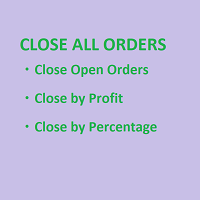
SmartClose(Close All Orders) helps you close all your trades. You can use it on any symbol. You can also set a warm value to manage the risk. With these functions: Close Open Orders : Close all open trades in the trading account. You don't need to set a value for the "value" parameter. Close by Profit : Close trades when profit reaches a specific predefined level. You need to set a value for the "value" parameter. Close by Percentage : Close trades based on a certain percentage of the balance.
FREE

このスクリプトは、乱数ジェネレータを使用した貿易取引のシミュレーションに基づいています。これにより、同じ入力パラメータでもまったく異なる結果を得ることができます。スクリプトを実行すると、ダイアログボックスが開き、そこで外部変数に必要な値を設定できます。 ブロックでは、TradingOptionsは取引のシミュレーションに必要な基本パラメータを定義します。 StartBalance - トレードバランスの初期サイズを設定します。 NumberTrade - スクリプトの実行時にモデル化される取引トランザクションの数を設定します。多かれ少なかれ有意な結果を得るためには、このパラメータが30より大きいことが必要です。 ProbilityWinning - 勝ち取引の確率。パーセンテージで示され、1から99までの有効値。 Min.StopLoss - StopLossの最小値をポイントで示します。これは、取引操作をモデル化するときに使用されます。 Max.StopLoss - StopLossの最大値をポイント単位で設定します。 PositiveWin - この変数は
FREE

Delete All Pending Orders for MT4 script - closes absolutely all orders, whether pending or market ones.
Orders are closed at the current profit/loss indicators at the time of closing.
The script is suitable for moments when you need to quickly close all orders at the current indicators.
The script is very easy to use, just drag the script onto the chart and it will do its job.
Add me as a friend, I have many other useful products.
FREE

This expert advisor can enter and exit trades at specific times and on specific weekdays, expressed in GMT Time. It offers weekday selection, trade management settings, a martingale function and money management features. [ Installation Guide | Update Guide | Troubleshooting | FAQ | All Products | Get Help ] Easy to use and supervise Fully configurable entry and exit times (up to 5 trades)
Enable or disable trading weekdays in inputs
Customizable break-even, stop-loss, take-profit and trail
FREE

Exaado Capital care If you've been searching for ways to manage Drawdown control, Drawdown Control, Balance protection, or Daily Drawdown Limit related to trading with Prop Firms, FTMO, My Forex Fund, or Funded accounts, then you've come to the right place. Additionally, if you're looking to safeguard your trading account, we can help. Do you struggle with managing your drawdown while trading funded accounts? Our EA is designed specifically for those in your position. Many prop firms have a "Tra
FREE

L'indicatore / Utilità Chart Clear è uno strumento essenziale per i trader che desiderano un grafico pulito, leggibile e professionalmente organizzato su Meta Trader 4. Una volta installato, modifica automaticamente l'aspetto del grafico senza richiedere alcun settaggio manuale, rendendolo immediatamente più chiaro e facile da analizzare.
Caratteristiche Principali: Grafico pulito e professionale: Sfondo bianco per una migliore leggibilità Candele verdi per i movimenti rialzisti e ros
FREE

This Expert Advisor Give Us Notification on MT4 Mobile Aplication if CAndle break throught the kumo aka senkou span A/B You can put your ichimoku cloud setting at your desire How to Setup Notification please read this https://www.metatrader4.com/en/trading-platform/help/setup/settings_notifications
This is an Expert Advisor just put on Experts on your MT4
FREE

EXTREME PRICE ACTION DASHBOARD
Make your trades professionally using advanced statistics and price action. Manages 29 pairs simultaneously. It has Buy and Sell buttons, close buy and close sell separately for each pair. Stop Gain and Stop Gain programmable in Pips automatically. Dynamically calculates 5 regions where statistically the most assertive sales and 5 more assertive shopping regions are found. Indicates the total lots, buy balance and sell balance for each pair. Change the graph's t
FREE

Trade Closer EA v2.0 – MT4用 オールインワン取引管理ツール
**バージョン:**2.00 | サポート: +1786 6057858(WhatsApp)
ワンクリックで取引を即座に管理・コントロール・クローズ! 概要:
Trade Closer EAは、MetaTrader 4(MT4)向けに設計された高度な取引管理エキスパートアドバイザーです。ワンクリックでポジションを素早くクローズしたり、条件に応じてトレーリングストップを自動適用したりできます。インタラクティブなボタン式インターフェースで、スキャルパー、デイトレーダー、スイングトレーダーに最適です。 主な機能: ワンクリック操作で簡単管理: すべての取引をクローズ
買い(Buy)ポジションのみクローズ
売り(Sell)ポジションのみクローズ
すべての保留注文をキャンセル
利益が出ているポジションのみクローズ
損失が出ているポジションのみクローズ
️ ヘッジされたペアポジションを同時クローズ
ダイナミックトレーリングストップを適用 カ
FREE

Tester for binary options, strategies and indicators. It allows you to test yourself, test strategies and indicators on binary options. The EA does not perform any real deals! It is for testing purposes only. It can be run both on a live chart, and in the MetaTrader 4 Strategy Tester. MetaTrader 4 provides numerous indicators, you can attach them to the chart and test indefinitely. There are two buttons on the chart, Call and Put, as well as a field for specifying the lot. During testing, it dis
FREE

Download Trade Manager EA by Mr_Green76 to manage your trades on MetaTrader 4 – FREE
️ Dynamic TP/SL Control – Set dollar or percentage-based targets
️ Smart Partial Closes – Auto-lock in profits or limit losses
️ One-Click Control Panel – Manage trades visually, close charts automatically
️ Live P/L Labels – Real-time stats on your chart
️ Save/Load Presets – Seamless session-to-session trading
FREE
Special Trailing Sl is a automatic trailing stop_loss. first It will try to free risk your trade then save the profits. first step is to move the SL 50 points below current price for long trades , and 50 points above current price for short trades.First step will happen when the trade get to minimum profit per point. second step : SL will follow the current price with a dynamic distance. This trailing stoploss has been used in my products.
FREE

MT4 Position manager
- Open/Sell buttons for open orders - Lot size, SL, TP for positions - "Set Breakeven" button for set SL on all opened positions - "Set TP" button for set TP on all opened positions - "Close Half lot" button for closing all open positions half lot size( opened 1.0Lot, click the button and automated close 0.5Lot) - "Positions Half Close" button for close open positions half qty. (Opened 10 position, ckick the button and automated close 5 positions) - "Close All" button for
FREE

M ulti Cross Alert! on your smartphone. Use multiple indicators to get a crossover signal on chart as well as on MetaTrader app. You can use all crossovers at the same time but it is not recommended cause your chart will look messy. Instead use combination of two indicators which will be better. IMP NOTE:- More indicators will be added in future updates. Any suggestions regarding indicators are welcome! Indicators List: 1. MA (Cross) 2. RSI (OB/OS) 3. MACD Lines (Main Line & Signal Line Cross)
FREE
Об индикаторе CandTimer: Крайне простой индикатор CandTimer. Индикатор CandTimer показывает оставшееся время свечи. Работает для таймфреймов: М1 (Минутный таймфрейм); М5 (Пятиминутный таймфрейм); М15 (Пятнадцатиминутный таймфрейм); М30 (Тридцатиминутный таймфрейм); Н1 (Часовой таймфрейм); Н4 (Четырехчасовой таймфрейм); D1 (Дневной таймфрейм); W1 (Недельный таймфрейм); MN (Месячный таймфрейм). Таймер отображается в виде чисел на графике в часах, минутах и секундах.
FREE

A simple risk management tool that closes all open orders if equity drops by a specified percentage. This tool is useful if you are running multiple EAs and multiple charts and pairs in order to control your risk. All orders will close accordingly. Once it hits specified percentage drawdown the closing of all orders cannot be stopped. The EA will reset once all orders are closed, until account equity drops again relative to account balance. Use at your own risk. This is only for MT4. There is o
FREE

OnBoard stats is a panel that show in a single view a lot of usefull information about working orders and trading account. It has 4 different sub-panels (from left to right): Symbols order statistics : it can be found symbols for which there are orders (market or pendings). Symbol with pendings are colored with "Pendings color". Clicking on a specific symbol row, chart will be changed to that symbol. Current symbol statistics : informations about the "current" symbol, the one which is opened in
FREE
MetaTraderマーケットは、開発者がトレーディングアプリを販売するシンプルで便利なサイトです。
プロダクトを投稿するのをお手伝いし、マーケットのためにプロダクト記載を準備する方法を説明します。マーケットのすべてのアプリは暗号化によって守られ、購入者のコンピュータでしか動作しません。違法なコピーは不可能です。

取引の機会を逃しています。
- 無料取引アプリ
- 8千を超えるシグナルをコピー
- 金融ニュースで金融マーケットを探索