 MetaTrader 5
 专家
专家
 指标
指标
 程序库
程序库
 实用工具
实用工具
 窗口小部件
窗口小部件
 规则
规则
免费的MetaTrader 4 交易实用工具 - 8
 以下是可在MetaTrader 4中简化外汇交易的交易程序。将鼠标悬停在下面列表中的工具上,阅读它的描述和用途。
Artemis Vision Assist MT4 Artemis Vision Assist MT4 is an accessibility utility for MetaTrader 4, designed for traders who find the platform's default interface difficult to read. MT4's small text, dense labels, and compact controls can create real problems for traders with visual impairment, reduced eyesight, or chronic eye strain. This utility adds a large, high-contrast dashboard directly onto the chart, bringing key trading information into a format that is genuinely easier to see and intera
FREE

该模块与练习模拟器同步显示图表时间和位置信息,不仅针对同一货币对,还显示不同时间范围和不同货币对的同步图表。
注意:该模块本身不能工作。 需要“Practice Simulator”
Practice Simulator
https://www.mql5.com/zh/market/product/98348
有两种同步模式可供选择。
简单同步方式:
通过打开要同步的图表并将此工具插入其中,您可以轻松创建同步图表。
图表将移至指定位置并部分隐藏。 因此图表有时可能在图表移位、子窗口等中可见。
主动同步模式:
使用离线图表创建图表以进行同步。
该过程更加复杂,但工作原理几乎与实时图表完全相同。
有关更详细的设置信息,请单击此处。
https://www.mql5.com/en/blogs/post/753894
FREE

The utility is designed to close several types of orders. Closing is done by pressing the hot key. How to place and delete orders by voice using the utilities of this type, see the video below the description. https://www.youtube.com/channel/UCTpVWJkEic6TzoXr0qc9RIw/featured Provided closing options:
KEY "1" DELETE BUY STOP. KEY "2" DELETE SELL STOP. KEY "3" DELETE BUY AND SELL STOP. KEY "4" DELETE BUY LIMIT. KEY "5" DELETE SELL LIMIT. KEY "6" DELETE BUY AND SELL LIMIT. KEY "7" DELETE ALL PEND
FREE

Telegram Signals Copier is a fully automated software that reads messages from Telegram and inserts them as orders on your MT4 terminal.
It comes with an advanced risk management tool, that can risk based on a % of your balance, fixed loss, and many other options.
You can fully customize how you take the signals, change the TP and SL level.
With an advanced analytics tool, you can see where your favorite signal providers are doing the most profit, and improve the profits even more.
Contact
FREE

CopyStar – File-based Trade Copier (MT5 Master/Slave, MT4-compatible) Short description
CopyStar mirrors changes to your open net positions from the master to any slaves – quickly, robustly, and without network configuration. Communication runs via common files (shared file folder), enabling CopyStar to support MT5↔MT5, MT5→MT4, MT4→MT4, and MT4→MT5. Supports symbol mapping, lot multiplication, optional SL/TP copying, magic/comment filters, and a clear chart status display including heartbeat.
FREE

Stop Loss and Take Profit Manager The EA allows you to set a Stop Loss (SL) for your orders or positions within milliseconds, regardless of the number of orders. How to Use: Attach the EA to the chart where you want to modify the SL for your orders. Configure the following input settings : Order_Type: Select the order or position types. SetStopLoss: Enable this if you want to set a Stop Loss. StopLoss: Enter the SL price. SetTakeProfit: Enable this if you want to set a Take Profit. TakeProfit:
FREE

Automate Your Profits with Precision
Please Notice that this tool is just the beginning! I really need to know your opinion about it, just leave a review and we will make it better for sure! The UPDATES Would be based on your feedback!
How It Works: The Auto TP Specified Expert Advisor continuously scans for orders lacking take profit settings. Once identified, it applies the user-defined take profit level, ensuring consistent profit-taking across trades. Existing take profit settings
FREE
The utility places stop loss and take profit for opened orders. It is necessary to allow automated trading in the terminal settings. Discuss the complexities of Forex trading here: chat "Age of Expert Advisors" . Parameters magic - magic number. If less than 0, orders with any magic number are processed. Select_Symbol - selection of symbols. Positions with selected symbols will be accompanied by. Take_Profit - take profit (TP). If the value is less than 0, then TP does not change. If the value
FREE

Stop Guessing Your Lot Size. Trade With Defined Risk. Order Management Script is a FREE risk-management utility that automatically calculates your lot size, Entry, Stop Loss, and Take Profit based on your predefined trading rules. No manual position-size calculations.
No repeated SL/TP calculations.
Just define your risk and trading setup. KEY FEATURES Automatic Lot Size Calculation
Calculate the correct position size using: • Fixed monetary risk
• Percentage of account equi
FREE
Session Timers (MT4) Session Timers adds a clean ribbon at the bottom of the chart showing the time until open and time until close for major FX sessions. While a session is open, a progress bar fills in real time. This is a charting utility; it does not provide trading signals and does not guarantee any profit. Sessions covered Sydney Tokyo Frankfurt London New York Main functions Countdown to the next session open/close for each market. Live progress bar while a session is active. Works on al
FREE

Umagads Lot Calculation and Auto SL TP Assistant MT4 是一款专业的 MetaTrader 4 半自动交易工具。它专为追求执行速度且不愿妥协风险管理的交易者而设计。有了这个助手,您不再需要手动计算手数,也不必在入场后匆忙设置止损。 核心功能 v2.40: 精准手数计算器: 根据账户余额的固定风险百分比(Risk %)实时计算理想手数。 即时自动防护: 在您点击买入或卖出的瞬间,助手会立即根据预设设置添加止损(SL)和止盈(TP)。 账户安全卫士: 仅支持 USD、USC 和 CNT 账户,防止非标准货币账户出现计算错误。 双语支持: 英文和印尼文界面灵活切换。 简约 UI: 清爽的面板和优化的排版(字号 12),不干扰您的技术分析。
FREE

DOES THIS SOUND FAMILIAR? Do you find the lot calculation slow and boring? Does it get worse with every new currency pair? Are you afraid of hitting a loss limit and losing the account? Does every lost account hurt more than the last one? I was caught in this loop myself. I built this tool for my own use. WHAT THIS IS This is an indicator. It contains no order functions at all.
It cannot open, modify or close an order. This is the MetaTrader 4 version. Drag the stop-loss line on your chart
FREE

Range Analyzer calculates the Average True Range (ATR) values for different timeframes in pips to give a fast and simple overview about the volatility of the chosen symbol. Settings are very easy: bars for calculation: Choose the number of bars for calculation or use the default value (14 periods). from bar: Choose the youngest bar to start the calculation or use the default setting (0 = current bar). You can use it for forex, crypto, indices, commodities or for what ever you want.This expert is
FREE

If you can not create a background image for yourself (photo size and format must be changed), let me know. I make your photo for free. Otherwise, you can read the help file . A tool for chart management You can change the background image You can change the background color Change the color of the candles Volume colors, line charts and everything else You can also enable and disable some items Read the help file for more information
Settings:
Save Changes After Remove Tool
Back Ground Photo
FREE

点差成本信息 点差产生的交易成本是制定交易盈亏比时的一个重要指标。点差成本信息对短线交易者尤其是超短线交易者尤为重要。本工具可以在不同的账户类型(美元账户、欧元账户等等)下,输出平台报价中所有外汇货币对(包括黄金XAU、白银XAG)的点差成本。
计算方法及原理 见文章: 外汇货币对的交易成本 Part1 外汇货币对的交易成本 Part2 外汇货币对的交易成本 Part3 外汇货币对的交易成本 Part4
参数 Lots - 设置计算点差成本的交易手数,默认为1.0。
如何使用 使用此工具前需将MT4的市场报价设置为“显示全部”,具体操作见下图; 输出的路径为“ MT4路径\MQL4\Files\SpreadCostData ”,文件名称是当前日期,输出成功后会在MT4 - 终端 - EA一栏显示成功输出信息,输出路径及文件名称见下图; 输出内容的第一列是货币对名称,第二列是点差(点数),第三列是交易 Lots 手的点差成本(点差成本以账户货币计价),具体内容见下图。
完全版 所有数据在面板上实时更新,下载地址: https://www.mql5.com/zh/market
FREE

Delete big amounts of orders, in just a few clicks. Drag the script to any chart to delete open and pending orders, you can delete all the orders from the account or delete a specific order groups, identifying them by magic number. You can modify the parameter MAGICN on the followay way: - Introduce the magic number that was used to place the orders you want to delete, the script will delete all pending and open orders that were placed with that magic number. - Also, introduce 0 (cero) to delete
FREE

CloseProfit is a utility created to automate the process of setting a stop-loss and closing orders when a certain percentage of profit is reached.
The utility also has two Buy and Sell buttons on the chart for opening orders.
The utility can be used to close orders opened by other advisors, with a stop-loss or a percentage of the increase in the deposit. To do this, you need to set in the settings a magic number that matches the one that is installed in the advisor when opening a transaction.
FREE

OneClickClose-Pro EA allow users to easily close all positions at once with multiple options with simple UI.
Options Includes::
1. Close All Positions
2. Close All Buy Positions
3. Close All Sell Positions
4. Close All Position GreaterThan or Equal to Profit
5. Close All Position LessThan or Equal to Profit
6. Close All Position By Symbol
7. Option to Set Deviation
8. Option to Set Maximum Retry (If position close fails)
MT5 Versio
FREE

Account Info EA It is a tool that presents on the graph all the positions of the account, and specific information concerning the positions, but also the account. It enables the user to have an image of his account at a glance. Use like any expert advisor. You can't attach it in the same chart with other expert advisor. It does not have the ability to open or manage positions. You can attach it on any chart and any timeframe.
FREE

Terminal Shutdown Timer closes the MetaTrader 4 terminal at a time you choose. That is all it does. It does not trade. It does not analyse the market. It does not send signals. It never opens, modifies or closes an order. What it does At the hour and minute you set, the terminal is closed. An optional on-chart warning appears before that, so the shutdown is never a surprise. The chart also shows the scheduled time and the time remaining. How to use it 1. Attach it to any chart. 2. Set the shutdo
FREE

MT4 Alert Sender is a free ea tool that help you send the alert messengers in MT4 program for many different purpose with ease. Very simple and effective, you only need to input the alert content in a input box, then click a "Send Alert" button. The EA will send alert message. An alert pop-up shows your content in a new window pop-up.
You can combine of using MT4 Alert Sender EA with any other tools out there for your need. Thanks for your trust in my product.
FREE

Pairs Navigator is a simple and easy-to-use tool that allows you to view all of your charts in a single window. This eliminates the need to open multiple charts from the Market Watch window, saving you time and effort. Pairs Navigator is also very lightweight, so it will not put a strain on your RAM or cause your MT4/5 platform to hang. To use Pairs Navigator, simply drag and drop the currency pairs you want to view into the Pairs Navigator window. You can then easily switch between charts by c
FREE

Tipu Stops is a simple indicator that plots buy/sell stop loss channels and pips value using commonly used indicators. Tipu Stops also works complementary to the Tipu Trader Panel. You can use the stop loss values from Tipu Stops in Tipu Trader before using the panel for trading.
How to Use Add the indicator to the chart and select your preferred method of stop loss plot. You may choose from the following methods: Average True Range on PRICE_CLOSE. Average True Range bands on Hull Moving Averag
FREE

倒计时计时器至酒吧关闭,+ 进度状态 %: #1 多功能实用工具 : 66+ 功能,包括此工具 | 联系我 如果您有任何问题 | MT5 版本 在指标设置中,您可以配置: 计算时间框架; true / false: 更高时间框架选项(下一个当前使用的:M15->M30, H4->D1...) 位置:
1 = 左下角;
2 = 右下角;
3 = 左上角;
4 = 右上角; 字体大小; 颜色; 字体样式; #1 多功能实用工具 : 66+ 功能,包括此工具 | 联系我 如果您有任何问题 | MT5 版本 #1 多功能实用工具 : 66+ 功能,包括此工具 | 联系我 如果您有任何问题 | MT5 版本 #1 多功能实用工具 : 66+ 功能,包括此工具 | 联系我 如果您有任何问题 | MT5 版本 #1 多功能实用工具 : 66+ 功能,包括此工具 | 联系我 如果您有任何问题 | MT5 版本
FREE
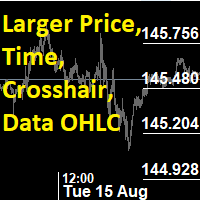
This utility indicator provides accessibility and readability, by displaying a larger price scale, time scale, crosshair, and symbol name/tf/ohlc information. All features are sizeable and can be styled separately, and are optional to show.
All Features optional to use font, size and color options
Price Scale
option to hide the default MT4 price scale option to show horizontal lines at price levels prices drawn can be at round numbers (ie automatic rounding to multiples of 5/10/20/25 points),
FREE

Fast Alerts MT4 — 一次购买,终身提醒。 曾经,为了在市场中保持领先,您需要每月订阅昂贵的平台……
这里$20,那里$50 — 只为每天收到少量提醒。您支付的不是价值,而是因为别无选择。
直到现在。 这个工具由一位交易者为交易者打造,让您完全自由地设置任何您关心的价格提醒 — 并在价格进入您的关注区域的毫秒内收到通知。 想象一下:您在图表上设置价格区域,离开屏幕,当价格进入您的关注区域时,您会立即收到实时提醒。不错过任何机会,无需每月付费。 为什么选择 Fast Alerts MT4? 根据您自己的交易水平设置自定义价格提醒 不再为有限的通知支付费用 一次性购买 — 终身拥有 由真正的交易者打造,而不是试图让您订阅的公司 下载免费演示版,亲自体验 — 它确实有效 无论您是关注价格行为、供需关系,还是支撑与阻力区域 —
Fast Alerts MT4 不只是另一个指标。
它是交易者的沉默助手,为您监控图表,只在最关键的时刻提醒您。 因为聪明的交易者不会追逐市场 — 他们等待市场向他们靠近。
FREE

️ 1. Visual Level Adjustment (Click-and-Drag Risk Management)
The utility provides an interactive framework to configure order parameters using chart-based lines rather than manual price typing: Exclusive Toggle Logic : Activating one level adjustment mode (e.g., clicking the Stop Loss button) automatically disarms the other two modes. This prevents graphic input conflicts on the chart. Target Parameters : It manages three distinct interactive pricing lines: Entry Price ( btn_p_ent_click / p_
FREE

Ultimate MT4 to Telegram Public Channel sends controlled trades (via symbol, magic, comment) to a public telegram channel. It sends open and closed trades, including pending orders and TP/SL modifications, along with chart screenshots, to this public telegram channel. Additionally, you can send trade reports of open trades and summary profit/pip reports for day, week, or month. You can customize the design of the trade actions or reports with variables and emoticons.
A beautiful panel allows
FREE

A backtest looks great. Then the EA runs live and the numbers are different, and nobody can say why. Was it slippage, missed signals, a restart or a manual trade? Or was the backtest flattering? TesterVsLive answers that trade by trade. It never opens, modifies or closes orders. What you get: Verdict: green (live matches backtest), amber (partly matches) or red (live differs). Trade match: trades on each side and the match rate (Jaccard) trades the backtest took but live missed, and what they ea
FREE

您是否厌倦了在没有您的情况下将收支平衡变成盈利交易? 不可调止损 (USL) 让您继续交易!
您精心计划了自己的交易,保持了耐心,并在“完美”时刻入场。 当交易朝着对您有利的方向发展时,您将止损调整至盈亏平衡,感到安全,没有资金面临风险。 但随后,市场出现意想不到的转变,阻止您出局,并朝着您预期的方向发展(参见屏幕截图 A)。 有没有想过可以采取什么不同的做法? 确定止损移动的时机与确定入场时机一样具有挑战性,如果选错往往会导致过早退出。 如果有更好的方法来应对移动止损的不确定性怎么办? 一种消除过早退出的方法,让您在交易中停留更长时间 隆重推出 Unwickable Stop Loss (USL),它是风险管理领域的变革者,可与您的硬止损无缝配合。 USL 提供的交易不会让您过早退出灯芯(参见屏幕截图 B),为您提供下行保护的安全性,同时保持盈亏平衡或追踪止损的弹性,即使面对恶性市场灯芯。 USL 的工作原理是要求蜡烛收盘价低于 USL(参见屏幕截图 C)。 不可调止损 (USL) 的主要优点: 1 - 尽可能长时间地留在交易中,以获得精神上更轻松的交易体验。 2 - 使用简单
FREE

Introducing "Prop Risk Manager": Your Trading Discipline Partner
Are you a trader looking to adhere to prop firm rules with unwavering discipline? Look no further. "Prop Risk Manager" is your comprehensive solution for navigating prop firm guidelines and optimizing your trading success.
Key Features:
- Precision Risk Management : "Prop Risk Manager" aligns with prop firm principles to ensure you never trade during news events, hold trades overnight, or risk weekends.
- Tailored Trading Hou
FREE

EA Germany 30 Functions: Detects and analyzes market gaps, providing insights into potential trend reversals or continuations. Facilitates risk management and order adjustments based on your configured settings. Trades exclusively from 10:00:00 (broker's time) onwards and solely on the Germany 30 (DE30) index. Please note: Trading involves risks. The EA Germany 30 expert advisor provides tools for analysis; however, results may vary. Use at your own discretion.
FREE

This tool can delete any object drawn on MT4 platform charts. you can delete: Line_Objects (Vertical_Line, Horizontal_Line, Trend_Line, TrendLinebyAngle, Cycle_Line) Channel_Objects (Fibo_Channel, Equidistant, Linear_Regression, Standard_Deviation, Andrews_Pitchfork) Gann_Objects (Gann_Line, Gann_Fan, Gann_Grid) Fibonacci_Objects (Fibo_Retracement, Fibo_TimeZones, Fibo_Fan, Fibo_Arcs, Fibo_Expansion) Shapes_Objects (Rectangle, Triangle, Ellipse, Text, Label) Arrows_Objects or you can Delete_All_
FREE
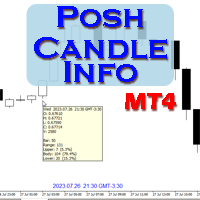
Show candle info with: Time in selected timezone Bar number Candle range points Upper wick points and percentage Body points and percentage Lower wick points and percentage Mark large/small candle body with customizable line. Settings group: Broker and local timezone. Lookback bars for candle marking. Large candle body Small candle body Date and time info with auto position or custom the x and y coordinate.
FREE

Investment Castle Panel — Your Trades, At a Glance
The Panel puts the numbers that matter right on your chart: floating profit and loss, drawdown and more — for manual trades and for any Expert Advisor. A clean, movable dashboard so you always know exactly where you stand.
What it does for you Live P/L on the chart: floating profit/loss for the current symbol, for both buy and sell orders, in your base currency and in pips. Max drawdown at a glance: keep an eye on risk without digging through
FREE

您的交易结果是靠实力还是靠运气?这款免费指标把您已平仓的交易与 1,000 名随机交易者对比:他们交易相同的品种、相同的方向、相同的手数,每笔交易的持仓时间也与您相同——只是开仓时间随机。 Luck or Skill 读取您的账户历史,给出一个清晰的结论:您战胜了多少名随机交易者。它从不交易。 MT5 版本(免费) | Pro 版本 | 我的全部工具 您会看到 结论:SKILL(您战胜了 95% 或更多的随机交易者)、LEANING SKILL(80–95%)、TOO CLOSE TO CALL,或 RANDOM ENTRIES DID BETTER 您的结果与随机交易者的中位数对比,以及其中 90% 的人最终落在的区间 全部 1,000 名随机交易者的分布图,并标出您的位置(YOU) 您的盈利交易占比与他们的对比 Pro 版本能在您的交易中找到多少漏洞和优势 随机交易者是怎样生成的 每一笔已平仓交易都生成 100 个随机“双胞胎”:相同品种、相同买卖方向、相同手数、相同持仓时间、相同佣金并计入点差,但开仓时间是您交易该品种期间内的随机时刻。每名随机交易者从您的每笔交易中各取一个双胞胎
FREE

Spread Monitor Live Real-time Spread Monitoring Tool for MT4 Version: 1.00
Last update: 15.06.2026
Author: Aleksandr Bezverkhikh Description Spread Monitor Live is a lightweight and efficient indicator for MetaTrader 4 that displays the current spread in real time directly on your chart. Perfect for scalpers, day traders, and anyone who needs to keep a close eye on trading conditions. The indicator shows the spread in points with clear color coding, allowing you to instantly s
FREE

Elevate your trading with this Breakeven and Trailing Stop Manager, an Expert Advisor (EA) built for MetaTrader 4 to streamline risk management by automating breakeven and trailing stop strategies. This EA helps secure profits and minimize losses without requiring constant manual intervention, giving you more time to focus on market analysis and strategy.
### Key Features:
- **Automatic Breakeven Adjustment:** Automatically move the Stop Loss to the breakeven level once your position reac
FREE

The Quick Style utility is designed for facilitation and acceleration of working with the properties of graphical objects. Left-click a graphical object while holding the Shift key to open the quick access window for configuring the object properties. In the window, you can change the color, style and line width with one click, including those of other graphical objects. All changes are displayed immediately. To close the Quick Style , simply click the free space on the chart. The utility is eas
FREE

Dear Friend ... I hope and Wish a happy new year to all of you .. as i told you < this is a simple Utility EA can helps you in your trading . he helps you to ensure that your decision is correct to enter the market . it is work on all currency pairs , stocks ,indices and crypto . its easy to install . no complicated inputs. this EA works as follows : it's main work is to detect the highest price and the lowest price on H4 & H1 time frame and draw resistance and support and trend every line has
FREE
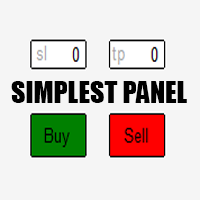
Just a simple panel that I created to make my trading life easier. Features: Buy and Sell with TP & SL right on chart Lot size is calculated by risk percentage Martingale - will open opposite position when SL hit (please don't enable unless you know what you are doing)
Will have more add-ons like Close-all button, Break-even, Trailing-Stop, etc. It's FREE so please leave your negative review somewhere else.
FREE

交易复制器 - 投资者密码 - 复制交易 - MT4 x MT5 跨平台
注意:您需要在客户账户所跟随的主账户上安装“Mirror Copier Master”,并在跟随主账户的客户账户上安装“Mirror Copier Client”
博客: https://www.mql5.com/en/blogs/post/756897
工作原理:
https://www.youtube.com/watch?v=V7FNpuzrg5M
MT4 版本
主账户: https://www.mql5.com/en/market/product/114774
客户端: https://www.mql5.com/en/market/product/114843
MT5 版本
主账户: https://www.mql5.com/en/market/product/114775
客户端: https://www.mql5.com/en/market/product/114844
“Mirror Copier”EA 是一款功能强大的工具,旨在实现不同 MetaTrader(MT4 或 MT
FREE
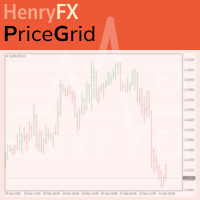
This indicator help you to easily calculate the price moving. You can change the gird size withing the input parameter for your trading style, such as hedge, swing trader, ect. It can let you easy to find your takeprofit and stoploss target price in chart.
For more about my tools and EA, you can join my channel below, thank you. Telegram channel: t.me/HenryEAChannel
FREE

Simple and unobtrusive utility for displaying weeks, days and hours
Options to control the display of separator lines and labels allow you to customize them to your own taste Display of the separator lines either only in the main chart, or across any indicator windows Automatically reduce intensity of less relevant separator lines and labels for the chart‘s current magnification
FREE

PulseBar is a visual trading tool designed for MT5/MT4 that eliminates guesswork when planning your trades. It draws an interactive horizontal line on your chart that instantly calculates and displays the projected PnL (Profit/Loss) of your open positions (long or short) if the price were to reach that exact level. It is ideal for Price Action traders, Scalpers, and Day Traders who need to quickly and cleanly visualize Take Profit targets, partial exit levels, or risk zones without leaving the
FREE
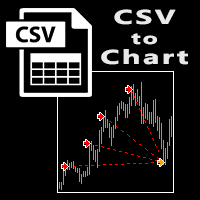
The script visually displays deals from CSV format reports on MT4 terminal charts. It automatically recognizes popular formats: MQL5.com Trading Signals for MT4 / MT5 platforms
MyFXBook service Copy the report file to the <Data Folder>\MQL4\Files folder and run the script on any chart. The script analyzes the CSV file, automatically creates new charts for all instruments that are found in the report, and draws the deals of each instrument on a separate chart. The script additionally calculates a
FREE

这是一个播放速度管理工具,能够在策略测试器中实现高效的测试和分析。 它提升了策略测试器的可用性,并可作为简化交易策略开发和评估的手段。
工具特点: 播放速度控制:用户可以在策略测试器中自由更改播放速度,使其快进、加速播放并在任意点暂停。 一条栏、一跳前进:'Next Bar'按钮允许用户一次前进一条栏。也可以一跳一跳地前进,以进行更详细的分析。 时间框架和货币对的同步:" Practice Simulator Sync (免费)" 允许您与不同的时间框架和货币对同步播放。这使您能够同时查看MTF和不同货币条件。 自动暂停:您可以在每天的特定时间(例如市场开放时)停下来,然后从那里分析动态。暂停可以根据每日交易时间表设置。 添加指标:不仅是MT4中的标准指标,您创建的自定义指标也可以共存并一起工作。 即时模板反映:即使在启动后图表运行期间,也可以立即更改模板。立即切换到与市场相匹配的模板。
重要说明:
要使用旧数据进行练习,需要历史数据。请提前下载。 请注意,在低配置的PC上性能可能会降低。
Practice Simulator Sync
https://www.mql5.com/
FREE
Patterns Wizard是一个用于创建蜡烛图形态的工具。通过它,您可以创建多种不同的图形形态,并在您的图表上添加任意数量的此指标的实例,每个实例都具有不同的形态。 为了更好地理解创建公式的方式,您可以使用名称为 My Candle的指标的示例,该指标包含70多个蜡烛图形态的示例 。 该指标的主要区别在于它具有 30个规则参数 ,这意味着您可以为前30根蜡烛分别设置不同的规则。 一旦出现图形形态,此工具可以执行以下操作: 播放自定义声音 在MetaTrader中发出警报 向您的手机发送通知 发送电子邮件 该指标不会重绘,只在蜡烛结束时执行,因此非常迅速。此外,它具有一个用于优化您想要分析的蜡烛的最大数量的参数。 在测试器中使用它,并随意使用它创建规则。当您准备迈出一步,拥有一款专业工具来帮助您分析交易时,就购买此工具吧。 蜡烛图形态的创建
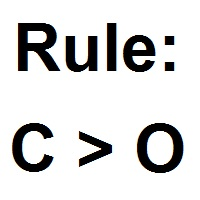
您可以使用此工具创建任何您想要的蜡烛形态,以下是如何获取图表值的方法 数值 描述 O 开盘价 H 最高价 L 最低价 C 收盘价 因此,如果您希望蜡烛是 阳线 ,只需构建以下公式 C > O 负责 阴线 的公式相同 C < O 这里是一个 十字星
FREE

这是使用《新闻过滤器》所需的脚本。这个脚本选择任何你想过滤的图表,并将输入发送到新闻过滤程序。每个输入都是针对该图表的,所以你可以灵活地为每个图表设置不同的输入。新闻过滤器(免费演示)的链接可以在下面找到: 新闻过滤指南+下载链接
新闻选择 新闻来源于Forex Factory的经济日历。 选择可以基于任何一种货币,如USD,EUR,GBP,JPY,AUD,CAD,CHF,NZD和CNY等。 选择也可以基于关键识别,例如Non-Farm (NFP),FOMC,CPI等。 能够选择新闻影响级别的筛选,从低、中、到高影响。 自动模式只选择与图表相关的新闻。 新闻来源每小时自动刷新,以确保最新的新闻数据。 为每个新闻影响级别提供单独的输入,以确定您要过滤掉的新闻发布前后的分钟数。
订单管理选项
在新闻发布前关闭未平仓头寸的选项,并在新闻发布后恢复它们。 在新闻发布前删除挂单的选项,并在新闻发布后恢复它们。 在新闻发布前移除止损和止盈水平的选项,并在新闻发布后恢复它们。 在新闻发布前移动止损和止盈水平的选项,并在新闻发布后恢复它们。如果您希望在新闻期间适应增加的波动性,这个功能特别有用。
FREE

Take a Break FREE is the free version of Take a Break , the account protection and risk management tool for all your Expert Advisors. It pauses your EAs before news, after a daily loss or when your own rules say so, and lets them continue when the pause is over. What the free version does Daily loss brake: a fixed limit of -5% per day is always active (reset at 00:00 server time). When it triggers, one chart pauses. News filter for one chart symbol: pause before and after scheduled releases, cur
FREE

This product is based on the single indicator TREND MATE. Link: https://www.mql5.com/es/market/product/50082
The aim of this EA is to watch for all pairs in a single panel in order to have a quick view of changes or new uptrends/downtrends. It is possible to watch from your mobile by sending push notifications when changes appear. If you want to have all push notifications for even exit trends you may receive multiple messages.
FREE

Grid, martingale, and averaging strategies share one weakness: a stop-loss tight enough to matter is usually tighter than your broker's minimum Stop Level allows. Traders work around this by tracking stops virtually inside the terminal — but a virtual stop only works while the terminal is running. If your connection drops, your VPS reboots, or the platform crashes, a purely virtual stop offers zero protection at the exact moment you need it most. Grid SL Guardian runs two protection layers at
FREE

This reliable, professional trade copier system is without a doubt one of the best on the market, it is able to copy trades at very fast speeds from one master account (sender) to one or multiple slave accounts (receivers). The system works very fast and mimics the master account a full 100%. So changing stop losses, take profits, pending orders on the master account is executed on the slave accounts too, like each other action. It is a 100% full copy (unlike many other copiers who only copy ma
FREE
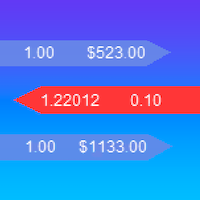
iExposure SYL displays information about opened trades considering commissions and swap, which affects the open price and the final outcome and and also allows drawing virtual transactions and calculating possible profits and losses in advance.
Differences from iExposure indicator of MT4: Separate profit column for BUY and SELL Trade open price considers commission and swap The indicator will come in handy for any hedging strategies that involve opening a large number of oppositely directed
FREE

This tool will allow you to export candles data (Open, High, Low, Close, Volume) for any financial instrument present in your MetaTrader 4. You can download the data of multiple Symbols and TimeFrames in the same csv file at once. You can schedule the frequency, simply choose the refresh interval (1 minute minimum, if 0 then the extraction will be done once) and the tool will do the work. No need to open a lot of charts in order to get the last sync, the tool will download the data directly. The
FREE

Trading Board is a Tool That Help you execute Sell and Buy Operation very smoothly.
General Description : This Tool has this functions: The function of Send Buy or Sell orders. The function to close all orders in the current chart. Choose the volume you need to trade. Calculate of Stop loss and Take Profit with the number of points. Draw the Fibonacci retracement.
FREE

a Perfect TradingPanel for who wants to have entry in a RANGE .
Join my channel ===> https://t.me/Ash_TheTrader
For example : You have a zone and you don't know where of the zone will be your entry so , you will use this Tool , to separate your risk per position and it will automatically calculate your LOT SIZE . Total risk base on martingale rules or Grid input . You can choose how many positions you want to have and it will calc the Lot size for you .
Features :
Enter in a range of p
FREE

Scalping Day Trading Support Utility Scalping One MT4 free
One position is displayed with one button. View P & L, Lot, and Point in real time. It is possible to switch the display of positions of only chart currencies and all currency pairs. (The free version has only 3 positions) Supports automatic identification in Japanese and English Account currency notation corresponds to dollar, euro, pound, yen (automatic identification) The timeline drawing function can be linked with the clock disp
FREE

Copier Provider RAlabs MT4 — a signal source for local trade copying. A lightweight trade publishing tool for a copying system consisting of Copier Provider RAlabs (signal source) and Copier Master RAlabs (receiver). Copier Provider RAlabs is installed on the donor account whose trades need to be copied and transmits those trades to the Copier Master RAlabs receiver. The provider publishes: position openings, modifications, and trade closures. Features: instant local transmission, minimal resour
FREE

# AutoECPointer
**AutoECPointer** stands for **Auto Entry Close Pointer** .
AutoECPointer is a custom indicator for MetaTrader 4 (MT4) designed to visualize your trade history directly on the chart. It automatically draws arrows for trade entries and exits, distinguishing between profitable and losing trades, helping traders review their past performance visually.
## Features
- **Automatic History Visualization** : Scans account history and plots trades on the chart. - **Entry & Exit Marker
FREE
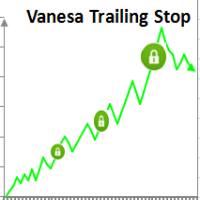
Setting Take profit (TP) to fixed level does not optimize your trade while using trailing stop requires traders to stay all time to screen. Vanesa Trailing Stop does trail stop by preset scenarios automatically. Vanesa Trailing Stop provides 3 (maximum) TP levels in points. For example: Level 1< Level 2 < Level 3. Traders provide value of trailing stop level for each TP level as parameters. Whenever total gain of a trade in points reaches the first TP level, EA will start doing trailing stop wit
FREE

Local Account Monitor MT4 is a read-only local monitoring utility for traders who run multiple MetaTrader terminals on the same PC or the same Windows VPS . It combines Agent mode and Dashboard mode so you can monitor local accounts from one place, spot stale terminals quickly, review account health states, and inspect risk details without switching between many terminals. Public channel: CLICK HERE
What it is for Monitoring multiple local MT4 terminals from one dashboard Quickly identifying
FREE

Msg2Line 是免费在线聊天网站,您可以在“LINE 聊天”中查看。
除非另有说明,否则我们将接受大多数的申请。
请不要将评论作为评论提交给国会。
已发送 0 条结果。
- 取消订阅 取消订阅
1. 编辑本段编辑内容。
2. 请勿打扰。
- 取消 评分 + 取消 评分
1. 编辑本段编辑内容。 2.
2. w/img 已删除。
- 删除此图片
1. 使用 IMG 删除图片。
*请注意,LINE TOKEN 不会自动生效。
*如果您使用“WebRequest”发送了电子邮件,
如果您使用“WebRequest”发送了电子邮件,请发送邮件至 LINE 帐户退出历史舞台并探索更多。 这是一个非常有用的工具,因此请明智地使用它。
由于缺乏解释,可能有些地方你不明白,但如果你不明白,请提问。
祝您交易生活愉快!
FREE

Msg2Slack 是将消息从 MT4/MT5 文本框发送到 Slack 的工具。 只需单击位于文本框右侧的按钮,您就可以轻松地将文本和图表图像发送到您的 Slack 频道。 即使您在图表上画线、标记、注释等,图像也会被发布。
无论您是想向自己还是群组发送消息,这个简单而强大的工具都可以让您非常轻松地捕获图表图像并即时发送消息。
Msg2Slack 工具显示在图表底部。 只需输入您的消息并单击右侧的按钮即可发布您的消息或带有图像的消息。
虽然效用水平因人而异,但任何使用 Slack 进行交流的人都可以从 Msg2Slack 即时发送图表图像的能力中获益。
获取 Slack API TOKEN 并将其设置为该工具的参数。
您还可以使用策略测试器来检查它是否有效。
FREE

Chart Buddy 是一款娱乐工具,旨在为您的交易图表增添乐趣。角色会沿着图表的右侧移动,仿佛在为价格波动加油,从而为您的交易体验增添独特和愉悦的元素。虽然它不会直接影响您的交易,但动画能提供轻松的分心效果,让您感受到仿佛有一个个人支持者。 主要功能: 价格波动支持 :角色根据价格方向(上升、下降或与您当前头寸一致)移动,仿佛在为市场加油。 角色选择 :您可以选择三种不同的角色(松鼠、相扑选手或女孩),也可以上传自定义图片来个性化体验。 可定制的动画 :调整角色移动的速度和切换时间,以符合您的喜好。 视觉娱乐 :动画角色为您的交易环境增添生动、互动的元素。 关于 illust STAMPO 该工具使用来自免费图片资源 illust STAMPO (stampo.fun) 的图片。有关这些图片的使用详情,请参阅 此文章 。 参数设置: 价格波动方向 :选择让角色响应价格的上升、下降或头寸的方向。 角色类型 :选择松鼠、相扑选手或女孩,或者上传自己的自定义图片。 切换时间 :设置角色移动的切换时间。 图片设置 :为上升和下降方向分别配置两组图片(共四张图片)。 Chart Buddy
FREE

This application is now replaced by Ofir Notify Light Edition (Free) or Ofir Notify (paid).
Thank all for your positive feedbacks.
Ofir Notify is a tool which send alerts on trades to Telegram Alert on any event concerning a position : Opening, Closing, modification (SL, TP) Send alerts to Chats, Groups and Channel Alert on Equity change Display Risk, Reward and progress of profit/lost for each position Customization of alerts ( only in full edition ) Sending charts screenshots with alerts
FREE

This EA helps traders in the following benefits : - show the entry point for sell or buy orders that you makes. -show the TP & SL levels on chart - control the lot size - control the TP & SL level in points - works on all chart period - rising algo trading rank in your signal - closing all deals in one click - closing only profitable deals - closing only losable traders enjoy
FREE

you can close all your positions in profit or lost when you use this robot. 1.you set your max profit and max lost for all your positions. 2.the robot show you in a window beside your chart. 3.when your equity reach your target close all your positions. 4.you can use one of them or both (profit or lost)togather. 5.this robot close all your positions. ((if you have any idea or want somthing i can help you)) i hope you win in all your times of life. best regard
FREE

Signalator Trade Summary Panel MT4 is a free local MetaTrader 4 utility that gives traders a clear account and open-trade overview directly on the chart.
The standard Trade tab shows individual positions, but it can be difficult to quickly understand the whole account situation when several trades or symbols are open. This panel summarizes the most important information in one compact dashboard.
The panel shows current floating profit or loss, floating P/L as a percentage of account balance,
FREE

HIZOA SPREAD AND TIMER PANEL is a clean and practical information utility for MetaTrader 4. It displays the current spread, rolling average spread, candle closing time and daily closing time directly on the chart. The panel automatically adapts to the active symbol and timeframe, allowing traders to monitor essential spread and timing information without unnecessarily covering important chart areas. HIZOA Spread and Timer Panel is available completely free of charge. MARKET CLOSE AWARENESS HIZOA
FREE
学习如何在MetaTrader AppStore上购买EA交易,MetaTrader平台的应用程序商店。
MQL5.community支付系统支持通过PayPay、银行卡和热门付款系统进行交易。为更好的客户体验我们强烈建议您在购买前测试EA交易。
