 MetaTrader 5
 Experts
 Indicateurs
 Bibliothèque
 Utilitaires
 Widgets
 Règles
Regardez les tutoriels vidéo de Market sur YouTube
Comment acheter un robot de trading ou un indicateur
Exécutez votre EA sur
hébergement virtuel
hébergement virtuel
Test un indicateur/robot de trading avant d'acheter
Vous voulez gagner de l'argent sur Market ?
Comment présenter un produit pour qu'il se vende bien
Utilitaires de trading gratuits pour MetaTrader 4 - 8
 Vous trouverez ci-dessous des programmes de trading simplifiant le trading sur le marché Forex dans MetaTrader 4. Passez la souris sur un utilitaire dans la liste ci-dessous pour lire sa description et son objectif.
MultiTP Trade Manager EA — Advanced Trade Management Made Effortless (MT4)
Limited Offer – First 100 Downloads FREE!
Be among the first 100 traders to download Trade Anchor Manager (MT4/MT5) completely free of charge. Hurry – once the limit is reached, the offer closes instantly! After trying it out, we’d love if you could leave a review and share your thoughts – your feedback helps us improve and lets other traders know what to expect.
Need this Trade Anchor Manager for MT5? http
FREE

The "InfoBox" utility is designed to display the presence of open orders, the number of lots, current profit and much more in one window. The version for the MT5 platform is here .
You've probably encountered a situation where you have an advisor that works on a currency pair, but information about its operation: - orders and their number, the size of the spread for the instrument, the volume of lots on the market, drawdown and much more - are scattered in different places of the terminal and
FREE

This panel is designed for manual binary options trading. It is possible to set the position volume and the expiration time. Note: make sure your broker supports binary option trading via the MetaTrader 4!
Settings Ask confirmation - ask for additional confirmation before opening; Magic number - unique identifier of opened positions.
FREE
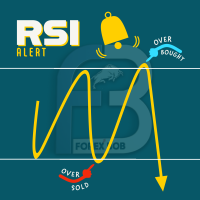
RSI PHONE ALERT RSI Alert is an amazing tool to get alerted on your mobile phone when Overbought/Oversell levels reached on RSI indicator. So that traders who doing manual trading can execute their trades from mobile phone while following their RSI strategy, as most of the traders use RSI for entering their trades. New suggessions are welcome INPUTS RSI levels RSI period Start/End time of the tool Custom text message to get on mobile phone Enable/Disable mobile alert function available Do not fo
FREE

Predetermination is an exit manager for trades you open yourself. It does not open positions and it does not send signals. After a manual buy or sell, it gives that trade a stop and up to six exit stages based on volatility. Three stages come from Average True Range, each with its own timeframe. Three come from completed range: daily (ADR), weekly (AWR), and monthly (AMR). Each stage can be switched on or off. Enabled stages are sorted by distance. Nearer stages trail the stop. The
FREE

www tradepositive .lat
ALGO Smart Flow Risk Manager (Keyboard Edition)
Have you ever spotted the perfect entry but hesitated so long calculating the lot size that the price ran away without you? Or has a bad streak ever wiped out 20% of your account because you didn't know when to stop? The ALGO Smart Flow Risk Manager is not an automated trading bot. It is a professional Execution Tool designed strictly for Manual Traders who demand speed, structure, and discipline. We turn your
FREE

Asa Manual Grid Buy Sell with UI is made for Grid trading when orders are placed above and below a set price, creating a grid of orders at incrementally increasing and decreasing prices.
Main Features Ability to set buy grid with 3 maximum orders. (200 in full version)
Ability to set sell grid with 3 maximum orders. (200 in full version)
Easy to use with simple interface. Have 2 mode of Take Profit and 1 for Stop Loss.
Real time information for the current open positions and calculate averag
FREE

Trade Receiver Free is a free tool to copy trades/signals from multiple MT4/MT5 accounts. The provider account must use copier EA to send the signal. This version can be used on MT4 accounts only. For MT5 accounts, you must use Trade Receiver Free for MT5 . Reference: - For MT4 receiver, please download Trade Receiver Free .
- For MT5 receiver, please download Trade Receiver Free MT5 .
- For cTrader receiver, please download Trade Receiver Free cTrader .
- If you only need copy from MT4 acco
FREE

Ce module se synchronise avec le simulateur d'entraînement pour afficher les informations de temps et de position du graphique, non seulement pour la même paire de devises, mais également pour afficher des graphiques synchronisés pour différentes périodes et différentes paires de devises.
Remarque : Ce module ne fonctionne pas tout seul. "Practice Simulator" est requis.
Practice Simulator
https://www.mql5.com/fr/market/product/98348
Deux modes de synchronisation sont disponibles.
Mode
FREE
Perspect EA
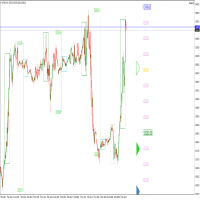
This version of the EA focusses on indicating points of interest on the chart, features include : Sessions (Asia/Gap/London/Gap/NewYork/Gap) Previous Daily/Weekly/Monthly highs and lows Previous Daily/Weekly/Monthly open and close price
Round numbers (Ruler) Opening range Initial balance Multi time frame (Yearly view, monthly opening range) Customizable chart templates for low light users The indicator will assist in advanced technical analysis, providing the user with desired
FREE

MQT Prop Guard DD protège les comptes de prop firm contre le dépassement de la limite de perte journalière et du drawdown total. Il surveille votre capital chaque seconde et ferme tout avant d'atteindre la limite journalière de votre challenge, puis bloque le trading jusqu'au reset quotidien suivant. Compatible avec les règles de prop firms comme FTMO, The5ers ou FundedNext (vérifiez toujours l'heure de reset et les limites exactes de votre firme). Comment ça marche (résumé de la logique) : À l'
FREE

RR Visualizer - Enhance Your MT4 Risk Management RR Visualizer is an essential MT4 utility for traders looking to optimize their risk management effortlessly. This tool calculates the ideal lot size based on your preferred risk percentage and the custom stop-loss distance you set, giving you full control over your money management. Designed with a user-friendly and attractive interface, RR Visualizer keeps the focus on your trading, not on complex calculations. Key Features Customizable Ris
FREE

Telegram Signals Copier is a fully automated software that reads messages from Telegram and inserts them as orders on your MT4 terminal.
It comes with an advanced risk management tool, that can risk based on a % of your balance, fixed loss, and many other options.
You can fully customize how you take the signals, change the TP and SL level.
With an advanced analytics tool, you can see where your favorite signal providers are doing the most profit, and improve the profits even more.
Contact
FREE
This practical tool let you setup your keyboard to have shortcuts and hotkeys to change Chart TimeFrame.
Bring your trading to another level by actually take fast and smooth control of switching Time Frames without losing time clicking all over the Meta Trader Terminal. This tool is born due to scalping issues, where switching from higher timeframe and lower timeframes is really mandatory to make a multi timeframe analysis of the trading setup. Uplift your trading activity, by letting your ke
FREE

Binary analyzer is a great opportunity to write your own indicators and trading strategies based on ready-made calculations based on binary code. The analyzer works on all currency pairs with 5 decimal places "0.00001" EUR / USD, GBP / USD ITD Recommended Session M1 Included in the Catalog. Indicator - "Binary reference" and 4 indicators measuring Bullish and Bearish market sentiment // ------------------------------------------------ ------------------- // Indicator "Binary reference" The algo
FREE

Minuteur de compte à rebours jusqu'à la fermeture du bar, + statut de progression %: #1 utilitaire multifonctionnel : 66+ fonctionnalités, incluant cet outil | Contactez-moi si vous avez des questions | version MT5 Dans les paramètres de l'indicateur, vous pouvez configurer : Plage de temps pour le calcul ; true / false : Option de plage de temps supérieure (suivante à celle actuellement utilisée : M15->M30, H4->D1...) Position :
1 = Coin inférieur gauche ;
2 = Coin inférieur droit
FREE

This Expert Advisor closes all open positions and pending orders. It is possible to close only buy or sale orders, market or pending orders, positions with profit or loss.
You can to get source code from here .
Parameters CloseAllBuy - close buy positions. CloseAllSell - close sell positions. CloseMarketOrders - close market orders. DeletePendingOrders - delete pending orders. CloseOnlyProfit - close only profitable orders. CloseOnlyLoss - close only loss-making orders. ClearChart - clear the
FREE

Êtes-vous fatigué de voir le seuil de rentabilité devenir une transaction gagnante sans vous ? Le Stop Loss Unwickable (USL) vous maintient dans le commerce !
Vous avez méticuleusement planifié vos transactions, fait preuve de patience et êtes entré au moment « parfait ». Au fur et à mesure que la transaction évolue en votre faveur, vous déplacez votre stop loss jusqu'au seuil de rentabilité, vous sentant en sécurité sans capital à risque. Mais ensuite, le marché prend une tournure inattendue
FREE

Umagads Lot Calculation and Auto SL TP Assistant MT4 est un outil professionnel de trading semi-automatique pour MetaTrader 4. Il est conçu pour les traders exigeant rapidité et rigueur. Caractéristiques v2.40: Calculateur de lot précis: Calcul en temps réel selon un pourcentage de risque fixe (Risk %). Auto-Shield instantané: Dès l'entrée en position, l'assistant place le SL et le TP automatiquement. Sécurité du compte: Fonctionne uniquement sur comptes USD, USC et CNT pour éviter les erreurs
FREE

If you can not create a background image for yourself (photo size and format must be changed), let me know. I make your photo for free. Otherwise, you can read the help file . A tool for chart management You can change the background image You can change the background color Change the color of the candles Volume colors, line charts and everything else You can also enable and disable some items Read the help file for more information
Settings:
Save Changes After Remove Tool
Back Ground Photo
FREE

ClosureMaster Utility closes all orders and offers 7 additional modes. If you have dozens or even hundreds of orders and need to close them all or some of them selectively by comment, magic number, buy only, sell only, if Stop Loss is not set, only profitable or losing trades, then ClosureMaster Utility can take care of this task.
External parameters:
Close all Losing trades Close all Profitable trades Close all orders without Stop Loss Close Buy orders only Close Sell orders only Close by Magic
FREE

CloseProfit is a utility created to automate the process of setting a stop-loss and closing orders when a certain percentage of profit is reached.
The utility also has two Buy and Sell buttons on the chart for opening orders.
The utility can be used to close orders opened by other advisors, with a stop-loss or a percentage of the increase in the deposit. To do this, you need to set in the settings a magic number that matches the one that is installed in the advisor when opening a transaction.
FREE

VisualTicks_EA is an Expert Advisor dedicated to the VisualTicks chart.
Works ONLY on the VisualTicks chart.
Is a tool that lets you open and close transactions directly on the VisualTicks chart.
There is only one parameter in EA settings:
magic - next EA number. If you use more than one VisualTicks_EA on MT4, you must enter a different magic number.
After starting VisualTicks_EA, the following buttons will appear on the chart:
Open BUY - opens one BUY transaction of a specified lot size.
Cl
FREE
-It deletes all graphical objects on a chart. You choose the chart , then you execute the script on the chart. After the execution, all objects will disappear. Objects can be lines: trend lines, horizontal lines, vertical lines. They can be buttons, texts, labels , rectangles, edit boxes... parts of a panel. It executes fast within a second. You can use as many times as you want.
FREE
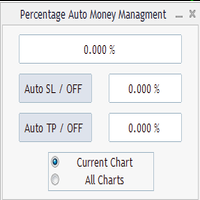
Percentage Auto MM sends automatic orders to close all positions immediately after reaching percentage SL/TP target, set by the User . Orders will be sent if the market is open and the SL / TP application buttons are pressed ( they can be used separately or together ) . It could be applied for current chart/all charts, depending on selected option. It works independently of SL and TP order settings for individual positions. SWAP, Commision can be also included ( look at input options ).
Atte
FREE

This reliable, professional trade copier system is without a doubt one of the best on the market, it is able to copy trades at very fast speeds from one master account (sender) to one or multiple slave accounts (receivers). The system works very fast and mimics the master account a full 100%. So changing stop losses, take profits, pending orders on the master account is executed on the slave accounts too, like each other action. It is a 100% full copy (unlike many other copiers who only copy mar
FREE

功能 勾选需要显示的内容,(当前版本包括当前K线倒计时,市场信息)并显示到图表右下角。
显示格式参数 fontsize 字体大小
c 颜色 font 字体类型
自定义显示的内容 参数 Symbol candle time left SPREAD DIGITS STOPLEVEL LOTSIZE LOTSIZE TICKSIZE SWAPLONG SWAPSHORT STARTING EXPIRATION TRADEALLOWED MINLOT LOTSTEP MAXLOT SWAPTYPE PROFITCALCMODE MARGINCALCMODE MARGININIT MARGINMAINTENANCE MARGINHEDGED MARGINREQUIRED FREEZELEVEL CLOSEBY_ALLOWED
FREE

This tool can delete any object drawn on MT4 platform charts. you can delete: Line_Objects (Vertical_Line, Horizontal_Line, Trend_Line, TrendLinebyAngle, Cycle_Line) Channel_Objects (Fibo_Channel, Equidistant, Linear_Regression, Standard_Deviation, Andrews_Pitchfork) Gann_Objects (Gann_Line, Gann_Fan, Gann_Grid) Fibonacci_Objects (Fibo_Retracement, Fibo_TimeZones, Fibo_Fan, Fibo_Arcs, Fibo_Expansion) Shapes_Objects (Rectangle, Triangle, Ellipse, Text, Label) Arrows_Objects or you can Delete_All_
FREE
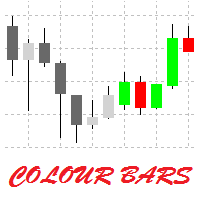
This is a simple utility for visual market analysis. Users can select trading day and time. Bullish candles located within the necessary time interval are shown in green, while bearish ones - in red. Candles outside of the trading time interval are shown in gray and dark gray.
Parameters Trade_Time = "00:00-00:00" - enter trading time. TradeSunday - trade on Sunday. TradeMonday - trade on Monday. TradeTuesday - trade on Tuesday. TradeWednesday - trade on Wednesday. TradeThursday - trade on
FREE
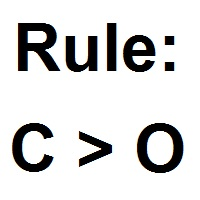
Patterns Wizard est un outil de création de motifs de bougies. Avec lui, vous pouvez créer plusieurs motifs différents et ajouter autant d'instances de cet indicateur que vous le souhaitez sur votre graphique, chacune avec un motif différent. Pour mieux comprendre le fonctionnement des formules de création, vous pouvez prendre des exemples de l'indicateur My Candle, qui contient plus de 70 exemples de motifs de bougies, disponible sur le marché MQL5 . La principale différence de cet indicateur
FREE

This script paces itself to zoom into the deepest setting of ZOOM +
You may be in tune to know a few keyboard easter eggs. Pressing the minus <-> button has the capability to Zoom the Chart Outward! Interesting to see the price reevaluate itself in perspective. This we could see is quite contagiously useful if we wanted to be quick with analyzing, examining through your tools, in your plans and such.
So, if you ever wanted to zoom IN and OUT, here is Your play around with the chart poin
FREE

Ultimate MT4 to Telegram Public Channel sends controlled trades (via symbol, magic, comment) to a public telegram channel. It sends open and closed trades, including pending orders and TP/SL modifications, along with chart screenshots, to this public telegram channel. Additionally, you can send trade reports of open trades and summary profit/pip reports for day, week, or month. You can customize the design of the trade actions or reports with variables and emoticons.
A beautiful panel allows
FREE

Basket Recovery System : is useful for trading multiple pair on a single account, single chart.
Functions Of this Ea
with a simple click on a button in any Symbol row, this Utilities will,
Open new Order, Set Lot, Close Order, Reverse Order, Add new Symbol, Delete Symbol, with a simple click on a Navigation Button, this Utilities will,
Select all Symbol Available on Broker, ReSet Symbol Lots, Close all Order, Set Low Risk for all Symbol, Remove all Pair with spread above 2two.
FREE

The EA monitors positions for selected pairs, sets a break-even level and moves a trailing stop. When the trade is "n" points of profit (parameter dist_BEP), the stop loss is moved to the break-even point (the level of the trade opening price) plus the specified distance in points (parameter BEP) The EA checks all available (or filtered) trades for break-even and moves stop-loss levels if necessary. The EA also checks all available (or filtered) trades for trailing stop conditions and, if neces
FREE

Artemis Prop Guard Pro Artemis Prop Guard Pro is a professional risk-control utility for MT4, built for manual traders who want a disciplined, rule-based trading environment. It does not generate signals, predict market direction, or automate strategy logic. Its sole purpose is protecting account equity from avoidable rule breaks, over-risking, emotional trading, and unmanaged exposure. Why account discipline matters Most traders do not lose accounts in a single trade. They lose them through a c
FREE

- The Symbol Changer Utility for MetaTrader is a tool that enables traders to switch between various symbols on the MetaTrader trading platform easily and quickly. - It is designed to change the symbol of the current and all open chart windows and the timeframe of the current chart window (by clicking the button). - The tool retrieves symbols from the Market Watch, displaying only the necessary symbols in the market watch.
FREE

Orders Manager is a simple and indispensable assistant for managing all your orders. Inputs: Magic = 999; // Magic TakeProfit = 1000; // Take Profit. If = 0 the level is not setts. StopLoss = 0; // Stop Loss. If = 0 the level is not setts. Slippage = 10; // Slippage GeneralProfit = false; // Closing all orders based on total profit. If false the function is disabled and works according to TakePr
FREE

The Buffer Reader will help you to check and export the custom indicators buffers data for your current chart and timeframe. You can select the number of buffer and historical bars to read/export. The data can be exported in a CSV format and the files will be stored in the folder: \MQL4\Files .
How it works Put the number of buffers to read in the Buffers_Total input parameter. Put the number of rows to display in the Rows_Total. Choose the CSV separator in the parameter. Copy the correct name
FREE
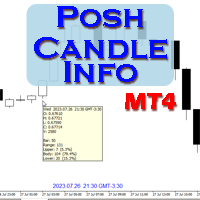
Show candle info with: Time in selected timezone Bar number Candle range points Upper wick points and percentage Body points and percentage Lower wick points and percentage Mark large/small candle body with customizable line. Settings group: Broker and local timezone. Lookback bars for candle marking. Large candle body Small candle body Date and time info with auto position or custom the x and y coordinate.
FREE

Investment Castle Panel — Your Trades, At a Glance
The Panel puts the numbers that matter right on your chart: floating profit and loss, drawdown and more — for manual trades and for any Expert Advisor. A clean, movable dashboard so you always know exactly where you stand.
What it does for you Live P/L on the chart: floating profit/loss for the current symbol, for both buy and sell orders, in your base currency and in pips. Max drawdown at a glance: keep an eye on risk without digging through
FREE

Panoramica Pending Order Assistant è progettato per automatizzare la creazione di ordini pendenti Buy Stop e Sell Stop su coppie di valute specifiche ( EURUSD, GBPUSD, AUDUSD ). Questo EA consente ai trader di impostare facilmente livelli di entrata strategici senza dover posizionare manualmente gli ordini.
Funzionalità Principali Creazione Automatica di Ordini Pendenti L'EA genera automaticamente 4 ordini Buy Stop e 4 ordini Sell Stop appena viene attivato sul grafico. Gli ordini sono distanzi
FREE

En s'adaptant à la volatilité, les positions de trading de Risque potentiel pour récompenser sont affichées sur la base de la Fourchette réelle moyenne. Les cases Risque-Récompense sont affichées lorsque le bouton "Acheter ou Vendre" est cliqué! Une utilité du calcul de l'ATR, réjouissez-vous d'une question qui ne fait pas partie d'une décision difficile pour savoir quand fermer une transaction. Cette question aiderait votre décision de gestion des risques.
Spécification La fourchette vraie m
FREE

IzaRP - Risk / Profit Monitor (MT4) IzaRP — это вспомогательный индикатор для трейдеров, предназначенный для анализа открытых позиций и контроля рисков в реальном времени. Индикатор автоматически рассчитывает ожидаемый риск и ожидаемую прибыль по всем открытым сделкам на торговом счёте на основе установленных уровней Stop Loss и Take Profit и отображает результат непосредственно на графике. Основные возможности Анализирует все открытые рыночные ордера (BUY и SELL) Игнорирует отложенные орде
FREE

Elevate your trading with this Breakeven and Trailing Stop Manager, an Expert Advisor (EA) built for MetaTrader 4 to streamline risk management by automating breakeven and trailing stop strategies. This EA helps secure profits and minimize losses without requiring constant manual intervention, giving you more time to focus on market analysis and strategy.
### Key Features:
- **Automatic Breakeven Adjustment:** Automatically move the Stop Loss to the breakeven level once your position reac
FREE

Close_All_Trades_with_TP_SL is a reliable and efficient MQL4 Expert Advisor designed to simplify and automate trade management for all open positions on your MT4 account. This EA is especially useful for traders who open multiple trades quickly or use high-frequency strategies where manual TP/SL placement becomes difficult and time-consuming. The primary purpose of the EA is to ensure that every open trade—whether Buy or Sell—always has a predefined Take Profit (TP) and Stop Loss (SL) applied. M
FREE

Cet utilitaire permet de basculer entre les symboles. Vous devez insérer dans l'entrée vos tickers favoris. Il est possible de personnaliser jusqu'à 5 symboles
Touche de raccourci : Basculer entre les symboles : A -Avant D -Arrière
Inputs Vous pouvez configurer vos touches préféré pour basculer entre les symboles. Vous pouvez personnaliser la coleur de l'arrière-plan et le bord des boutons . Vous pouvez personnaliser les libellés : dimension et police
FREE

Server Time On Chart is a simple indicator that shows the time of the broker's server with hours, minutes and seconds in the lower left corner of the chart's. Within the inputs you can only change the size of the font and the color you want depending on your taste. You can see more of my publications here: https://www.mql5.com/en/users/joaquinmetayer/seller
FREE

The Quick Style utility is designed for facilitation and acceleration of working with the properties of graphical objects. Left-click a graphical object while holding the Shift key to open the quick access window for configuring the object properties. In the window, you can change the color, style and line width with one click, including those of other graphical objects. All changes are displayed immediately. To close the Quick Style , simply click the free space on the chart. The utility is eas
FREE

In version 4.2 we have combined this tool with our own indicator written by our experts. You can download the indicator (Volume Time Marvel) for free from the Indicators section of MQL5.com and use it alongside this tool to better manage your open positions with a better understanding of market timing and trading volume.
Forex trading is conduct 24 hours a day, but trading volume is not the same at all hours. Identifying the best times to trade can significantly improve your trading strategy. Wi
FREE

ขอบคุณ แรงบันดาลใจ จากโค้ชแพม ที่ทำให้เริ่มทำ Close all ตัวนี้ Close all and update profit Version 3.03 Full version Give you free
For MT5 Click https://www.mql5.com/en/market/product/95989
V3.03 Fix TPSL calculate USDxxx and xxxUSD or XXX/XXX and add Decimal Digi, 0 is default
Program function
Tab 1 Close order function and show break port
1.Can show and hidden all button
2.Update sell and buy total lots easy to manage order
3.Close all order and update all profit
4.Close all sell a
FREE

Description: - BidAskLine Indicator is very simple and easy, but each utility can be important in the probability that we will win in our trade. This utility Indicator shows lines and prices of the Bid, Ask and Spread. Input Parameters: - Visual Aspect Options : Select between 2 options with Box or Simple Style. - Parameters Bid Price : Select between show or hide line or box objects, change color, style or width line. - Parameters Ask Price : Select between show or hide line or
FREE

Ceci est un outil de gestion de la vitesse de lecture qui permet des tests et des analyses efficaces dans le Testeur de Stratégie. Il améliore l'utilisabilité du Testeur de Stratégie et peut être utilisé comme un moyen pour rationaliser le développement et l'évaluation des stratégies de trading.
Caractéristiques de l'outil : Contrôle de la vitesse de lecture : Les utilisateurs peuvent librement changer la vitesse de lecture dans le Testeur de Stratégie, leur permettant de faire avancer rapideme
FREE

a Perfect TradingPanel for who wants to have entry in a RANGE .
Join my channel ===> https://t.me/Ash_TheTrader
For example : You have a zone and you don't know where of the zone will be your entry so , you will use this Tool , to separate your risk per position and it will automatically calculate your LOT SIZE . Total risk base on martingale rules or Grid input . You can choose how many positions you want to have and it will calc the Lot size for you .
Features :
Enter in a range of p
FREE
SmartClose(Close All Orders) helps you close all your trades. You can use it on any symbol. You can also set a warm value to manage the risk. With these functions: Close Open Orders : Close all open trades in the trading account. You don't need to set a value for the "value" parameter. Close by Profit : Close trades when profit reaches a specific predefined level. You need to set a value for the "value" parameter. Close by Percentage : Close trades based on a certain percentage of the balance.
FREE

CopyStar – File-based Trade Copier (MT5 Master/Slave, MT4-compatible) Short description
CopyStar mirrors changes to your open net positions from the master to any slaves – quickly, robustly, and without network configuration. Communication runs via common files (shared file folder), enabling CopyStar to support MT5↔MT5, MT5→MT4, MT4→MT4, and MT4→MT5. Supports symbol mapping, lot multiplication, optional SL/TP copying, magic/comment filters, and a clear chart status display including heartbeat.
FREE

MT4 to Telegram & Discord Notifier MT4 to Telegram & Discord Notifier is a lightweight and practical notification utility for MetaTrader 4 that automatically sends real-time trade updates to your Telegram and Discord channels. It is designed for traders who want to stay informed about trading activity without constantly watching the terminal. Once connected, the notifier delivers instant alerts whenever a trade is opened or closed, helping you monitor live activity, improve communication, and ke
FREE

Timezone Filter EA: Precision Trading with Session Control The Timezone Filter EA is an essential tool for traders looking to refine their trading strategy by restricting trade execution to specific trading sessions. Designed for precision and discipline, this EA allows traders to filter which trading sessions they want to engage in—such as Asian, London, or New York sessions —while ensuring that no trades occur outside the defined time periods. Key Features: Customizable Trading
FREE

This application is now replaced by Ofir Notify Light Edition (Free) or Ofir Notify (paid).
Thank all for your positive feedbacks.
Ofir Notify is a tool which send alerts on trades to Telegram Alert on any event concerning a position : Opening, Closing, modification (SL, TP) Send alerts to Chats, Groups and Channel Alert on Equity change Display Risk, Reward and progress of profit/lost for each position Customization of alerts ( only in full edition ) Sending charts screenshots with alerts
FREE

ForexInsured — Gestion des Risques, « Assurance contre les Pertes » et Analyse des Performances Tradez intelligemment · Gérez vos risques · Protégez votre capital ForexInsured est une solution complète de gestion des risques et d’analyse des performances de trading , conçue pour fonctionner avec MetaTrader 4 (MT4) et MetaTrader 5 (MT5) . ForexInsured repose sur une idée simple mais essentielle : La responsabilité principale d’un trader n’est pas seulement de rechercher des profits, mais aussi de
FREE

K-line Terminator - a countdown tool that accurately grasps every second Core Summary: Still anxious about not knowing when the current candlestick will end? 'Candlestick Terminator' is an indispensable tool in your trading toolbox! It utilizes a clear and intuitive countdown timer to display the precise time remaining for the currently active candlestick in real-time, helping you avoid making hasty decisions during the chaotic moments of candlestick transitions, thus allowing you to enter, exit
FREE

you can close all your positions in profit or lost when you use this robot. 1.you set your max profit and max lost for all your positions. 2.the robot show you in a window beside your chart. 3.when your equity reach your target close all your positions. 4.you can use one of them or both (profit or lost)togather. 5.this robot close all your positions. ((if you have any idea or want somthing i can help you)) i hope you win in all your times of life. best regard
FREE
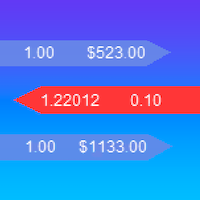
iExposure SYL displays information about opened trades considering commissions and swap, which affects the open price and the final outcome and and also allows drawing virtual transactions and calculating possible profits and losses in advance.
Differences from iExposure indicator of MT4: Separate profit column for BUY and SELL Trade open price considers commission and swap The indicator will come in handy for any hedging strategies that involve opening a large number of oppositely directed
FREE

This tool will allow you to export candles data (Open, High, Low, Close, Volume) for any financial instrument present in your MetaTrader 4. You can download the data of multiple Symbols and TimeFrames in the same csv file at once. You can schedule the frequency, simply choose the refresh interval (1 minute minimum, if 0 then the extraction will be done once) and the tool will do the work. No need to open a lot of charts in order to get the last sync, the tool will download the data directly. The
FREE

If you need to quickly open grid of pending orders (Buy Limit, Sell Limit, Buy Stop, Sell Stop) on a certain distance from the current price, this script will do all the routine for you.
Usage Run the Script on a chart.
Input Parameters Lots - Lot size for pending orders. OpenDirection (SELL_LIMIT, BUY_LIMIT, SELL_STOP, BUY_STOP) - Type of pending orders. HowManyOrders - Number of orders to be opened. StepPoints - Distance between orders in points. StopLoss - SL Level Points TakeProfit - TP Le
FREE

Protectron — Account Protection System A utility that monitors account equity in real time and closes all open positions automatically when a defined upper or lower threshold is reached. Works alongside any Expert Advisor or manual trading strategy without interfering with their logic. Overview Protectron attaches to a chart and monitors total account equity continuously — including floating positions. When equity reaches a configured threshold in either direction, all open positions are closed
FREE

The FX Indicators Alert is a Scanner Tool that allow you to set up alerts for any Indicator, and display or send notifications to your email box and/or mobile device. It will monitor your rules in the selected TimeFrames and Symbols. The tool can manage the standard indicators and the Custom one (7 buffers for the custom indicators). You can create your alerts by combining different indicators.
Please note that this tool is not supported in the strategy tester due to multi Symbols, TimeFrames,
FREE

This tool will allow you to export MetaTrader indicators data (Buffers) for any financial instrument present in your MetaTrader 4. You can download multiple Symbols and Timeframes in the same csv file. Also, you can schedule the frequency of download (every minute, 5 minutes, 60 minutes, etc.). No need to open a lot of charts in order to get the last data, the tool will download the data directly. The CSV File will be stored in the folder: \MQL4\Files . MetaTrader 5 version : https://www.
FREE

This is a very simple yet useful tool to close positions with different conditions and methods. You can use panel buttons to close positions or set multiple rules to close all positions. Panel has two main tab, Active Order and Pending Orders:
Active Tab:
You can set profit or loss target to close all positions.
You can set equity target to close all positions,
You can set a special time to close all positions. Moreover, by panel buttons you can close only buy/sell positions or only negative/pos
FREE

Automatic Trend Scanner for MT4 24/7 Global Market Monitoring and Instant Trend Identification. Are you still wasting valuable hours manually analyzing dozens of charts looking for the right market direction? Let technology do the heavy lifting for you. Automatic Trend Scanner is a powerful tool designed specifically for MetaTrader 4 that continuously scans global markets, identifying institutional trends and price direction reversals with surgical precision. Our tool completely eliminates the
FREE
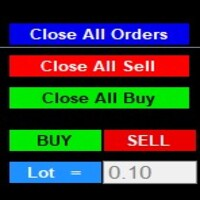
After purchase : - Please contact me at telegram https://t.me/SmartForex777 This Smart Dashboard Penal Very Easy , Fast And Accurate to Enter And Exit Trade Manually... Unique features Close All Orders... Close All Sell... Close All Buy... Buy / Sell... Lot Size Change Option... Works on any account type and broker... Works with all times frames and currency...
FREE
Le MetaTrader Market offre un lieu pratique et sécurisé pour acheter des applications pour la plateforme MetaTrader. Téléchargez des versions démo gratuites de Expert Advisors et des indicateurs directement depuis votre terminal pour les tester dans le testeur de stratégie.
Testez les applications dans différents modes pour surveiller les performances et effectuez un paiement pour le produit que vous souhaitez en utilisant le système de paiement MQL5.community.

Vous manquez des opportunités de trading :
- Applications de trading gratuites
- Plus de 8 000 signaux à copier
- Actualités économiques pour explorer les marchés financiers
Inscription
Se connecter
Vous acceptez la politique du site Web et les conditions d'utilisation
Si vous n'avez pas de compte, veuillez vous inscrire