Microflow Engine
- Yardımcı programlar
- Sürüm: 3.5
- Etkinleştirmeler: 20

MicroFlow Engine v3.0 — 1 Minute Quantitative Gold (XAUUSD) Scalping & Execution Terminal
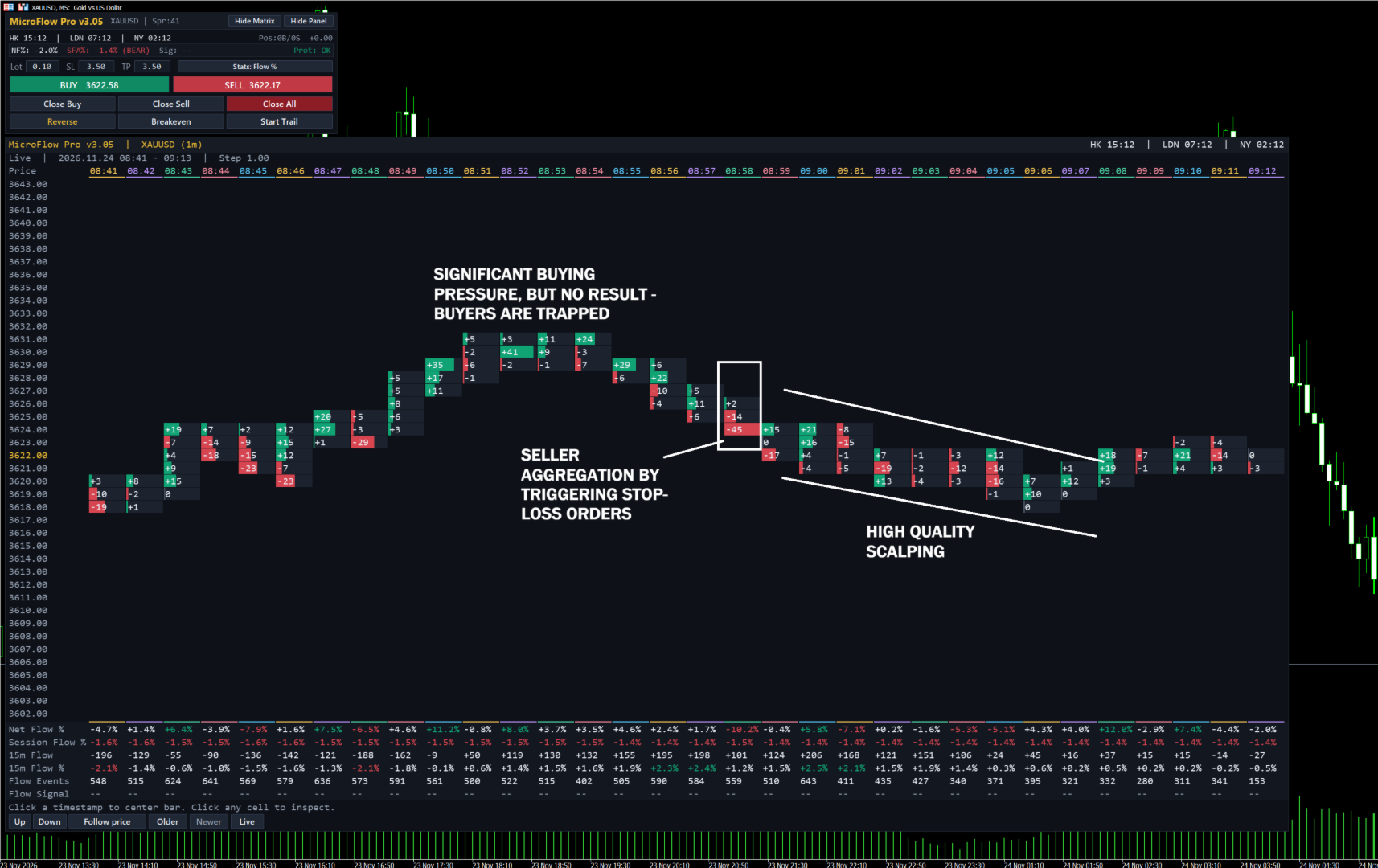
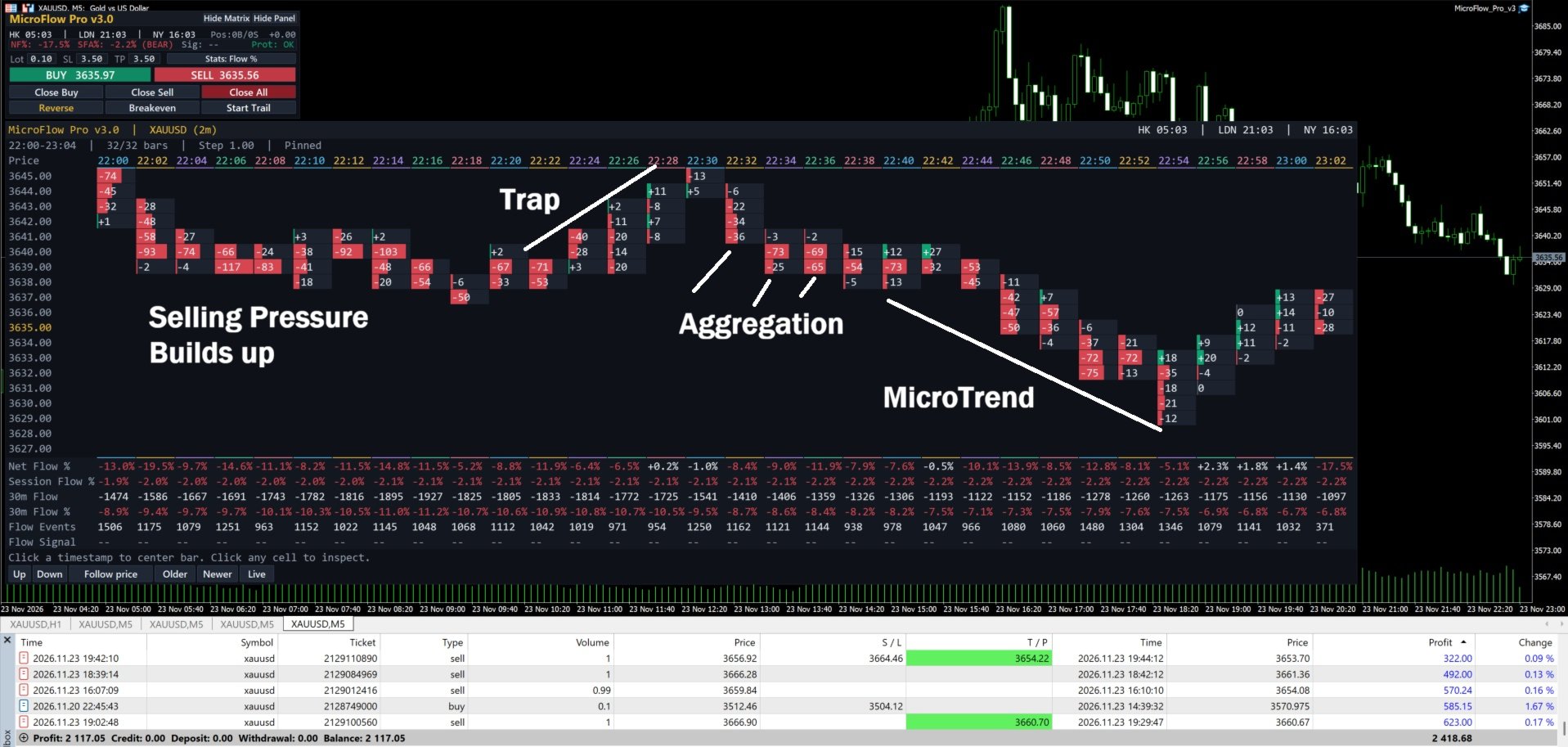
MicroFlow Pro v3.0 is a precision 1m–15m microstructure analysis and execution terminal engineered specifically for short-term Gold (XAUUSD) scalping. Powered by a custom-built quantitative flow engine, it maps real-time buy-side and sell-side aggregation directly onto an interactive price-level matrix. By quantifying short-term Net Flow, Flow Momentum, and Session Flow Accumulation, MicroFlow Pro enables discretionary traders to identify the dominant counterparty in real time and execute high-confidence entries and exits without leaving the chart.
Unlike black-box automated bots that fail under varying broker spreads and execution conditions, MicroFlow Pro is built as a high-speed discretionary execution workspace—combining institutional-style flow visualization, closed-bar signal alerts, one-click trade management, and automated daily drawdown protection in a single MetaTrader 5 terminal.
Check for : How to Make High Precision 1 Minute Scaping with Microflow Engine?
Trader Prerequisites (Read Before Use)
MicroFlow Pro v3.0 is a specialized quantitative trading tool designed for active intraday traders and scalpers. It is not a "set-and-forget" automated profit generator.
- Required Knowledge: Users should have a working understanding of market microstructure concepts—including absorption, aggregation, exhaustion, session bias, and counterparty dominance.
- Recommended Onboarding: If you are new to microstructure-based scalping, do not deploy MicroFlow Pro on a live account immediately. Spend time observing how Net Flow % and Session Flow Accumulation (SFA) behave around key intraday highs, lows, and session opens on a demo environment first.
- User Manual: MicroFlow Engine Pro Gold — User Manual & Dashboard Reference
Core Architecture & Features
1. MicroFlow Matrix & Composite Profile
- Dual Visualization Modes: Switch seamlessly between Flow Matrix (time-interval columns displaying price-level flow) and Composite Profile (aggregated flow across the active window).
- Interactive Inspection: Click any cell to inspect exact Buy-Side Flow, Sell-Side Flow, and Net Flow values, or click any column timestamp to center the matrix on that bar.
- Multi-Page Aligned Statistics: Toggle between three live statistical views beneath the matrix—Bar Metrics (Bar Time, Net Flow, Flow Momentum, Buy-Side Flow, Sell-Side Flow, Session Flow), Flow % Metrics (Net Flow %, Session Flow %, Rolling Flow, Rolling Flow %, Flow Events, Flow Signal), and Price Structure (OHLC and Prior Range Extremes).
- Clean Workspace: Automatically hides the default MT5 background grid on load and renders in a high-contrast Obsidian, Emerald, and Crimson theme.
2. Quantitative Flow Signal Engine
- Normalized & Adaptive Filtering: Evaluates closed-bar Net Flow % against Session Flow Accumulation (SFA %) alignment, optional Bar Structure filters, Flow Momentum acceleration, and Prior Range Sweep confirmation.
- Session-Aware Logic: Restricts signal generation to user-defined active trading windows with configurable daily Session Flow reset times.
- Non-Intrusive Alerts: Prints live BUY / SELL signal badges on the Trade Panel and Matrix, with optional chart arrows and popup alerts on bar close.
3. Integrated One-Click Execution Terminal
- Live Market Context: Displays real-time Hong Kong (HK), London (LDN), and New York (NY) session clocks, active spread, managed position count, and floating P&L.
- Instant Order Controls: Editable on-chart Lot Size, Stop Loss, and Take Profit fields supporting either Symbol Price Distance (e.g., $3.50 on Gold) or Broker Points.
- Full Position Management: Dedicated one-click buttons for BUY, SELL, Close Buy, Close Sell, Close All, Reverse, Breakeven (with configurable profit-lock offset), and Start/Stop Trailing Stop.
4. Automated Account Protection & Prop-Firm Guardrails
- Triple-Layer Daily Limits: Enforces Max Daily Loss (Account Currency), Max Daily Loss (% of Day-Start Balance), and Max Intraday Drawdown (% from Peak Equity).
- Configurable Scope: Monitor and protect either the Current Symbol Only or the Entire Account.
- Hard Lock & Auto-Close: Automatically closes open positions upon limit breach (optional) and locks execution buttons until the next configured daily reset time, persisting state across terminal restarts.
Technical Specifications
| Specification | Details |
|---|---|
| Platform | MetaTrader 5 (MT5) — Expert Advisor |
| Primary Instrument | Gold ( XAUUSD ) — compatible with other symbols via configurable price-row width |
| Column Timeframes | Configurable from 1 to 15 minutes per flow column (up to 96 retained intervals) |
| History Depth | Fast session-sync loading ( 1 to 15 days configurable) |
| Price Row Granularity | Configurable by symbol price width (default 1.00 ) or broker points override |
| Distance Units (SL/TP/BE/Trail) | Selectable: Symbol Price Distance or Broker Points |
| Trailing Stop Engine | Configurable activation profit, trailing distance, and minimum step size |
| Account Protection | Daily Loss ($), Daily Loss (%), Intraday Peak-Equity Drawdown (%), Auto-Close & Execution Lock |
| UI & Ergonomics | Collapsible Trade Panel & Matrix, cell scaling ( 100%–250% ), navigation controls (Up, Down, Follow, Older, Newer, Live) |
| Strategy Tester Support | Full Visual Mode compatibility with configurable UTC server offset for session clocks |
Core Metrics Glossary
- Net Flow (NF): The estimated net of buy-side versus sell-side activity within a price bar, expressed in flow units; positive values indicate estimated buy-side dominance.
- Net Flow % (NF%): Net Flow expressed as a percentage of total sampled flow events in the bar, allowing comparison across bars of different activity levels.
- Session Flow Accumulation (SFA): The running sum of Net Flow from the configured session reset time, measuring which side has dominated the session overall.
- Flow Momentum (FM): The change in Net Flow between consecutive bars, used to detect acceleration or exhaustion of directional pressure.
- Rolling Flow: Cumulative Net Flow and Net Flow % calculated over a configurable lookback window (default: 15 bars).
- Flow Event: A single market data update contributing to the flow estimate.