RBR Tick Import

A custom symbol built from imported ticks is only as good as its clock. MetaTrader 5 does not convert the time zone when ticks are imported, and the time offset and daylight saving rule of a downloaded file usually have to be set by hand. RBR Tick Import finds them itself: week by week it matches the hourly price changes of your file to the H1 candles of the chart symbol. Then it cleans the data, writes the ticks into a custom symbol and saves a report. It never sends orders.

What it does

  • Reads tick files you downloaded yourself (CSV or TXT, UTF-8 or UTF-16) from Common\Files\RBR_IMPORT. A file mask joins several files, for example monthly ones, into one stream.
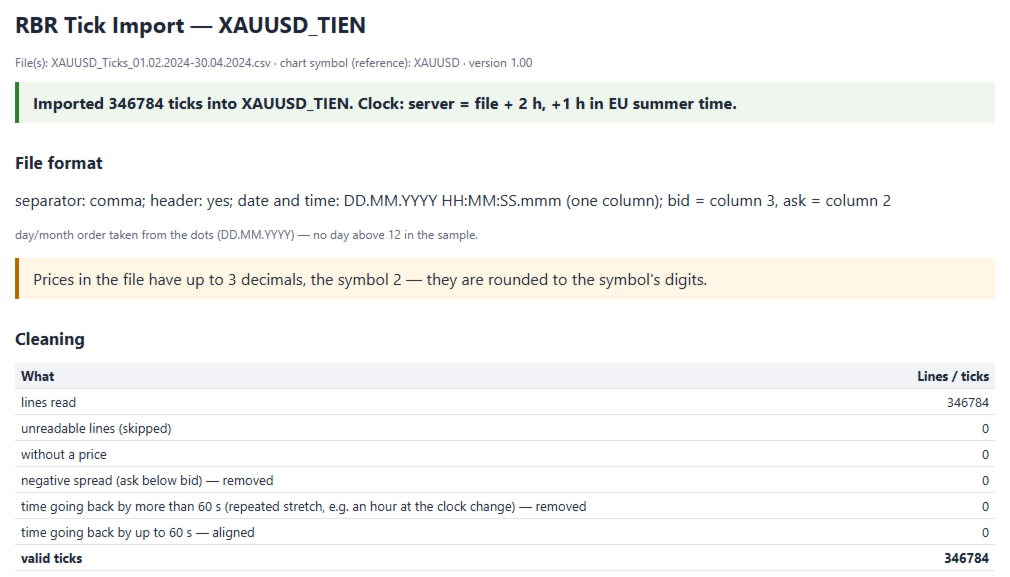
  • Recognises the format from the first lines: separator (tab, semicolon, | or comma), header, date and time in one or two columns (YYYYMMDD HHMMSSmmm, YYYY.MM.DD HH:MM:SS.mmm, DD.MM.YYYY, MM/DD/YYYY, Unix time in ms or s). Bid and ask are taken from the header names or from which price is higher, so the order ask, bid also works. Empty price fields of a MetaTrader export are filled with the last price. If the day/month order cannot be told from the file, it stops and asks for the "Date order" input instead of guessing.
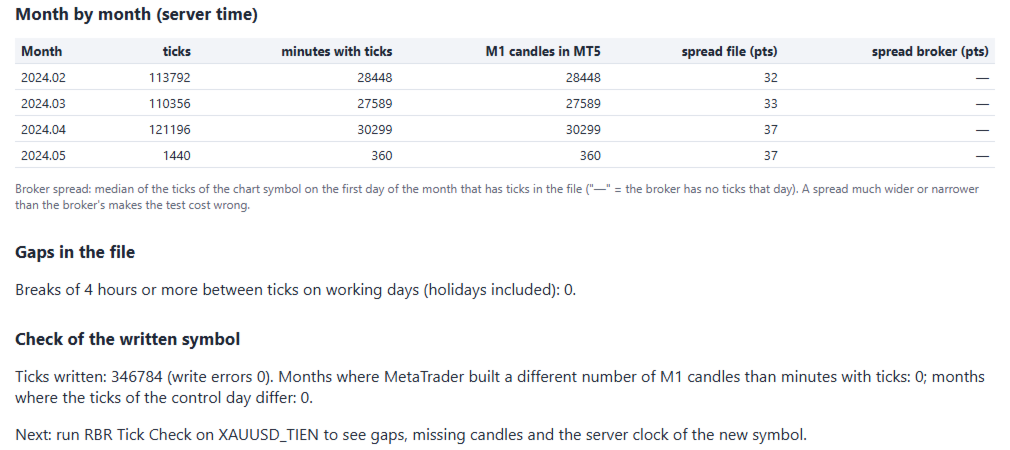
  • Cleans the data: time going back by more than 60 s is a repeated stretch (for example an hour repeated at a clock change) and is removed; going back by up to 60 s is aligned. Ticks with ask below bid are removed; unreadable lines are skipped and shown with examples in the report.
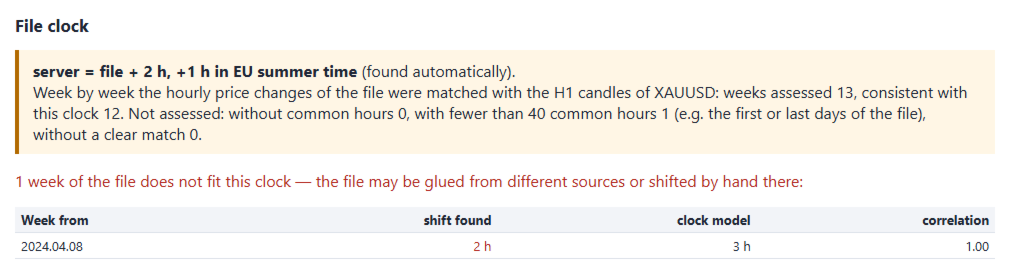
  • Matches the file clock automatically: server = file + B h, + a h in US summer time, + b h in EU summer time (a and b are -1, 0 or +1). For each week the shift comes from the correlation of hourly price changes with the chart's H1 candles - changes, not price levels, so it also works when the source quotes a slightly different price than your broker. The model that fits the most weeks wins; weeks that do not fit are listed (a file glued from different sources or shifted by hand shows up there). A manual clock is available too.
  • Creates a custom symbol with properties copied from the chart symbol and writes the ticks in server time. MetaTrader builds the M1 candles from the same ticks, so candles and ticks agree.
  • Saves an HTML and a text report: format, cleaning, clock with the weeks that do not fit, month by month (ticks, minutes with ticks, M1 candles, spread of the file next to the broker's spread from ticks), gaps of 4 hours or more on working days and a check of the written symbol. "Check only" does the same without creating a symbol.

How to use it

  1. Copy your tick file(s) to Common\Files\RBR_IMPORT (File > Open Data Folder, one level up, then Common\Files).
  2. Attach RBR Tick Import to a chart of the same instrument at your broker (any timeframe). Its H1 candles are the reference for the clock.
  3. Set the file mask and the name of the new symbol (empty = chart symbol + _IMP), or turn on "Check only" to check the file first.
  4. Progress is shown in the corner of the chart. At the end the result appears on the chart and the report is saved in Common\Files\RBR_IMPORT.

Inputs: File(s) (mask), New custom symbol, Check only, Replace an existing custom symbol, File clock (automatic or manual), Manual clock: hours, US summer, EU summer (-1, 0, +1), Date order (auto, DD/MM, MM/DD), Report language (auto, English, Polish, German).

Notes

  • The automatic clock needs H1 candles of the chart symbol in the period of the file, and the file must be the same instrument. Otherwise set the clock manually.
  • If the common period covers only one season, or has no weeks between the US and the EU clock change, the report says that the daylight saving rule cannot be determined instead of guessing.
  • M1 candles are checked only within the terminal's "Max bars in chart" limit; the Strategy Tester uses the full history.
  • Candle files (open, high, low, close) are refused: it needs ticks with bid and ask.
  • It does not download data - you bring your own file, and it must be in Common\Files\RBR_IMPORT (MetaTrader programs can read files only from the terminal's own data folders).
  • To see gaps, missing candles and the clock of the new symbol afterwards, run RBR Tick Check on it.
  • It works on a chart. In the Strategy Tester it only prints a message.
  • No DLL, no internet connection, no trading functions.
Önerilen ürünler
See how your account is really doing at a glance, right on the chart. The dashboard reads your account and trade history and never opens, modifies or closes a trade. How it works Every second the dashboard reads balance, equity, margin and open positions. Closed results come from the deal history: for each closing deal the profit, swap, commission and fee are added together. From these deals it calculates closed profit for today, this week and this month, plus statistics for the period you choos
FREE
This indicator will mirror the assets in use in another metatrader, being able to choose the timeframe and a template. This is the Metatrader 5 Client, it needs the Metatrader 4 or 5 Server versions: Metatrader 4 Mirror Chart Server:   https://www.mql5.com/en/market/product/88644 Metatrader 5 Mirror Chart Server: https://www.mql5.com/en/market/product/88652 Details of how it works in the video.
FREE
A deterministic Renko engine for MetaTrader 5. It builds a real, custom Renko symbol from broker M1 tick/candle history using a fixed brick size (in pips) — so the chart plays out identically whether it's running on your VPS or your local PC, restart after restart. No ATR-based sizing, no drift between terminals. Key features Fixed brick size in pips — no ATR drift, same lattice every time Creates its own custom Renko symbol in Market Watch — works on any broker or symbol Optional wicks — toggle
FREE
Core Purpose ​ A permanent crosshair indicator designed exclusively for MetaTrader 5 (MT5). It addresses key limitations of MT5's default crosshair, including the need for manual activation, automatic disappearance on click, and solid lines obscuring price bars. This indicator optimizes chart analysis by delivering a smooth, professional-grade crosshair experience on MT5. ​ Key Features ​ Automatic activation: Enabled immediately after loading, replacing the default Ctrl+F function. The crossha
FREE
Donchian Breakout And Rsi
Mattia Impicciatore
4.33 (3)
Genel Açıklama Bu gösterge, klasik Donchian Kanalı ’nın geliştirilmiş bir versiyonudur ve gerçek işlem için pratik işlevlerle zenginleştirilmiştir. Standart üç çizgiye (üst, alt ve orta çizgi) ek olarak sistem breakout (fiyat kırılımı) noktalarını tespit eder ve bunları grafikte oklarla görsel olarak gösterir. Ayrıca grafiği sadeleştirmek için mevcut trend yönünün tersindeki çizgi yalnızca görüntülenir. Gösterge şunları içerir: Görsel sinyaller : Kırılım sırasında renkli oklar Otomatik bildiriml
FREE
Order Book, known also as Market Book, market depth, Level 2, - is a dynamically updated table with current volumes of orders to buy and to sell specific financial instument at price levels near Bid and Ask. MetaTrader 5 provides the means for receiving market book from your broker, but in real time only, without access to its history. This expert adviser OrderBook History Playback allows you to playback the market book events on the history using files, created by OrderBook Recorder . The exper
FREE
BBMA with EMA50
Teeraporn Satitman
This indicator consist of Standard BBMA Standard signal Sign on chart added EMA50 Behavior Tracking: The chart background changes color based on the EMA50 (default is black) and shifts to white when a breakout of the Bollinger Bands occurs. Three Engulfing Color Change: Automatically adjusts colors to help you easily determine market zones. default yellow/white High-Low Line Sign: Highlights the potential trading range and key price levels for better visual  MHV
FREE
Signalator Lot Size Evaluator MT5 , manuel işlem yapan traderların bir işlem açmadan önce tahmini pozisyon büyüklüğünü hesaplamaları için geliştirilmiş ücretsiz ve yerel bir MetaTrader 5 aracıdır. Seçilen sembol, BUY veya SELL yönü, planlanan giriş fiyatı, Stop Loss, isteğe bağlı Take Profit ve risk yüzdesini kullanarak işleminizi planlamanıza yardımcı olur. Hesaplayıcı, önerilen lot büyüklüğünü ve temel risk değerlerini tahmin etmek için mevcut hesap bilgilerini broker tarafından sağlanan sembo
FREE
TrendVision AI
Murtadha Majid Jeyad Al-Khuzaie
TrendVision AI – Smart Trend Channels & Price Forecasting for MetaTrader 5 Discover market structure and explore potential future price direction with TrendVision AI, an advanced technical indicator for MetaTrader 5 that combines automatic trendline analysis with a machine-learning-based price forecasting model. How Does TrendVision AI Work? TrendVision AI analyzes historical candlestick data within a configurable lookback window. It automatically draws two trendlines directly on the chart:
FREE
The Rayol Code Hour Interval Lines indicator was  designed to assist your trading experience.  It  draws the range of hours chosen by the user directly on the chart, so that it enables traders to visualize price movements during their preferred trading hours, providing  traders a more comprehensive view of price movements and market dynamics. This indicator allows the user to choose not only the Broker's time, but also the Local time. This way, the user no longer needs to calculate local time in
FREE
JT360 DNA Mini PnL Pointer V1.04 Public Kompakt. Net. Her zaman göz önünde. JT360 DNA Mini PnL Pointer, MetaTrader 5 için geliştirilmiş hafif bir göstergedir. Mevcut grafik sembolündeki tüm açık pozisyonların toplam anlık kâr ve zararını (PnL) görüntüler. Grafik üzerinde az yer kaplayan tasarımı; R cinsinden riske dayalı PnL gösterimini, ince bir mini çubuğu ve özelleştirilebilir renk matrisini bir araya getirir. JT360’ın karakteristik turkuaz ve macenta renkleri, kâr ve zarar seviyelerinin tek
FREE
Session Profiles
Basharat Umar Khan
5 (1)
Short Description Draws rolling Time-Price-Opportunity (TPO) and footprint volume profiles for the Asia, London, and New York sessions with POC/VAH/VAL levels, delta volume bias, order flow overlays, liquidity heatmaps, developing rolling lines, Naked POC (NPOC) tracking, Initial Balance breakouts, multi-session confluence zones, and automatic broker GMT-offset detection. Full Description Plots separate market-profile and volume-profile style histograms for the three major trading sessions (Asi
FREE
Expansoes M
Marcus Vinicius Da Silva Miranda
The M Extensions are variations of the Golden Ratio (Fibonacci Sequence). It is the World's first technique developed for Candle Projections. Advantages: Easy to plot. Candle anchoring; High and accurate precision as support and resistance; Excellent Risk x Return ratio; Works in any timeframe; Works in any asset / market.   The M Extensions are classified into: M0: Zero point (starting candle) RC: Initial candle control region M1: Extension region 1 M2: Extension region 2 M3: Extension regi
FREE
Manuel pozisyon yönetimi genellikle geciken çıkışlara, duygusal kararsızlıklara ve korumasız açık pozisyonların getirdiği risklere yol açar. Trade Manager Lite , MetaTrader 5 üzerinde açık bulunan tüm işlemleriniz için Zarar Durdur (Stop Loss), Kâr Al (Take Profit), Başa Baş Noktası (Break-Even), İz Süren Stop (Trailing Stop) ve Kısmi Kapanış (Partial Close) fonksiyonlarını otomatik olarak yöneten yüksek performanslı bir ticaret aracıdır. İşlemleri ister masaüstünden manuel olarak açın, ister MT
FREE
Meridia Sessions
Marco Lorenzo Gerbino
Meridia Sessions, Meridia Session Suite'in temel sürümüdür. H1 mumlarını her alt zaman diliminde, güncel H1 mumunun kapanışına kadar geri sayımla çizer; Asya, Londra ve New York seanslarını en yüksek ve en düşük seviyeleriyle kutular olarak gösterir. Her saat değişikliğini izleyen seanslar Her seansın kendi saat dilimi vardır (Orta Avrupa, Londra, New York, Tokyo, Sidney, UTC veya sunucu saati) ve yaz saati her yıl otomatik uygulanır, böylece kutular her saat değişikliğinde doğru yerde kalır. Ar
FREE
Important Lines
Terence Gronowski
4.88 (24)
This indicator displays Pivot-Lines, preday high and low, preday close and the minimum and maximum of the previous hour. You just have to put this single indicator to the chart to have all these important lines, no need to setup many single indicators. Why certain lines are important Preday high and low : These are watched by traders who trade in a daily chart. Very often, if price climbs over or falls under a preday low/high there is an acceleration in buying/selling. It is a breakout out of a
FREE
GRInvest Breakeven Manager is an MT5 trade-management Expert Advisor designed to manage existing open positions after entry. Its purpose is to automate breakeven protection, staged partial closes, trailing stops and position management while still giving the trader full manual control over individual trades. The EA does not need to open trades itself . It can manage manual trades and trades opened by other Expert Advisors according to the selected symbol, direction and magic-number filters. The
FREE
Hourly xx:00 Candle Direction Signal for MT5 Know the direction of every hourly opening candle. The Hourly xx:00 Candle Direction Signal automatically analyzes the candle that starts exactly at xx:00 on your selected timeframe (M1–H1) and instantly tells you whether it closed LONG , SHORT , or DOJI . Designed for traders who want a simple and reliable hourly bias, the indicator displays clear chart signals and can send real-time notifications to your desktop or mobile device. Features Detects
FREE
Renko subwindow
Alexandre Vincent Traber
Overview Renko SubWindow, ana grafiği etkilemeden ayrı bir gösterge penceresinde renkli mumlarla bir Renko grafiği çizer. Tuğla boyutu puan olarak sabit ayarlanabilir veya volatiliteye dayalı uyarlanabilir tuğlalar için ATR ile dinamik olarak hesaplanabilir. How it works Mevcut sembol/zaman diliminin kapanış fiyatlarından Renko tuğlalarını yeniden oluşturur. Fiyat, önceki tuğlanın kapanışından tanımlanan tuğla boyutunu aştığında yeni bir tuğla oluşur. Tuğlalar renkli mumlar olarak gösterilir: yü
FREE
RiskCompass Panel MT5 1. The Problem and the Approach You have a position idea, and the first real question is always the same: how much of this account am I about to put at risk, and can the account carry it. The information that answers that question is scattered across half a dozen windows. Balance is on one tab. Margin level is somewhere else. The spread you just paid is visible only if you look at the instrument row. The server day, which decides whether your daily loss limit has already be
FREE
Order Book, known also as Market Book, market depth, Level 2, - is a dynamically updated table with current volumes of orders to buy and to sell specific financial instument at price levels near Bid and Ask. MetaTrader 5 provides the means for receiving market book from your broker in real time. The expert OrderBook Recorder records market book changes and stores them in local files for further usage in indicators and expert adviser, including testing in the tester. The expert stores market book
FREE
Cumulative Delta MT5
Evgeny Shevtsov
4.49 (63)
The indicator analyzes the volume scale and splits it into two components - seller volumes and buyer volumes, and also calculates the delta and cumulative delta. The indicator does not flicker or redraw, its calculation and plotting are performed fairly quickly, while using the data from the smaller (relative to the current) periods. The indicator operation modes can be switched using the Mode input variable: Buy - display only the buyer volumes. Sell - display only the seller volumes. BuySell -
FREE
Ürün Özeti Bu araç, grafikteki tüm pozisyonlar için Kar Al (TP) ve Zarar Durdur (SL) seviyelerini toplu olarak ayarlamanızı sağlar. Her bir pozisyonu manuel olarak ayarlama zahmetini ortadan kaldırarak hızlı risk yönetimini destekler. Daha pratik bir toplu yönetim ve otomatik kapanış için "One Click Pro SL TP Batch Auto Close"yu deneyin. https://www.mql5.com/tr/market/product/186278 İşlem Adımları 1. Değer Girişi: "ALL POSITIONS TP/SL" alanı içindeki her bir düzenleme kutusuna istediğiniz
FREE
Position Selective Close MT5
Francisco Manuel Vicente Berardo
The Position Selective Close is a multi-symbol multi-timeframe script used to close simultaneously various positions.  General Description   The Position Selective Close   possesses   three operation modes (Intersection,   Union   and All) that control the way   as   four position features (symbol, magic number,   type   and profit) are used. The modes, available through the Selection Mode input parameter, relate to the features, available through the “Select by Feature” and “Feature” input pa
FREE
Know the Candle Close Time
Benbyaanda Silvere Henri Sedric Kabore
This indicator allows to know the remaining time before the closing of the candle. It works on every timeframe. It is very usefull when your trading strategy depend of the close or the open of a specific candle. So use it like you want. Don't forget to leave a comment or a request for a EA or an indicator. Also spread it to your friends and don't hesitate to visit my profile to see others tools.
FREE
New update 11/11/2026 DEAR USERS?! PLEASE GIVE THIS ITEM YOUR FAIR AND HONEST REVIEW?! Thank you! ️ THE ALPHAQUANT ADVANTAGE: BUILT FOR PROP FIRMS and LIVE ACCOUNTS Most standard dashboards only show you the profit and loss of individual EAs. AlphaQuant goes further to protect your funded accounts: True Account-Level Drawdown Tracking: Prop firms do not care about an individual EA's drawdown; they care about your total account drawdown. AlphaQuant tracks your account's highest equity peak an
FREE
Risk Calculator EA – Utility for Precise Trade Sizing If you find this tool useful consider to  Buy me a coffee!   The Ultimate Risk Calculator is a lightweight in-chart Expert Advisor (EA) designed to help you easily and quickly calculate position size and set stop-loss / take-profit levels with full control over risk management directly on the chart. What it does? It turns manual risk decisions into fast, visual, and accurate calculations. You draw or adjust the Entry, Stop-Loss and Take-P
FREE
The utility draws pivot levels based on a selection from day week month The previous candlestick of the selected timeframe is taken and the values for the levels are calculated using the following formulas: Pivot = (high + close + low) / 3 R1 = ( 2 * Pivot) - low S1 = ( 2 * Pivot) - high R2 = Pivot + (R1 -S1) R3 = high + ( 2 * (Pivot - low)) S2 = Pivot - (R1 - S1) S3 = low - ( 2 * (high - Pivot)); The style and thickness for all lines are adjusted. The colors for the R, Pivot and S lines ar
FREE
Rainbow MT5
Jamal El Alama
4 (1)
Description : Rainbow MT5 is a technical indicator based on Moving Average with period 34 and very easy to use. When price crosses above MA and MA changes color to green, then this is a signal to buy. When price crosses below MA and MA changes color to red, then this is a signal to sell. The Expert advisor ( Rainbow EA MT5 ) based on Rainbow MT5 indicator is now available here . MT4 version is available here .
FREE
Trade key pro
Lawrence Chiiambb Mkandawi
TradeKeys Pro – Keyboard Trading Assistant for MetaTrader 5 TradeKeys Pro is a lightweight, keyboard‑driven trading assistant for MetaTrader 5 that combines the speed of shortcut keys with a clean configuration panel. It is designed for traders who prefer to keep their chart uncluttered and execute trades with a single keystroke, while still having full control over risk parameters and position management. Core Concept The expert advisor places a compact graphical user interface (GUI) on the c
FREE
Bu ürünün alıcıları ayrıca şunları da satın alıyor
Trade Assistant MT5
Evgeniy Kravchenko
4.43 (216)
It helps to calculate the risk per trade, the easy installation of a new order, order management with partial closing functions, trailing stop of 7 types and other useful functions. Additional materials and instructions Installation instructions - Application instructions Line function -   shows on the chart the Opening line, Stop Loss, Take Profit. With this function it is easy to set a new order and see its additional characteristics before opening.   Risk management  - The risk calculation
Trade Manager EA’ye hoş geldiniz! Ticaretin daha sezgisel, hassas ve verimli hale gelmesi için tasarlanmış nihai risk yönetim aracı ile tanışın. Bu sadece bir emir verme aracı değil; ticaret planlaması, pozisyon yönetimi ve risk kontrolü için kapsamlı bir çözüm. İster yeni başlayan bir yatırımcı olun, ister deneyimli bir trader ya da hızlı emir gerektiren bir scalper, Trade Manager EA ihtiyaçlarınıza uyum sağlar ve forex, endeksler, emtialar ve kripto paralar dahil tüm piyasalarda esneklik sunar
Farmed Hedge Yield Farming | All Markets (Manual - Hybrid - Semi/Automated EA) VERIFIED TRADING RESULTS - Farmed Hedge Yield Axi Copy:  https://www.mql5.com/en/signals/2356376 - Farmed Hedge Yield Exn Copy:   https://www.mql5.com/en/signals/2356404 - Farmed Hedge Yield V Copy:  https://www.mql5.com/en/signals/2357156 IMPORTANT NOTICE: FarmedHedge is a MANUAL-FOCUSED TRADING UTILITY ,not a fully automated EA. Results shown on this Signal include manual trades and overall strategic management.
Local Trade Copier EA MT5
Juvenille Emperor Limited
4.94 (150)
Local Trade Copier EA MT5, aynı Windows bilgisayarı veya Windows VPS üzerinde çalışan birden fazla MetaTrader 5 hesabı arasında işlemleri kopyalamak ve yönetmek için hızlı ve esnek bir işlem kopyalayıcıdır. Yerel işlem senkronizasyonunu, Receiver tarafında lot büyüklüğü, risk yönetimi, işlem filtreleme, sembol eşleştirme, işlem yönetimi ve hesap koruması kontrolleriyle birleştirir. Transmitter ve Receiver terminallerinizi yaklaşık 1 dakika içinde ayarlayın ve aynı veya farklı brokerlardaki hesa
Telegram to MT5 Multi-Channel Copier   , Telegram ve Discord kanallarınızdaki alım-satım sinyallerini doğrudan MetaTrader 5'e otomatik kopyalar. Bot yok, tarayıcı uzantısı yok, elle kopyalama yok. Sinyal Telegram'a veya Discord'a düşer ve EA birkaç saniye içinde terminalinizde işlemi açar. Ve bir kanalı kopyalamadan önce, yerleşik backtester o kanalın hesabınızda ne yapmış olacağını gösterir. Ürün iki bileşenden oluşur: Telegram kanallarınızı dinleyen bir Windows uygulaması ve sinyalleri MT5 ter
EA Overfitter
Stephen J Martret
5 (4)
That backtest looks great. But will it still be making money tomorrow, next week, next month? EA Overfitter re-runs your EA on 100 price histories it has never seen. One score tells you if the edge is real. A backtest tells you what an EA did on one price history — the one that happened to occur. What you cannot tell from it is how much of that result was the strategy and how much was the particular path. EA Overfitter answers that. It builds up to 100 synthetic price histories your EA has n
TradePanel MT5
Alfiya Fazylova
4.89 (174)
Trade Panel, çok işlevli bir ticaret asistanıdır. Uygulama, manuel ticaret için 50'den fazla ticaret fonksiyonu içerir ve çoğu ticaret görevini otomatikleştirmeyi mümkün kılar. Uygulama talimatları: https://www.mql5.com/en/blogs/post/756482 Demo hesabı için uygulamanın deneme sürümü: https://www.mql5.com/en/blogs/post/750865 Uygulamayı nasıl kurulur: https://www.mql5.com/en/blogs/post/756239 Uygulamayı görsel modda nasıl test edilir: https://www.mql5.com/en/blogs/post/770277 Uygulamayı VPS MetaT
News Trade EA MT5
Konstantin Kulikov
4.55 (11)
Birkaç yıldır kullandığım çok yararlı bir robotu tanıtıyorum. Hem yarı otomatik hem de tam otomatik modlarda kullanılabilir. >>> Chat <<< Program, ekonomik takvim haberlerinde esnek ticaret ayarlarını içeriyor. Stratejiler test cihazında kontrol edilemez. Sadece gerçek bir iş. Ayarların en son arşivini indirin: https://www.mql5.com/en/blogs/post/747929 Sinyal izleme: https://www.mql5.com/en/signals/author/test-standart Bu bilirkişi için kendi ayarlar setinizi oluştururken, blogdaki tüm paramet
Exp COPYLOT CLIENT for MT5
Vladislav Andruschenko
3.97 (35)
MetaTrader 5 için profesyonel işlem kopyalayıcı MetaTrader için hızlı, profesyonel ve güvenilir bir işlem kopyalayıcı . COPYLOT , MT4 ve MT5 terminalleri arasında Forex işlemlerini kopyalamanıza olanak tanır ve Hedge ile Netting hesaplarını destekler. COPYLOT MT5 sürümü şunları destekler: - MT5 Hedge → MT5 Hedge - MT5 Hedge → MT5 Netting - MT5 Netting → MT5 Hedge - MT5 Netting → MT5 Netting - MT4 → MT5 Hedge - MT4 → MT5 Netting MT4 sürümü Tam açıklama + DEMO + PDF Nasıl satın alınır Nasıl kurul
Strategy Ledger Pro
Abdullah Uygar Tuna
5 (17)
Şimdi Türkçe dil desteği ile. Strategy Ledger Pro , MetaTrader 5 için salt okunur bir hesap analiz panelidir. Hesap sonuçlarını Uzman Danışman (EA), strateji, sembol ve magic numaraya göre ayırır; böylece her birinin gerçekte ne kattığını görürsünüz. Panel 11 dilde kullanılabilir: English, Français, Deutsch, Español, Italiano, Português, Русский, Türkçe, 中文, 日本語 ve 한국어. Demoyu indirmeden önce. Market, her ücretli ürünün demosunu yalnızca Strateji Test Cihazında çalıştırır. Bu panel kendi hesabı
Power Candles Strategy Scanner: Kendini Optimize Eden Çoklu Sembol Kurulum Bulucu Her kıpırtıda öten bir tarayıcı, size onu görmezden gelmeyi öğretir. Hareketli tek bir mum kapanışı, peş peşe uyarılar ve gerçekten işlem yaptığınız o tek kurulum gürültünün içinde kaybolur. Power Candles Strategy Scanner , kendini optimize eden Power Candles motorunu Market Watch'unuzdaki her sembolde çalıştırır ve yalnızca kendi filtrelerinizden geçen durumlar için uyarır: son kapanan mumun gücü, kurulumun ödül/r
Telegram sinyallerini kendi işlem kurallarınızla kopyalayın Telegram to MT5 Signal Trader , herkese açık ve özel Telegram kanallarındaki ve gruplarındaki metin tabanlı işlem sinyallerini otomatik olarak MetaTrader 5'e kopyalar. Tek bir masaüstü uygulamasından birden fazla sinyal sağlayıcısını ve MT5 hesabını yönetin; her sağlayıcı için ayrı risk ve işlem ayarları belirleyin. Sinyal kopyalamak için Telegram botu veya API kurulumu gerekmez. Kendi Telegram hesabınızla telefon numarası veya QR kod k
================================================================================ POC BREAKOUT - V20.72. Full Professional Grade Toolkit ================================================================================ POC Breakout is a full MetaTrader 5 trading dashboard for discretionary traders who want breakout signals, Point of Control (POC) context, volume profiles, order flow, market structure, news, alerts, and advanced trade planning in one professional workspace. Attached directly to you
Telegram To MT5 — Sinyal Kopyalayıcı Telegram kanallarınızdaki işlem çağrılarını gerçek MT5 emirlerine dönüştürün — otomatik olarak, istediğiniz kadar hesapta ve risk ile kurallar tamamen sizin kontrolünüzde. Telegram To MT5, Telegram'da zaten takip ettiğiniz VIP / sinyal kanallarını MetaTrader 5 terminalinize bağlar. Ücretsiz bir eşlik eden masaüstü uygulaması mesajları okur (botlara izin vermeyen kanallardan bile), ve bu Expert Advisor bunları hesabınızda yürütür — kendi risk ayarlarınızı, sem
HINN MAGIC ENTRY – the ultimate tool for entry and position management! SIMPLE. FASTEST. INTUITIVE. MAX AUTOMATED. Place orders by selecting a level directly on the chart! full description   ::  demo-version  :: 60-sec-video-description Key features: - Market, limit, and pending orders - Automatic lot size calculation - Automatic spread and commission accounting - Unlimited partitial take-profits  - Breakeven and trailing stop-loss and take-profit  functions - Invalidation leves - Intuitive, a
Timeless Charts
Samuel Manoel De Souza
5 (9)
Timeless Charts, profesyonel yatırımcılar için hepsi bir arada bir trading aracıdır. Saniye Grafikleri ve Renko gibi özel grafik türlerini, Footprints , Clusters , Hacim Profilleri , VWAP çalışmaları ve gelişmiş piyasa analizi sağlayan sabitlenmiş analiz araçlarıyla gelişmiş emir akışı analiziyle birleştirir. İşlem ve pozisyon yönetimi, entegre işlem yönetim paneli aracılığıyla doğrudan grafik üzerinden gerçekleştirilirken, Market Replay ve Sanal Hesaplar trading becerileri ve stratejileri üzeri
Sonraki Güncelleme — Sürüm 2.52 Çok Yakında! [YENİ] Piyasa Analizinizi ve İşlem Sürecinizi Geliştirmek İçin Tasarlanmış 4 Büyük Yeni Özelliğe Hazır Olun İşlem ihtiyaçlarınızı karşılamak üzere tasarlanmış 4 yeni özellikle piyasa analizini bir üst seviyeye taşıyoruz. İşte yeni özellikler: TRADE OVERVIEW DASHBOARD CONFLUENCE AT ZONE STRONG & WEAK HIGH/LOW OTE 1. TRADE OVERVIEW DASHBOARD Piyasanın genel görünümünü daha kolay anlamanıza yardımcı olan, işlem kararlarınızı desteklemek için rehberlik s
Strategy Builder offers an incredible amount of functionality. It combines a trade panel with configurable automation (covert indicators into an EA), real-time statistics (profit & draw down) plus automatic optimization of SL, TP/exit, trading hours, indicator inputs. Multiple indicators can be combined into an single alert/trade signal and can include custom indicators, even if just have ex4 file or purchased from Market. The system is easily configured via a CONFIG button and associated pop-u
Trade copier MT5
Alfiya Fazylova
4.61 (57)
Trade Copier, ticaret hesapları arasındaki işlemleri kopyalamak ve senkronize etmek için tasarlanmış profesyonel bir yardımcı programdır. Kopyalama, tedarikçinin hesabından/terminalinden alıcının aynı bilgisayarda veya vps'de kurulu olan hesabına/terminaline gerçekleşir. Satın almadan önce demo sürümünü bir demo hesabında test edebilirsiniz. Demo versiyonu burada . Tüm talimatlar burada . Ana işlevler ve avantajlar: Emirlerin kopyalanmasını destekler: МТ5> МТ5, МТ4> МТ5, МТ5> МТ4. Emirlerin kopy
EA Auditor
Stephen J Martret
5 (7)
EA Auditor is an independent analysis tool for traders evaluating Expert Advisors and trading signals on MetaTrader 5. It audits backtest reports, reviews posted developer signals, and cross-verifies the two against each other to help traders assess strategies before committing capital. The MQL5 market offers a wide range of Expert Advisors from many developers, with varying approaches, quality, and transparency. EA Auditor provides a consistent, data-driven framework for reviewing them, answer
Trade Dashboard simplifies how you open, manage, and control your trades, with built-in lot size calculation. It allows you to execute trades, manage risk, and control positions directly on the chart, with tools such as partial close, breakeven, and trailing stop. Designed to reduce manual work and help you stay focused on your trading decisions. A demo version is available for testing. Detailed explanations of features are provided within the MQL5 platform. Installation instructions are include
EA Portfolio Control & Cloud Monitoring for MetaTrader 5 Your EAs manage trades. KONTROL_01 manages your EAs. A control system for traders running multiple Expert Advisors on the same account. Coordinate EA activity, manage trading risks and monitor your setup remotely. A detailed User Manual is available via DM after purchase. IN PRACTICE Multiple EAs. No coordination. Your EAs trade independently, unaware of each other's activity. KONTROL_01 coordinates them, limits simultaneous activity a
News Filter EA: Advanced Algo Trading Assistant News Filter EA is an advanced algo trading assistant designed to enhance your trading experience. By using the News Filter EA , you can integrate a Forex economic news filter into your existing expert advisor, even if you do not have access to its source code. In addition to the news filter, you can also specify trading days and hours for your expert. The News Filter EA also includes risk management  and equity protection features. MT4 Version Ma
Equity Protect Pro: Endişesiz İşlem İçin Kapsamlı Hesap Koruma Uzmanınız Hesap koruması, öz sermaye koruması, portföy koruması, çoklu strateji koruması, kar koruması, kar toplama, işlem güvenliği, risk kontrol programları, otomatik risk kontrolü, otomatik tasfiye, koşullu tasfiye, planlı tasfiye, dinamik tasfiye, iz süren stop loss, tek tıklamayla kapatma, tek tıklamayla tasfiye ve tek tıklamayla geri yükleme gibi özellikler arıyorsanız, Equity Protect Pro ihtiyacınız olan programdır. Kurulumu
Riskinizi otomatik olarak hesaplarken işlemlere hızlı bir şekilde girip çıkmanıza yardımcı olacak Ticaret Yöneticisi. Aşırı Ticaret, İntikam Ticareti ve Duygusal Ticaretten korunmanıza yardımcı olacak özellikler içerir. İşlemler otomatik olarak yönetilebilir ve hesap performans ölçümleri bir grafikte görselleştirilebilir. Bu özellikler, bu paneli tüm manuel yatırımcılar için ideal kılar ve MetaTrader 5 platformunun geliştirilmesine yardımcı olur. Çoklu Dil desteği. MT4 Sürümü  |  Kullanım Kılavu
The product will copy all telegram signal to MT5 ( which you are member) , also it can work as remote copier.  Easy to set up, copy order instant, can work with almost signal formats, image signal,  s upport to translate other language to English Work with all type of channel or group, even channel have "Restrict Saving Content", work with  multi channel, multi MT5 Work as remote copier: with signal have ticket number, it will copy exactly via ticket number. Support to backtest signal. How to s
VirtualTradePad PRO SE MT5 — MetaTrader 5 için profesyonel işlem kontrol merkezi VirtualTradePad PRO SE , MetaTrader 5 için grafik tabanlı premium bir işlem paneli ve trade yönetim çalışma alanıdır. Daha hızlı emir yürütme, daha net pozisyon kontrolü, yapılandırılmış trade yönetimi, görsel seviye planlama ve doğrudan grafik üzerinden profesyonel bir çalışma akışı isteyen traderlar için tasarlanmıştır. Bu yalnızca basit bir BUY / SELL paneli değildir. PRO SE; manuel işlem, bekleyen emirler, pozis
Local Trade Copier EA , bir MAM veya PAMM hesabına ihtiyaç duymadan, harici kaynaklardan ticaret sinyalleri yürütmesi veya aynı anda birkaç hesabı yönetmesi gereken bireysel tüccarlar veya hesap yöneticileri için bir çözümdür. 8 ana hesaptan sınırsız bağımlı hesaba kopyalar [ Kurulum Kılavuzu | Güncelleme Kılavuzu | Sorun Giderme | SSS | Tüm Ürünler ] %100 kendi kendine barındırılan Kurulumu ve kullanımı kolay Hiçbir yükleyici, yapılandırma dosyası, sunucu, bellek kanalı veya DLL kullanılmadı E
Seconds Chart - MetaTrader 5 için saniye bazlı grafikler oluşturmanıza olanak sağlayan eşsiz bir araçtır. Seconds Chart sayesinde saniye cinsinden zaman dilimleriyle grafik oluşturabilir, standart dakika veya saatlik grafiklerde mümkün olmayan esneklik ve analiz hassasiyetine ulaşabilirsiniz. Örneğin, S15 zaman dilimi 15 saniyelik mum çubuklarını ifade eder. Desteklenen özel sembollerle herhangi bir gösterge ve danışman kullanabilirsiniz. Onlarla çalışmak, standart grafiklerde işlem yapmak kadar
MetaTrader 5 için Trading Panel — grafik ve klavyeden profesyonel tek tıkla işlem kontrolü Aktif traderlar için geliştirilmiş güçlü bir Trading Panel; işlemleri standart MetaTrader arayüzüne göre çok daha hızlı açmanıza, yönetmenize ve kapatmanıza yardımcı olur. Bu çözüm; pozisyonları, bekleyen emirleri, toplam kârı ve işlem yürütmesini tek bir profesyonel çalışma alanında kontrol etmek isteyen kullanıcılar için tasarlanmıştır. Bu sadece sıradan bir yardımcı araç değildir. MetaTrader 5 için ger
Yazarın diğer ürünleri
RBR Catalyst Map marks two things on the chart: the time windows around high-impact macro releases for the currency of the symbol, and H1 breakouts of a 20-candle channel in the direction of the trend. Each breakout is labelled as "with a cause" (a high-impact release for the symbol currency within 2 hours before to 1 hour after the candle) or "without a cause". Labels are placed only on closed candles and are not repainted. The situation card Click an arrow to open the situation card. The card
FREE
RBR Luck or Edge reads the closed trades in your account history and answers one question: is your result an edge, or is it within the range of chance? It shows the 90% range of your average result, the result without your best trades, your losing streaks and your drawdown compared with 2,000 random orders of the same trades. It is an indicator, so it runs next to your Expert Advisor on the same chart. It sends no orders and does not connect to the internet. What it shows A verdict in one senten
FREE
RBR Lot Calculator shows the lot size for a chosen risk directly on the chart. You drag the stop loss line, and the panel shows the lot, the money at risk and the loss per lot. It never sends, changes or closes an order. How it calculates The loss per lot is calculated from the contract specification of your terminal: contract size, profit currency, tick value rules and conversion to the account currency. The lot is rounded down to the volume step and never up, so the money at risk is never larg
FREE
RBR Lot Calculator shows the lot size for a chosen risk directly on the chart. You drag the stop loss line, and the panel shows the lot, the money at risk and the loss per lot. It never sends, changes or closes an order. How it calculates The loss per lot is calculated from the contract specification of your terminal: contract size, profit calculation mode, profit currency, tick value and conversion to the account currency. The lot is rounded down to the volume step and never up, so the money at
FREE
RBR Luck or Edge reads the closed trades in your account history and answers one question: is your result an edge, or is it within the range of chance? It shows the 90% range of your average result, the result without your best trades, your losing streaks and your drawdown compared with 2,000 random orders of the same trades. It is an indicator, so it runs next to your Expert Advisor on the same chart. It sends no orders and does not connect to the internet. What it shows A verdict in one senten
FREE
RBR Prop Check shows where your prop account stands against the rules you trade under: how much you can still lose today and in total, how far the profit target is, how many trading days you have, whether the consistency rule is met, and what chance of reaching the target your own trades give, estimated with 2,000 simulations. It is an indicator, so it runs next to your Expert Advisor on the same chart. It sends no orders and does not connect to the internet. What it shows Daily loss limit: the

RBR Risk Guard watches the limits of a prop-firm challenge on your account equity, the way prop firms count them, and closes everything before a limit is reached. It does not trade for you: no strategy, no signals, no automatic entries. What it guards Daily loss limit: a percentage of the account size or of the balance at the daily reset, counted from the balance or from the higher of balance and equity at the reset. Reset hour in broker server time, UTC, Central European time or New York time,
RBR Strategy Lab tests a trading strategy that you write down before you see any result, and tells you whether it holds up outside the data it was built on. You build the strategy from ready-made blocks in a panel on the chart or in the Strategy Tester inputs. The Lab freezes it, tests it on real ticks with your account's costs, compares it with random entries and with holding the market, and shows the last 30 % of the data only once. Most strategies will not pass, and that is what the tool is f
RBR Indicator Check answers one question: do the signals of your indicator know anything, or would random entries with the same stop and target do just as well? Pick an indicator you already have on the chart, press CALCULATE, and the panel shows the result of its signals after spread, commission and swap, the comparison with 1,000 series of random entries, and a verdict in one sentence. In the Strategy Tester it also checks whether the indicator changes its past signals (repainting). The EA sen
RBR Prop Check shows where your prop account stands against the rules you trade under: how much you can still lose today and in total, how far the profit target is, how many trading days you have, whether the consistency rule is met, and what chance of reaching the target your own trades give, estimated with 2,000 simulations. It is an indicator, so it runs next to your Expert Advisor on the same chart. It sends no orders and does not connect to the internet. What it shows Daily loss limit: the
A backtest is only as good as the history it runs on. RBR Tick Check reads the price history of a symbol in your terminal and tells you which period is fit for a test on real ticks - and why the rest is not. It only reads history and never sends orders. What it checks Gaps in the tick history: hours where the chart has candles but not a single tick, including the period before the first tick (candles going back years while the ticks start only last year is common). In a gap a real-tick backtest
FREE
RBR Trade Manager manages the trades you already have - opened by hand, from the phone or by another EA - according to an exit plan in R (risk units) and keeps prop-firm rules in view. It never opens trades on a live account. What it does Exit plan in R: break-even, up to 3 partial take-profits (% of the original volume), trailing in R, in ATR or behind the last closed candle, final take-profit, close after X hours, close before the weekend. Positions without a stop loss: optional initial SL at
Filtrele:
Değerlendirme yok
Değerlendirmeye yanıt