Session Edge Profiler
- Göstergeler
- Sürüm: 1.10

Session statistics for the Asia, London and New York sessions, drawn directly on your chart.
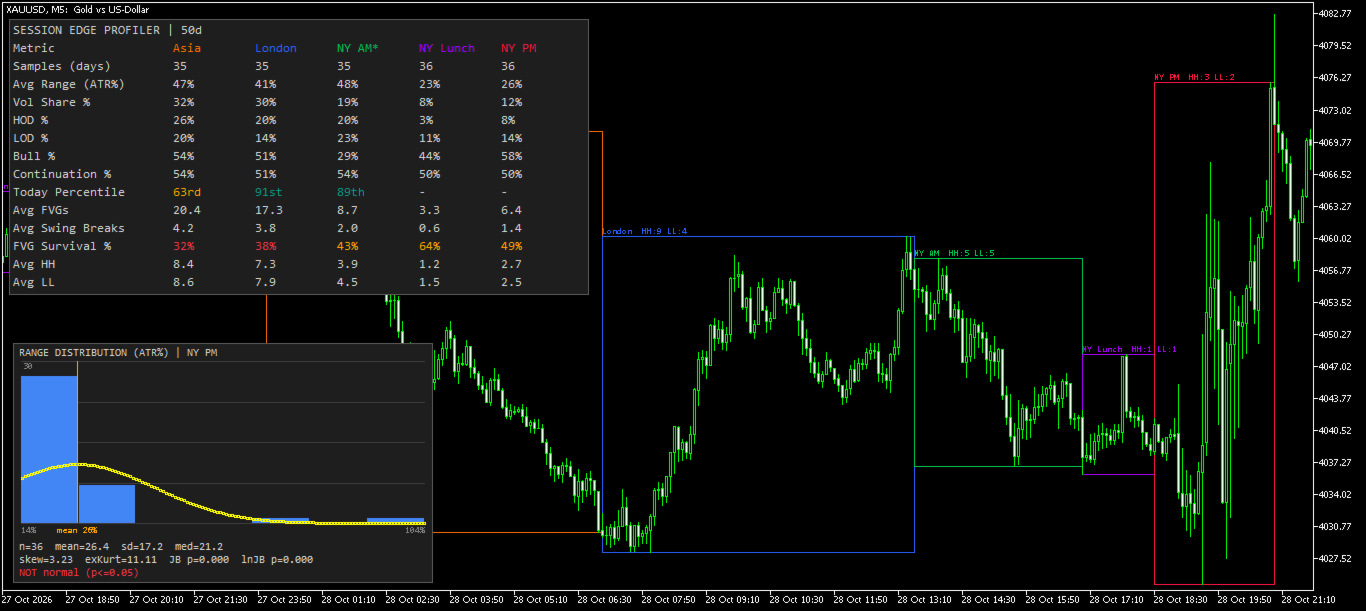
Session Edge Profiler works out how each trading session has actually behaved on your symbol over a lookback period you choose. It draws the session ranges on the chart and shows a dashboard of statistics for each session. It is a statistical profiling tool, not a signal generator: it gives you historical context on how large, how directional and how structured each session tends to be.
What it does
For each enabled session, the indicator:
- Finds every historical occurrence of that session within your lookback window.
- Measures the range, direction, structure and volume of each occurrence.
- Compares today's session with that history.
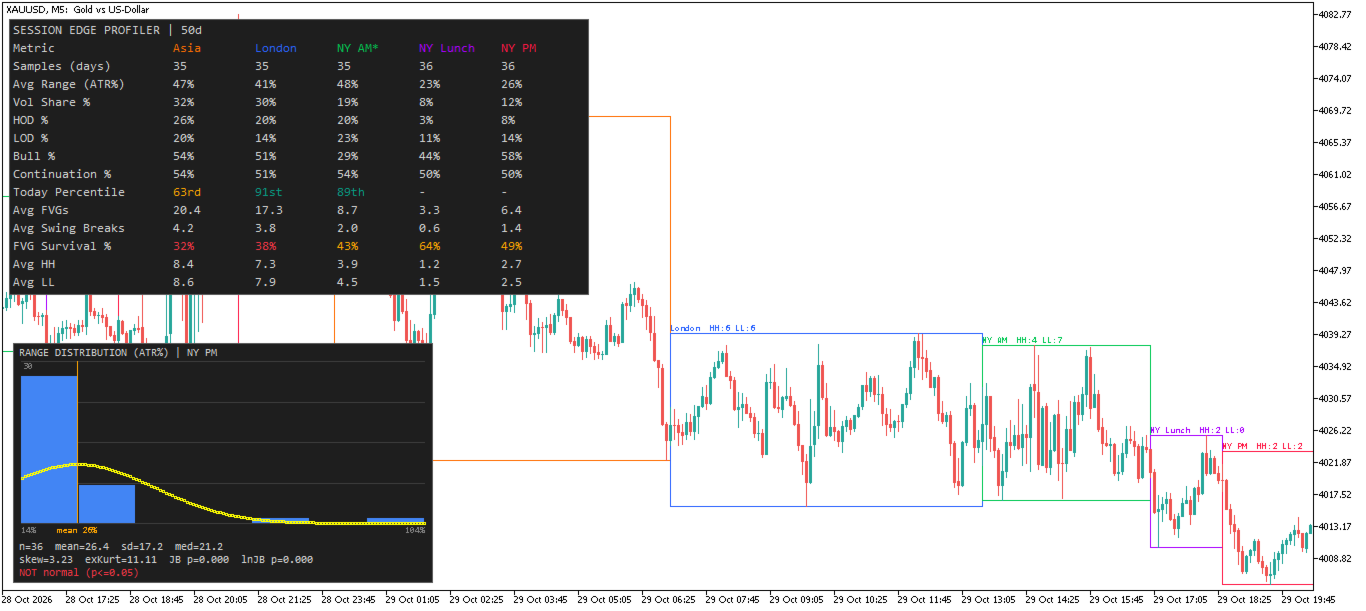
- Draws the session boxes on the chart and shows the aggregated statistics in a dashboard and a distribution histogram.
Sessions
Five sessions are supported. Each can be enabled or disabled, and each has its own start and end time input in New York time, in HH:MM format:
| Session | Default window (NY time) |
|---|---|
| Asia | 17:00 – 00:00 |
| London | 00:00 – 06:30 |
| NY AM | 06:30 – 10:00 |
| NY Lunch | 10:00 – 11:30 |
| NY PM | 11:30 – 14:00 |
- The end time is exclusive.
- If the end time is earlier than the start time, the window wraps past midnight, as Asia does.
- If start and end are equal, the session is never active.
- Invalid time strings fall back to the default for that field, and a message is printed in the Experts log.
- The defaults are tuned to a typical broker where server time is New York time plus 7 hours. Adjust the times and/or the server offset to match your broker.
Session boxes (on-chart)
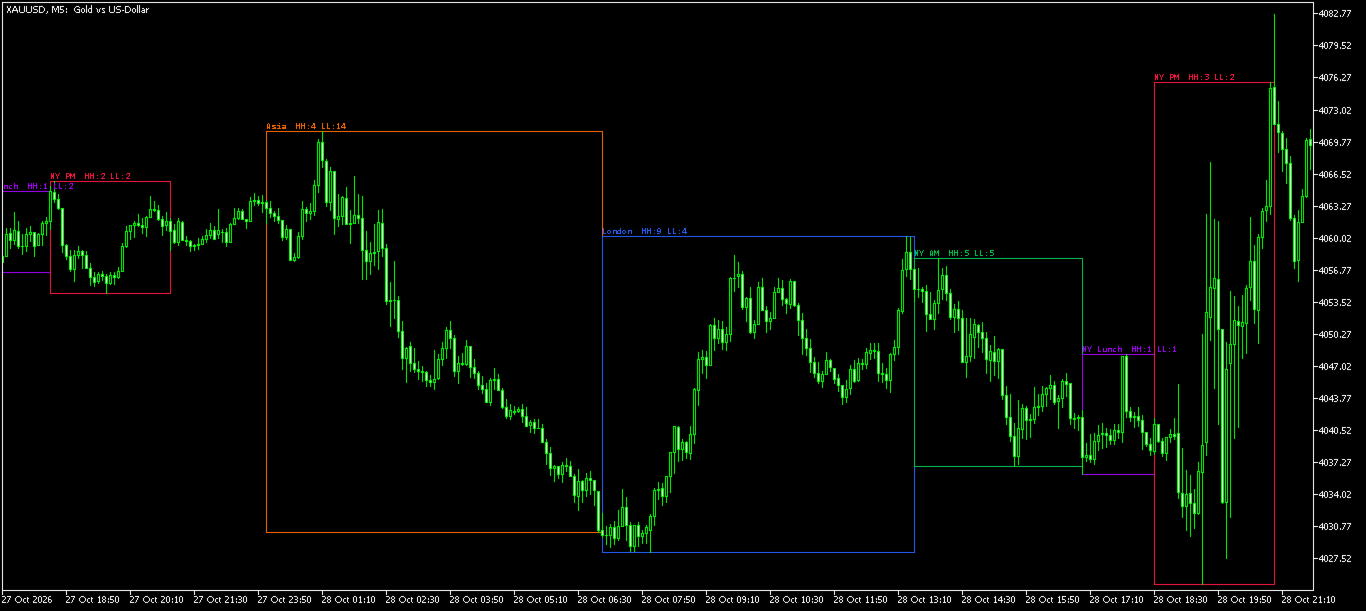
- Every historical session in the lookback is drawn as a rectangle spanning its high to low.
- The session still running is drawn with a dashed border and marked with an asterisk ( * ), and it updates as price develops.
- Each session has its own colour.
- Optional box labels show the session name plus the number of Higher Highs (HH) and Lower Lows (LL) formed inside that box.
- Boxes can be filled or outline-only. Filled boxes are drawn behind the candles.
Dashboard statistics
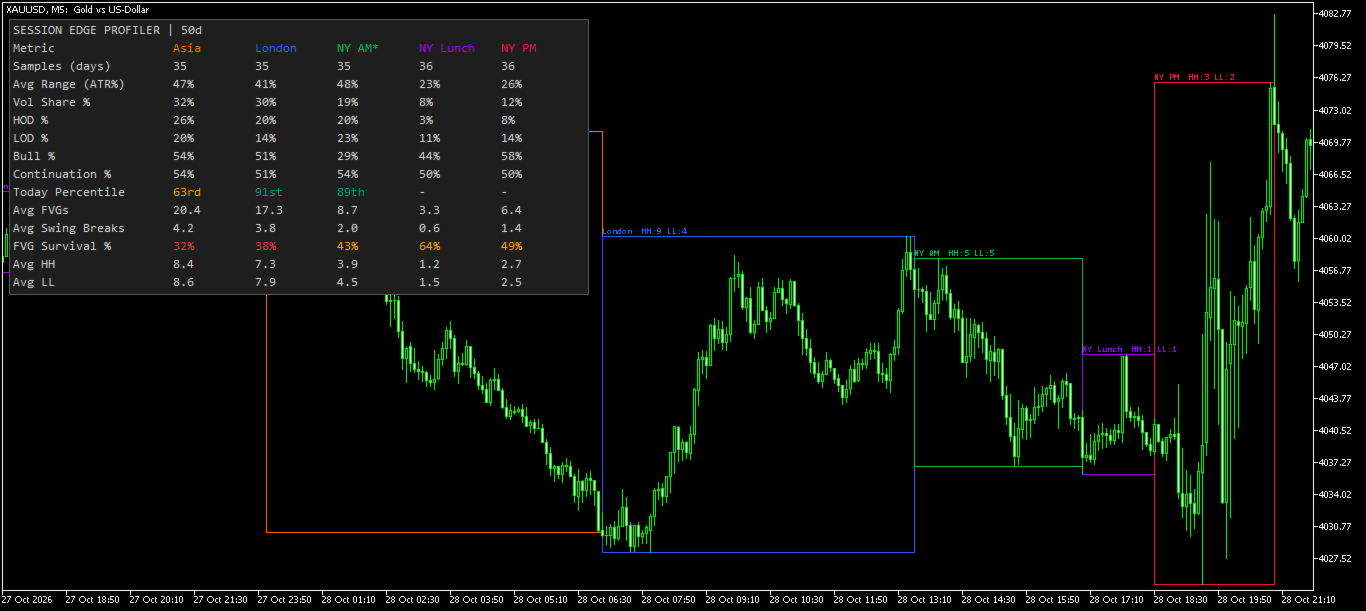
The dashboard has one column per enabled session. The active session is marked with * .
| Metric | Meaning |
|---|---|
| Samples (days) | Number of historical session instances used (after the weekday filter). |
| Avg Range (ATR%) | Average session high-low range as a percentage of the previous day's D1 ATR. 100% means the session moves one full daily ATR on average. |
| Vol Share % | Average share of the whole trading day's tick volume traded in this session. |
| HOD % | How often this session printed the high of the trading day. |
| LOD % | How often this session printed the low of the trading day. |
| Bull % | Percentage of sessions that closed above their open. |
| Continuation % | How often the session closed in the same direction as the previous occurrence of the same session. |
| Today Percentile | Where the current (or latest) session's range ranks among historical sessions. Coloured green at 75th and above, red at 25th and below, orange in between. |
| Avg FVGs | Average number of Fair Value Gaps (3-candle gaps) formed per session. |
| Avg Swing Breaks | Average number of closes beyond the latest confirmed swing high or low per session. |
| FVG Survival % | Percentage of Fair Value Gaps that were not invalidated by a close back through them within the same session. Green at 70% and above, orange at 40% and above, red below. |
| Avg HH | Average Higher Highs per session (bullish structure). Optional row. |
| Avg LL | Average Lower Lows per session (bearish structure). Optional row. |
Range distribution histogram
For each session, an optional panel plots a histogram of the historical session ranges (in ATR%) with a normal-curve overlay of the same mean and standard deviation. It also shows:
- sample count, mean, standard deviation and median
- skewness and excess kurtosis
- Jarque-Bera normality test p-value on the raw ranges
- the same test on the log of the ranges, to check for a log-normal shape
- a plain-language verdict: consistent with normal, not normal but plausibly log-normal, or not normal
At least 8 samples are needed. With fewer than 30 samples the verdict is flagged [small n] , because the test has little power on small samples. Session ranges cannot go below zero, so they are often right-skewed rather than normal.
Settings
General
- Timeframe – the timeframe the session bars are read from. The default is the current chart timeframe. Lower timeframes give more precise session boundaries.
- Days back – calendar days of history to analyse. The default is 50.
- Hours to ADD to server time to get NY time – a constant offset from broker server time to New York time. The default is -7.
Session times
- Enable toggle, start time and end time for each of the five sessions, as described above.
Filters
- Weekday toggles (Sun–Sat) – include or exclude trading days by weekday. The default is Monday to Friday. The weekday refers to the trading day, which rolls over at 18:00 NY, so the Asia session that starts in the evening belongs to the next calendar day's trading day.
- Daily ATR length – period of the Wilder ATR on D1 used to normalise ranges. The default is 14. The ATR value used is that of the previous completed D1 bar.
- Pivot strength – number of bars on each side required to confirm a swing high or low for Swing Breaks. The default is 5.
Session boxes
- Draw session ranges – show or hide the boxes.
- Fill boxes – filled or outline-only.
- Label each box – show the session name, HH and LL counts.
- Box label font size.
Stats
- Show stats – master switch for the dashboard and histogram. Turn it off for a clean chart that shows only the session boxes.
Distribution
- Show range distribution histogram.
- Histogram bins – 0 for automatic (Sturges' rule, limited to 6–30 bins), or set your own.
- Histogram X / Y – pixel position of the panel.
Dashboard
- Show dashboard.
- X / Y offset and font size.
- Show Avg HH / Avg LL rows.
How the calculations work
- Time zone: all session windows are defined in New York time. Broker server time is converted using the constant offset you set. Daylight saving time is not handled automatically. If your broker's offset to New York time changes during the year, update the input.
- Trading day: New York time plus 6 hours, so the day rolls over at 18:00 NY and the Asia session stays within one trading day.
- Volume: tick volume. Forex and CFD brokers rarely provide real volume, so Vol Share % reflects tick activity.
- Percentages are on a 0–100 scale and are not rounded internally.
- Fair Value Gap: a bullish gap is a candle low above the high two candles earlier. A bearish gap is a candle high below the low two candles earlier. A gap is invalidated when price closes back through its far edge.
- Swing Break: a close beyond the most recent confirmed pivot high or low, counted once per pivot.
- HH / LL: 3-candle pivot highs and lows that exceed the previous pivot of the same session.
- Today Percentile: the percentage of historical sessions whose range was less than or equal to the current range.
Tips
- Make sure your chart has enough history loaded for the lookback you choose, including D1 history for the ATR.
- Use the box labels together with the Avg HH / Avg LL rows to compare a single session's structure with its typical behaviour.
- A high Today Percentile on an active session means the session is already unusually wide relative to its history.
- If boxes look misaligned with the sessions you expect, check the server-to-NY offset first, then the session times.
- To reduce clutter on small charts, disable the histogram or lower the dashboard font size.
Notes
- The indicator uses chart objects only. It has no plot buffers and does not place trades.
- Statistics refresh on each new bar and at most every 30 seconds while the chart is live.
- Results depend on your broker's data, server time offset and the history available.
Disclaimer
This indicator is an analysis tool that summarises past price behaviour. Past session statistics do not guarantee future results. It is provided free, for educational and analytical purposes, and is not financial advice.