StatsBoard MT5

StatsBoard — Account P&L Statistics Board

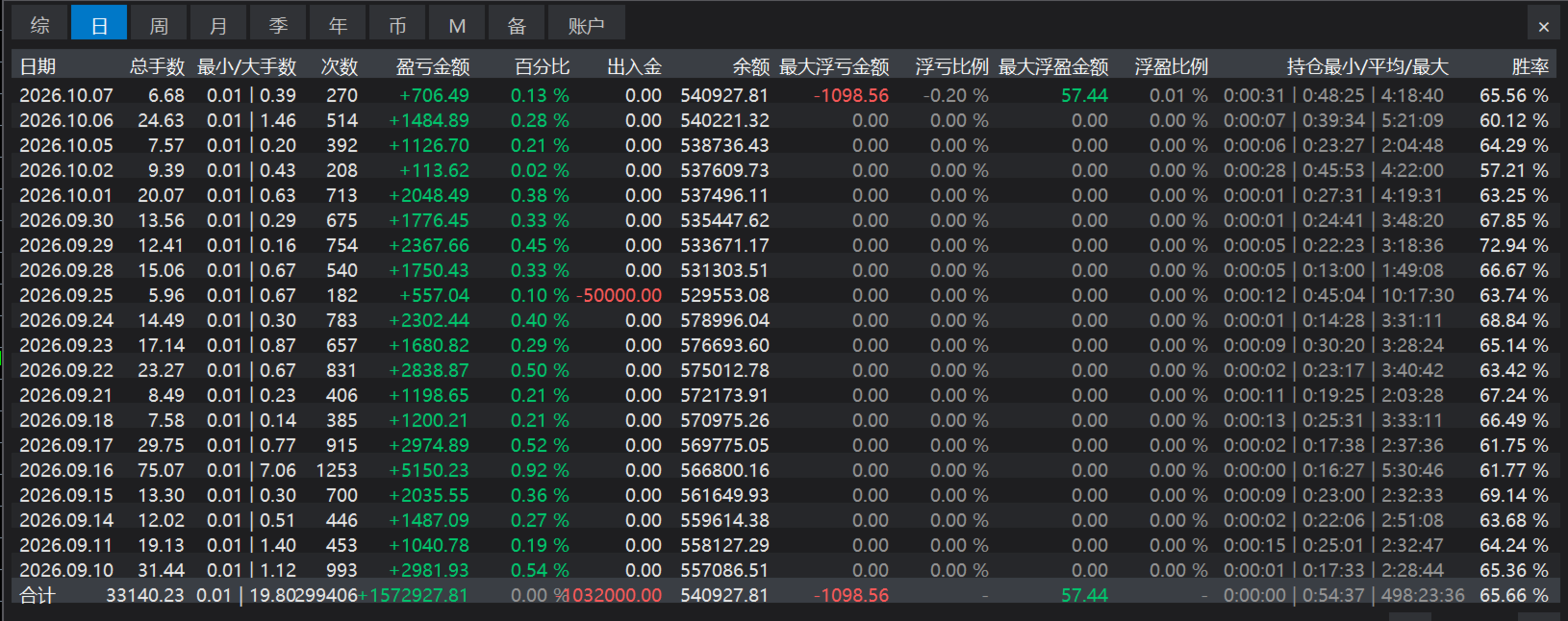
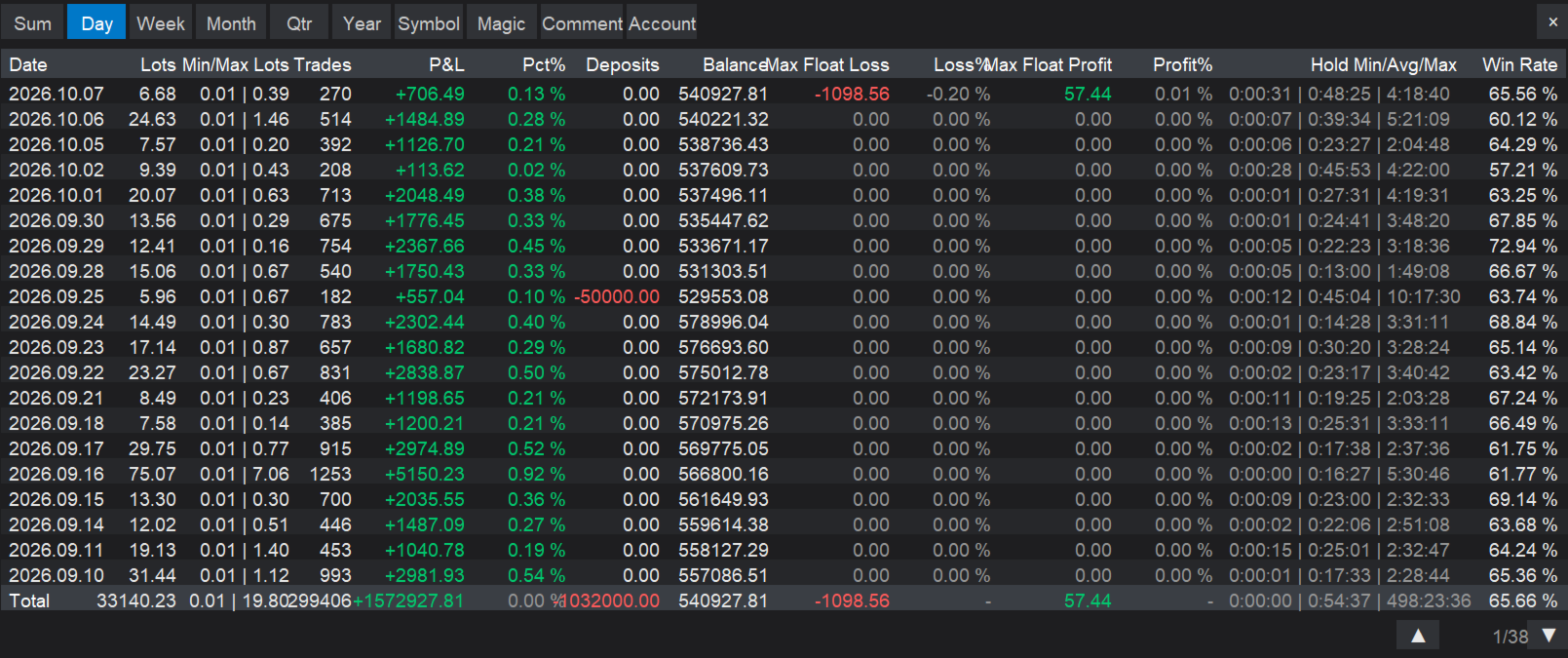
StatsBoard is a lightweight MT5 indicator that turns your entire trading history into a clear, on-chart statistics dashboard. No equity curve, no clutter — just the numbers that matter, organized by day, week, month, quarter, year, symbol, magic number, and comment.

**Key Features**

- **10 built-in tabs**: Summary, Day, Week, Month, Quarter, Year, Symbol, Magic, Comment, Account
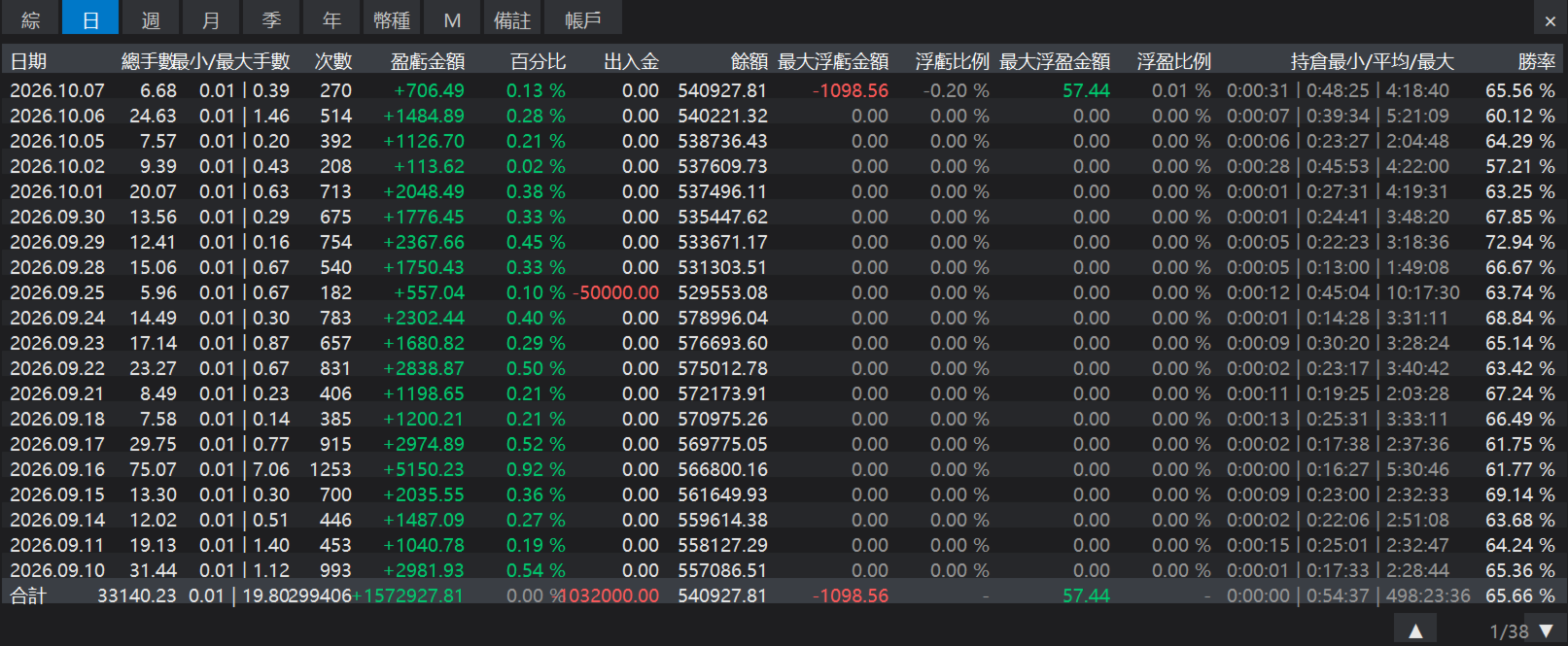
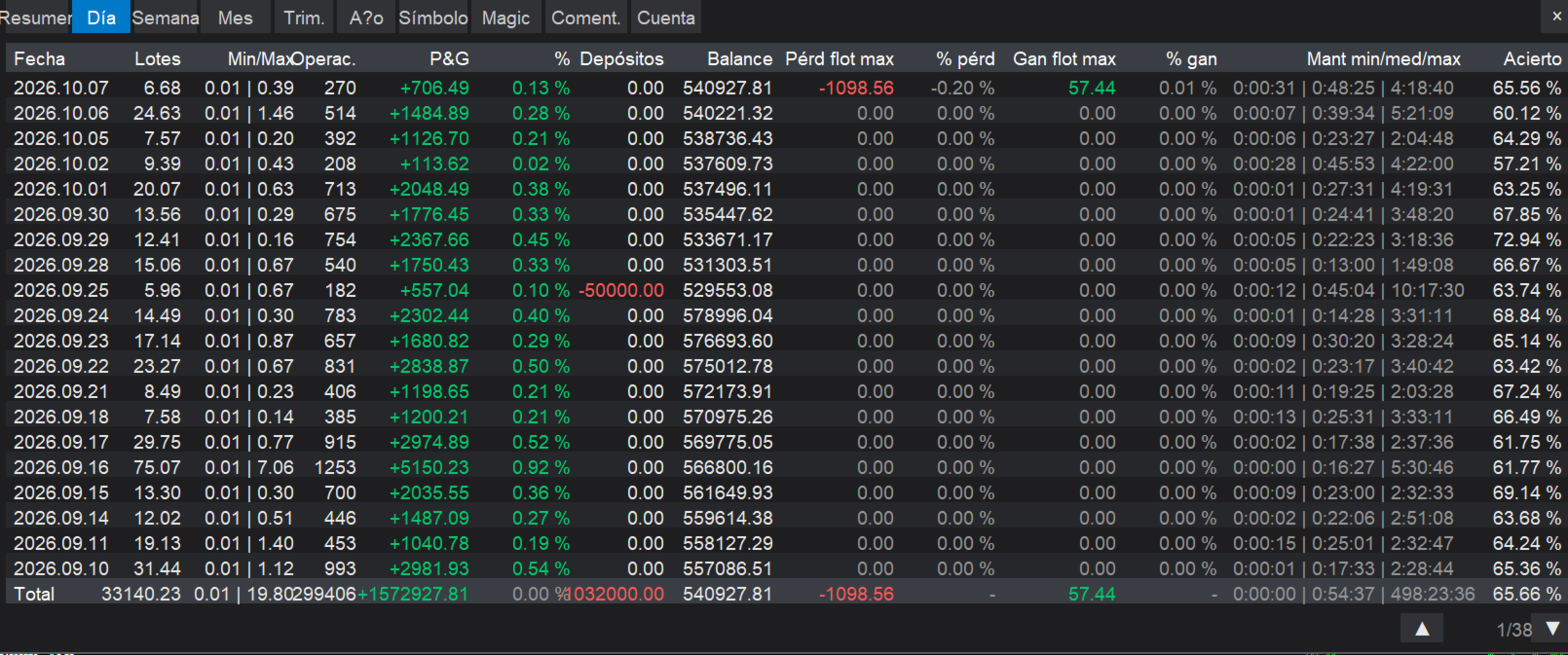
- **Full P&L breakdown per period**: lots, min/max lots, trade count, net P&L, return %, deposits, balance
- **Risk metrics**: max floating loss/profit per day (tracked live and saved), win rate, profit factor, max drawdown, best/worst trade
- **Group analysis**: break down performance by symbol, magic number, or comment, with sortable P&L column and P&L distribution bars
- **Account overview**: balance, equity, floating P&L, margin levels, deposits/withdrawals, symbol specifications (spread, min/max lot, margin per lot, stop level)
- **4 interface languages**: Simplified Chinese, English, Traditional Chinese, Español (via input parameter dropdown)
- **Zero dependencies**: drawn with native chart objects only — no external libraries required
- **Paging, sorting, hide/show button** for a clean chart

**Inputs**

- Language — interface language (dropdown: 简体中文 / English / 繁體中文 / Español)
- Panel X/Y offset — panel position on the chart
- Font size — default 14
- Rows per page — default 20
- Panel background — panel color

**How to Use**

1. Copy `StatsBoard.ex5` (or `.mq5`) into `MQL4/Indicators` and restart MT5 (or refresh the Navigator).
2. Drag StatsBoard onto any chart. The panel appears in the top-left corner.
3. Switch tabs to view statistics by period or grouping. Click the P&L column header to sort, use ▲▼ to turn pages, click × to hide the panel (a "Show Stats" button remains).
4. Change the interface language from the indicator inputs at any time.

**Notes**

- Daily max floating profit/loss is recorded only while the indicator is running. Periods when the indicator was not attached show 0 — historical floating P&L cannot be reconstructed by MT5.
- The indicator reads closed-trade history from the account; make sure the MT5 history tab covers the period you want to analyze.
Önerilen ürünler
RealCost Auditor MT5 is an execution-cost monitor for MetaTrader 5. It does not open, close, or modify trades. It watches the chart symbol, samples live spread, records executed deals, estimates signed slippage when the terminal exposes the requested price, and saves a local CSV audit file. Many backtests use spread, slippage, commission, and swap assumptions that are cleaner than real trading conditions. This utility gives you broker and account data from your own terminal before you trust a s

AUTO RISK MANAGER PRO: Forex ticaretindeki ortağınız! AUTO RISK MANAGER PRO_MT4 — MT4 için sürüm Demo sürümü + detaylı açıklama Duygular yüzünden para kaybetmeyi bırakın! Risk yönetimini profesyonel bir algoritmaya emanet etmenin zamanı geldi. Şu durumu hayal edin: piyasa pozisyonunuza karşı hızla hareket ediyor ve siz o sırada uyuyorsunuz, çalışıyorsunuz veya ailenizle vakit geçiriyorsunuz. Tanıdık bir senaryo, değil mi? Auto Risk Manager Pro ile — artık asla! Avantajlar: Risk yönetimine devr
No Hedge Guard keeps a hedging account free of hedges. If a buy and a sell are open on the same symbol at the same time, it closes the newer side at once. It works for manual trades and for any EA, and it never opens trades. Many prop firms do not allow hedging, and when two EAs trade the same symbol a hedge can appear by accident. Attach this utility to one chart and it watches the whole account. What it does Reacts to every new deal and also checks once per second. For each symbol it keeps the
FREE
Turn your trading history into a clean journal you can open in Excel or Google Sheets. How it works Click the button on the chart or let the utility export every day at a set time. Each closed position becomes one row: symbol, direction, volume, entry and exit time and price, SL, TP, pips, duration, profit, swap, commission and net result. A second summary file lists win rate, profit factor, average win and loss, largest win and loss and maximum consecutive losses. Key features One row per posit
FREE
Daily Loss Equity Guard watches the equity of the whole account against the loss limits you set. When a limit is reached it closes every position, deletes the pending orders and keeps the account flat until the next daily reset. It never opens trades on your account. It is meant for traders who follow fixed loss rules, for example on evaluation accounts with a daily loss limit and a maximum loss limit, and for anyone who wants a hard stop for a bad day. Daily loss limit In percent or in account
Risk Manager Rocket – MT5 Daily Loss Limit & Drawdown Protection EA Take full control of your trading risk with Risk Manager Rocket , a professional-grade MetaTrader 5 Expert Advisor designed to protect your account from excessive losses and enforce strict risk discipline. Whether you are trading manually or using automated strategies, this EA acts as a risk firewall , ensuring you never exceed your predefined daily loss limit. Core Features Daily Loss Limit (Hard Protection) Automatically track
FREE
SmartGuard Risk Manager helps MetaTrader 5 traders control account exposure before risk becomes too large. It monitors daily loss, floating loss, drawdown, margin level, open positions, pending orders, lot exposure and spread conditions directly on the chart. Start safely in Monitor Only mode: the utility shows risk status, alerts and local CSV logs without opening, closing or modifying trades. Emergency protection actions can be enabled manually after demo testing. Main features: Daily closed
T Manager, the ultimate trade management solution designed by traders for traders. If you are searching for a simple and efficient trade panel, trade manager, or trade assistant, you are at the right place.   The market contains a diverse number of those tools , but this one is designed by traders for traders . I designed this tool, and I am using it daily. Take my advice and stop buying tools blended with un-useful features that you will never use,   T Manager provides you with the essential y
Midas AI Trade Coach Review your closed MT5 trades with a statistical map and optional AI explanations. The utility reads account history and displays its findings on your chart. It never places, changes or closes orders, including in the Strategy Tester. Your History, Eight Views Explore results by UTC hour block, weekday, session, symbol, direction, holding time, trade size, and whether a trade followed a win or loss. Filter by look-back period, symbol and magic number, including manual trades
Make your Take Profit, Stop Loss, and Trailing Stop levels invisible to the broker! Main option: STEALTH MODE Virtual Trailing Stop Virtual Take Profit Virtual Breakeven Virtual Stop Loss Virtual Orders Lifetime WARNING: The Expert Advisor does not place orders by itself. You must open orders yourself (including through the Expert panel) or use a third-party Expert on another chart of the same currency pair. Please specify the Magic number "-1" in the Expert settings for the Expert to process th
Forget about enabling templates when you launch the window. Auto Template Master Service  is a professional utility tool that runs as a system service in MetaTrader 5, and it will do it for you. Unlike traditional indicators or expert advisors (EAs), the program runs in the background of the entire terminal and doesn't require you to add it to each window individually. As soon as you open a new chart of any instrument (Forex, Stocks, Crypto), the service immediately detects the new window and a
Position Manager Breakeven Partial Trailing takes care of positions that are already open: trades you opened by hand, from your phone, or by any other Expert Advisor. It does not open trades on your account. It only moves stop losses, closes part of a position once, and (if you want) closes everything at a set time. Main features Break-even with lock offset. When the trade has moved far enough in your favour, the stop loss is moved to the open price plus a small offset (for example +10 points),
Xiao Dan Kuai Pao is a fast and clean one-click order panel for MetaTrader 5. Open and manage your trades instantly, with Stop Loss and Take Profit placed automatically — no more typing TP distances by hand. Key features: - One-click buttons: BUY, SELL, CLOSE, BREAK EVEN - Custom Stop Loss and Take Profit (in points) — set any distance you want - Flexible risk/reward — combine SL and TP freely to build any ratio, such as 1:1, 1:2, 1:3, 1:4 or 1:5 - Real-time price display (Bid) - Bar countdown t
EquityGuard watches your account and does two things:   it   records the real drawdown   — day, month, all time, on equity and on balance — and, if you ask it to,   it   closes every open positions when a drawdown limit or a profit target is reached. It opens no position of its own. No strategy, no entries, no orders. It only ever closes, and only when you have told it to, so it runs alongside your manual trading or any other EA without interfering. WHAT MAKES IT DIFFERENT Most equity protec
EW Close All – Tek Tık. Her Şey Kapandı. EW Close All , hafif ve çok dilli bir Expert Advisor’dır. Tek bir butona tıklayarak tüm açık pozisyonları anında kapatır ve tüm bekleyen emirleri iptal eder. Tüm açık pozisyonları kapatır   Tüm bekleyen emirleri iptal eder   Her sembol ve her zaman diliminde çalışır   Çok dilli arayüz   Temiz, hızlı ve güvenilir Hızlı çıkışlar, risk kontrolü veya gün sonu temizliği için mükemmeldir. Tam kontrol sizde kalsın — EW Close All ile saniyeler için
FREE
Visual Trade Manager for MT5 is an interactive trade execution and position management tool designed for traders who want fast chart-based control over risk and execution. The panel provides a visual trade box with entry, stop and target lines directly on the chart. Position size is calculated from the selected risk percentage, and the tool supports both market execution and pending order placement. Main features - BUY and SELL switching directly from chart buttons - Draggable Entry, Stop and
How the Chart Cleaner Script Works The Chart Cleaner is a one-click tool designed to instantly wipe your chart clean. When you drag and drop the script onto a chart, it scans for and removes all visual objects—including trend lines, horizontal lines, text labels, shapes, and any other drawings you have placed. The result is a completely clean, uncluttered chart, giving you a fresh workspace for your analysis. It's the fastest way to reset your chart to its default state.
Watchman is a news filter and drawdown guard for MetaTrader 5. It pauses any Expert Advisor during high-impact economic news, closes or protects open positions, and enforces daily loss and maximum drawdown limits across the whole account. It works with any EA, including commercial products with no built-in news filter and no accessible source code. Attach Watchman to one empty chart. It finds every chart in the terminal running an EA, reads the MetaTrader economic calendar for events affecting t
Automatic calculation of a trading lot taking into account Stop Loss (in pips) and the percentage of risk from the account balance. The Expert Advisor panel is located on the chart at the top left. On the panel of the advisor, you can select the size of the stop loss in pips and the percentage of risk from the balance. You can set the deviation from the current price in pips for pending orders. The red color indicates the amount in the deposit currency that you can lose when the stop loss is tr
This tool can help you close all open orders with one click, just click "Close all". If you only want to close profitable orders, click the "Close profitable" button. After clicking, all floating orders will be closed; If you only want to close the orders with floating losses, click the "Close losable" button. After clicking, all orders with floating losses will be closed. This tool has been tested for a year. The one-click position closing function is very complete, the position closing is time
VRD Insight, MT5 için salt okunur bir EA performans takipçisi ve işlem analizcisidir. Hesap istatistiklerinizi magic number'a göre ayırır; böylece her EA'nın hesabı nasıl kullandığını görürsünüz: sonucu, açık lotları ve pozisyonları ve işlem etkinliği, hesabın drawdown'u ile birlikte tek bir grafik panelinde. Birden fazla EA aynı hesabı paylaştığında, hesap toplamları hangi EA'nın sermayeyi taşıdığını, hangisinin onu riske attığını gizler. Insight her EA'ya kendi satırını verir; böylece onu kend
FREE
Neuron News Risk Manager MT5 Neuron News Risk Manager MT5 , MetaTrader 5 için ekonomik haber koruması, risk yönetimi ve Telegram uzaktan kontrol sistemidir. MT5 Ekonomik Takvimini izleyerek yaklaşan haberi, para birimini, zamanı, önem seviyesini, etkisini ve kalan süreyi panelde gösterir. Low, Medium ve High seviyesindeki haberler filtrelenebilir ve grafik üzerinde haber çizgileri görüntülenebilir. Global Algo Trading Guard , ekonomik haber öncesinde Algo Trading'i otomatik olarak devre dışı bır
FREE
Overview Equity Watching Telegram Pro is an advanced, intelligent portfolio guardian designed for professional traders and investors who demand real-time control over their MetaTrader accounts. This Expert Advisor continuously monitors your account's Balance, Equity, and Floating P/L, instantly dispatching structured, mobile-optimized status cards directly to your Telegram account or group chats. Whether you are running multiple automated trading strategies simultaneously, managing high-volatil
Bot to attach to any different chart than the one using to get the orders and send them to telegram Inputs: Telegram Bot Token, Telegram Chat ID Sends Open Price, Order Type, Lots, Take Profit and Stop Loss instantly after the trade is executed. Easy to SetUp and to use My other Bot for XAUUSD and USDCHF:   https://www.mql5.com/en/market/product/94001 Just remember to go to Tolls->Options->ExpertAdvisors->Allow Web Request for listed URL:  https://api.telegram.org/
Tüm açık işlemlerinizde gizlenen korelasyonlu riski görün — grafikte canlı olarak, bir maruziyet limiti ve anlaşılır uyarılarla. GENEL BAKIŞ Birçok trader her işlemin büyüklüğünü dikkatle belirler, ancak birkaç açık pozisyon aynı para birimine bağlı olduğu veya birlikte hareket ettiği için yine de planladığından fazla risk alır. EURUSD ve GBPUSD'yi birlikte almak büyük ölçüde tek bir USD işlemidir. Negatif korelasyonlu bir paritede yapılan "hedge" kendini sıfırlayabilir ve yalnızca spread ekle
Symbol Spec Auditor, bir sembolün sözleşme spesifikasyonunun pozisyon büyüklüğünü ve işlem maliyetini belirleyen kısmını grafikte tek bir panelde toplar: puan değeri, spread maliyeti, teminat, swap, emir gerçekleştirme kuralları ve işlem seansları. Ham spesifikasyon değerleri hesap para biriminde 1,00 lot başına paraya çevrilir ve lot büyüklüğü kodunu sessizce bozan broker ayarları uyarı olarak listelenir. Tek bir düğme aynı denetimi Piyasa Gözlemi'ndeki her sembol için bir CSV dosyasına aktarır
FREE
Position Prime
Mariana Cordeiro Neves Fernandes
Şimdi ücretsiz demo sürümünü indirin ve satın almadan önce Strateji Test Cihazınızdaki tüm risk yönetimi özelliklerini test edin! Position Prime , MetaTrader 5 için kurumsal düzeyde görsel bir işlem asistanı ve risk yöneticisidir. Hız ve hassasiyet arayan yatırımcılar için tasarlanmış olup, manuel lot hesaplama ihtiyacını ortadan kaldırır ve grafiğinizi gerçek bir işlem masasına dönüştürür. Saniyeler içinde işlemlerinizi planlayın, uygulayın ve koruyun. ️ Risk Yönetimi ve Otomatik Lot Hesapl
Firmanızın günlük zarar ve düşüş (drawdown) limitlerini bir kez girin. Multi-Account Risk Sync Panel hesabınızı gün boyu bu limitlere göre kontrol eder ve bir limite ulaşıldığı anda açık pozisyonlarınızı kapatır, bekleyen emirlerinizi siler ve kendini durdurur. Prop firma challenge'ları, fonlanmış hesaplar ve sert bir zarar limiti olan her hesap için geliştirildi. İşlem açmaz, işlem kopyalamaz ve başka hiçbir hesaba dokunmaz. Bu sayfadaki tüm ekran görüntüleri canlı bir demo grafiğinden alınmışt
The Multi-Order Execution is an Expert Advisor for MetaTrader 5, designed to simplify the placement of multiple pending orders through a convenient on-chart control panel. The EA supports four pending order types: Buy Limit, Sell Limit, Buy Stop, and Sell Stop. Traders can configure the entry price, lot size, number of orders, price interval, take-profit (TP), and stop-loss (SL) directly from the chart. The EA automatically calculates each order's entry price based on the selected order type and
Drawdown Tracker MT5
AL MOOSAWI ABDULLAH JAFFER BAQER
KNOW YOUR REAL DRAWDOWN. TODAY, THIS SESSION AND FOR THE WHOLE LIFE OF THE ACCOUNT. Your broker shows equity. It does not show how deep the account has ever fallen, how much room you have left today or how far you are from your best balance. Drawdown Tracker keeps those numbers on one calm card and saves them, so they are still there after a restart. Try it free first: load it in the MetaTrader 5 Strategy Tester in visual mode and watch every card update tick by tick before you put it on a live
Bu ürünün alıcıları ayrıca şunları da satın alıyor
Trade Assistant MT5
Evgeniy Kravchenko
4.43 (216)
It helps to calculate the risk per trade, the easy installation of a new order, order management with partial closing functions, trailing stop of 7 types and other useful functions. Additional materials and instructions Installation instructions - Application instructions Line function -   shows on the chart the Opening line, Stop Loss, Take Profit. With this function it is easy to set a new order and see its additional characteristics before opening.   Risk management  - The risk calculation
Trade Manager EA’ye hoş geldiniz! Ticaretin daha sezgisel, hassas ve verimli hale gelmesi için tasarlanmış nihai risk yönetim aracı ile tanışın. Bu sadece bir emir verme aracı değil; ticaret planlaması, pozisyon yönetimi ve risk kontrolü için kapsamlı bir çözüm. İster yeni başlayan bir yatırımcı olun, ister deneyimli bir trader ya da hızlı emir gerektiren bir scalper, Trade Manager EA ihtiyaçlarınıza uyum sağlar ve forex, endeksler, emtialar ve kripto paralar dahil tüm piyasalarda esneklik sunar
Telegram to MT5 Multi-Channel Copier   , Telegram ve Discord kanallarınızdaki alım-satım sinyallerini doğrudan MetaTrader 5'e otomatik kopyalar. Bot yok, tarayıcı uzantısı yok, elle kopyalama yok. Sinyal Telegram'a veya Discord'a düşer ve EA birkaç saniye içinde terminalinizde işlemi açar. Ve bir kanalı kopyalamadan önce, yerleşik backtester o kanalın hesabınızda ne yapmış olacağını gösterir. Ürün iki bileşenden oluşur: Telegram kanallarınızı dinleyen bir Windows uygulaması ve sinyalleri MT5 ter
Local Trade Copier EA MT5
Juvenille Emperor Limited
4.94 (150)
Local Trade Copier EA MT5, aynı Windows bilgisayarı veya Windows VPS üzerinde çalışan birden fazla MetaTrader 5 hesabı arasında işlemleri kopyalamak ve yönetmek için hızlı ve esnek bir işlem kopyalayıcıdır. Yerel işlem senkronizasyonunu, Receiver tarafında lot büyüklüğü, risk yönetimi, işlem filtreleme, sembol eşleştirme, işlem yönetimi ve hesap koruması kontrolleriyle birleştirir. Transmitter ve Receiver terminallerinizi yaklaşık 1 dakika içinde ayarlayın ve aynı veya farklı brokerlardaki hesa
Farmed Hedge Yield Farming | All Markets (Manual - Hybrid - Semi/Automated EA) VERIFIED TRADING RESULTS - Farmed Hedge Yield Axi Copy:  https://www.mql5.com/en/signals/2356376 - Farmed Hedge Yield Exn Copy:   https://www.mql5.com/en/signals/2356404 - Farmed Hedge Yield V Copy:  https://www.mql5.com/en/signals/2357156 IMPORTANT NOTICE: FarmedHedge is a MANUAL-FOCUSED TRADING UTILITY ,not a fully automated EA. Results shown on this Signal include manual trades and overall strategic management.
TradePanel MT5
Alfiya Fazylova
4.89 (176)
Trade Panel, çok işlevli bir ticaret asistanıdır. Uygulama, manuel ticaret için 50'den fazla ticaret fonksiyonu içerir ve çoğu ticaret görevini otomatikleştirmeyi mümkün kılar. Uygulama talimatları: https://www.mql5.com/en/blogs/post/756482 Demo hesabı için uygulamanın deneme sürümü: https://www.mql5.com/en/blogs/post/750865 Uygulamayı nasıl kurulur: https://www.mql5.com/en/blogs/post/756239 Uygulamayı görsel modda nasıl test edilir: https://www.mql5.com/en/blogs/post/770277 Uygulamayı VPS MetaT
Strategy Ledger Pro
Abdullah Uygar Tuna
5 (17)
Şimdi Türkçe dil desteği ile. Strategy Ledger Pro , MetaTrader 5 için salt okunur bir hesap analiz panelidir. Hesap sonuçlarını Uzman Danışman (EA), strateji, sembol ve magic numaraya göre ayırır; böylece her birinin gerçekte ne kattığını görürsünüz. Panel 11 dilde kullanılabilir: English, Français, Deutsch, Español, Italiano, Português, Русский, Türkçe, 中文, 日本語 ve 한국어. Demoyu deneyin. Strateji Test Cihazının görsel modunda çalıştırın: panel, yerleşik bir örnek hesapta açılır ve her sayfayı etk
EA Overfitter
Stephen J Martret
5 (5)
That backtest looks great. But will it still be making money tomorrow, next week, next month? EA Overfitter re-runs your EA on 100 price histories it has never seen. One score tells you if the edge is real. A backtest tells you what an EA did on one price history — the one that happened to occur. What you cannot tell from it is how much of that result was the strategy and how much was the particular path. EA Overfitter answers that. It builds up to 100 synthetic price histories your EA has n
Telegram sinyallerini kendi işlem kurallarınızla kopyalayın Telegram to MT5 Signal Trader , herkese açık ve özel Telegram kanallarındaki ve gruplarındaki metin tabanlı işlem sinyallerini otomatik olarak MetaTrader 5'e kopyalar. Tek bir masaüstü uygulamasından birden fazla sinyal sağlayıcısını ve MT5 hesabını yönetin; her sağlayıcı için ayrı risk ve işlem ayarları belirleyin. Sinyal kopyalamak için Telegram botu veya API kurulumu gerekmez. Kendi Telegram hesabınızla telefon numarası veya QR kod k
Exp COPYLOT CLIENT for MT5
Vladislav Andruschenko
3.97 (35)
MetaTrader 5 için profesyonel işlem kopyalayıcı MetaTrader için hızlı, profesyonel ve güvenilir bir işlem kopyalayıcı . COPYLOT , MT4 ve MT5 terminalleri arasında Forex işlemlerini kopyalamanıza olanak tanır ve Hedge ile Netting hesaplarını destekler. COPYLOT MT5 sürümü şunları destekler: - MT5 Hedge → MT5 Hedge - MT5 Hedge → MT5 Netting - MT5 Netting → MT5 Hedge - MT5 Netting → MT5 Netting - MT4 → MT5 Hedge - MT4 → MT5 Netting MT4 sürümü Tam açıklama + DEMO + PDF Nasıl satın alınır Nasıl kurul
AI Agent Supervisor is NOT an Expert Advisor. AI Agent Supervisor   is a   multi-agent AI risk & portfolio supervisor   that watches every EA on your account and intervenes in real time.  WANT AN AI PORTFOLIO MANAGER WATCHING YOUR FLEET 24/7?   Run your fleet on the same brokers I do:   IC MARKETS , IC TRADING   .  Unlike the centralized stock market, Forex has no single, unified price feed.  Every broker sources liquidity from different providers, creating unique data streams. The Supervisor r
HINN MAGIC ENTRY 4 – grafiğe tıkla, işlem hazır! BASİT. HIZLI. KESİN. Stop, giriş ve kâr al doğrudan grafikte – lot, riskine göre otomatik hesaplanır. tam açıklama   ::  kurulum ve SSS   ::  destek sohbeti Neler var: - LIMIT 3 tıkla, MARKET 2 tıkla – risk %, $, lot veya klasik Fixed Lots - DEFAULTS: kâr al, kısmi kâr ve başa baş şablonun her yeni işleme hazır gelir – MARKET tek tıkla - Sınırsız kısmi kâr al, hacim % ile paylaştırılır - İstediğin tetik ve ofsetle başa baş, her seviyede iz süren
================================================================================ POC BREAKOUT - V20.72. Full Professional Grade Toolkit ================================================================================ POC Breakout is a full MetaTrader 5 trading dashboard for discretionary traders who want breakout signals, Point of Control (POC) context, volume profiles, order flow, market structure, news, alerts, and advanced trade planning in one professional workspace. Attached directly to you
News Trade EA MT5
Konstantin Kulikov
4.55 (11)
Birkaç yıldır kullandığım çok yararlı bir robotu tanıtıyorum. Hem yarı otomatik hem de tam otomatik modlarda kullanılabilir. >>> Chat <<< Program, ekonomik takvim haberlerinde esnek ticaret ayarlarını içeriyor. Stratejiler test cihazında kontrol edilemez. Sadece gerçek bir iş. Ayarların en son arşivini indirin: https://www.mql5.com/en/blogs/post/747929 Sinyal izleme: https://www.mql5.com/en/signals/author/test-standart Bu bilirkişi için kendi ayarlar setinizi oluştururken, blogdaki tüm paramet
The product will copy all telegram signal to MT5 ( which you are member) , also it can work as remote copier.  Easy to set up, copy order instant, can work with almost signal formats, image signal,  s upport to translate other language to English Work with all type of channel or group, even channel have "Restrict Saving Content", work with  multi channel, multi MT5 Work as remote copier: with signal have ticket number, it will copy exactly via ticket number. Support to backtest signal. How to s
EA Auditor
Stephen J Martret
5 (7)
EA Auditor is an independent analysis tool for traders evaluating Expert Advisors and trading signals on MetaTrader 5. It audits backtest reports, reviews posted developer signals, and cross-verifies the two against each other to help traders assess strategies before committing capital. The MQL5 market offers a wide range of Expert Advisors from many developers, with varying approaches, quality, and transparency. EA Auditor provides a consistent, data-driven framework for reviewing them, answer
25% discount on the release of the tool: only for the next 3 buyers Send a message to receive a demo version. AstroTrade Trading Assistant AstroTrade is a comprehensive multi-functional trading utility developed for the MetaTrader 5 platform. It integrates essential tools for trade execution, risk management, and technical monitoring into a single unified interface. The application is designed to assist traders in managing their daily operations through a visual and structured environment. Vi
Power Candles Strategy Scanner: Kendini Optimize Eden Çoklu Sembol Kurulum Bulucu Her kıpırtıda öten bir tarayıcı, size onu görmezden gelmeyi öğretir. Hareketli tek bir mum kapanışı, peş peşe uyarılar ve gerçekten işlem yaptığınız o tek kurulum gürültünün içinde kaybolur. Power Candles Strategy Scanner , kendini optimize eden Power Candles motorunu Market Watch'unuzdaki her sembolde çalıştırır ve yalnızca kendi filtrelerinizden geçen durumlar için uyarır: son kapanan mumun gücü, kurulumun ödül/r
Equity Protect Pro: Endişesiz İşlem İçin Kapsamlı Hesap Koruma Uzmanınız Hesap koruması, öz sermaye koruması, portföy koruması, çoklu strateji koruması, kar koruması, kar toplama, işlem güvenliği, risk kontrol programları, otomatik risk kontrolü, otomatik tasfiye, koşullu tasfiye, planlı tasfiye, dinamik tasfiye, iz süren stop loss, tek tıklamayla kapatma, tek tıklamayla tasfiye ve tek tıklamayla geri yükleme gibi özellikler arıyorsanız, Equity Protect Pro ihtiyacınız olan programdır. Kurulumu
Timeless Charts
Samuel Manoel De Souza
5 (9)
Timeless Charts, profesyonel yatırımcılar için hepsi bir arada bir trading aracıdır. Saniye Grafikleri ve Renko gibi özel grafik türlerini, Footprints , Clusters , Hacim Profilleri , VWAP çalışmaları ve gelişmiş piyasa analizi sağlayan sabitlenmiş analiz araçlarıyla gelişmiş emir akışı analiziyle birleştirir. İşlem ve pozisyon yönetimi, entegre işlem yönetim paneli aracılığıyla doğrudan grafik üzerinden gerçekleştirilirken, Market Replay ve Sanal Hesaplar trading becerileri ve stratejileri üzeri
EA Performance Hub — Performance dashboard for MetaTrader 5 See which Expert Advisors are driving your account’s results. EA Performance Hub brings your strategies into one indicator panel, with a portfolio overview and a detailed view for each EA or group. Identify and group your EAs The indicator detects Magic Numbers from trade history and open positions. It uses suitable trade comments as names when available. EAs running across multiple symbols can be grouped into a single row. You can a
Zentral Trading Manager
Ray Zeanrik Parreno Fredeluces
5 (4)
Zentral Manager Your Command Center for Precision Trading — Now Stronger than Ever Take control of your trades like never before. Zentral Trading Manager is your all-in-one manual trading panel for MetaTrader 5 — built for scalpers, day traders, and serious strategy execution. Fully compatible with both Mac and Windows laptops. High-DPI safe. No more layout issues. Key Features (Latest 2025 Update): • One-Click Close – Instantly close Buy/Sell, winning/losing trades, or even half positions with
KT Equity Protector MT5
KEENBASE SOFTWARE SOLUTIONS
3.6 (5)
An equity protection EA for MetaTrader that enforces your loss limits and profit target for you: when your account reaches a rule you set, it closes your trades on every symbol, before one bad day turns into a lost account. It suits prop firm challenges and personal accounts alike. Attach it to one chart, answer a few questions in the on-chart setup wizard, and it watches your whole account in the background while you trade by hand or with other EAs. What it protects Daily loss limit: a percenta
Custom Alerts: Birden Fazla Piyasayı Takip Edin ve Hiçbir Önemli Sinyali Kaçırmayın Genel Bakış Custom Alerts , birden fazla enstrümanı tek bir yerden takip etmek isteyen yatırımcılar için dinamik bir çözümdür. FX Power, FX Volume, FX Dynamic, FX Levels ve IX Power gibi önde gelen araçlarımızdan gelen verileri entegre ederek, Custom Alerts sizi grafikler arasında geçiş yapmak zorunda kalmadan önemli piyasa gelişmeleri hakkında otomatik olarak bilgilendirir. Artık broker’ınızın sunduğu tüm varl
Trade copier MT5
Alfiya Fazylova
4.62 (58)
Trade Copier, ticaret hesapları arasındaki işlemleri kopyalamak ve senkronize etmek için tasarlanmış profesyonel bir yardımcı programdır. Kopyalama, tedarikçinin hesabından/terminalinden alıcının aynı bilgisayarda veya vps'de kurulu olan hesabına/terminaline gerçekleşir. Satın almadan önce demo sürümünü bir demo hesabında test edebilirsiniz. Demo versiyonu burada . Tüm talimatlar burada . Ana işlevler ve avantajlar: Emirlerin kopyalanmasını destekler: МТ5> МТ5, МТ4> МТ5, МТ5> МТ4. Emirlerin kopy
Tıklamadan önce riskinizi bilin. İşlemi sonra yönetin. Çizgileri sürükleyin, BUY veya SELL'e tıklayın, lot büyüklüğü sizin için hesaplanır. Ardından işlemi break even, kısmi kapatma, çoklu hedefler ve daha fazlasıyla yönetin. Mercurial Position Sizing PRO, manuel işlem yapan trader'lar için bir MT5 aracıdır. Bakiyenize, risk yüzdenize ve stop loss mesafenize göre doğru lot büyüklüğünü hesaplar, ardından işlemi SL ve TP zaten eklenmiş şekilde açar. Ücretsiz sürümdeki her şeyi içerir ve ayrıca da
Telegram kanallarınızdaki sinyaller, birkaç saniye içinde MetaTrader 4 ve MetaTrader 5'e kopyalanır. TradingMind Signal Bridge seçtiğiniz kanal ve grupları okur, her sinyali hızlı yerleşik kurallarla tanır, ekran görüntüsü olarak paylaşılan sinyaller dahil karışık mesajları bir yapay zeka modeline devreder ve emri terminalinizdeki uzman danışmana iletir. Haber filtresi, prop firma hesap koruması ve uzaktan kontrol için bir Telegram botu, neyin işleme gireceği kararını sizde bırakır. Bu ürün ne i
Seconds Chart - MetaTrader 5 için saniye bazlı grafikler oluşturmanıza olanak sağlayan eşsiz bir araçtır. Seconds Chart sayesinde saniye cinsinden zaman dilimleriyle grafik oluşturabilir, standart dakika veya saatlik grafiklerde mümkün olmayan esneklik ve analiz hassasiyetine ulaşabilirsiniz. Örneğin, S15 zaman dilimi 15 saniyelik mum çubuklarını ifade eder. Desteklenen özel sembollerle herhangi bir gösterge ve danışman kullanabilirsiniz. Onlarla çalışmak, standart grafiklerde işlem yapmak kadar
Prop Guardian Risk Manager MT5 – Drawdown, Risk & Hedge Protection for Prop Firm and Managed Accounts Prop Guardian Risk Manager is a professional risk-control utility for MetaTrader 5, designed for prop firm traders, money managers and anyone who wants strict account-level risk protection. It does not generate trading signals, strategy entries or trading decisions. Instead, it runs in the background, monitors your account risk and can automatically block new exposure, close managed positions or
Check your trade before you place it Your risk checks out. Does the trade fit your rules? APEX AI Advisor shows your estimated risk and position size, then lets you ask AI to challenge the setup against your playbook and market context—all inside MT5. You decide whether to act. One trade idea, two different checks In the walkthrough, a EURUSD buy limit passes the local checks: 0.10 lots, $10 estimated risk at the stop and a 2:1 reward-to-risk ratio on the sample account. That does not make it a
Yazarın diğer ürünleri
Lot Profit Stats User Manual I am used to trading with the Martingale strategy. Every time I need to do statistics, I have to export the chart data to Excel for analysis, which is a very tedious process. Although there are already many statistical indicators on the market, there is a lack of one specifically for analyzing lots. With such an indicator, it would be very convenient to easily analyze the profit and loss status under different lot sizes. 1. Overview `Lot Profit Stats` is a chart-
StatsBoard — Account P&L Statistics Board StatsBoard is a lightweight MT4 indicator that turns your entire trading history into a clear, on-chart statistics dashboard. No equity curve, no clutter — just the numbers that matter, organized by day, week, month, quarter, year, symbol, magic number, and comment. Key Features 10 built-in tabs : Summary, Day, Week, Month, Quarter, Year, Symbol, Magic, Comment, Account Full P&L breakdown per period : lots, min/max lots, trade count, net P&L, return %, d
Martingale stratejisiyle işlem yapmaya alışkınım. Her istatistik yapmam gerektiğinde, grafik verilerini dışa aktarıp Excel'de analiz etmem gerekiyor, bu çok zahmetli bir süreç. Piyasada halihazırda birçok istatistik göstergesi olmasına rağmen, özellikle lot analizine yönelik bir gösterge eksik. Böyle bir gösterge olsaydı, farklı lot büyüklüklerindeki kâr ve zarar durumunu kolayca analiz edebilmek çok kullanışlı olurdu.
Filtrele:
Değerlendirme yok
Değerlendirmeye yanıt