Position Manager Breakeven Partial Trailing

  • Yardımcı programlar
  • Cristian Bodisteanu
    Cristian Bodisteanu
    • MQL5 Developer – Expert Advisors & Indicators at  MQL5 Freelance
    • İtalya
    • 299
    MQL5 developer – Expert Advisors, indicators and risk management for MetaTrader 5
    I build and test MetaTrader 5 Expert Advisors, indicators and scripts in MQL5.
    What I have built for my own trading research:
  • Sürüm: 1.0
  • Etkinleştirmeler: 5

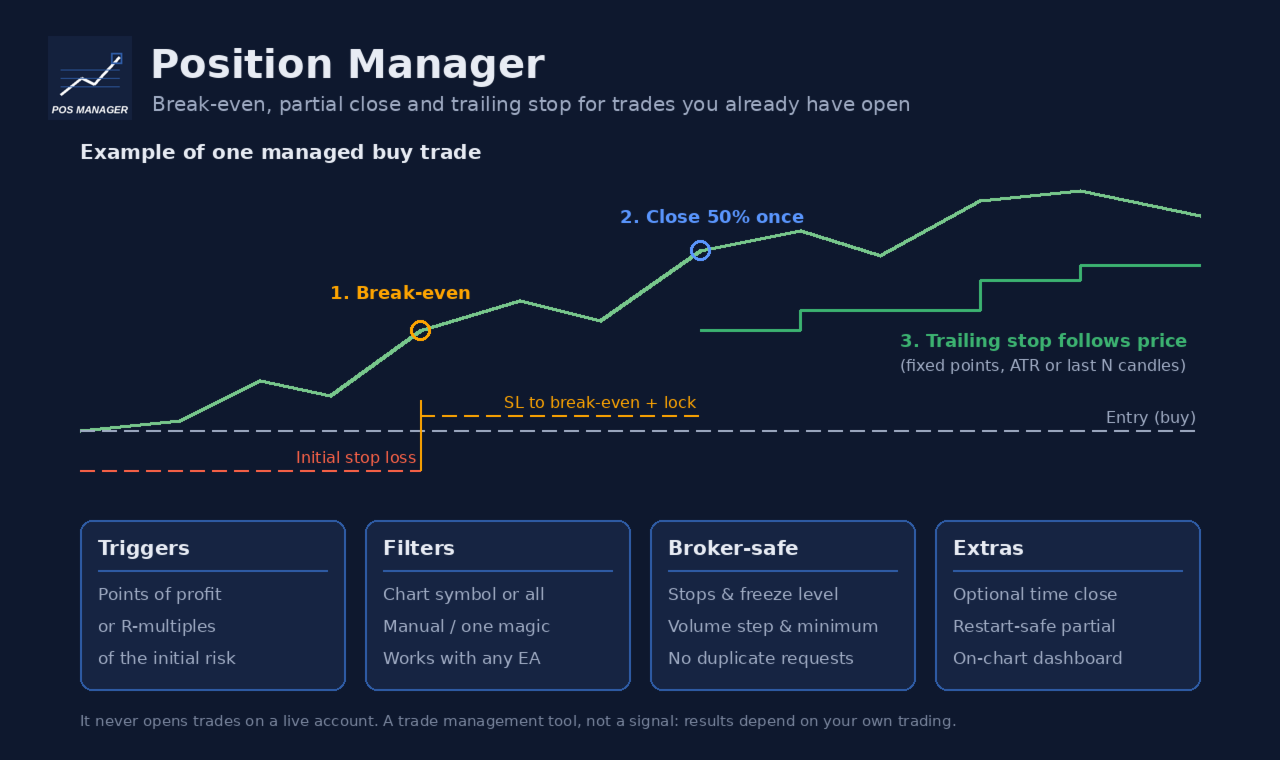
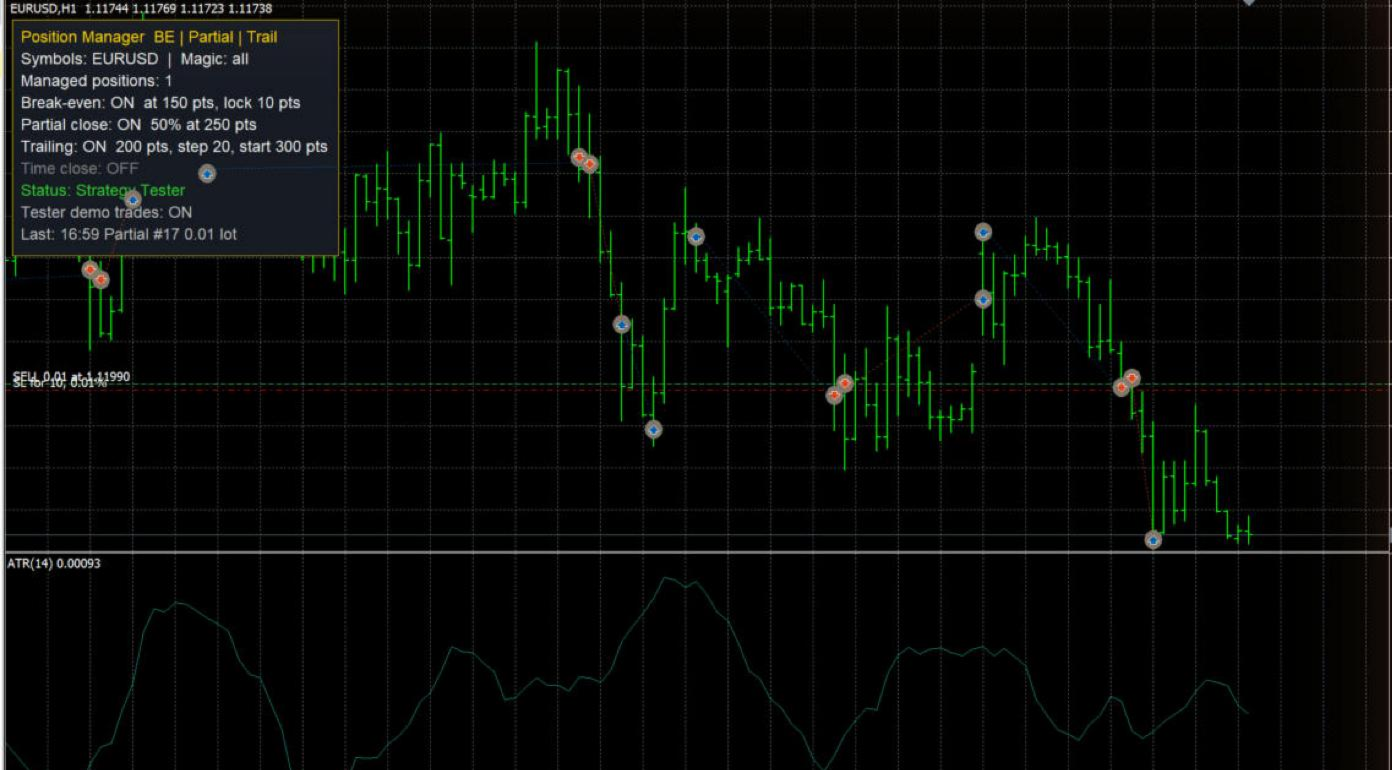
Position Manager Breakeven Partial Trailing takes care of positions that are already open: trades you opened by hand, from your phone, or by any other Expert Advisor. It does not open trades on your account. It only moves stop losses, closes part of a position once, and (if you want) closes everything at a set time.

Main features

  • Break-even with lock offset. When the trade has moved far enough in your favour, the stop loss is moved to the open price plus a small offset (for example +10 points), so a few points are locked in.
  • One-time partial close. At a profit level of your choice, a percentage of the position (for example 50%) is closed. This happens only once per position, even after a terminal or VPS restart: the utility remembers it in terminal global variables and also checks the deal history of the position.
  • Trailing stop, three modes:
  • Fixed points: the stop follows the price at a fixed distance.
  • ATR: distance = ATR(period) x multiplier on the timeframe you choose, so the stop adapts to volatility.
  • Candles: the stop sits below the lowest low (buy) or above the highest high (sell) of the last N closed candles, plus a buffer.
  • Trailing starts only after a profit threshold and only moves the stop when the improvement is at least the step you set. The stop is never moved backwards.
  • Triggers in points or in R. Break-even, partial close and trailing start can each use points of profit or R-multiples of the initial risk (distance from the open price to the first stop loss). R-based triggers are skipped for positions without a stop loss; points-based triggers still work.
  • Time close (optional, off by default). Close all managed positions at a set server time on a chosen day (for example Friday 21:45), or every day.
  • Filters. Manage only the chart symbol or all symbols; all positions, only manual positions (magic 0), or only one magic number.
  • On-chart dashboard. Shows the number of managed positions, which features are on, the connection and Algo Trading status, and the last action. The panel can sit in any chart corner.

Built to respect broker rules

  • Every stop loss change respects the symbol's stops level and freeze level, is rounded to the tick size, and is skipped when nothing would change.
  • Volumes respect the minimum volume and volume step. If the partial volume would be below the minimum volume, the partial close is skipped and a message is printed once.
  • Requests are throttled: the same stop loss is never sent twice in a row, and after a rejected request the utility waits before trying again for that position.
  • Nothing is sent while the market of the symbol is closed, while Algo Trading is disabled, or while there is no connection.
  • Every rejected request is printed in the Experts journal with the server return code.
  • Works on hedging and netting accounts.

Inputs

Position filters

  • Symbols to manage: Current chart symbol only or All symbols.
  • Magic filter: -1 = every position, 0 = only manual positions, any positive number = only positions with that magic number.

Break-even

  • Enable break-even: on/off.
  • Break-even trigger type: points of profit, or R-multiple of the initial risk.
  • Break-even trigger: profit in points: profit needed (points mode).
  • Break-even trigger: profit in R: profit needed in R (R mode), for example 1.0 = profit equal to the initial risk.
  • Lock offset beyond the open price (points): the new stop is placed this many points beyond the open price in the profit direction. Keep the trigger larger than this offset plus the broker's stops level.

Partial close

  • Enable one-time partial close: on/off.
  • Partial close trigger type: points or R.
  • Partial close trigger: profit in points / profit in R: profit needed for the partial close.
  • Volume to close (% of the current volume): for example 50. The volume is rounded down to the volume step, and at least the minimum volume is left open. 100 closes the whole position.

Trailing stop

  • Enable trailing stop: on/off.
  • Trailing mode: fixed distance, ATR x multiplier, or low/high of the previous N candles.
  • Trailing start type: points or R.
  • Start trailing after profit in points / in R: trailing begins only after this profit.
  • Fixed mode: distance from price (points): distance of the stop from the current price.
  • Minimum SL improvement per move (points): the stop is moved only when it improves by at least this amount (also used in ATR and candle modes).
  • ATR / candle mode: timeframe: timeframe for the ATR and candle calculations (current chart timeframe by default).
  • ATR mode: ATR period and ATR multiplier: distance = ATR x multiplier.
  • Candle mode: number of closed candles: how many closed candles are used.
  • Candle mode: buffer beyond low/high (points): extra distance beyond the candle low or high. For sell positions the current spread is also added.

Time close

  • Close managed positions at a server time: on/off (off by default).
  • Day: a weekday or Every day (server time).
  • Hour and Minute: from this time until the end of that server day, all managed positions are closed, including positions opened after that time.

Execution

  • Maximum slippage for closing deals (points): used for partial and time closes.

Dashboard

  • Show dashboard, Dashboard corner, Horizontal / vertical distance from the corner (px), Font size, Background color, Text color, Title and border color.

Strategy Tester demo (ignored on live charts)

  • Open demo trades in the Strategy Tester: in the tester, the utility opens small demo trades by itself so you can watch break-even, partial close and trailing work. It never does this on a live or demo account.
  • Open a demo trade every N bars (when flat), Demo volume = minimum volume x this, Demo stop loss type (ATR or fixed points), Demo ATR period, Demo SL = ATR x this, Demo SL in points, Demo TP = SL distance x this.

How to use

1. Attach the utility to one chart. With Current chart symbol only, attach one copy per symbol you want to manage. With All symbols, one chart is enough. Do not let two copies manage the same positions.

2. Turn on Algo Trading in the terminal.

3. Set the filters and the features you want, then open your trades as usual (by hand, from the mobile app, or with another EA).

4. Keep the terminal running (a VPS is recommended): stop losses are moved by the terminal and then held by the broker's server.

Good to know

  • The initial risk for R-multiples is taken from the stop loss of the opening order. If the position had no stop loss, it is taken from the first stop loss added later.
  • If a position was already partially closed (by this utility, by hand or by another EA), no further partial close is made for it.
  • Default values are in points, which mean different price distances on different symbols (for example forex vs gold vs indices). Check the values for every symbol you trade, or use the R-based triggers.
  • This is a trade management tool. It does not predict the market and does not guarantee profit; results depend on your own trading decisions, your settings and market conditions. Test your settings on a demo account first.
Önerilen ürünler
KS Çoklu Bağımsız Stratejiler Otomatik İşlem 1.9 EA'ya Genel Bakış Bu, öncelikle MetaTrader 5'te altın (XAUUSD) ticareti için tasarlanmış profesyonel düzeyde bir MQL5 Uzman Danışmanıdır (EA). Performansı optimize etmek için birden fazla bağımsız işlem stratejisi, gelişmiş risk yönetimi ve çeşitli filtreleri destekler. EA, otomasyona, kar korumasına ve Telegram ve Discord gibi harici araçlarla entegrasyona önem verir. Herhangi bir zaman diliminde çalışır, ancak belirli seanslar ve haber olayları
This tool can help you close all open orders with one click, just click "Close all". If you only want to close profitable orders, click the "Close profitable" button. After clicking, all floating orders will be closed; If you only want to close the orders with floating losses, click the "Close losable" button. After clicking, all orders with floating losses will be closed. This tool has been tested for a year. The one-click position closing function is very complete, the position closing is time
Risk Manager Rocket – MT5 Daily Loss Limit & Drawdown Protection EA Take full control of your trading risk with Risk Manager Rocket , a professional-grade MetaTrader 5 Expert Advisor designed to protect your account from excessive losses and enforce strict risk discipline. Whether you are trading manually or using automated strategies, this EA acts as a risk firewall , ensuring you never exceed your predefined daily loss limit. Core Features Daily Loss Limit (Hard Protection) Automatically track
FREE
RealCost Auditor MT5 is an execution-cost monitor for MetaTrader 5. It does not open, close, or modify trades. It watches the chart symbol, samples live spread, records executed deals, estimates signed slippage when the terminal exposes the requested price, and saves a local CSV audit file. Many backtests use spread, slippage, commission, and swap assumptions that are cleaner than real trading conditions. This utility gives you broker and account data from your own terminal before you trust a s

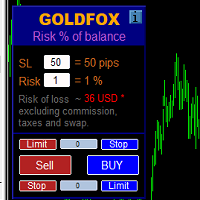
Automatic calculation of a trading lot taking into account Stop Loss (in pips) and the percentage of risk from the account balance. The Expert Advisor panel is located on the chart at the top left. On the panel of the advisor, you can select the size of the stop loss in pips and the percentage of risk from the balance. You can set the deviation from the current price in pips for pending orders. The red color indicates the amount in the deposit currency that you can lose when the stop loss is tr
Visual Trade Manager for MT5 is an interactive trade execution and position management tool designed for traders who want fast chart-based control over risk and execution. The panel provides a visual trade box with entry, stop and target lines directly on the chart. Position size is calculated from the selected risk percentage, and the tool supports both market execution and pending order placement. Main features - BUY and SELL switching directly from chart buttons - Draggable Entry, Stop and
Apexy Engine
Salatiel Pereira Da Silva
Apex Engine HFT is a high-performance execution and data-processing layer engineered for MetaTrader 5 algotraders and institutional developers who require deterministic processing speed during high-volatility market events (such as CPI, FOMC, and Payroll). The architecture is built with ultra-optimized, sequential data structures, eliminating overhead and ensuring maximum execution safety through an active embedded checksum loop. Official Bare-Metal Benchmark Results (Validated on dual-core har
MT4 için Expert Advisor Risk Manager çok önemli ve bence her yatırımcı için gerekli bir program. Bu Uzman Danışman ile ticaret hesabınızdaki riski kontrol edebileceksiniz. Risk ve kar kontrolü hem parasal hem de yüzdesel olarak yapılabilir. [Instruction for Risk Manager parameters] Danışman işlevleri Bu risk yöneticisi, riskleri kontrol etmenize yardımcı olacaktır: - bir anlaşma için - günlük - bir hafta için - Bir ay için Ayrıca kontrol edebilirsiniz 1) Ticaret yaparken izin verilen ma
Make your Take Profit, Stop Loss, and Trailing Stop levels invisible to the broker! Main option: STEALTH MODE Virtual Trailing Stop Virtual Take Profit Virtual Breakeven Virtual Stop Loss Virtual Orders Lifetime WARNING: The Expert Advisor does not place orders by itself. You must open orders yourself (including through the Expert panel) or use a third-party Expert on another chart of the same currency pair. Please specify the Magic number "-1" in the Expert settings for the Expert to process th
Portfolio Allocator tells you how many lots each Expert Advisor of a portfolio should trade. It reads one saved Strategy Tester report per Expert Advisor, or the history of an account that runs several of them (one strategy per magic number), and computes the allocation with eight methods: from equal risk and risk parity to hierarchical risk parity, maximum diversification, maximum Sharpe and minimum tail loss. Then it scales the whole portfolio to the drawdown you accept, and shows with a walk-
OneClick Risk Manager — Manual Trading Assistant OneClick Risk Manager is a manual trading panel for MetaTrader 5. It does not trade on its own — you stay in control and open, close and manage every position with one click. Its job is to do the math for you: position size, risk, partial take-profits, break-even and trailing, so you can trade fast and precisely without manual calculations. Works on any symbol — XAUUSD (gold), US100/NAS100, US30/DJ30, FX pairs and more. The panel is fully scalable
Overview Equity Watching Telegram Pro is an advanced, intelligent portfolio guardian designed for professional traders and investors who demand real-time control over their MetaTrader accounts. This Expert Advisor continuously monitors your account's Balance, Equity, and Floating P/L, instantly dispatching structured, mobile-optimized status cards directly to your Telegram account or group chats. Whether you are running multiple automated trading strategies simultaneously, managing high-volatil
Telegram ChartSnap MT5 is an utility tool to bridge your MetaTrader 5 activities to your Telegram chat/group/channel. It will screen shot your MetaTrader 5 chart and send it to your dedicated Telegram chat/group/channel through a Telegram bot. The whole process will keep repeating based on a time cycle that predetermined by the user. It is a convenient tool for those who like to get access to their favorite system/dashboard that only available at MetaTrader Desktop. Beside that, trader can easi
Live Forex Signals site sinyalleri üzerinden işlem yapmak için tasarlanmıştır   https://live-forex-signals.com/en ve  https://foresignal.com/en . Live Forex Signal for MetaTrader 4   https://www.mql5.com/en/market/product/81445 Ayarlar Web sitelerine aboneliğiniz varsa   Username   ve   Password   live-forex-signals.com/foresignal.com . o zaman bu seçenekleri kimlik bilgilerinizle doldurmalısınız; Abonelik yoksa alanları boş bırakın; Comment   açılan anlaşmalara ilişkin yorum Risk = 0 ise, tic
T Manager, the ultimate trade management solution designed by traders for traders. If you are searching for a simple and efficient trade panel, trade manager, or trade assistant, you are at the right place.   The market contains a diverse number of those tools , but this one is designed by traders for traders . I designed this tool, and I am using it daily. Take my advice and stop buying tools blended with un-useful features that you will never use,   T Manager provides you with the essential y
Trade Control Panel Function Normal One Click Function Close All Close All Profit Close All Loss Close All Pending Order Close All Sell Close All Buy Advance One Click Function 1.  Close Partial Lot Sell by Percent It will help you partial close for all open position by desire percent you wanted. No longer partial close one by one for every open position Manual input for desire percent 2. Close Partial Lot Buy by Percent It will help you partial close for all open position by desire percent
One Click Trader  is a tool designed for MetaTrader 4 platform, which enables you to take your trading to the next level. It enables you to open, manage and close your trades in simple an efficient way by just one click of your mouse button. "-"   ,  "+"  change OCT window size  Up arrow minimizes the OCT panel Down arrow maximizes the OCT panel Right arrow displays the next panel with additional features Left arrow hides the panel with additional features Red  SELL  button enables you to open s
Simple Stats is utility for trades history management. (works as Expert Advisor) Allowing you to:   see trading performance for each symbol separately , and so it     helps you to find the M0ST and the W0RST profitable type of trades  based on past results. filters: see only manual trades see only EA trades see only EA trades from one specific Magic Number select time period for history SS will  distinguish reports with filename - each history report is named with account number an
Launch price: $39 - increases to $49 once the first 10 copies sell. Message me after purchase and I'll help you set it up for your exact symbol/broker. Drag a line. Watch every chart update. Never break your risk plan by accident. Most risk panels stop at "drag SL, see lot size." This one goes further: move your Stop Loss and Take Profit follows automatically to hold your exact R:R — move your Entry and SL/TP travel with it, so your risk never silently drifts. And every level you plan appears
Firmanızın günlük zarar ve düşüş (drawdown) limitlerini bir kez girin. Multi-Account Risk Sync Panel hesabınızı gün boyu bu limitlere göre kontrol eder ve bir limite ulaşıldığı anda açık pozisyonlarınızı kapatır, bekleyen emirlerinizi siler ve kendini durdurur. Prop firma challenge'ları, fonlanmış hesaplar ve sert bir zarar limiti olan her hesap için geliştirildi. İşlem açmaz, işlem kopyalamaz ve başka hiçbir hesaba dokunmaz. Bu sayfadaki tüm ekran görüntüleri canlı bir demo grafiğinden alınmışt
Blade Position Manager Pro – MT5 Trade Management Utility Take Control of Your Trades with One Professional Dashboard Blade Position Manager Pro is a MetaTrader 5 trade management utility designed to help traders manage open positions, control risk, protect floating profits, and simplify everyday trading operations. Whether you trade Gold (XAUUSD), Forex, indices, or other supported instruments, Blade Position Manager Pro provides practical tools for managing your trades from a compact, easy-to-
GPA_Smart_Risk_Manager Complete User Guide   PRODUCT OVERVIEW GPA_Smart_Risk_Manager is a professional-grade, all-in-one trading panel and autonomous risk management Expert Advisor for MetaTrader 5. It combines rapid one-click execution, intelligent position sizing, autonomous risk compounding, ATR-based protection, dynamic volatility adjustment, and multi-layered safety controls into a single, modern, on-chart control centre. Designed for discretionary traders, scalpers, day traders, and swing
Tüm açık işlemlerinizde gizlenen korelasyonlu riski görün — grafikte canlı olarak, bir maruziyet limiti ve anlaşılır uyarılarla. GENEL BAKIŞ Birçok trader her işlemin büyüklüğünü dikkatle belirler, ancak birkaç açık pozisyon aynı para birimine bağlı olduğu veya birlikte hareket ettiği için yine de planladığından fazla risk alır. EURUSD ve GBPUSD'yi birlikte almak büyük ölçüde tek bir USD işlemidir. Negatif korelasyonlu bir paritede yapılan "hedge" kendini sıfırlayabilir ve yalnızca spread ekle
CT All in One Trading Manager V603 | MetaTrader 5 Profesyonel İşlem ve Piyasa Yönetim Paneli Tek ekran. Tam kontrol. Profesyonel işlem yönetimi. CT All in One Trading Manager, MetaTrader 5 (MT5) platformu için geliştirilmiş, manuel işlem yapmayı, bekleyen emirleri yönetmeyi, açık pozisyonları takip etmeyi ve canlı piyasa bilgilerini tek ekranda görüntülemeyi sağlayan çok işlevli bir işlem yönetim panelidir. Birden fazla pencere arasında geçiş yapmadan, işlemlerinizi ve piyasa hareketlerini aynı
BNT Rapid Copier Local MT4 / MT5 trade copying with configurable execution and copy-profit statistics. User Manual and Installation Guide Download the English User Manual and Installation Guide (ZIP) Download and extract the ZIP file to access the PDF user manual. The guide covers Sender and Receiver setup, channel configuration, symbol mapping, lot sizing, synchronization options, profit statistics and troubleshooting. MT4 and MT5 in One Workflow BNT Rapid Copier connects a source trading acco
Trade Guardian Risk Manager is a MT5 utility Expert Advisor dedicated to risk control and equity protection. Many know how to trade. Few know when to stop. Trade Guardian formalizes discipline and mechanically enforces your limits when emotions or over-exposure take over. Risk management utility No trading logic — Does NOT open trades : does not open positions, does not provide signals, contains no strategy, and does not guarantee results. Operating principle — Equity Monitoring + rule enf
Kullanım kılavuzu (PDF): https://polymaria.net/manuals/maria-trade-manager-mt5-user-guide.pdf Maria Trade Manager, manuel işlem yapan trader'lar için doğrudan MetaTrader 5 grafiğinizde çalışan bir işlem masasıdır. BUY ya da SELL'e tıklamadan önce panel işlem planını grafiğe çizer: giriş, stop loss ve take profit bölgeleri; riske edilen tutar, hedeflenen kazanç ve risk:ödül oranı ile birlikte. Planı değiştirmek için bir çizgiyi sürükleyin, ardından emri tek tıkla açın. İşlem açıldıktan sonra pane
Position Prime
Mariana Cordeiro Neves Fernandes
Şimdi ücretsiz demo sürümünü indirin ve satın almadan önce Strateji Test Cihazınızdaki tüm risk yönetimi özelliklerini test edin! Position Prime , MetaTrader 5 için kurumsal düzeyde görsel bir işlem asistanı ve risk yöneticisidir. Hız ve hassasiyet arayan yatırımcılar için tasarlanmış olup, manuel lot hesaplama ihtiyacını ortadan kaldırır ve grafiğinizi gerçek bir işlem masasına dönüştürür. Saniyeler içinde işlemlerinizi planlayın, uygulayın ve koruyun. ️ Risk Yönetimi ve Otomatik Lot Hesapl
TradeDesk EA — Semi-Automatic Trading and Account Discipline Panel for MT5 English Description Faster execution with rules that remain in force TradeDesk EA is a bilingual semi-automatic trading assistant for MetaTrader 5. It combines order execution, position sizing, trade management, conditional tasks, account statistics, and optional discipline controls in one compact panel. It can be used with Forex, metals, indices, energy products, stocks, and other CFD instruments made available by th
ApexForge Economic Calendar Safety Dashboard MT5 Ekonomik Takvim | Forex Ekonomik Takvim | News Filter | Önemli Ekonomik Veri Uyarıları | Ekonomik Etkinlik Geri Sayımı | Acil Pozisyon Kapatma | Close All | Piyasa Tatili Uyarısı | Erken Kapanış Uyarısı | KTimer | Mum Kapanış Geri Sayımı | Mobil Push Bildirimi | 12 Dil + Auto ApexForge Economic Calendar Safety Dashboard , MT5 Economic Calendar ekonomik takvim, Forex News Filter, önemli ekonomik veri uyarıları, ekonomik etkinlik geri sayımı, acil p
Bu ürünün alıcıları ayrıca şunları da satın alıyor
Trade Assistant MT5
Evgeniy Kravchenko
4.43 (216)
It helps to calculate the risk per trade, the easy installation of a new order, order management with partial closing functions, trailing stop of 7 types and other useful functions. Additional materials and instructions Installation instructions - Application instructions Line function -   shows on the chart the Opening line, Stop Loss, Take Profit. With this function it is easy to set a new order and see its additional characteristics before opening.   Risk management  - The risk calculation
Trade Manager EA’ye hoş geldiniz! Ticaretin daha sezgisel, hassas ve verimli hale gelmesi için tasarlanmış nihai risk yönetim aracı ile tanışın. Bu sadece bir emir verme aracı değil; ticaret planlaması, pozisyon yönetimi ve risk kontrolü için kapsamlı bir çözüm. İster yeni başlayan bir yatırımcı olun, ister deneyimli bir trader ya da hızlı emir gerektiren bir scalper, Trade Manager EA ihtiyaçlarınıza uyum sağlar ve forex, endeksler, emtialar ve kripto paralar dahil tüm piyasalarda esneklik sunar
Farmed Hedge Yield Farming | All Markets (Manual - Hybrid - Semi/Automated EA) VERIFIED TRADING RESULTS - Farmed Hedge Yield Axi Copy:  https://www.mql5.com/en/signals/2356376 - Farmed Hedge Yield Exn Copy:   https://www.mql5.com/en/signals/2356404 - Farmed Hedge Yield V Copy:  https://www.mql5.com/en/signals/2357156 IMPORTANT NOTICE: FarmedHedge is a MANUAL-FOCUSED TRADING UTILITY ,not a fully automated EA. Results shown on this Signal include manual trades and overall strategic management.
Telegram to MT5 Multi-Channel Copier   , Telegram ve Discord kanallarınızdaki alım-satım sinyallerini doğrudan MetaTrader 5'e otomatik kopyalar. Bot yok, tarayıcı uzantısı yok, elle kopyalama yok. Sinyal Telegram'a veya Discord'a düşer ve EA birkaç saniye içinde terminalinizde işlemi açar. Ve bir kanalı kopyalamadan önce, yerleşik backtester o kanalın hesabınızda ne yapmış olacağını gösterir. Ürün iki bileşenden oluşur: Telegram kanallarınızı dinleyen bir Windows uygulaması ve sinyalleri MT5 ter
Local Trade Copier EA MT5
Juvenille Emperor Limited
4.94 (149)
Local Trade Copier EA MT5, aynı Windows bilgisayarı veya Windows VPS üzerinde çalışan birden fazla MetaTrader 5 hesabı arasında işlemleri kopyalamak ve yönetmek için hızlı ve esnek bir işlem kopyalayıcıdır. Yerel işlem senkronizasyonunu, Receiver tarafında lot büyüklüğü, risk yönetimi, işlem filtreleme, sembol eşleştirme, işlem yönetimi ve hesap koruması kontrolleriyle birleştirir. Transmitter ve Receiver terminallerinizi yaklaşık 1 dakika içinde ayarlayın ve aynı veya farklı brokerlardaki hesa
TradePanel MT5
Alfiya Fazylova
4.88 (172)
Trade Panel, çok işlevli bir ticaret asistanıdır. Uygulama, manuel ticaret için 50'den fazla ticaret fonksiyonu içerir ve çoğu ticaret görevini otomatikleştirmeyi mümkün kılar. Uygulama talimatları: https://www.mql5.com/en/blogs/post/756482 Demo hesabı için uygulamanın deneme sürümü: https://www.mql5.com/en/blogs/post/750865 Uygulamayı nasıl kurulur: https://www.mql5.com/en/blogs/post/756239 Uygulamayı görsel modda nasıl test edilir: https://www.mql5.com/en/blogs/post/770277 Uygulamayı VPS MetaT
News Trade EA MT5
Konstantin Kulikov
4.55 (11)
Birkaç yıldır kullandığım çok yararlı bir robotu tanıtıyorum. Hem yarı otomatik hem de tam otomatik modlarda kullanılabilir. >>> Chat <<< Program, ekonomik takvim haberlerinde esnek ticaret ayarlarını içeriyor. Stratejiler test cihazında kontrol edilemez. Sadece gerçek bir iş. Ayarların en son arşivini indirin: https://www.mql5.com/en/blogs/post/747929 Sinyal izleme: https://www.mql5.com/en/signals/author/test-standart Bu bilirkişi için kendi ayarlar setinizi oluştururken, blogdaki tüm paramet
Telegram sinyallerini kendi işlem kurallarınızla kopyalayın Telegram to MT5 Signal Trader , herkese açık ve özel Telegram kanallarındaki ve gruplarındaki metin tabanlı işlem sinyallerini otomatik olarak MetaTrader 5'e kopyalar. Tek bir masaüstü uygulamasından birden fazla sinyal sağlayıcısını ve MT5 hesabını yönetin; her sağlayıcı için ayrı risk ve işlem ayarları belirleyin. Sinyal kopyalamak için Telegram botu veya API kurulumu gerekmez. Kendi Telegram hesabınızla telefon numarası veya QR kod k
================================================================================ POC BREAKOUT - V20.72. Full Professional Grade Toolkit ================================================================================ POC Breakout is a full MetaTrader 5 trading dashboard for discretionary traders who want breakout signals, Point of Control (POC) context, volume profiles, order flow, market structure, news, alerts, and advanced trade planning in one professional workspace. Attached directly to you
Exp COPYLOT CLIENT for MT5
Vladislav Andruschenko
3.97 (35)
MetaTrader 5 için profesyonel işlem kopyalayıcı MetaTrader için hızlı, profesyonel ve güvenilir bir işlem kopyalayıcı . COPYLOT , MT4 ve MT5 terminalleri arasında Forex işlemlerini kopyalamanıza olanak tanır ve Hedge ile Netting hesaplarını destekler. COPYLOT MT5 sürümü şunları destekler: - MT5 Hedge → MT5 Hedge - MT5 Hedge → MT5 Netting - MT5 Netting → MT5 Hedge - MT5 Netting → MT5 Netting - MT4 → MT5 Hedge - MT4 → MT5 Netting MT4 sürümü Tam açıklama + DEMO + PDF Nasıl satın alınır Nasıl kurul
The product will copy all telegram signal to MT5 ( which you are member) , also it can work as remote copier.  Easy to set up, copy order instant, can work with almost signal formats, image signal,  s upport to translate other language to English Work with all type of channel or group, even channel have "Restrict Saving Content", work with  multi channel, multi MT5 Work as remote copier: with signal have ticket number, it will copy exactly via ticket number. Support to backtest signal. How to s
REVDEN AI Desk: Trading'inizi Kendi Yapay Zekanızla Tek Bir Sohbetten Yönetin, REVDEN'in Piyasa Bağlamıyla Trading'inizi tek bir sohbetten yönettiğinizi düşünün. REVDEN AI Desk bunu MetaTrader 5'e getiriyor: kendi yapay zekanıza piyasayı nasıl okuduğunu sorarsınız, o da işlem yaptığınız semboller hakkında REVDEN'in tam bağlamından, yani durumlarından, risk görünümlerinden ve yaklaşan açıklamalardan yanıt verir. Önerileri giriş, stop, hedef ve riskle gelir; uygun olanları siz onaylarsınız. Kurall
EA Overfitter
Stephen J Martret
5 (3)
That backtest looks great. But will it still be making money tomorrow, next week, next month? EA Overfitter re-runs your EA on 100 price histories it has never seen. One score tells you if the edge is real. A backtest tells you what an EA did on one price history — the one that happened to occur. What you cannot tell from it is how much of that result was the strategy and how much was the particular path. EA Overfitter answers that. It builds up to 100 synthetic price histories your EA has n
Power Candles Strateji Tarayıcısı - Kendi Kendini Optimize Eden Çoklu Sembol Kurulum Bulucu Power Candles Strateji Tarayıcısı , Power Candles göstergesini çalıştıran aynı kendinden optimize edici motoru, Piyasa İzleyicinizdeki her sembol üzerinde yan yana çalıştırır. Tek bir panel, şu anda istatistiksel olarak hangi sembollerin işlem yapılabilir olduğunu, her birinde hangi stratejinin kazandığını, en uygun Stop Loss / Take Profit çiftini gösterir ve yeni bir sinyal geldiği anda size bildirim gön
Timeless Charts
Samuel Manoel De Souza
5 (9)
Timeless Charts, profesyonel yatırımcılar için hepsi bir arada bir trading aracıdır. Saniye Grafikleri ve Renko gibi özel grafik türlerini, Footprints , Clusters , Hacim Profilleri , VWAP çalışmaları ve gelişmiş piyasa analizi sağlayan sabitlenmiş analiz araçlarıyla gelişmiş emir akışı analiziyle birleştirir. İşlem ve pozisyon yönetimi, entegre işlem yönetim paneli aracılığıyla doğrudan grafik üzerinden gerçekleştirilirken, Market Replay ve Sanal Hesaplar trading becerileri ve stratejileri üzeri
MetaTrader 5 için Trading Panel — grafik ve klavyeden profesyonel tek tıkla işlem kontrolü Aktif traderlar için geliştirilmiş güçlü bir Trading Panel; işlemleri standart MetaTrader arayüzüne göre çok daha hızlı açmanıza, yönetmenize ve kapatmanıza yardımcı olur. Bu çözüm; pozisyonları, bekleyen emirleri, toplam kârı ve işlem yürütmesini tek bir profesyonel çalışma alanında kontrol etmek isteyen kullanıcılar için tasarlanmıştır. Bu sadece sıradan bir yardımcı araç değildir. MetaTrader 5 için ger
Your EAs cannot see each other, but Anchor can. Anchor gives you one place to coordinate your EAs, manage risk, and decide when trading is allowed. It works alongside the trading bots you already use without any changes to them. The Problem One EA opens a trade. Then another starts trading. The next thing you know, you wake up to multiple grids built across your account. Each EA may be doing exactly what it was designed to do, but together they can place far more risk on your account than you in
VirtualTradePad PRO SE MT5 — MetaTrader 5 için profesyonel işlem kontrol merkezi VirtualTradePad PRO SE , MetaTrader 5 için grafik tabanlı premium bir işlem paneli ve trade yönetim çalışma alanıdır. Daha hızlı emir yürütme, daha net pozisyon kontrolü, yapılandırılmış trade yönetimi, görsel seviye planlama ve doğrudan grafik üzerinden profesyonel bir çalışma akışı isteyen traderlar için tasarlanmıştır. Bu yalnızca basit bir BUY / SELL paneli değildir. PRO SE; manuel işlem, bekleyen emirler, pozis
RETAILBERG FOOTPRINT CHART PRO — Order-Flow Workspace for MetaTrader 5 Version 7.00  |  Professional System  |  31 tools  |  One chart A full 150-page illustrated User Manual is included. Please read the full manual to understand this feature packed footprint chart elements and ui. https://www.mql5.com/en/blogs/post/777982 DEMO / STRATEGY TESTER — PLEASE READ FIRST
Trade Dashboard simplifies how you open, manage, and control your trades, with built-in lot size calculation. It allows you to execute trades, manage risk, and control positions directly on the chart, with tools such as partial close, breakeven, and trailing stop. Designed to reduce manual work and help you stay focused on your trading decisions. A demo version is available for testing. Detailed explanations of features are provided within the MQL5 platform. Installation instructions are include
Trade Indicator Assistant   is a powerful MT5 utility designed to turn indicators into automated trading systems. Its main feature is the ability to automatically detect an indicator’s   BUY and SELL signal buffers , without requiring you to know the buffer numbers, search through indicator settings, or modify the indicator source code. Bonus Indicator:   After purchasing Trade Indicator Assistant, contact me to receive   Trade Signal Pro   completely free as a bonus indicator. [Download Demo V
Seconds Chart - MetaTrader 5 için saniye bazlı grafikler oluşturmanıza olanak sağlayan eşsiz bir araçtır. Seconds Chart sayesinde saniye cinsinden zaman dilimleriyle grafik oluşturabilir, standart dakika veya saatlik grafiklerde mümkün olmayan esneklik ve analiz hassasiyetine ulaşabilirsiniz. Örneğin, S15 zaman dilimi 15 saniyelik mum çubuklarını ifade eder. Desteklenen özel sembollerle herhangi bir gösterge ve danışman kullanabilirsiniz. Onlarla çalışmak, standart grafiklerde işlem yapmak kadar
Riskinizi otomatik olarak hesaplarken işlemlere hızlı bir şekilde girip çıkmanıza yardımcı olacak Ticaret Yöneticisi. Aşırı Ticaret, İntikam Ticareti ve Duygusal Ticaretten korunmanıza yardımcı olacak özellikler içerir. İşlemler otomatik olarak yönetilebilir ve hesap performans ölçümleri bir grafikte görselleştirilebilir. Bu özellikler, bu paneli tüm manuel yatırımcılar için ideal kılar ve MetaTrader 5 platformunun geliştirilmesine yardımcı olur. Çoklu Dil desteği. MT4 Sürümü  |  Kullanım Kılavu
Sonraki Güncelleme — Sürüm 2.52 Çok Yakında! [YENİ] Piyasa Analizinizi ve İşlem Sürecinizi Geliştirmek İçin Tasarlanmış 4 Büyük Yeni Özelliğe Hazır Olun İşlem ihtiyaçlarınızı karşılamak üzere tasarlanmış 4 yeni özellikle piyasa analizini bir üst seviyeye taşıyoruz. İşte yeni özellikler: TRADE OVERVIEW DASHBOARD CONFLUENCE AT ZONE STRONG & WEAK HIGH/LOW OTE 1. TRADE OVERVIEW DASHBOARD Piyasanın genel görünümünü daha kolay anlamanıza yardımcı olan, işlem kararlarınızı desteklemek için rehberlik s
MT5 to Telegram Signal Provider , hesabınızı bir sinyal sağlayıcı haline getirerek belirtilen sinyalleri Telegram'ın sohbetine, kanalına veya grubuna göndermeyi sağlayan kullanımı kolay, tamamen özelleştirilebilir bir araçtır. Rakip ürünlerin çoğunun aksine, DLL içe aktarması yapmaz. [ Demo ] [ Kılavuz ] [ MT4 Versiyonu ] [ Discord Versiyonu ] [ Telegram Kanalı ]  New: [ Telegram To MT5 ] Kurulum Adım adım bir kullanıcı kılavuzu mevcuttur. Telegram API'si hakkında bilgi gerekmemektedir; ihtiyac
DrawDown Limiter
Haidar Lionel Haj Ali
5 (23)
DrawDown Limiter v5.0 — Gelişmiş Hesap Koruma Kontrolcüsü DrawDown Limiter v5.0, trading hesabınızı izlemek ve yapılandırılmış risk, kâr, haber, zamanlama, rollover veya pozisyon sayısı limitlerine ulaşıldığında otomatik olarak tepki vermek üzere tasarlanmış istemci taraflı bir hesap koruma kontrolcüsüdür. Tek bir özel grafik üzerinden manuel işlemleri, otomatik stratejileri, birden fazla Expert Advisor'ı, bekleyen emirleri ve açık pozisyonları izleyebilir. Tüm hesabı koruyabilir veya Magic Numb
RS Trade Copier - gerçek grafik arayüze sahip, ultra hızlı yerel işlem kopyalayıcı. Hesap numaralarını elle girmeyi bırakın. Artık 200'den fazla anlaşılmaz giriş parametresiyle uğraşmak yok. Birden fazla MT5 ve MT4 terminali arasında işlem operasyonlarını kopyalamak için güvenilir ve esnek bir araçtır. Hem profesyonel yatırımcılar, sinyal hizmetleri hem de bireysel yatırımcılar için uygundur. Bir veya birden fazla Sağlayıcıdan bir veya birden fazla Alıcıya ticareti senkronize eder ve bunu yüksek
25% discount on the release of the tool: only for the next 3 buyers Send a message to receive a demo version. AstroTrade Trading Assistant AstroTrade is a comprehensive multi-functional trading utility developed for the MetaTrader 5 platform. It integrates essential tools for trade execution, risk management, and technical monitoring into a single unified interface. The application is designed to assist traders in managing their daily operations through a visual and structured environment. Vi
Zentral Trading Manager
Ray Zeanrik Parreno Fredeluces
5 (4)
Zentral Manager Your Command Center for Precision Trading — Now Stronger than Ever Take control of your trades like never before. Zentral Trading Manager is your all-in-one manual trading panel for MetaTrader 5 — built for scalpers, day traders, and serious strategy execution. Fully compatible with both Mac and Windows laptops. High-DPI safe. No more layout issues. Key Features (Latest 2025 Update): • One-Click Close – Instantly close Buy/Sell, winning/losing trades, or even half positions with
Master Your Trading Discipline   Stop losing your hard-earned gains to overtrading and emotional decisions. The Discipline Tool is your ultimate trading assistant, ensuring strict risk management in real-time. Key Protection Features: Advanced Drawdown Defense : Automatically halts trading if your daily drawdown exceeds a preset threshold (percentage or dollar amount). Real-Time Equity Lock : Safeguard profits by referencing peak equity, ensuring drawdown stays within control. Hard Profit Target
Yazarın diğer ürünleri
Most prop-firm accounts are not lost because of a bad strategy, but because of one bad day. Prop Firm Guard watches your account equity every second and enforces the rules of your challenge for you. What it does Daily loss limit : in percent of the account size or in money. Measured from the balance at the start of the day, or from the higher of balance/equity (as some firms do). Floating losses are included. Maximum drawdown : static (from the initial account size) or trailing (from the highest
The first minutes after the New York open often define the range that the rest of the session reacts to. NY Opening Range Breakout Retest draws that range automatically and waits for a clean sequence: a candle closes outside the range, then price comes back to retest the broken edge and a strong candle closes in the breakout direction. Only then is a signal printed. How a signal is formed 1. Opening range : the high and low of all bars that open between Range start and Range end (default 09:30-0
Filtrele:
Değerlendirme yok
Değerlendirmeye yanıt