StructuraX
- Göstergeler
-
Ibe Hyginus Ugwoke
 I’m an MQL4/MQL5 developer and active trader. I build and personally test the trading tools I develop, which gives me a practical understanding of edge cases, signal timing, and the differences between backtest and live behaviour.
 - Sürüm: 2.32
- Etkinleştirmeler: 5
Non-repainting market structure analysis with a mechanical bias score, optional higher-timeframe context, key levels, and risk-based reference calculations.
Overview
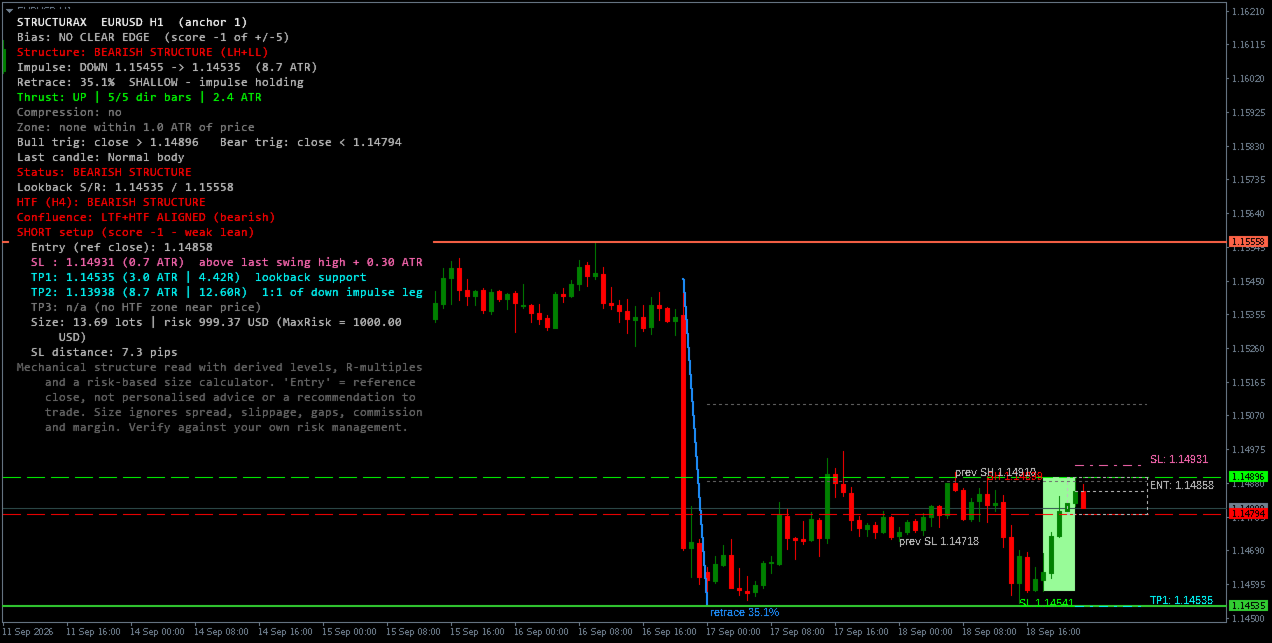
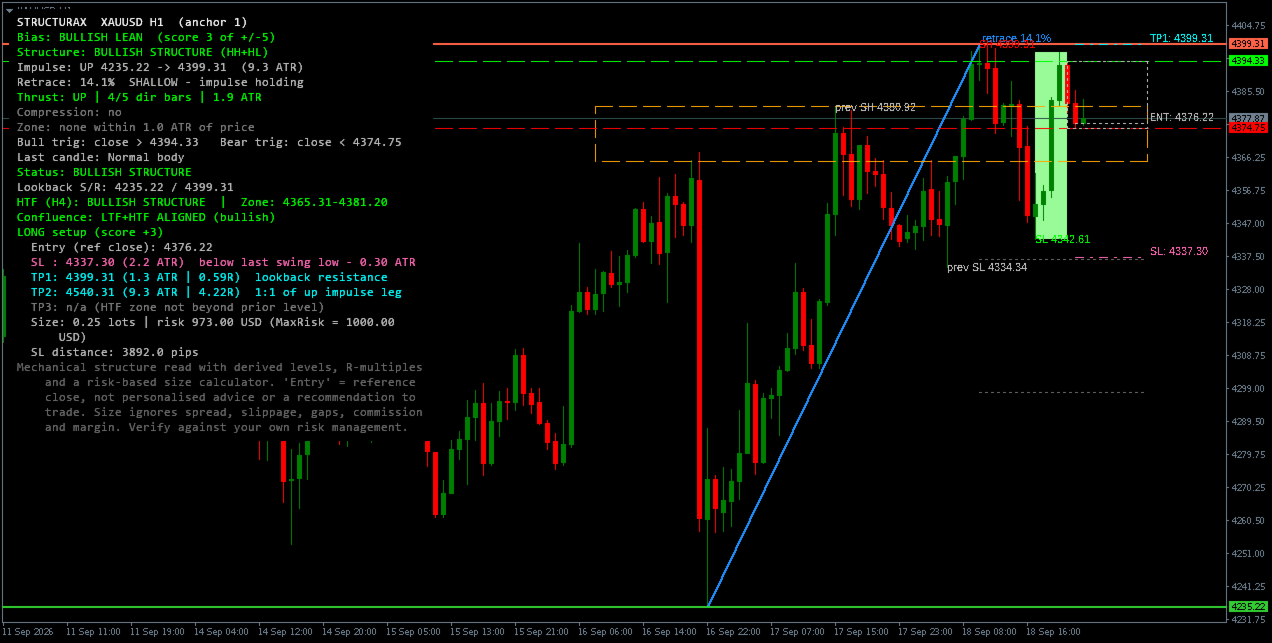
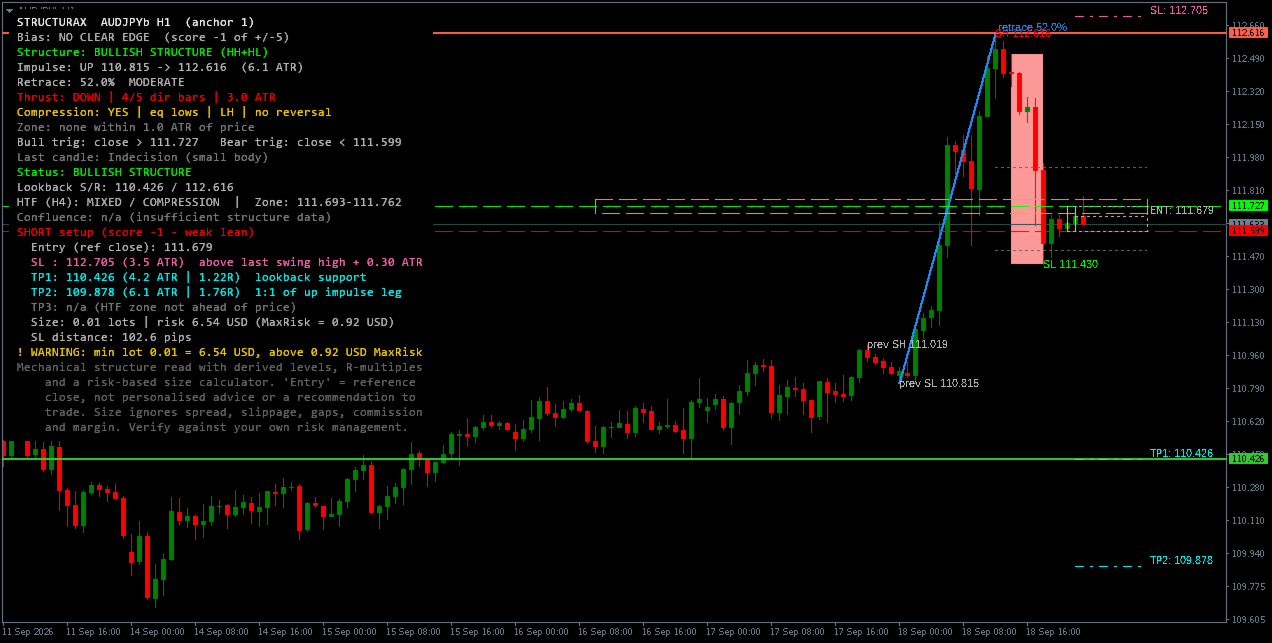
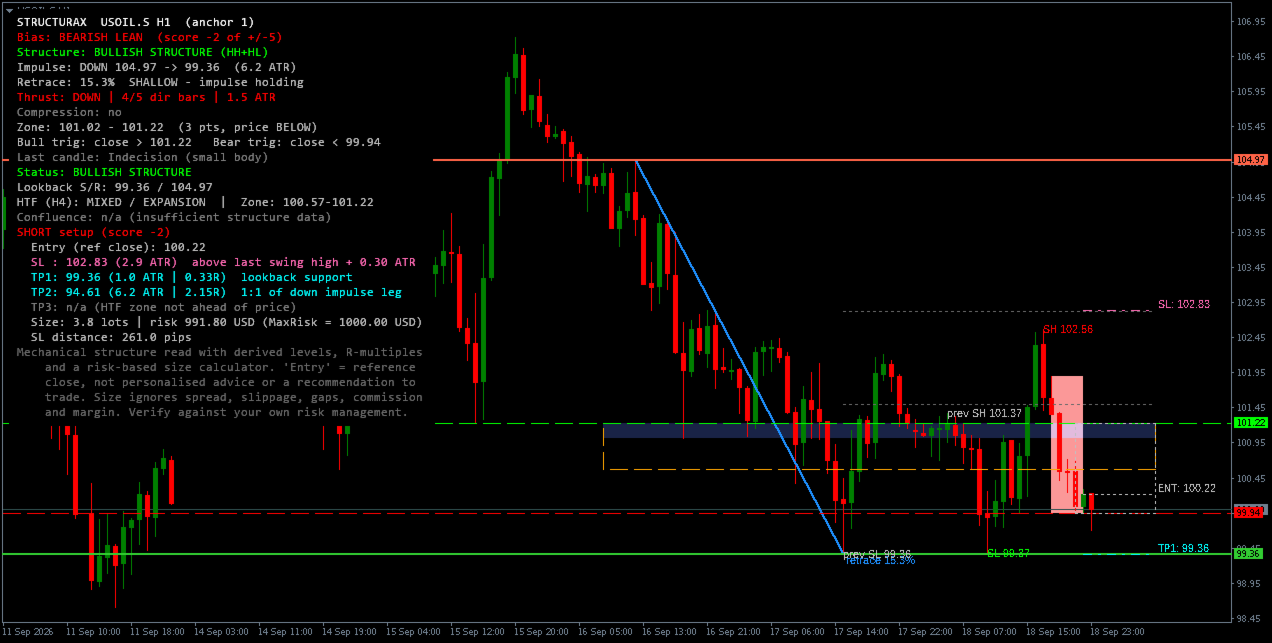
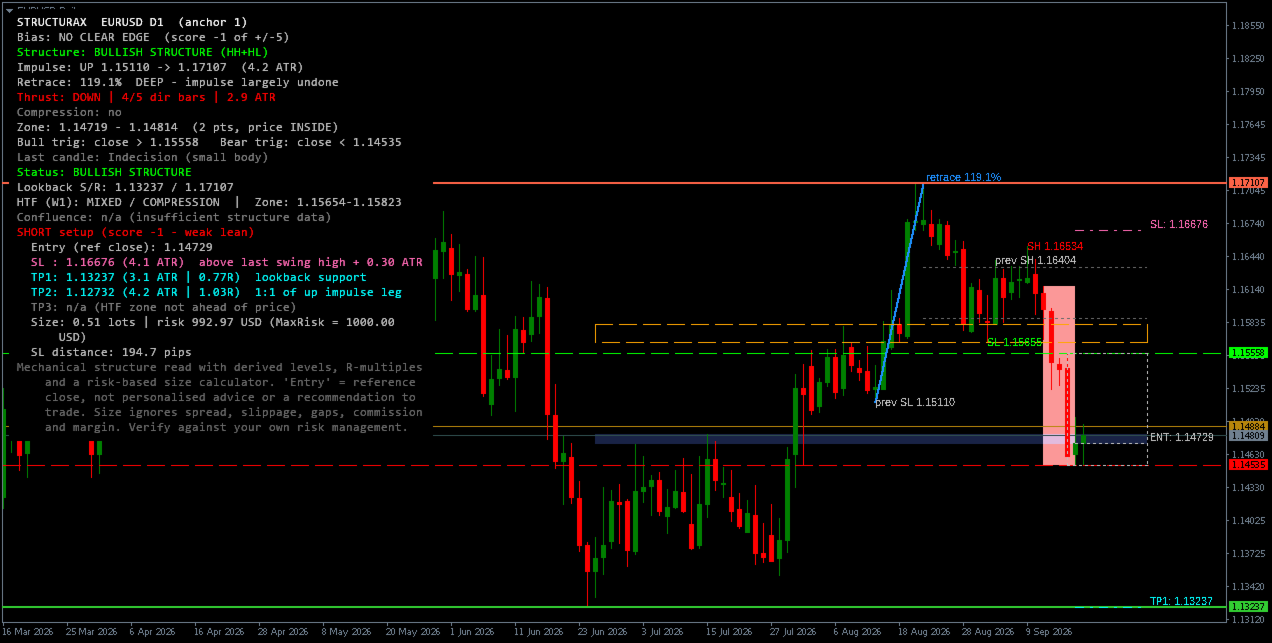
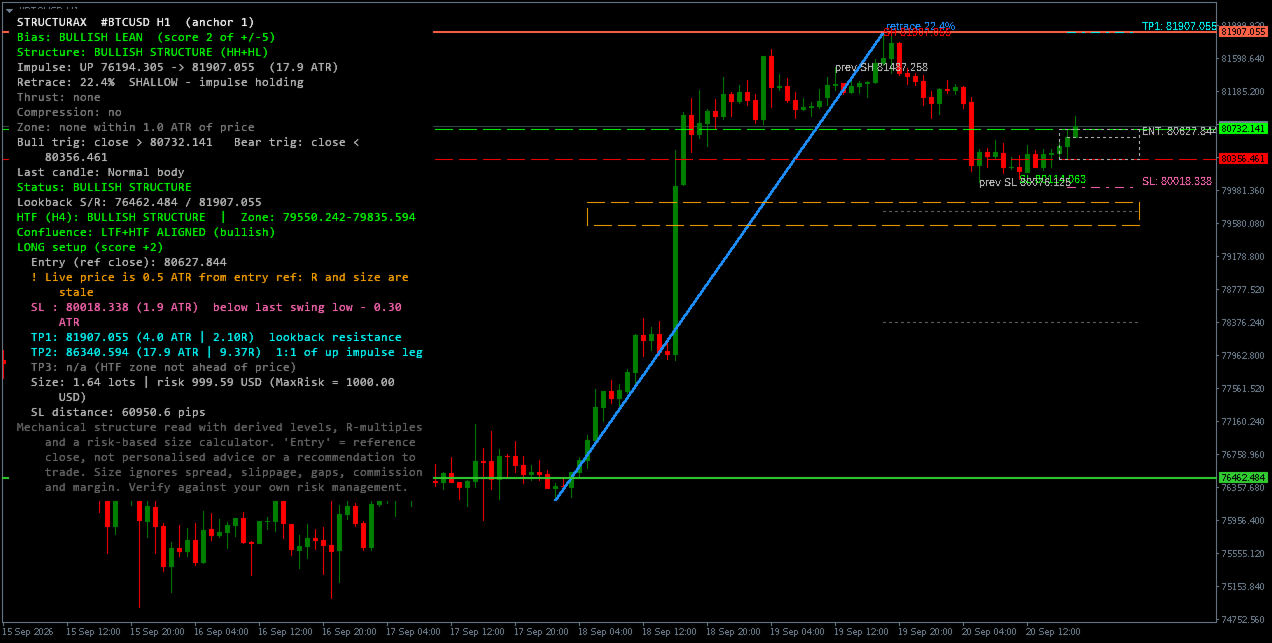
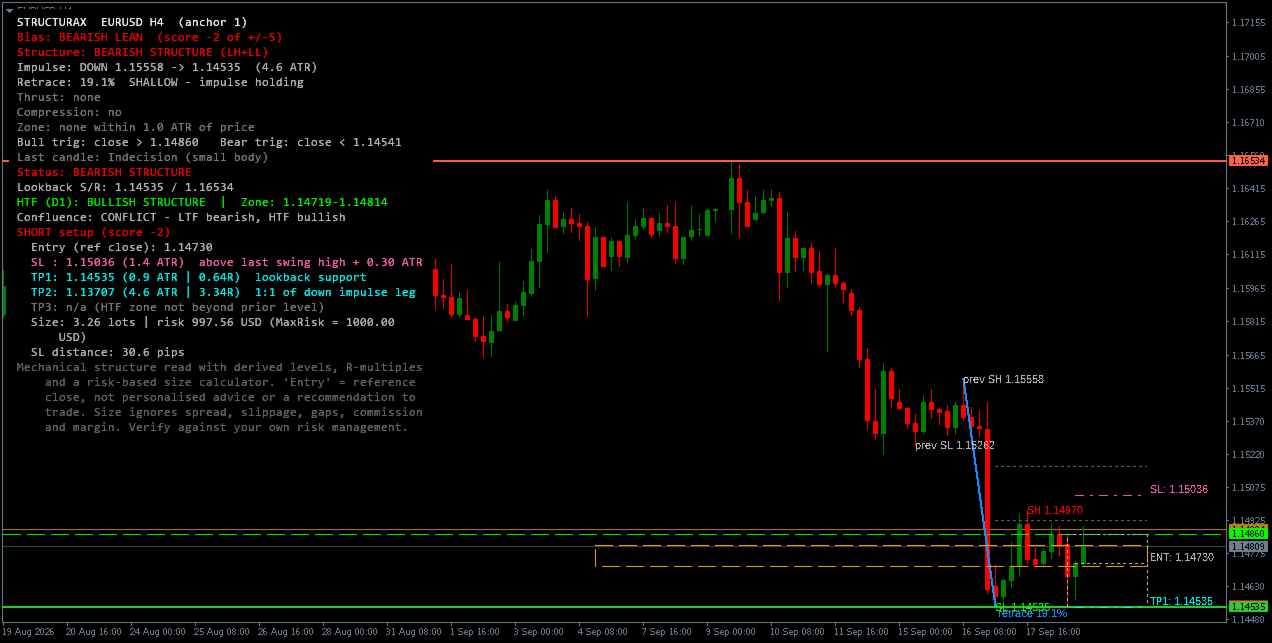
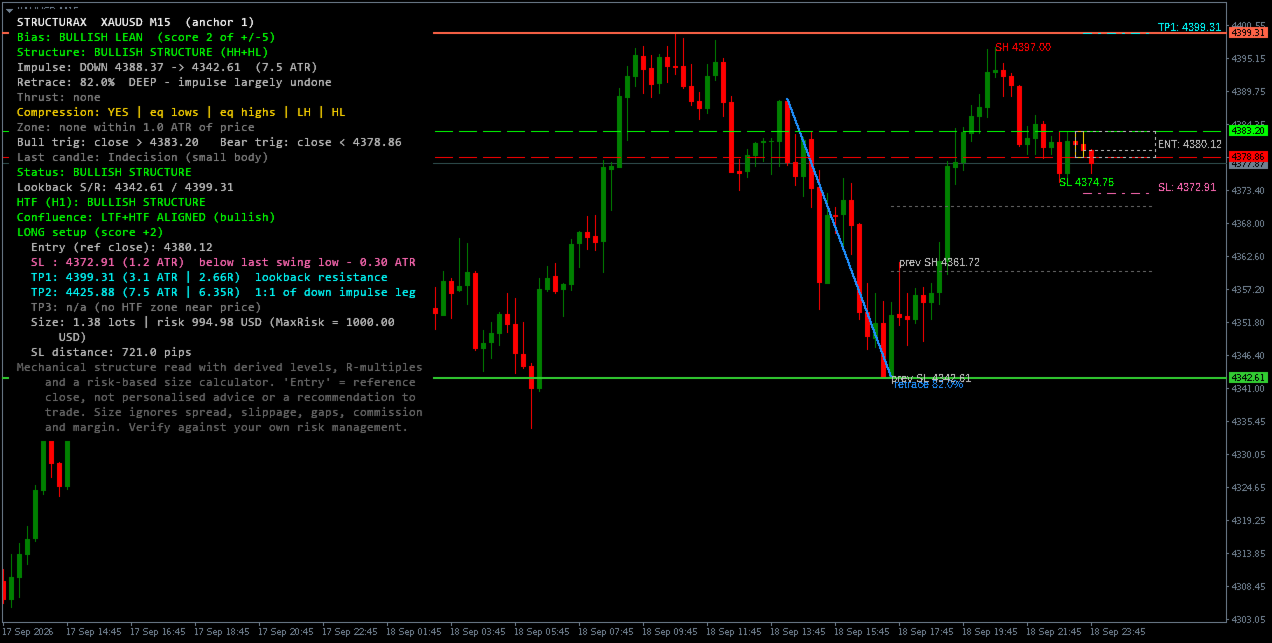
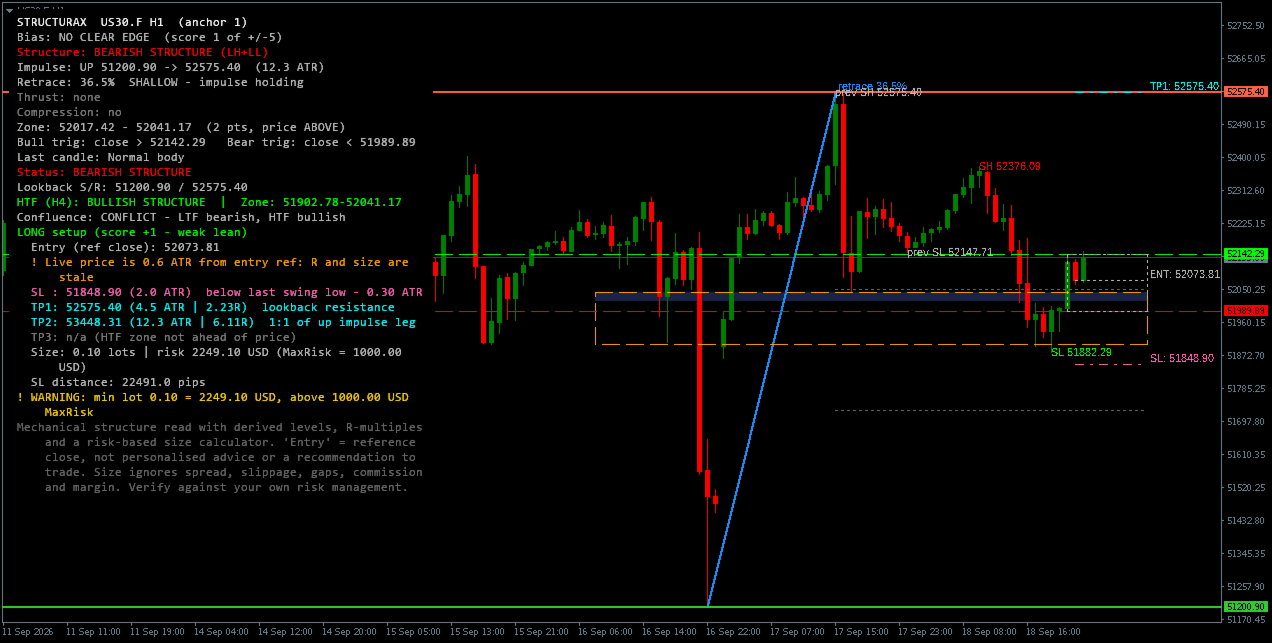
StructuraX is a rule-based market structure indicator designed to turn price action into a structured analytical framework.
It analyses the current chart timeframe for:
-
Market structure: HH/HL and LH/LL
-
Confirmed Break of Structure (BOS)
-
Dominant impulse and retracement depth
-
Momentum thrust
-
Compression
-
Key structural zones
-
Lookback support and resistance
-
Bull and bear trigger levels
-
Custom price levels
-
Optional higher-timeframe structure and key zone
-
LTF/HTF confluence
The indicator presents the analysis through on-chart objects and a configurable dashboard.
Mechanical Bias Score
StructuraX produces a heuristic bias score from -5 to +5.
The score is derived from five chart-timeframe structural analyses:
-
Impulse retracement
-
Recent momentum
-
Momentum reversal behaviour
-
Price location relative to the key zone
-
Market structure classification
Score Interpretation
-
+2 to +5: Bullish lean
-
-1 to +1: No clear edge
-
-2 to -5: Bearish lean
The score is a structural heuristic. It is not a probability, win rate, or validated prediction of future price movement.
Higher-timeframe context is displayed separately as a confluence flag and is not included in the bias score.
Higher-Timeframe Context
An optional HTF layer provides a second structure read using a user-selected higher timeframe.
It displays:
-
HTF structure classification
-
HTF key zone
-
LTF/HTF confluence status
The confluence flag can show:
-
LTF+HTF ALIGNED
-
CONFLICT
-
n/a
HTF analysis uses only the last closed HTF bar and does not follow the chart-timeframe anchor mode.
Derived Reference Levels
When enabled and the bias score is non-zero, StructuraX can derive:
-
Reference price
-
Structural stop level
-
TP1
-
TP2
-
TP3
-
R-multiple for each valid target
The reference price is the close of the anchor bar. It is the reference point for the level distances and for the R-multiple calculations. It is labelled "Entry" on the dashboard for identification. It is not an instruction to enter at that price.
Each level is accompanied by the structural rule that produced it.
Target references can come from:
-
Lookback or key-zone boundaries
-
Current impulse extensions
-
Higher-timeframe zone edges
These are mechanical reference levels, not trade recommendations or predictions.
Risk-Based Position Sizing
When a valid stop is available, the indicator can calculate a reference position size based on:
-
Account balance or equity
-
Maximum risk percentage
-
Fixed maximum risk amount
-
Stop distance
-
Broker lot step and minimum/maximum lot constraints
The calculator also provides an entry-drift warning when price has moved sufficiently away from the reference close.
The calculation does not account for spread, slippage, gaps, commissions, margin requirements, correlation exposure, existing positions, or individual risk tolerance.
Non-Repainting Design
The default anchor mode is ANCHOR_LAST_CLOSED.
Analysis is performed on the last fully closed chart-timeframe bar.
The indicator also provides:
-
ANCHOR_AUTO
-
ANCHOR_INCLUDE_FORMING
The forming-bar mode recalculates on every tick and repaints by design. It is therefore not intended for backtesting or reproducible historical signals.
On-Chart Dashboard
The configurable dashboard can display:
-
Bias score
-
Structure
-
BOS status
-
Impulse and retracement
-
Momentum thrust
-
Compression
-
Key zone
-
Last candle classification
-
Lookback S/R
-
Custom levels
-
HTF structure
-
HTF zone
-
LTF/HTF confluence
-
Derived levels
-
R-multiples
-
Position size
Dashboard position, visibility, wrapping, panel background, and individual rows can be configured.
Alerts
Alerts can be independently enabled for:
-
Bullish BOS
-
Bearish BOS
-
Zone reclaim
-
Zone loss
-
Lookback breakout/breakdown
-
Custom level crossing
Supported channels:
-
Popup
-
Sound
-
Push notification
-
Email
Alerts are generated only from live closed-bar events and are deduplicated per bar.
Customisation
All major thresholds are exposed as inputs, including:
-
ATR period
-
Swing strengths
-
Lookback windows
-
Impulse thresholds
-
Retracement thresholds
-
Momentum thresholds
-
Compression parameters
-
Key-zone parameters
-
Trigger buffers
-
HTF parameters
-
Stop and target parameters
-
Risk and sizing parameters
-
Dashboard settings
-
Alert settings
-
Object colours and visibility
Every numeric threshold is configurable.
Technical Information
Platform: MetaTrader 4, build 600 or later
Type: Chart-window indicator
Buffers: 1
Buffer 0: Current live bias score for the active anchor bar
Dependencies: None
Object prefix: SX_
All indicator objects are removed automatically when the indicator is removed from the chart.
Important Notes
StructuraX is a visual market-analysis tool.
It does not:
-
Place trades
-
Manage positions
-
Generate guaranteed buy/sell signals
-
Analyse volume or order flow
-
Analyse market profile
-
Use external data
-
Identify institutional activity
The bias score is heuristic and should not be interpreted as a statistical probability or win rate.
Derived Entry, SL, TP and position-size values are mechanical reference calculations. They are not personalised trading advice or instructions to trade.
R-multiples are arithmetic ratios, not performance expectations.
Enabling the dashboard on-top option places all of the indicator's objects in front of the candles rather than behind them. The chart's original setting is restored when the indicator is removed.
Past market structure and zone behaviour are not indicative of future price movement.
Always verify calculated position size, contract specifications, and execution assumptions with your broker and your own risk-management rules.
Support
Bug reports, feature requests, and setup questions are welcome in the Comments section of the product page.
For reproducible issues, please provide the symbol, timeframe, settings, and a screenshot where possible.