MSRLab Context Matrix Workstation

MSRLab Context Matrix Workstation

A self-contained MT5 workspace for scanning closed-bar context, inspecting structure, planning risk and recording a discretionary decision.
Context Matrix Workstation is a utility for traders who want a calmer, repeatable process before they act. It is not an automated strategy, a signal service or a promise of profitable trading. The EA stays on one chart and helps you move through a practical workflow:
1. Scan → 2. Inspect → 3. Decide independently → 4. Plan the risk → 5. Journal and monitor.
The product is one compiled Expert Advisor with no DLL, WebRequest, cloud relay, licence server, external indicator or additional runtime file.

What you see

1. Monitor — scan your watchlist

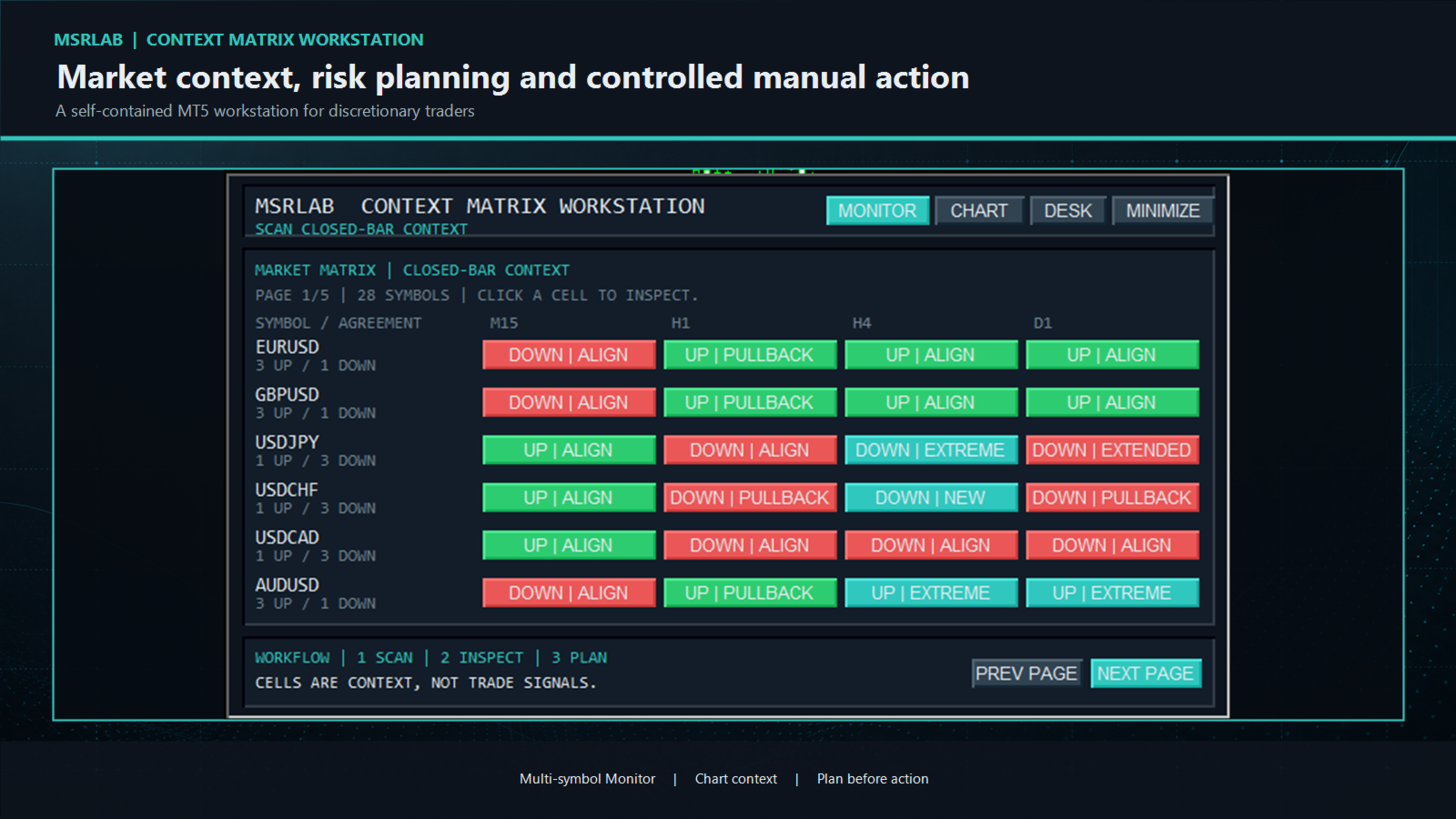
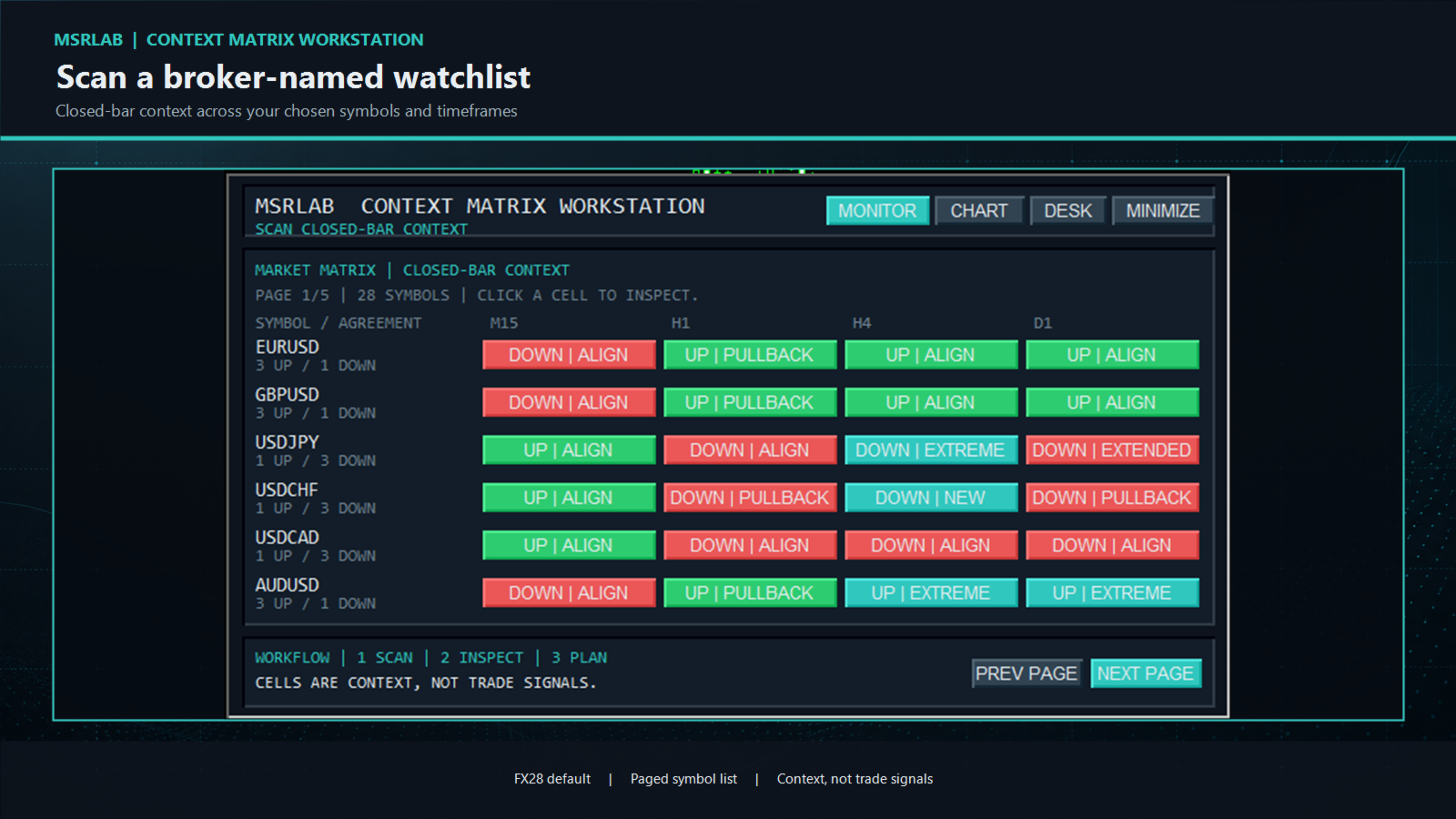
The Monitor starts first. Enter broker-exact symbol names in one CSV input and review a paged list across your chosen timeframes. The default list is the commonly traded FX28 universe. Each coloured cell is a closed-bar observation such as `UP | ALIGN`, `DOWN | PULLBACK`, `CONFLICT` or `EXTENDED`.
Use the pages for longer lists. Click a populated cell to open that exact symbol and timeframe in the Workstation's Chart view. A coloured cell is an invitation to inspect; it is never a buy, sell or probability signal.

2. Chart — inspect structure in context

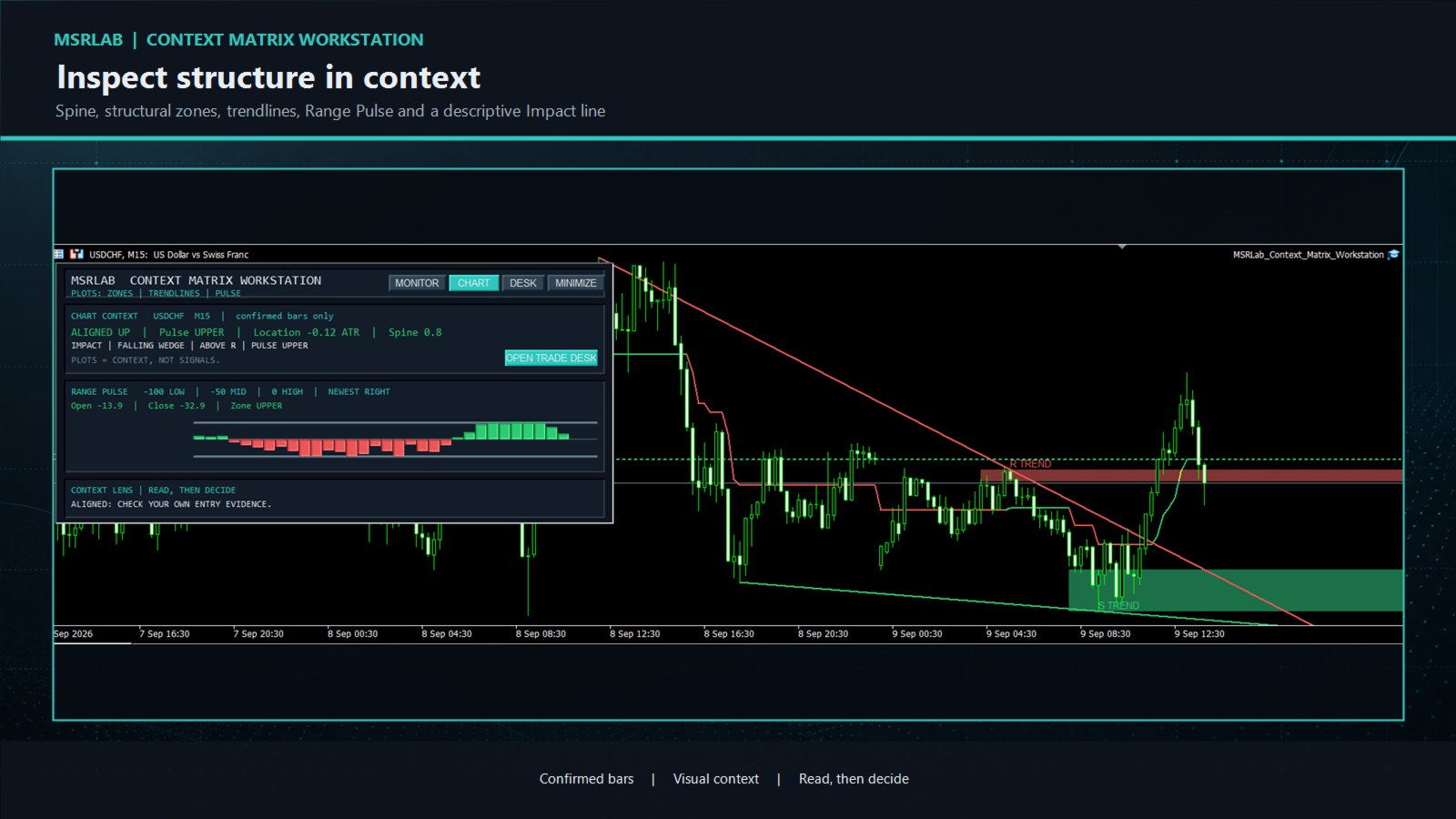
The Chart view presents several descriptive observations from completed bars:

Structure Spine: a confirmed visual trail of the current structural state. It updates only from closed bars.

Support and Resistance zones: shaded references constructed from the recent confirmed swing cycle. They begin from the older qualifying pivot, contain the relevant pivot prices and project a configurable distance right. They are places to examine price response, not instructions to fade or trade a break.

Swing trendlines: projected lines linking the two latest qualifying swing highs or lows. Their slopes contribute to the geometry description.

Range Pulse: an MSRLab implementation that shows where confirmed close behaviour sits within its recent range. The ribbon is a context display, not a standalone oscillator strategy.

Impact: a short plain-language summary of direction, Pulse, location, simple two-pivot geometry and zone relationship. Terms such as triangle, channel, wedge and broadening are descriptive labels; they do not predict a breakout, reversal or target.
The chart view may return `WAIT` or `NOT READY` when history is insufficient. That is an intentional safety state, not an error or signal.


3. Planning Desk — define risk before action

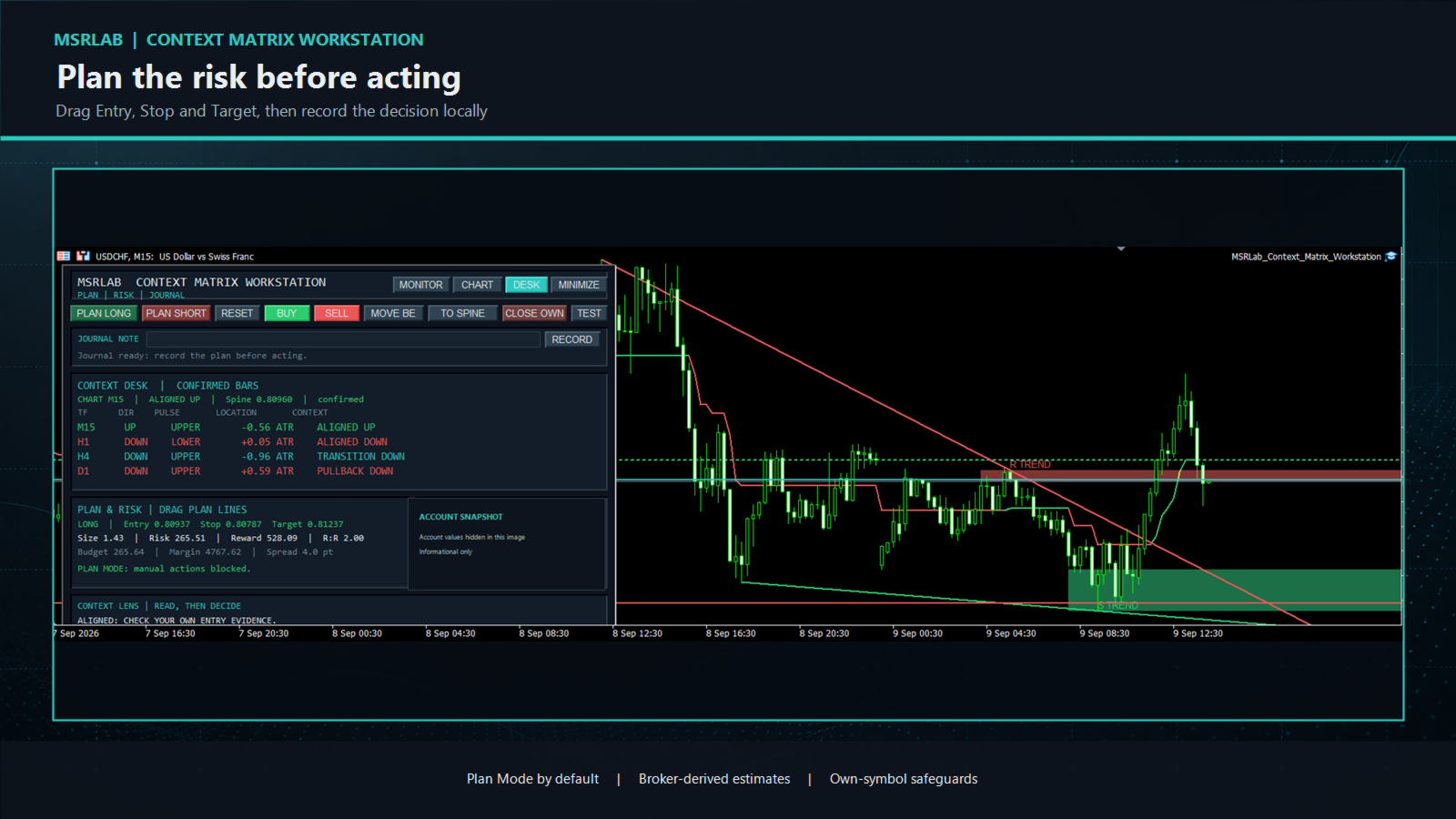
Open the Desk from the header or the Chart view. `PLAN LONG`, `PLAN SHORT` and `RESET` establish draggable Entry, Stop and Target lines. As you move the lines, the Workstation estimates volume, cash risk, projected reward, R:R, margin and spread from your broker's contract details.

The Account Snapshot is informational. The position panel and any management actions are limited to the current chart symbol and the Workstation's own magic number. The EA neither chooses a trade direction nor manages unrelated positions.
Manual trading controls are **disabled by default**. When deliberately enabled by the user, every order or management action remains guarded by plan geometry, protective-stop, broker-volume, stop-distance, spread, daily-loss, margin and owned-position checks, and requires a deliberate two-click confirmation.


4. Journal — make the decision reviewable

Write a short note and press `RECORD` to append the plan/action context to a local journal. The journal is designed for review of a discretionary process; it is not a cloud service, broker statement or backup. Use it to record why a context was accepted, rejected or left alone.

5. Alerts — step away without a separate service

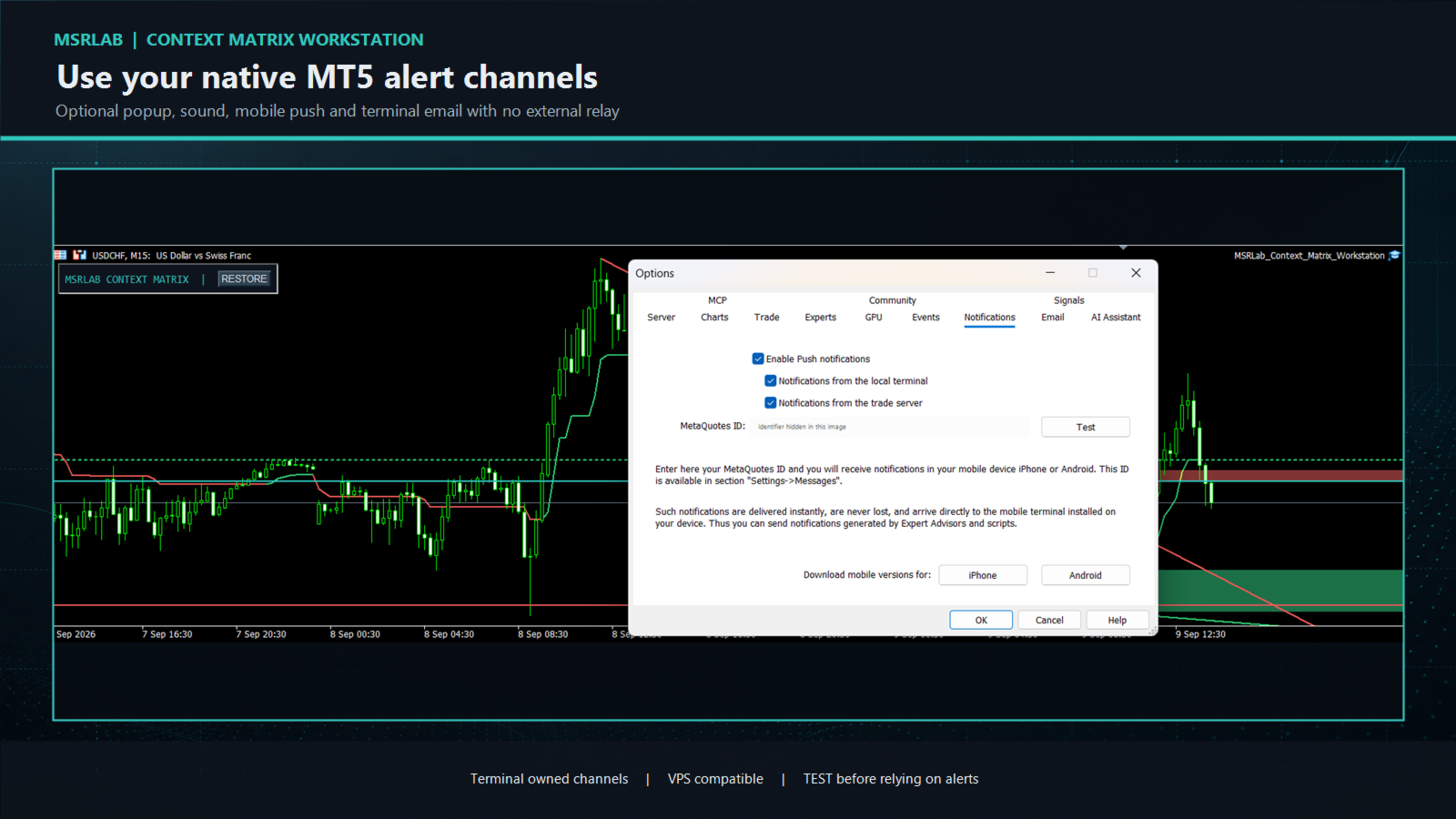
Alert Center is optional. It can use native MT5 popup, sound, mobile push and terminal-email channels for selected closed-bar context, geometry or price/plan events. Delivery is handled by the buyer's MT5 terminal/VPS settings, not an external MSRLab server. Set up and test the desired native channel first in **Tools → Options**, then use the Workstation `TEST` control before relying on an alert. Cooldowns and caps help control repeated messages.
No alert can place, close or modify a position.

How to use the workstation responsibly

A practical routine:
1. Attach the EA to a demo chart and check that the Monitor opens.
2. Enter the exact symbol spelling used by your broker; keep only liquid and relevant markets in your watchlist at first.
3. Scan the Monitor and click a cell worth examining.
4. Read the Chart view: direction, Spine location, Pulse, zone relationship and geometry are context. Bring your own entry and exit evidence.
5. If your independent plan still qualifies, open the Desk and drag Entry, Stop and Target. Reject any plan outside your risk, margin or spread rules.
6. Record the decision before acting. Leave manual trading disabled while you learn the tool, and test every enabled action on demo first.
7. Review alerts and journal records regularly. Change or stop a process when its own monitoring criteria say it is no longer behaving as intended.

Inputs and parameters

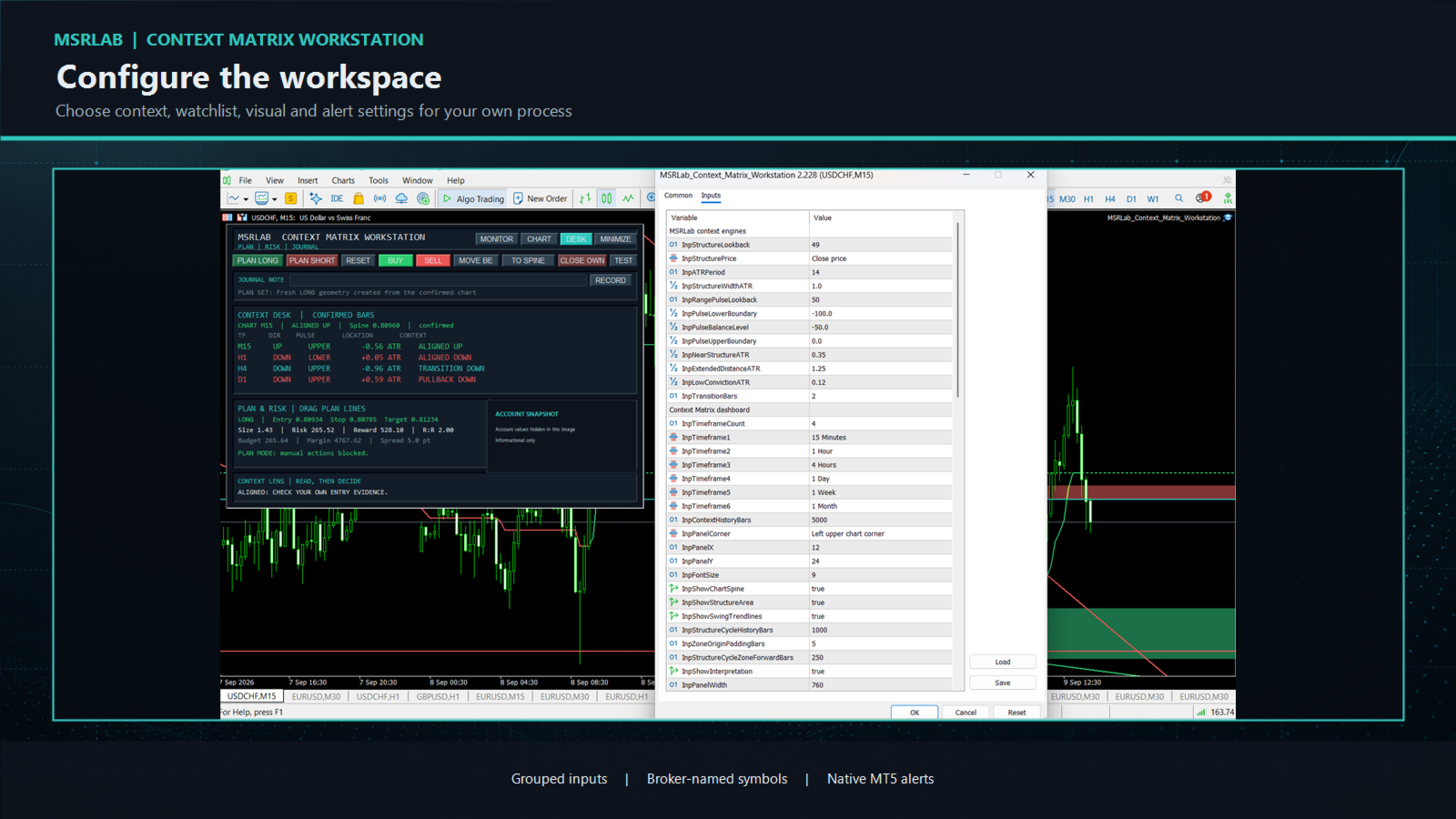
The Inputs tab is organised in plain groups. Start with the defaults and change one group at a time on demo. All names and on-screen messages are English.

Context engines:
InpStructureLookback: completed-bar lookback used by Structure Spine.
InpStructurePrice: price source used by the structure calculation.
InpATRPeriod and InpStructureWidthATR: volatility reference and visual Spine width.
InpRangePulseLookback: completed-bar range used by Range Pulse.
InpPulseLowerBoundary, InpPulseBalanceLevel and InpPulseUpperBoundary: the Pulse display bands.
InpNearStructureATR, InpExtendedDistanceATR and InpLowConvictionATR: distance thresholds used for descriptive context.
InpTransitionBars: confirmed bars used to label a recent structural change as transition.

Dashboard and chart visuals:
InpTimeframeCount and InpTimeframe1 to InpTimeframe6: timeframes shown in the current-chart context desk.
InpContextHistoryBars: history requested for context calculation.
InpPanelCorner, InpPanelX, InpPanelY, InpPanelWidth and InpFontSize: panel position and scale.
InpShowChartSpine, InpShowStructureArea, InpShowSwingTrendlines and InpShowInterpretation: enable or hide chart/context elements.
InpStructureCycleHistoryBars, InpSpineTrailBars, InpZoneOriginPaddingBars and InpStructureCycleZoneForwardBars: history and rightward visual extent for confirmed structure references.

Monitor watchlist:
InpWatchSymbolsCSV: comma- or semicolon-separated broker-exact symbols. The default is 28 commonly traded major and cross currency pairs. Replace it if your broker uses suffixes, prefixes or a different symbol universe.
InpWatchRowsPerPage: number of watchlist symbols visible on each page.
InpWatchTimeframeCount and InpWatchTimeframe1 to InpWatchTimeframe4: Monitor columns.

Alert Center:
InpEnableAlerts: master switch. It is off by default.
InpAlertPopup, InpAlertSound, InpAlertPush and InpAlertEmail: native MT5 delivery channels. Configure and test each channel in terminal settings.
InpAlertContextChange, InpAlertStructureFlip, InpAlertPulseChange, InpAlertGeometryChange, InpAlertPriceEvents, InpAlertPlanEvents and InpAlertActionEvents: event types that may be reported.
InpAlertCooldownMinutes, InpAlertMaxPerHour and InpAlertScanContextsPerTimer: rate-control and scan-load settings.

Manual plan and risk:
InpEnableManualOrders: keeps all manual order controls blocked until the user explicitly enables them. It is off by default.
InpMagicNumber: identifier used to isolate the Workstation's own positions.
InpRiskPercent or InpRiskCash: planned risk budget. A positive cash value takes precedence when configured.
InpMaxOwnedPositions, InpMaxDailyLossCash, InpMaxSpreadPoints and InpMaxDeviationPoints: optional action guards.
InpRequireProtectiveStop, InpArmSeconds, InpDefaultStopATR and InpDefaultRewardRisk: protective-stop, confirmation and initial-plan settings.

Journal and theme:
InpEnableJournal, InpJournalFile, InpJournalTag, InpJournalUseCommonFiles and InpDefaultJournalNote: local journal storage and default-note settings.
InpBullColor, InpBearColor, InpAccentColor, InpPanelColor, InpPanelBorderColor, InpTextColor and InpMutedTextColor: visual theme colours only. They do not alter context or risk calculations.

Educational research questions — not trade signals

The Workstation is built to support questions a trader can test independently:
Does an existing entry rule behave differently when higher-timeframe context agrees than when it conflicts?
Is a Pulse pullback near the Spine distinct from an extended move far from the Spine for your own setup?
Do entries or management decisions have a different distribution when price responds at a displayed zone?
Does a separately defined breakout, retest or mean-reversion method behave differently in a labelled two-pivot structure?
Do written risk, spread and margin constraints improve adherence to your process?
For any idea, define the market, data range, trigger, entry, invalidation, exit, costs, development/validation split, risk cap and monitoring rule before looking at results. The product provides no hidden entry rules, private portfolio mappings, presets, trade history or performance evidence.

Important limitations

Trading involves risk. No software can guarantee future performance.
Context labels, zones, trendlines, geometry and alerts are descriptive observations, not recommendations or instructions to trade.
Use closed-bar readings. Intrabar price can change while a current candle is still forming.
Test the product and any personal workflow on demo with your intended broker, symbol, account type and VPS before live use.
The journal is stored locally. Maintain your own backups and records.
Push and email availability depend on the buyer's MT5 setup and native delivery channels. Test them before relying on them.


Installation and support

Install through the MQL5 Market in MetaTrader 5, attach the EA to one chart, and begin with Monitor and manual order controls disabled. The supplied manual covers Monitor, Chart, Desk, plan lines, controls, journal, alerts, inputs, privacy and troubleshooting.

For support, contact the seller through the MQL5 Market product discussion or private messages. Include MT5 build, broker server, symbol, timeframe, a screenshot and a description of the observed behaviour. Never share passwords, MetaQuotes IDs or account credentials.

Product boundary

This is single self-contained MT5 Expert Advisor for discretionary workflow. It does not include a developer indicator, buffer/API interface,automated strategy, third-party logic, private MSRLab research, portfolio presets, account information or performance claims.
Önerilen ürünler
Margin Call Shield – Defend Your Margin on Your Terms Margin Call Shield is a tool for MetaTrader 5 traders who want to decide for themselves which open positions are closed during margin call situations before the platform does so automatically based on its internal rules. By default, the broker or platform decides which positions to close, often using undisclosed algorithms. Margin Call Shield lets you set this order according to your own strategy. Why Was Margin Call Shield Created? In a mar
Net Exposure & Net Average Price is a lightweight utility Expert Advisor for MetaTrader 5 hedge accounts . This tool helps traders instantly understand their true market exposure when multiple Buy and Sell positions are open on the same symbol. What the EA Does The EA displays a clear on-chart panel showing: Total Buy Trades Total Buy Lots Total Sell Trades Total Sell Lots Net Lots (Net Exposure) Net Average Price (hedge-adjusted breakeven) The Net Average Price represents the true breakeven
Exp5 Duplicator
Vladislav Andruschenko
4.78 (9)
Duplicator for MetaTrader 5 — tek terminal içinde profesyonel pozisyon çoğaltıcı MetaTrader 5 içinde önceden açılmış pozisyonları otomatik olarak çoğaltmak, hacmi artırmak, özel lot ayarları uygulamak ve kopyaları hassas kurallarla yönetmek isteyen yatırımcılar için güvenilir bir Expert Advisor. Manuel işlem, algoritmik sistemler ve tek terminal içinde mevcut pozisyonların esnek yönetimi için pratik bir araçtır. Duplicator for MT5 kendi işlem stratejisine göre pozisyon açmaz. Görevi, MetaTrader
MT5'ten Telegram'a tamamen özelleştirilebilir sinyaller gönderin ve bir Sinyal Sağlayıcı olun! Bu ürün, kullanımı kolay ve görsel olarak çekici bir grafik arayüzünde sunulmaktadır. Ayarlarınızı özelleştirin ve ürünü birkaç dakika içinde kullanmaya başlayın! Kullanıcı Kılavuzu + Demo  | MT4 Sürümü  | Discord Sürümü Demo denemek istiyorsanız, Kullanıcı Kılavuzuna bakın. MT5'ten Telegram'a gönderen, strateji testinde çalışmaz. MT5'ten Telegram'a Özellikler Büyük bir seçenek yelpazesi ile sinyali
DR Trade and Risk Manager: The Foundational Algorithmic Risk Console for MT5 For the discretionary trader, the greatest adversary is not the market; it is the undisciplined self. You have a solid strategy, but in moments of high pressure, do you follow your rules with perfect consistency? Do you cut losses without hesitation? Do you let winners run without cutting them short out of fear? For most, the answer is no. This gap between strategy and execution is where profits are lost. DR Trade and R
BulkOp Trade Manager
Ahmed Jumaa Saif Ali Almheiri
BulkOp Trade Manager Trade faster. Manage smarter. Close with confidence. BulkOp Trade Manager is a powerful MT5 utility EA built for traders who need speed, control, and clean execution directly from the chart. It is designed for active manual traders, scalpers, gold traders, and anyone who wants to manage multiple positions with less delay and fewer clicks. Why BulkOp? Ultra-fast Buy and Sell execution One-click Bulk Close Profit One-click Bulk Close Loss Keyboard trading control Bulk order e
Manually enter the price for Buy position or Sell position. This EA will automatically open 3 orders and also 3 Pending (In deposited position) = Total 6 orders per one click Please see Screenshot or Videos for more explanation. - Easy to manage your different order. - Fast in modification for SL and TP. - Can modified the SL and TP depends on individual techniques.

PS4 Trading Controller lets you trade MetaTrader 5 using a DualShock 4 controller (USB or Bluetooth). Designed for traders who want speed and convenience, this tool maps controller buttons to essential trading actions so you can execute and manage positions without touching the keyboard or mouse. Key Features: • Market Buy / Sell with R2 and L2 • Close one position at a time (R1 / L1) • Close all profitable trades (Triangle) • Close all losing trades (Circle) • Adjust lot size with D-Pad • Mov
FREE
SmartEA Trade Manager is a supervisor for accounts that run several Expert Advisors at once. It enforces an EXCLUSIVE TRADING LOCK: the first EA to open a position trades alone, all other managed EAs are removed from their charts, and they are restored with their exact original settings once the account is flat again. You keep the diversification of many EAs without ever stacking their risk. The manager does NOT open trades of its own. It manages the EAs you already run. EAs not in your list a
Trade Insight Pro Trade Insight Pro is an advanced trading performance analytics utility for MetaTrader 5. It transforms your MT5 trading history into clear and useful performance statistics directly on the chart. The utility is designed for traders who want to understand their historical results in greater detail, identify performance patterns, compare BUY and SELL behavior, and review their trading activity using objective data. Trade Insight Pro does not generate trading signals and does
Inverted_Chart_EA Utility Expert Advisor Inverted_Chart_EA creates and maintains a mirror-inverted chart of any symbol and timeframe. It automatically generates a custom instrument (e.g. US30_INV ) and keeps its price history updated in real time, with bars mirrored around a chosen pivot. This utility gives traders a new way to analyze the market from a different perspective by flipping the chart upside down. Why use an inverted chart? Highlight hidden patterns – price formations that look ordin
Trade Panel Pro — MetaTrader 5 için Profesyonel Risk Yönetimi ve Emir İcra Terminali Trade Panel Pro , MetaTrader 5 için aktif day trader'lar ve profesyoneller amacıyla tasarlanmış gelişmiş, hepsi bir arada bir ticaret ve risk yönetimi aracıdır. Hassas risk hesaplamasını şimşek hızında emir icrasıyla birleştirerek sermayenizi korumanıza ve çok hedefli işlemleri zahmetsizce yönetmenize yardımcı olur. Başlıca Avantajlar ve Temel Özellikler Otomatik Lot Hesaplaması: Manuel hacim hesaplamaların
Trade Copilot - Altın (XAUUSD) ve her enstrüman için yarı otomatik risk yönetim paneli Trade Copilot, kendi girişleri üzerindeki kontrolünden vazgeçmeden bir EA disiplinini isteyen manuel trader'lar için tasarlanmış yarı otomatik bir işlem panelidir. Yönü ve seviyeyi siz belirlersiniz; panel risk boyutlandırmasını, stop-loss yerleşimini, take-profit yönetimini ve pozisyon korumasını otomatik olarak yapar. TEMEL ÖZELLİKLER - Riske dayalı lot hesaplama - Risk %, Risk $ veya Sabit Lot seçin; pa
HedgeSafe Trade Assistant Risk kontrolünü önceliklendiren MetaTrader 5 manuel işlem paneli. HedgeSafe, BUY veya SELL düğmesine basmadan önce işlemi doğrudan grafik üzerinde hazırlamanıza, doğrulamanıza ve yönetmenize yardımcı olur. HedgeSafe bir sinyal hizmeti, piyasa tahmin aracı, yapay zekâ botu veya otomatik strateji değildir. İşlem yönünü seçmez ve kâr vaat etmez. Her işlem kararı traderın sorumluluğundadır. Başlıca özellikler Hesap bakiyesinin yüzdesine veya hesap para birimindeki sabit tut
Bastion is a monitor-and-close-only risk manager for prop-firm traders. It watches your account against your firm's daily-loss and maximum-drawdown limits in real time and force-closes your open positions BEFORE you cross a line. It never opens a trade of its own, so it stays fully within the tools allowed by FTMO, FundedNext, The5ers, FTUK and FXIFY. Why traders fail challenges A large share of failed evaluations end on a single daily-loss breach: a moment of inattention, a news spike, one tra
Rhino Backtest Manager - canlı işlem ve strateji test edicisi için işlem yönetim paneli Rhino Backtest Manager, hem canlı işlemde hem de MetaTrader 5 strateji test edicisinde çalışan bir işlem yönetim panelidir. Canlı hesapta kullanılan arayüzün aynısıyla test edicinin içinde elle emir girmenize ve bu emirleri yönetmenize olanak tanır; böylece bir strateji geçmiş veriler üzerinde denendikten sonra araç değiştirmeden işleme alınabilir. Panel, pozisyon hacmini risk ayarlarınıza göre hesaplar, emi
Trade Manager Dashboard MT5 – Description Trade Manager Dashboard MT5 is a powerful manual trading assistant designed to help traders execute and manage trades quickly and efficiently directly from the chart. The EA provides an intuitive dashboard that allows traders to control risk management, order execution, trailing stop, and DCA (Dollar Cost Averaging) in one place without manually calculating lot sizes or modifying orders. This tool is ideal for traders who want to improve execution speed,
Tool Auto Modify SLTP – Protect Your Trades, Optimize Your Strategy In trading, risk is always present. Just one forgotten SL/TP can turn a promising trade into a loss. Even experienced traders occasionally make mistakes. That’s why Tool Auto Modify SLTP was created – to keep you protected and let you focus on your strategy. Key Features: Manage Orders for All Symbols: Monitor and adjust SL/TP for all your trading pairs. Three Flexible Risk Modes: Point-Based: Set fixed SL/TP distances. Account
Short Description: FTMO Protector PRO MT5 is an EA designed to protect your funded account by managing risk and ensuring compliance with the Prop Firm's trading rules. This EA automatically monitors equity levels, closes trades when profit targets or drawdown limits are reached, and provides a visual display of key account metrics.  EA w orks with all different Prop Firm service providers. Overview: FTMO Protector PRO MT5 is an Drawdown Safeguard Expert Advisor meticulously crafted for trade
TRADE MANAGER G2 – PRODUCT DESCRIPTION By Ida Bagus Putu Mahardika Trade Manager G2 – All-in-One Trading Panel for Professional Execution & Risk Management Trade Manager G2 is a next-generation trading panel designed to give you full control over order execution, position management, and profit optimization in real time on MetaTrader 5. With a modern card-based user interface and individual TP actions per level, this panel elevates your trading experience to the next level. KEY ADVANTAGES OF
King Trade Copier
Mohammed Maher Al-sayed Mohammed Ahmed Saleh
KingCopier – Lightning-Fast Local Trade Copier for MetaTrader (Master + Slave) KingCopier is a professional local trade copier that mirrors every trading action from one Master account to unlimited Slave accounts on the same PC or VPS — with an internal copy latency of just a few milliseconds. It was built by a real trader for daily real-money use, with one goal: whatever happens on the Master must happen on the Slave, instantly and without exceptions. Watch the demo video to see the real cop
Monitor Dashboard
Johann Dominique Carnevali
Clear EA & Internal Strategy Performance Separation The core purpose of MONIT Dashboard MT5 is to help traders clearly identify where their real performance comes from . On a MetaTrader 5 account, the global balance result is often not enough. A profitable account can hide a weak EA, an overactive strategy, a manual trading loss, or one specific Magic Number group generating most of the drawdown. This becomes even more important when several Expert Advisors are running on the same account, or w
Currency Exposure Matrix is a currency-level exposure dashboard derived from current open positions. Key functions: - Gross and net currency exposure - Long and short decomposition - Deposit-currency conversion - Concentration warnings - Transparent handling when conversion symbols are unavailable The utility helps users understand aggregated currency exposure across their portfolio. It does not generate entry signals, predict market direction or guarantee trading results. Review broker symbol
Indicator Automator EA: The Ultimate Indicator Automation Tool Tired of being chained to your desk, waiting for signals from your favorite indicator? Do you want to eliminate emotional trading and unlock the true potential of your manual strategy? Indicator Automator EA is a powerful and highly versatile Expert Advisor for MetaTrader 5 designed to automate any trading indicator that provides clear Buy and Sell signals through its indicator buffers. You don't need to be a programmer. If you have
The Ultimate All-In-One Trade Manager & Prop Firm Guardian for MT5. Nexus Pro Trade Manager is the most advanced, all-in-one trading assistant designed for both manual traders and Prop Firm challengers. Featuring a stunning, lag-free UI (Dark/Light mode), it completely transforms your MT5 into a professional trading terminal. Whether you are trading a personal account or trying to pass evaluations for FTMO, FundedNext, or other prop firms, Nexus Pro protects your capital, automates your risk cal
TradePilotmt5
Hossein Khalil Alishir
TradePilot Expert Advisor (EA) for MetaTrader 5 TradePilot is a professional and user-friendly Expert Advisor (EA) for MetaTrader 5 (MT5) . It simplifies automated trading , risk management , and trade execution with a smart trading panel . Perfect for beginners and experienced traders looking for a reliable trade manager EA with automated lot size calculation and smart position management. Key Advantages User-Friendly Trading Panel: Customizable panel with buttons and hotkeys for fast ex
Reverse TradeCopier for Followers   can copy trades from an account that is running Reverse TradeCopier Source . Features: Copies trades from one source (master) account to multiple following (slave) accounts. Allows investor (read only) password for source (master) account. There are no complicated settings and input parameters, everything is easy. Works with different brokers. Works with different quotes symbols (EURUSD_FX, eurusd_m, etc.). Can copy orders from 4-digit quotes platform to 5-dig
TradePad
Ruslan Khasanov
5 (1)
TradePad hem manuel hem de algoritmik ticaret için bir araçtır. Size hızlı ticaret işlemleri ve çeşitli ticaret enstrümanlarındaki pozisyonların kontrolü için basit bir çözüm sunuyoruz. Dikkat, uygulama strateji test cihazında çalışmıyor! Demo hesabı için uygulamanın deneme sürümü ve tüm araçların açıklaması Uygulama arayüzü yüksek çözünürlüklü monitörler için uyarlanmıştır, basit ve sezgiseldir. Rahat bir çalışma için, tüccara aşağıdaki araç seti sunulur: Ticaret işlemlerini yönetmek, ana grafi
Manual Trading Assistant Pro 【Manuel Yatırımcılar İçin Nihai "Hayatta Kalma" Aracı】 Hızlı piyasa hareketleri sırasında lot hesaplamaları veya TP/SL ayarlarıyla hiç zorlandınız mı? Bu araç, %100 "Giriş (Saldırı)" üzerine odaklanmak ve "Çıkış (Savunma)" işini makineye bırakmak isteyen yatırımcılar için tasarlanmıştır. 【V3.82'de Yeni: Tanı Özelliği】 Dahili Ayar Tanısı (Pips Check) Yanlış ayarlar konusunda endişelenmeyin. [Pips Check] düğmesi, çarpan ayarlarınızın aracı kurumunuzun formatına (JPY
Resiko
Monita Melyana Sinurat
This tool functions to: 1. Manage Risk - Set SL and TP for all open orders - Close all open orders according to the set risk 2. Manage Orders - This tool also functions as an assistant for Martingale or Grid trading, according to the set order spacing. This tool is ideal for traders who prefer to use Grid or Martingale systems with strict risk management..........
Bu ürünün alıcıları ayrıca şunları da satın alıyor
Farmed Hedge Yield Farming | All Markets (Manual - Hybrid - Semi/Automated EA) VERIFIED TRADING RESULTS - Farmed Hedge Yield Axi Copy:  https://www.mql5.com/en/signals/2356376 - Farmed Hedge Yield Exn Copy:   https://www.mql5.com/en/signals/2356404 - Farmed Hedge Yield V Copy:  https://www.mql5.com/en/signals/2357156 IMPORTANT NOTICE: FarmedHedge is a MANUAL-FOCUSED TRADING UTILITY ,not a fully automated EA. Results shown on this Signal include manual trades and overall strategic management.
================================================================================ POC BREAKOUT - V20.72. Full Professional Grade Toolkit ================================================================================ POC Breakout is a full MetaTrader 5 trading dashboard for discretionary traders who want breakout signals, Point of Control (POC) context, volume profiles, order flow, market structure, news, alerts, and advanced trade planning in one professional workspace. Attached directly to you
EA Overfitter
Stephen J Martret
5 (1)
That backtest looks great. But will it still be making money tomorrow, next week, next month? EA Overfitter re-runs your EA on 100 price histories it has never seen. One score tells you if the edge is real. A backtest tells you what an EA did on one price history — the one that happened to occur. What you cannot tell from it is how much of that result was the strategy and how much was the particular path. EA Overfitter answers that. It builds up to 100 synthetic price histories your EA has n
Power Candles Strateji Tarayıcısı - Kendi Kendini Optimize Eden Çoklu Sembol Kurulum Bulucu Power Candles Strateji Tarayıcısı , Power Candles göstergesini çalıştıran aynı kendinden optimize edici motoru, Piyasa İzleyicinizdeki her sembol üzerinde yan yana çalıştırır. Tek bir panel, şu anda istatistiksel olarak hangi sembollerin işlem yapılabilir olduğunu, her birinde hangi stratejinin kazandığını, en uygun Stop Loss / Take Profit çiftini gösterir ve yeni bir sinyal geldiği anda size bildirim gön
Welcome to ENTRY IN THE ZONE WITH SMC MULTI TIMEFRAME Entry In The Zone and SMC Multi Timeframe is a real-time market analysis tool based on Smart Money Concepts (SMC), designed to analyze market structure, price direction, and key trading zones. It supports both Single-Timeframe Analysis and Multi-Timeframe Analysis, providing a clearer view of the overall market structure across multiple timeframes, with real-time BUY / SELL signals that do not repaint. It is designed to help filter trading op
Footprint Chart Pro — Professional OrderFlow EA for MetaTrader 5 Version 6.34 | Professional tool for real traders | Institutional-Grade Visualization DEMO USERS - PLEASE SELECT EVERY TICK / REAL TICK WHEN TESTING AND YOU HAVE DOWNLOADED HISTORICAL DATA. IF YOU SEE A WAITING SCREEN AND IT IS NOT DOWNLOADING, IT MEANS YOU HAVE LOW HISTORICAL DATA. TRY 1 MIN AND 5 MIN FIRST ON 1 DAY DATA. ONE DAY DATA SHOULD BE THE NEWEST AND MOST CURRENT DATE. PLEASE WAIT UNTIL THE MARKET HAS ROLLED OVER PERIOD.
FUTURES ORDERFLOW FOOTPRINT CHART Professional OrderFlow EA for MetaTrader 5 Version 1.01| Professional tool for real traders | Institutional-Grade Visualization STRATEGY TESTER USERS - PLEASE SELECT EVERY REAL TICK WHEN TESTING AND YOU HAVE DOWNLOADED HISTORICAL DATA. IF YOU SEE A WAITING SCREEN AND IT IS NOT DOWNLOADING, IT MEANS YOU HAVE LOW HISTORICAL DATA. TRY 1 MIN AND 5 MIN FIRST ON 1 DAY DATA. ONE DAY DATA SHOULD BE THE NEWEST AND MOST CURRENT DATE. PLEASE WAIT UNTIL THE MARKET HAS ROL
Ultimate Extractor - Professional Trading Analytics for MT5 *****this is the local HTML version of Ultimate Extractor. !!!!!it is not compatible with Cloud!!!! For the online version please reach out to me directly****** Ultimate EA manager also now available when you use cloud pro and above for free!! Ultimate Extractor transforms your MetaTrader 5 trading history into actionable insights with comprehensive analytics, interactive charts, and real-time performance tracking. What It Does Automa
Üye olduğunuz herhangi bir kanaldan (özel ve kısıtlı olanlar dahil) sinyalleri doğrudan MT5'inize kopyalayın.  Bu araç, kullanıcıyı göz önünde bulundurarak tasarlanmış olup işlemleri yönetmek ve izlemek için ihtiyacınız olan birçok özelliği sunar. Bu ürün, kullanıcı dostu ve görsel olarak çekici bir arayüzde sunulmaktadır. Ayarlarınızı özelleştirin ve ürünü dakikalar içinde kullanmaya başlayın! Kullanıcı Kılavuzu + Demo  | MT4 Sürümü | Discord Sürümü Demo denemek isterseniz lütfen kullanıcı kı
Prop Firm Os
Gayathiri Gopalakrishnan
5 (1)
PROP FIRM OS Structured Trading Assistant for MetaTrader 5 PROP FIRM OS is a structured trading assistant designed for MetaTrader 5 users who prefer rule-based market analysis and organized trading workflows. The Expert Advisor combines market analysis tools, scanner functions, dashboard monitoring, alerts, risk-control settings, and trade management features inside one system. PROP FIRM OS is designed to help traders follow selected rules, filters, and monitoring conditions during trading activ
EA Auditor
Stephen J Martret
5 (5)
EA Auditor is an independent analysis tool for traders evaluating Expert Advisors and trading signals on MetaTrader 5. It audits backtest reports, reviews posted developer signals, and cross-verifies the two against each other to help traders assess strategies before committing capital. The MQL5 market offers a wide range of Expert Advisors from many developers, with varying approaches, quality, and transparency. EA Auditor provides a consistent, data-driven framework for reviewing them, answer
The product will copy all telegram signal to MT5 ( which you are member) , also it can work as remote copier.  Easy to set up, copy order instant, can work with almost signal formats, image signal,  s upport to translate other language to English Work with all type of channel or group, even channel have "Restrict Saving Content", work with  multi channel, multi MT5 Work as remote copier: with signal have ticket number, it will copy exactly via ticket number. Support to backtest signal. How to s
YuClusters
Yury Kulikov
4.93 (43)
Attention: You can view the program operation in the free version  YuClusters DEMO .  YuClusters is a professional market analysis system. The trader has unique opportunities to analyze the flow of orders, trade volumes, price movements using various charts, profiles, indicators, and graphical objects. YuClusters operates on data based on Time&Sales or ticks information, depending on what is available in the quotes of a financial instrument. YuClusters allows you to build graphs by combining da
AI Agent Supervisor is NOT an Expert Advisor. AI Agent Supervisor   is a   multi-agent AI risk & portfolio supervisor   that watches every EA on your account and intervenes in real time.  WANT AN AI PORTFOLIO MANAGER WATCHING YOUR FLEET 24/7?   Run your fleet on the same brokers I do:   IC MARKETS , IC TRADING   .  Unlike the centralized stock market, Forex has no single, unified price feed.  Every broker sources liquidity from different providers, creating unique data streams. The Supervisor r
Quant AI Agents are independent trading Expert Advisors. Instead of trading using a fixed strategy like other conventional EAs, Quant AI Agents   is a   multi-agent AI trading framework   that turns natural-language strategy prompts into live.  WANT THE SAME RESULTS AS MY LIVE SIGNAL?   Use the exact same brokers I do:   IC MARKETS , IC TRADING   .  Unlike the centralized stock market, Forex has no single, unified price feed.  Every broker sources liquidity from different providers, creating un
VirtualTradePad PRO SE MT5 — MetaTrader 5 için profesyonel işlem kontrol merkezi VirtualTradePad PRO SE , MetaTrader 5 için grafik tabanlı premium bir işlem paneli ve trade yönetim çalışma alanıdır. Daha hızlı emir yürütme, daha net pozisyon kontrolü, yapılandırılmış trade yönetimi, görsel seviye planlama ve doğrudan grafik üzerinden profesyonel bir çalışma akışı isteyen traderlar için tasarlanmıştır. Bu yalnızca basit bir BUY / SELL paneli değildir. PRO SE; manuel işlem, bekleyen emirler, pozis
Custom Alerts AIO: Tüm Piyasaları Takip Et — Hiçbir Kurulum Gerekmez Genel Bakış Custom Alerts AIO , hiçbir ek yapılandırma gerektirmeyen, kullanıma hazır bir piyasa izleme çözümüdür. Gerekli tüm göstergeler — FX Power, FX Volume, FX Dynamic, FX Levels, IX Power — iç yapısına gömülüdür. Grafik görüntülemesi olmadan çalışır, bu da onu sessiz ve verimli bir şekilde gerçek zamanlı alarm üretimi için mükemmel hale getirir. Brokerınızın sunduğu tüm varlık sınıflarını destekler: Forex, Metaller, End
Global Investing FX Terminal
Santiago Nicolas Pla Casuriaga
5 (1)
Global Investing FX Terminal , MetaTrader 5 için hepsi bir arada bir FX dashboard'udur — merkez bankası politika faizleri, CFTC COT pozisyonlanması, carry sıralamaları, ekonomik sürprizler, opsiyon skew'u, perakende duyarlılığı ve korelasyonlar, toplamda on üç panel — titremesiz tek bir canvas katmanında görüntülenir ve tek bir ekli EA'dan her 10 saniyede bir güncellenir. Harici yazılım gerekmez. Profesyonel FX analizi, normalde ayrı platformlarda bulunan verilere eş zamanlı erişim gerektirir: f
Trading Chaos Expert
Gennadiy Stanilevych
5 (11)
This software has no equals in the world and represents a universal trade "console" covering trading signals, automated market entry, setting of Stop Loss and Take Profit, as well as Trailing Profit for multiple trades at the same time in a single open window. Intuitive control of the Expert Advisor in "three clicks" ensures a comprehensive use of all its functions on different computers, including tablets PCs. Interacting with additional signal indicators that mark the chart to give a real mark
EASY Insight AIO – Akıllı ve zahmetsiz yatırım için hepsi bir arada çözüm Genel Bakış Tüm piyasayı — Forex, Altın, Kripto, Endeksler ve hatta Hisseler — saniyeler içinde, manuel grafik incelemesi, gösterge kurulumu ya da karmaşık ayarlar olmadan analiz edebildiğinizi hayal edin. EASY Insight AIO , yapay zekâ destekli yatırım için nihai, kullanıma hazır dışa aktarma aracınızdır. Tüm piyasanın kapsamlı bir anlık görüntüsünü tek bir temiz CSV dosyasında sunar; bu dosya ChatGPT, Claude, Gemini, Pe
This is exactly what the name says. Visual strategy builder . One of a kind. Turn your trading strategies and ideas into Expert Advisors without writing single line of code. Generate mql source code files with a few clicks and get your fully functional Expert Advisors, which are ready for live execution, strategy tester and cloud optimization. There are very few options for those who have no programming skills and can not create their trading solutions in the MQL language. Now, with Bots Builde
The real‑time view of what is happening inside the market. Footprint Secrets brings detailed analysis directly into MetaTrader 5. It shows where volume is trading, how buyers and sellers are interacting, and how liquidity shifts as the market evolves. Designed for traders who want a precise, real‑time understanding of market behavior. Check out the free preview version here:  https://www.mql5.com/en/market/product/172398 Benefits for the Trader See the real activity behind price . Footprint ch
The core idea: using the user interface, you configure the parameters the chart must meet before entering a position (or positions), choose which entry models to use, and set the rules for when trading and planning should end. Lazy Trader  handles the rest: it  takes over all the routine chart watching and execution! full description  :: 3 key videos [1] ->  [2]   ->  [3] What can it do? - Understands Larry Williams market structure - Understands swing market structure by Michael Huddleston
Check EA performance  https://www.mql5.com/en/signals/2376164?source=Site +Profile+Seller Spot vs Future Arbitrage EA for MT5 Spot vs Future Arbitrage EA is an automated Expert Advisor designed for MetaTrader 5 that operates using price differences between Gold spot and Gold futures instruments. The strategy opens positions on both instruments simultaneously to take advantage of temporary differences between spot and futures prices. Requirements The trading account must provide both Gold spot
The product will copy all  Discord  signal   to MT5   ( which you are member  ) , also it can work as remote copier.  Easy to set up. Work with almost signal formats, support to translate other language to English Work with multi channel, multi MT5. Work with Image signal. Copy order instant, auto detect symbol. Work as remote copier: with signal have ticket number, it will copy exactly via ticket number. How to setup and guide: Let read all details about setup and download Discord To MetaTrader
Trade Copier Pro MT5 is a tool to copy trade remotely to multiple MT4, MT5 and cTradfer accounts at different computers/locations over internet. This is an ideal solution for you if you are a signal provider and want to copy your trades to other receivers globally on your own rules. One provider can copy trades to multiple receivers and one receiver can get trade from multiple providers as well. The provider can even set the subscription expiry for each receiver, so that receiver will not be abl
Telegram to MT5 Pro — Advanced Telegram Signal Copier with Auto-Fix, Multi-TP, Risk Control and Full Trade Management Telegram to MT5 Pro — Profesyonel Telegram Sinyal Kopyalayıcı Telegram to MT5 Pro, Telegram’dan gelen sinyalleri MetaTrader 5 hesabına otomatik olarak doğrudan uygulayan yüksek performanslı bir trade kopyalayıcıdır ve risk, işlem yürütme ve trade yönetimi üzerinde tam kontrol sağlar. Sistem iki bileşenden oluşur: • MetaTrader 5 içinde çalışan Expert Advisor (EA) • Telegram’a bağ
ManHedger MT5
Peter Mueller
4.83 (6)
THIS EA IS A SEMI-AUTO EA, IT NEEDS USER INPUT. Manual & Test Version Please TEST this product before BUYING  and watch my video about it. The price of the ManHedger will increase to 250$ after 20 copies sold. Contact me for user support or bug reports or if you want the MT4 version! MT4 Version  I do not guarantee any profits or financial success using this EA. With this Expert Advisor, you can: Implement your own Zone Recovery strategy to capitalize on trending markets. Create Grid trading s
Latency Arbitrage – Ultra Fast Execution & Price Inefficiency Capture Latency Arbitrage  utility tool is designed to exploit short-term price inefficiencies between fast and slow price feeds. Instead of predicting market direction, the EA focuses on execution speed and price deviation opportunities, allowing traders to capture micro-movements before the market fully adjusts. With built-in risk controls and smart filtering, it ensures precise and disciplined trading performance. Price increases b
Crystal Trade Manager – Advanced MT5 Risk and Trade Control Utility Overview Crystal Trade Manager (CTM) is a professional MetaTrader 5 utility designed for risk management, trade automation, and instant execution control. It provides traders with an integrated system for protecting equity, managing daily drawdowns, controlling lot sizes, and applying automation features such as automatic SL/TP, break-even, and trailing stop. The tool is suitable for manual traders, prop-firm challenge particip
Filtrele:
Değerlendirme yok
Değerlendirmeye yanıt