MSRLab Context Matrix Workstation

MSRLab Context Matrix Workstation

A self-contained MT5 workspace for scanning closed-bar context, inspecting structure, planning risk and recording a discretionary decision.
Context Matrix Workstation is a utility for traders who want a calmer, repeatable process before they act. It is not an automated strategy, a signal service or a promise of profitable trading. The EA stays on one chart and helps you move through a practical workflow:
1. Scan → 2. Inspect → 3. Decide independently → 4. Plan the risk → 5. Journal and monitor.
The product is one compiled Expert Advisor with no DLL, WebRequest, cloud relay, licence server, external indicator or additional runtime file.

What you see

1. Monitor — scan your watchlist

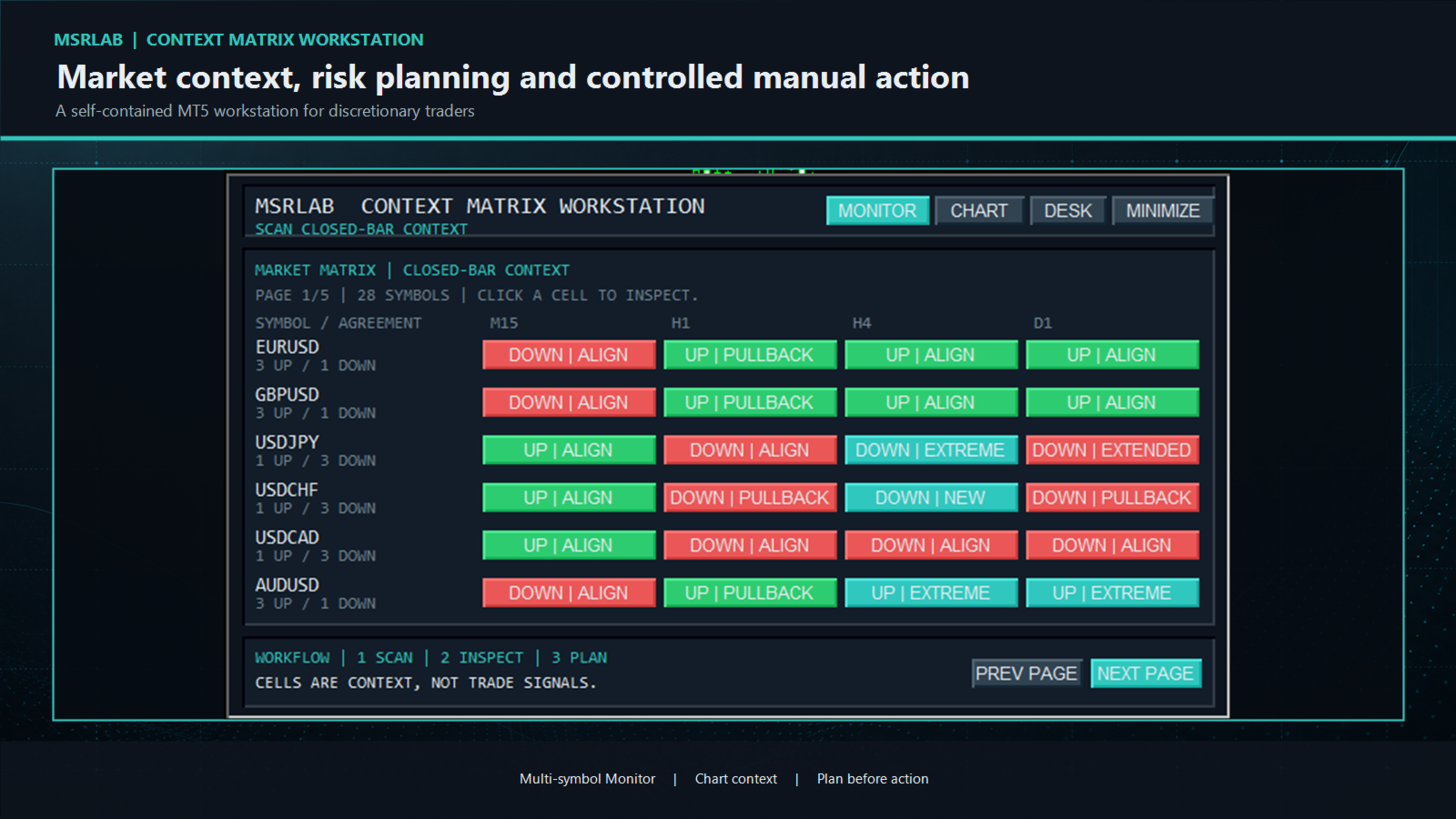
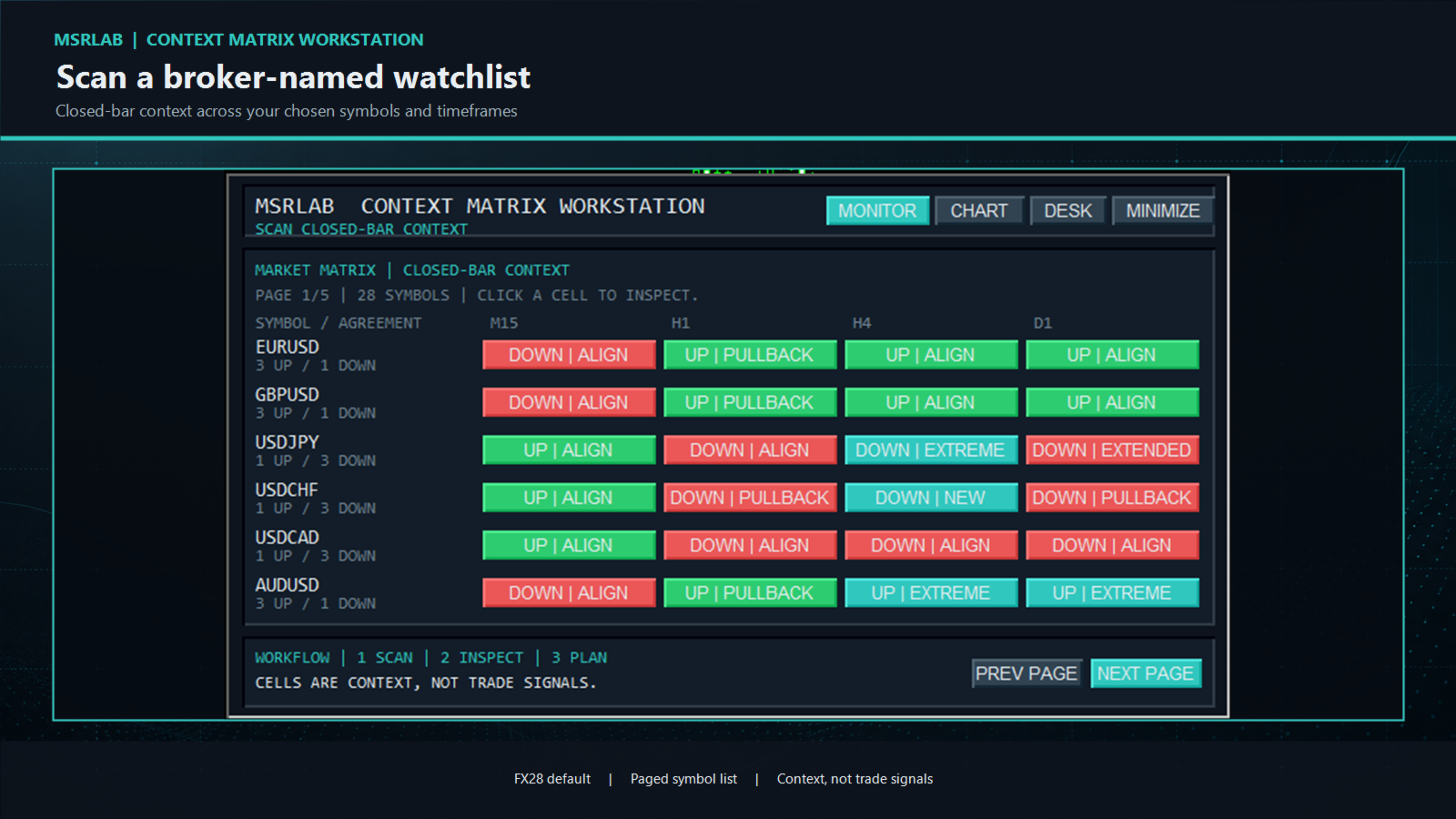
The Monitor starts first. Enter broker-exact symbol names in one CSV input and review a paged list across your chosen timeframes. The default list is the commonly traded FX28 universe. Each coloured cell is a closed-bar observation such as `UP | ALIGN`, `DOWN | PULLBACK`, `CONFLICT` or `EXTENDED`.
Use the pages for longer lists. Click a populated cell to open that exact symbol and timeframe in the Workstation's Chart view. A coloured cell is an invitation to inspect; it is never a buy, sell or probability signal.

2. Chart — inspect structure in context

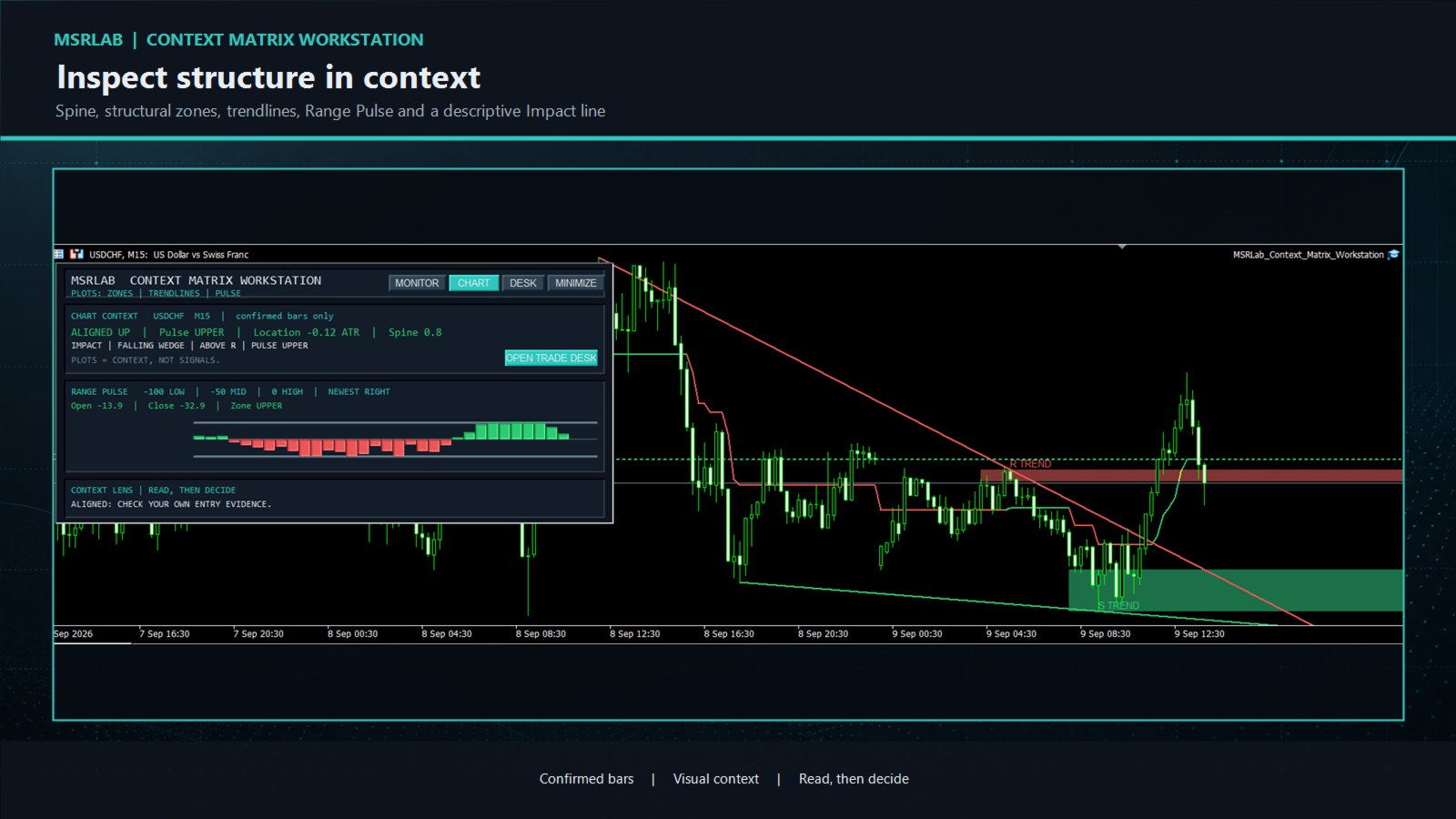
The Chart view presents several descriptive observations from completed bars:

Structure Spine: a confirmed visual trail of the current structural state. It updates only from closed bars.

Support and Resistance zones: shaded references constructed from the recent confirmed swing cycle. They begin from the older qualifying pivot, contain the relevant pivot prices and project a configurable distance right. They are places to examine price response, not instructions to fade or trade a break.

Swing trendlines: projected lines linking the two latest qualifying swing highs or lows. Their slopes contribute to the geometry description.

Range Pulse: an MSRLab implementation that shows where confirmed close behaviour sits within its recent range. The ribbon is a context display, not a standalone oscillator strategy.

Impact: a short plain-language summary of direction, Pulse, location, simple two-pivot geometry and zone relationship. Terms such as triangle, channel, wedge and broadening are descriptive labels; they do not predict a breakout, reversal or target.
The chart view may return `WAIT` or `NOT READY` when history is insufficient. That is an intentional safety state, not an error or signal.


3. Planning Desk — define risk before action

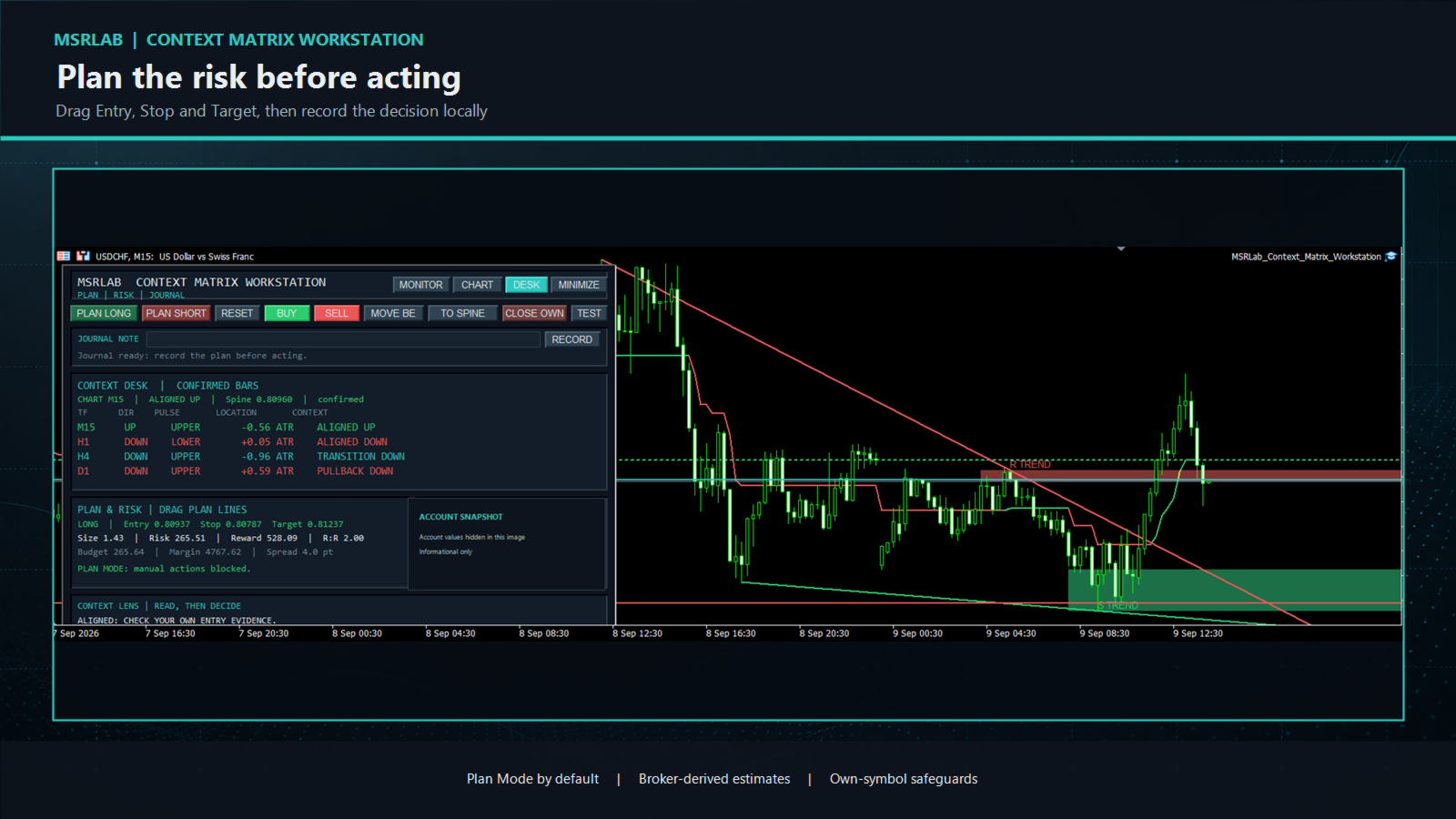
Open the Desk from the header or the Chart view. `PLAN LONG`, `PLAN SHORT` and `RESET` establish draggable Entry, Stop and Target lines. As you move the lines, the Workstation estimates volume, cash risk, projected reward, R:R, margin and spread from your broker's contract details.

The Account Snapshot is informational. The position panel and any management actions are limited to the current chart symbol and the Workstation's own magic number. The EA neither chooses a trade direction nor manages unrelated positions.
Manual trading controls are **disabled by default**. When deliberately enabled by the user, every order or management action remains guarded by plan geometry, protective-stop, broker-volume, stop-distance, spread, daily-loss, margin and owned-position checks, and requires a deliberate two-click confirmation.


4. Journal — make the decision reviewable

Write a short note and press `RECORD` to append the plan/action context to a local journal. The journal is designed for review of a discretionary process; it is not a cloud service, broker statement or backup. Use it to record why a context was accepted, rejected or left alone.

5. Alerts — step away without a separate service

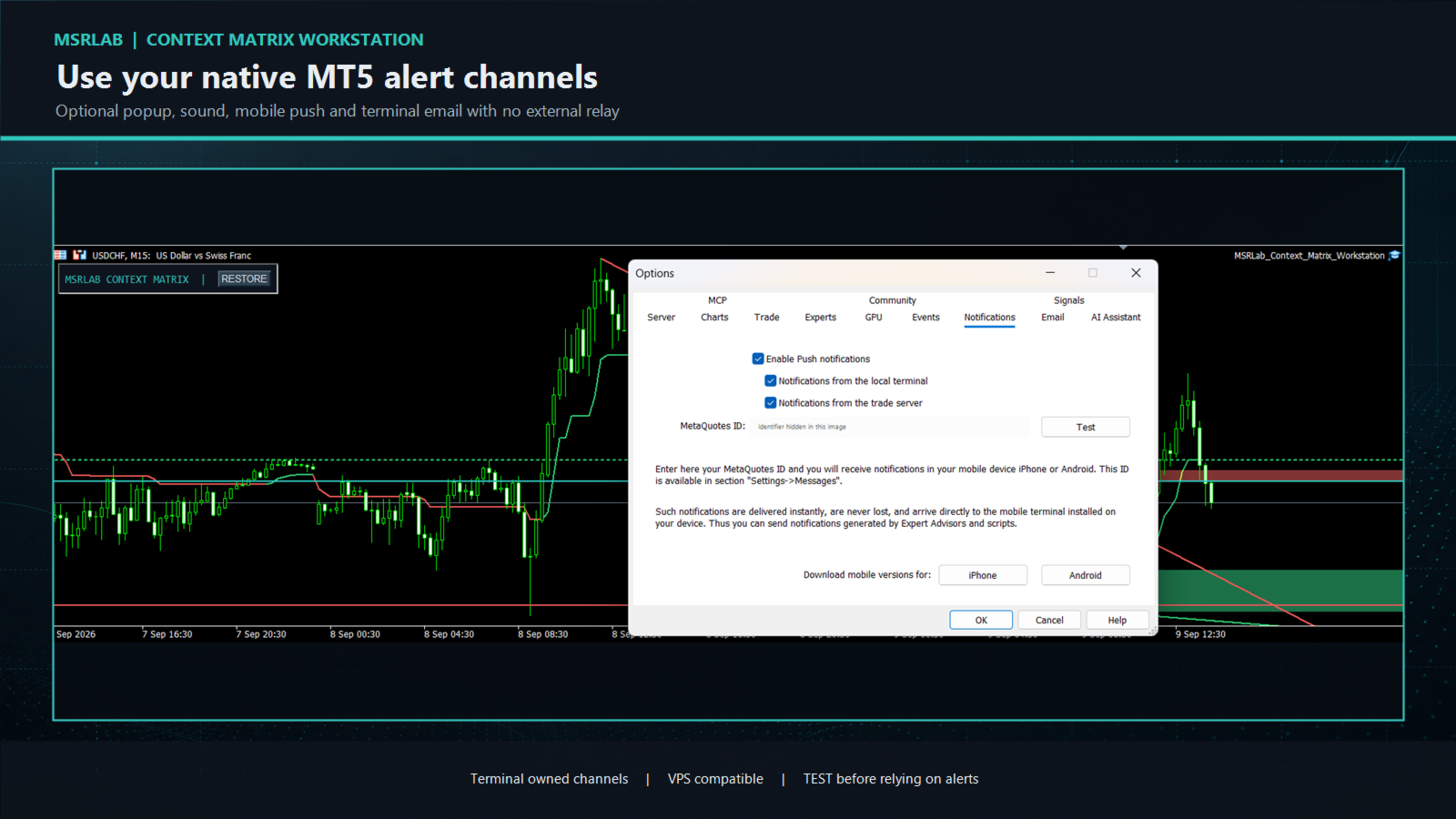
Alert Center is optional. It can use native MT5 popup, sound, mobile push and terminal-email channels for selected closed-bar context, geometry or price/plan events. Delivery is handled by the buyer's MT5 terminal/VPS settings, not an external MSRLab server. Set up and test the desired native channel first in **Tools → Options**, then use the Workstation `TEST` control before relying on an alert. Cooldowns and caps help control repeated messages.
No alert can place, close or modify a position.

How to use the workstation responsibly

A practical routine:
1. Attach the EA to a demo chart and check that the Monitor opens.
2. Enter the exact symbol spelling used by your broker; keep only liquid and relevant markets in your watchlist at first.
3. Scan the Monitor and click a cell worth examining.
4. Read the Chart view: direction, Spine location, Pulse, zone relationship and geometry are context. Bring your own entry and exit evidence.
5. If your independent plan still qualifies, open the Desk and drag Entry, Stop and Target. Reject any plan outside your risk, margin or spread rules.
6. Record the decision before acting. Leave manual trading disabled while you learn the tool, and test every enabled action on demo first.
7. Review alerts and journal records regularly. Change or stop a process when its own monitoring criteria say it is no longer behaving as intended.

Inputs and parameters

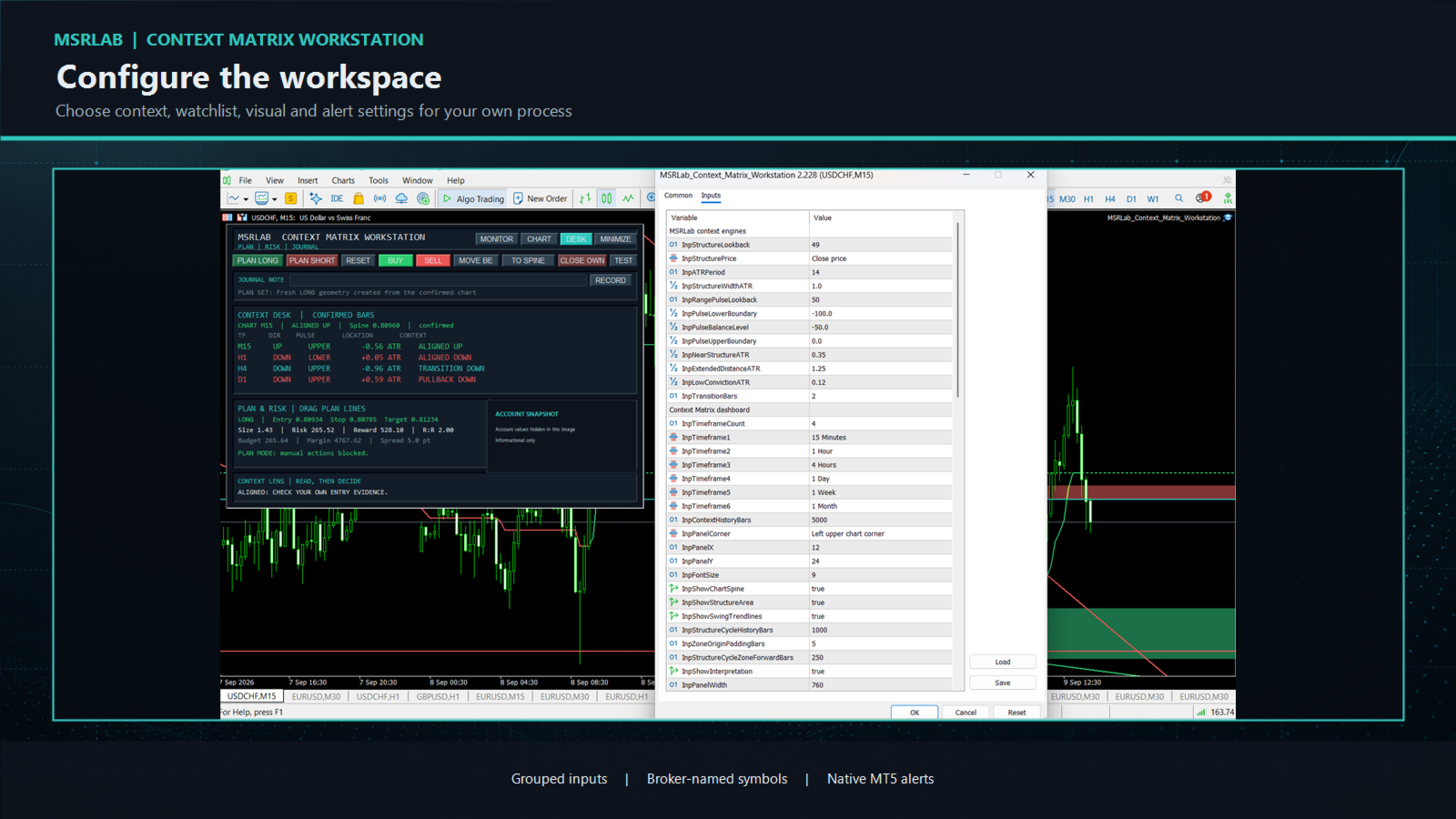
The Inputs tab is organised in plain groups. Start with the defaults and change one group at a time on demo. All names and on-screen messages are English.

Context engines:
InpStructureLookback: completed-bar lookback used by Structure Spine.
InpStructurePrice: price source used by the structure calculation.
InpATRPeriod and InpStructureWidthATR: volatility reference and visual Spine width.
InpRangePulseLookback: completed-bar range used by Range Pulse.
InpPulseLowerBoundary, InpPulseBalanceLevel and InpPulseUpperBoundary: the Pulse display bands.
InpNearStructureATR, InpExtendedDistanceATR and InpLowConvictionATR: distance thresholds used for descriptive context.
InpTransitionBars: confirmed bars used to label a recent structural change as transition.

Dashboard and chart visuals:
InpTimeframeCount and InpTimeframe1 to InpTimeframe6: timeframes shown in the current-chart context desk.
InpContextHistoryBars: history requested for context calculation.
InpPanelCorner, InpPanelX, InpPanelY, InpPanelWidth and InpFontSize: panel position and scale.
InpShowChartSpine, InpShowStructureArea, InpShowSwingTrendlines and InpShowInterpretation: enable or hide chart/context elements.
InpStructureCycleHistoryBars, InpSpineTrailBars, InpZoneOriginPaddingBars and InpStructureCycleZoneForwardBars: history and rightward visual extent for confirmed structure references.

Monitor watchlist:
InpWatchSymbolsCSV: comma- or semicolon-separated broker-exact symbols. The default is 28 commonly traded major and cross currency pairs. Replace it if your broker uses suffixes, prefixes or a different symbol universe.
InpWatchRowsPerPage: number of watchlist symbols visible on each page.
InpWatchTimeframeCount and InpWatchTimeframe1 to InpWatchTimeframe4: Monitor columns.

Alert Center:
InpEnableAlerts: master switch. It is off by default.
InpAlertPopup, InpAlertSound, InpAlertPush and InpAlertEmail: native MT5 delivery channels. Configure and test each channel in terminal settings.
InpAlertContextChange, InpAlertStructureFlip, InpAlertPulseChange, InpAlertGeometryChange, InpAlertPriceEvents, InpAlertPlanEvents and InpAlertActionEvents: event types that may be reported.
InpAlertCooldownMinutes, InpAlertMaxPerHour and InpAlertScanContextsPerTimer: rate-control and scan-load settings.

Manual plan and risk:
InpEnableManualOrders: keeps all manual order controls blocked until the user explicitly enables them. It is off by default.
InpMagicNumber: identifier used to isolate the Workstation's own positions.
InpRiskPercent or InpRiskCash: planned risk budget. A positive cash value takes precedence when configured.
InpMaxOwnedPositions, InpMaxDailyLossCash, InpMaxSpreadPoints and InpMaxDeviationPoints: optional action guards.
InpRequireProtectiveStop, InpArmSeconds, InpDefaultStopATR and InpDefaultRewardRisk: protective-stop, confirmation and initial-plan settings.

Journal and theme:
InpEnableJournal, InpJournalFile, InpJournalTag, InpJournalUseCommonFiles and InpDefaultJournalNote: local journal storage and default-note settings.
InpBullColor, InpBearColor, InpAccentColor, InpPanelColor, InpPanelBorderColor, InpTextColor and InpMutedTextColor: visual theme colours only. They do not alter context or risk calculations.

Educational research questions — not trade signals

The Workstation is built to support questions a trader can test independently:
Does an existing entry rule behave differently when higher-timeframe context agrees than when it conflicts?
Is a Pulse pullback near the Spine distinct from an extended move far from the Spine for your own setup?
Do entries or management decisions have a different distribution when price responds at a displayed zone?
Does a separately defined breakout, retest or mean-reversion method behave differently in a labelled two-pivot structure?
Do written risk, spread and margin constraints improve adherence to your process?
For any idea, define the market, data range, trigger, entry, invalidation, exit, costs, development/validation split, risk cap and monitoring rule before looking at results. The product provides no hidden entry rules, private portfolio mappings, presets, trade history or performance evidence.

Important limitations

Trading involves risk. No software can guarantee future performance.
Context labels, zones, trendlines, geometry and alerts are descriptive observations, not recommendations or instructions to trade.
Use closed-bar readings. Intrabar price can change while a current candle is still forming.
Test the product and any personal workflow on demo with your intended broker, symbol, account type and VPS before live use.
The journal is stored locally. Maintain your own backups and records.
Push and email availability depend on the buyer's MT5 setup and native delivery channels. Test them before relying on them.


Installation and support

Install through the MQL5 Market in MetaTrader 5, attach the EA to one chart, and begin with Monitor and manual order controls disabled. The supplied manual covers Monitor, Chart, Desk, plan lines, controls, journal, alerts, inputs, privacy and troubleshooting.

For support, contact the seller through the MQL5 Market product discussion or private messages. Include MT5 build, broker server, symbol, timeframe, a screenshot and a description of the observed behaviour. Never share passwords, MetaQuotes IDs or account credentials.

Product boundary

This is single self-contained MT5 Expert Advisor for discretionary workflow. It does not include a developer indicator, buffer/API interface,automated strategy, third-party logic, private MSRLab research, portfolio presets, account information or performance claims.
おすすめのプロダクト
Margin Call Shield – Defend Your Margin on Your Terms Margin Call Shield is a tool for MetaTrader 5 traders who want to decide for themselves which open positions are closed during margin call situations before the platform does so automatically based on its internal rules. By default, the broker or platform decides which positions to close, often using undisclosed algorithms. Margin Call Shield lets you set this order according to your own strategy. Why Was Margin Call Shield Created? In a mar

Net Exposure & Net Average Price is a lightweight utility Expert Advisor for MetaTrader 5 hedge accounts . This tool helps traders instantly understand their true market exposure when multiple Buy and Sell positions are open on the same symbol. What the EA Does The EA displays a clear on-chart panel showing: Total Buy Trades Total Buy Lots Total Sell Trades Total Sell Lots Net Lots (Net Exposure) Net Average Price (hedge-adjusted breakeven) The Net Average Price represents the true breakeven
Exp5 Duplicator
Vladislav Andruschenko
4.78 (9)
Duplicator for MetaTrader 5 — 1つの端末内で動作するプロフェッショナルなポジション複製システム MetaTrader 5 ですでに開かれているポジションを自動で複製し、総ボリュームを拡張し、独自のロット設定を適用しながら、複製ポジションを明確なルールで管理したいトレーダーのための信頼性の高い Expert Advisor です。 手動売買、アルゴリズム売買、そして既存ポジションをより柔軟に管理したい場面に適した実用的なツールです。 Duplicator for MT5 は独自の売買戦略で新規ポジションを開くものではありません。役割は、MetaTrader 5 口座内にすでに存在しているポジションを監視し、指定した条件に従ってその複製を作成することです。複製回数、ロットサイズ、Stop Loss、Take Profit、コメント、追加の管理条件まで細かく設定できます。 異なるプラットフォーム間のコピーではなく、 同じ MetaTrader 5 端末内で ポジションを正確に複製したい場合、この MT5 版 Duplicator はその目的のために作られていま
MT5からTelegramに完全にカスタマイズ可能なシグナルを送信して、シグナルプロバイダーになりましょう!この製品は、使いやすく視覚的に魅力的なグラフィカルインターフェースで提供されています。設定をカスタマイズして、数分で製品を使用開始できます! ユーザーガイド + デモ  | MT4バージョン  | Discordバージョン デモを試したい場合は、ユーザーガイドをご覧ください。 MT5からTelegramへの送信者は、ストラテジーテスターでは動作しません。 MT5からTelegramへの機能 多数のオプションを使用して、シグナルを完全にカスタマイズします シグナルの前後に独自のカスタムメッセージを追加します。これには、タグ、リンク、チャンネルなどが含まれます シグナル内の絵文字を追加、削除、カスタマイズします。また、すべて削除することもできます。 シンボルまたはマジックナンバーで送信する取引をフィルタリングします 特定のシンボルの送信を除外します 特定のマジックナンバーの送信を除外します シグナルと一緒に送信する取引の詳細をカスタマイズします シグナルと一緒にスクリーンショット
BulkOp Trade Manager
Ahmed Jumaa Saif Ali Almheiri
BulkOp Trade Manager Trade faster. Manage smarter. Close with confidence. BulkOp Trade Manager is a powerful MT5 utility EA built for traders who need speed, control, and clean execution directly from the chart. It is designed for active manual traders, scalpers, gold traders, and anyone who wants to manage multiple positions with less delay and fewer clicks. Why BulkOp? Ultra-fast Buy and Sell execution One-click Bulk Close Profit One-click Bulk Close Loss Keyboard trading control Bulk order e
Manually enter the price for Buy position or Sell position. This EA will automatically open 3 orders and also 3 Pending (In deposited position) = Total 6 orders per one click Please see Screenshot or Videos for more explanation. - Easy to manage your different order. - Fast in modification for SL and TP. - Can modified the SL and TP depends on individual techniques.
PS4 Trading Controller lets you trade MetaTrader 5 using a DualShock 4 controller (USB or Bluetooth). Designed for traders who want speed and convenience, this tool maps controller buttons to essential trading actions so you can execute and manage positions without touching the keyboard or mouse. Key Features: • Market Buy / Sell with R2 and L2 • Close one position at a time (R1 / L1) • Close all profitable trades (Triangle) • Close all losing trades (Circle) • Adjust lot size with D-Pad • Mov
FREE
SmartEA Trade Manager is a supervisor for accounts that run several Expert Advisors at once. It enforces an EXCLUSIVE TRADING LOCK: the first EA to open a position trades alone, all other managed EAs are removed from their charts, and they are restored with their exact original settings once the account is flat again. You keep the diversification of many EAs without ever stacking their risk. The manager does NOT open trades of its own. It manages the EAs you already run. EAs not in your list a
Trade Insight Pro Trade Insight Pro is an advanced trading performance analytics utility for MetaTrader 5. It transforms your MT5 trading history into clear and useful performance statistics directly on the chart. The utility is designed for traders who want to understand their historical results in greater detail, identify performance patterns, compare BUY and SELL behavior, and review their trading activity using objective data. Trade Insight Pro does not generate trading signals and does
Inverted_Chart_EA Utility Expert Advisor Inverted_Chart_EA creates and maintains a mirror-inverted chart of any symbol and timeframe. It automatically generates a custom instrument (e.g. US30_INV ) and keeps its price history updated in real time, with bars mirrored around a chosen pivot. This utility gives traders a new way to analyze the market from a different perspective by flipping the chart upside down. Why use an inverted chart? Highlight hidden patterns – price formations that look ordin
Trade Panel Pro — MetaTrader 5向けプロフェッショナル・リスク管理・注文執行ターミナル Trade Panel Pro は、MetaTrader 5向けに開発された高度なオールインワン型取引・リスク管理ユーティリティです。アクティブなデイトレーダーやプロフェッショナルのために設計されており、正確なリスク計算と超高速な注文執行を実現し、資産保護と多段階利確トレードの管理を容易にします。 主なメリットと特徴 自動ロット計算: 面倒な手動計算は不要です!設定したUSDリスク金額とストップロス(SL)までの距離に基づき、正確なロットサイズを瞬時に計算します。 ️ 完全インタラクティブなビジュアルライン(革新的機能): 数値を手入力する必要はありません。チャート上で直接、エントリー(EP)、ストップロス(SL)、テイクプロフィット(TP)ラインをドラッグするだけでトレードを管理できます。リスク指標、ロットサイズ、予測利益はラインの移動に合わせてリアルタイムで動的に再計算されます! 完全多言語対応: パネルのインターフェースは自動的に言語設定に適応し
Trade Copilot - ゴールド(XAUUSD)およびあらゆる銘柄向けセミオート・リスク管理パネル Trade Copilot は、自分でエントリーの主導権を握りながらもEAのような規律を求める裁量トレーダーのために設計されたセミオート取引パネルです。方向とレベルはあなたが決め、リスクサイジング、ストップロスの設置、テイクプロフィット管理、ポジション保護はパネルが自動で行います。 主な機能 - リスクベースのロット計算 - リスク%、リスク$、固定ロットから選択可能。ストップロスまでの距離からポジションサイズを自動計算 - 3種類のストップロスモード - ATR倍率、固定ポイント、固定$距離 - ワンクリックの成行・指値注文(Buy/Sell Now、Pending Buy/Sell)、ドラッグ可能なエントリー/SL/TPライン - グリッドトレード - 価格帯にわたりベルカーブ型のロット配分で複数の指値注文を配置(マーチンゲールではありません - ロットサイズは中心からの距離で固定され、損失時に倍増することはありません) - マルチTP(最大4段階) - メインターゲ
HedgeSafe Trade Assistant リスク管理を重視した MetaTrader 5 用の裁量取引パネルです。 HedgeSafe は、BUY または SELL を押す前に、チャート上で取引の準備、検証、管理を行うためのツールです。 HedgeSafe はシグナル配信、相場予測、AI ボット、自動売買戦略ではありません。取引方向を決定せず、利益を保証しません。すべての取引判断はトレーダー自身が行います。 主な機能 口座残高の割合、または口座通貨の固定金額からロットを計算。 Stop Loss をポイントまたは価格で、Take Profit をポイント、価格、R 倍率で設定。 金額リスク、想定リターン、ロット、リスクリワード比を事前表示。 Entry、Stop Loss、Take Profit のチャートラインをパネルと同期。 BUY と SELL を個別に判定し、執行直前に方向別の最終検証を実行。 最小/最大数量、数量ステップ、tick size、tick value、stops level、freeze level を確認。 市場の利用可否、銘柄の取引モード、スプレッド
Bastion is a monitor-and-close-only risk manager for prop-firm traders. It watches your account against your firm's daily-loss and maximum-drawdown limits in real time and force-closes your open positions BEFORE you cross a line. It never opens a trade of its own, so it stays fully within the tools allowed by FTMO, FundedNext, The5ers, FTUK and FXIFY. Why traders fail challenges A large share of failed evaluations end on a single daily-loss breach: a moment of inattention, a news spike, one tra
Rhino Backtest Manager - ライブ取引とストラテジーテスターのためのトレード管理パネル Rhino Backtest Manager は、ライブ取引と MetaTrader 5 のストラテジーテスターの両方で動作するトレード管理パネルです。ライブ口座と同じインターフェースのままテスター内で手動の発注と管理ができるため、ヒストリカルデータで手法を確認したあと、ツールを変えずにそのまま取引できます。 パネルは設定したリスク条件からロット数を計算し、発注前にストップロスとテイクプロフィットの金額を表示します。また、日次、週次、月次、および口座の全期間の成績を記録します。 ユーザーマニュアル: 製品の使い方 無料デモ版: デモ版をダウンロード MetaTrader 4 版: Rhino Backtest Manager MT4 版 初回起動の前に、マニュアルページで配布しているフォントをインストールしてください。フォントが無い場合、パネルは正しく表示されません。 機能 2つのモード。 同じパネルがライブ取引とストラテジーテスターモードで動作します。 注文の種類。 成行、
Trade Manager Dashboard MT5 – Description Trade Manager Dashboard MT5 is a powerful manual trading assistant designed to help traders execute and manage trades quickly and efficiently directly from the chart. The EA provides an intuitive dashboard that allows traders to control risk management, order execution, trailing stop, and DCA (Dollar Cost Averaging) in one place without manually calculating lot sizes or modifying orders. This tool is ideal for traders who want to improve execution speed,
Tool Auto Modify SLTP – Protect Your Trades, Optimize Your Strategy In trading, risk is always present. Just one forgotten SL/TP can turn a promising trade into a loss. Even experienced traders occasionally make mistakes. That’s why Tool Auto Modify SLTP was created – to keep you protected and let you focus on your strategy. Key Features: Manage Orders for All Symbols: Monitor and adjust SL/TP for all your trading pairs. Three Flexible Risk Modes: Point-Based: Set fixed SL/TP distances. Account
Short Description: FTMO Protector PRO MT5 is an EA designed to protect your funded account by managing risk and ensuring compliance with the Prop Firm's trading rules. This EA automatically monitors equity levels, closes trades when profit targets or drawdown limits are reached, and provides a visual display of key account metrics.  EA w orks with all different Prop Firm service providers. Overview: FTMO Protector PRO MT5 is an Drawdown Safeguard Expert Advisor meticulously crafted for trade
TRADE MANAGER G2 – PRODUCT DESCRIPTION By Ida Bagus Putu Mahardika Trade Manager G2 – All-in-One Trading Panel for Professional Execution & Risk Management Trade Manager G2 is a next-generation trading panel designed to give you full control over order execution, position management, and profit optimization in real time on MetaTrader 5. With a modern card-based user interface and individual TP actions per level, this panel elevates your trading experience to the next level. KEY ADVANTAGES OF
King Trade Copier
Mohammed Maher Al-sayed Mohammed Ahmed Saleh
KingCopier – Lightning-Fast Local Trade Copier for MetaTrader (Master + Slave) KingCopier is a professional local trade copier that mirrors every trading action from one Master account to unlimited Slave accounts on the same PC or VPS — with an internal copy latency of just a few milliseconds. It was built by a real trader for daily real-money use, with one goal: whatever happens on the Master must happen on the Slave, instantly and without exceptions. Watch the demo video to see the real cop
Monitor Dashboard
Johann Dominique Carnevali
Clear EA & Internal Strategy Performance Separation The core purpose of MONIT Dashboard MT5 is to help traders clearly identify where their real performance comes from . On a MetaTrader 5 account, the global balance result is often not enough. A profitable account can hide a weak EA, an overactive strategy, a manual trading loss, or one specific Magic Number group generating most of the drawdown. This becomes even more important when several Expert Advisors are running on the same account, or w
Currency Exposure Matrix is a currency-level exposure dashboard derived from current open positions. Key functions: - Gross and net currency exposure - Long and short decomposition - Deposit-currency conversion - Concentration warnings - Transparent handling when conversion symbols are unavailable The utility helps users understand aggregated currency exposure across their portfolio. It does not generate entry signals, predict market direction or guarantee trading results. Review broker symbol
Indicator Automator EA: The Ultimate Indicator Automation Tool Tired of being chained to your desk, waiting for signals from your favorite indicator? Do you want to eliminate emotional trading and unlock the true potential of your manual strategy? Indicator Automator EA is a powerful and highly versatile Expert Advisor for MetaTrader 5 designed to automate any trading indicator that provides clear Buy and Sell signals through its indicator buffers. You don't need to be a programmer. If you have
The Ultimate All-In-One Trade Manager & Prop Firm Guardian for MT5. Nexus Pro Trade Manager is the most advanced, all-in-one trading assistant designed for both manual traders and Prop Firm challengers. Featuring a stunning, lag-free UI (Dark/Light mode), it completely transforms your MT5 into a professional trading terminal. Whether you are trading a personal account or trying to pass evaluations for FTMO, FundedNext, or other prop firms, Nexus Pro protects your capital, automates your risk cal
TradePilotmt5
Hossein Khalil Alishir
TradePilot Expert Advisor (EA) for MetaTrader 5 TradePilot is a professional and user-friendly Expert Advisor (EA) for MetaTrader 5 (MT5) . It simplifies automated trading , risk management , and trade execution with a smart trading panel . Perfect for beginners and experienced traders looking for a reliable trade manager EA with automated lot size calculation and smart position management. Key Advantages User-Friendly Trading Panel: Customizable panel with buttons and hotkeys for fast ex
Reverse TradeCopier for Followers   can copy trades from an account that is running Reverse TradeCopier Source . Features: Copies trades from one source (master) account to multiple following (slave) accounts. Allows investor (read only) password for source (master) account. There are no complicated settings and input parameters, everything is easy. Works with different brokers. Works with different quotes symbols (EURUSD_FX, eurusd_m, etc.). Can copy orders from 4-digit quotes platform to 5-dig
TradePad
Ruslan Khasanov
5 (1)
TradePad は、手動取引とアルゴリズム取引の両方に使用できるツールです。複数の取引商品での迅速な取引操作とポジション管理のためのシンプルなソリューションを提供します。 注意: アプリケーションは戦略テスターでは動作しません。 デモアカウント用のアプリケーションの試用版とすべてのツールの説明 アプリケーション インターフェイスは高解像度のモニターに適応しており、シンプルで直感的です。快適な作業のために、トレーダーには次のツール セットが提供されます: 取引操作の管理、メイン チャートの期間の切り替え、TradePad 商品の切り替えを行うホット キー マネージャー。 ポジションを開くときや保留中の注文を設定するときに、ドローダウンのリスクを評価し、潜在的な利益を計算するために取引レベルをマークするツール。 複数の取引シンボルを視覚的に監視し、アルゴリズム取引の取引シグナルを受信するための MultiCharts ツール。利便性のために、取引ペアのセットを整理できます。これにより、複数の時間枠で価格を監視し、複数の通貨取引を行うことができます。 履歴の任意の期間の取引統計を表示するた
Manual Trading Assistant Pro 【裁量トレーダーのための「生存」支援ツール】 エントリーの瞬間にロット計算やTP/SL設定で焦ったことはありませんか? このユーティリティは、「エントリー(攻め)」だけに集中し、面倒な「決済(守り)」を機械に任せたい裁量トレーダーのために設計されました。 相場の急変動からあなたの資金を守り、利益を着実に残すための機能が詰まっています。 【主な機能】 設定診断機能(Pips Check) 「設定倍率は1倍?100倍?」ともう迷う必要はありません。 [Pips Check] ボタンを押すだけで、お使いのブローカーや通貨ペア(クロス円、ドルストレート)に合わせて、設定が正しいかどうかを自動診断します。設定ミスによる事故を未然に防ぎます。 自動TP/SLセット 手動エントリーした瞬間に、設定したpips数で利確・損切ラインを自動挿入します。「裸のポジション」を晒すリスクをゼロにします。 バスケット決済(平均建値) 複数のポジションを持った際、損益分岐点(ブレイクイーブン)をチャート上に可視化。合計利益が目標に達した瞬間に全
Resiko
Monita Melyana Sinurat
This tool functions to: 1. Manage Risk - Set SL and TP for all open orders - Close all open orders according to the set risk 2. Manage Orders - This tool also functions as an assistant for Martingale or Grid trading, according to the set order spacing. This tool is ideal for traders who prefer to use Grid or Martingale systems with strict risk management..........
このプロダクトを購入した人は以下も購入しています
Farmed Hedge Yield Farming | All Markets (Manual - Hybrid - Semi/Automated EA) VERIFIED TRADING RESULTS - Farmed Hedge Yield Axi Copy:  https://www.mql5.com/en/signals/2356376 - Farmed Hedge Yield Exn Copy:   https://www.mql5.com/en/signals/2356404 - Farmed Hedge Yield V Copy:  https://www.mql5.com/en/signals/2357156 IMPORTANT NOTICE: FarmedHedge is a MANUAL-FOCUSED TRADING UTILITY ,not a fully automated EA. Results shown on this Signal include manual trades and overall strategic management.
================================================================================ POC BREAKOUT - V20.72. Full Professional Grade Toolkit ================================================================================ POC Breakout is a full MetaTrader 5 trading dashboard for discretionary traders who want breakout signals, Point of Control (POC) context, volume profiles, order flow, market structure, news, alerts, and advanced trade planning in one professional workspace. Attached directly to you
EA Overfitter
Stephen J Martret
5 (1)
That backtest looks great. But will it still be making money tomorrow, next week, next month? EA Overfitter re-runs your EA on 100 price histories it has never seen. One score tells you if the edge is real. A backtest tells you what an EA did on one price history — the one that happened to occur. What you cannot tell from it is how much of that result was the strategy and how much was the particular path. EA Overfitter answers that. It builds up to 100 synthetic price histories your EA has n
Power Candles Strategy Scanner - 自動最適化型マルチシンボル設定ファインダー パワーキャンドル・ストラテジー・スキャナーは 、パワーキャンドル・インジケーターを駆動するのと全く同じ自己最適化エンジンを、マーケットウォッチに登録されているすべての銘柄に対して並行して実行します。1つのパネルで、現在統計的に取引可能な銘柄、各銘柄で勝率の高い戦略、最適なストップロス/テイクプロフィットの組み合わせが表示され、新たなシグナルが発生した瞬間に通知が届きます。 このツールは、Stein Investmentsのエコシステムの一部です。  18種類以上のツールをすべて閲覧し、AIを活用したセットアップの推奨を受け取り、  https://stein.investments でコミュニティに参加しましょう 市場動向を網羅。銘柄ごとに3,000件以上の自動最適化。2種類のアラート。ワンクリックでチャートを切り替えて即座にアクション。 なぜこれが必要なのか 多くのマルチ銘柄スキャナーは、 価格の動き (ボラティリティ、変動率、銘柄ごとのRSI)を表示するだけです。それ
Footprint Chart Pro — Professional OrderFlow EA for MetaTrader 5 Version 6.34 | Professional tool for real traders | Institutional-Grade Visualization DEMO USERS - PLEASE SELECT EVERY TICK / REAL TICK WHEN TESTING AND YOU HAVE DOWNLOADED HISTORICAL DATA. IF YOU SEE A WAITING SCREEN AND IT IS NOT DOWNLOADING, IT MEANS YOU HAVE LOW HISTORICAL DATA. TRY 1 MIN AND 5 MIN FIRST ON 1 DAY DATA. ONE DAY DATA SHOULD BE THE NEWEST AND MOST CURRENT DATE. PLEASE WAIT UNTIL THE MARKET HAS ROLLED OVER PERIOD.
FUTURES ORDERFLOW FOOTPRINT CHART Professional OrderFlow EA for MetaTrader 5 Version 1.01| Professional tool for real traders | Institutional-Grade Visualization STRATEGY TESTER USERS - PLEASE SELECT EVERY REAL TICK WHEN TESTING AND YOU HAVE DOWNLOADED HISTORICAL DATA. IF YOU SEE A WAITING SCREEN AND IT IS NOT DOWNLOADING, IT MEANS YOU HAVE LOW HISTORICAL DATA. TRY 1 MIN AND 5 MIN FIRST ON 1 DAY DATA. ONE DAY DATA SHOULD BE THE NEWEST AND MOST CURRENT DATE. PLEASE WAIT UNTIL THE MARKET HAS ROL
Ultimate Extractor - Professional Trading Analytics for MT5 *****this is the local HTML version of Ultimate Extractor. !!!!!it is not compatible with Cloud!!!! For the online version please reach out to me directly****** Ultimate EA manager also now available when you use cloud pro and above for free!! Ultimate Extractor transforms your MetaTrader 5 trading history into actionable insights with comprehensive analytics, interactive charts, and real-time performance tracking. What It Does Automa
あなたがメンバーである任意のチャネルから(プライベートおよび制限されたものを含む)シグナルを直接あなたのMT5にコピーします。  このツールは、トレードを管理し監視するために必要な多くの機能を提供しながら、ユーザーを考慮して設計されています。 この製品は使いやすく、視覚的に魅力的なグラフィカルインターフェースで提供されています。設定をカスタマイズして、数分で製品を使用を開始できます! ユーザーガイド + デモ  | MT4版 | Discord版 デモを試してみたい場合は、ユーザーガイドにアクセスしてください。 Telegram To MT5 受信機は、ストラテジーテスターで動作しません! Telegram To MT5の特徴 複数のチャネルから一度にシグナルをコピー プライベートおよび制限されたチャネルからシグナルをコピー BotトークンまたはChat IDは必要ありません   (必要に応じて使用することができます) リスク%または固定ロットを使用して取引 特定のシンボルを除外 すべてのシグナルをコピーするか、コピーするシグナルをカスタマイズするかを選択 すべてのシグナルを認
Prop Firm Os
Gayathiri Gopalakrishnan
5 (1)
PROP FIRM OS Structured Trading Assistant for MetaTrader 5 PROP FIRM OS is a structured trading assistant designed for MetaTrader 5 users who prefer rule-based market analysis and organized trading workflows. The Expert Advisor combines market analysis tools, scanner functions, dashboard monitoring, alerts, risk-control settings, and trade management features inside one system. PROP FIRM OS is designed to help traders follow selected rules, filters, and monitoring conditions during trading activ
EA Auditor
Stephen J Martret
5 (5)
EA Auditor is an independent analysis tool for traders evaluating Expert Advisors and trading signals on MetaTrader 5. It audits backtest reports, reviews posted developer signals, and cross-verifies the two against each other to help traders assess strategies before committing capital. The MQL5 market offers a wide range of Expert Advisors from many developers, with varying approaches, quality, and transparency. EA Auditor provides a consistent, data-driven framework for reviewing them, answer
The product will copy all telegram signal to MT5 ( which you are member) , also it can work as remote copier.  Easy to set up, copy order instant, can work with almost signal formats, image signal,  s upport to translate other language to English Work with all type of channel or group, even channel have "Restrict Saving Content", work with  multi channel, multi MT5 Work as remote copier: with signal have ticket number, it will copy exactly via ticket number. Support to backtest signal. How to s
AI Agent Supervisor is NOT an Expert Advisor. AI Agent Supervisor   is a   multi-agent AI risk & portfolio supervisor   that watches every EA on your account and intervenes in real time.  WANT AN AI PORTFOLIO MANAGER WATCHING YOUR FLEET 24/7?   Run your fleet on the same brokers I do:   IC MARKETS , IC TRADING   .  Unlike the centralized stock market, Forex has no single, unified price feed.  Every broker sources liquidity from different providers, creating unique data streams. The Supervisor r
YuClusters
Yury Kulikov
4.93 (43)
Attention: You can view the program operation in the free version  YuClusters DEMO .  YuClusters is a professional market analysis system. The trader has unique opportunities to analyze the flow of orders, trade volumes, price movements using various charts, profiles, indicators, and graphical objects. YuClusters operates on data based on Time&Sales or ticks information, depending on what is available in the quotes of a financial instrument. YuClusters allows you to build graphs by combining da
Copy your MT5 trades to Interactive Brokers You keep using MT5. Every order you open or close is sent to your IB account. In real time. No coding. No changes to your strategy or EA. Try it first Rent 1 month: $30. Test on a live or paper account. What it does Real-time copying: same direction, reverse, or one side only. Map any MT5 symbol to any IB symbol. Set a lot ratio for each. Forex, Futures, Stocks, CFDs, Metals and Crypto. Position sync: both accounts checked, any difference fixed. Optio
Quant AI Agents are independent trading Expert Advisors. Instead of trading using a fixed strategy like other conventional EAs, Quant AI Agents   is a   multi-agent AI trading framework   that turns natural-language strategy prompts into live.  WANT THE SAME RESULTS AS MY LIVE SIGNAL?   Use the exact same brokers I do:   IC MARKETS , IC TRADING   .  Unlike the centralized stock market, Forex has no single, unified price feed.  Every broker sources liquidity from different providers, creating un
VirtualTradePad PRO SE MT5 — MetaTrader 5向けプロフェッショナル取引コントロールセンター VirtualTradePad PRO SE は、 MetaTrader 5 向けのプレミアムなチャートベースの取引パネルであり、トレード管理ワークスペースです。より速い執行、明確なポジション管理、構造化されたトレード管理、視覚的なレベル計画、そしてチャート上で完結するプロフェッショナルなワークフローを求めるトレーダー向けに設計されています。 これは単なる BUY / SELL パネルではありません。PRO SE は、手動取引、予約注文、ポジション管理、部分決済、バスケット損益管理、平均化レベル、ATMルール、シグナル監視、リアルタイム市場情報、ストラテジーテスター (Strategy Tester) ワークフロー、VPS向け運用を、1つの連携されたインターフェースに統合します。 MT4版 | 完全な説明とスクリーンショット | 購入方法 | インストール方法 | ログファイルの取得方法 | テストと最適化の方法 | Expforex のすべての製品 PRO
Custom Alerts AIO:マルチマーケット監視を一括で実現 — 設定不要ですぐに使えるインテリジェントツール 概要 Custom Alerts AIO は、追加のインジケーター設定が不要で、インストール後すぐに利用できる高機能マーケットスキャナーです。FX Power、FX Volume、FX Dynamic、FX Levels、IX Power を内部にすべて統合し、主要なすべての資産クラス(為替、金属、指数、暗号資産)を一括監視できます。MetaTrader の仕様により、株式は個別のシンボルとして追加可能ですが、一般的には利用頻度は低めです。 1. なぜ Custom Alerts AIO を選ぶべきか 追加ライセンス不要 • 必要なすべての Stein Investments インジケーターが内蔵されており、すぐに使用可能です。 • チャートに表示されるグラフィックは省略されており、アラート生成に特化した構成です。 市場を広範囲にカバー • 為替、金属、暗号資産、株価指数に対応(株式は手動追加可能)。 • シンボル名を入力する必要はなく、プロパティで資産クラス
Global Investing FX Terminal
Santiago Nicolas Pla Casuriaga
5 (1)
Global Investing FX Terminal は、MetaTrader 5 向けのオールインワン FX ダッシュボードです——中央銀行政策金利、CFTC COT ポジション、キャリーランキング、経済サプライズ、オプションスキュー、リテールセンチメント、相関まで、合計 13 のアナリティクスパネルを、ちらつきのない単一キャンバス上に表示し、単一の EA から 10 秒ごとに更新します。外部ソフトウェア不要です。 プロの FX 分析には、通常は別々のプラットフォームに分散しているデータへの同時アクセスが欠かせません。レートデリバティブ、政府統計ポータル、ブローカーのスワップ仕様、オプションデスク——このEAはそれらすべてを、実際に売買判断を下すトレーディングターミナルの単一画面に集約します。 ダッシュボードの表示内容 マーケットオーバービュー FX ペアテーブル — G10 全 28 ペアに加え、ブローカーの Market Watch に NOK/SEK クロスが存在する場合はそれも含めた最大 36 ペアのリアルタイム Bid/Ask。各行にはスプレッド、日次・週次変化、pip
Trading Chaos Expert
Gennadiy Stanilevych
5 (11)
This software has no equals in the world and represents a universal trade "console" covering trading signals, automated market entry, setting of Stop Loss and Take Profit, as well as Trailing Profit for multiple trades at the same time in a single open window. Intuitive control of the Expert Advisor in "three clicks" ensures a comprehensive use of all its functions on different computers, including tablets PCs. Interacting with additional signal indicators that mark the chart to give a real mark
EASY Insight AIO – スマートで手間いらずな取引のオールインワンソリューション 概要 数秒で市場全体——FX、ゴールド、暗号資産、指数、さらには株式まで——を、手作業のチャート確認や複雑なセットアップ・インジケーター導入なしにスキャンできたらどうでしょうか? EASY Insight AIO はAIトレードのための究極のプラグ&プレイ型エクスポートツールです。市場全体のスナップショットを、クリーンなCSVファイルで一括出力。ChatGPT、Claude、Gemini、Perplexityなど、さまざまなAIプラットフォームで即座に解析できます。 ウィンドウの切り替えやグラフのごちゃごちゃしたオーバーレイはもう不要。自動エクスポートされる純粋で構造化されたインサイトだけで、無駄なチャート監視に悩まされず、スマートなデータ主導の判断に集中できます。 なぜEASY Insight AIOなのか? 本当のオールインワン • セットアップ不要、インジケーターのインストール不要、チャートへのオーバーレイ不要。インストールして起動し、エクスポートするだけです。 マルチアセット対
This is exactly what the name says. Visual strategy builder . One of a kind. Turn your trading strategies and ideas into Expert Advisors without writing single line of code. Generate mql source code files with a few clicks and get your fully functional Expert Advisors, which are ready for live execution, strategy tester and cloud optimization. There are very few options for those who have no programming skills and can not create their trading solutions in the MQL language. Now, with Bots Builde
The real‑time view of what is happening inside the market. Footprint Secrets brings detailed analysis directly into MetaTrader 5. It shows where volume is trading, how buyers and sellers are interacting, and how liquidity shifts as the market evolves. Designed for traders who want a precise, real‑time understanding of market behavior. Check out the free preview version here:  https://www.mql5.com/en/market/product/172398 Benefits for the Trader See the real activity behind price . Footprint ch
The core idea: using the user interface, you configure the parameters the chart must meet before entering a position (or positions), choose which entry models to use, and set the rules for when trading and planning should end. Lazy Trader  handles the rest: it  takes over all the routine chart watching and execution! full description  :: 3 key videos [1] ->  [2]   ->  [3] What can it do? - Understands Larry Williams market structure - Understands swing market structure by Michael Huddleston
Check EA performance  https://www.mql5.com/en/signals/2376164?source=Site +Profile+Seller Spot vs Future Arbitrage EA for MT5 Spot vs Future Arbitrage EA is an automated Expert Advisor designed for MetaTrader 5 that operates using price differences between Gold spot and Gold futures instruments. The strategy opens positions on both instruments simultaneously to take advantage of temporary differences between spot and futures prices. Requirements The trading account must provide both Gold spot
The product will copy all  Discord  signal   to MT5   ( which you are member  ) , also it can work as remote copier.  Easy to set up. Work with almost signal formats, support to translate other language to English Work with multi channel, multi MT5. Work with Image signal. Copy order instant, auto detect symbol. Work as remote copier: with signal have ticket number, it will copy exactly via ticket number. How to setup and guide: Let read all details about setup and download Discord To MetaTrader
Trade Copier Pro MT5 is a tool to copy trade remotely to multiple MT4, MT5 and cTradfer accounts at different computers/locations over internet. This is an ideal solution for you if you are a signal provider and want to copy your trades to other receivers globally on your own rules. One provider can copy trades to multiple receivers and one receiver can get trade from multiple providers as well. The provider can even set the subscription expiry for each receiver, so that receiver will not be abl
Telegram to MT5 Pro — 高度なTelegramシグナルコピー機(自動修正・マルチTP・リスク管理・完全トレード管理) Telegram to MT5 Pro — プロフェッショナル Telegram シグナルコピーツール Telegram to MT5 Pro は、TelegramのシグナルをMetaTrader 5アカウントへ自動で直接実行する高性能トレードコピーシステムです。リスク管理、執行、トレード管理を完全に制御できます。 本システムは2つのコンポーネントで構成されています: • MetaTrader 5内で動作するExpert Advisor(EA) • Telegramと接続しシグナルをローカルでEAへ送信するコンパニオンデスクトップアプリ 両方は同じPC上で動作する必要があります。MQL5の制限によりEAはTelegramへ直接接続できません。ブリッジがTelegram処理を担当し、EAが取引を実行します。 サポートとインストール支援 完全なPDFインストール&ユーザーガイドが提供されます。 サポート内容: • 完全PDFユーザーガイド(全設定説明)
ManHedger MT5
Peter Mueller
4.83 (6)
THIS EA IS A SEMI-AUTO EA, IT NEEDS USER INPUT. Manual & Test Version Please TEST this product before BUYING  and watch my video about it. The price of the ManHedger will increase to 250$ after 20 copies sold. Contact me for user support or bug reports or if you want the MT4 version! MT4 Version  I do not guarantee any profits or financial success using this EA. With this Expert Advisor, you can: Implement your own Zone Recovery strategy to capitalize on trending markets. Create Grid trading s
Latency Arbitrage – Ultra Fast Execution & Price Inefficiency Capture Latency Arbitrage  utility tool is designed to exploit short-term price inefficiencies between fast and slow price feeds. Instead of predicting market direction, the EA focuses on execution speed and price deviation opportunities, allowing traders to capture micro-movements before the market fully adjusts. With built-in risk controls and smart filtering, it ensures precise and disciplined trading performance. Price increases b
フィルタ:
レビューなし
レビューに返信