Legend Terminal Pro
- Yardımcı programlar
- Sürüm: 1.1
- Güncellendi: 3 Eylül 2026
- Etkinleştirmeler: 10

LEGEND TERMINAL PRO — Trade Execution & Risk Management Panel for MetaTrader 5
Legend Terminal Pro is a manual trade execution, risk management and position management panel designed for MetaTrader 5.
It brings the essential stages of discretionary trading into one interface: trade preparation, risk calculation, order execution, position management and performance analysis.
Legend Terminal Pro does not generate trading signals and does not make trading decisions for you. The trader remains in full control of every order.
MAIN FEATURES
SETUP — Trade Preparation
Prepare your trade before execution with support for:
- Buy
- Sell
- Buy Limit
- Sell Limit
- Buy Stop
- Sell Stop
- Buy Stop Limit
- Sell Stop Limit
Configure:
- Entry Price
- Limit Price
- Stop Loss
- Take Profit
- Risk / Reward
- Risk Money
- Reward Money
- Actual Risk
VOLUME & RISK CONTROL
Two position sizing modes are available:
- LOT — use a fixed trading volume
- % RISK — calculate the volume according to the selected risk percentage
The automatic volume calculation uses account equity, entry price, Stop Loss and the specifications of the current symbol.
This helps the trader maintain consistent risk management across different instruments and trade setups.
TRADE GUARD
Trade Guard adds an additional validation layer before trade execution.
Trade Guard is configurable through the Expert Advisor input parameters in MetaTrader 5 and includes predefined default values.
Available controls include:
- Maximum Risk Percentage
- Maximum Spread
- Minimum Risk / Reward
- Maximum Number of Positions
- Maximum Daily Loss Percentage
Default settings:
- Maximum Risk: 2.00%
- Maximum Spread: 30 points
- Minimum Risk / Reward: 1.50
- Maximum Positions: 1
- Maximum Daily Loss: 3.00%
These values can be modified by the user through the Expert Advisor Inputs according to their trading requirements.
Trade Guard can also be enabled or disabled directly from the Legend Terminal Pro interface using the GUARD ON/OFF control.
When enabled, the terminal checks the configured conditions before allowing trade execution.
EXECUTION COCKPIT
Before sending an order, the Execute section provides a clear summary of the trade configuration.
Information displayed includes:
- Order Type
- Symbol
- Entry
- Volume
- Stop Loss
- Risk
- Take Profit
- Reward
- Risk / Reward
- Margin
- Spread
- Validation Status
- Trade Guard Status
This provides an additional review step before final execution.
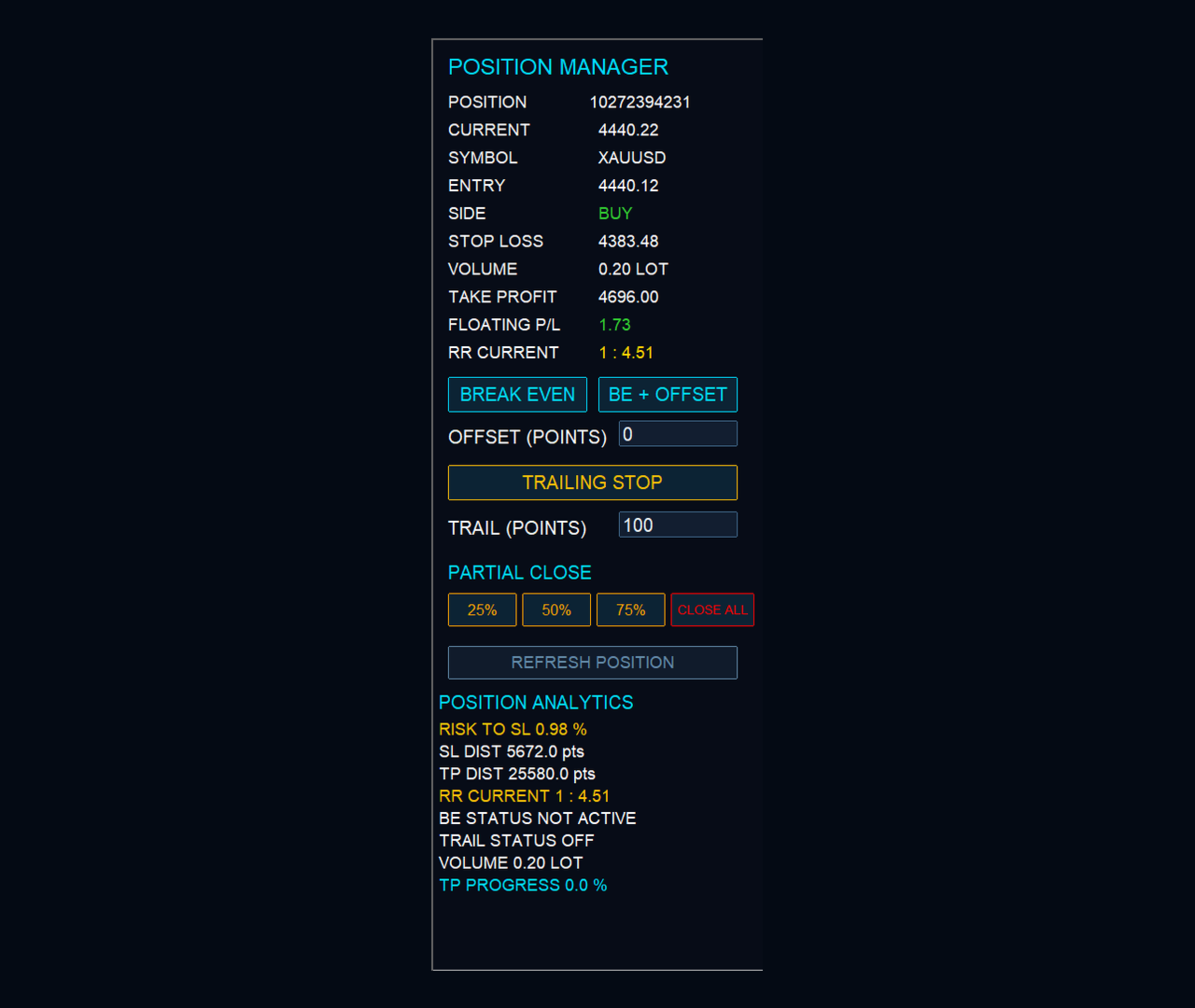
POSITION MANAGER
Manage an active position directly from Legend Terminal Pro.
Available functions include:
- Break Even
- Break Even + Offset
- Trailing Stop
- Partial Close 25%
- Partial Close 50%
- Partial Close 75%
- Close Position
- Refresh Position
The terminal also displays:
- Position Ticket
- Symbol
- Side
- Entry Price
- Current Price
- Stop Loss
- Take Profit
- Volume
- Floating P/L
- Current Risk / Reward
POSITION ANALYTICS
The Position Analytics section provides additional information about the active position:
- Risk to Stop Loss %
- Stop Loss Distance
- Take Profit Distance
- Current Risk / Reward
- Break Even Status
- Trailing Stop Status
- Current Volume
- Take Profit Progress
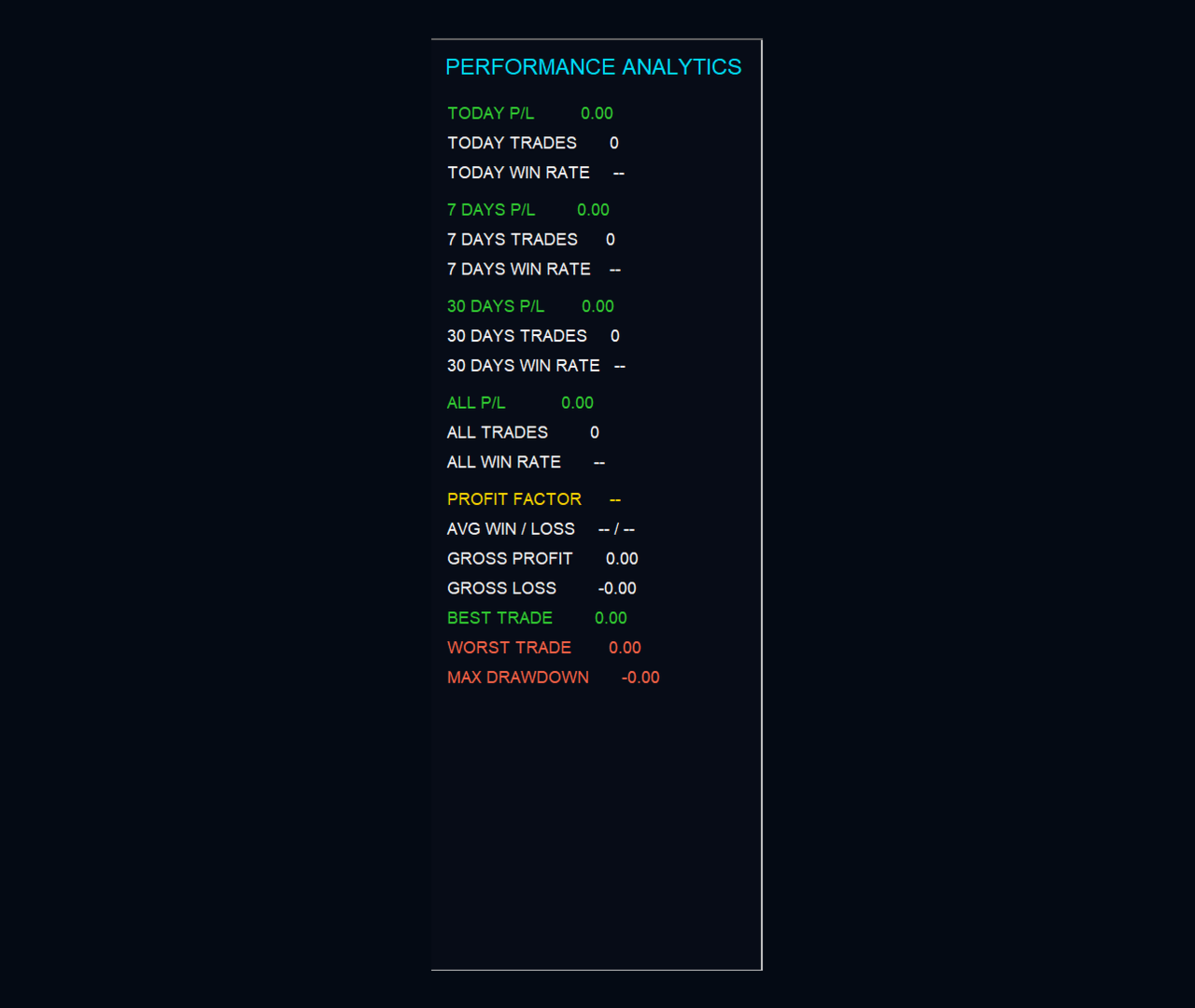
PERFORMANCE ANALYTICS
Legend Terminal Pro includes an integrated statistics section.
Performance can be reviewed for:
- Today
- 7 Days
- 30 Days
- All History
Available statistics include:
- Profit / Loss
- Number of Trades
- Win Rate
- Profit Factor
- Average Win
- Average Loss
- Gross Profit
- Gross Loss
- Best Trade
- Worst Trade
- Maximum Drawdown
Statistics are designed to track trading activity associated with Legend Terminal Pro on the current symbol.
4-SECTION WORKFLOW
Legend Terminal Pro is organized into four main sections:
SETUP — Prepare the order and configure risk.
EXECUTE — Review the complete trade configuration before execution.
MANAGE — Manage the active position.
STATS — Analyze trading performance.
TRADE GUARD INPUT PARAMETERS
- TradeGuardEnabled — Enables Trade Guard when the terminal starts
- GuardMaxRiskPercent — Maximum allowed risk percentage
- GuardMaxSpreadPoints — Maximum allowed spread in points
- GuardMinRR — Minimum allowed Risk / Reward
- GuardMaxPositions — Maximum allowed number of positions
- GuardMaxDailyLossPct — Maximum allowed daily loss percentage
IMPORTANT
Legend Terminal Pro is a trade execution and risk management utility. It is not a trading strategy, signal service or financial advisory tool.
No trading result or profitability is guaranteed.
Trading involves risk. The trader remains responsible for order selection, position sizing, risk parameters and all trading decisions.
It is recommended to test the terminal and configure its parameters according to your trading environment before using it on a live account.