Legend Terminal Pro

LEGEND TERMINAL PRO — Trade Execution & Risk Management Panel for MetaTrader 5

Legend Terminal Pro is a manual trade execution, risk management and position management panel designed for MetaTrader 5.

It brings the essential stages of discretionary trading into one interface: trade preparation, risk calculation, order execution, position management and performance analysis.

Legend Terminal Pro does not generate trading signals and does not make trading decisions for you. The trader remains in full control of every order.

MAIN FEATURES

SETUP — Trade Preparation

Prepare your trade before execution with support for:

  • Buy
  • Sell
  • Buy Limit
  • Sell Limit
  • Buy Stop
  • Sell Stop
  • Buy Stop Limit
  • Sell Stop Limit

Configure:

  • Entry Price
  • Limit Price
  • Stop Loss
  • Take Profit
  • Risk / Reward
  • Risk Money
  • Reward Money
  • Actual Risk

VOLUME & RISK CONTROL

Two position sizing modes are available:

  • LOT — use a fixed trading volume
  • % RISK — calculate the volume according to the selected risk percentage

The automatic volume calculation uses account equity, entry price, Stop Loss and the specifications of the current symbol.

This helps the trader maintain consistent risk management across different instruments and trade setups.

TRADE GUARD

Trade Guard adds an additional validation layer before trade execution.

Trade Guard is configurable through the Expert Advisor input parameters in MetaTrader 5 and includes predefined default values.

Available controls include:

  • Maximum Risk Percentage
  • Maximum Spread
  • Minimum Risk / Reward
  • Maximum Number of Positions
  • Maximum Daily Loss Percentage

Default settings:

  • Maximum Risk: 2.00%
  • Maximum Spread: 30 points
  • Minimum Risk / Reward: 1.50
  • Maximum Positions: 1
  • Maximum Daily Loss: 3.00%

These values can be modified by the user through the Expert Advisor Inputs according to their trading requirements.

Trade Guard can also be enabled or disabled directly from the Legend Terminal Pro interface using the GUARD ON/OFF control.

When enabled, the terminal checks the configured conditions before allowing trade execution.

EXECUTION COCKPIT

Before sending an order, the Execute section provides a clear summary of the trade configuration.

Information displayed includes:

  • Order Type
  • Symbol
  • Entry
  • Volume
  • Stop Loss
  • Risk
  • Take Profit
  • Reward
  • Risk / Reward
  • Margin
  • Spread
  • Validation Status
  • Trade Guard Status

This provides an additional review step before final execution.

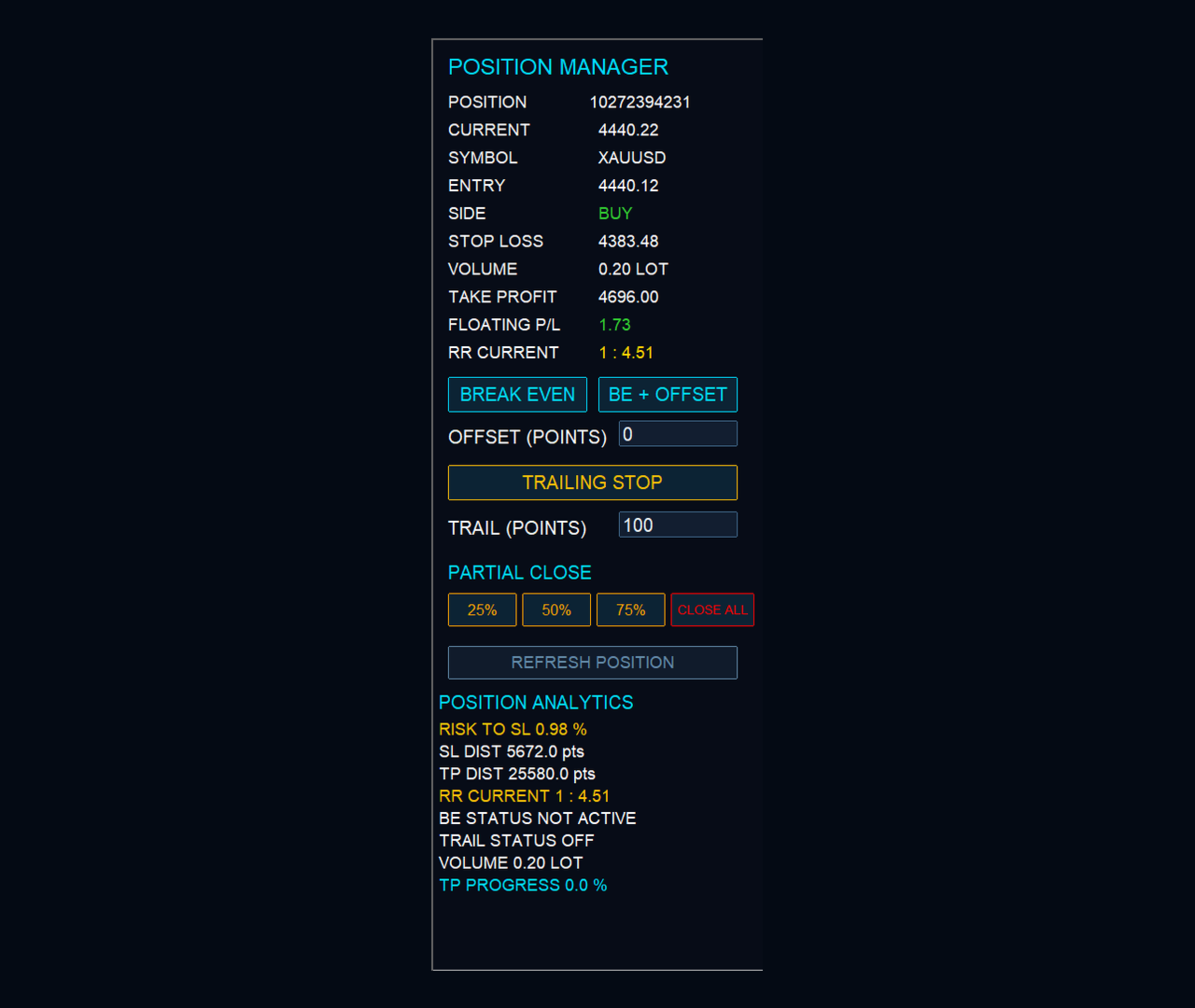
POSITION MANAGER

Manage an active position directly from Legend Terminal Pro.

Available functions include:

  • Break Even
  • Break Even + Offset
  • Trailing Stop
  • Partial Close 25%
  • Partial Close 50%
  • Partial Close 75%
  • Close Position
  • Refresh Position

The terminal also displays:

  • Position Ticket
  • Symbol
  • Side
  • Entry Price
  • Current Price
  • Stop Loss
  • Take Profit
  • Volume
  • Floating P/L
  • Current Risk / Reward

POSITION ANALYTICS

The Position Analytics section provides additional information about the active position:

  • Risk to Stop Loss %
  • Stop Loss Distance
  • Take Profit Distance
  • Current Risk / Reward
  • Break Even Status
  • Trailing Stop Status
  • Current Volume
  • Take Profit Progress

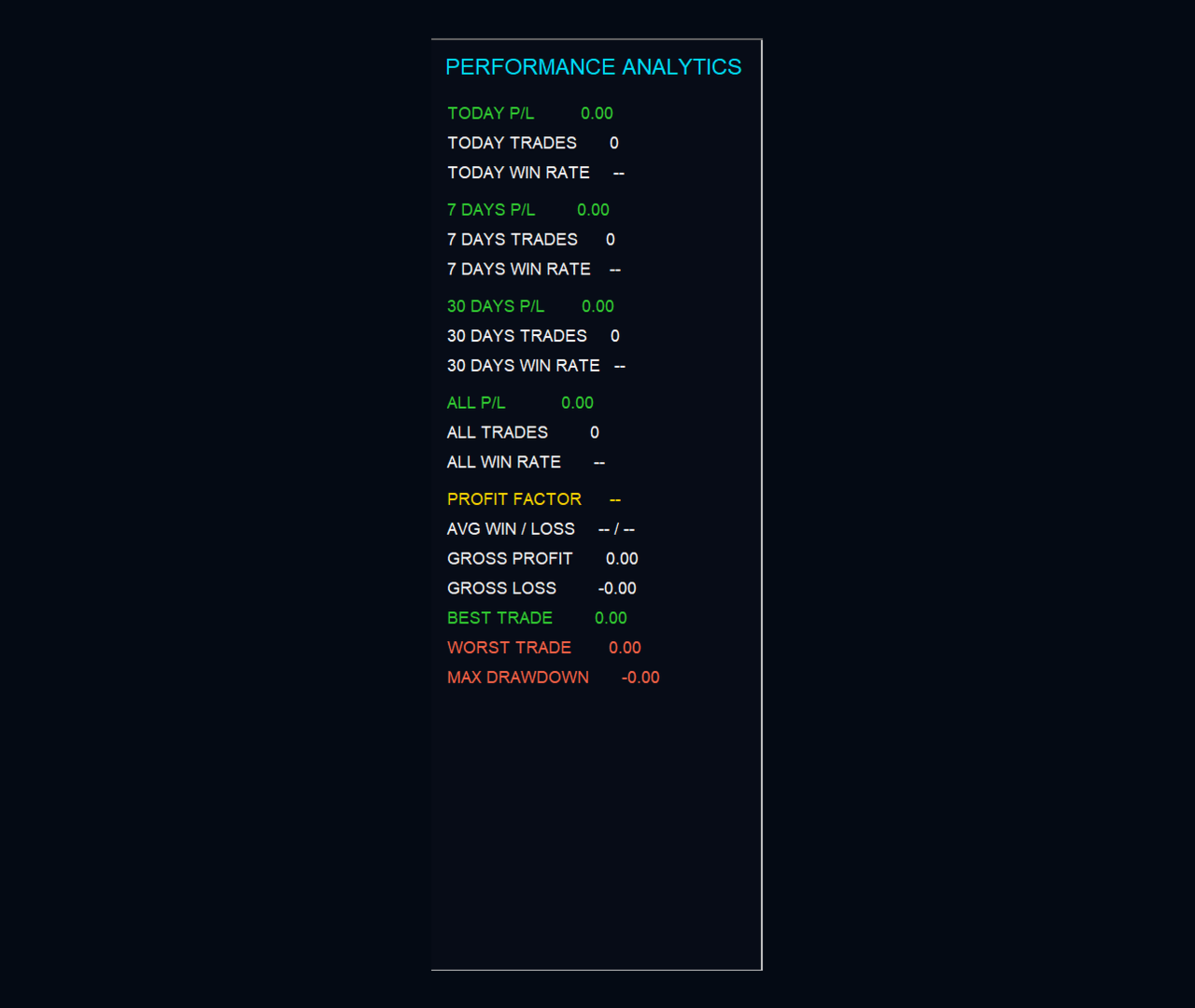
PERFORMANCE ANALYTICS

Legend Terminal Pro includes an integrated statistics section.

Performance can be reviewed for:

  • Today
  • 7 Days
  • 30 Days
  • All History

Available statistics include:

  • Profit / Loss
  • Number of Trades
  • Win Rate
  • Profit Factor
  • Average Win
  • Average Loss
  • Gross Profit
  • Gross Loss
  • Best Trade
  • Worst Trade
  • Maximum Drawdown

Statistics are designed to track trading activity associated with Legend Terminal Pro on the current symbol.

4-SECTION WORKFLOW

Legend Terminal Pro is organized into four main sections:

SETUP — Prepare the order and configure risk.

EXECUTE — Review the complete trade configuration before execution.

MANAGE — Manage the active position.

STATS — Analyze trading performance.

TRADE GUARD INPUT PARAMETERS

  • TradeGuardEnabled — Enables Trade Guard when the terminal starts
  • GuardMaxRiskPercent — Maximum allowed risk percentage
  • GuardMaxSpreadPoints — Maximum allowed spread in points
  • GuardMinRR — Minimum allowed Risk / Reward
  • GuardMaxPositions — Maximum allowed number of positions
  • GuardMaxDailyLossPct — Maximum allowed daily loss percentage

IMPORTANT

Legend Terminal Pro is a trade execution and risk management utility. It is not a trading strategy, signal service or financial advisory tool.

No trading result or profitability is guaranteed.

Trading involves risk. The trader remains responsible for order selection, position sizing, risk parameters and all trading decisions.

It is recommended to test the terminal and configure its parameters according to your trading environment before using it on a live account.


추천 제품
Trade Panel Pro — Professional Risk Management & Order Execution Terminal for MetaTrader 5 Trade Panel Pro is an advanced, all-in-one utility for MetaTrader 5, designed for active day traders and professionals. It combines precise risk calculation with lightning-fast order execution, helping you protect your capital and manage multi-target trades with ease. Main Advantages and Key Features Automated Lot Calculation: Forget manual volume calculations! The panel instantly calculates the exact
HedgeSafe Trade Assistant 위험 관리를 우선하는 MetaTrader 5용 수동 매매 패널입니다. HedgeSafe는 BUY 또는 SELL을 누르기 전에 차트에서 거래를 준비하고 검증하며 관리할 수 있도록 돕습니다. HedgeSafe는 신호 서비스, 시장 예측 도구, AI 봇 또는 자동매매 전략이 아닙니다. 거래 방향을 선택하거나 수익을 보장하지 않습니다. 모든 거래 결정은 트레이더의 책임입니다. 주요 기능 계좌 잔액 비율 또는 계좌 통화의 고정 금액으로 랏 계산. Stop Loss를 포인트 또는 가격으로, Take Profit을 포인트, 가격 또는 R 배수로 설정. 금액 위험, 예상 보상, 거래량 및 위험/보상 비율 미리 보기. Entry, Stop Loss, Take Profit 차트 라인을 패널 값과 동기화. BUY와 SELL 준비 상태를 별도로 표시하고 실행 직전에 방향별 검증 수행. 최소/최대 거래량, 거래량 단계, tick size, tick value,
DR Trade and Risk Manager: The Foundational Algorithmic Risk Console for MT5 For the discretionary trader, the greatest adversary is not the market; it is the undisciplined self. You have a solid strategy, but in moments of high pressure, do you follow your rules with perfect consistency? Do you cut losses without hesitation? Do you let winners run without cutting them short out of fear? For most, the answer is no. This gap between strategy and execution is where profits are lost. DR Trade and R
TradePanel EA – Manual + Semi-Auto Trading Dashboard TradePanel EA is a powerful assistant for traders who want precision, speed, and full control over their trades. It combines on-chart execution , basket profit management , drawdown protection , and market/session awareness into one easy-to-use panel. Core Features Click-to-Trade System Place BUY/SELL instantly from the panel Click on the chart to set Stop Loss — TP is auto-calculated by your chosen R:R Risk Control & Lot Sizing Risk
TradePilotmt5
Hossein Khalil Alishir
TradePilot Expert Advisor (EA) for MetaTrader 5 TradePilot is a professional and user-friendly Expert Advisor (EA) for MetaTrader 5 (MT5) . It simplifies automated trading , risk management , and trade execution with a smart trading panel . Perfect for beginners and experienced traders looking for a reliable trade manager EA with automated lot size calculation and smart position management. Key Advantages User-Friendly Trading Panel: Customizable panel with buttons and hotkeys for fast ex
Trader Evolution
Siarhei Vashchylka
5 (7)
" Trader Evolution " - A utility designed for traders who use wave and technical analysis in their work. One tab of the utility is capable of money management and opening orders, and the other can help in making Elliott wave and technical analysis. Manual (Be sure to read before purchasing) | Version for MT4 Advantages 1. Trading in a few clicks. Immediate and pending orders are available in the panel 2. Money management. The program automatically selects the appropriate lot size 3. Simplifies
DDKiller Pro
Njaratahiry Michael Randrianiaina
Stop Blowing Your Account. Once and For All. DDKiller Pro is the MT5 risk guardian that runs silently on your chart and shuts down trading the moment you hit a limit — whether you're grinding a prop firm challenge or managing your own CFD account. The problem every trader knows: You set your rules. You break them anyway. One revenge trade. One overleveraged position. One session that erases a month of gains. DDKiller Pro removes that decision from your hands entirely. What it does: The second yo
Breakevan Utility
Jose Luis Thenier Villa
BreakEvan Utility  Is a simple tool in a panel with this utilities: This utility will draw a Golden Line in the chart applied showing the breakeven price, considering all the positions opened for that specific symbol. Also the information panel shows: Balance Breakeven Price for that chart Force Breakeven (for that symbol) as ON/OFF Force Breakeven Global (takes into account all trades opened) as ON/OFF Total Lots opened for Symbol Total Lots opened Global And two buttons: Force Breakeven: Whe
ManualEdge ∴ Manual Trading & Basket Risk Panel Trade by hand. Let the system watch your back. ManualEdge is a one-click chart panel built for discretionary traders who want the speed of manual execution combined with the discipline of automated risk management. Instead of choosing between a dumb button panel and a black-box EA, ManualEdge gives you both: you decide when to enter, the panel handles the boring ∴ and dangerous ∴ parts of managing the trade afterward. Protect yourself from bad habb
SL TP Panel
Mikhail Ostashov
SL TP Panel — Visual Trading Panel for MT5 A convenient trading panel that lets you place pending orders by simply dragging lines on the chart. Stop Loss, Take Profit, order type, and lot size — everything is controlled with your mouse in seconds. Who is this for This panel is designed for manual traders who value speed of execution. Instead of opening the order window, filling in fields, and calculating levels — just drag a line to the desired price and click one button. Key Features Visua
Net Exposure & Net Average Price is a lightweight utility Expert Advisor for MetaTrader 5 hedge accounts . This tool helps traders instantly understand their true market exposure when multiple Buy and Sell positions are open on the same symbol. What the EA Does The EA displays a clear on-chart panel showing: Total Buy Trades Total Buy Lots Total Sell Trades Total Sell Lots Net Lots (Net Exposure) Net Average Price (hedge-adjusted breakeven) The Net Average Price represents the true breakeven
Symbol Manager for MT5
Taras Slobodyanik
5 (3)
Symbol Manager or Grid Manager, designed to group orders into one position (by Symbol or by Magic Number). This utility will be useful to multi-currency traders (many EAs), who can have multiple orders on several pairs. You will be able to see the total number of lots, the total profit, and set virtual stop loss and virtual take profit. To set a real TP (or SL), you must first set the virtual value, and then enter the command in this cell: "set". If you want to set real TP/SL for all orders at
Fast execution utility for manual traders. Drag-and-drop visual trading, split take-profits, and single-ticket management system. Speed, Precision, and Risk Control. KAB Trade Manager is built for traders who need to execute fast but keep risk tight. It integrates all essential tools into floating, collapsible windows. Core Functions: Instant Order Execution:   Market and Pending orders with automatic Lot sizing based on SL distance. Focus Ticket Manager:   A dedicated window to monitor and mana
Monitor Dashboard
Johann Dominique Carnevali
Clear EA & Internal Strategy Performance Separation The core purpose of MONIT Dashboard MT5 is to help traders clearly identify where their real performance comes from . On a MetaTrader 5 account, the global balance result is often not enough. A profitable account can hide a weak EA, an overactive strategy, a manual trading loss, or one specific Magic Number group generating most of the drawdown. This becomes even more important when several Expert Advisors are running on the same account, or w
Manual Trade Panel EA MT5
Juvenille Emperor Limited
5 (2)
수동 무역 패널 EA MT5 는 MT5에서 찾을 수 있는 가장 간단하고 사용하기 쉬운 무역 패널입니다. 추가 창이나 패널을 열 필요 없이 한 표면에 모든 옵션과 기능이 있습니다. 그것은 인터페이스를 사용하기 매우 편리한 하나의 주문 관리, 위험 계산기, 부분 폐쇄 및 계정 보호 유틸리티 모두입니다! 수동 거래 패널 EA MT5 를 사용하면 기존 수동 거래 방법보다 몇 배 더 빠르고 정확하게 거래할 수 있으며 거래 결정에 더 많은 시간과 더 명확한 정신을 집중할 수 있습니다. 계정 보존은 우리의 최우선 순위이므로   Manual Trade Panel EA MT5 는 또한 계정 이익을 얻거나 중지한 후 모든 미결 주문을 닫고 보류 중인 모든 주문을 삭제하며 EA가 첨부된 모든 터미널 차트를 닫을 수 있는 훌륭한 계정 보호 유틸리티입니다. 손실 자산에 도달했습니다. 이것은 이익 조건에서 매우 편리할 수 있으며 자산이 원하는 손절매 수준 아래로 떨어질 때 추가 손실로부터 거래 계정을
Codez Hotkeys
Mzwandile Derrick Mkhonza
The best way to place and close trades using your keyboard. Perfect for Scalpers, sniper entries. The default keys are as follows: 8= Buy (Lots set by user) 5= Sell  (Lots set by user) 9= Closes All Buy Positions 6= Closes All Sell Positions 2= Opens a Sell and a Buy position instantly. 0= CLOSES All Positions //These are the default keys, can be changed upon request.
Exp5 Duplicator
Vladislav Andruschenko
4.78 (9)
Duplicator for MetaTrader 5 — 하나의 터미널 안에서 동작하는 전문 포지션 복제 시스템 MetaTrader 5에서 이미 열려 있는 포지션을 자동으로 복제하고, 전체 거래 규모를 확장하며, 사용자 지정 로트 규칙을 적용하고, 복제 포지션을 정교한 로직으로 관리하려는 트레이더를 위한 신뢰성 높은 Expert Advisor입니다. 수동 매매, 알고리즘 매매, 그리고 이미 존재하는 포지션을 더 유연하게 관리하려는 사용자에게 적합한 실전형 도구입니다. Duplicator for MT5는 자체 매매 전략으로 새로운 포지션을 열지 않습니다. 이 제품의 역할은 MetaTrader 5 계정 안에 이미 존재하는 포지션을 감시하고, 사용자가 설정한 조건에 따라 복제 포지션을 생성하는 것입니다. 복제 횟수, 로트 크기, Stop Loss, Take Profit, 코멘트, 추가 관리 조건까지 세밀하게 설정할 수 있습니다. 서로 다른 플랫폼이나 다른 터미널 간 복사 기능이 아니라, 같
No Overnight Closer is a smart risk-management utility designed to automatically close your trades before daily rollover or overnight holding time. It protects your profits from swap fees, spread spikes, sudden volatility, and broker reset risks. This tool is perfect for day traders, scalpers, crypto traders, and prop firm traders who prefer to finish the day flat without exposing capital to unnecessary overnight danger. MT4 Version - https://www.mql5.com/en/market/product/164795/ Join To Lea
Candlestick Pattern Scanner is a multi-timeframe and multi-symbol dashboard and alert system that checks all timeframes and currency pairs for different candlestick patterns that are formed in them. Scanner is integrated   with support and resistance zones so you can check the candlestick patterns in most important areas of the chart to find breakout and reversal patterns in the price chart. Download demo version   (works on M4,M6,M12,H3,H8 timeframes and 20 symbols of Market Watch window) Read
Trade Copilot - 금(XAUUSD) 및 모든 상품을 위한 반자동 리스크 관리 패널 Trade Copilot는 자신의 진입 결정권을 유지하면서도 EA와 같은 규율을 원하는 재량 트레이더를 위해 설계된 반자동 트레이딩 패널입니다. 방향과 가격대는 사용자가 결정하고, 리스크 사이징, 손절 설정, 익절 관리, 포지션 보호는 패널이 자동으로 처리합니다. 주요 기능 - 리스크 기반 로트 계산 - Risk %, Risk $, 고정 로트 중 선택 가능; 손절 거리에 따라 패널이 포지션 크기를 자동 계산 - 3가지 손절 모드 - ATR 배수, 고정 포인트, 고정 $ 거리 - 원클릭 시장가/예약 주문(Buy/Sell Now, Pending Buy/Sell), 드래그 가능한 진입가/SL/TP 라인 - 그리드 트레이딩 - 가격 범위에 걸쳐 벨커브 로트 분배로 다수의 예약 주문 배치(마틴게일이 아님 - 로트 크기는 중심으로부터의 거리로 고정되며 손실 시 절대 두 배로 늘어나지 않음) -
MrRexo Trade Panel
ARKADIUSZ KROL MULTIPRO
MrRexo Trade Panel - MT5 트레이딩 패널 MrRexo Trade Panel 은 MetaTrader 5 용 차트 위 트레이딩 패널입니다. 빠른 주문 실행, 명확한 리스크 관리, 차트에서 직접 포지션 관리를 원하는 수동 트레이더를 위해 제작되었습니다. 이 패널은 주문 실행, 리스크 관리, lot 계산기, 시각적 R:R 계획, Break Even, Trailing Stop, 포지션 보호, 세션, 추세 컨텍스트, 가격 레벨 및 차트 모듈을 하나의 Expert Advisor에 통합합니다. Forex, 지수, 원자재, 금속, CFD 및 브로커 suffix가 있는 심볼에서 사용할 수 있습니다. Hedging 및 Netting 계정 유형을 지원합니다. 수동 트레이딩 및 실행 차트에서 Buy 및 Sell 실행. 설정된 lot, Stop Loss, Take Profit을 사용하는 시장가 주문 . 시각적 레벨을 이용한 pending order 계획. Close All , Close P
The utility displays in a convenient form the historical trades made on the account. You can filter trades by magic or comcent, display only profitable or losing trades, and only buy or sell trades. Using this utility, you can see trade entry and exit points, stop loss and take profit levels, trade profit, magic number and comment, order ticket and order size - you only need to run the utility on the chart of the currency pair you want information on get and customize the input parameters. MT4

This EA is there to take your trade closing stress away. Quickly close as many trades as you have opened at the click of a button, INCLUDING PENDING ORDERS. This works on the MT5 platform whether it be currencies, Indices, stocks or Deriv synthetic indices. I have saved it under utilities as it is a utility, however, to install this, you have to save the file in you "EA" folder. That is; Go to "File", then "Open Data Folder", "MQL5" and then "Experts". Paste this file there. Restart MT5 and you'
CopyIQ
Stephen Sanjeeve Sahayam
CopyIQ mirrors your trades between MetaTrader 5 terminals running on the same Windows PC - one source account feeding as many receiver accounts as you need. Everything happens locally on the one machine: no VPS, no DLLs, and no internet link between terminals to lag or break. A trade on your source account reaches every receiver in milliseconds. CopyIQ was built by studying where other local copiers let traders down - copies that arrive late, lot sizes that ignore the receiving account, symbols
Expert Trade Panel — Профессиональная панель ручной торговли и управления рисками **Expert Trade Panel** — это мощный и интуитивно понятный торговый терминал прямо на вашем графике MetaTrader 5. Панель разработана для трейдеров, которым необходим полный контроль над позициями, быстрое исполнение ордеров, автоматический расчет бесубытка и визуальный контроль уровней усреднения. ---   Ключевые возможности  1. Управление в один клик и каскадный Тейк-Профит * **Исполнение сделок:** Мгновенный вх
# Equity Monitor Pro  ## Short Description Equity Monitor Pro is a professional equity p**Equity Monitor Pro** is a powerful risk management tool that automatically protects your trading account by monitoring equity levels and enforcing prop firm style rules. Whether you're taking an FTMO challenge, trading a funded account, or just want to protect your capital, this EA runs silently alongside your trading strategy and takes action when it matters most. Protection tool designed for prop firm
Turbo Close All is a powerful and versatile script designed to help traders quickly and efficiently manage their trading positions and pending orders on MetaTrader 5. With its advanced features and customizable settings, this script is an essential tool for traders who want to streamline their trading process and maintain control over their positions and orders. Key Features: Comprehensive Closing Options: Turbo Close All allows you to close all market positions and/or delete pending orders bas
PRODUCT TITLE: Ben TIK Copy Trading MT5 COMMERCIAL DESCRIPTION Ben TIK Copy Trading is the ultimate, ultra-fast, all-in-one solution for replicating your trades in real-time on the MetaTrader 5 platform. Designed specifically for demanding traders and community managers, this utility combines Master (sender) and Slave (receiver) roles into a single, unified file. No need to handle multiple scripts or indicators anymore: a simple input parameter allows you to configure each terminal's role in j
SMC TrendMatrix Pro
Mykhailo Karpiuk
ENGLISH DESCRIPTION (Full Version) SMC TrendMatrix PRO (v2.36) — Multi-Timeframe Smart Money Zone Matrix SMC TrendMatrix PRO is a professional analytical tool designed for traders utilizing the Smart Money Concepts (SMC) and Inner Circle Trader (ICT) methodologies. The indicator automatically scans up to 21 timeframes simultaneously, identifies strong institutional zones of interest (Order Blocks with strict liquidity sweep and momentum filters), and consolidates the entire analysis into a s
JMM Trade Panel MT5 JMM Trade Panel MT5는 MetaTrader 5용 차트 기반 거래 관리 도구입니다. 차트에서 직접 Buy와 Sell 주문을 실행하고, 패널에서 로트를 빠르게 조정하며, 바스켓별 손익과 관리 상태를 확인할 수 있습니다. 전체 사용자 설명서:  다운로드 주요 기능 차트 내 Buy, Sell 및 Close All 버튼. EA가 관리하는 모든 포지션을 한 번에 청산. Magic Number와 관계없이 계좌의 모든 오픈 포지션을 관리하는 옵션. 현재 차트 심볼만 관리하거나 계좌의 모든 심볼을 관리. 패널을 통한 수동 로트 설정. +0.01, +0.10, +1.00, -0.01, -0.10, -1.00 로트 조정 버튼. 계좌 자본 비율과 예상 증거금을 기준으로 로트를 자동 계산하는 옵션. Buy 및 Sell 바스켓 정보 개별 표시. 바스켓 손익을 계좌 통화와 핍으로 표시. 전체 관리 손익을 계좌 통화와 핍으로 표시. Buy 및 Sell 바스켓
이 제품의 구매자들이 또한 구매함
================================================================================ POC BREAKOUT - V20.72. Full Professional Grade Toolkit ================================================================================ POC Breakout is a full MetaTrader 5 trading dashboard for discretionary traders who want breakout signals, Point of Control (POC) context, volume profiles, order flow, market structure, news, alerts, and advanced trade planning in one professional workspace. Attached directly to you
Farmed Hedge Yield Farming | All Markets (Manual - Hybrid - Semi/Automated EA) VERIFIED TRADING RESULTS - Farmed Hedge Yield Axi Copy:  https://www.mql5.com/en/signals/2356376 - Farmed Hedge Yield Exn Copy:   https://www.mql5.com/en/signals/2356404 - Farmed Hedge Yield V Copy:  https://www.mql5.com/en/signals/2357156 * Before purchasing, please feel free to send me a message if you have any questions about the product or setup. ** After purchase,  Contact me via private message to receive t
EA Overfitter
Stephen J Martret
That backtest looks great. But will it still be making money tomorrow, next week, next month? EA Overfitter re-runs your EA on 100 price histories it has never seen. One score tells you if the edge is real. A backtest tells you what an EA did on one price history — the one that happened to occur. What you cannot tell from it is how much of that result was the strategy and how much was the particular path. EA Overfitter answers that. It builds up to 100 synthetic price histories your EA has n
Premium Trade Manager - 코치가 내장된 트레이딩 패널 Premium Trade Manager 는 차트 안에 트레이딩 코치를 심어놓은 도구입니다. 주문을 확정하기 전에, AI 트레이딩 코치 Max가 설정된 거래를 직접 읽고 명확한 판단을 내려줍니다. 스톱이 규율 있는 접근 방식에 맞는지, 리스크 크기가 합리적인지, 고영향 뉴스 이벤트가 몇 분 후에 있는지, 프롭 펌 한도에 근접했는지. 그 아래에는 완전한 실행 엔진이 있습니다. 원클릭 리스크 기반 진입, 차트에서 드래그로 세우고 거래가 진행되는 동안에도 계속 움직일 수 있는 플랜, 최대 4단계 분할 익절, 7가지 트레일링 방식, 실시간 프롭 펌 컴플라이언스, 뉴스 가드, 그리고 자체 비용을 평가하는 스프레드까지. 결정은 당신이 내립니다. Max가 두 번째 시선으로 확인합니다. 패널이 그 이후의 모든 것을 처리합니다. 구매 전에 직접 체험해 보세요. 브라우저에서 라이브 패널을 직접 클릭해볼 수 있습니다. 구매 전에 실제
FUTURES ORDERFLOW FOOTPRINT CHART Professional OrderFlow EA for MetaTrader 5 Version 1.01| Professional tool for real traders | Institutional-Grade Visualization STRATEGY TESTER USERS - PLEASE SELECT EVERY REAL TICK WHEN TESTING AND YOU HAVE DOWNLOADED HISTORICAL DATA. IF YOU SEE A WAITING SCREEN AND IT IS NOT DOWNLOADING, IT MEANS YOU HAVE LOW HISTORICAL DATA. TRY 1 MIN AND 5 MIN FIRST ON 1 DAY DATA. ONE DAY DATA SHOULD BE THE NEWEST AND MOST CURRENT DATE. PLEASE WAIT UNTIL THE MARKET HAS ROL
The product will copy all telegram signal to MT5 ( which you are member) , also it can work as remote copier.  Easy to set up, copy order instant, can work with almost signal formats, image signal,  s upport to translate other language to English Work with all type of channel or group, even channel have "Restrict Saving Content", work with  multi channel, multi MT5 Work as remote copier: with signal have ticket number, it will copy exactly via ticket number. Support to backtest signal. How to s
YuClusters
Yury Kulikov
4.93 (43)
Attention: You can view the program operation in the free version  YuClusters DEMO .  YuClusters is a professional market analysis system. The trader has unique opportunities to analyze the flow of orders, trade volumes, price movements using various charts, profiles, indicators, and graphical objects. YuClusters operates on data based on Time&Sales or ticks information, depending on what is available in the quotes of a financial instrument. YuClusters allows you to build graphs by combining da
파워 캔들 전략 스캐너 - 자체 최적화 다중 종목 설정 찾기 도구 파워 캔들 전략 스캐너는 마켓 워치에 등록된 모든 종목에 대해 파워 캔들 지표와 동일한 자체 최적화 엔진을 동시에 실행합니다. 하나의 패널에서 현재 통계적으로 거래 가능한 종목, 각 종목별 최적의 전략, 최적의 손절매/익절 조합을 알려주며, 새로운 신호가 발생하면 즉시 알림을 전송합니다. 이 도구는 Stein Investments 에코시스템의 일부입니다. 18개 이상의 도구와 함께 당신의 1대1 AI 트레이딩 멘토 Max.  항상 대기 중, 모든 인디케이터를 깊이 있게 이해, 무언가를 차근차근 생각해보고 싶은 순간에 도움을 줍니다.  https://stein.investments 에서 만나보세요 완벽한 시장 모니터링. 종목당 3,000건 이상의 자동 최적화. 2가지 알림 유형. 한 번의 클릭으로 차트를 전환하고 바로 거래하세요. 이 도구가 필요한 이유 대부분의 다중 종목 스캐너는 가격 변동만 보여줍니다. 티커별
Ultimate Extractor
Clifton Creath
5 (8)
Ultimate Extractor - Professional Trading Analytics for MT5 *****this is the local HTML version of Ultimate Extractor. !!!!!it is not compatible with Cloud!!!! For the online version please reach out to me directly****** Ultimate EA manager also now available when you use cloud pro and above for free!! Ultimate Extractor transforms your MetaTrader 5 trading history into actionable insights with comprehensive analytics, interactive charts, and real-time performance tracking. What It Does Automa
Quant AI Agents
Ho Tuan Thang
5 (1)
Quant AI Agents are independent trading Expert Advisors. Instead of trading using a fixed strategy like other conventional EAs, Quant AI Agents   is a   multi-agent AI trading framework   that turns natural-language strategy prompts into live.  WANT THE SAME RESULTS AS MY LIVE SIGNAL?   Use the exact same brokers I do:   IC MARKETS , IC TRADING   .  Unlike the centralized stock market, Forex has no single, unified price feed.  Every broker sources liquidity from different providers, creating un
Footprint Chart Pro — Professional OrderFlow EA for MetaTrader 5 Version 6.34 | Professional tool for real traders | Institutional-Grade Visualization DEMO USERS - PLEASE SELECT EVERY TICK / REAL TICK WHEN TESTING AND YOU HAVE DOWNLOADED HISTORICAL DATA. IF YOU SEE A WAITING SCREEN AND IT IS NOT DOWNLOADING, IT MEANS YOU HAVE LOW HISTORICAL DATA. TRY 1 MIN AND 5 MIN FIRST ON 1 DAY DATA. ONE DAY DATA SHOULD BE THE NEWEST AND MOST CURRENT DATE. PLEASE WAIT UNTIL THE MARKET HAS ROLLED OVER PERIOD.
Bots Builder Pro MT5
Andrey Barinov
4.17 (6)
This is exactly what the name says. Visual strategy builder . One of a kind. Turn your trading strategies and ideas into Expert Advisors without writing single line of code. Generate mql source code files with a few clicks and get your fully functional Expert Advisors, which are ready for live execution, strategy tester and cloud optimization. There are very few options for those who have no programming skills and can not create their trading solutions in the MQL language. Now, with Bots Builde
The real‑time view of what is happening inside the market. Footprint Secrets brings detailed analysis directly into MetaTrader 5. It shows where volume is trading, how buyers and sellers are interacting, and how liquidity shifts as the market evolves. Designed for traders who want a precise, real‑time understanding of market behavior. Check out the free preview version here:  https://www.mql5.com/en/market/product/172398 Benefits for the Trader See the real activity behind price . Footprint ch
Custom Alerts AIO: 다중 시장을 동시에 모니터링 – 설정 없이 즉시 사용 가능 개요 Custom Alerts AIO 는 복잡한 설정 없이 즉시 사용할 수 있는 통합 시장 모니터링 도구입니다. FX Power, FX Volume, FX Dynamic, FX Levels, IX Power 등 필요한 모든 지표가 내장되어 있어 별도의 설치나 구성 없이 알림 기능을 바로 사용할 수 있습니다. 차트 그래픽 없이 작동하며, Forex, 금속, 지수, 암호화폐 등 주요 자산군을 모두 지원합니다. 주식(Symbols)은 별도로 입력하여 추가할 수 있으나, MetaTrader에서는 일반적으로 제한적으로만 사용됩니다. 1. 왜 Custom Alerts AIO를 선택해야 하나요? 추가 라이선스가 필요 없습니다 • 모든 Stein Investments 지표가 내장되어 있어 별도 구매가 필요 없습니다. • 즉시 알림 기능을 시작할 수 있어 빠르고 간편합니다. 모든 시장을 하나의 도구로
AI Agent Supervisor is NOT an Expert Advisor. AI Agent Supervisor   is a   multi-agent AI risk & portfolio supervisor   that watches every EA on your account and intervenes in real time.  WANT AN AI PORTFOLIO MANAGER WATCHING YOUR FLEET 24/7?   Run your fleet on the same brokers I do:   IC MARKETS , IC TRADING   .  Unlike the centralized stock market, Forex has no single, unified price feed.  Every broker sources liquidity from different providers, creating unique data streams. The Supervisor r
Welcome to ENTRY IN THE ZONE WITH SMC MULTI TIMEFRAME Entry In The Zone and SMC Multi Timeframe is a real-time market analysis tool based on Smart Money Concepts (SMC), designed to analyze market structure, price direction, and key trading zones. It supports both Single-Timeframe Analysis and Multi-Timeframe Analysis, providing a clearer view of the overall market structure across multiple timeframes, with real-time BUY / SELL signals that do not repaint. It is designed to help filter trading op
EasyInsight AIO MT5
Alain Verleyen
4.92 (12)
EASY Insight AIO – 스마트하고 손쉬운 트레이딩을 위한 올인원 솔루션 개요 외환, 금, 암호화폐, 지수, 심지어 주식까지 — 전 시장을 몇 초 만에, 수동 차트 확인이나 복잡한 설치, 인디케이터 설정 없이 스캔할 수 있다고 상상해 보세요. EASY Insight AIO 는 AI 기반 트레이딩을 위한 궁극의 플러그 앤 플레이(Plug & Play) 데이터 내보내기 도구입니다. 단 하나의 깔끔한 CSV 파일로 전체 시장 스냅샷을 제공하며, ChatGPT, Claude, Gemini, Perplexity 등 다양한 AI 플랫폼에서 즉시 분석할 수 있습니다. 창 전환, 복잡함, 차트 오버레이는 더 이상 필요 없습니다. 자동으로 내보내지는 순수하고 구조화된 데이터 인사이트만으로, 반복적인 차트 감시 대신 데이터 기반의 스마트한 의사결정에 집중할 수 있습니다. 왜 EASY Insight AIO인가요? 진정한 올인원 • 별도의 설정, 인디케이터 설치, 차트 오버레이가 필요 없습
VirtualTradePad PRO SE MT5 — MetaTrader 5용 전문 트레이딩 컨트롤 센터 VirtualTradePad PRO SE 는 MetaTrader 5 용 프리미엄 차트 기반 트레이딩 패널이자 거래 관리 워크스페이스입니다. 더 빠른 주문 실행, 더 명확한 포지션 관리, 구조화된 거래 관리, 시각적인 레벨 계획, 그리고 차트에서 직접 작업하는 전문적인 워크플로를 원하는 트레이더를 위해 설계되었습니다. 이 제품은 단순한 BUY / SELL 패널이 아닙니다. PRO SE는 수동 트레이딩, 예약 주문, 포지션 관리, 부분 청산, 바스켓 손익 관리, 평균가 레벨, ATM 규칙, 신호 모니터링, 실시간 시장 정보, 전략 테스터 (Strategy Tester) 워크플로, VPS 중심 운용을 하나의 연결된 인터페이스로 통합합니다. MT4 버전 | 전체 설명 및 스크린샷 | 구입 방법 | 설치 방법 | 로그 파일을 얻는 방법 | 테스트 및 최적화 방법 | Expforex의 모든
Global Investing FX Terminal
Santiago Nicolas Pla Casuriaga
Global Investing FX Terminal 은 MetaTrader 5용 올인원 FX 대시보드입니다 — 중앙은행 정책금리, CFTC COT 포지션, 캐리 순위, 경제 서프라이즈, 옵션 스큐, 소매 심리, 상관관계까지 총 열세 개의 분석 패널을 깜빡임 없는 단일 캔버스에 렌더링하며, 단일 EA에서 10초마다 갱신됩니다. 외부 소프트웨어가 필요 없습니다. 전문적인 FX 분석은 일반적으로 별도의 플랫폼에 분산된 데이터에 동시에 접근해야 합니다: 금리 파생상품, 정부 데이터 포털, 브로커 스왑 명세, 옵션 데스크. 이 EA는 이 모든 것을 거래 결정이 실행되는 거래 터미널 내 단일 화면에 통합합니다. 대시보드에서 보이는 것 시장 개요 FX 페어 테이블 — 28개 G10 통화쌍 전체에, 브로커의 Market Watch에 NOK/SEK 크로스가 있을 경우 이를 더한 최대 36개 통화쌍의 실시간 매수/매도 가격. 각 행은 스프레드, 일간·주간 변화, 핍 단위의 절대 범위, ADR% — 1
EA Auditor
Stephen J Martret
5 (5)
EA Auditor is an independent analysis tool for traders evaluating Expert Advisors and trading signals on MetaTrader 5. It audits backtest reports, reviews posted developer signals, and cross-verifies the two against each other to help traders assess strategies before committing capital. The MQL5 market offers a wide range of Expert Advisors from many developers, with varying approaches, quality, and transparency. EA Auditor provides a consistent, data-driven framework for reviewing them, answer
Trading Chaos Expert
Gennadiy Stanilevych
5 (11)
This software has no equals in the world and represents a universal trade "console" covering trading signals, automated market entry, setting of Stop Loss and Take Profit, as well as Trailing Profit for multiple trades at the same time in a single open window. Intuitive control of the Expert Advisor in "three clicks" ensures a comprehensive use of all its functions on different computers, including tablets PCs. Interacting with additional signal indicators that mark the chart to give a real mark
Features   With MT5 to Interactive Brokers(IB) Trader, you can: 1. Load chart data from IB to MT5, and Analyze with all standard or customer Indicators. 2. Place Orders to IB Account Directly in MT5. 3. Make your Own EAs upon IB Securities by only making minus changes of the trading function. Usage 1) Installation Copy the "Mt5ToIBTraderEn.ex4" and sample files to [MT5 Data Folder]->MQL5->Experts.  2)  MT5 Settings Add the IP Address to the MT5 Allowed URLs in 'Tools->Options->Expert Adviso
HINN Lazy Trader
ALGOFLOW OÜ
5 (1)
The core idea: using the user interface, you configure the parameters the chart must meet before entering a position (or positions), choose which entry models to use, and set the rules for when trading and planning should end. Lazy Trader  handles the rest: it  takes over all the routine chart watching and execution! full description  :: 3 key videos [1] ->  [2]   ->  [3] What can it do? - Understands Larry Williams market structure - Understands swing market structure by Michael Huddleston
Check EA performance  https://www.mql5.com/en/signals/2376164?source=Site +Profile+Seller Spot vs Future Arbitrage EA for MT5 Spot vs Future Arbitrage EA is an automated Expert Advisor designed for MetaTrader 5 that operates using price differences between Gold spot and Gold futures instruments. The strategy opens positions on both instruments simultaneously to take advantage of temporary differences between spot and futures prices. Requirements The trading account must provide both Gold spot
Telegram To MT5 Receiver
Levi Dane Benjamin
4.53 (15)
가입한 모든 채널에서 (개인 및 제한된 채널 포함) 시그널을 바로 MT5로 복사합니다.   이 도구는 사용자를 고려하여 설계되었으며 거래를 관리하고 모니터하는 데 필요한 많은 기능을 제공합니다. 이 제품은 사용하기 쉽고 시각적으로 매력적인 그래픽 인터페이스로 제공됩니다. 설정을 사용자 정의하고 제품을 몇 분 안에 사용할 수 있습니다! 사용자 가이드 + 데모  | MT4 버전 | 디스코드 버전 데모를 시도하려면 사용자 가이드로 이동하십시오. Telegram To MT5 수신기는 전략 테스터에서 작동하지 않습니다! Telegram To MT5 특징 여러 채널에서 동시에 신호를 복사합니다. 개인 및 제한된 채널에서 신호를 복사합니다. Bot 토큰이나 채팅 ID가 필요하지 않습니다.   (원하는 경우에는 사용할 수 있습니다) 위험 % 또는 고정된 로트로 거래합니다. 특정 심볼을 제외합니다. 모든 신호를 복사할지 또는 복사할 신호를 사용자 정의할지 선택할 수 있습니다. 모든 신호를 인
The product will copy all  Discord  signal   to MT5   ( which you are member  ) , also it can work as remote copier.  Easy to set up. Work with almost signal formats, support to translate other language to English Work with multi channel, multi MT5. Work with Image signal. Copy order instant, auto detect symbol. Work as remote copier: with signal have ticket number, it will copy exactly via ticket number. How to setup and guide: Let read all details about setup and download Discord To MetaTrader
Prop Firm Os
Gayathiri Gopalakrishnan
5 (1)
PROP FIRM OS Structured Trading Assistant for MetaTrader 5 PROP FIRM OS is a structured trading assistant designed for MetaTrader 5 users who prefer rule-based market analysis and organized trading workflows. The Expert Advisor combines market analysis tools, scanner functions, dashboard monitoring, alerts, risk-control settings, and trade management features inside one system. PROP FIRM OS is designed to help traders follow selected rules, filters, and monitoring conditions during trading activ
Telegram to mt5 pro
Janet Abu Khalil
4 (4)
Telegram to MT5 Pro — Advanced Telegram Signal Copier with Auto-Fix, Multi-TP, Risk Control and Full Trade Management Telegram to MT5 Pro — 전문 텔레그램 신호 복사기 Telegram to MT5 Pro는 텔레그램 신호를 MetaTrader 5 계정으로 자동으로 직접 실행하는 고성능 트레이드 복사기로, 리스크, 실행, 트레이드 관리에 대한 완전한 제어를 제공합니다. 이 시스템은 두 가지 구성 요소로 이루어져 있습니다: • MetaTrader 5 내부에서 실행되는 Expert Advisor (EA) • 텔레그램에 연결되어 신호를 로컬로 EA에 전송하는 데스크톱 브리지 애플리케이션 두 구성 요소는 동일한 컴퓨터에서 실행되어야 합니다. MQL5 플랫폼 제한으로 인해 EA는 텔레그램에 직접 연결할 수 없습니다. 브리지는 텔레그램을 처리하고 EA는 거래를 실행합니다. 지원 및 설치
Trade Copier Pro MT5
Vu Trung Kien
3.67 (3)
Trade Copier Pro MT5 is a tool to copy trade remotely to multiple MT4, MT5 and cTradfer accounts at different computers/locations over internet. This is an ideal solution for you if you are a signal provider and want to copy your trades to other receivers globally on your own rules. One provider can copy trades to multiple receivers and one receiver can get trade from multiple providers as well. The provider can even set the subscription expiry for each receiver, so that receiver will not be abl
ManHedger MT5
Peter Mueller
4.83 (6)
THIS EA IS A SEMI-AUTO EA, IT NEEDS USER INPUT. Manual & Test Version Please TEST this product before BUYING  and watch my video about it. The price of the ManHedger will increase to 250$ after 20 copies sold. Contact me for user support or bug reports or if you want the MT4 version! MT4 Version  I do not guarantee any profits or financial success using this EA. With this Expert Advisor, you can: Implement your own Zone Recovery strategy to capitalize on trending markets. Create Grid trading s
제작자의 제품 더 보기
Legend Terminal MT4
Nathanae E Nemazine Taraconat
Legend Terminal is a manual trade execution and risk management panel for MetaTrader 4. It allows traders to prepare and execute orders directly from the chart by combining trade parameters, position sizing and risk information in a single interface. ORDER TYPES • Buy • Sell • Buy Limit • Sell Limit • Buy Stop • Sell Stop RISK MANAGEMENT • Fixed lot position sizing • Percentage risk position sizing • Automatic volume calculation • Risk amount calculation • Potential reward calculation • Actual r
Legend Terminal Pro MT4
Nathanae E Nemazine Taraconat
LEGEND TERMINAL PRO Legend Terminal Pro is a professional manual trading, risk management and position management panel designed for MetaTrader 4. It brings trade preparation, execution, position management, protection tools and trading statistics together in a single interface directly on the chart. Legend Terminal Pro does not generate trading signals and does not trade automatically based on a strategy. The trader remains in control of trade selection and execution. MAIN FEATURES SETUP
Legend Terminal
Nathanae E Nemazine Taraconat
Legend Terminal is a manual trade execution and risk management panel for MetaTrader 5. Designed to provide a clear and structured trading workflow directly from the chart, it combines order execution, position sizing and risk calculations in one interface. Order Types • Buy • Sell • Buy Limit • Sell Limit • Buy Stop • Sell Stop • Buy Stop Limit • Sell Stop Limit Risk Management • Fixed lot position sizing • Percentage risk position sizing • Automatic volume calculation • Risk amount calculation
필터:
리뷰 없음
리뷰 답변