Market Maker Reversal Scanner MT5
- Göstergeler
- Sürüm: 15.2
- Güncellendi: 12 Ekim 2026
- Etkinleştirmeler: 5

By the time you've clicked through forty charts looking for a first red day at a monthly high, the setup you wanted has already closed.
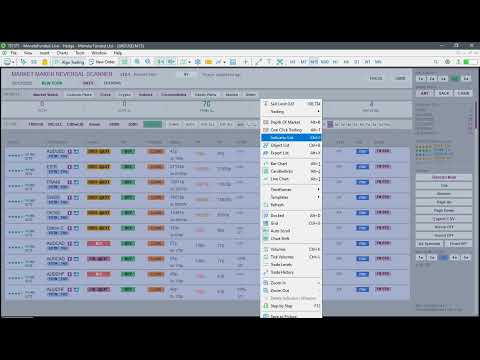
Market Maker Reversal Scanner reads your Market Watch, finds a fixed set of reversal and exhaustion patterns, scores each one on a transparent 10-point scale, and puts the results in a single sortable panel on one chart. You stop hunting. You start choosing.
New in v12.1: a DAYS / SESSIONS switch. Sessions mode runs the same scanner on closed H4 candles and tags every row Asia, London or New York. A per-pair WIN% column now sits beside that pair's own base rate, so you can see how its past signals compare with its normal behaviour.
Introduction
This is an analysis tool. It does not place, modify or close trades, and it makes no claim about profitability. It has no DLL imports and makes no web requests.
A signal here is a candidate for the next session, not an entry now. The scanner shows which instruments closed in a condition worth watching and which side is likely trapped. Where and whether you enter is your own work, on your own timeframe.
The logic follows the Stacey Burke ACB framework ("ain't coming back") and the Taylor 3-Day Cycle: price is pushed to an extreme, late traders get trapped there, and the reversal is the trade. "Market maker" in the name refers to that model of price behaviour. The scanner reads bar data only. It has no access to order flow or institutional positioning.
How it works
- Days mode (default): each closed D1 bar is evaluated against the weekly and monthly structure around it.
- Sessions mode: each closed H4 candle plays the role of a day. Its tag (ASIA / LONDON / NY) is the session it opened in. Signal names change to match: FRS/FGS, 3SHC/3SLC, 3S-BO, INSIDE-S, OS and S-CIB.
- Scoring: every row shows its own arithmetic, so nothing is a black box.
Score (max 10)
- Extreme (max 6): close at a monthly extreme = 6, close at a weekly extreme = 4, monthly high/low = 2, weekly high/low = 1.
- Signal (max 3): FRD/FGD, 3HC/3LC, Inside Day, Outside Day, a chain, and close-in-breakout or 3-day breakout at an extreme.
- Timing (max 2): backside of the month, first day of the trading month, Wednesday.
- Template (max 1): FRD, FGD, Inside Day or Outside Day on a Wednesday or Thursday, backside only.
- Tiers: ELITE 9–10, PRIME 7–8, STRONG 5–6, WATCH 3–4, ALERT 1–2.
Design rules that keep the list short:
- FRD/FGD need an extreme on the matching side.
- 3HC/3LC need an extreme.
- Breakout-family signals score zero away from an extreme (default setting).
- Only the named high-conviction setups at a monthly-close extreme can reach ELITE. Everything else caps at PRIME.
You will see fewer rows than a typical scanner produces. That is the point.
Key Features
- One scanner, two windows. Switch between DAYS and SESSIONS live from the title bar. Scoring, filters and alerts work the same in both.
- Narrows the universe to a watchlist you can manage. Scan your whole Market Watch or a custom list. Forex, indices and commodities are on by default. Crypto, exotics, stocks and other are off by default and can be toggled independently, with broker prefixes and suffixes handled.
- Detected setups: FRD, FGD, 3HC, 3LC, Inside Day, Outside Day, 3-day breakout up/down, daily close-in-breakout up/down, weekly close-in-breakout up/down (Days mode), plus the 3HC→FRD / 3LC→FGD chain as a distinct high-conviction row.
- Close-in-breakout handled as the method intends. At an extreme it is a scored row. Anywhere else it is flagged IN PLAY as a watchlist trigger, scoring zero and never alerting.
- Direction on every row. BUY, SELL or WATCH, derived from which extreme the bar is at.
- Per-pair WIN% next to a base rate. WIN% is how often this pair's past signals of the same setup, extreme and weekday were followed by a next-day (next-H4 in Sessions mode) close in the signal's direction. DAY G/R is how often that pair closes green or red with no signal at all. Hover for the edge, wins/n and the 90% lower bound. History is seeded on start by replaying up to 250 past daily bars per symbol. It never pools different pairs.
- Volatility context. ADR(14), 3×ADR, distance travelled from the open and an EXT flag past 3×ADR, plus week-to-date range.
- Written thesis per row. Hover any signal for a plain-English explanation of what fired, which extreme it is at and the ADR context.
- Filters and sorting. Independent signal-type filters, an extreme-quality filter that cycles from all extremes down to monthly-close only, a minimum-star filter, and four sort modes (score, age, A–Z, today first). Age filters read days in Days mode and 1h / 4h / 8h since candle close in Sessions mode.
- Data health reporting. Symbols with thin or stale history are counted, named in a tooltip, excluded from results, and retried automatically.
- CSV export. 44 columns per row, including every score component, every extreme flag, session, age, thesis and the WIN% and base-rate fields.
- Alerts. Pop-up, optional sound (a different file per tier) and optional e-mail (needs your terminal's SMTP settings). Alerts fire only for PRIME and ELITE setups on the latest closed bar. There is no mobile push.
- Responsive on large lists. The universe is scanned in slices with a time budget per tick, so the terminal stays usable.
- Interface. 13 themes including the new Obsidian Gold, a saved default theme, scrollbar and mouse-wheel scrolling, focus mode and a built-in ? GUIDE overlay. Clicking a row opens that symbol's chart (D1 by default, M5 in Sessions mode).
Risk Management and Settings
The scanner has no risk module because it never touches your account. What it gives you are the controls that decide how strict it is, which is where discipline lives:
- InputMinStrengthFilter (default 4): shows PRIME and ELITE rows only. Lower it to widen the list.
- InputCIBExtremeOnlyTradeable (default on): keeps breakout-family signals out of the scored list unless they are at a genuine extreme.
- InpFRD_MinPumpDays (default 1): consecutive higher/lower closes required before an FRD/FGD. Set 3 for strict three-close behaviour.
- InpFRD_RequireFalseBreak (default off): require the FRD/FGD bar to poke a new extreme and fail.
- InputCheckMonthlyExtremes / InputCheckWeeklyExtremes (default on): which extreme windows are evaluated.
- InputUseTemplateDayBonus (default on): turn off the Wednesday/Thursday template point if you don't trade the template.
- InputShowMultipleSignalsPerSymbol (default on): every qualifying setup, or only the newest per symbol.
- InpProbMinTrials / InpProbBackfillBars: how many graded past signals a % needs before it is shown, and how much history seeds it.
- InpFridayCloseHourUTC (default 21, US-DST aware): after this hour Friday's bar is treated as closed.
- InputAlertCustomOnly and InputInstanceTag: limit alerts to your custom list, and keep several attached instances from colliding.
A workflow that fits the method: take only PRIME and ELITE rows, read WIN% against DAY G/R rather than on its own, check the EXT flag before entering, and use the CSV export to keep an honest record of which tiers perform on your instruments and your feed.
FAQ
Does it trade for me? No. It reads price and displays results. It never opens, modifies or closes a position.
Does it repaint? Scored signals are built from closed bars. In Days mode the forming daily bar is skipped on weekdays. Once the Friday close hour passes, Friday's bar is treated as closed so its setups appear that evening. ADR, range and EXT figures update live. A signal row does not change after its bar closes.
What does WIN% actually tell me? Only how often this pair's past signals of the same setup were followed by a next-day close in the signal's direction. Green means reliably above 50% (90% lower bound). It does not subtract the pair's normal drift, so compare it with DAY G/R. A small number of past signals is weak evidence, and 15/19 means far more than 4/4. It is not a profit figure.
Why no backtest or profit statistics? The scanner identifies conditions. It defines no entries, stops or targets, so there is no strategy to backtest. Use the CSV export to build statistics on your own instruments.
Why are there so few signals? Most of the filtering is intentional. You can widen the list by lowering the minimum-star filter and disabling InputCIBExtremeOnlyTradeable, but you are trading precision for volume.
Which alerts are supported? Pop-up, sound and e-mail. There is no mobile push. Sound can be limited to ELITE only with MIN SOUND STARS in the sidebar.
What timeframe do I attach it to? Any. Days mode analyses D1 and Sessions mode analyses H4, whatever the chart is. The chart is only a canvas for the panel.
Will I get identical results to another trader? Not necessarily. Brokers with different server times close the daily candle at different hours, and symbol availability differs.
Some symbols aren't showing. Symbols with thin or stale history are excluded and listed under DATA HEALTH. Open those charts once so the terminal downloads D1 (and H4 for Sessions mode), then rescan.
What files does it write? Signal history and graded results (MMR_SignalHistory.csv, MMR_DayResults.csv), alert-dedup keys, and your CSV exports, all in the terminal's Files folder.
Getting Started
Attach it to any chart, open the ? GUIDE overlay and read the scoring breakdown against live rows for a week before changing a single default. Then switch to SESSIONS to see the same logic on H4. If it puts one setup in front of you on a symbol you would never have opened, it has paid for itself.
Analysis tool only. Past signal behaviour does not guarantee future results.