Position Timeout Manager
- Yardımcı programlar
- Sürüm: 2.45
- Güncellendi: 16 Ekim 2026
- Etkinleştirmeler: 10

This utility helps protect against excessive losses and prevents positions or pending orders from remaining open for too long when using scalping or grid trading robots.
These types of trading EAs can accumulate significant unrealized drawdowns when a position is opened in the wrong direction and additional positions are added through a grid system. As a result, the EA may become unable to open new trades for an extended period.
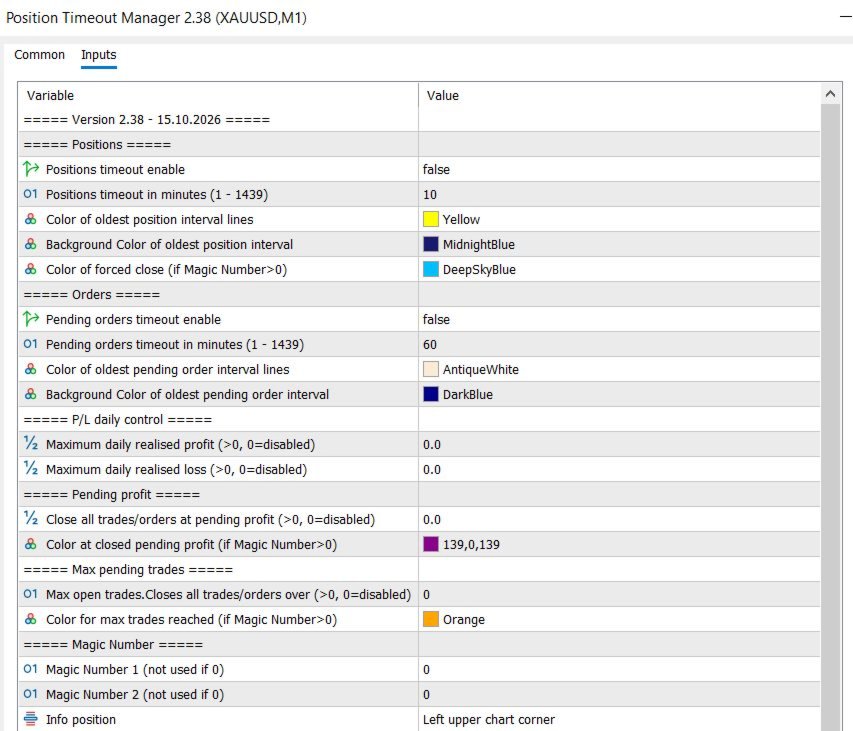
The utility allows you to define separate time limits for pending orders and open positions. Once the specified time limit is reached, all pending orders are canceled and all open positions are closed automatically. The remaining time is displayed graphically on the MetaTrader 5 (MT5) chart.
Open positions have higher priority. This means that once a pending order has been filled and an open position exists, only the time limit for the open position applies, regardless of whether additional pending orders are placed afterwards.
In addition, the maximum daily loss or profit can be limited, a feature that many EAs do not provide. Once the specified limit is reached, all open orders and positions are closed immediately for the remainder of the day. The daily profit display will indicate this by changing to red or green.
It is possible to limit the maximum number of open positions. All positions and pending orders will be closed if the number of open positions exceeds this limit.
When the defined profit level of the open positions is reached, all positions and pending orders will be closed. This allows trades to be closed earlier with a smaller profit.
A vertical line is displayed at the point where the utility closed all trades on the current day, provided that a Magic Number is specified.
By specifying two possible Magic Numbers, all functions can be applied exclusively to the orders and positions generated by a particular EA.
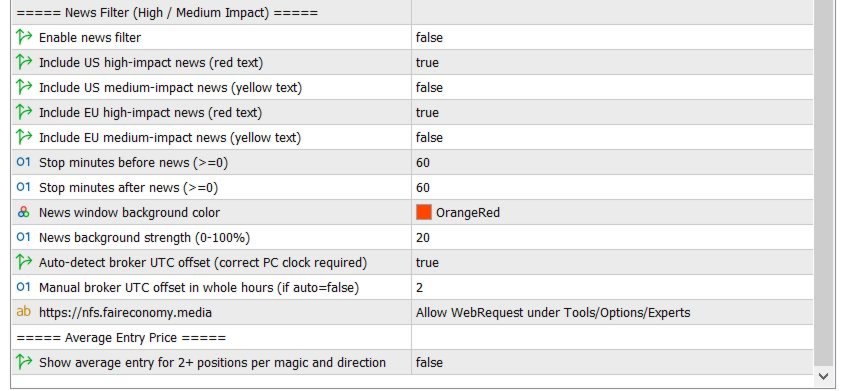
It can cancel all pending orders and close all open positions within a configurable number of minutes before and after a news release, provided the news filter settings and specified Magic Numbers match. High- and medium-impact US and EU news can be included. The protected time interval can be highlighted in color on the chart.
Optionally filters high- and medium-impact US and EU news from Fair Economy, displays upcoming events and shaded stop windows on the chart, and automatically closes matching positions and deletes pending orders during configurable periods before and after each event.
If you are using an Expert Advisor on a chart, simply attach Position Timeout Manager to a separate chart within your MT5 terminal and ensure that Algo Trading is enabled. It will automatically monitor and manage all trades generated by that EA.
If you are using an MQL5 VPS, make sure to attach all EAs, including Position Timeout Manager, to separate charts. Enable Algo Trading, then right-click the MQL5 VPS in the Navigator window and select "Synchronize Experts, Indicators" to migrate your entire trading setup to the virtual server.
Note: Position Timeout Manager does not work in the MT5 Strategy Tester.
Support
I'm always available. If you have any questions, please feel free to contact me. For a quick response, send me a private message.