Multi Symbol Volatility Alert MT5
- Yardımcı programlar
- Sürüm: 1.0
- Etkinleştirmeler: 5

This tool is designed for users who want to monitor sudden price movements across multiple instruments.
-------------------------------------------------------------------------------------------------------------------------------
HOW TO USE
1. Install the product from the MetaTrader 5 Market after purchase.
2. Open any chart in MetaTrader 5.
3. Find the product in:
Navigator > Market > Purchased
4. Drag and drop the product onto the open chart.
5. Make sure Algo Trading is enabled in MetaTrader 5.
6. Configure the input parameters.
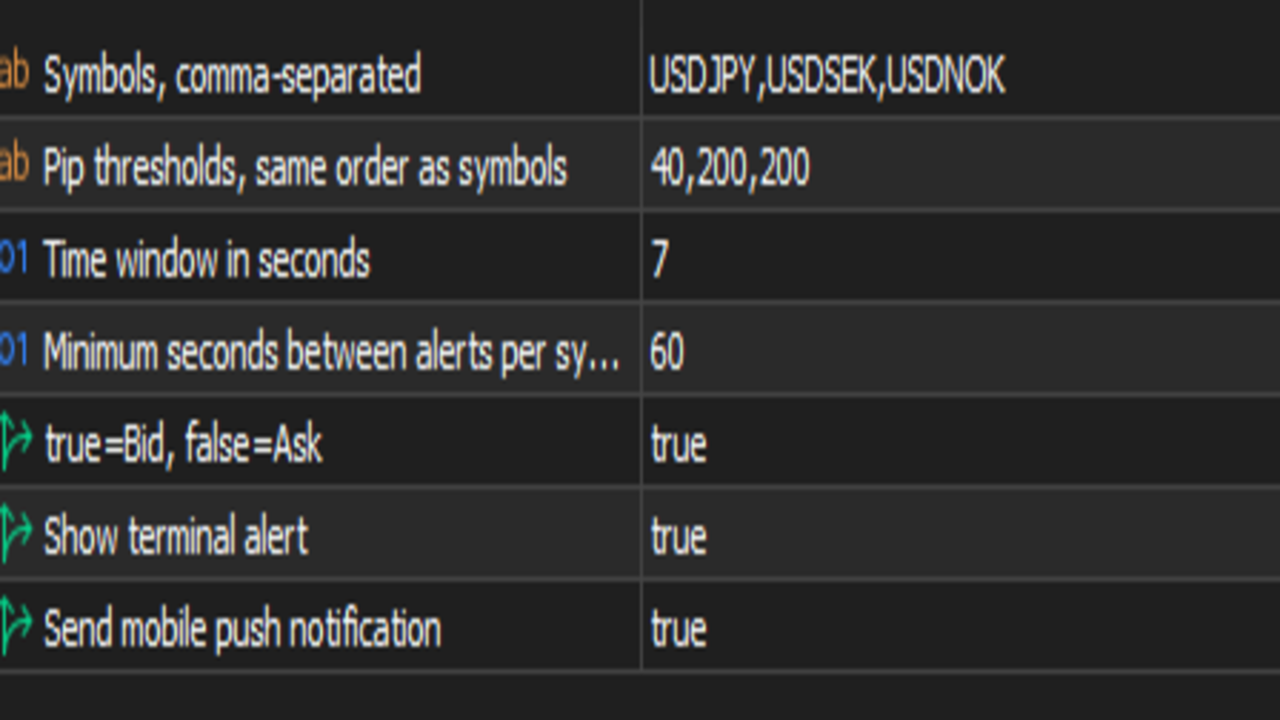
Symbols:
Enter the symbols you want to monitor, separated by commas.
Example:
USDJPY,USDSEK,USDNOK
PipThresholds:
Enter the pip movement threshold for each symbol in the same order as the Symbols list.
Example:
40,200,200
This means:
USDJPY = 40 pips
USDSEK = 200 pips
USDNOK = 200 pips
WindowSeconds:
Defines the time window used to measure price movement, in seconds.
Example:
7
CooldownSeconds:
Defines the minimum time before another alert can be sent for the same symbol.
Example:
60
SendTerminalAlert:
If enabled, the product will show an alert inside the MetaTrader terminal.
SendPushNotification:
If enabled, the product will send a mobile push notification.
7. To receive mobile push notifications, open:
Tools > Options > Notifications
8. Enable Push Notifications.
9. Get your MetaQuotes ID from the MetaTrader 5 mobile app and enter it in the desktop MetaTrader 5 terminal.
10. Click the Test button to confirm that mobile notifications are working.
11. Click OK to start monitoring.
Alert example:
USDJPY volatility alert: 42.0 pips in 7 seconds. Direction: DOWN. High: 161.900 Low: 161.480 Last: 161.500
Important notes:
The number of symbols must match the number of pip thresholds.
Correct example:
USDJPY,USDSEK,USDNOK
40,200,200
Incorrect example:
USDJPY,USDSEK,USDNOK
40,200
The product monitors the symbols entered in the Symbols input, not only the chart symbol.
MetaTrader 5 must remain open and connected to the internet for the product to work.