DivScope MT4
- Göstergeler
- Sürüm: 1.5
- Etkinleştirmeler: 5

Stop Chasing Noise. Start Trading Real Divergence.
Three oscillators. One clean engine. Regular and hidden divergence — detected only at confirmed pivots.
Most divergence indicators overwhelm you with signals on every bar.
You watch arrows paint and repaint, signals cluster on trend candles, and by the time you act, the move is already over.
DivScope was built to solve exactly that. It runs a structural swing-confirmation check before marking any divergence — so every signal you see is rooted in a real price structure, not random oscillator fluctuation.
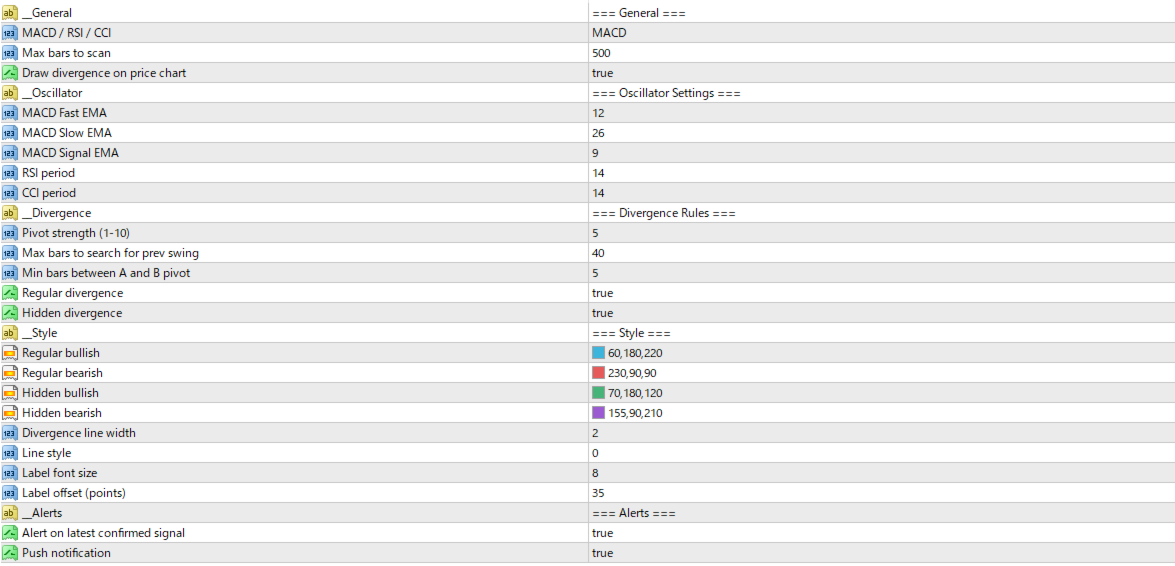
Choose your oscillator (MACD, RSI, or CCI), set your pivot strength, and let DivScope do the filtering that used to take years of screen time to develop.
Key Features
Triple Oscillator Engine: Switch between MACD, RSI, and CCI with a single dropdown — no extra windows, no clutter. One tool adapts to your strategy.
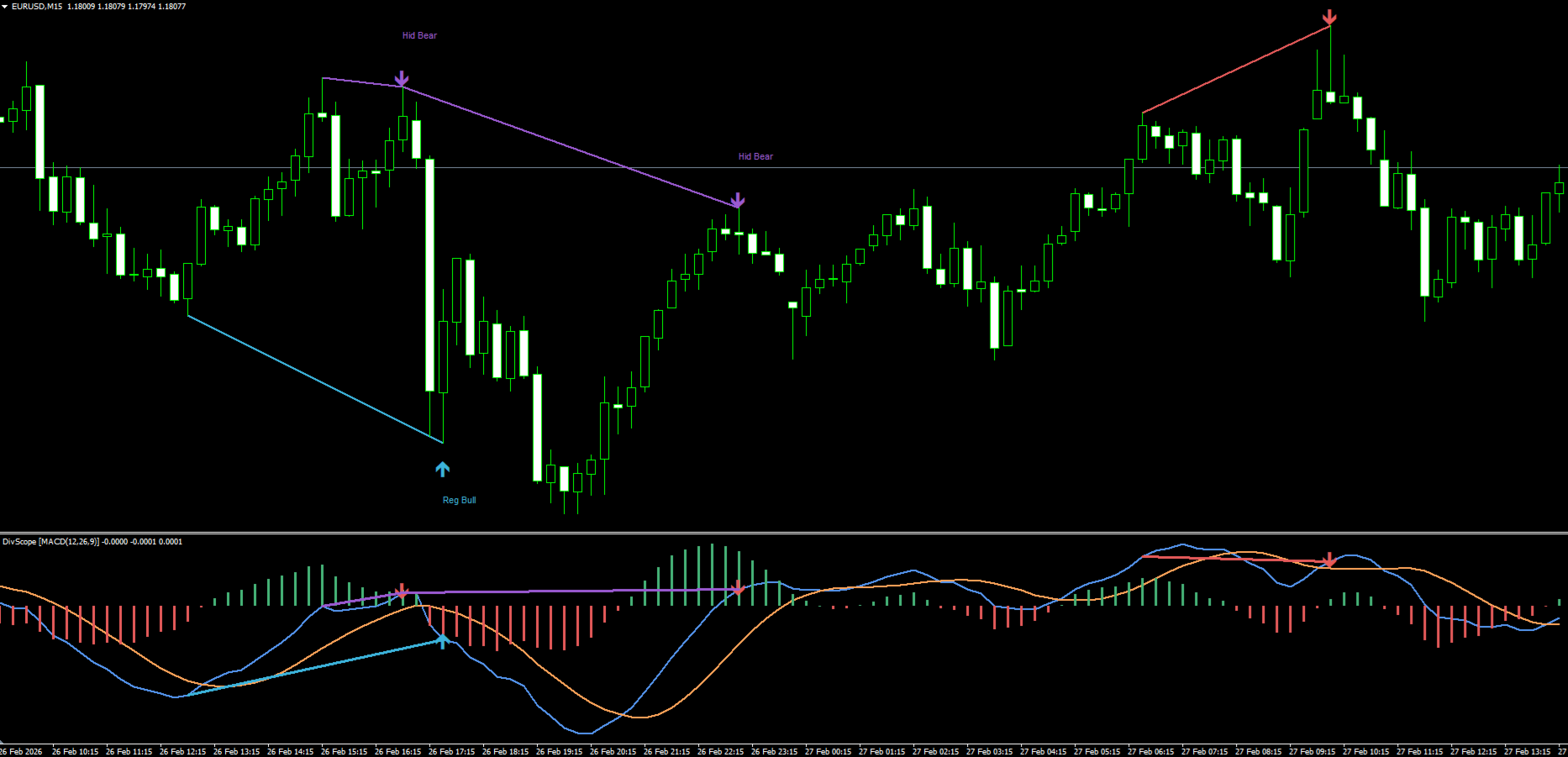
Confirmed Swing-Only Detection: DivScope validates structural highs and lows before scanning for divergence.
Bars that aren't genuine pivot points are never treated as signals — this is the fix that eliminates the signal overload plaguing most divergence tools.
Regular + Hidden Divergence: Regular divergence (potential reversal) and hidden divergence (trend continuation) are both tracked and displayed in distinct colors, so you can immediately read the market context.
Dual-Layer Visualization: Divergence lines appear simultaneously on the price chart and in the oscillator subwindow, with color-coded arrows and text labels. Nothing is ambiguous — you see the divergence exactly where it forms.
Real-Time Alerts: Pop-up and push notifications fire only on the latest confirmed signal bar — no duplicate alerts, no missed entries when you step away from the screen.
How It Works
DivScope calculates your chosen oscillator (MACD, RSI, or CCI) and then identifies structurally confirmed swing highs and lows using an N-bar pivot validation algorithm.
Only bars with N stronger candles on both sides qualify as pivot points.
The indicator then compares price and oscillator values at those pivots to detect divergence.
The MinDivBars parameter adds an additional filter: A and B pivot pairs must be separated by a minimum number of bars, eliminating near-identical pivot pairs that would otherwise generate noise.
Who This Is For
You have been trading long enough to understand divergence, but frustrated enough with existing tools to look for something better.
You trade forex, indices, or commodities on MT4 — anything from M15 to H4.
You want a tool that shows fewer signals with higher structural integrity, not more signals with lower reliability.
You also want the flexibility to switch between MACD, RSI, and CCI without managing three separate indicators.
DivScope was built for this exact trader.
Investment & Value
DivScope is priced at $59.
A single miscalled entry on a standard lot can cost multiples of that in seconds. A quality signal subscription runs $100–300 per month, indefinitely.
DivScope is a one-time license that runs on your own MT4 terminal, on every symbol and timeframe you trade, without a monthly fee.
Use the MQL5 demo version to test it on your live charts before purchasing — zero risk to try.
See the Difference a Cleaner Divergence Engine Makes
Download the demo and apply DivScope to your current charts. Compare the signal quality against what you have been using.
If the structural confirmation logic delivers cleaner setups, the purchase decision makes itself.
FAQ
Q: There are free divergence indicators on MQL5. Why pay for this one?
A: Free tools typically test every bar for divergence — which is why they generate constant signal noise on trending candles.
DivScope's swing-confirmation logic (introduced in v1.05) filters down to structurally valid pivots only. That gap in quality is the reason for the price difference.
Q: Does DivScope repaint signals?
A: Divergence lines are drawn at confirmed swing highs and lows — meaning the pivot must have N confirmed bars on both sides before it qualifies.
Signals are not drawn on the live unconfirmed bar, which eliminates the repainting behavior common in other tools.
Q: I mainly use RSI. Is MACD mode something I need to worry about?
A: Not at all. You select your oscillator once in the settings and the indicator behaves as a dedicated RSI divergence scanner.
The MACD histogram and signal line simply stay hidden. You get one clean subwindow, not three.