Box Levels Pro
- Göstergeler
- Sürüm: 1.0

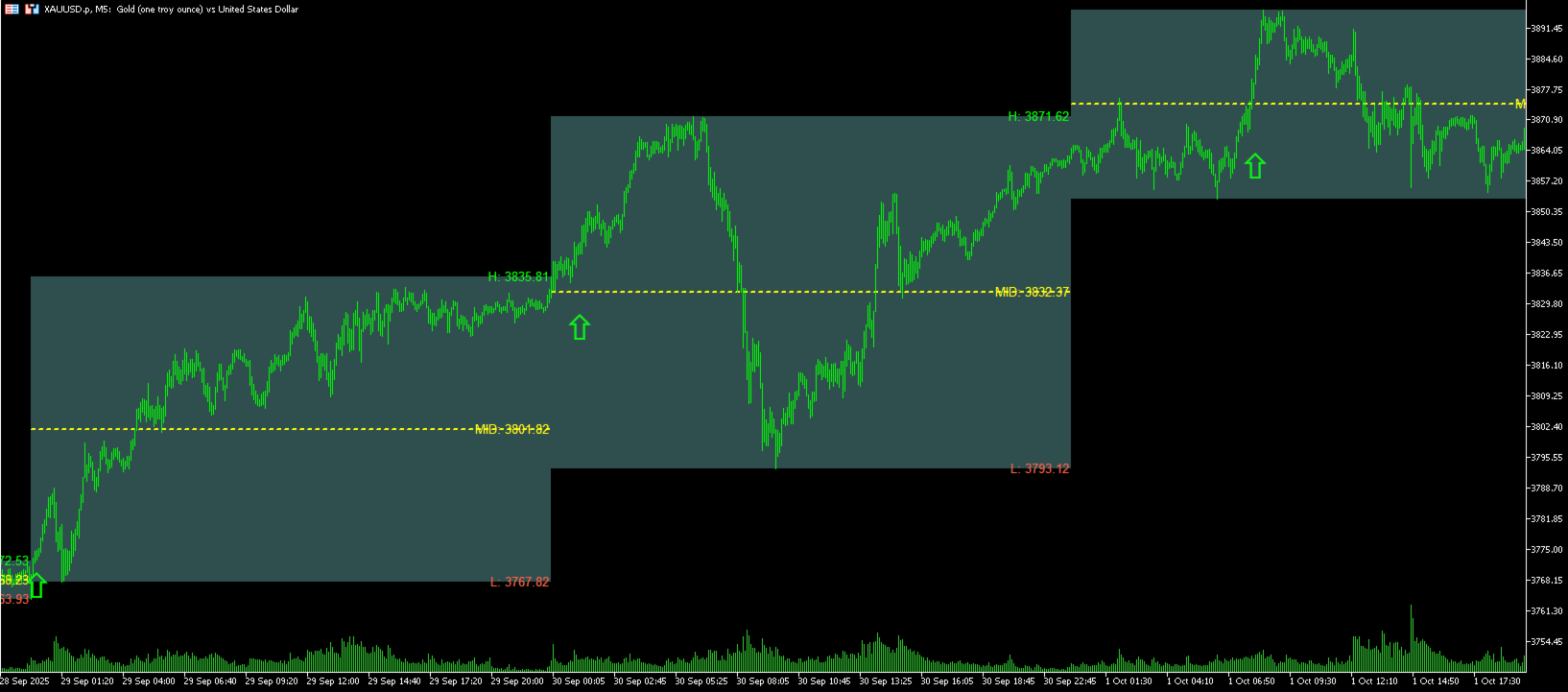
BoxLevels Pro automatically plots the previous day’s high/low box with a midline and labels, then detects breakouts in the next session with directional arrows. It’s a clean, fast tool for range, breakout and mean-reversion strategies on FX, indices, metals, and CFDs.
Why it works
Yesterday’s range often acts as a key liquidity zone. The first clean break in the following session can trigger directional volatility—BoxLevels Pro highlights these moments and filters weak breaks with distance rules.
Key Features
-
Previous Day Box: High, Low, and Midline rendered as a shaded box.
-
Next-Session Breakout Arrows: Signals after N consecutive closes beyond High/Low.
-
Distance Filters: Minimum distance from the level by Auto / Points / Pips / % of Range (+ optional points floor) to reduce false breaks.
-
Session Start (UTC): Fully configurable to align with your market session.
-
Labels: H/L/MID values printed near the box for quick reference.
-
Custom Styling: Colors, borders, fills, line styles, and arrow size/offset.
-
Lightweight: No buffers or repaint gimmicks—draws historical levels consistently.
Inputs (Overview)
-
Style & Colors: Border, width, style, fill, background drawing, prefix.
-
Midline: Color, width, style.
-
Labels: Colors for High/Low/Mid, font size, position from right edge.
-
DaysBack: Number of historical boxes to display.
-
Session Start (UTC): Hour and minute to define the trading day.
-
Breakouts: Enable/disable arrows, ConsecutiveBars, arrow size and offset.
-
Min Distance Mode: Auto / Points / Pips / %Range + MinDistanceValue and PointsFloor.
-
Debug: Optional diagnostic output.
How It Works
-
You define the UTC session start (e.g., 00:00 for a classic daily box).
-
The indicator builds the previous day’s range [High–Low] and Midline.
-
In the next session only, it scans for ConsecutiveBars closing beyond High or Low.
-
If the minimum distance rule is satisfied, an up/down arrow is drawn at the breakout area.
Practical Uses
-
Breakout entries on the first clean move beyond yesterday’s range.
-
Fade/mean reversion setups on failed breaks (combine with your own filters).
-
Session mapping to align levels with specific market opens (Asia/London/NY).
Tips
-
Start with ConsecutiveBars = 2 or 3 for higher-quality breaks.
-
On FX, AUTO uses pips; on indices/metals it uses % of range.
-
Combine with a trend filter (MA/HTF bias) or volatility filter (ATR) to refine entries.
Notes
-
This is an analysis tool; it does not execute trades and is not a standalone signal provider.
-
Historical DST offsets are not reconstructed; the server–UTC offset is taken at runtime.
Compatibility: MetaTrader 5, any symbol/timeframe.
Best for: M1–M15 intraday mapping, also useful on higher TFs for context.
Bring structure to your session and focus on the breaks that matter—BoxLevels Pro.