Impulse System MTF
- Göstergeler
- Sürüm: 1.3

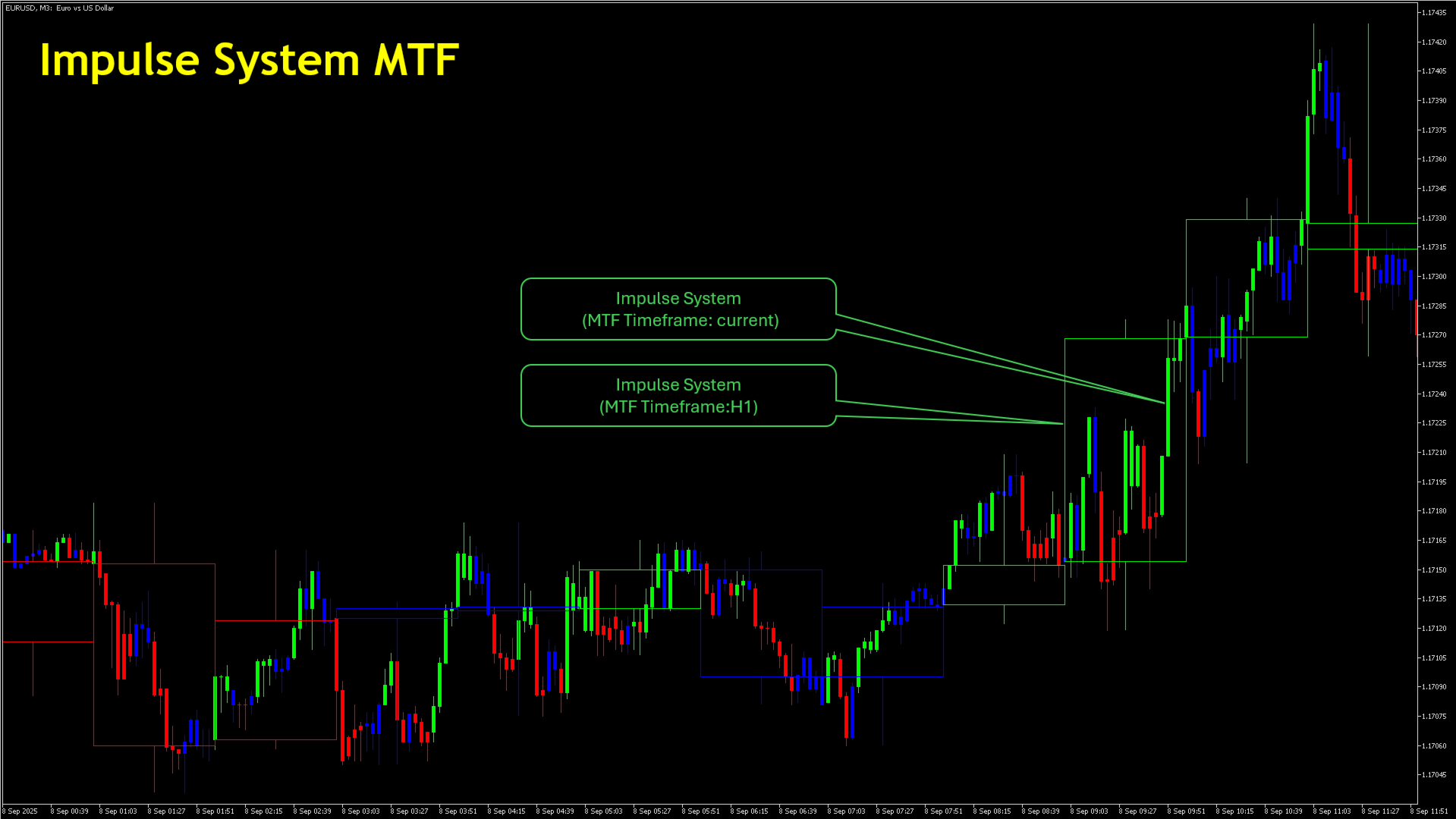
Impulse System MTF, grafiğinizdeki mumları Alexander Elder'ın tarif ettiği Impulse System'e göre renklendirir ve bu renklendirmeyi baktığınız periyot yerine daha üst bir periyottan alabilir. Impulse System bir trend ölçüsü ile bir momentum ölçüsünü birleştirir: kapanışın üssel hareketli ortalaması ve MACD histogramı. İkisi birden yükseliyorsa mum yeşil, ikisi birden düşüyorsa kırmızı, ikisi uyuşmuyorsa mavi olur.
Bu üç durumu yararlı kılan şey, Elder'ın onlara verdiği görevdir. Impulse System sinyal üreten değil, yasaklayan bir sistemdir. Yeşil al demek değildir; alıcılar hem trendi hem momentumu elinde tuttuğu sürece satışın yasak olduğu anlamına gelir. Kırmızı sat demek değildir; alımın yasak olduğu anlamına gelir. Mavi, hiçbir tarafın kontrolü elinde tutmadığı ve her iki yönün de serbest olduğu anlamına gelir ki uygulamada trendlerin bittiği ve başladığı yer burasıdır. Bu şekilde okunduğunda renklendirme, hâlihazırda kullandığınız giriş yönteminin üzerine konan bir filtredir, onun yerine geçen bir şey değil.
Gösterge iki modda çalışır ve seçtiğiniz periyoda göre aralarında kendisi seçim yapar. Seçilen periyot grafikle aynıysa, grafiğin kendi mumlarını yerinde yeniden renklendirir. Daha üst bir periyot seçerseniz, o periyodun mumlarını mevcut grafiğin üzerine bindirerek çizer; böylece beş veya on beş dakikada çalışırken günlük ya da dört saatlik yapı görünür kalır. Sunulan periyot listesi platformunuzun sağladığı listedir ve seçim tek bir açılır menüden yapılır.
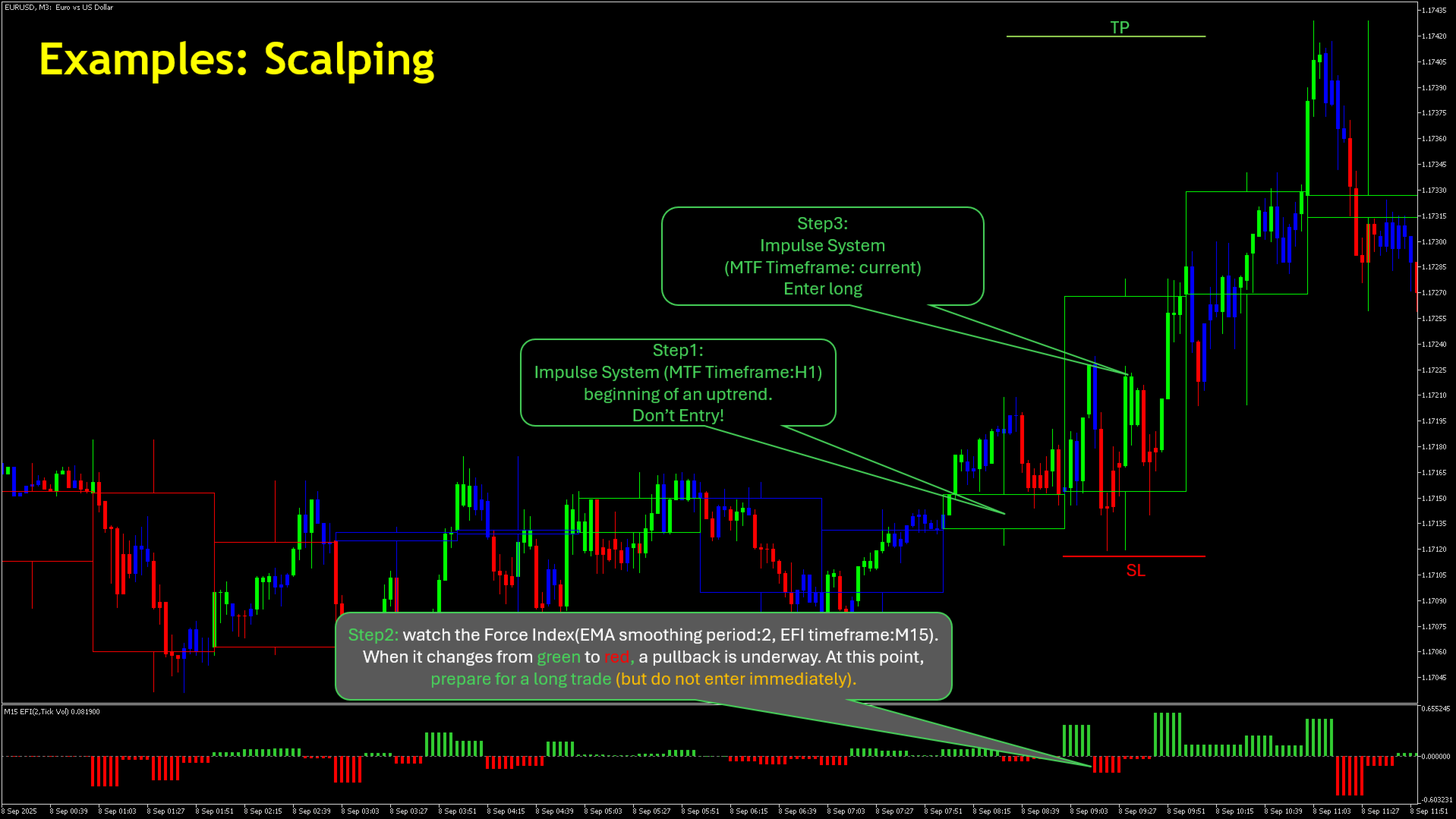
Yaygın bir çalışma biçimi şudur: periyodu grafiğinizden daha üst bir seviyeye ayarlayıp o rengi işlem yapmanıza izin verilen yön olarak kabul etmek, ardından fiyatın buna karşı geri çekilmesini beklemek ve momentum üst periyodun yönüne döndüğünde bir giriş aramak. Bu sıralamanın hiçbir adımı burada otomatik değildir. Gösterge üç rengi bildirir; karar, giriş fiyatı, zarar durdurma ve pozisyon büyüklüğü tamamen size aittir.
Uyarılar yalnızca renk değişimlerinde çalışır. Değişim, son kapanan mumun bir renge dönmesi ve ondan önceki mumun başka renkte olması demektir; dolayısıyla arka arkaya on yeşil mum yalnızca ilkinde bir kez uyarır, sonrasında sessiz kalır. Uyarılar yalnızca kırmızı, yalnızca yeşil, yalnızca mavi ya da kırmızı ve yeşil birlikte olacak şekilde sınırlanabilir ve terminal penceresi, ses, e-posta veya anlık bildirim olarak iletilebilir. Üst bir periyot seçildiğinde denetim o periyodun mumlarını izler, böylece üst periyottaki bir renk değişimi tek bir uyarı üretir, grafiğinizin her mumu için ayrı ayrı değil.
Uyarılar kapanmış mumlar üzerinde değerlendirilir ve bunun nedenini açıkça söylemekte yarar var. Oluşmakta olan mumun kesin bir rengi yoktur: hareketli ortalaması da MACD histogramı da her tikte hareket eder, dolayısıyla mum tamamlanana kadar renk birkaç kez değişebilir. Gösterge o mum için asla uyarı vermez. Mevcut durumu görebilmeniz için onu yine de renklendirir, ancak orada görünen renk kapanışa kadar geçicidir.
Kalan ayarlar hareketli ortalama uzunluğunu, MACD'nin hızlı, yavaş ve sinyal uzunluklarını, kaç geçmiş mumun renklendirileceğini ve mumların görünümünü kapsar. Gövde genişliği varsayılan olarak grafiğin yakınlaştırma düzeyini izler, böylece yakınlaştırıp uzaklaştırdığınızda mumlar oranlarını korur; bunun yerine seçtiğiniz bir genişliğe sabitlenebilir. Köşedeki isteğe bağlı etiket hangi periyodun gösterildiğini belirtir ve mevcut durumun rengini alır.
Impulse System, üç ekran yönteminin birinci ekranıdır; bu yöntemde üst periyot izin verilen yönü belirler, daha hızlı bir periyottaki osilatör ise zamanlamayı üstlenir. Elder'ın bununla eşleştirdiği osilatör Force Index'tir ve Force Index MTF adıyla ayrıca ücretsiz bir gösterge olarak yayımlanmıştır.
Bu göstergenin hem MetaTrader 4 hem de MetaTrader 5 için yayımlanmış sürümleri vardır. MetaTrader 5 sürümü, o platformun sunduğu daha uzun periyot listesini kullanır.
Sorumluluk reddi: bu bir analiz aracıdır. Pozisyon açmaz, değiştirmez veya kapatmaz ve gelecekteki fiyatlara ilişkin herhangi bir tahminde bulunmaz. Demo hesapta test edin, yöntemin kendi enstrümanınıza ve periyodunuza uygun olup olmadığına kendiniz karar verin ve riskinizi kendiniz yönetin. Bu ürün, kamuya açık olarak tarif edilmiş bir yöntemin bağımsız bir uygulamasıdır; söz konusu yöntemin yazarıyla herhangi bir bağlantısı yoktur, yazar tarafından yetkilendirilmemiş ve onaylanmamıştır.
Bu gösterge işinize yararsa, bir puan veya değerlendirme memnuniyetle karşılanır. Sorularınız veya talepleriniz için lütfen bu ürün sayfasının Yorumlar bölümünü kullanın.