XP Layering and set BE tool

  • Yardımcı programlar
  • Mostafa Mahmoud
    Mostafa Mahmoud
    Proven records crushing the market with drawdown 25% got 139% gain in 1 year with records proven and verified by MyfxBook:
    myfxbook.com/portfolio/old-acc-beat-market/11656325
    this means almost x6 or 600% of drawdown yearly , this was amazing year ,
  • Sürüm: 2.84
  • Güncellendi: 26 Ocak 2025
  • Etkinleştirmeler: 5

Smart Trade Manager for Layering & BE

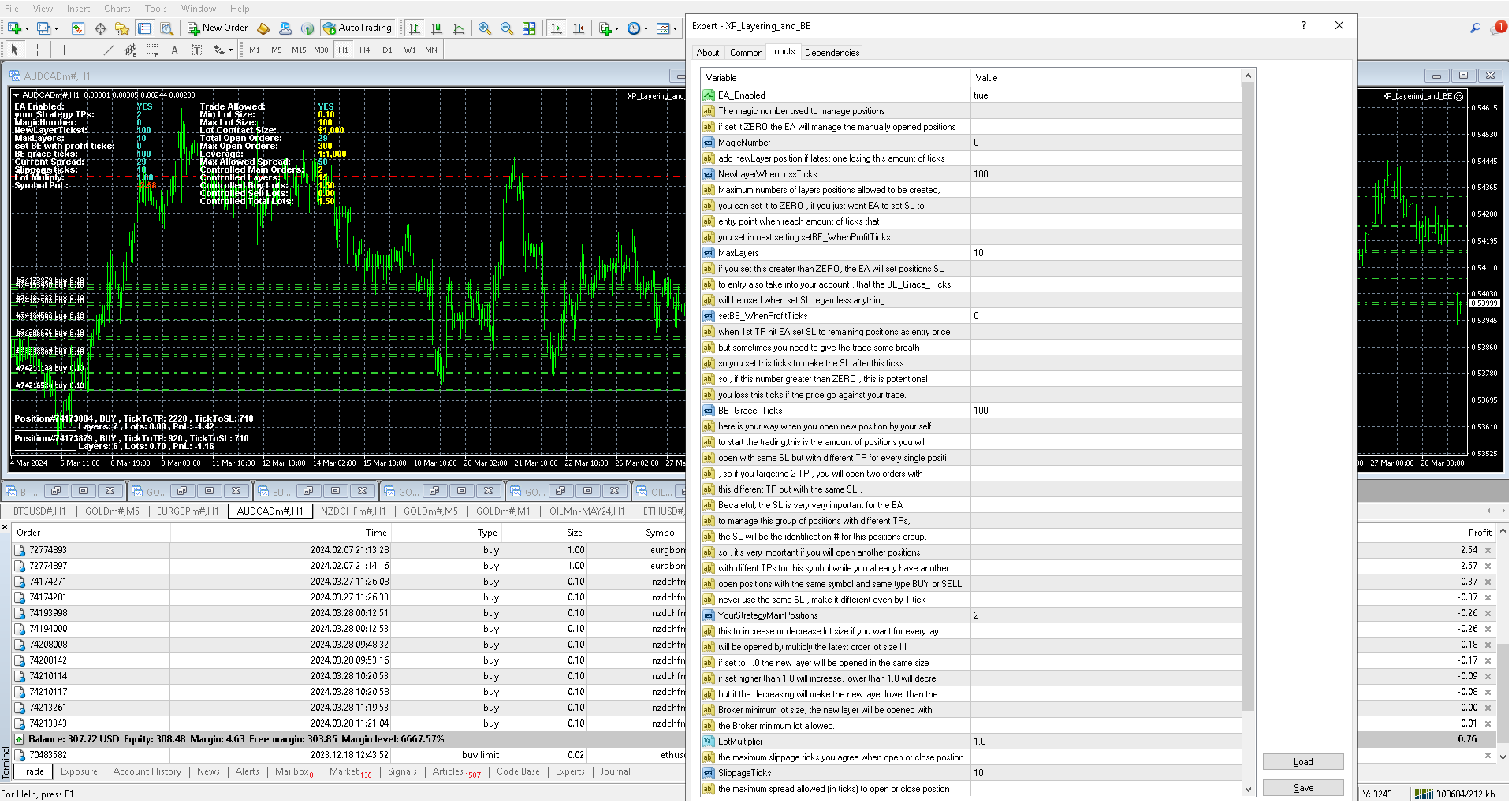
This trading tool automates trade management by handling entry positions, Break-Even (BE), and Take Profit (TP) dynamically. It allows traders to layer trades and protect their profits without manual intervention.

Key Features:

  • Secure profits automatically by setting BE once a trade reaches profit.
  • Distribute trade volume across multiple entries to average the price.
  • Set multiple TP targets to scale out of positions efficiently.
  • Use tick-based calculations instead of pips for precision across different brokers.

How It Works:

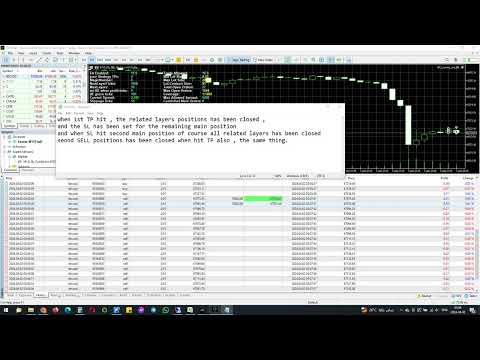
  • Automated trade management: The EA monitors your positions and adjusts SL, TP, and entries dynamically.
  • Break-even protection: Moves SL to the entry price when conditions are met.
  • Layering strategy: Opens additional positions when the market moves against or in favor of your trade.

Input Settings:

1. Main Trade Strategy Settings

  • YourStrategyMainPositions: Defines the number of main positions to be opened initially.

    • 0 : The EA will only open layering positions.
    • 1 : The EA opens a single main position and layers additional ones until reaching MaxLayers .
    • >1 : The EA manages multiple main positions with different TP levels.
  • NewLayerWhenLossTicks: Defines how many ticks a position should go against the trade before a new layer is opened.

  • InverseLayering: A revolutionary feature (added in 2024) that layers positions when the trade is profitable instead of during losses. This increases potential gains rather than accumulating losses.

2. Break-Even & TP Management

  • SetBE_WhenProfitTicks: Moves SL to the entry price after the trade reaches a specified profit in ticks.
  • BE_Grace_Ticks: Defines how many ticks away from entry price the SL should be set when moving to BE.
  • setTPAsEntry_WhenLossTicks: If the price moves against your trade by the defined tick value, TP is set at entry price to exit ASAP.
  • DynamicTPforLayers: Sets TP for newly opened layers with a specific target in ticks.

3. Order Handling Options

  • PositionsTypesToHandle: Choose whether to manage BUY, SELL, or BOTH position types.

  • LotMultiplier: Adjusts the lot size dynamically for each new layer.

    • 1.0 : Keeps the same lot size.
    • >1.0 : Increases lot size for each new layer.
    • <1.0 : Decreases lot size, but will not go below the broker’s minimum allowed lot.
  • MaxSpreadTicks: Prevents opening or closing positions when the spread exceeds a defined value.

  • SlippageTicks: Controls the maximum slippage allowed for trade execution.

4. Automation & Risk Management

  • UnloadExpertWhenEnd: Automatically unloads the EA when there are no active positions left.
  • WaitSecondsBeforeExecution: Delays execution for a few seconds after applying the EA to allow traders to review settings before processing.
  • SendPushNotification: Sends MetaTrader push notifications for every executed action.
  • DelayRetryOnError: Prevents excessive retry attempts in case of execution errors due to market conditions.

Latest Updates:

2024-04-23:

  • AutoOpenRemainingMainPositions: Ensures fast execution by automatically opening the remaining main positions.
  • IncreaseTPforAutoMainPositions: Allows users to set a TP increase for automatically opened positions.
  • OnlyPositionsNotPassedThisSeconds: Prevents automatic position copying if the last position was opened more than a set number of seconds ago.

2024-05-19:

  • SetSLforLayersAsPreviousPosition: A risk-management feature that prevents multiplying losses by setting SL for layers when inverse layering is active.

2024-11-02 (Version 2.8):

  • setTPAsEntry_WhenLossTicks: A scalping feature that automatically exits trades when a price move goes against the position.
  • DynamicTPforLayers: Enables precise TP control for layered positions, allowing traders to capture profits at predefined intervals.

Why Use This EA?

No need to monitor trades manually.
Automatic TP and SL management.
Customizable settings for any trading style.
Backtested and optimized for performance.

Your feedback is highly appreciated!
MT5 version

Önerilen ürünler
Account Protector MT4
Vladimir Mametov
4.5 (10)
The Expert Advisor is designed to protect the account, fix profit (loss) and display current information about the account. Trading account protection is carried out by closing all open orders in the terminal and/or closing all charts. When running the Expert Advisor with default parameters, it will only display your account information and will be reduced in size. Next, you can set the conditions under which your trading account will be protected. Profit and loss limits can be set for daily pro
FREE
It is so very disappointing when the price does not have enough points to achieve Take Profit and makes a reversal. This EA sets virtual levels near the TakeProfit levels. This EA sets virtual levels next to TakeProfit orders. If these levels are reached by price, breakeven or trailing stop is applied for an order. This is a free version of the EA. It works only on NZDUSD. Features This EA does not set new orders. The aim of this EA is to manage stop losses of existing orders that are set by an
FREE
Automated Timeframe cycling with Symbols centered. F orce every timeframe onto one clock window, so the story you see on Daily is the same story you are slicing on H4, H1, and M1.  Traders usually flip timeframes and lose the span. A Daily chart shows a few weeks, then M15 shows a few hours, and the eye treats them as different markets. TASSERACT locks the window to N bars of the highest enabled timeframe — default 10 Daily — and maps every lower timeframe to that same stretch. You stay inside o
FREE
Grid Trading EA is a semi-automated one-click trading EA for both Normal Trading and Grid/Martingale Trading . Normal Trading Simply click Buy or Sell directly from the chart. The EA will automatically manage trades by: Setting Stop Loss and Take Profit Managing Trailing Stop Grid / Martingale Trading When Grid Trading mode is enabled, the EA will automatically open additional grid orders at specified distances while increasing the lot size based on your settings. Inputs & Settings Lots — Initia
MT4 için NAS100 Auto SL ve TP Maker ile tanışın: MetaTrader 4'te Nasdaq 100 piyasasında gezinen yatırımcılar için vazgeçilmez bir yardımcı olan NAS100 Auto SL ve TP Maker ile StopLoss ve TakeProfit ayarlarını bir daha asla kaçırmayın. Bu araç, StopLoss ve TakeProfit seviyelerinin yönetimini otomatikleştirmek için sorunsuz bir çözüm arayanlar için tasarlanmıştır. Temel Özellikler: Zahmetsiz Otomasyon: StopLoss ve/veya TakeProfit olmadan Nasdaq 100 işlemlerini otomatik olarak izler. Kullanıcı tar
FREE
Hello, trading champs! I trust you are doing well. Have you experienced entering a position where the market initially moves in your favour or approach your takeprofit then suddenly the market reversed opposite your position? Well, it has happened to me numerous times and today I decide to fight back. I present to you a trade manager that help you protect your position(s). This project helps you set your position(s) to breakeven either when a certain amount of pips you specify is reached or a
FREE
You can manually open a trade (one click), and this EA will take care of setting the SL and TP. SL and TP are set based on the number of pips you specify in the input screen. You can also choose monetary SL and TP. SL and TP are determined based on the weighted average price (WAP), so if you open a new trade, SL and TP will be updated according to the new WAP. The WAP is not unique but differentiated between buy and sell trades (this is useful only if you open opposite trades on the same chart)
FREE
Simple RSI Forex Trading Strategy
Victor Manuel Valderrama Zamora
2.5 (2)
Diversify the risk in your trading account by combining our Expert Advisors. Build your own custom trading system here:   Simple Forex Trading Strategies The expert advisor opens trades when RSI indicator enter in oversold or overbought areas. The Stop Loss, Take Profit, and Trailing Stop are calculated based on the ATR indicator. The recommended currency pair is EURGBP and the recommended timeframe to operate and to do backtests is H4. This Expert Advisor can be profitable in any TimeFrame an
FREE
SnowyOwlFree
RODION SLOTIN
3 (2)
The free version of the snowyowl trend adviser, which is based on determining combinations of candle patterns. A virtual trailing stop tracks each open order and groups open orders to close them simultaneously. In the free version, you can only work on one timeframe, while in the paid version, opening orders on the selected TF is a signal to open orders on lower TF.
FREE
PZ Goldfinch Scalper EA
PZ TRADING SLU
2.7 (44)
This is the latest iteration of my famous scalper, Goldfinch EA, published for the first time almost a decade ago. It scalps the market on sudden volatility expansions that take place in short periods of time: it assumes and tries to capitalize of inertia in price movement after a sudden price acceleration. This new version has been simplified to allow the trader use the optimization feature of the tester easily to find the best trading parameters. [ Installation Guide | Update Guide | Troublesh
FREE
EURUSD EMA–SMA Reversal Breakout (H1) is a fully automated MetaTrader 4 strategy designed to capture **confirmed reversal breakouts** on EURUSD using a simple trend + position filter with rule-based **pending STOP execution** beyond recent structure. The EA was backtested on **EURUSD on the H1 timeframe** from **April 1, 2004 to April 24, 2024** using a MetaTrader 4 backtest engine (base data: EURUSD_M1_UTC2). No parameter setup is required — the system is delivered with optimized and fine-tune
FREE
Donar EA
Walter Ludwig Tengler
Donar EA is a sophisticated automated trading Expert Advisor (EA) designed for MetaTrader 4 platforms. This algorithmic trading system provides intelligent trade management with customizable parameters to suit various trading strategies and risk profiles. Key Features: Adaptive trading time windows Configurable trade direction (Buy, Sell, or Both) Robust risk management Dynamic lot sizing Comprehensive performance tracking Trading Methodology: The EA employs a strategic approach to market entry
FREE
This is a DEMO version of the Smarter Trade Manager Smarter Trade Manager  is an advanced trade management tool that can monitor and manage your manual and EA trades according to the settings you choose. It works as an Expert Advisor (EA), it does not open any trades but it closes trades as per the auto closing settings or when manually pressing any of the close buttons. FEATURES: Three-dimensional  interactive  view of your trades Trade Summary, P/L, Alerts, Closure by  Currency Trade Summary,
FREE
AI Advisor – Yapay Zekânın Gerçek Hesabınızı Görmesini Sağlayın AI Advisor, gerçek hesap bilgilerinizden otomatik olarak yüksek kaliteli komut metinleri (prompt) üretir ve bunları doğrudan istediğiniz herhangi bir yapay zekâ sohbetine yapıştırarak kullanabilirsiniz. Hesap durumunuzu hızlıca özetlemenize, enstrümanın mevcut yapısını anlamanıza, riskleri fark etmenize ve potansiyel kâr fırsatlarını keşfetmenize yardım eder; böylece yapay zekâ, hayali bir senaryoya değil,   gerçek işlem durumunuza
FREE
Dark Phoenix Scalper
Hossein Davarynejad
4.13 (8)
////  Dark Phoenix  Scalper  //// Dark Phoenix Scalper  is Advance Scalper Working On All Broker  This Scalper Working on All Forex Pairs   and  Gold (For Gold send me massage i will send  Gold setfile, default not working on Gold) ( Cent Account have high spread this scalper need lowest spread for best performance do not run on Standard account or high spread account )  This Scalper Have 2 Mode Trading  Normal Mode   ( Working on Signal Chart ) Multicurrency Mode ( Working on All Pairs List 
FREE
BDB Reversion 4 is a mean-reversion Expert Advisor for EURUSD and EURGBP on the H1 timeframe, with grid-based recovery and basket take profit. Designed for low-intervention, automated execution on RAW spread accounts. LIVE VERIFIED RESULTS Live signal: https://www.mql5.com/en/signals/2366129 Running live on EURUSD and EURGBP H1, real broker conditions, no demo cherry-picking. HOW IT WORKS BDB Reversion 4 iden
FREE
PZ Trade Pad EA
PZ TRADING SLU
4.29 (31)
This simple visual expert advisor allows you to trade easily from the chart. It handles risk management for you and can perform several useful tasks with your existing trades, saving time and making risk-management for each individual trade easier.  [ Installation Guide | Update Guide | Troubleshooting | FAQ | All Products   |  Get Help ] Trade easily from the chart Trade with precise risk management, hassle free Trade pending order with drag and drop price selection Set SL and TP levels with
FREE
PZ MA Crossover EA
PZ TRADING SLU
3.88 (25)
Bu EA, Hareketli Ortalama Geçişlerini kullanarak işlem yapar. Tamamen özelleştirilebilir ayarlar, esnek pozisyon yönetimi ayarları ve ayrıca özelleştirilebilir ticaret oturumları ve martingale ve ters martingale modu gibi birçok kullanışlı özellik sunar. [ Kurulum Kılavuzu | Güncelleme Kılavuzu | Sorun Giderme | SSS | Tüm Ürünler ] Kullanımı ve denetlenmesi kolay Tamamen özelleştirilebilir hareketli ortalama ayarları İki farklı ticaret davranışı uygular Özelleştirilebilir başa baş, SL, TP ve ta
FREE
SAAD TrendTracker
Adnan Iqbal
4.03 (34)
SAAD TrendTracker is a fully automated EA. It is based on mathematical algorithms Trend Tracker indicator and SAADScalper. The EA scalps pips by its strong Entry strategy based on SAADScalper. Trades that are not successful to scalp are handled in a different way of uniquely designed algorithm based on Trend Tracker indicator. EA is designed for M1, M5, M15 and M30. It consults daily chart for successful trading accuracy. It consults H1 to handle unsuccessful trades using Trend Tracker Indicator
FREE
Grid Assistant Pro – Utility for Managing Grid Strategies on MetaTrader 4 Grid Assistant Pro is a professional utility that helps traders manage and monitor unidirectional grid strategies directly from the MT4 chart. It provides a visual dashboard , clear controls, and automated risk protection features for precise and efficient grid operation. Key Features Visual Dashboard Real-time metrics: Balance, Equity, Floating P/L, Drawdown %, Free Margin Grid status: active and pending or
FREE
Mir Station MT4  it is a Secure Automated Software for trade Forex market and indices. The architecture is a Fully Automatic Autonomous Robot Expert capable of independently analyzing the market and making trading decisions Mir Station MT4     Have  neurals nets to used the correct algoritm in the correct market situation Mir Station MT4         It is an advanced trading system. This is a fully automatic Expert Advisor.      Mir Station MT4     is a plug and play system Mir Station MT4     It
ISS Station MT4        it is a Secure Automated Software for trade Forex market and indices. The architecture is a Fully Automatic Autonomous Robot Expert capable of independently analyzing the market and making trading decisions       ISS Station MT4         Have neurals nets to used the correct algoritm in the correct market situation       ISS Station MT4               It is an advanced trading system. This is a fully automatic Expert Advisor.        ISS Station MT4     is a plug and play
AVB Expert
Ayaz Maqsud RaŞİdov
Based on technical analysis and the logic of upward (bullish) and downward (bearish) trends, the bot eliminates speculative cases in the market. High-precision bots surpass humans in all aspects: they replace a workforce and have no limitations on working hours. Unlike humans, they are not subject to fatigue, illnesses, emotions, etc. The bot is limited from the risks of losing the entire capital as it incorporates STOP Loss and Take Profit features. These features help manage potential losses
FREE
CryptoTrend
Paulo Martins Barbosa
4 (2)
<h3>CryptoTrend</h3> <p> <b>CryptoTrend</b> is the free edition of a rule-based cryptocurrency Expert Advisor created for traders who want to test the product philosophy and core execution style before using the full version. </p> <h3>Overview</h3> <p> This EA is designed around the idea of participating in relevant crypto price trends through structured rules and controlled execution. It avoids dangerous recovery methods and focuses on practical automated trading. </p> <p> There is no marti
FREE
Activation initiates the sequence from the initial symbol in the Market Watch roster, forming a perpetual loop that continues until deactivation. The system employs global terminal variables to sustain operational continuity amid symbol-induced reinitializations, thereby ensuring uninterrupted performance. This EA should not be checked off as 'Allowed live Trading' and is functional with that checkmark box, when uploading the EA. Principal advantages encompass augmented productivity in overseein
FREE
Super Buy Sell
Rio Purwanggono
3.25 (4)
Super Buy Sell  is a combination of Hedging and Martingale strategy. Buy and Sell at the same time and open order every 20 pips (default setting) with customized Target Profit. It was backtested and optimized using real ticks with high quality. The Expert Advisor has successfully passed the stress test with slippage approximate to the real market conditions. This EA can run on several instruments simultaneously. This EA is recommended for cent accounts. Real account monitoring https://www.mql5.
FREE
İstenen kaldıraçla kolayca alım ve satım yapmanızı sağlayan basit bir ticaret asistanı. Nihai veya acemi tüccar için oluşturuldu ve eToro veya Binary.com gibi popüler web tabanlı ticaret platformlarından ilham aldı. Farklı kaldıraç seçeneklerini uygulayan bir dizi işlem düğmesi ve tüm işlemleri kapatmak için ek bir düğme içerir. Tüm işlemler, kullanılan kaldıraca göre stop-loss ile yapılır. Diğer platformlardan Metatrader'a geçiş yapan tüccarlar için özellikle yararlı olacaktır. Sezgisel arayüz
FREE
Macd Martin
Roman Yablonskiy
2.5 (2)
Double Breakout   is an automatic expert advisor with two separate strateges that uses martingale. The MACD indicator with adjustable parameters is used as inputs for each flow of orders. The specified takeprofit and stoploss levels are used to exit the position.  General recommendation The minimum recommended deposit is 1000 cents. Spread is recommended not more than 3 points. It is better to use trend currency pairs. The martingale parameter can be set from 0.1 to any value. When martingale i
FREE
OTRX Fimathe Backtest is a tool for the Trader or Enthusiast who uses the Fimathe technique created by Trader Marcelo Ferreira to carry out his training and validate if he can obtain profitability. In this tool you will be able to: 1. Define whether you are looking for a buy or sell entry. (Trend). 2. Define by clicking twice on the horizontal lines where your Reference Zone and your Neutral Zone will be. 3. Monitor the entry, subcycle and exit of the trade. 4. Trading Summary, Daily, Week
FREE
The Arrow Scalper
Fawwaz Abdulmantaser Salim Albaker
1 (2)
Dear Friend..  I share with you this simple Expert Adviser .. it is full automatic  this Expert Adviser following the trend of the pair you install on or any stocks or indices , it is works like that: - when the trend on H4 chart show a start of up trend the expert will wait till the 15M & 1H charts show an up trend the EA will open a buy order directly , and do the same for down trend and open a sell order the buy or sell  order lot size and take profit and stop loss will measured manually  by
FREE
Bu ürünün alıcıları ayrıca şunları da satın alıyor
Local Trade Copier EA MT4
Juvenille Emperor Limited
4.96 (111)
Local Trade Copier EA MT4, aynı Windows bilgisayarı veya Windows VPS üzerinde çalışan birden fazla MetaTrader 4 hesabı arasında işlemleri kopyalamak ve yönetmek için hızlı ve esnek bir işlem kopyalayıcıdır. Yerel işlem senkronizasyonunu, Receiver tarafında lot büyüklüğü, risk yönetimi, işlem filtreleme, sembol eşleştirme, işlem yönetimi ve hesap koruması kontrolleriyle birleştirir. Transmitter ve Receiver terminallerinizi yaklaşık 1 dakika içinde ayarlayın ve aynı veya farklı brokerlardaki hesa
Trade Manager EA’ye hoş geldiniz! Ticaretin daha sezgisel, hassas ve verimli hale gelmesi için tasarlanmış nihai risk yönetim aracı ile tanışın. Bu sadece bir emir verme aracı değil; ticaret planlaması, pozisyon yönetimi ve risk kontrolü için kapsamlı bir çözüm. İster yeni başlayan bir yatırımcı olun, ister deneyimli bir trader ya da hızlı emir gerektiren bir scalper, Trade Manager EA ihtiyaçlarınıza uyum sağlar ve forex, endeksler, emtialar ve kripto paralar dahil tüm piyasalarda esneklik sunar
Trade Indicator Assistant is a powerful MT4 utility designed to turn indicators into automated trading systems. Its main feature is the ability to automatically detect an indicator’s   BUY and SELL signal buffers , without requiring you to know the buffer numbers, search through indicator settings, or modify the indicator source code. Bonus Indicator: After purchasing Trade Indicator Assistant, contact me to receive Trade Signal Pro completely free as a bonus indicator. [Download Demo Version]
Trade Assistant MT4
Evgeniy Kravchenko
4.43 (197)
It helps to calculate the risk per trade, the easy installation of a new order, order management with partial closing functions, trailing stop of 7 types and other useful functions. Additional materials and instructions Installation instructions   -   Application instructions   -   Trial version of the application for a demo account Line function -   shows on the chart the Opening line, Stop Loss, Take Profit. With this function it is easy to set a new order and see its additional characteris
Exp COPYLOT CLIENT for MT4
Vladislav Andruschenko
4.69 (65)
MetaTrader 4 için profesyonel işlem kopyalayıcı MetaTrader 4 için hızlı, güvenilir ve profesyonel bir işlem kopyalayıcı. COPYLOT , MetaTrader 4 ve MetaTrader 5 terminalleri arasında Forex işlemlerinin kopyalanmasını sağlar ve farklı hesap türleri ile işlem senaryoları için esnek senkronizasyon sunar. COPYLOT MT4 sürümü şunları destekler: MetaTrader 4 → MetaTrader 4 MetaTrader 5 Hedge → MetaTrader 4 MetaTrader 5 Netting → MetaTrader 4   MT5 sürümü Tam açıklama + DEMO + PDF Nasıl satın alınır Nası
Telegram to MT4 Multi-Channel Copier   , Telegram kanallarınızdaki alım-satım sinyallerini doğrudan MetaTrader 4'e otomatik kopyalar. Bot yok, tarayıcı uzantısı yok, elle kopyalama yok. Sinyal Telegram'a düşer ve EA birkaç saniye içinde terminalinizde işlemi açar. Ve bir kanalı kopyalamadan önce, yerleşik backtester o kanalın hesabınızda ne yapmış olacağını gösterir. Ürün iki bileşenden oluşur: Telegram kanallarınızı dinleyen bir Windows uygulaması ve sinyalleri MT4 terminalinizde yürüten bu Exp
Take a Break pauses your Expert Advisors when trading is a bad idea: before news, after a daily loss, outside your trading hours, or when a rule you wrote yourself says so. When the pause is over, your EAs simply continue. Account protection for all your EAs in one tool: news filter, drawdown and equity protection, time filter and custom rules. One EA on one chart protects the whole account, the free indicator gives every chart its own rules on top. Free demo | What is new in 26.09 | Support Ass
Riskinizi otomatik olarak hesaplarken işlemlere hızlı bir şekilde girip çıkmanıza yardımcı olacak Ticaret Yöneticisi. Aşırı Ticaret, İntikam Ticareti ve Duygusal Ticaretten korunmanıza yardımcı olacak özellikler içerir. İşlemler otomatik olarak yönetilebilir ve hesap performans ölçümleri bir grafikte görselleştirilebilir. Bu özellikler, bu paneli tüm manuel yatırımcılar için ideal kılar ve MetaTrader 4 platformunun geliştirilmesine yardımcı olur. Çoklu Dil desteği. MT5 Sürümü  |  Kullanım Kılavu
Telegram'dan MT4'e:   Nihai Sinyal Kopyalama Çözümü Telegram ile MT4'e   işlemlerinizi kolaylaştırın, DLL'lere ihtiyaç duymadan doğrudan Telegram kanallarından ve sohbetlerinden MetaTrader 4 platformunuza işlem sinyallerini kopyalamak için tasarlanmış son teknoloji yardımcı program. Bu sağlam çözüm, sinyallerin benzersiz hassasiyet ve özelleştirme seçenekleriyle sorunsuz bir şekilde yürütülmesini sağlayarak size zaman kazandırır ve verimliliğinizi artırır. [ Instructions and DEMO ] Temel Özellik
Partial Closure EA MT4
Juvenille Emperor Limited
5 (3)
Partial Closure EA MT4 , hesabınızdaki herhangi bir işlemi kısmen kapatmanıza olanak tanır. İşlemleri, lot büyüklüğünün seçilen bir yüzdesiyle ve/veya işlem biletiyle manuel olarak veya TP/SL seviyelerindeki belirli yüzdelerle otomatik olarak kapatabilir; bu, başlangıç lot büyüklüğünün yüzdesini en fazla 10 take profit ve 10 stop loss seviyesinde kapatır. Belirli magic numaralarını, yorumları veya sembolleri belirterek veya hariç tutarak hesabınızdaki tüm veya seçili işlemleri yönetebilir. İpu
MT4 to Telegram Signal Provider , Telegram'a sinyal göndermeyi sağlayan ve hesabınızı bir sinyal sağlayıcısına dönüştüren kullanımı kolay ve tamamen özelleştirilebilir bir araçtır. Mesajların formatı tamamen özelleştirilebilir! Ancak basit kullanım için, önceden tanımlanmış bir şablonu seçebilir ve mesajın belirli kısımlarını etkinleştirebilir veya devre dışı bırakabilirsiniz. [ Demo ]  [ Kullanım Kılavuzu ] [ MT5 Sürümü ] [ Discord Sürümü ] [ Telegram Kanalı ]  New: [ Telegram To MT5 ] Kurulum
MetaTrader 4 için para birimi gücü göstergesi Bu para birimi gücü göstergesi 28 kadar ana pariteyi okur ve 8 ana para birimi için birer değer üretir: USD, EUR, GBP, JPY, CHF, CAD, AUD ve NZD. Kimin önde olduğunu anlamak için grafik üstüne grafik açmak yerine, MetaTrader 4 grafiğinizdeki tek bir paneli okur ve hangi para biriminin alındığını, hangisinin satıldığını görürsünüz. Panelde ne görürsünüz 8 para biriminin her biri için sıralanmış güç çubuğu ve yüzdesi Çoklu zaman dilimi matrisi: para bi
TradePanel MT4
Alfiya Fazylova
4.84 (95)
Trade Panel, çok işlevli bir ticaret asistanıdır. Uygulama, manuel ticaret için 50'den fazla ticaret fonksiyonu içerir ve çoğu ticaret görevini otomatikleştirmeyi mümkün kılar. Uygulama talimatları : https://www.mql5.com/en/blogs/post/756482 Demo hesabı için uygulamanın deneme sürümü: https://www.mql5.com/en/blogs/post/750865 Uygulamayı nasıl kurulur: https://www.mql5.com/en/blogs/post/756239 Uygulamayı görsel modda nasıl test edilir: https://www.mql5.com/en/blogs/post/770277 Uygulamayı VPS Meta
VirtualTradePad mt4 Extra
Vladislav Andruschenko
4.85 (61)
1 tıklama ile ticaret için Ticaret Paneli.   Pozisyonlar ve emirlerle çalışmak!   Grafikten veya klavyeden alım satım. Alım satım panelimizi kullanarak, grafikten tek bir tıklamayla alım satım yapabilir ve alım satım işlemlerini standart MetaTrader kontrolünden 30 kat daha hızlı gerçekleştirebilirsiniz. Bir tüccar için hayatı kolaylaştıran ve bir tüccarın ticaret faaliyetlerini çok daha hızlı ve daha rahat gerçekleştirmesine yardımcı olan parametrelerin ve işlevlerin otomatik hesaplamaları. Graf
Fotokopi->Kullanışlı ve hızlı arayüz etkileşimi, kullanıcılar hemen kullanabilir       ->>>> Windows bilgisayarlarda veya VPS Windows'ta kullanılması önerilir Özellikler: Çeşitlendirilmiş ve kişiselleştirilmiş kopyalama ticareti ayarları: 1. Farklı sinyal kaynakları için farklı lot modları ayarlanabilir 2. İleri ve geri kopyalama ticareti için farklı sinyal kaynakları ayarlanabilir 3. Sinyaller yorumlarla ayarlanabilir 4. Lotun sözleşme lotuna göre kalibre edilip edilmeyeceği Çeşitlendirilmiş v
Çalışan Deneme Sürümünü İndir Copy Cat More (Taklitçi Kedi) — İşlem Kopyalayıcı (Trade Copier) MT4 sadece basit bir yerel işlem kopyalayıcı değildir; bugünün ticaret zorlukları için tasarlanmış eksiksiz bir risk yönetimi ve yürütme çerçevesidir (risk management and execution framework). Prop firm challenge'larından kişisel portföy yönetimine kadar, sağlam yürütme, sermaye koruması, esnek yapılandırma ve gelişmiş işlem yönetimi karışımıyla her duruma uyum sağlar. Kopyalayıcı hem   Master (Mast
King Trade Copier MT4
Mohammed Maher Al-sayed Mohammed Ahmed Saleh
5 (1)
King Trade Copier, aynı bilgisayarda veya VPS'te çalışan MetaTrader terminallerini birbirine bağlar. Bir hesapta açılan işlemler diğerlerinde de görünür. Dosya her iki rolü de taşır, bu yüzden aynı indirme, Mode'u neye ayarladığınıza bağlı olarak gönderici ya da alıcı olur. Her grafikte panel, bu terminalin gönderip göndermediğini ya da alıp almadığını gösterir, karşı taraftaki hesabın adını verir, yanıt veren alıcıları sayar ve son sinyalin yaşını bildirir. Kopyalanmayan bir emir, kaybolmak ye
Smart Copy Local MT4
Kyra Nickaline Watson-gordon
5 (7)
Smart Copy is an Easy-to-Use EA that supports Multi Copying Metatrader4 and Metatrader5 and Local/Remote Copying. (Remote Version is coming soon) Free version is available on Smart Copy Local Free MT4 Specifications :     Real Time, Multi Terminal - Multi Account - MT4/MT5 trade copying     Copy from netting to hedge and hedge to netting is supported.     Fast and instant copy     All settings are input visually.     Easy modifying symbol names, prefix, suffix     Enable/Disable copying s
Fotokopi->Kullanışlı ve hızlı arayüz etkileşimi, kullanıcılar hemen kullanabilir       ->>>> Windows bilgisayarlarda veya VPS Windows'ta kullanılması önerilir Temel işlevler: Kopyalama ticaretinin normal etkileşim hızı 0,5 saniyeden azdır Sinyal kaynaklarını otomatik olarak algıla ve sinyal kaynağı hesaplarının bir listesini görüntüle Sembolleri otomatik olarak eşleştirin, farklı platformlarda yaygın olarak kullanılan ticaret sembollerinin %95'i (farklı ekler gibi özel durumlar) otomatik olarak
Close If Profit or Loss with Trailing for MetaTrader 4 — toplam kâr veya toplam zarar ile otomatik kapatma MetaTrader 4 için pratik bir işlem yönetimi aracıdır. Toplam kâr veya toplam zarar belirlediğiniz seviyeye ulaştığında, seçilen pozisyonları otomatik olarak kapatabilir. Expert Advisor açık işlemleri izler, değişken kâr/zarar sonucunu hesaplar, Trailing Profit kullanabilir ve pozisyonları manuel müdahaleden daha hızlı yönetmenize yardımcı olur. MetaTrader 4 hâlâ manuel trader’lar, scalper’
Risk manager Risk manager - it will simplify the tracking of drawdown and will notify you (alert) when the specified risk is reached, and close/lock orders when the critical DD risk level is reached. If the specified drawdown is exceeded, you can choose two options for actions: All orders will be closed that mean loss will be fixed on depo. The terminal also closes. Instead of fixing the loss on depo, the opposite order will be opened - orders locking will occure. Not a single order will be c
Trade Dashboard simplifies how you open, manage, and control your trades, with built-in lot size calculation. It allows you to execute trades, manage risk, and control positions directly on the chart, with tools such as partial close, breakeven, and trailing stop. Designed to reduce manual work and help you stay focused on your trading decisions. A demo version is available for testing. Detailed explanations of features are provided within the MQL5 platform. Installation instructions are include
The product will copy all telegram signal to MT4   ( which you are member  ) , also it can work as remote copier.  Easy to set up, copy order instant, can work with almost signal formats, image signal, s upport to translate other language to English Work with all type of channel or group, even channel have "Restrict Saving Content", work with  multi channel, multi MT5 Work as remote copier: with signal have ticket number, it will copy exactly via ticket number. Support to backtest signal. How to
News Filter EA: Advanced Algo Trading Assistant News Filter EA is an advanced algo trading assistant designed to enhance your trading experience. By using the   News Filter EA , you can integrate a Forex economic news filter into your existing expert advisor, even if you do not have access to its source code. In addition to the news filter, you can also specify   trading days   and   hours   for your expert. The News Filter EA also includes   risk management   and   equity protection   features
Want automatically to put the pending order, take profit and stop loss? This EA will do it on your behalf! The Fibo Heart EA strategy will place limit order after the ‘check point’ breakout. The position will be triggered when the price make a successful retest. If not, the pending order will automatically deleted after price hit certain level. You also have option to enable market order (instant execution) and custom take profit in the inputs setting. This EA must be attached with Fibo Heart In
Unlimited Trade Copier Pro is a tool to copy trade remotely to multiple MT4, MT5 and cTrader accounts at different computers/locations over internet. This is an ideal solution for you if you are a signal provider and want to copy your trades to other receivers globally on your own rules. One provider can copy trades to multiple receivers and one receiver can get trade from multiple providers as well. The provider can even set the subscription expiry for each receiver, so that receiver will not b
Bar Replay MT4
Hoang The Manh
3.43 (7)
Don't purchase before testing the Demo version first. DEMO version:   https://www.mql5.com/en/market/product/76917 __________________________________________________ This EA  - Tool allow you replay bar in Meta Trader 4 for back test. This Tool can back test in multi timeframe in only one chart. This Tool is very useful for Price action trader. It can work with Indicators, some indicators cannot works. So please download Demo to test before purchase.  Demo Version We do not accept refund in any
This is a program in the form of an EA that attaches to a chart in MetaTrader 4. Then, by using API from Bittrex, Binance websites, it downloads the history of altcoins. By selecting a pair name, the EA automatically downloads all time frames history (Daily,H12,H4,H2,H1,M30,M15,M5,M3,M1) so there is no need to attach multiple EAs to different charts. You can select one pair from Bittrex and 4 pairs from Binance exchange with one running EA and create up to 15 timeframes for 5 different pairs. Th
Strategy Builder offers an incredible amount of functionality. It combines a trade panel with configurable automation (covert indicators into an EA), real-time statistics (profit & draw down) plus automatic optimization of SL, TP/exit, trading hours, indicator inputs. Multiple indicators can be combined into an single alert/trade signal and can include custom indicators, even if just have ex4 file or purchased from Market. The system is easily configured via a CONFIG button and associated pop-up
Grid Manual MT4
Alfiya Fazylova
4.71 (17)
Grid Manual, sipariş ızgarasıyla çalışmak için kullanılan bir ticaret yardımcı programıdır. Yardımcı program evrenseldir, esnek ayarlara ve sezgisel bir arayüze sahiptir. Sadece kayıpların ortalaması yönünde değil, aynı zamanda kazanç artışı yönünde de bir emir ızgarası ile çalışır. Tüccarın bir emir ızgarası oluşturmasına ve eşlik etmesine gerek yoktur, bu yardımcı programı yapacaktır. Emri açmanız yeterlidir ve Grid manual otomatik olarak ona bir emir ızgarası oluşturacak ve kapanana kadar ona
Yazarın diğer ürünleri
Stop Loss and Take Profit Manager The EA allows you to set a   Stop Loss (SL)   for your orders or positions within milliseconds, regardless of the number of orders. How to Use: Attach the EA to the chart where you want to modify the SL for your orders. Configure the following   input settings : Order_Type:   Select the order or position types. SetStopLoss:   Enable this if you want to set a Stop Loss. StopLoss:   Enter the SL price. SetTakeProfit:   Enable this if you want to set a Take Profit
FREE
Stop Loss and Take Profit Manager The EA allows you to set a Stop Loss (SL) for your orders or positions within milliseconds, regardless of the number of orders. How to Use: Attach the EA to the chart where you want to modify the SL for your orders. Configure the following input settings : Order_Type: Select the order or position types. SetStopLoss: Enable this if you want to set a Stop Loss. StopLoss: Enter the SL price. SetTakeProfit: Enable this if you want to set a Take Profit. TakeProfit:
FREE
Close Positions on Candle Close This tool allows you to automatically close positions based on the last candle's closing price, helping confirm trade exits and avoiding unpredictable price movements. How It Works: The EA waits for a candle to close above or below the Stop Loss level before executing a position close. It eliminates the need to manually monitor trades and helps automate exit strategies. Settings: Order_Type: Select the types of orders or positions to be managed. CandleTimeFrame:
FREE
### Description This Expert Advisor is designed to instantly close active positions and/or pending orders based on user-defined criteria. It supports filtering by trade type, magic number, and symbol scope, and is optimized for fast execution. ### Features - Close buy trades, sell trades, or both. - Filter by symbol: close trades on current chart only or across all symbols. - Filter by magic number or close all trades regardless of magic. - Set maximum allowed slippage for execution control. -
FREE
Close Positions on Candle Close This tool allows you to automatically close positions based on the last candle's closing price, helping confirm trade exits and avoiding unpredictable price movements. How It Works: The EA waits for a candle to close above or below the Stop Loss level before executing a position close. It eliminates the need to manually monitor trades and helps automate exit strategies. Settings: Order_Type: Select the types of orders or positions to be managed. CandleTimeFrame:
FREE
Stealth Mode TP/SL Manager with AI Protection This AI-powered tool manages Stop Loss and Take Profit dynamically using either price-based or profit-and-loss (PnL) calculations while hiding these levels from the market . Also the this tool is very important to   PROP FIRMS   accounts , so you can set your stoploss to not hitting the daily stop loss ! Key Features: Supports BUY, SELL, or both position types. Flexible symbol selection: Manage the current chart, all symbols, or specific symbols (se
Signal Provider Utility Pro (Telegram & Discord) The Professional Solution for Signal Providers. Automated Broadcasting | Smart GUI Panel | Performance Reports Stop managing your signals manually.   Signal Provider Utility Pro   is the realiable bridge between your MetaTrader 4 terminal and your community on Telegram and Discord. Designed for high-performance signal services, this tool gives you instant control over your broadcasts without ever needing to open the settings window. From   real-ti
The ultimate tool for Prop Firm traders. Automatically closes trades before weekends/swaps and reopens them later. Features spread protection, CSV crash recovery, and multi-schedule support. Swap Shield is a professional utility designed specifically for traders dealing with Proprietary Trading Firms (Prop Firms) rules and those looking to avoid negative Swap fees. Many Prop Firms strictly prohibit holding positions over the weekend. Failing to close trades can lead to the immediate loss of you
Smart Trade Manager for Layering & BE This   trading tool   automates trade management   by handling entry positions, Break-Even (BE), and Take Profit (TP) dynamically. It allows traders to   layer trades   and   protect their profits   without manual intervention. Key Features: Secure profits automatically   by setting BE once a trade reaches profit. Distribute trade volume across multiple entries   to average the price. Set multiple TP targets   to scale out of positions efficiently. Use tick
Stealth Mode TP/SL Manager with AI Protection This AI-powered tool   manages Stop Loss and Take Profit dynamically   using either price-based or profit-and-loss (PnL) calculations while   hiding these levels from the market . Also the this tool is very important to PROP FIRMS accounts , so you can set your stoploss to not hitting the daily stop loss ! Key Features: Supports BUY, SELL, or both position types. Flexible symbol selection:   Manage the current chart, all symbols, or specific symbols
Signal Provider Utility Pro (Telegram & Discord) The Professional Solution for Signal Providers. Automated Broadcasting | Smart GUI Panel | Performance Reports Stop managing your signals manually. Signal Provider Utility Pro is the realiable bridge between your MetaTrader 5 terminal and your community on Telegram and Discord. Designed for high-performance signal services, this tool gives you instant control over your broadcasts without ever needing to open the settings window. From real-time tr
The ultimate tool for Prop Firm traders. Automatically closes trades before weekends/swaps and reopens them later. Features spread protection, CSV crash recovery, and multi-schedule support. Swap Shield   is a professional utility designed specifically for traders dealing with   Proprietary Trading Firms (Prop Firms)   rules and those looking to avoid negative Swap fees. Many Prop Firms strictly prohibit holding positions over the weekend. Failing to close trades can lead to the immediate loss
Filtrele:
Değerlendirme yok
Değerlendirmeye yanıt