 MetaTrader 5
 Uzmanlar
 Göstergeler
 Komut dosyaları
 Kütüphaneler
 Depo
Alım-satım robotlarını ücretsiz olarak nasıl indirebileceğinizi izleyin
Bizi Twitter üzerinde bulun!
Fan sayfamıza katılın
Fan sayfamıza katılın
Kodu beğendiniz mi? MetaTrader 5 terminalinde deneyin

CreyesHistoryCSV - Closed trades to CSV with summary - MetaTrader 5 için komut dosyası
Cesar De Los Reyes Sanchez

I design and develop expert advisors (EAs), indicators and trading utilities for MetaTrader 5. My focus is rule-based systems with clear logic and built-in risk management: fixed stop loss, risk per trade as a percentage of the account, daily loss limits and account protections. No martingale, no
- Görüntülemeler:
- 42
- Yayınlandı:
-
 Alım-satım fırsatlarını kaçırıyorsunuz:
- Ücretsiz alım-satım uygulamaları
- İşlem kopyalama için 8.000'den fazla sinyal
- Finansal piyasaları keşfetmek için ekonomik haberler
Kayıt Giriş yapWeb sitesi politikasını ve kullanım şartlarını kabul edersiniz
Hesabınız yoksa, lütfen kaydolun -
 Bu koda dayalı bir robota veya göstergeye mi ihtiyacınız var? Freelance üzerinden sipariş edin
Freelance'e git

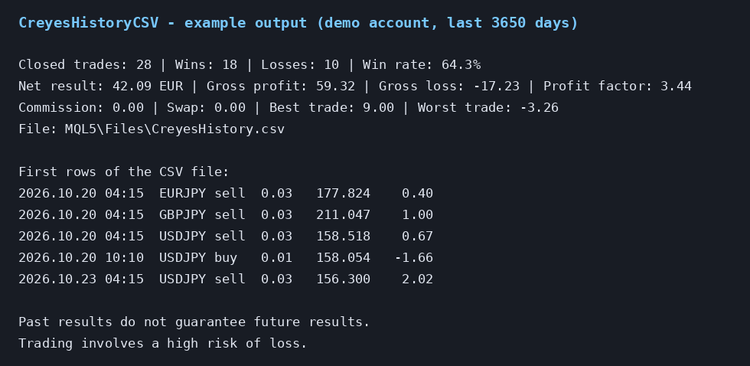
CreyesHistoryCSV reads the closed trades of the trading account and saves them in a CSV file that can be opened in Excel, LibreOffice or any other spreadsheet. It also prints a short summary in the Experts tab. The script is read-only: it never opens, modifies or closes trades.
How to use it
1. Copy CreyesHistoryCSV.mq5 to the MQL5\Scripts folder of your terminal (or compile it from MetaEditor).
2. Drag the script from the Navigator to any chart.
3. Set the inputs and press OK.
4. Open the file in the MQL5\Files folder (File - Open Data Folder).
Inputs
- InpDays: number of days of history to export, from 1 to 3650.
- InpSymbol: symbol filter. Empty means all symbols.
- InpMagic: magic number filter. -1 means all magic numbers.
- InpFileName: name of the CSV file, saved in MQL5\Files.
- InpSeparator: column separator (comma by default; use a semicolon if your spreadsheet expects it).
CSV columns
Time, Deal, Position, Symbol, Type (direction of the position), Volume, Price, Profit, Commission, Swap, Net, Magic, Comment.
Summary
The summary shows the number of closed trades, wins and losses, win rate, net result, gross profit, gross loss, profit factor, commission, swap, best trade and worst trade, in the currency of the account.
Notes
- Only deals that close a position are exported. Deposits and withdrawals are ignored.
- The terminal must have the account history loaded. If it is incomplete, open the History tab, right-click and select All History.
- The example image shows the output on a demo account. Past results do not guarantee future results. Trading involves a high risk of loss.
 Daily Drawdown Guard
An account-wide MetaTrader 5 utility that tracks daily loss from the chosen start-of-day equity and intraday equity peak. Shows warning and critical levels with optional money and percent limits plus terminal, sound or push alerts. It never places, modifies or closes trades.
 Session Range Box
Draw Asian, London and New York session ranges as chart boxes with high/low lines, labels and an optional London–New York overlap. Configure GMT or broker-server hours and review the latest session statistics in a panel.
Daily Pivot Points – Classic, Fibonacci and Camarilla
Daily pivot point with three resistance levels and three support levels, using Classic, Fibonacci or Camarilla formulas.
Supertrend EA Gold Breakeven
Supertrend expert advisor for MT5 on Gold (XAUUSD), forex and indices: entry on the closed candle of the flip, stop at the Supertrend line, target by stop multiple, breakeven and lot by risk percent. Open source code.