 MetaTrader 5
 Uzmanlar
 Göstergeler
 Komut dosyaları
 Kütüphaneler
 Depo
Alım-satım robotlarını ücretsiz olarak nasıl indirebileceğinizi izleyin
Bizi Twitter üzerinde bulun!
Fan sayfamıza katılın
Fan sayfamıza katılın
Kodu beğendiniz mi? MetaTrader 5 terminalinde deneyin

- Görüntülemeler:
- 62
- Yayınlandı:
-
 Alım-satım fırsatlarını kaçırıyorsunuz:
- Ücretsiz alım-satım uygulamaları
- İşlem kopyalama için 8.000'den fazla sinyal
- Finansal piyasaları keşfetmek için ekonomik haberler
Kayıt Giriş yapWeb sitesi politikasını ve kullanım şartlarını kabul edersiniz
Hesabınız yoksa, lütfen kaydolun -
 Bu koda dayalı bir robota veya göstergeye mi ihtiyacınız var? Freelance üzerinden sipariş edin
Freelance'e git

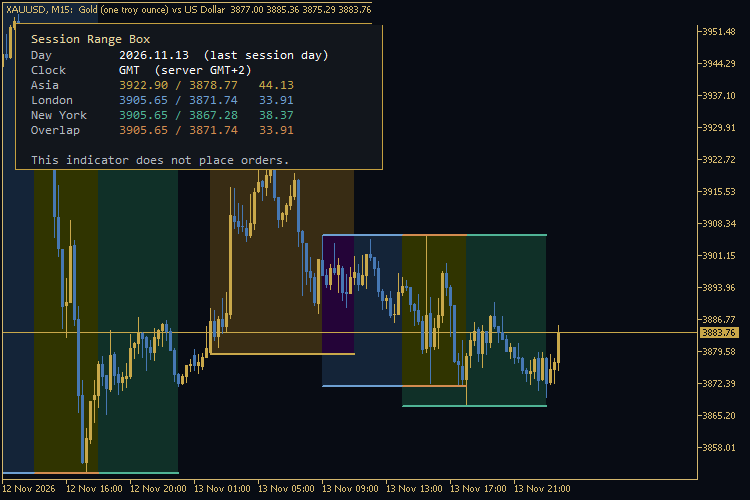 Session Range Box is a MetaTrader 5 chart indicator. It draws the Asian, London and New York session ranges as boxes, with high and low lines and a range label. An optional fourth box marks the London / New York overlap. The indicator does not place, modify or close orders.
What it shows
- A filled box for each enabled session, from the session open to the session close (the current session is drawn to its planned end and updates as a new high or low is printed).
- High and low lines on top of each box, with an optional mid line.
- A label with the session name and the range size, in price units of the symbol.
- A corner panel with the latest session day: high, low and range for Asia, London, New York and the overlap, plus the clock in use.
If you attach the indicator on a Saturday or Sunday, the panel shows the last session day that has bars, not an empty weekend date.
Default session hours
Session hours are set in GMT by default (the “Hours in GMT” input). The defaults are:
- Asian: 00:00–09:00 GMT
- London: 07:00–16:00 GMT
- New York: 12:00–21:00 GMT
- Overlap: the intersection of London and New York, 12:00–16:00 GMT with these defaults
The panel also prints the broker server’s current offset from GMT, for example “server GMT+2”. You can switch the inputs to broker server time instead of GMT.
These hours do not change automatically for daylight-saving time. When London or New York moves the clock, adjust the start and end hours. The historical boxes of the last few days use the current GMT offset of the server, so a one-hour shift is possible around a DST change.
Inputs
Time
- Hours in GMT (true) or broker server time (false).
- Number of past calendar days to draw, including today (default 5, maximum 20).
Each session
- Show or hide the session.
- Start and end hour and minute.
- Box fill colour and high / low line colour.
Overlap
Show or hide the London / New York overlap box and its colours. The overlap is disabled automatically if London or New York is hidden, or if the two windows do not intersect.
Display
- Fill the rectangle, draw high / low lines, draw the mid line, show labels, show the panel.
- Panel corner, offsets, font size and colours.
How the range is measured
For each session window the indicator reads the high and low of the bars whose open time falls inside that window. The range is high − low . A point on the symbol is one unit of _Point ; the label uses the symbol’s digits, not a conversion to pips.
The indicator is easiest to read on M5, M15, M30 and H1. It still runs on H4 or D1, but a session may cover only one or two bars.
Requirements
- Platform: MetaTrader 5.
- Works on any symbol that has time and OHLC data.
- No DLL calls, no WebRequest and no internet connection.
- Objects are removed when the indicator is removed from the chart.
About the author
Author of Golden Sniper XAU: https://www.mql5.com/en/market/product/207995
 Risk-Based Lot Size Calculator (script)
A small script that turns "risk in % of the account" and "stop loss in pips" into a lot size. It only calculates and prints; it never opens, modifies or closes trades.
 ICT Session Boxes - four GMT windows, automatic broker offset, high and low lines
Session windows are quoted in GMT; the chart runs on the broker's clock. This indicator takes each window in GMT, applies your broker's offset, and draws the box over that window's bars. It adds the high and low lines to every enabled window unless you switch them off, prints the session name and range only on that session's newest box when there is room, and never trades.
 Daily Drawdown Guard
An account-wide MetaTrader 5 utility that tracks daily loss from the chosen start-of-day equity and intraday equity peak. Shows warning and critical levels with optional money and percent limits plus terminal, sound or push alerts. It never places, modifies or closes trades.
CreyesHistoryCSV - Closed trades to CSV with summary
Script that exports the closed trades of your account to a CSV file and prints a short summary: trades, win rate, net result and profit factor.