 MetaTrader 5
 Uzmanlar
 Göstergeler
 Komut dosyaları
 Kütüphaneler
 Depo
Depo
Fan sayfamıza katılın

- Görüntülemeler:
- 61
- Derecelendirme:
- Yayınlandı:
-
 Alım-satım fırsatlarını kaçırıyorsunuz:
- Ücretsiz alım-satım uygulamaları
- İşlem kopyalama için 8.000'den fazla sinyal
- Finansal piyasaları keşfetmek için ekonomik haberler
Kayıt Giriş yapWeb sitesi politikasını ve kullanım şartlarını kabul edersiniz
Hesabınız yoksa, lütfen kaydolun -
 Bu koda dayalı bir robota veya göstergeye mi ihtiyacınız var? Freelance üzerinden sipariş edin
Freelance'e git
Bu koda dayalı bir robota veya göstergeye mi ihtiyacınız var? Freelance üzerinden sipariş edin
Freelance'e git


Session Range and Spread marks the three main trading sessions on the chart. For every day it draws a box from the session's highest high to its lowest low and writes the session range on the box. A small panel in the chart corner shows the current spread and which sessions are open right now.
The session boxes show where Asia, London and New York traded, how wide each session was, and where the current session sits compared to earlier ones. Many traders use the Asia range as a reference for London breakouts, or compare today's range with previous days to judge volatility. The indicator only draws objects. It does not trade and gives no buy or sell signals.
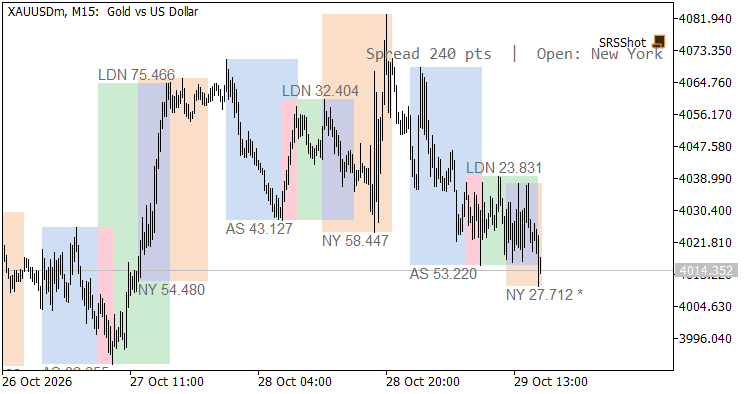
XAUUSD M15: ranges shown in price units
How it works
- Session times are entered in UTC. On a live chart the broker's UTC offset is detected automatically from the difference between server time and GMT. You can also set the offset by hand.
- Sessions that cross midnight, for example 22:00-06:00, are supported.
- The range is shown in pips for 3/5-digit forex pairs and in price units for metals, indices and other symbols. You can force price, points or pips.
- The session that is still running is updated on every tick and marked with *.
- London labels are placed above the box and Asia/New York labels below it, so overlapping sessions stay readable.
- Boxes are drawn on H1 and lower timeframes. On higher timeframes only the panel is shown.
- All objects are removed when the indicator is removed from the chart.
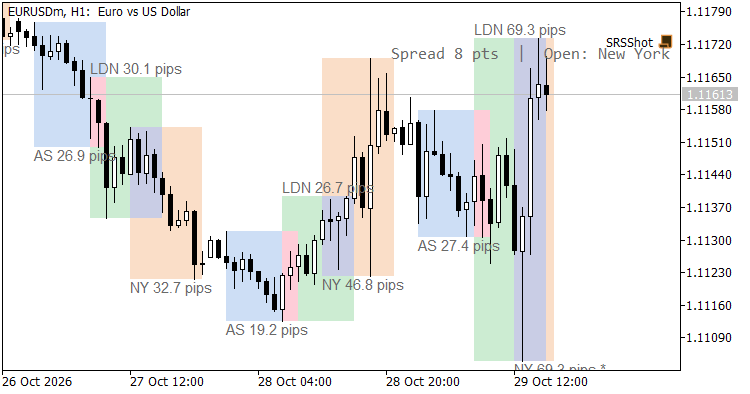
EURUSD H1: ranges shown in pips
Input parameters
| Input | Default | Description |
| Show Asia / London / New York session | true | Draw that session |
| Asia start / end | 00:00 / 09:00 | Session time in UTC, HH:MM |
| London start / end | 07:00 / 16:00 | Session time in UTC, HH:MM |
| New York start / end | 12:00 / 21:00 | Session time in UTC, HH:MM |
| Asia / London / New York color | light blue / green / orange | Box color |
| Broker UTC offset in hours | -99 | -99 = automatic, otherwise -12..14 |
| Range units in labels | Auto | Auto, Price, Points or Pips |
| Calendar days to draw | 10 | 1..365 |
| Fill boxes | true | Filled or outline boxes |
| Show session range labels | true | Range label on each box |
| Show spread / open-sessions panel | true | Panel on or off |
| Panel corner | Right upper | Panel position |
| Label and panel text color | Dim gray | Text color; use a light color on dark charts |
| Font size | 9 | Label and panel font size |
Notes
- The default times are winter (GMT) hours. During daylight saving time, move London and New York one hour earlier if you want the exact local opening times.
- In the Strategy Tester the broker offset cannot be detected, so it is set to 0. Enter the offset of your broker manually there.
- The default colors are for a white chart. On a dark chart, choose darker box colors and a light text color.
- The spread in the panel is the symbol's current spread in points, as reported by the terminal.
 Daily Loss Guard
Closes all trades when your daily loss reaches your limit.
 Supply Demand Zones
Supply and demand zones for Gold (XAUUSD), EURUSD and any symbol: zones from swing highs and lows sized by ATR, fresh or tested, merged, broken ones removed, alerts and 5 buffers for EAs. Open source code.
Accelerator Oscillator (AC)
The Acceleration/Deceleration Indicator (AC) measures acceleration and deceleration of the current driving force.
MACD Signals
Indicator edition for new platform.