 MetaTrader 5
 Uzmanlar
 Göstergeler
 Komut dosyaları
 Kütüphaneler
 Depo
Depo
Fan sayfamıza katılın

Daily Loss Guard - MetaTrader 5 için uzman

What I do:
- Pine Script to MQL5 / MQL4 conversions (TradingView indicators and strategies into MT5/MT4 indicators or EAs)
- Fixes and changes to existing EAs and indicators: bugs, new inputs, filters, daily limits, breakeven and trailing logic
- Görüntülemeler:
- 148
- Derecelendirme:
- Yayınlandı:
-
 Alım-satım fırsatlarını kaçırıyorsunuz:
- Ücretsiz alım-satım uygulamaları
- İşlem kopyalama için 8.000'den fazla sinyal
- Finansal piyasaları keşfetmek için ekonomik haberler
Kayıt Giriş yapWeb sitesi politikasını ve kullanım şartlarını kabul edersiniz
Hesabınız yoksa, lütfen kaydolun -
 Bu koda dayalı bir robota veya göstergeye mi ihtiyacınız var? Freelance üzerinden sipariş edin
Freelance'e git
Bu koda dayalı bir robota veya göstergeye mi ihtiyacınız var? Freelance üzerinden sipariş edin
Freelance'e git

Daily Loss Guard closes all trades when your daily loss reaches your limit. Attach it to any one chart of the account: it does not open trades itself and works alongside manual trading and other Expert Advisors. It also runs on a timer, so a quiet chart is fine, and any symbol and timeframe can host it, for example EURUSD M15.
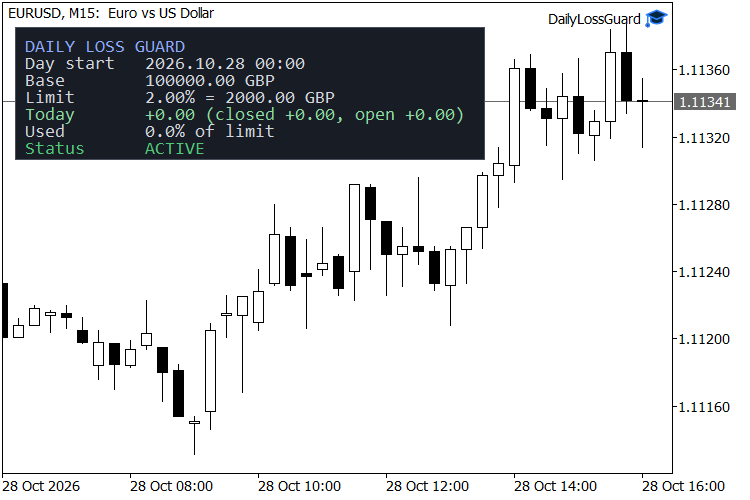
How it works. It counts today's closed trades and the change in open trades since the day started. Deposits and withdrawals are not trades, so they never count as a loss. When this total loss reaches your limit, it closes all positions and deletes pending orders, and until the next trading day it closes any new trade that opens.
The trading day starts at the server hour you choose. The start balance and the limit-hit state are kept in the terminal's global variables, so a terminal restart or a re-attach in the middle of the day keeps them, and a new day starts fresh automatically.
The panel shows the start of the trading day, the start balance, the limit in money, today's result split into closed and open, how much of the limit is used, and the status: ACTIVE, WARNING when 75 percent of the limit is used, or LIMIT HIT with the time. If algo trading is switched off, the panel says so, because the guard cannot close trades then.
Inputs
- Limit type: percent of the day's start balance, or a fixed amount in the account currency.
- Limit, %: default 2.0. Limit, account currency: default 100.
- New day starts at (server hour, 0-23): default 0.
- Close positions, Delete pending orders, Close new trades until the next day: all on by default.
- Max slippage, points: default 20.
- Symbols: empty watches all symbols, or give a list such as EURUSD,XAUUSD. Magic number: -1 watches all, 0 means manual trades only; one magic number can be set.
- Pop-up alert, Push notification, Show panel, Panel X and Panel Y position.
Important: it closes at market price, so on fast news the loss can go a little past the limit. Always use stop losses as well. This tool does not give signals and does not promise profit.
 Supply Demand Zones
Supply and demand zones for Gold (XAUUSD), EURUSD and any symbol: zones from swing highs and lows sized by ATR, fresh or tested, merged, broken ones removed, alerts and 5 buffers for EAs. Open source code.
 Copula: Gaussian, Student t, Clayton, Gumbel and Frank copulas with tail dependence
Fits five bivariate copulas on ranks, with Kendall's tau, tail dependence, the probability of joint extreme days, AIC and the conditional probabilities of pairs trading.
Session Range and Spread
Draws Asia, London and New York session high/low boxes with each session's range in pips or price, plus a live spread and open-sessions panel.
MACD Signals
Indicator edition for new platform.