 MetaTrader 5
 Uzmanlar
 Göstergeler
 Komut dosyaları
 Kütüphaneler
 Depo
Alım-satım robotlarını ücretsiz olarak nasıl indirebileceğinizi izleyin
Bizi Telegram üzerinde bulun!
Fan sayfamıza katılın
Fan sayfamıza katılın
Kodu beğendiniz mi? MetaTrader 5 terminalinde deneyin

Virtual - MetaTrader 5 için kütüphane
fxsaber

Посты по улучшениям: https://www.mql5.com/ru/search#!keyword=uluchshenie&amp%3Bauthor=fxsaber&amp%3Bmethod=2&method=2 Посты по ошибкам: https://www.mql5.com/ru/search#!keyword=oshibka&amp%3Bauthor=fxsaber&amp%3Bmethod=2&method=2 Blog
- Görüntülemeler:
- 12467
- Derecelendirme:
- Yayınlandı:
- Güncellendi:
-
 Alım-satım fırsatlarını kaçırıyorsunuz:
- Ücretsiz alım-satım uygulamaları
- İşlem kopyalama için 8.000'den fazla sinyal
- Finansal piyasaları keşfetmek için ekonomik haberler
Kayıt Giriş yapWeb sitesi politikasını ve kullanım şartlarını kabul edersiniz
Hesabınız yoksa, lütfen kaydolun -
 Bu koda dayalı bir robota veya göstergeye mi ihtiyacınız var? Freelance üzerinden sipariş edin
Freelance'e git
This cross-platform allows working with a virtual trading environment in one of the easiest ways.
Scenarios for using a virtual trading environment
- Real time tester. This means, you can observe what would be if the EA traded on the most recent prices in the tester in real time. This allows you to identify the causes of discrepancies between the real market and the Tester. There is no need to wait for a new day (MT5 tester limitation) or create special tools for the Tester, so that it can pick up recent data. Accordingly, it is not necessary to run the Tester repeatedly to get updates. In fact, the virtual trading environment is a real-time Tester.
- Auto optimization. The virtual trading environment assumes that you define what data it should work with. Therefore, an array of historical data allows you to run any TS on them inside a virtual trading environment. Thus, you can implement auto optimization into programs - a program regularly optimizes itself, just like the conventional Tester.
- Turning real trading into virtual one (and vice versa). For example, temporarily disabling a TS in case of losses. The time to re-enable the TS can be analyzed via the Tester or by trading a minimum lot. In turn, the virtual environment allows users to stop trading in real time, while continuing trading in the virtual trading environment. This provides much convenience when analyzing if it is time to re-enable the TS and the ability to easily re-enable real trading.
- Simplifying a trading logic on a working account. The market creates situations not present in the Tester. These include rejects and partial execution. The greatest issue is making real trading as similar to the one performed by the TS in the Tester as possible. Generally, TS developers spend considerable efforts to overcome market nuances that are extremely difficult to foresee. In fact, they learn from their own mistakes and pay real money for that, since demo accounts are unable to emulate many things of the real market. The virtual environment, in turn, allows us to see the perfect execution picture. Thus, in order to bypass the pitfalls of the real market, we need access to this perfect picture and a high-quality synchronizer (copying service) from the virtual environment to the real one. Therefore, virtual trading environments are of great help when dealing with difficult situations on real market.
- Tester acceleration. The built-in Tester is a universal tool. This means that it has to emulate the trading environment as fully as possible. This entails high costs in the form of operation speed limitations. When developing and analyzing a TS, such high accuracy is exhaustive. There are various ways to accelerate the Tester, including custom symbols (up to hundreds of percent) and virtual trading environments (tens and hundreds of percent), which can afford to not take something into account for the sake of speed. The Tester acceleration is an essential advantage of virtual trading environments, since it saves computing resources and, most importantly, time.
- TS reversal. A virtual trading environment allows reversing any TS easily.
- Using multiple TS on a netting account. A virtual trading environment considerably simplifies launching any number of TS on a netting account. TS do not interfere with each other.
- Unidirectional positions on a netting account. You can open several positions in one direction. Each of them will have its own Magic, OpenTime, OpenPrice, Comment, etc. This, for example, allows creating grid TS on a netting account, where each TP of a unidirectional position is different.
- Hiding Limit/Stop/SL/TP levels. If there is a task to hide significant trading levels, it can be quickly solved using a virtual trading environment.
- Launching Hedge TS on a netting account. All TS are launched in a hedge virtual environment. Netting real environment synchronizes with a virtual one.
- Resuming the TS operation after (abnormal) stop. The logic of many TS depends on what it did before. This is why even if you disable a TS and restart it immediately, you may not obtain the result that would have been received if the TS had worked without a shutdown. A virtual trading environment allows you to solve this task. When launching, the TS temporarily runs in virtual environment on a price history up to the current moment. Then it is moved to the real trading environment permanently. For example, that may solve many abnormal situations involving TS shutdowns and restarts.
Implementation
The library allows creating a virtual trading environment and trade as if it is a real trading environment. The library functionality is not new, although provided cross-platform library features one property that may be important at times: you do not need to study anything to use. Knowing MT4 (not MT5) trading logic is sufficient.
MT4-style trading logic was selected for virtual trading since it is more convenient and allows developing cross-platform EAs with ease.
Example
The library functionality can traditionally be demonstrated by an example prepared in advance.
// Launching TS in real and virtual trading environments

#include <MT4Orders.mqh> // https://www.mql5.com/en/code/16006
#include <fxsaber\Virtual\Virtual.mqh> // Virtual trading environment

input double Lots = 1;
input int Interval = 100;  // Position lifetime
input bool Example = true; // What code example to select

// Reversal TS
void System()
{
  if (!OrderSelect(OrdersTotal() - 1, SELECT_BY_POS))
    OrderSend(_Symbol, OP_BUY, Lots, SymbolInfoDouble(_Symbol, SYMBOL_ASK), 100, 0, 0); // If there is no position, open one
  else if (TimeCurrent() - OrderOpenTime() > Interval) // If the position lifetime exceeds the specified time
  {
    // Reverse the position
    OrderClose(OrderTicket(), OrderLots(), OrderClosePrice(), 100);
    OrderSend(_Symbol, 1 - OrderType(), Lots, OrderClosePrice(), 100, 0, 0);
  }
}

void OnTick()
{
  static const int handle = VIRTUAL::Create(); // Virtual trading environment handle created. 0 - real trading environment

  if (Example)
  {
    if (VIRTUAL::SelectByHandle()) // Real trading environment selected
      System();                    // Launching TS on a selected trading environment (real)

    if (VIRTUAL::SelectByHandle(handle)) // Virtual trading environment selected
    {
      VIRTUAL::NewTick();      // Added tick to the virtual trading environment
      System();                // Launching TS on a selected trading environment (virtual)
    }
  }
  else // Alternative fixation of the same actions.
    // Move along all existing trading environments
    for (int i = 0; i <= VIRTUAL::Total(); i++)
      if (VIRTUAL::SelectByIndex(i)) // Selected appropriate trading environment
      {
        VIRTUAL::NewTick(); // Added tick to a selected trading environment

        System(); // Launching TS on a selected trading environment
      }

  Comment(VIRTUAL::ToString()); // Display the status of the virtual trading environment on the chart
}
This is a cross-platform reversal EA. Its trading logic can be described in just a few strings (System function) thanks to MT4 style. The EA launches TS in real and virtual trading environments simultaneously. This can be well seen in the MT4 or MT5 Tester (CTRL+F5)
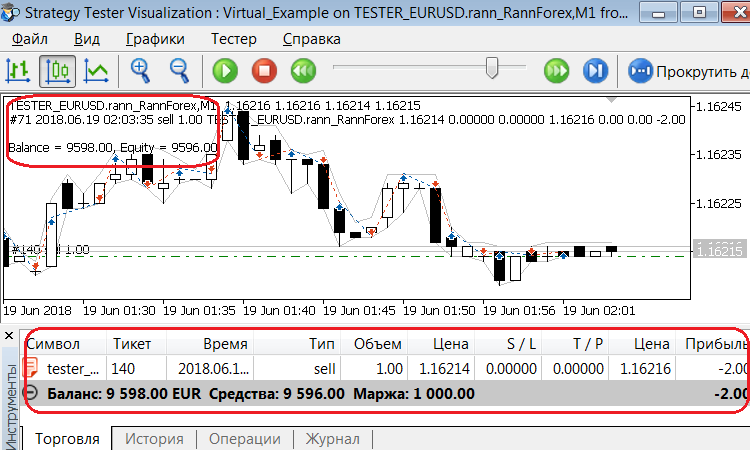
The screenshot shows that trading in real and virtual environments is identical.
Note that TS code remains the same. Only a trading environment is selected: a real one or any number of virtual ones.
The code displayed here is redundant - the two versions simply show the logic of working with the library.
Tester acceleration
Since the Tester acceleration scenario (see p. 5 above) may be required more often than others, we have added the ability to switch any TS to a virtual environment and back by adding two strings at the beginning of the code.
#define VIRTUAL_TESTER // Launch in the virtual trading environment
#include <fxsaber\Virtual\Virtual.mqh> // Virtual trading environment
The highlighted string allows users not to interfere with the TS original code.
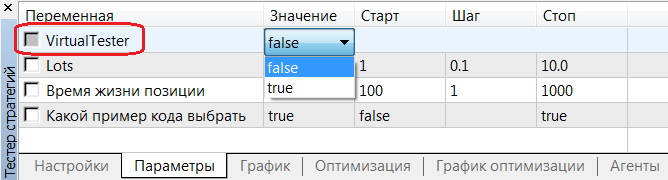
This mode has been made specifically for the Tester. It is assumed that a long-term Optimization is started with the enabled (VirtualTester = true) virtual environment instead of a real one. This provides a significant gain in Optimization speed (time). The obtained results (OnTester criterion - Balance) can then be used for standard single runs in real trading environment (VirtualTester = false).
TS reversal
The same two strings intended to accelerate the Tester allows solving another common problem - TS reversal.
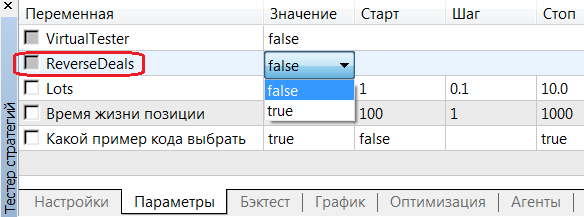
ReverseDeals = true mode enables reversal of deals. The internal algorithm is as follows:
- The original EA trades inside the virtual environment as if in the real one.
- In real environment, there are positions that are inverse to the appropriate positions in the virtual one.
Thus, the EA logic is not violated in any way. At the same, we can see what the TS reversal provides. This mode is also meant for the Tester.
Features
- Not everything is implemented in this virtual trading environment, compared with the built-in Tester.
- Both Hedge/Netting modes are supported. For example, you can create netting and hedging virtual environments simultaneously in MT4/5.
- No limitations on the number of virtual environments.
- No execution by last prices, as it sometimes happens in the MT5 Tester, since the last price is not relevant for any point in time.
- Limit orders and TakeProfit levels are always executed at the specified prices without a slippage. This removes an impression of a grail nature of some TS made by the MT5 tester.
- Stop orders and StopLoss levels are always executed at the first accept price (negative slippages) in order to avoid tester grails.
- Setting pending orders and SL/TP levels at the current prices launches their accept at once, unlike some MT5 tester operation modes. Such a behavior corresponds to market realities.
MetaQuotes Ltd tarafından Rusçadan çevrilmiştir.
Orijinal kod: https://www.mql5.com/ru/code/22577
 MAMy Expert
MAMy v.3 indicator-based EA
 TrendLineAlert_V2
The indicator displays a sloping trend line. Its parameters are set when the indicator is launched by a trader. The trend line defines the signal trigger level. The trend line breakthrough activates signals accompanied by emails and push notifications.