Position Overview And Record

5
When I was testing several EAs on my demo account I realised, that I could not distinguish between the running orders. There were simply too many orders opened. For this I wrote this EA. Normally I test over 10 EAs on one demo account at a time.

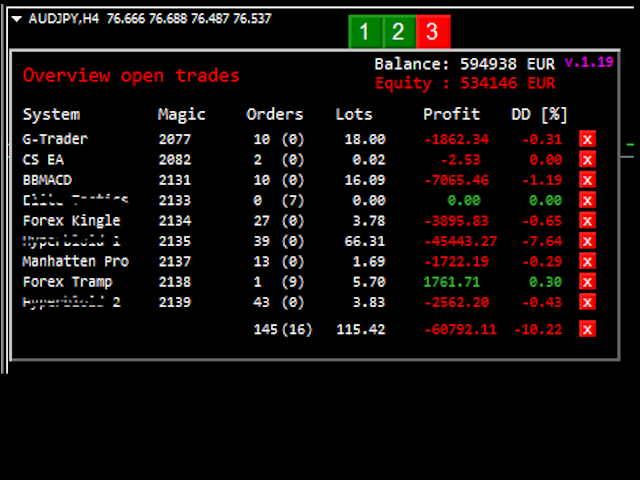
As you can see in the screenshot, there is one table with open positions. All orders are grouped by Magic Number. Now you see the opened orders, the profit and the drawdown of each Magic Number. 

In addition there is an option to connect the Magic Number with a name.
So it is even better to see how the EA is doing.
For this we need some preparation.
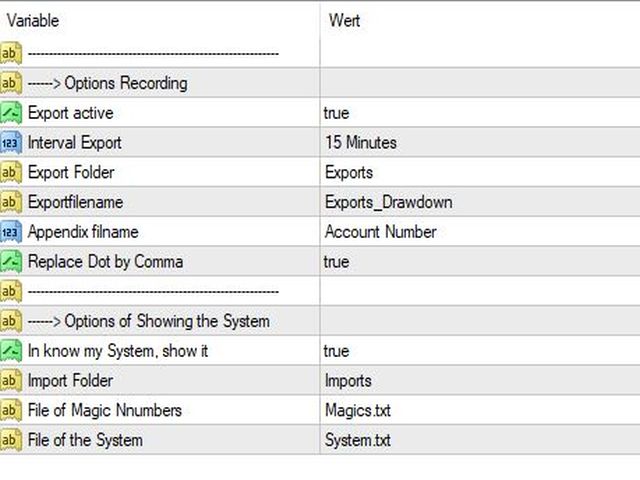
In the Files-Folder of your MT4-Installation you create an folder (Imports). There you locate 2 files:
  • Magics.txt: Import every Magic Number, separated by ","
  • System.txt: Import every EA-Name, separated by ",". Very important: The order the EA-Name is the same how you put in the Magic Numbers in Magics.txt

Otherwise the EA won't display the correct Name to the Magic Number.


Interactive Panel

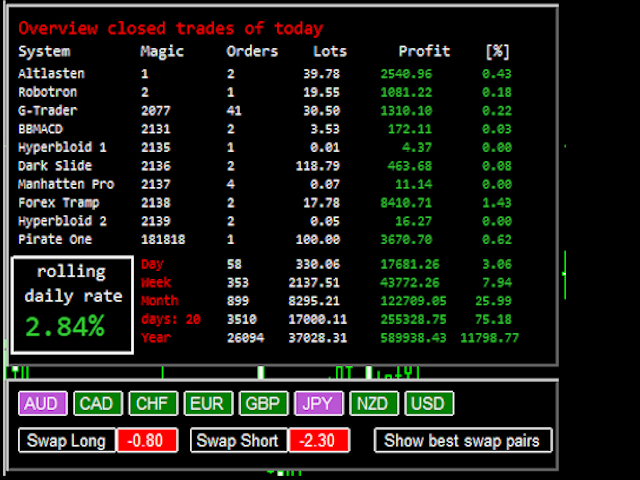
  • Click on Button "More": some infos to your account
  • Click on magic number: detailed overview of the orders filtered by magic number


What else can you do?

  • In order to keep track of your EAs you can record several information to an external file. In Microsoft Excel you can now analyse the various EAs


In the first comment you'll find examples of "Magics.txt" and the corresponding "System.txt". Moreover I'll give you an Excel-table to generate the strings for the 2 *.txt and to analyse the systems.


If you need any help with the EA get in touch with me. I will be glad to help you.

Отзывы 1
tomdub196
107
tomdub196 2021.05.03 18:48 

Great product for managing orders. Florian has been incredibly helpful in making this work and developing the product further. I can manage orders based on pairs, and magic numbers. I run multiple EA's and sometimes I like closing a certain pair on a certain EA as it's in profit, which allows me to do so quickly. Very happy with the purchase. Keep up the good work!!!

Рекомендуем также
Automated Timeframe cycling with Symbols centered.  Force every timeframe onto one clock window, so the story you see on Daily is the same story you are slicing on H4, H1, and M1.  Traders usually flip timeframes and lose the span. A Daily chart shows a few weeks, then M15 shows a few hours, and the eye treats them as different markets. This indicator locks the window to N bars of the highest enabled timeframe — default 10 Daily — and maps every lower timeframe to that same stretch. You stay ins
FREE
Description: Please tick "Show object descriptions" in chart properties to enable hrays views That utility converts a trendline into a horizontal ray known as tool for drawing supply and demand zones. Simply create a trendline on a chart and once selected, it will get converted. Ray remains horizontal while dragging.  Quick ray plot: press "R" key to create horizontal ray. It will be snapped to the nearest OHLC value Further versions will be improved. For feature request please post new comm
TSim
Sergey Kruglov
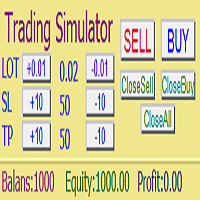
Утилита  TSim   позволяет симулировать ручную торговлю в Тестере Стратегий MetaTrader 4. В панеле можно устанавливать размеры лота, тейпрофита и стоплосса. Панель имеет кнопки Sell   и Buy для выставления рыночных ордеров, а также кнопки CloseSell, CloseBuy и CloseAll для быстрого закрытия ордеров. Под панелью отображается список открытых ордеров. Внимание. Панель работает только в Визуальном режиме Тестера Стратегий MetaTrader 4.
FREE
Night Scalper EA Lite
Robots4Forex Ltd
2.25 (4)
The Night Scalper EA Lite is a fully automated Expert Advisor that trades at night and relies on price reversion. The EA trades using market orders and has the option to use time averaging to improve performance. This EA works best on EURUSD using the M5 timeframe, but will also work on AUDUSD, GBPUSD, NZDUSD, USDCAD, USDCHF and likely many more. A VPS is advisable when trading this system and a low spread and commission based broker is best. Check the comments for back test results and optimiz
FREE
Program Overview: This program is a trading tool designed to monitor and analyze the 7 major currency pairs. It is a variant of a similar program used for tracking stock indices, but this version focuses on the seven major currency pairs. The program helps in identifying and calculating significant price movements (gaps) between the high and low prices of these currency pairs over a specified time frame. It then provides insights through comments and alerts based on the calculated gaps. Major Cu
EA Master Version any Follow Copy Account  (Acc. Number)  need a open MT Terminal, download multiple times Step1:   Open Master MT5 Terminal    =  install master- Version   (on any Symbol just one Time) Step2:   Open Follower MT5 Terminal = install follower- Version  (on any Symbol just one Time) Step3:   all Trades from any Symbol or any Robot are copy now to follow- Terminal immediately for simple copy set on Chart and   Start   no optimization. This Robot is a Trade Copier for MT5 that automa
FREE
NAS100 Auto Sl And TP
Moustapha Boulouz
5 (2)
Представляем NAS100 Auto SL и TP Maker для MT4: Никогда больше не пропустите установку StopLoss и TakeProfit с нашим NAS100 Auto SL и TP Maker, незаменимым помощником для трейдеров, работающих на рынке Nasdaq 100 в MetaTrader 4. Этот инструмент предназначен для тех, кто ищет беспроблемное решение для автоматизации управления уровнями StopLoss и TakeProfit. Ключевые особенности: Эффективная автоматизация: Автоматически отслеживает сделки Nasdaq 100 без StopLoss и/или TakeProfit. Динамически регу
FREE
EA Follower Version any Follow Copy Account  (Acc. Number)  need a open MT Terminal, download multiple times Step1:   Open Master MT5 Terminal    =  install master- Version   (on any Symbol just one Time) Step2:   Open Follower MT5 Terminal = install follower- Version  (on any Symbol just one Time) Step3:   all Trades from any Symbol or any Robot are copy now to follow- Terminal immediately for simple copy set on Chart and   Start   no optimization. This Robot is a Trade Copier for MT5 that auto
FREE
This indicator help to mark the high and low of the session Asian,London,Newyork , with custom hour setting This indicator is set to count from minute candle so it will move with the current market and stop at the designated hour and create a accurate line for the day. below is the customization that you can adjust : Input Descriptions EnableAsian Enables or disables the display of Asian session high and low levels. EnableLondon Enables or disables the display of London session high and
FREE
Real-time spread tracking and monitoring software Displays spread values in form of histograms on current timeframe of chart Convenient for analyzing spread changes, as well as for comparing trading conditions of different brokers By placing on desired chart, the spread changes at different trading times are displayed Additionally Fully customizable Works on any instrument Works with any broker
FREE
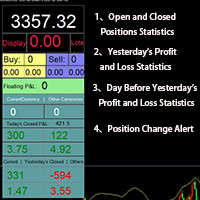
Smart Trade Monitor — Real-Time Position Tracking, P&L Analysis & Alert System   Real-Time Monitoring : Auto-tracks open/closed positions, displays yesterday’s & previous day’s P&L—no manual calculations!   Smart Alerts (Premium Only) : Instant push notifications + sound alerts for position changes—never miss a trading opportunity!   User-Friendly : One-click setup, key data displayed directly on charts for faster decisions.   Cross-Platform : Supports both MT4 & MT5, compatible with
FREE
Simple RSI Forex Trading Strategy
Victor Manuel Valderrama Zamora
2.5 (2)
Diversify the risk in your trading account by combining our Expert Advisors. Build your own custom trading system here:   Simple Forex Trading Strategies The expert advisor opens trades when RSI indicator enter in oversold or overbought areas. The Stop Loss, Take Profit, and Trailing Stop are calculated based on the ATR indicator. The recommended currency pair is EURGBP and the recommended timeframe to operate and to do backtests is H4. This Expert Advisor can be profitable in any TimeFrame an
FREE
DF Fib Trader Pro DF Fib Trader Pro — это автоматизированная торговая система, разработанная для MetaTrader 4. Она использует ценовые уровни Фибоначчи в сочетании с анализом тренда и структуры для определения точек входа и выхода. Советник поддерживает как длинные, так и короткие позиции и включает встроенные параметры управления рисками. Основные характеристики: • Использует логику коррекции и расширения Фибоначчи для построения точек входа, стоп-лосса и тейк-профита. • Настраиваемый размер л
FREE
Индикатор Crypto_Forex "Auto FIBO Pro" - отличный вспомогательный инструмент в торговле! - Индикатор автоматически рассчитывает и размещает на графике уровни Фибоначчи и локальные линии тренда (красного цвета). - Уровни Фибоначчи указывают ключевые области, где цена может развернуться. - Наиболее важными уровнями являются 23,6%, 38,2%, 50% и 61,8%. - Вы можете использовать его для скальпинга на разворот или для торговли по зональной сетке. - Существует множество возможностей улучшить вашу текущ
Change Timeframe for All
Mohamed Amine Talbi
5 (1)
The script changes the timeframe of all open charts on the MetaTrader platform in a simple click without having to do it manually by going through all the open charts and changing them one by one, it is handy when there are many open charts. The script lets you choose which timeframe to apply to the open charts. The timeframes available in the dropdown menu are the ones already available on the MetaTrader platform : M1, M5, M15, M30, H1, H4, D1, W1, MN1.
FREE
SL and TP Setter
Giacomo Barone
4 (1)
You can manually open a trade (one click), and this EA will take care of setting the SL and TP. SL and TP are set based on the number of pips you specify in the input screen. You can also choose monetary SL and TP. SL and TP are determined based on the weighted average price (WAP), so if you open a new trade, SL and TP will be updated according to the new WAP. The WAP is not unique but differentiated between buy and sell trades (this is useful only if you open opposite trades on the same chart)
FREE
Top Clock MT4
Blasius Kiss
5 (1)
Displays a digital clock in the chart in realtime. Benefits: Current time always in sight for market open/close, economic data, etc. Displays accurate time (server/broker time) Clearly visible (set color, size, font, position) Always runs/refreshes even without new price tick Hint: To display the most accurate time, use the server (broker) clock setting combined with the time (hour) offset for your time zone.
FREE
Внимание: Демо-версия работает только на EURUSD. Ее нельзя использовать в тестере стратегий. ChartTrader — это профессиональный торговый инструмент, который должен быть в арсенале любого трейдера. Он разработан для платформы MetaTrader 4. Утилита ChartTrader предлагает несколько вариантов для быстрого и удобного размещения ордеров на рынке Форекс. Пользовательский интерфейс располагается в окне графика, поэтому при установке ордеров вам не придется переходить в отдельные окна. Программа позволяе
FREE
Самый быстрый способ поменять период. Подходит для трейдеров, использующих несколько графиков и таймфреймов. Размер форма и цвет настраиваются. Входные параметры Corner — выберите "Right lower chart corner" ("Нижний правый угол графика") в качестве угла размещения Color — цвет фона кнопки ColorText — цвет текста кнопки ColorOn — цвет фона кнопки для текущего периода ColorOnText — цвет текста кнопки для текущего периода Font — шрифт Arial, Verdana... FontSize — размер шрифта в пикселях DistanceX
FREE
Position Selective Close MT4
Francisco Manuel Vicente Berardo
The Position Selective Close is a multi-symbol multi-timeframe script used to close simultaneously various positions.  General Description   The Position Selective Close   possesses   three operation modes (Intersection,   Union   and All) that control the way   as   four position features (symbol, magic number,   type   and profit) are used. The modes, available through the Selection Mode input parameter, relate to the features, available through the “Select by Feature” and “Feature” input pa
FREE
Если вам нравится этот проект, оставьте 5-звездочный обзор. Данный показатель рисует открытые, высокие, низкие и закрывающие цены на указанные период и его можно отрегулировать для специфического часового пояса. Это важные уровни, которые выглядят многие институциональные и профессиональные трейдеры и могут быть полезны для вас, чтобы знать места, где они могут быть больше активный. Доступные периоды: Предыдущий день. Предыдущая неделя. Предыдущий месяц. Предыдущий квартал. Предыдущий год. Или
FREE
The Saz_Timer indicator belongs to the Saz_Forex suite of professional indicators designed by Traders, for Traders. This indicator will show minutes and seconds of real time on the chart window. The indicator uses the OnTimer() event so it can update even while no ticks received on the chart. The text is shown toward the bottom right of the chart, encircled red in the screenshot. Inputs: Text Colour, allows selection of the colour for the text.
FREE
SX Supply Demand Zones accurately identifies and draws high-probability Supply and Demand zones using a sophisticated algorithm. Unlike traditional indicators that clutter your chart, this indicator is designed with a focus on performance and a clean user experience. New Unique Feature: Interactive Legend System What truly sets this indicator apart from everything else is the Interactive Control Legend. You have a professional dashboard directly on your chart that allows you to: Show/Hide: Ins
FREE
Constructor – удобный инструмент для создания, проверки, построения (конструктор стратегий) и применения торговых стратегий и идей, тестирования и использования отдельных индикаторов и их групп. Constructor включает в себя открытие, закрытие, сопровождение сделок, модуль усреднения, модуль восстановления, а также различные варианты торговли с усреднением или без, с применением мартингейла или без. К продукту можно подключить до 10 различных внешних индикаторов, подробная инструкция приложена в p
FREE
IceFX TradeInfo
Norbert Mereg
4.77 (44)
TradeInfo от IceFX - утилита, отображающая наиболее важную информацию текущем счете и позициях на нем. Отображаемая информация: Информация о текущем счете (баланс, средства, свободная маржа). Текущий спред, текущая просадка (DD), планируемая прибыль, ожидаемый убыток и т.д. Количество открытых позиций, объем (LOT), прибыль. Диапазон за прошлый и текущий день. Оставшееся время до следующей свечи. Информация о прибыли за последний день (при помощи интегрированного индикатора IceFX ProfitInfo). Ло
FREE
Lycan MT4
Leo Carlo Bermudez
Lycan MT4 is an automated Scalping system optimized for  XAUUSD (GOLD)  on the MetaTrader platform. The EA does not use grid or martingale recovery methods. It applies volatility-based stop loss protection and rule-based filters (spread, news, and session) to select scalp trade opportunities using confirmed breakout strength, rather than relying on high-frequency or recovery-based entries. Core Principle: No Grid, No Martingale, Dual Scalp Strategy System Lycan does not add to losing positions
FREE
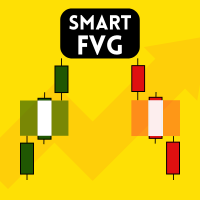
Индикатор Smart FVG для MT4 – Продвинутое определение Fair Value Gap для MetaTrader 4 Индикатор Smart FVG для MetaTrader 4 обеспечивает профессиональное обнаружение, мониторинг и оповещение о Fair Value Gap (FVG) прямо на ваших графиках. Он сочетает фильтрацию на основе ATR со структурно-ориентированной логикой, чтобы убрать шум, адаптироваться к ликвидности и оставлять только наиболее значимые дисбалансы для точных торговых решений. Ключевые преимущества Точное обнаружение FVG: находит реальн
FREE
Mirror chart
Salavat Yulamanov
4.5 (2)
Индикатор,  отображает на одном графике две различных пары,  предназначен для упрощения отображаемой информации,   Способен работать практически со всеми доступными в терминале инструментами (не только валютными парами, но и металлами, сырьем). Особенность использования  для визуального метода корреляции для любых валютных пар SubSymbol. Валютная пара выводится на экран цветными свечами. Это та самая коррелируемая пара. Mirroring. Вспомогательная валюта. Средствами индикатора отражается два тип
FREE
PZ Trade Pad Pro MT4
PZ TRADING SLU
3.67 (3)
Это визуальная торговая панель, которая помогает вам легко размещать сделки и управлять ими, избегая человеческих ошибок и повышая вашу торговую активность. Он сочетает в себе простой в использовании визуальный интерфейс с надежным подходом к управлению рисками и положением [ Руководство по установке | Руководство по обновлению | Устранение неполадок | FAQ | Все продукты ] Удивительно простой в использовании Торгуйте легко с графика Торгуйте с точным управлением рисками, без проблем Сохранение
Smart Backtest
Mr Chaiyaporn Boonsamorn
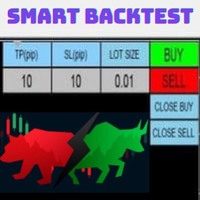
For those who are still not confident in their system or are testing new techniques to make it easier without wasting time to change the charts one by one, we recommend EA Smart Backtest to help you backtest your system efficiently. -The EA is intended to Backtest your system.   -Able to open buy or sell in visual mode and can modify values ​​for LOT, SL, TP.   -The chart also shows the Balance Equity Profit status. -Can choose to close, Buy, Close, Sell
С этим продуктом покупают
Добро пожаловать в Trade Manager EA — лучший инструмент для управления рисками, предназначенный для упрощения, точности и эффективности торговли. Это не просто инструмент для размещения ордеров; это комплексное решение для удобного планирования торгов, управления позициями и усиленного контроля над рисками. Независимо от того, начинающий вы трейдер, опытный специалист или скальпер, нуждающийся в быстром исполнении, Trade Manager EA адаптируется к вашим потребностям и работает с любыми активами:
Exp COPYLOT CLIENT for MT4
Vladislav Andruschenko
4.69 (65)
Профессиональный копировщик сделок для MetaTrader 4 Быстрый, профессиональный и надежный копировщик сделок для MetaTrader 4 . COPYLOT позволяет копировать сделки Forex между терминалами MetaTrader 4 и MetaTrader 5 , обеспечивая гибкую синхронизацию для разных типов счетов и сценариев торговли. Версия COPYLOT MT4 поддерживает: MetaTrader 4 → MetaTrader 4 MetaTrader 5 Hedge → MetaTrader 4 MetaTrader 5 Netting → MetaTrader 4   Версия MT5 Полное описание + DEMO + PDF Как купить Как установить Как по
Local Trade Copier EA MT4
Juvenille Emperor Limited
4.96 (111)
Local Trade Copier EA MT4 — это быстрый и гибкий копировщик сделок для копирования и управления сделками между несколькими счетами MetaTrader 4 на одном компьютере с Windows или Windows VPS. Он сочетает локальную синхронизацию сделок с настройками на стороне Receiver для управления размером лота, рисками, фильтрацией сделок, сопоставлением символов, управлением сделками и защитой счета. Настройте терминалы Transmitter и Receiver примерно за 1 минуту и копируйте ручные сделки или сделки, открыты
The product will copy all telegram signal to MT4   ( which you are member  ) , also it can work as remote copier.  Easy to set up, copy order instant, can work with almost signal formats, image signal, s upport to translate other language to English Work with all type of channel or group, even channel have "Restrict Saving Content", work with  multi channel, multi MT5 Work as remote copier: with signal have ticket number, it will copy exactly via ticket number. Support to backtest signal. How to
Trade Assistant MT4
Evgeniy Kravchenko
4.43 (197)
Помогает рассчитать риск на сделку, простая установка нового ордера с помощью линий, управление ордерами с функциями частичного закрытия, 7 типов трейлинг-стопа и другие полезные функции. Дополнительные материалы и инструкции Инструкция по установке   -   Инструкция к приложению   Функция Линии   - отображает на графике линию открытия, стоп-лосс, тейк-профит. С помощью этой функции легко установить новый ордер и увидеть его дополнительные характеристики перед открытием. Управление риском   -
Trade Indicator Assistant is a powerful MT4 utility designed to turn indicators into automated trading systems. Its main feature is the ability to automatically detect an indicator’s   BUY and SELL signal buffers , without requiring you to know the buffer numbers, search through indicator settings, or modify the indicator source code. Bonus Indicator: After purchasing Trade Indicator Assistant, contact me to receive Trade Signal Pro completely free as a bonus indicator. [Download Demo Version]
TradePanel MT4
Alfiya Fazylova
4.84 (95)
Trade Panel — это многофункциональный торговый помощник. Приложение содержит более 50 торговых функций для ручной торговли и позволяет автоматизировать большинство торговых операций. Инструкция к приложению: https://www.mql5.com/ru/blogs/post/756476 Пробная версия приложения для демо-счета: https://www.mql5.com/ru/blogs/post/750864 Как установить приложение: https://www.mql5.com/ru/blogs/post/750096 Как тестировать приложение в визуальном режиме: https://www.mql5.com/ru/blogs/post/770274 Как уст
Trade copier MT4
Alfiya Fazylova
4.62 (37)
Trade Copier — это профессиональная утилита, предназначенная для копирования и синхронизации сделок между торговыми счетами. Копирование происходит от счета/терминала поставщика к счету/терминалу получателя, которые установлены на одном компьютере или vps. Перед покупкой вы можете протестировать демо-версию на демо-счете. Демо-версия здесь . Полная инструкция здесь . Основной функционал и преимущества: Русифицированный интерфейс, поддержка на русском языке. Поддерживает копирование МТ4 > МТ4, МТ
Telegram to MT4 Coppy
Sergey Batudayev
4.09 (11)
Telegram to MT4: Идеальное решение для копирования сигналов Упростите свою торговлю с Telegram to MT4 — современным инструментом, который копирует торговые сигналы прямо из каналов и чатов Telegram на вашу платформу MetaTrader 4, без необходимости использования DLL. Это мощное решение обеспечивает точное исполнение сигналов, широкие возможности настройки, экономит время и повышает вашу эффективность. [ Instructions and DEMO ] [ FAQ ] [ How atach logs properly ] [ Settings descrition ] Ключевые
News Filter EA: Advanced Algo Trading Assistant News Filter EA is an advanced algo trading assistant designed to enhance your trading experience. By using the   News Filter EA , you can integrate a Forex economic news filter into your existing expert advisor, even if you do not have access to its source code. In addition to the news filter, you can also specify   trading days   and   hours   for your expert. The News Filter EA also includes   risk management   and   equity protection   features
DoIt Trade Manager - Risk Panel and EA Position Manager for MT4 Finding an entry is only half the job. Many execution mistakes happen in position sizing, partial exits, breakeven, trailing and account protection. DoIt Trade Manager puts the complete workflow on the chart. Plan the risk before entry, execute the order and apply consistent management rules to your manual trades and selected positions opened by other EAs. Full setup guide + how the free version works and where PRO starts :  https:/
The program is use to copy trading from MT4   to MT4 and MT5  on same Windows   PC or VPS .   Now you can easy copy trades to any MT4 account or MT5 account. Instants copy, speed smaller 0.1 seconds, easy to setup. Need run EA as Signal provider on one MT4 account, other MT4 / MT5 will run EA as Trade copier. You can download and try demo version on demo account Copi Trade MT4 demo   version   here   Copi Trade MT5 demo   version  here  
Trade Manager Pro MT4
Bryan Djoufack Nguessong
Это утилита для облегчения торговли, позволяющая в один клик или несколько кликов выполнять такие трудоемкие задачи, как управление ордерами и управление рисками. Особенности Управление рисками   Автоматически рассчитывает лоты на основе риска, указанного в % или $ в поле риска, и позволяет вам вводить ордера, просто размещая линии для SL TP и т.д., и отображает Risk Reward в реальном времени. TrueRisk включает комиссионные при расчете размера лота только на FX парах, так что вы рискуете 1%
Trading History MT4
Siarhei Vashchylka
5 (9)
Trading History - Программа для торговли и управления капиталом на истории котировок в тестере стратегий. Может работать с отложенными и немедленными ордерами, оснащена функциями трейлинг стопа, безубытка и тейкпрофита. Очень хорошо подходит для тренировок и тестирования различных стратегий. Инструкция/Мануал ( Обязательно читайте перед приобретением ) Преимущества 1. В кратчайшие сроки позволяет протестировать любую торговую стратегию 2. Отличный тренажёр для тренировок трейдинга. Можно получи
CloseIfProfitorLoss with Trailing
Vladislav Andruschenko
4.88 (32)
Close If Profit or Loss with Trailing для MetaTrader 4 — автоматическое закрытие по общей прибыли или убытку Надёжная торговая утилита для MetaTrader 4, которая автоматически закрывает позиции, когда общая прибыль или общий убыток достигает заданного уровня. Советник контролирует открытые сделки, считает плавающий результат, может использовать трейлинг прибыли и помогает закрывать позиции быстрее, чем ручная реакция трейдера. MetaTrader 4 до сих пор активно используют ручные трейдеры, скальперы
Shepherd Safety EA
AW Trading Software Limited
4.92 (13)
AW Shepherd Safety EA - советник для сопровождения открытых позиций. Первый ордер открывает трейдер с панели, дальше советник ведёт корзину сам: доливает ордера восстановления с фильтром тренда, закрывает сторону по TakeProfit, трейлингу или стопу и показывает уровни закрытия на графике. Покупки и продажи ведутся отдельно, обе стороны могут быть открыты одновременно. Ордер восстановления открывается не просто по шагу цены, а после разворота в сторону позиции по Parabolic SAR, двум MA или цвету с
Trade Assistant Pro 36 in 1
Makarii Gubaydullin
4.76 (21)
Многофункциональная утилита: калькулятор лота, сеточные ордера, индикатор Price Action, управление сделками, рассчёт R/R, и многое другое Демо веpсия  | Инструкция  | Версия для MT5 Утилита не работает в тестере стратегий: вы можете скачать   демо версию ЗДЕСЬ , чтобы протестировать продукт перед покупкой. Напишите мне  если есть вопросы / идеи по улучшению / в случае найденного бага Упроситите и сделайте вашу торговлю быстрее, при этом расширяя стандартные возможности терминала. 1. Открытие
RS Trade Copier - сверхбыстрый локальный копировщик сделок с полноценным графическим интерфейсом. Хватит вбивать номера счетов вручную. Никаких 200+ непонятных параметров в настройках. Надёжный и гибкий инструмент для копирования торговых операций между несколькими терминалами MT4 и MT5. Подходит как опытным трейдерам и сигнал-сервисам, так и частным инвесторам. Позволяет синхронизировать торговлю от одного или нескольких источников к одному или нескольким приёмникам с высокой точностью и минима
Telegram to MT4 Multi-Channel Copier   автоматически копирует торговые сигналы из ваших Telegram- и Discord -каналов прямо в MetaTrader 4. Без ботов, без браузерных расширений, без ручного копирования. Сигнал приходит в Telegram или Discord — и советник открывает сделку в вашем терминале за считанные секунды. А перед тем как копировать канал, встроенный бэктестер покажет, что этот канал сделал бы на вашем счёте. Продукт состоит из двух компонентов: приложения для Windows, которое слушает ваши Te
Rhino Chart Drawing Tools предоставляет рабочий процесс рисования в стиле TradingView для MetaTrader 4. Включает 54 инструмента рисования , настраиваемую панель инструментов, Избранное, быстрое форматирование, настройки объектов, шаблоны и менеджер объектов. Руководство пользователя: Как использовать продукт Бесплатная демо-версия: Скачать демо-версию Версия для MetaTrader 5: Rhino Drawing Tools для MT5 Инструменты рисования Группа Список объектов Линии Линия тренда, луч, продолженная линия, г
MT4 к Telegram Signal Provider - это простой в использовании и полностью настраиваемый инструмент, который позволяет отправлять сигналы в Telegram, превращая ваш аккаунт в поставщика сигналов. Формат сообщений полностью настраиваем! Однако для простого использования вы также можете выбрать предопределенный шаблон и включать или отключать определенные части сообщения. [ Демо ]  [ Руководство ] [ Версия для MT5 ] [ Версия для Discord ] [ Телеграм-канал ]  New: [ Telegram To MT5 ] Настройка Шаг за
Multi Account Local Trade Copier — быстрый локальный копировщик сделок для MetaTrader: копируйте сделки между терминалами MT4/MT5 на одном компьютере или VPS с Windows, с одного мастер-счёта на несколько счетов-приёмников — на ваши собственные реальные, демо- и проп-счета, у одного брокера или у разных. Работает по событиям : мастер публикует каждую сделку в момент её совершения, а приёмник измеряет и записывает реальную задержку копирования каждой сделки — обычно 50-150 мс . Без DLL, без интерн
Индикатор имеет три основных инструмента: шкалы Времени и Цены, Увеличитель (всплывающий чарт) и Пересечение. Вы можете перемещать всё это с помощью мышки и настраивать различные форматы отображения, размер и цвет каждого элемента. Увеличитель (всплывающий чарт) позволяет отображать свечи с любого таймфрейма и разным масштабом. Горячие клавиши по умолчанию:  'Q'-увеличить таймфрейм, 'A'-уменьшить таймфрейм, 'W'-уменьшить масштаб свечей, 'S'-увеличить масштаб свечей,'Z'-показать/скрыть всплываю
Automatic Trailing Stop Based on Take Profit Percentage with Profit Lock EA MT4   Lock in your profits and "let your winners run" past your 100% take profit target with this EA.  This Expert Advisor automatically adjusts your Stop Loss based on up to 4 user-defined Take Profit Target Percentages, locking in your profit.  If price pushes past your 100% take profit target, the EA will automatically trail the price by user-defined pips, so you won't miss that runaway train again.   EA Features The
Exit Manager
Victor Christiaanse
5 (2)
Close every trade at the right moment, automatically. Most traders spend their energy on the entry and then close too early, too late, or on a feeling. Exit Manager takes the exit off your hands. Open a trade the way you always do, by hand or with any Expert Advisor, and Exit Manager watches it and closes it, fully or partly, when the indicator signal you chose appears. You can see it working on the chart. A clean panel on your chart shows, for every open trade, which rule will close it next, ho
Exp Averager
Vladislav Andruschenko
4.82 (22)
Усреднитель для MetaTrader 4 — профессиональная система сопровождения сделок и управления средней ценой Профессиональный советник для тех, кто хочет не просто усреднять позиции, а грамотно управлять серией сделок, просадкой и общей точкой выхода. Этот инструмент помогает сопровождать уже открытые позиции, улучшать среднюю цену входа и выстраивать понятную логику выхода всей серии в безубыток или прибыль. Усреднитель для MT4 создан не как автономная торговая система, а как специализированный мод
TradeMirror - это советник-копировщик для платформы MT4/MT5. Руководство по использованию Нажмите на ссылку Руководство по Trademirror , чтобы посмотреть больше инструкций. Почему TradeMirror Мы понимаем важность безопасности, стабильности и конфиденциальности для финансового программного обеспечения, поэтому мы приложили максимум усилий для детального укрепления этих трех элементов: Предоставляет удобный графический интерфейс, которым легко управлять Фокус на конфиденциальности и безопасности,
Unlimited Trade Copier Pro - это мощный инструмент для удаленного копирования сделок между несколькими счетами MetaTrader 4/MetaTrader 5, расположенными удаленно друг от друга, по сети интернет. Это идеальное решение для провайдеров сигналов, которые хотят поделиться своей торговлей с другими трейдерами по всему миру. Один поставщик может копировать сделки на неограниченное количество счетов-получателей, а один получатель также может копировать сделки неограниченного количества провайдеров. Пост
King Trade Copier MT4
Mohammed Maher Al-sayed Mohammed Ahmed Saleh
5 (1)
King Trade Copier соединяет терминалы MetaTrader, запущенные на одном компьютере или VPS. Сделки, открытые на одном счёте, появляются на остальных. Файл содержит обе роли, поэтому одна и та же загрузка становится отправителем или получателем в зависимости от значения, которое вы зададите параметру Mode. На каждом графике панель показывает, отправляет этот терминал сигналы или принимает их, называет счёт на другой стороне, считает получателей, которые ответили, и показывает возраст последнего си
Take a Break
Eric Emmrich
5 (31)
Take a Break pauses your Expert Advisors when trading is a bad idea: before news, after a daily loss, outside your trading hours, or when a rule you wrote yourself says so. When the pause is over, your EAs simply continue. Account protection for all your EAs in one tool: news filter, drawdown and equity protection, time filter and custom rules. One EA on one chart protects the whole account, the free indicator gives every chart its own rules on top. Free demo | What is new in 26.09 | Support Ass
Другие продукты этого автора
History data loader
Florian Riedrich
5 (1)
================================================================================ The utility is useful when you have to load history data for many symbols and timeframes. It loads the symbol used in the market watch. One symbol is scanned for all timeframes. Then the charts will be closed and the next symbol is scanned. You cannot abort the operation. Wait till it is done. ================================================================================
FREE
I was looking for a lean symbol changer. I could not find any. Normally other products hide lot's of screen space. So I developed a very lean symbol changer Just click on the 2 currencies you want to combine. The order does not matter. If you miss some pairs, you can add up to 5 custom symbols. Please make sure, your broker support your custom symbols. Drag an drop the panel with the green button. In future I plan to include suffix and prefix als well.
FREE
Trade Assistant – Position & History Overview Streamline your trading workflow with a powerful all-in-one panel for MetaTrader 5. Trade Assistant is a professional EA panel that gives you full control over your trades — from order execution to real-time position monitoring — all within a clean, intuitive on-chart interface. Key Features One-Click Order Execution Instant   Market Orders   (Buy / Sell) with configurable Lot, SL and TP Full   Pending Order   support: Buy/Sell Limit & Buy/Se
FREE
With this EA you are able to record the spread of any currency pair you place in the input parameter. Just drag and drop the EA to one currency. You can record all currencies from ONE chart. There is no need to open multiple charts! But fill the market watch with all specified symbols! Double click on the background of the panel. So you can move it to another position. parameters: RunEA >>> Rec yes/no right from the beginning Export Folder Export Filename Appendix >>> None / Date / Day of Week U
Every trader is watching over his account over and over.... trying to anlayse every system he or she has. With this tool you are able to  export your complete history of every account export withdrawls / deposits / rebates to a separate file export account status with balance / equity / current drawdown recalculate micro to standard lots / profits ...  export decimal by "." or ","  combine a series of Magic Numbers to one unique Magic Number   filter to ignore OrderComments.
Pearl
Florian Riedrich
5 (1)
This is my own developed EA "Pearl" It trades the whole market and tries to catch reversals. But it tries to trade within the overall D1-trend. It trades currency pairs only It uses martingale-strategies. It does use flexible grids though. It is free to you when to increase the lotsize of grid levels A grid level can be skipped. If the price overruns a grid level and volatility is still high, a trade will not open. The EA waits till volatility has decreased. Grid distances can be extended by
Фильтр:
tomdub196
107
tomdub196 2021.05.03 18:48 

Great product for managing orders. Florian has been incredibly helpful in making this work and developing the product further. I can manage orders based on pairs, and magic numbers. I run multiple EA's and sometimes I like closing a certain pair on a certain EA as it's in profit, which allows me to do so quickly. Very happy with the purchase. Keep up the good work!!!

Florian Riedrich
1800
Ответ разработчика Florian Riedrich 2021.05.05 08:50
Thanks! Nice to hear it helps!
Ответ на отзыв