BRiCK TradeByArrow MT4 Free

* The product for MT5 converted using "BRiCK TradeByArrow MT4" is here.

BRiCK is a simple and versatile utility. 
By combining Experts, Indicators and utilities like the Lego block, various trading styles can be realized.

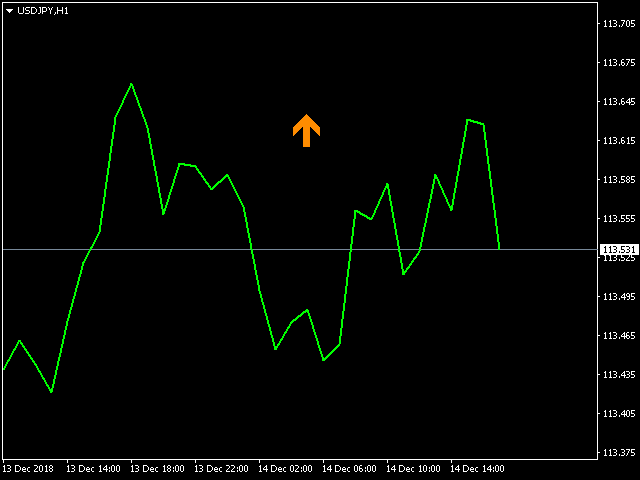
"TradeByArrow" is Utility that executes order processing when an arrow object is created on the chart.
Combined with Indicator which outputs arrow object, it can be used like Expert.


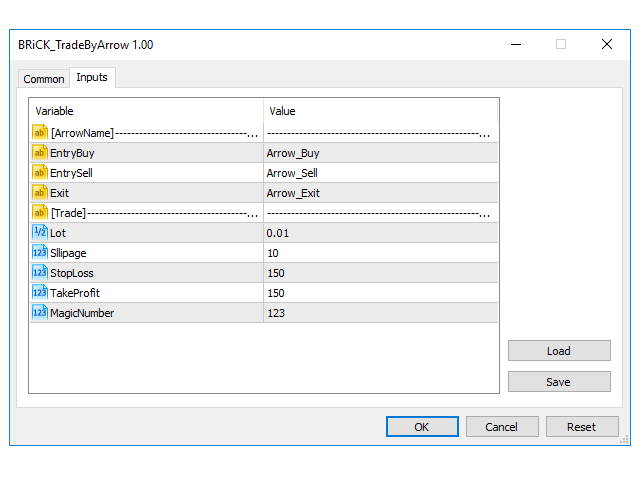
Parameter

[ArrowName]

  • EntryBuy: Arrow object name for buy order (partial match)
  • EntrySell: Arrow object name for sell order (partial match)
  • Exit: Arrow object name for close order (partial match)

[Trade]

  • Lot: Volume to trade
  • Sllipage: Sllipage to trade
  • StopLoss: Loss margin based on acquisition price
  • TakeProfit: Profit margin based on acquisition price
  • MagicNumber: Magic number (Order identification number)


Procedure

1. Open the chart to be traded.

2. Insert the utility "TradeByArrow" on the open chart.

3. Insert the indicator that outputs the arrow object into the same chart.

4. When the graphical object specified by ArrowName is created on the chart, the following processing is executed.

  • When position does not exist
    - EntryBuy: Execute buy order
    - EntrySell: Execute sell order
    - Exit: Do nothing

  • When buy position exist
    - EntryBuy: Do nothing
    - EntrySell: Close the buying position, execute the selling order
    - Exit: Close purchase position

  • When sell position exist
    - EntryBuy: After closing selling position, execute buy order
    - EntrySell: Do nothing
    - Exit: Close the selling position


Confirmation

- The free version can not be used in a real account.

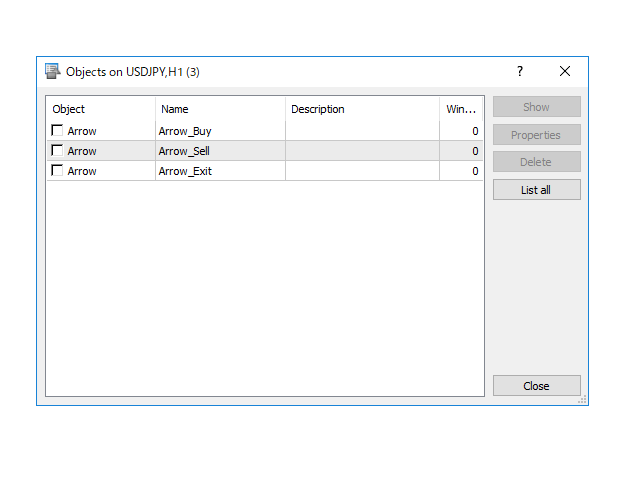
- All arrow names must be different names.

- The method of judging the arrow name is partial match.

- All orders will be executed in a market order.

- Arrow object to be an execution trigger.

IDDescription
 OBJ_ARROW_THUMB_UP Thumbs Up
 OBJ_ARROW_THUMB_DOWN Thumbs Down
 OBJ_ARROW_UP Arrow Up
 OBJ_ARROW_DOWN Arrow Down
 OBJ_ARROW_STOP Stop Sign
 OBJ_ARROW_CHECK Check Sign
 OBJ_ARROW_LEFT_PRICE Left Price Label
 OBJ_ARROW_RIGHT_PRICE Right Price Label
 OBJ_ARROW_BUY Buy Sign
 OBJ_ARROW_SELL Sell Sign
 OBJ_ARROW Arrow


Рекомендуем также
Equity Shield 2 for MT4 Equity Shield 2 monitors your account limits while you trade. Set daily drawdown, maximum drawdown, daily profit and account profit targets, then track your remaining room live from one on-chart panel. When an enabled limit is reached, Equity Shield 2 can close your open positions and alert you. Built for prop firm challenges and traders who want an additional layer of account protection. Account protection Monitor up to four account limits: Daily drawdown Maximum accoun
Trading Board is a Tool That Help you execute Sell and Buy Operation very smoothly. General Description : This Tool has this functions: The function of Send Buy or Sell orders. The function to close all orders in the current chart. Choose the volume you need to trade. Calculate of Stop loss and Take Profit with the number of points. Draw the Fibonacci retracement.
FREE
The Chart Navigator is a powerful and user-friendly indicator designed to enhance your chart navigation experience in the MetaTrader platform. With its advanced features and intuitive interface, it enables traders to effortlessly explore multiple timeframes, switch between symbols, and efficiently analyze price movements. Key Features: Timeframe Navigation: Seamlessly switch between different timeframes with just a single click. The Chart Navigator provides a graphical object that allows you to
FREE
This Expert Advisor sends an email notification, generates an alert or outputs a message to the journal (depending on the settings) every time a new order is opened (buy, sell, limit, stop). It also sends a similar message about closure of orders. The EA can be useful for those who want to always be informed of which orders had been opened/closed on the account. Limitations: In this demo version, notifications are available only for the GBPCHF currency pair. To use notifications on all currency
FREE
This indicator helps you control several pairs in a small workspace, therefore, it is not necessary to open several charts on the platform to do so. The indicator shows sequentially up to 6 different pairs, besides that each of these pairs has a button with which you can stop the indicator to observe the selected pair. Place the indicator on a chart to monitor several pairs and the rest of your space use it on the chart of the pair you wish to observe in detail.    MT5 version          Parameter
Pending Grid STOP Manual
Nantakan Leungonnam
5 (1)
Hola Traders. Lot - lot size for pending orders. Martingale - double lot size of pending orders. *(No Martingale = 1.00) TotalGridEachSide - unit each side of pending orders. SpaceOfFirstOrder - distance for the first order in points. Take Profit - profit in points. Stop Loss - loss in points. The entire positioning uses POINTS only. (10 point = 1 pip) and you can open order BUYSTOP, SELLSTOP, ALLBUYANDSELL you can Close Pending, Close orders Profit and Loss and Close All ***  ideas for using
Hola Traders. Lot - lot size for pending orders. Martingale - double lot size of pending orders. *(No Martingale = 1.00) TotalGridEachSide - unit each side of pending orders. SpaceOfFirstOrder - distance for the first order in points. Take Profit - profit in points. Stop Loss - loss in points. The entire positioning uses POINTS only. (10 point = 1 pip) and you can open order BUYLIMIT, SELLLIMIT, ALLBUYANDSELL you can Close Pending, Close orders Profit and Loss and Close All ***  ideas for usin
Choose all the pairs that have positive swap in your broker Then, the EA will buy/sell before the triple swap takes place, and it will close the position after the triple swap is paid to you. It is recommended to test the EA at least 1 month in demo account so you can see the results. If you have any doubt or suggestion, don't hesitate to contact me! HOW TO USE Inputs swapDay = The day that the 3x swap is paid in your broker lots = The lot size that you want to use SL = stop loss in points (not
Trend Teller — Узнайте направление тренда за считанные секунды! Trend Teller   — это мощная и интуитивно понятная панель, созданная для того, чтобы дать вам полное представление о рыночных трендах по всем основным валютным парам и таймфреймам — от M1 до MN1. Созданный трейдерами для трейдеров, этот инструмент устраняет догадки при анализе тренда и помогает вам оставаться в курсе общей картины. Большинство начинающих трейдеров испытывают трудности при определении направления рынка — с этим иногда
FREE
Just Currency Strength is a simple, and easy to use as a market analysis tool. It could helps trader to understand the broder view of the market and forcasting the movemt of each currency symbol and trend direction of each specific currency pair. Parameters Timeframe (Move Timeframe box to move the pannel) Currency (Must NOT be less than 5 currencies) Refreshtime in second Colors Strong//Weak//Neutrial Alerts setting Alert On/Off Push notification On/Off Happy Trading...
FREE
"Ichimoku Waves Meter"  Измеритель Волн Ишимоку  это професиональный инструмент для графического анализа с использованием действительных интерпретаций Ichimoku kinkōhyō! это графическая программа, позволяющая быстро и просто измерить пропорции между указанными точками на графике цены. Предлагаемый показатель ценового и временного диапазона является основным инструментом для анализа графика в соответствии со стратегией Ichimoku на платформе MT4. За короткий промежуток времени с помощью данного ин
FREE
SI Connect
Daniel Stein
5 (3)
SI Connect - это утилита, которая устанавливает соединение с нашими серверами для использования FX Volume. Технические инструкции по подготовке вашего терминала к использованию SI Connect Разрешите веб-запросы и вставьте https://stein.investments в список разрешенных URL в вашем терминале Опции -> Подкатегория советников . Вам нужен только один экземпляр советника на терминал, но он должен постоянно работать в фоновом режиме, чтобы получать последние данные из нашего центра обработки данных. В
FREE
Candle close countdown indicator. Almost all indicators work by ticks and therefore stop counting when the price stops in moments of little volatility. This indicator does not stop and remains synchronized with the broker's clock. It also has other functions that can help the trader. All features are configurable and you can choose if you want to use it or not: - Volume control:                         the counter changes color when the current candle has a higher volume of contracts than the pr
Having trouble marking where the various forex sessions start and end? Or perhaps your strategy requires you trade only in a specific session, then this is for you. The session indicator shades the session you require in a certain color so that you can identify it easily. The sessions shown include: London session, New York session, Asian Session, Asian - London overlap and London - New York Overlap. Difference source give varying time ranges for the various session, mostly differing by not mo
FREE
"Ichimoku Waves Meter"  Измеритель Волн Ишимоку  это професиональный инструмент для графического анализа с использованием действительных интерпретаций Ichimoku kinkōhyō! это графическая программа, позволяющая быстро и просто измерить пропорции между указанными точками на графике цены. Предлагаемый показатель ценового и временного диапазона является основным инструментом для анализа графика в соответствии со стратегией Ichimoku на платформе MT4. За короткий промежуток времени с помощью данного ин
Водяной знак на графике: Символ + Таймфрейм / или ваш собственный текст Многофункциональная утилита:   содержит более 66 функций, включая эту |   Свяжитесь со мной , если у вас есть какие-либо вопросы В настройках индикатора вы можете настроить: Размер шрифта; Цвет текста; Имя шрифта; Угол на графике: 1 = Вверху слева; 2 = Вверху справа; 3 = Внизу слева; 4 = Внизу справа; 5 = По центру; Показ текущего таймфрейма: вкл /выкл; Префикс символа, подлежащего удалению ( n_AUDCAD --> AUDCAD ); Суффикс с
One more Copier MT4
Oleksii Chepurnyi
5 (1)
Просто еще один копировщик сделок, ничего особенного. Демо версию можно скачать тут . Основные возможности Копирует сделки между терминалами: по рынку, отложенные ордера (опционально), а также их уровни стоп-лосс и тейк-профит (также опционально). Можно копировать с одного Master-счета на несколько Slave-счетов, а также с нескольких Master-счетов на один Slave-счет. Расчет объема В данный момент есть два варианта расчета объема: Объем сделки берется 1 к 1 с Master-счета, плюс множитель; Объем
THIS PRODUCT CAN NOT BE TEST IN STRATEGY TESTER. PLEASE TRY DEMO VERSION: https: //www.mql5.com/en/market/product/58082 FIRST 10 COPIES AT 30 USD, NEXT PRICE WOULD BE 50 USD RISK AND TRADE MANAGER RISK AND TRADE MANAGER   is an advanced trading panel designed for manual trading.   Utility helps to manage trades effectively and efficiently with a single click. MAIN FEATURES Convert and display Stop Loss (SL)   Pips into % and amount to view the clear picture of the trades if SL hits. Fund alloca
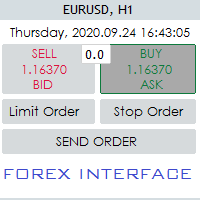
Hello Guys! I want to share with you a very useful tools. Anyone of us who has used MT4 for some time knows how impractical this platform can be for discretionary trading. That's why I created this graphical interface!  Interface is very simple, all the info that you need are in the video and in the screenshot. NB: Before to run the EA Interface, remember to copy the file in the comment in your MT4 folder "Controls". PATH: .../MQL4/INCLUDE/CONTROLS NB: unfortunately the interface can't be test
Market Monitor
Rodrigo Rethka Goncalves
Market Monitor – Smart Asset Performance Dashboard for MT4 Turn your MetaTrader 4 into a professional trading intelligence center! Market Monitor is a powerful monitoring tool that displays, in real time, the most relevant performance metrics of each symbol being traded — helping you make faster, smarter, and more strategic decisions. What Does This Indicator Do? Market Monitor scans all open and historical orders, consolidates the data by symbol, and displays everything in visual pa
Scalping Strategy Having a strategy in the market is one of the main conditions for trading. The presence of various and complicated indicators and tools sometimes makes trading difficult, and the user gets confused after trying various methods and gets stuck in a loss cycle, the result of which is usually clear. This indicator is a simple strategy based on the detection of pivots and short-term trends, which helps you to easily trade in trends. Sometimes a simple but efficient strategy has a be
Один график. Полный контроль. Хватит тратить время на управление объектами, цветами и настройками на каждом графике по отдельности. С Chart Sync Manager вы можете мгновенно синхронизировать, копировать и контролировать все свои графики MetaTrader с помощью одной панели и нескольких горячих клавиш. Рисуйте один раз - обновляйте везде. Открывайте и закрывайте графики одним щелчком. Поддерживайте порядок в рабочей области благодаря управлению объектами по символам. И не упускайте важные детали благ
Smart Trade Guard Elite PRO MT4 " The Ultimate Manual Trading & Risk Discipline Panel " Stop Trading with Emotions. TradeGuard Elite PRO is an advanced manual trading panel designed for traders who want the speed of manual execution with the discipline of a professional risk management system. Open trades in one click, calculate lot size automatically, move to break-even, partial close positions, and even block yourself from revenge trading after consecutive losses. This is not an auto tradin
Данная завершенная система сетки отложенных ордеров открывает любую комбинацию отложенных ордеров (Buy Stop, Sell Stop, Buy Limit и Sell Limit) и закрывает все существующие отложенные ордера. Вы сможете перемещать скрипт по графику. Он подхватит начальную цену для первой позиции в сетке с той точки, на которой вы его оставите. Обычно такая точка располагается в области линий поддержки/сопротивления. Входные параметры Перед выставлением отложенных ордеров открывается окно входных параметров, в к
Indicator overview   Trend indicator usage Moving averages. Highest quality alerts that need no introduction. It is completely loyal to the original algorithm and uses other useful features. Easy to trade Carry out all kinds of notifications It's not a new paint and it's not a back paint. Setting Indicator WMA50 in Time frame H1 for any pair currency and Gold Spot. EMA200 in Time frame H1 for any pair currency and more than EMA250 for Gold spot. Using it for maximum benefit Set up notification
FREE
Track All Gains RJS
Robert Jasinski-sherer
This Program will not execute any trades! Works on any chart and any time frame! This is the MT4 version. MT5 version: https://www.mql5.com/en/market/product/125598?source=Site+Market+My+Products+Page This EA will produce a comment box at the top left of the chart and show you your equity % difference throughout the day, week, month and year. Updating constantly in real time. The daily resets back to zero on open of a new market open day. The weekly resests back to zero at open of a new mar
Fixed Range Volume Profile MT4 Volume Profile Indicator — Auto-Detecting Trendline Tracking, POC, Value Area & High Volume Nodes in Real Time Fixed Range Volume Profile (FRVP) displays volume distribution over a user-defined range — automatically detecting the latest trendline you draw or drag on the chart. No manual range selection. No naming conflicts. Just draw a trendline and the profile appears. Update it live by dragging. MT4 Native • No Repainting • Real-Time Trendline Tracking • Fully Cu
MyHistoryDraw
Mohamed Hamed
5 (1)
This EA will make all the history trades appear on the chart,,  will make it easy to track each trade in history  separately , it will show each trade open price + time and closing price + time  simply download the EA to your MT4 platform, then apply it on any chart that belongs to any trades in mt4 history,  for example, if you have traded on GBPUSD in the history, open GBPUSD chart and apply the EA on it, it will automatically print all info on the chart about the trades ,, EA works per
FREE
TradeCalc Pro MT4 — торговые калькуляторы для MetaTrader 4 с интерактивными линиями на графике. Рассчитайте размер позиции, маржу, стоимость пункта, своп и прибыль, перетаскивая линии Entry/TP/SL для визуального планирования сделок. Подробная статья со скриншотами: TradeCalc Pro — полное руководство Заменяет 6 разрозненных инструментов и мгновенно рассчитывает риск прямо на графике. Данная утилита предназначена исключительно для аналитических расчетов и моделирования — она не совершает торговые
Market View MT4
Kyra Nickaline Watson-gordon
5 (1)
Definition : Market View is a dashboard (scanner) to view price graphs of all symbols and all timeframes at a glance. The utility is designed user friendly and added a wide range of customization options. Main features of Market View : Visual settings window on the chart Customizable list of symbols and timeframes Different shapes : Real Candles, Schematic Candles, Arrows Customizable number of candles Changeable size of dashboard (scanner) Highlight timeframes with gaps on candles Open approp
С этим продуктом покупают
Добро пожаловать в Trade Manager EA — лучший инструмент для управления рисками, предназначенный для упрощения, точности и эффективности торговли. Это не просто инструмент для размещения ордеров; это комплексное решение для удобного планирования торгов, управления позициями и усиленного контроля над рисками. Независимо от того, начинающий вы трейдер, опытный специалист или скальпер, нуждающийся в быстром исполнении, Trade Manager EA адаптируется к вашим потребностям и работает с любыми активами:
Exp COPYLOT CLIENT for MT4
Vladislav Andruschenko
4.69 (65)
Профессиональный копировщик сделок для MetaTrader 4 Быстрый, профессиональный и надежный копировщик сделок для MetaTrader 4 . COPYLOT позволяет копировать сделки Forex между терминалами MetaTrader 4 и MetaTrader 5 , обеспечивая гибкую синхронизацию для разных типов счетов и сценариев торговли. Версия COPYLOT MT4 поддерживает: MetaTrader 4 → MetaTrader 4 MetaTrader 5 Hedge → MetaTrader 4 MetaTrader 5 Netting → MetaTrader 4   Версия MT5 Полное описание + DEMO + PDF Как купить Как установить Как по
Local Trade Copier EA MT4
Juvenille Emperor Limited
4.96 (111)
Local Trade Copier EA MT4 — это быстрый и гибкий копировщик сделок для копирования и управления сделками между несколькими счетами MetaTrader 4 на одном компьютере с Windows или Windows VPS. Он сочетает локальную синхронизацию сделок с настройками на стороне Receiver для управления размером лота, рисками, фильтрацией сделок, сопоставлением символов, управлением сделками и защитой счета. Настройте терминалы Transmitter и Receiver примерно за 1 минуту и копируйте ручные сделки или сделки, открыты
Trade Assistant MT4
Evgeniy Kravchenko
4.43 (197)
Помогает рассчитать риск на сделку, простая установка нового ордера с помощью линий, управление ордерами с функциями частичного закрытия, 7 типов трейлинг-стопа и другие полезные функции. Дополнительные материалы и инструкции Инструкция по установке   -   Инструкция к приложению   Функция Линии   - отображает на графике линию открытия, стоп-лосс, тейк-профит. С помощью этой функции легко установить новый ордер и увидеть его дополнительные характеристики перед открытием. Управление риском   -
Trade Dashboard MT4
Fatemeh Ameri
4.96 (55)
Trade Dashboard simplifies how you open, manage, and control your trades, with built-in lot size calculation. It allows you to execute trades, manage risk, and control positions directly on the chart, with tools such as partial close, breakeven, and trailing stop. Designed to reduce manual work and help you stay focused on your trading decisions. A demo version is available for testing. Detailed explanations of features are provided within the MQL5 platform. Installation instructions are include
Ultimate No Nonsense FX Backtester - You can Run Forward Test Simulation with this tool! Do Not Download the Demo Here, Please Read Below! Step by Step Manual Guide PDF for this backtester PDF List of Commands(Shortcuts) for this backtester Ultimate NNFX Backtester is a powerful utility tool that significantly reduces the length of backtesting process for NNFX followers.  As well as for Forex traders that operates their entries and exits at the close of a candle and manage the risk using ATR.
The product will copy all telegram signal to MT4   ( which you are member  ) , also it can work as remote copier.  Easy to set up, copy order instant, can work with almost signal formats, image signal, s upport to translate other language to English Work with all type of channel or group, even channel have "Restrict Saving Content", work with  multi channel, multi MT5 Work as remote copier: with signal have ticket number, it will copy exactly via ticket number. Support to backtest signal. How to
Simple button panel of trade on your chart with OneClick VZ . This trade panel will make it easier for you. Equipped with several functions that make it very easy for you. You can try Trial Version OneClick V1 in here . This version includes: Open Order Buy Open Order Sell Open Pending Order [Buy Limit - Buy Stop - Sell Limit-Sell Stop] Close ALL orders Close Order Buy Close Order Sell Delete Pending Order [Buy Limit - Buy Stop - Sell Limit-Sell Stop] Order Management: Stop Loss Take Profit Tra
Trade Indicator Assistant is a powerful MT4 utility designed to turn indicators into automated trading systems. Its main feature is the ability to automatically detect an indicator’s   BUY and SELL signal buffers , without requiring you to know the buffer numbers, search through indicator settings, or modify the indicator source code. Bonus Indicator: After purchasing Trade Indicator Assistant, contact me to receive Trade Signal Pro completely free as a bonus indicator. [Download Demo Version]
Practice Simulator — это универсальный симулятор торговли для бэктестинга, тренировочной торговли и реальной торговли. Он подходит как для начинающих трейдеров, которым нужна практика, так и для опытных трейдеров, анализирующих торговые данные. Используйте его для торговли на Forex, анализа рынка и оптимизации торговых стратегий. Practice Simulator позволяет практиковаться в торговле в любое время, даже в выходные и праздничные дни рынка, и предлагает простой, но функциональный интерфейс для упр
News Filter EA: Advanced Algo Trading Assistant News Filter EA is an advanced algo trading assistant designed to enhance your trading experience. By using the   News Filter EA , you can integrate a Forex economic news filter into your existing expert advisor, even if you do not have access to its source code. In addition to the news filter, you can also specify   trading days   and   hours   for your expert. The News Filter EA also includes   risk management   and   equity protection   features
Equity Protect Pro: Ваш эксперт по комплексной защите счетов для спокойной торговли Если вы ищете такие функции, как защита счета, защита капитала, защита портфеля, защита мультистратегий, защита прибыли, сбор прибыли, безопасность торговли, программы контроля рисков, автоматический контроль рисков, автоматическая ликвидация, условная ликвидация, запланированная ликвидация, динамическая ликвидация, скользящий стоп-лосс, закрытие в один клик, ликвидация в один клик и восстановление в один клик,
Trailing Stop and Breakeven Manager - Trail Architect MT4 Auto Trailing Stop and Breakeven Manager for MT4. Protect profit with automatic break even, then trail your stop loss using Classic, Step, ATR or Candle trailing - all from one professional panel. Every trader knows the pain: a winning trade turns into a loss because the stop loss was never moved. Watching the chart all day just to move your stop to break even and trail the stop loss by hand is exhausting - and one missed move can wipe o
TradePanel MT4
Alfiya Fazylova
4.84 (95)
Trade Panel — это многофункциональный торговый помощник. Приложение содержит более 50 торговых функций для ручной торговли и позволяет автоматизировать большинство торговых операций. Инструкция к приложению: https://www.mql5.com/ru/blogs/post/756476 Пробная версия приложения для демо-счета: https://www.mql5.com/ru/blogs/post/750864 Как установить приложение: https://www.mql5.com/ru/blogs/post/750096 Как тестировать приложение в визуальном режиме: https://www.mql5.com/ru/blogs/post/770274 Как уст
Grid Manual MT4
Alfiya Fazylova
4.71 (17)
Grid Manual — это торговая панель для работы с сеточными стратегиями. Утилита универсальная, имеет гибкие настройки и понятный интерфейс. Работает с сеткой ордеров не только в сторону усреднения убытков, но и в сторону наращивания прибыли. Трейдеру не нужно создавать и сопровождать сетку ордеров, это сделает утилита. Достаточно открыть ордер и Grid manual автоматически создаст ему сетку ордеров и будет сопровождать его до самого закрытия. Полная инструкция и демо-версия здесь . Основные особенно
DoIt Trade Manager - Risk Panel and EA Position Manager for MT4 Finding an entry is only half the job. Many execution mistakes happen in position sizing, partial exits, breakeven, trailing and account protection. DoIt Trade Manager puts the complete workflow on the chart. Plan the risk before entry, execute the order and apply consistent management rules to your manual trades and selected positions opened by other EAs. Full setup guide + how the free version works and where PRO starts :  https:/
Black Week: покупка за 69.99 USD. Предложение заканчивается в пятницу, 27 ноября. Telegram to MT4 Multi-Channel Copier   автоматически копирует торговые сигналы из ваших Telegram- и Discord -каналов прямо в MetaTrader 4. Без ботов, без браузерных расширений, без ручного копирования. Сигнал приходит в Telegram или Discord — и советник открывает сделку в вашем терминале за считанные секунды. А перед тем как копировать канал, встроенный бэктестер покажет, что этот канал сделал бы на вашем счёте. Пр
AZ Trade Recovery Assistant MT4   combines manual trading flexibility with intelligent automated management.This advanced on-chart panel isn’t just for trade execution — it’s a complete trade management assistant. You can open or close positions instantly, adjust lot size, manage trailing stops, and modify Take Profit or Stop Loss — all directly from the panel. It’s built for traders who want full control of their trades with smart automation running in the background. What truly makes this assi
CloseIfProfitorLoss with Trailing
Vladislav Andruschenko
4.88 (32)
Close If Profit or Loss with Trailing для MetaTrader 4 — автоматическое закрытие по общей прибыли или убытку Надёжная торговая утилита для MetaTrader 4, которая автоматически закрывает позиции, когда общая прибыль или общий убыток достигает заданного уровня. Советник контролирует открытые сделки, считает плавающий результат, может использовать трейлинг прибыли и помогает закрывать позиции быстрее, чем ручная реакция трейдера. MetaTrader 4 до сих пор активно используют ручные трейдеры, скальперы
Нужна поддержка? Как настроить? Есть вопросы? Спрашивайте здесь на своём языке, быстрый ответ: https://www.mql5.com/en/market/product/139089/comments Скачать рабочую пробную версию Copy Cat More (Копи Кэт Мор) — копировщик сделок (Trade Copier) MT4 — это не просто локальный копировщик сделок; это полноценная система управления рисками и исполнения (risk management and execution framework), созданная для современных торговых задач. От челленджей проп-фирм (prop firm) до управления личным портф
Trade copier MT4
Alfiya Fazylova
4.62 (37)
Trade Copier — это профессиональная утилита, предназначенная для копирования и синхронизации сделок между торговыми счетами. Копирование происходит от счета/терминала поставщика к счету/терминалу получателя, которые установлены на одном компьютере или vps. Перед покупкой вы можете протестировать демо-версию на демо-счете. Демо-версия здесь . Полная инструкция здесь . Основной функционал и преимущества: Русифицированный интерфейс, поддержка на русском языке. Поддерживает копирование МТ4 > МТ4, МТ
RS Trade Copier - сверхбыстрый локальный копировщик сделок с полноценным графическим интерфейсом. Хватит вбивать номера счетов вручную. Никаких 200+ непонятных параметров в настройках. Надёжный и гибкий инструмент для копирования торговых операций между несколькими терминалами MT4 и MT5. Подходит как опытным трейдерам и сигнал-сервисам, так и частным инвесторам. Позволяет синхронизировать торговлю от одного или нескольких источников к одному или нескольким приёмникам с высокой точностью и минима
Telegram to MT4 Coppy
Sergey Batudayev
4.09 (11)
Telegram to MT4: Идеальное решение для копирования сигналов Упростите свою торговлю с Telegram to MT4 — современным инструментом, который копирует торговые сигналы прямо из каналов и чатов Telegram на вашу платформу MetaTrader 4, без необходимости использования DLL. Это мощное решение обеспечивает точное исполнение сигналов, широкие возможности настройки, экономит время и повышает вашу эффективность. [ Instructions and DEMO ] [ FAQ ] [ How atach logs properly ] [ Settings descrition ] Ключевые
Trading History MT4
Siarhei Vashchylka
5 (9)
Trading History - Программа для торговли и управления капиталом на истории котировок в тестере стратегий. Может работать с отложенными и немедленными ордерами, оснащена функциями трейлинг стопа, безубытка и тейкпрофита. Очень хорошо подходит для тренировок и тестирования различных стратегий. Инструкция/Мануал ( Обязательно читайте перед приобретением ) Преимущества 1. В кратчайшие сроки позволяет протестировать любую торговую стратегию 2. Отличный тренажёр для тренировок трейдинга. Можно получи
Exit Manager
Victor Christiaanse
5 (2)
Close every trade at the right moment, automatically. Most traders spend their energy on the entry and then close too early, too late, or on a feeling. Exit Manager takes the exit off your hands. Open a trade the way you always do, by hand or with any Expert Advisor, and Exit Manager watches it and closes it, fully or partly, when the indicator signal you chose appears. You can see it working on the chart. A clean panel on your chart shows, for every open trade, which rule will close it next, ho
Forex Sentiment Trader PRO EA
Salvador Martinez Ramos
5 (2)
I have created this  MT4 Tool EA to test if it is more profitable to trade in favor of the mass sentiment of traders or it is better to go against it. Remember to authorize Myfxbook url in WebRequest options in MT4 .  Features: Market Sentiment update every 30 minutes SL TP BreakEven Trail SL Daily Target Profit Max Daily DrawDown (Useful for prop firm) Max Spread Filter Time Filter Custom Trade Comments Protection in case a pair is not read correctly from the web (Prevents improper closing or o
Уровни гамма-экспозиции (GEX) из данных опционов CBOE в реальном времени. ES, NQ, RTY, Gold. Обновление каждые 2 минуты. Full description: GammaOrderBook — Советник «всё в одном», загружает и отображает данные GEX в реальном времени прямо на графике. Отдельный индикатор не нужен. Что отображается • GEX Bars — Уровни гаммы Call/Put в виде горизонтальных баров, разделённые по источнику ETF/Index • Zero Gamma Line — Критический уровень смены направления хеджирования • Panorama V4 — Мультитаймфр
Drawdown Minimizer for MetaTrader 4 - your EAs pay in, old losers get paid off. This utility runs next to your other Expert Advisors and never opens a trade. It keeps a savings book of the net realized profit of your whole account and uses it to close the oldest losing positions of the EAs you choose - slice by slice, oldest first. WHY IT EXISTS Made by traders, for traders. One of our grid EAs got stuck in drawdown for months. The old positions did not come back, and they paid swap every single
Trade Autopilot сопровождает сделки, которые вы открываете вручную, с ПК или с телефона. Он ставит стоп-лосс, если его нет, переносит его в безубыток, закрывает часть сделки и ведёт остаток трейлингом. Всё измеряется в R, вашем начальном риске, и в ATR, поэтому одна и та же настройка работает на золоте, индексах и форексе. Цена на старте до 15 декабря: 30 USD, скидка 50% от обычной цены 60 USD. Когда входить, решаете вы. Дальше сделкой занимается Trade Autopilot. Он не открывает сделки и не даёт
ATTENTION: The Indicator cannot be backtested, as it is generated exclusively from live intraday calculations based on options flow. GEX Level Converter – Gamma Exposure Mapping for CFD Charts NASDAQ-100 edition — for US100 · NDX · NAS100 · USTECH and every Nasdaq-100 CFD equivalent Instantly see professional options-market levels directly on your MetaTrader Nasdaq-100 CFD chart. The GEX Level Converter translates the daily Gamma Exposure (GEX) zones of the NDX options market into precise pri
Другие продукты этого автора
* This product was converted using  "BRiCK Convert4To5 MT4 "  based on the MQL4 source file of  "BRiCK Convert4To5 MT4 Free" . "Convert4To5" is a Script that converts MQL4 source files into MQL5 source files. Experts, Indicators, Scripts, and Libraries with extension ".mq4" will be available for MT5. Parameter None. Procedure 1. Open the following folder.     terminal_data_folder\MQL4\Files\ (in the terminal menu select to view "File" - "Open the data directory") 2. Confirm that the BRiCK_Conv
FREE
* This product was converted using  "BRiCK Convert4To5 MT 5 "  based on the MQL4 source file of  "BRiCK TradeByArrow MT4 Free" . BRiCK is a simple and versatile utility.   By combining Experts, Indicators and utilities like the Lego block, various trading styles can be realized. "TradeByArrow" is Utility that executes order processing when an arrow object is created on the chart. Combined with Indicator which outputs arrow object, it can be used like Expert. Parameter [ArrowName] EntryBuy: A
FREE
* Based on this product   "BRiCK Convert4To5 MT5 Free"   was created. "Convert4To5" is a Script that converts MQL4 source files into MQL5 source files. Experts, Indicators, Scripts, and Libraries with extension ".mq4" will be available for MT5. Parameter None. Procedure 1. Open the following folder.     terminal_data_folder\MQL4\Files\ (in the terminal menu select to view "File" - "Open the data directory") 2. Confirm that the BRiCK_Convert4To5 folder exists.     If it does not exist, insert
FREE
BRiCK is a simple and versatile Utility.  By combining Experts, Indicators and utilities like the Lego block, various trading styles can be realized. "BetByTrade" is a utility to automatically add / close positions when trading. If you open the position in the trade pool, if the calculation result of the betting method exceeds the initial lot, the utility will order additional. If you close the position in the trade pool, if the position that was additionally ordered by the utility remains, it w
FREE
Фильтр:
Нет отзывов
Ответ на отзыв