Visual MACD Momentum Shift Indicator
- Индикаторы
-
AL MOOSAWI ABDULLAH JAFFER BAQER
 To trade successfully we need to go through the proven path that others had gone and reached!
Here are 17 quotes from such successful investors:
1- Limit your size in any position so that fear does not become the prevailing instinct guiding your judgment.
Joe Vidich - Версия: 1.30
- Обновлено: 28 октября 2026
- Активации: 5
SEE THE EXACT CANDLE WHERE MACD MOMENTUM CHANGES SIDE
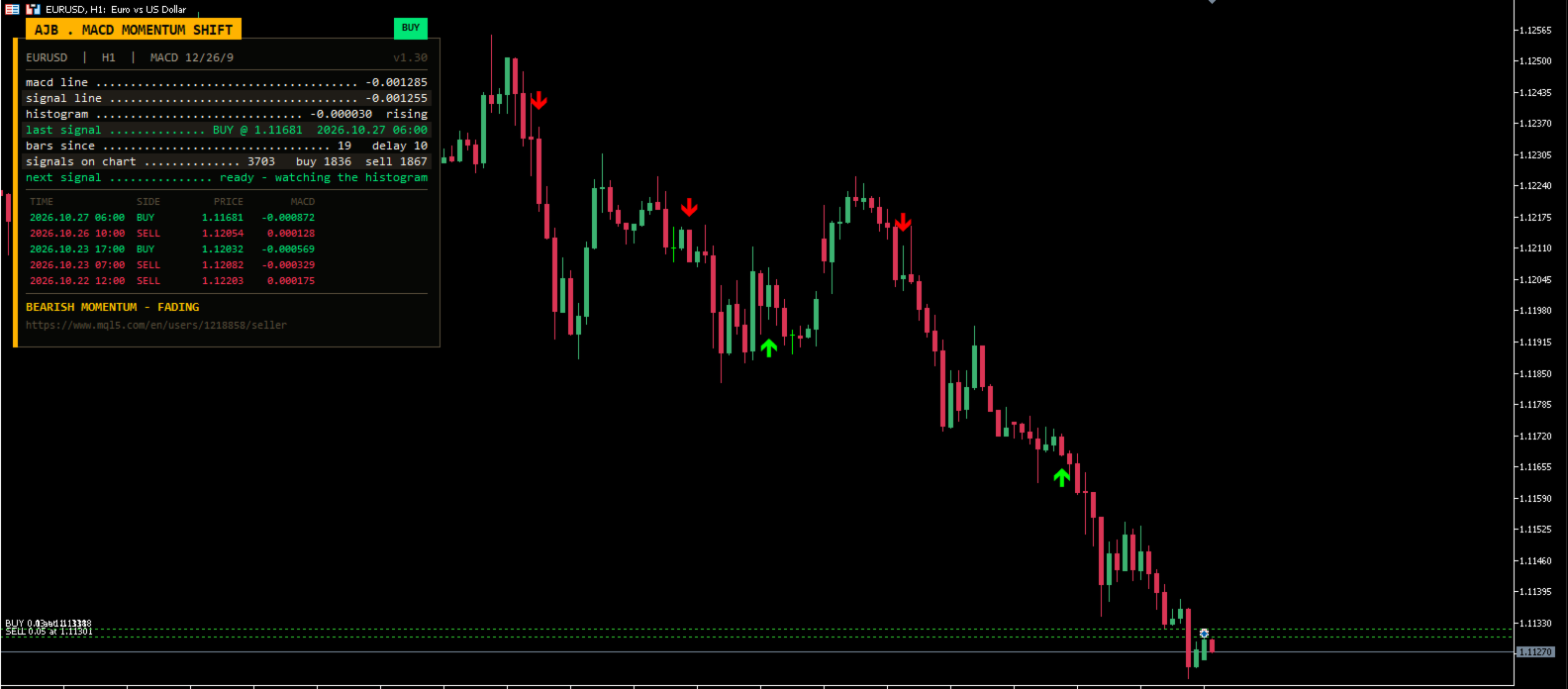
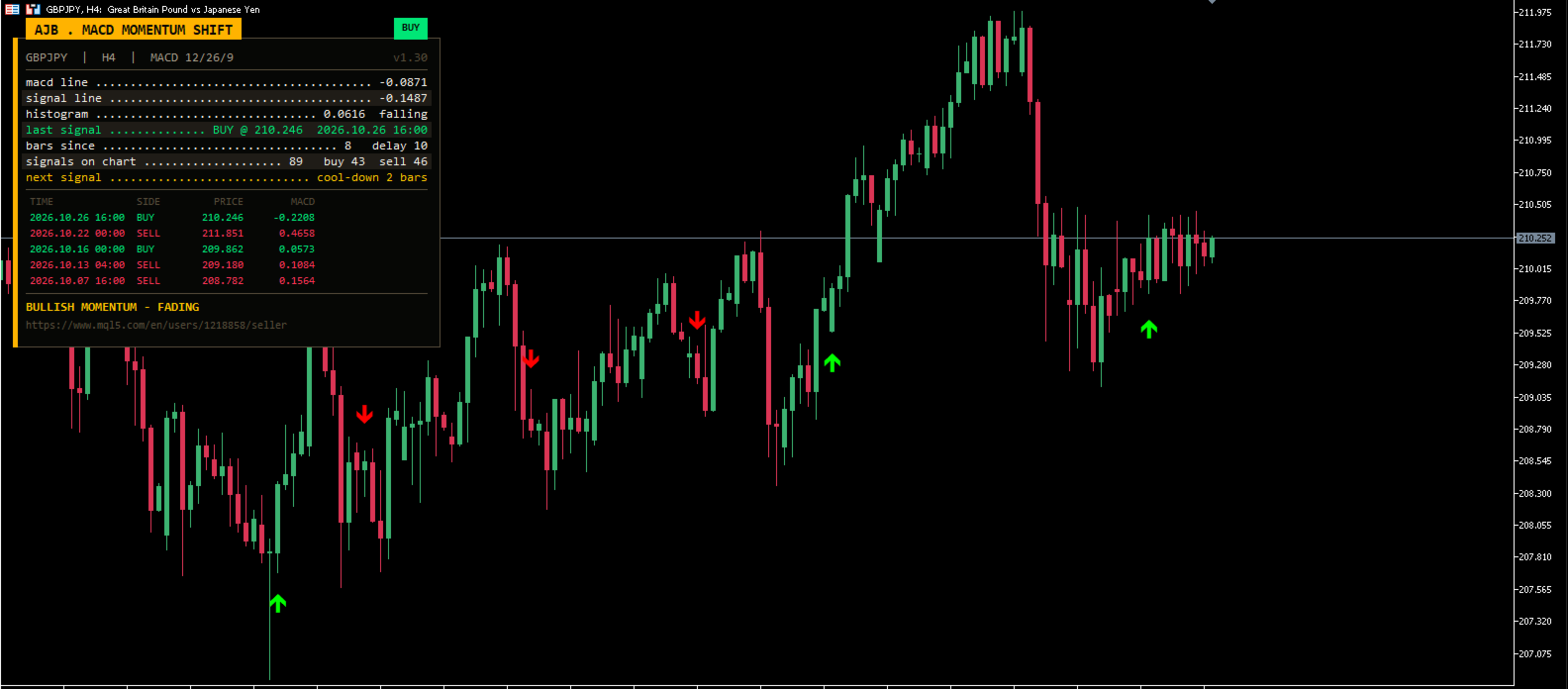
Visual MACD Momentum Shift Indicator puts a clear buy or sell arrow on the price chart at the closed candle where the MACD histogram flips from one side of zero to the other and the MACD line turns with it. No separate window to squint at, no guessing which bar the cross happened on, and no arrow that moves or vanishes after the candle has closed.
Try it free before you decide: open the MetaTrader 5 Strategy Tester, choose this indicator, tick visual mode and press Start. You will see every arrow appear in real time, the panel count the signals and the momentum line change colour as the histogram builds and fades.
- Arrows drawn on the price candles, read from closed bars only, so they do not repaint.
- Arrow distance follows the average candle size, so it looks right on forex, gold, indices and crypto alike.
- A built-in spacing rule (bars between signals) filters out the burst of flips that happens in a flat market.
- Live info panel with the MACD line, signal line, histogram direction, last signal, bars since it, cool-down state and a five-row signal history.
- Popup, sound, push and e-mail alerts when a new signal confirms.
- MACD line, signal and histogram values available in the Data Window and through iCustom for your own Expert Advisors.
WHO IT IS FOR
Traders who already like MACD but are tired of switching their eyes between the sub-window and the candles. Discretionary traders who want a calm, rule-based "momentum has changed" marker to confirm their own levels. Developers who want a clean, non-repainting MACD event to read from an Expert Advisor.
HOW A SIGNAL IS FORMED
1. Histogram flip. The histogram here is the real one: MACD line minus signal line. A buy needs the previous bar's histogram below zero and the just-closed bar's histogram above zero; a sell is the mirror image.
2. Line confirmation. The MACD line itself must be rising on that closed bar for a buy, or falling for a sell. A flip that the main line does not agree with is ignored.
3. Spacing. If fewer bars than your "Bars to wait between signals" setting have passed since the last arrow, the new flip is skipped and the panel shows how many bars of cool-down are left.
4. Arrow and alert. The arrow is placed below the low (buy) or above the high (sell) of the closed candle where the flip completed. Because the decision uses closed bars only, the arrow never changes afterwards. On a live chart the alerts fire once, on the first tick of the following bar.
THE PANEL
The panel sits in the top-left corner by default and leaves the right side and the price scale free. A gold title tab, a status pill that shows the last signal (BUY, SELL or WAIT), and dotted rows with live values: MACD line, signal line, histogram with rising/falling, last signal with price and time, bars since that signal, how many signals are on the loaded history (split buy/sell) and whether the next signal is ready or still cooling down. Below sits a colour-coded table of the most recent signals and a banner that reads the momentum of the last closed bar: building or fading, bullish or bearish. The panel measures its own text and shrinks its font on small screens, so it never runs off the chart, and it is not drawn during non-visual optimisation.
HOW TO USE IT
- Attach it to any symbol and timeframe. H1 and H4 are good places to begin; on M1-M5 consider a larger bar delay.
- Read the context first. An arrow tells you momentum has changed side; it does not tell you where the trend is. Many traders take buy arrows only above a higher-timeframe level or moving average, and sell arrows only below it.
- Use the banner. "Building" after an arrow means the histogram is still growing in the new direction; "fading" warns that the push is losing strength.
- Tune the spacing. Raise "Bars to wait between signals" for fewer, cleaner arrows; lower it to catch more turns.
- Turn on alerts you need (popup is on by default; push and e-mail use the terminal's own Notifications and E-mail settings).
EVERY SETTING EXPLAINED
MACD Parameters
- MACD Fast Period (12) - fast EMA length. Must be smaller than the slow period.
- MACD Slow Period (26) - slow EMA length.
- MACD Signal Period (9) - smoothing of the signal line; the histogram is MACD minus this line.
- Bars to wait between signals (10) - minimum distance in bars between two arrows. 0 shows every qualifying flip.
- Show detailed logs in journal (true) - prints each live signal and each skipped flip with its values in the Experts journal.
Visual Panel Settings
- Enable Visual Panel (true) - show or hide the info panel.
- Panel Background Color / Text Color - colours of the card and of its value rows.
- Chart Corner (0) - 0 top left, 1 top right, 2 bottom left, 3 bottom right.
- Font Size (9) - base size; it is reduced automatically if the chart is too small.
- X Offset / Y Offset - distance of the panel from the chosen corner, in pixels.
- Show Signal History (true) - the table of the five most recent signals.
- Panel Width / Panel Height - minimum size of the card; it grows to fit its text.
Chart Signal Log Settings
- Enable Chart Signal Log (false) - an extra compact box listing the last five signals with their MACD value.
- Chart Log Background Color / Text Color / Font Size - its look.
- Chart Log X Offset / Y Offset - its position; when the panel is on, the log is kept below it so the two never overlap.
Signal Alerts
- Popup alert (true) - terminal alert window on each new confirmed signal.
- Play a sound (false) and Sound file (alert.wav) - any .wav from the terminal's Sounds folder.
- Push notification (false) - to the MetaTrader app on your phone.
- E-mail (false) - through the terminal's e-mail settings.
FOR EXPERT ADVISOR BUILDERS
Buffer 0 holds buy arrow prices, buffer 1 sell arrow prices (EMPTY_VALUE when there is no signal), buffer 2 the MACD line, buffer 3 the histogram and buffer 4 the signal line. Read shift 1 or older to get only confirmed signals.
HONEST EXPECTATIONS
This is a momentum-shift marker, not a complete trading system and not a forecast. MACD is built from moving averages, so every arrow arrives after the turn has started; in strong one-way trends some arrows will point against the trend and in tight ranges flips are frequent. Combine it with your own levels and risk rules, and use the Strategy Tester on your own symbols to learn its rhythm before you rely on it. Works on any symbol and timeframe, no DLLs, no extra files.
If the indicator earns a place on your charts, a short honest review on this page would mean a lot - it tells other traders what it is really like to use and helps decide what gets improved next.