Trade Assistant B90 MT4

Trade Assistant B90 is designed for manual trading so that it helps us to manage capital and position well.
This expert has the ability to change the default inputs of the expert as desired before use.
You can see the expert entries in the photo below, each of which we explain below.

1.    Background Color : With this entry, you can change the assistant's background
Color
2.    Font size: You can change the size of the fonts used in the assistant.
3.    Button‌ color: Change the color of assistant buttons.
4.    Button color: Change the text color of assistant buttons.
5.    Line color: Change the color of the lines.
6.    Text color: Changing the color of the texts that will appear on the chart.
7.    Text font size: Changing the font of the texts that will appear on the chart.
8.    Stop loss color: Changing the color of the square that appears on the chart to determine the loss limit.
9.    Take profit color: Changing the color of the square that appears on the chart to determine the profit limit.
10.    SL (pip): set default stop loss based on the currency pair and time frame you are trading.
11.    TP (pip): Set default profit limit based on the currency pair and time frame you are trading.
12.    Risk free (pip): By clicking on the Risk free button, the loss limit will be a few pips higher than the profit entry point (By default, we have considered 2 pips). For example, by clicking on the risk-free button, the loss limit will be moved 2 pips into profit, and by clicking the risk-free button again, 2 pips more than the loss limit will be moved into profit.
13.    One Click Trading: If you set this input to false, a message will appear on the graph before you click on a button from the assistant, asking you if you are sure you want to do this, and by clicking yes or no, you will respond to the desired action. But if you want it to run without asking when you click on the buttons, you can set this entry to true.
After the changes you made on the inputs, the appearance will be adjusted to your taste. For example, as shown below.

In the following, we explaining each of the components of the assistant.
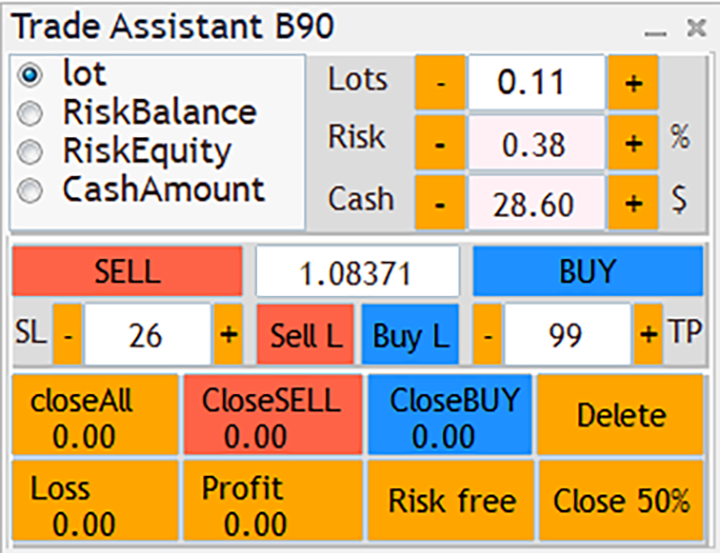
We can determine the volume of transactions with this assistant in3  ways.
•    Volume based on lot
•    Risk percentage: For the risk percentage, we can consider the account balance or account equity as the basis. When you choose one of these methods, you must have a loss limit. Because for risk percentage calculations, the loss limit distance has a great impact on determining the volume of transactions. The smaller the loss limit is, the larger the trading volume is, and the further the loss limit is from the entry point, the smaller it is.
•    Cash: You can also determine the volume of transactions based on the amount. For example, in this method, you can determine the amount of 100 dollars for your loss limit. Then determine the distance of the stop loss from the entry point.
In this method, the distance between the loss limit and the entry point is important, and the shorter the distance, the higher the transaction volume. And the further it is, the volume of the transaction decreases, but the minimum amount is the same as you set
In this example $100

It is recommended that if you want to use methods 2  and 3  to determine the volume of transactions, you must determine the limit using the lines that appear on the chart with this assistant. For this, you can use the line S and line B buttons.

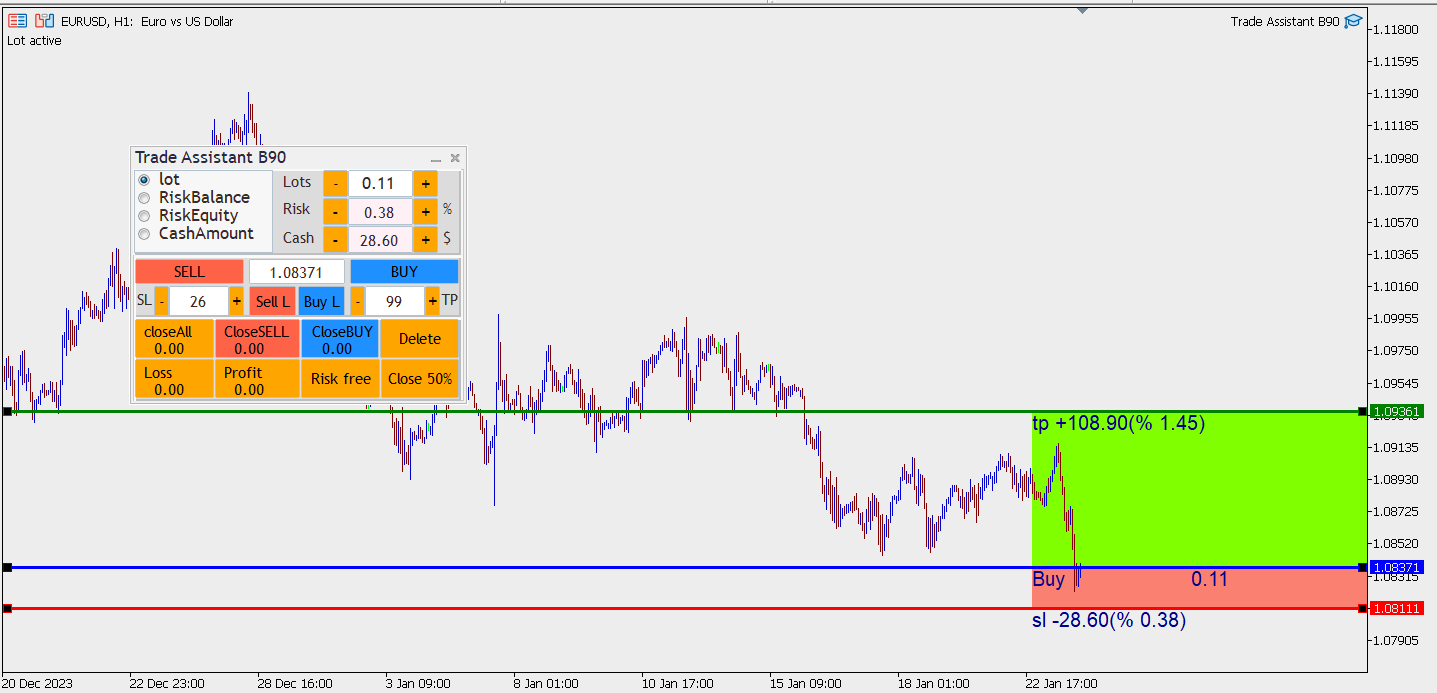
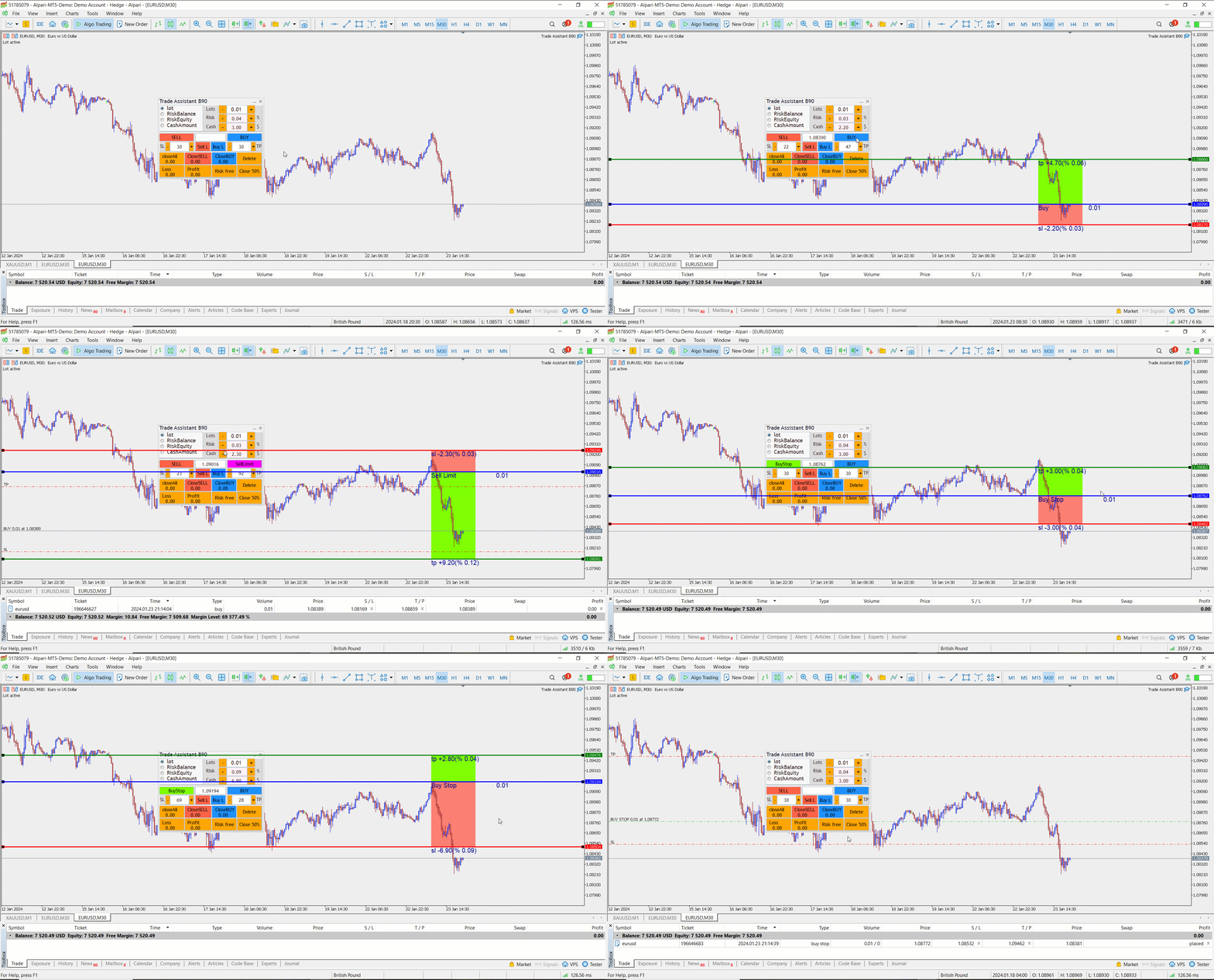
Line B‌: When you click on this button, lines will appear on the chart, which by default specify the entry price as Ask and the profit limit and loss limit based on the profit and loss limit that you set from the expert or assistant entry. Then you can change the profit and loss limits by moving the lines and see the percentage of profit and loss as well as its amount before entering the position.

Line S: This button works like the line B button with the difference that it considers the Bid as the entry price and prepares the profit and loss limit for selling positions by default. But you can provide a buy position by moving the loss limit lower.

SELL: With this button, you can enter the sell position and set the default profit and loss limit. But before pressing this button, it is recommended to see the position of profit and loss limit and the percentage of profit and loss on the chart first, then enter the position knowing this.

You can also enter a buy position with this button, and all the tips we said for the SeIl button apply to it.
In addition to buying and selling, you can also take pending positions, and based on the position of the lines on the chart, the text of the Sell and Buy button changes to Buy Limit, Buy Stop, Sell Limit, and Sell Stop, and you can place an order by clicking on it.
We have determined 8 buttons to manage positions, which we will explain each one below.

Close All: This button shows the amount of profit and loss of all buy and sell positions on the currency pair on which the expert is executed. By clicking on this button, all the positions of the desired currency pair will be closed.
Profit: This button shows the amount of positions that are in profit. By clicking on this button, all positions will be closed in profit.

Loss: This button shows the amount of positions that are in loss. By clicking on this button, all losing positions will be closed.

Delete: If you have a pending position on the currency pair on which the expert has been executed, by clicking on this button, all of them will be deleted from the chart.
Close BUY: This button shows the amount of profit and loss of purchase positions of the desired currency pair. By clicking on this button, all purchase positions will be closed.

Close SELL: This button shows the amount of profit and loss of selling positions of the desired currency pair. By clicking on this button, all sales positions will be closed.

Risk free: If your positions are in profit, by clicking on this button, the loss limit will be on the entry point (Of course, several more pips in profit). You have already determined this amount from the expert inputs. By default, we put 2 pips and by clicking on this button, the loss limit will be 2 pips in profit. Then, if you press this button again, if it is in profit, the loss limit will be moved to profit by another 2 pips.

Close 50%: This button is designed to save profit. So it will only work when your positions are in profit. By clicking on this button, 50% of the position volume will be closed. By pressing the button again, another 50% of the volume of positions in profit will be closed. Note that if the size of the position is reduced to a minimum, for example, 0.01, this button will no longer work.


Рекомендуем также
Fast copier for sending trades to multiple MT4 / MT5 accounts. Perfect for copying trades from MT4 to MT5 accounts. MT4 Trade Copier Master EA sends trades instantly from your master account to one or multiple slave accounts. Supports copying to: • MT5 accounts • MT4 accounts Perfect for: • Multi-account traders • Signal providers • Account managers • Personal account mirroring Main Features • Fast local trade copying • Low latency execution • Multiple slave accounts support • Copy open position

Auto Trade Copier
Vu Trung Kien
4.76 (85)
Auto Trade Copier предназначен для копирования сделок между несколькими счетами / терминалами MT4 / MT5 со 100% точностью. С помощью этого инструмента вы можете действовать как поставщик (источник) или получатель (пункт назначения). Все торговые действия будут скопированы от поставщика к получателю без задержки. Этот копир можно использовать только на счетах MT4. Для счетов MT5 вы должны использовать Auto Trade Copier для MT5 или Trade Receiver Free для MT5. Демо-версия : Демо-версию для тести
Утилита копирует сделки со счетов поставщиков сигналов (master-счета, один или несколько поставщиков) на неограниченное количество счетов-получателей (slave-счета). Задание поставщика осуществляется с помощью параметра provider (любая комбинация цифр и букв). Например, есть два поставщика. Запускаете на них утилиту в режиме master, задав разные значения параметру provider. На счете, предназначенном для копирования этих сигналов, запускаете две утилиты в режиме slave в разных окнах, задав одной p
Copyist MS
Aleksei Moshkin
4 (4)
Copyist MS  простой и понятный в использовании копировщик сделок, работает как советник в виде одного файла с переключением режимов работы Master и Slave. Copyist MS  быстро копирует сделки между различными счетами MetaTrader 4 и MetaTrader 5 через торговый пароль или пароль инвестора. Copyist MS поддерживает   копирование и модификацию стоп лоса и тейк профита с Мастер терминала. Copyist MS  поддерживает   копирование и модификацию отложенных ордеров. Настройки Type of work  - выбор режима раб
Автоматическая установка уровней безубытка При помощи этой утилиты вы можете настроить автоматическое перемещение SL, когда сделка достигнет желаемой прибыли.  Особенно   удобно   для   краткосрочных   трейдеров.   Также доступна опция смещения: часть прибыли может быть защищена. Многофункциональная утилита : 66+ функций, включая расширенную работу с уровнями BE  |   Напишите мне  если у вас есть вопросы  |   Версия для MT5 Процесс активации функции автоматического безубытка: 1.   Выберите Симв
The XauUsd Net Strength indicator is a professional-grade market strength tool designed to track and compare the relative performance of Gold (XAU) against the U.S. Dollar (USD) across a diversified basket of currency pairs. Instead of relying on a single chart, it aggregates information from multiple gold- and dollar-based pairs, applies weighting factors, and translates the results into an easy-to-read strength comparison. The indicator plots six components in a separate window: Green & Red Hi
Superior Local Trade Copier — MT4 Copy trades super-fast with the Superior Local Trade Copier instantly between multiple MetaTrader 4 accounts on the same Windows computer or VPS, with speeds under a few milliseconds. Built for beginners running multiple accounts, pros passing prop-firm challenges, and signal providers alike — we've made it simple. Start multiplying your profits in just a few seconds — attach it to a chart and go. Behind this easy setup is a powerful set of 217 settings, giving
Indicator shows balance curves based on magic number for portfolio analysis. It allows to visually estimate different strategies performance on a single symbol. Any of magic number can be hidden by clicking on the value in legend. Parameters: HideAllOnStart - all magics are hidden and can be activated by clicking on its value; MAMode - shows average profit from trades; MAPeriod - Moving average period; Magics - a string with magic numbers separated by comma like "1,2,123". If this field is empty
Скрипт позволяет закрывать часть открытой позиции, если по позиции есть какая-то прибыль. Нужно просто накинуть скрипт на графике требуемой валютной пары.  Скажем, у вас есть длинная позиция объемом 1 лот с положительным профитом. С помощью этого скрипта вы можете закрыть любую часть 1 лота (входной параметр LotCoeff от 0,1 до 0,9), а оставшаяся часть (например, 0,4 лота) будет иметь стоп-лосс в безубытке. Перед размещением противоположного ордера открывается окно входных параметров, у котором и
PulseCopier MT4
Sergio Marquez Uroz
PulseCopier   копирует сделки между терминалами MetaTrader, работающими на одном компьютере или VPS с Windows. Работает   по событиям : мастер публикует каждую сделку в момент её совершения, а приёмник   измеряет и записывает реальную задержку копирования   каждой сделки — обычно   50-150 мс . Без DLL, без интернет-моста, без файлов конфигурации. Один советник, два режима Установите его как   MASTER   на терминале-источнике и как   RECEIVER   на каждом терминале-получателе. С   Master ID = AUTO
Symbol Order Close EA was developed to handle the closing and trailing of profit per symbol. The expert can also trail by dollars and the user can specify a particular magic number in case multiple experts are used on the same account. You can close by total profit on a symbol, start trailing, stop trailing and trailing step, all in a dollar value This EA is VERY handy if you are running an expert that trades multiple symbols and ends up with a floating profit. It can also be used to close man
The utility displays in a convenient form the historical trades made on the account. You can filter trades by magic or comcent, display only profitable or losing trades, and only buy or sell trades. Using this utility, you can see trade entry and exit points, stop loss and take profit levels, trade profit, magic number and comment, order ticket and order size - you only need to run the utility on the chart of the currency pair you want information on get and customize the input parameters. MT5
Local Trade Copier EA MT4
Juvenille Emperor Limited
4.96 (111)
Опыт экстремально быстрого копирования сделок с помощью Local Trade Copier EA MT4 . Благодаря простой установке в течение 1 минуты этот копировщик сделок позволяет вам копировать сделки между несколькими терминалами MetaTrader на одном компьютере с Windows или на Windows VPS с крайне быстрыми скоростями копирования менее 0.5 секунды. Независимо от того, новичок вы или профессиональный трейдер, Local Trade Copier EA MT4 предлагает широкий спектр опций, чтобы настроить его под ваши конкретные пот
Virtual Collider Manual   – торговый робот-помощник со встроенной панелью для ручной торговли, осуществляющий автоматический вывод открываемой трейдером позиции в профит, используя инновационный адаптивный сеточный алгоритм усреднения и адаптивный пирамидинг. Ноу-хау используемого сеточного алгоритма усреднения и пирамидинга торгового робота   Virtual Collider Manual   базируется на полной автоматической адаптации всех характеристик динамически выстраиваемой сетки и пирамиды ордеров под актуальн
Apex Trade Copier MT4
Asanka Manikgama Arachchilage Don
Apex Trade Copier is a local trade copier for MetaTrader 4 and MetaTrader 5. It copies trades between MT4 and MT5 accounts on the same computer or VPS and works in every combination, including MT4 to MT5 and MT5 to MT4, across different brokers. It runs locally through a shared file, so there is no internet dependency, no DLL, and no monthly fee. One master account can feed any number of client accounts, and a single client can copy from up to eight masters at once. Each client sizes its trades
Smartility
Syed Oarasul Islam
This utility is designed to help you with your Manual Trading. It allows different ways of closing trades. It can display total number of BUY and SELL orders individually and also their individual profits. It can enter trades without stopl loss and take profits. However upon selecting UseStopLossTakeProfit from the settings it can use best possible stop loss and take profits based on the market conditions. Upon selecting the CloseOppositeTrades  from the settings it can close opposite trades. Fo
Utility, which draws buy or sell trendlines, which can also become support or resistances able to close any position on the screen Algorithm that calculates the gain of the position, at the touch closure of the line.   The benefits you get: Works on forex and CFD, timeframe from M1 to Weekly. Easy to use screen control panel. Audible warning messages at the touch of the line. Easy to use.
News Scalping Executor Pro - это утилита, которая помогает торговать высоко значимые новости с огромной волатильностью. Эта утилита помогает создавать две противоположные позиции с управлением рисками и защитой прибыли. Утилита автоматически перемещает стоп приказ (далее SL), таким образом, чтобы избежать потерь в максимально возможной степени, используя для этого много различных алгоритмов. Утилита также помогает избежать торговли новостями, если спред внезапно становится очень большим. Он мож
Trade Assistant Pro 36 in 1
Makarii Gubaydullin
4.76 (21)
Многофункциональная утилита: калькулятор лота, сеточные ордера, индикатор Price Action, управление сделками, рассчёт R/R, и многое другое Демо веpсия  | Инструкция  | Версия для MT5 Утилита не работает в тестере стратегий: вы можете скачать   демо версию ЗДЕСЬ , чтобы протестировать продукт перед покупкой. Напишите мне  если есть вопросы / идеи по улучшению / в случае найденного бага Упроситите и сделайте вашу торговлю быстрее, при этом расширяя стандартные возможности терминала. 1. Открытие
HFT Fast Scalping EA
Sami George Saba Zeidan
HFT FAST SCALPING EA the High Frequency Trading which use stop orders to enter the trades when market is trending. best use for 1- Low slippage brokers for us30 and DE40 . 2- LOW OR ZERO COMMISSION BROKERS FOR EUR AND GOLD. 3-Prop firms like ftmo ,tff,.......etc This EA UNLIKE Other HFT EAs , You can see that in the parameters ,, CHOOSE LOT SIZE , MAX LOT , CHOOSE TIME , COMMENT AND OTHERS . IT STOPS 3 MINUTES AUTOMATICALLY EVERY 15 MINUTES TO PROTECT THE EQUITY FROM A BIG UNWANTED SLIPPAGE .
Советник с элементами графического трейдинга. Данная утилита совершает торговые операции с помощью графической фигуры "Прямоугольник" (или "Квадрат"). Советник автоматически рисует квадрат и при пересечении его нижней или верхней границ открывает ордер соответственно Buy или Sell. Рисование графической фигуры может осуществляться вручную, для этого необходимо в настройках советника выключить функцию авторисования. При движении цены не в нужную сторону советник выставляет до 4-х ордеров по систем
Trade copier MT4
Alfiya Fazylova
4.6 (35)
Trade Copier — это профессиональная утилита, предназначенная для копирования и синхронизации сделок между торговыми счетами. Копирование происходит от счета/терминала поставщика к счету/терминалу получателя, которые установлены на одном компьютере или vps. АКЦИЯ - Если вы уже приобрели "Trade copier MT4", вы можете получить "Trade copier MT5" бесплатно (для копирования MT4 > MT5 и MT4 < MT5). Для получения более подробной информации об условиях, пожалуйста, свяжитесь с нами через личные сообщени
EA Risk Manager is a professional risk‑management Expert Advisor designed to protect your trading account and enforce disciplined money management. The EA does not open trades by itself – it only monitors and manages all existing positions (manual and automated) on the account. It is especially useful for traders who want to: Hard‑limit daily / weekly / monthly losses and profits. Restrict lot size and the number of open trades. Trade a basket of G7‑related Forex pairs using one centralized
Margin Call Shield – Defend Your Margin on Your Terms Margin Call Shield   is a tool for MetaTrader 4 traders who want to decide for themselves which open positions are closed during margin call situations before the platform does so automatically based on its internal rules. By default, the broker or platform decides which positions to close, often using undisclosed algorithms. Margin Call Shield lets you set this order according to your own strategy. Why Was Margin Call Shield Created? In a  
Trade Copier Professional — Локальное решение для копирования сделок   Trade Copier Professional — это надёжная локальная система копирования сделок для MetaTrader 4/5. Она позволяет трейдерам мгновенно дублировать позиции на нескольких счетах на одном компьютере, оснащена встроенными средствами безопасности и профессиональной панелью управления.   Обзор   Советник работает в режимах Master и Slave из одного файла, с лёгким переключением. Сделки могут копироваться между терминалами MT4 и MT5 бе
Панель торговли валютной силы EA MT4 выводит концепцию силы валюты на совершенно новый уровень, поскольку она сочетает ее с ценовым действием и может применяться к любому символу/паре, кроме обычных 28 комбинаций 8 основных валют. Это означает, что вы можете торговать силой или слабостью любой пары, включая все валюты, товары и криптовалюты (но не индексы). Это настоящий революционный продукт, который дает вам четкое представление о 16/32 символах с одного взгляда с помощью цветных полос, котор
Symbol Manager
Taras Slobodyanik
5 (4)
Менеджер символов или Сеточный менеджер, разработан для группировки ордеров в одну позицию (по символу и по направлению). Эта утилита будет полезна сеточникам и мультивалютникам, тем у кого может быть открыто множество ордеров по нескольким парам. Вы сможете видеть общее количество лотов, общую прибыль, и устанавливать виртуальные стоплосс и тейкпрфит. Для установки реального ТП (или СЛ) необходимо сначала задать виртуальное значение, а затем ввести в этой ячейке команду: "set". Если вы хотите
Индикатор торговой платформы MetaTrader 4 Commodity Channel Index Message - три в одном, в отличие от стандартного имеет систему оповещений об изменении рыночной ситуации, состоящую из сигналов: Пересечение Главной линией уровней крайних зон и уровня 50%; Пересечение Главной линией Трендовой линии в окне индикатора; Дивергенция на последнем баре. Значения экстремальных, среднего уровней и зон дивергенции настраиваются. Параметры Language – выбрать русский/английский язык; Options – настройки ин
Candlestick Pattern Scanner is a multi-timeframe and multi-symbol dashboard and alert system that checks all timeframes and currency pairs for different candlestick patterns that are formed in them. Scanner is integrated with support and resistance zones so you can check the candlestick patterns in the most important areas of the chart to find breakout and reversal patterns in the price chart. Download demo version   (works on M30,D1,W1 timeframes and 20 symbols of Market Watch window) Read the
Risk Commander
Adisorn Soodkanueng
Product Name: Risk Commander: Trade Assistant & Strategy Simulator Risk Commander is more than just a trade panel—it is a complete Manual Trading Ecosystem . It serves two powerful purposes: Live Assistant: Helps you execute trades with speed, precision, and perfect risk management in real-time markets. Training Simulator: Fully compatible with the Strategy Tester (Visual Mode) , allowing you to practice manual trading on historical data without risking a cent. NEW! Built-in Simulator Mode Stop
С этим продуктом покупают
Добро пожаловать в Trade Manager EA — лучший инструмент для управления рисками, предназначенный для упрощения, точности и эффективности торговли. Это не просто инструмент для размещения ордеров; это комплексное решение для удобного планирования торгов, управления позициями и усиленного контроля над рисками. Независимо от того, начинающий вы трейдер, опытный специалист или скальпер, нуждающийся в быстром исполнении, Trade Manager EA адаптируется к вашим потребностям и работает с любыми активами:
Exp COPYLOT CLIENT for MT4
Vladislav Andruschenko
4.69 (65)
Профессиональный копировщик сделок для MetaTrader 4 Быстрый, профессиональный и надежный копировщик сделок для MetaTrader 4 . COPYLOT позволяет копировать сделки Forex между терминалами MetaTrader 4 и MetaTrader 5 , обеспечивая гибкую синхронизацию для разных типов счетов и сценариев торговли. Версия COPYLOT MT4 поддерживает: MetaTrader 4 → MetaTrader 4 MetaTrader 5 Hedge → MetaTrader 4 MetaTrader 5 Netting → MetaTrader 4   Версия MT5 Полное описание + DEMO + PDF Как купить Как установить Как по
Trade Assistant MT4
Evgeniy Kravchenko
4.43 (197)
Помогает рассчитать риск на сделку, простая установка нового ордера с помощью линий, управление ордерами с функциями частичного закрытия, 7 типов трейлинг-стопа и другие полезные функции. Дополнительные материалы и инструкции Инструкция по установке   -   Инструкция к приложению   -   Пробная версия приложения для демо счета Функция Линии   - отображает на графике линию открытия, стоп-лосс, тейк-профит. С помощью этой функции легко установить новый ордер и увидеть его дополнительные характери
The product will copy all telegram signal to MT4   ( which you are member  ) , also it can work as remote copier.  Easy to set up, copy order instant, can work with almost signal formats, image signal, s upport to translate other language to English Work with all type of channel or group, even channel have "Restrict Saving Content", work with  multi channel, multi MT5 Work as remote copier: with signal have ticket number, it will copy exactly via ticket number. Support to backtest signal. How to
TradePanel MT4
Alfiya Fazylova
4.84 (95)
Trade Panel — это многофункциональный торговый помощник. Приложение содержит более 50 торговых функций для ручной торговли и позволяет автоматизировать большинство торговых операций. Инструкция к приложению + видео-инструкции: https://www.mql5.com/ru/blogs/post/756476 Пробная версия приложения для демо-счета: https://www.mql5.com/ru/blogs/post/750864 Как установить приложение: https://www.mql5.com/ru/blogs/post/750096 Как тестировать приложение в визуальном режиме: https://www.mql5.com/ru/blogs/
Telegram to MT4 Coppy
Sergey Batudayev
4.09 (11)
Telegram to MT4: Идеальное решение для копирования сигналов Упростите свою торговлю с Telegram to MT4 — современным инструментом, который копирует торговые сигналы прямо из каналов и чатов Telegram на вашу платформу MetaTrader 4, без необходимости использования DLL. Это мощное решение обеспечивает точное исполнение сигналов, широкие возможности настройки, экономит время и повышает вашу эффективность. [ Instructions and DEMO ] [ FAQ ] [ How atach logs properly ] [ Settings descrition ] Ключевые
Prop Guardian Risk Manager MT4 – Drawdown, Risk & Hedge Protection for Prop Firm and Managed Accounts Prop Guardian Risk Manager is a professional risk-control utility for MetaTrader 4, designed for prop firm traders, money managers and anyone who wants strict account-level risk protection. It does not generate trading signals, strategy entries or trading decisions. Instead, it runs in the background, monitors your account risk and can automatically block new exposure, close managed trades or ac
Скачать рабочую пробную версию Copy Cat More (Копи Кэт Мор) — копировщик сделок (Trade Copier) MT4 — это не просто локальный копировщик сделок; это полноценная система управления рисками и исполнения (risk management and execution framework), созданная для современных торговых задач. От челленджей проп-фирм (prop firm) до управления личным портфелем — он адаптируется к любой ситуации благодаря сочетанию надёжного исполнения, защиты капитала, гибкой настройки и продвинутой обработки сделок. Ко
X2 Copy MT4
Liubov' Shkandrii
Быстрый. Точный. Инновационный. Технологичный. Откройте для себя мгновенное копирование сделок с революционным X2 Copy MT4. Всего за 10 секунд простой установки вы получите мощный инструмент для синхронизации сделок между терминалами MetaTrader на одном компьютере или Windows VPS с беспрецедентной скоростью. Управляете несколькими счетами, следуете сигналам или масштабируете свою стратегию — X2 Copy MT4 адаптируется к вашему рабочему процессу с непревзойдённой точностью и контролем. Работайте бы
News Filter EA: Advanced Algo Trading Assistant News Filter EA is an advanced algo trading assistant designed to enhance your trading experience. By using the   News Filter EA , you can integrate a Forex economic news filter into your existing expert advisor, even if you do not have access to its source code. In addition to the news filter, you can also specify   trading days   and   hours   for your expert. The News Filter EA also includes   risk management   and   equity protection   features
EA Local Trade Copier Pro MT4: The Ultimate DLL-Free Trade Duplicator Are you tired of complicated trade copiers that require unsafe external DLLs, crash your terminal, or confuse you with separate "Master" and "Client" files? Experience the next generation of trade copying with EA Local Trade Copier Pro MT4. Engineered for maximum stability, lightning-fast execution, and ultimate simplicity, this utility allows you to seamlessly copy trades between multiple MetaTrader terminals on the same Wind
Fast Trade MT4
Alexey Valeev
4.8 (5)
Данная торговая панель разрабатывалась для быстрой и комфортной работы на финансовых рынках. Оснащена необходимыми функциями для ручной и полуавтоматической торговли. Благодаря наличию функций трейлинга ордеров, трейлинг-стопу и автоматическому закрытию по средствам, профиту, времени, Вы можете автоматизировать свою торговую систему. Вам останется лишь открыть позицию и задать параметры сопровождения, всё остальное советник сделает за вас. Если Вы хотите ограничить свои убытки, задайте автоматич
Riskless Pyramid
Snapdragon Systems Ltd
5 (1)
Introduction This powerful MT4 trade mangement EA offers a way potentially to aggressively multiply trade profits in a riskfree manner. Once a trade has been entered with a defined stoploss and take profit target then the EA will add three pyramid add-on trades in order to increase the overall level of profit. The user sets the total combined profit target to be gained if everything works out. This can be specified either as a multiple of the original trade profit or as a total dollar amount. Fo
The News Filter
Leolouiski Gan
5 (25)
Этот продукт фильтрует всех экспертных советников и ручные графики во время новостей, так что вам не нужно беспокоиться о внезапных скачках цены, которые могут разрушить ваши ручные торговые настройки или сделки, введенные другими экспертными советниками. Этот продукт также поставляется с полной системой управления ордерами, которая может обрабатывать ваши открытые позиции и ордера на ожидание перед выпуском новостей. После покупки The News Filter вам больше не придется полагаться на встроенные
Grid Manual MT4
Alfiya Fazylova
4.71 (17)
Grid Manual — это торговая панель для работы с сеточными стратегиями. Утилита универсальная, имеет гибкие настройки и понятный интерфейс. Работает с сеткой ордеров не только в сторону усреднения убытков, но и в сторону наращивания прибыли. Трейдеру не нужно создавать и сопровождать сетку ордеров, это сделает утилита. Достаточно открыть ордер и Grid manual автоматически создаст ему сетку ордеров и будет сопровождать его до самого закрытия. Полная инструкция и демо-версия здесь . Основные особенно
Unlimited Trade Copier Pro - это мощный инструмент для удаленного копирования сделок между несколькими счетами MetaTrader 4/MetaTrader 5, расположенными удаленно друг от друга, по сети интернет. Это идеальное решение для провайдеров сигналов, которые хотят поделиться своей торговлей с другими трейдерами по всему миру. Один поставщик может копировать сделки на неограниченное количество счетов-получателей, а один получатель также может копировать сделки неограниченного количества провайдеров. Пост
Trend Line Optimizer
Evgenii Aksenov
4.11 (19)
Это автоматический оптимизатор параметров для индикатора   Trend Line PRO Легко и быстро вы подберете оптимальные параметры для вашего любимого индикатора Trend Line PRO.  Оптимизация занимает всего несколько секунд. Оптимизатор позволяет находит лучшие параметры для каждой пары и периода: Amplitude, TP1-TP3, StopLoss, а так же значения для Time Filter и HTF Filter на выбранном участке истории (Days)  Для оптимизации разных таймфреймов вам нужен разный диапазон истории: M5-M15 установите парам
Trading History MT4
Siarhei Vashchylka
5 (9)
Trading History - Программа для торговли и управления капиталом на истории котировок в тестере стратегий. Может работать с отложенными и немедленными ордерами, оснащена функциями трейлинг стопа, безубытка и тейкпрофита. Очень хорошо подходит для тренировок и тестирования различных стратегий. Инструкция/Мануал ( Обязательно читайте перед приобретением ) Преимущества 1. В кратчайшие сроки позволяет протестировать любую торговую стратегию 2. Отличный тренажёр для тренировок трейдинга. Можно получи
Trade Manager MT4 DaneTrades
Levi Dane Benjamin
4.09 (11)
Trade Manager, который поможет вам быстро входить и выходить из сделок, автоматически рассчитывая риск. Включает функции, которые помогут предотвратить чрезмерную торговлю, торговлю из мести и эмоциональную торговлю. Сделками можно управлять автоматически, а показатели эффективности счета можно визуализировать в виде графика. Эти функции делают эту панель идеальной для всех трейдеров, занимающихся ручной торговлей, и помогают улучшить платформу MetaTrader 4. Многоязычная поддержка. Версия MT5  |
MT4 к Telegram Signal Provider - это простой в использовании и полностью настраиваемый инструмент, который позволяет отправлять сигналы в Telegram, превращая ваш аккаунт в поставщика сигналов. Формат сообщений полностью настраиваем! Однако для простого использования вы также можете выбрать предопределенный шаблон и включать или отключать определенные части сообщения. [ Демо ]  [ Руководство ] [ Версия для MT5 ] [ Версия для Discord ] [ Телеграм-канал ]  New: [ Telegram To MT5 ] Настройка Шаг за
Trade Reverse Copie4
Chukwuemeka Kingsley Anyanwu
5 (1)
Feel free to contact me for any extra features :) [SEE MT5 VERSION  https://www.mql5.com/en/market/product/128846 The Local Reverse Copier is an Expert Advisor designed to synchronize positions between a Master account and a Slave account with a twist: it reverses the trades. When a buy position is opened on the Master account, the EA opens a sell position on the Slave account, and vice versa. This allows for a unique form of trade copying where positions are mirrored in opposite directions bet
Lot Architect — Trade Panel and Position Size Calculator for MT4 Lot Architect is a trade panel and risk-based position size calculator for MetaTrader 4. It helps calculate lot size from the selected risk, displays trade parameters before entry, and supports Market, Limit and Stop orders from the chart. The utility is designed for traders who want a structured workflow for position sizing, stop-loss placement, take-profit planning and order execution. Purpose Before opening a trade, a trader nee
Trade Dashboard MT4
Fatemeh Ameri
4.96 (54)
Trade Dashboard simplifies how you open, manage, and control your trades, with built-in lot size calculation. It allows you to execute trades, manage risk, and control positions directly on the chart, with tools such as partial close, breakeven, and trailing stop. Designed to reduce manual work and help you stay focused on your trading decisions. A demo version is available for testing. Detailed explanations of features are provided within the MQL5 platform. Installation instructions are include
Basket EA MT4
Juvenille Emperor Limited
5 (5)
Basket EA MT4 — мощный инструмент для фиксации прибыли и комплексная система защиты счёта, объединённые в простое и удобное решение. Его основная цель — обеспечить полный контроль над общей прибылью и убытками вашего торгового счёта, управляя всеми открытыми позициями как корзиной, а не по отдельности. Усовершённый набор функций включает уровни тейк-профита, стоп-лосса, безубытка и трейлинг-стоп. Эти параметры можно задавать как процент от баланса, фиксированную сумму в валюте счёта или в виде
Custom Alerts AIO: Универсальный сканер рынка — Без настройки Обзор Custom Alerts AIO — это самый быстрый и простой способ отслеживать рыночные сигналы в реальном времени на множестве инструментов без дополнительной настройки и без необходимости покупать другие продукты. В состав входят все необходимые индикаторы от Stein Investments, что делает этот инструмент идеальным решением «всё в одном» для трейдеров, ценящих простоту и эффективность. Просто установите на график и сразу получайте сигнал
LMBFWatchlist is an interactive tool for Metatrader 4 that lets you create and manage watch lists directly on your Metatrader charts. ‌Functionality includes: ‌Add an unlimited number of watch lists with names of your choice Add different groups of watchlists for different time frames Add comments for symbols that always appear on the chart when that symbol is selected. Easily identify which symbols have comments against them. See watch lists instantly synchronise across all open charts that hav
Ultimate Partial Profit EA
BLAKE STEVEN RODGER
4.67 (3)
This EA Utility delivers a robust solution for managing an unlimited array of open orders, both manual and automated. It enables customizable partial profit levels utilizing metrics such as pips, ratios, ATR (Average True Range), and profit amounts for precise trade management. The utility features an advanced on-screen display, offering clear visualization of all orders and their profit levels to enhance strategic decision-making and control. To evaluate its performance and interface, the EA s
CloseIfProfitorLoss with Trailing
Vladislav Andruschenko
4.88 (32)
Close If Profit or Loss with Trailing для MetaTrader 4 — автоматическое закрытие по общей прибыли или убытку Надёжная торговая утилита для MetaTrader 4, которая автоматически закрывает позиции, когда общая прибыль или общий убыток достигает заданного уровня. Советник контролирует открытые сделки, считает плавающий результат, может использовать трейлинг прибыли и помогает закрывать позиции быстрее, чем ручная реакция трейдера. MetaTrader 4 до сих пор активно используют ручные трейдеры, скальперы
PZ Trade Pad Pro MT4
PZ TRADING SLU
3.67 (3)
Это визуальная торговая панель, которая помогает вам легко размещать сделки и управлять ими, избегая человеческих ошибок и повышая вашу торговую активность. Он сочетает в себе простой в использовании визуальный интерфейс с надежным подходом к управлению рисками и положением [ Руководство по установке | Руководство по обновлению | Устранение неполадок | FAQ | Все продукты ] Удивительно простой в использовании Торгуйте легко с графика Торгуйте с точным управлением рисками, без проблем Сохранение
Eagle Local Trade Copier MT4 Eagle Local Trade Copier MT4  is a local trade synchronization utility for MetaTrader terminals running on the same Windows computer or Windows VPS. The same Expert Advisor can operate as a Master or a Slave . Communication is performed locally through the shared MetaTrader Common Files folder. No external server, DLL, WebRequest, subscription, or third-party account is required. Main Features Master and Slave modes in one Expert Advisor Multiple Master and Slave ter
Другие продукты этого автора
Trade Assistant B90
Mohammadbagher Ramezan Akbari
Trade Assistant B90 is designed for manual trading so that it helps us to manage capital and position well. This expert has the ability to change the default inputs of the expert as desired before use. You can see the expert entries in the photo below, each of which we explain below. 1.    Background Color : With this entry, you can change the assistant's background Color 2.    Font size: You can change the size of the fonts used in the assistant. 3.    Button‌ color: Change the color of assis
Martingale panel MT5
Mohammadbagher Ramezan Akbari
In this article, we would like to introduce the trade panel product with the Martingale panel. This panel is made in such a way that it can meet the needs of traders to a great extent. This trade panel actually consists of two trade panels at the same time, with the first one you can take positions with certain profit and loss limits, and with the second one, you can have positions with profit limits but without loss limits. When positions lose, a new position will be added based on the settings
Фильтр:
Нет отзывов
Ответ на отзыв